Best 34 Inch Ultrawide Monitors: 15 Spec-Based Picks
As an Amazon Associate we earn from qualifying purchases. Links on this page are affiliate links.
Finding the best 34 Inch ultrawide monitors requires balancing panel curvature, resolution, and refresh rate. We compared 15 models strictly using specifications published on their listings.
The SANSUI 34-Inch Curved 200Hz Ultrawide Monitor leads the list because its 1440p curved display pairs with a fast 200Hz refresh rate across multiple video inputs. Other options feature panels ranging from 100Hz to 240Hz, including OLED and flat IPS designs. This guide helps you select the ideal refresh rate, display curve, and connectivity for your desk setup.
Quick picks
The best fit for you
- You want balanced high-refresh gaming across multiple devices. SANSUI 34-Inch Curved 200Hz Ultrawide Monitor The 200Hz refresh rate and 1440p resolution provide fluid motion clarity across multiple connected devices.
- You want ultra-fast competitive response times and deep curvature. LG 34-Inch UltraGear OLED Curved Monitor The 240Hz OLED panel delivers a 0.03ms response time paired with an aggressive 800R curve.
- You need single-cable laptop docking for creative work. ASUS ProArt 34-Inch Curved USB-C Monitor Its 96W USB-C connection and integrated Ethernet provide comprehensive docking alongside a 1440p panel.
- You manage two computers at a single desk. Samsung 34-Inch ViewFinity 1000R Curved Monitor A built-in KVM switch, Ethernet port, and USB-C connectivity allow seamless control of dual systems.
Our 15 picks

SANSUI 34-Inch Curved 200Hz Ultrawide Monitor
Best for: high-refresh ultrawide gaming with multi-device setups
- Size
- 34 Inch (what this guide is about)
- Screen Size
- 34-Inch
- Resolution
- 3440 x 1440
- Refresh Rate
- 200Hz
- Panel Type
- Fast VA
- Aspect Ratio
- 21:9
View on Amazon: SANSUI 34-Inch Curved 200Hz Ultrawide Monitor
This SANSUI 34-inch curved monitor gives you a 3440 x 1440 UWQHD resolution across a 21:9 Fast VA panel with a 1500R curvature. You get a 200Hz refresh rate across both DisplayPort 1.4 and its two HDMI 2.1 ports, paired with an overdrive 1ms response time and variable refresh rate support. It suits you if you want high-refresh ultrawide gameplay and multitasking via picture-in-picture without needing high-end display upgrades.
Pros
- 200Hz refresh rate supported over both DP 1.4 and dual HDMI 2.1 ports
- UWQHD 3440 x 1440 resolution on a 1500R curved Fast VA panel
- 1ms overdrive response time with VRR support
- Hardware PIP and PBP split-screen support
Cons
- No built-in speakers
- Stand offers tilt only without height, swivel, or pivot adjustments
Good fit if
- You want a 200Hz refresh rate over HDMI 2.1 or DisplayPort 1.4 connections.
- You plan to connect multiple video inputs using PIP or PBP display modes.
- You want a 1500R curved 3440 x 1440 display for immersive gaming.
Skip if
- You need built-in speakers rather than external audio or headphones.
- You need height adjustment or swivel without buying a separate VESA arm.
Verdict: SANSUI 34-Inch 200Hz Curved Ultrawide Monitor delivers a fast 200Hz refresh rate across multiple modern inputs alongside a 1440p curved panel. It is an effective ultrawide choice if you prioritize motion clarity and multi-source inputs over stand adjustability and integrated audio.

Sceptre 34-Inch Curved 240Hz Ultrawide Monitor
Best for: high-refresh 1440p gaming across multiple video sources
- Size
- 34 Inch (what this guide is about)
- Screen Size
- 34"
- Resolution
- 3440 x 1440
- Refresh Rate
- up to 240Hz
- Response Time
- 1ms
- Connectivity
- DisplayPort x2, HDMI x2, Audio Out
View on Amazon: Sceptre 34-Inch Curved 240Hz Ultrawide Monitor
This 34-inch curved ultrawide monitor pairs a 3440 x 1440 resolution with a fast 240Hz refresh rate and a 1ms response time. Its 1500R curvature fills your field of view, while two DisplayPort and two HDMI ports let you connect multiple devices. It delivers 100% sRGB color coverage and includes integrated speakers, making it suitable if you prioritize high-speed gaming on an expansive screen.
Pros
- 240Hz refresh rate with 1ms response time
- Four video inputs with two DisplayPort and two HDMI connections
- 1500R curved 3440 x 1440 panel
- Built-in speakers and audio out jack
Cons
- No USB-C connectivity or power delivery listed
- Color coverage limited to 100% sRGB without wider gamuts specified
Good fit if
- You need a 240Hz refresh rate for fast-action gaming at 1440p.
- You want to connect up to four video sources across DisplayPort and HDMI.
Skip if
- You require a USB-C connection to dock and charge a laptop.
- You need professional wide color spaces beyond 100% sRGB.
Verdict: Sceptre 34-Inch 240Hz Curved Ultrawide Monitor delivers fluid high-refresh gaming and deep 1500R immersion with four display inputs. It provides dedicated 1440p speed and wide desktop space for multi-source setups.

SANSUI 34-Inch 240Hz Curved Ultrawide Monitor
Best for: high-refresh-rate ultrawide gaming on PC and consoles
- Size
- 34 Inch (what this guide is about)
- Screen Size
- 34 Inch
- Resolution
- 3440x1440
- Refresh Rate
- 240Hz
- Panel Type
- Fast VA
- Aspect Ratio
- 21:9
View on Amazon: SANSUI 34-Inch 240Hz Curved Ultrawide Monitor
The SANSUI 34-inch curved ultrawide monitor pairs a 3440x1440 UWQHD resolution with a 240Hz refresh rate across a 21:9 Fast VA panel. You get dual HDMI 2.1 and dual DisplayPort 1.4 inputs alongside FreeSync and variable refresh rate support. It suits you if you want high-frame-rate ultrawide gaming across multiple PC or console inputs without sacrificing pixel density.
Pros
- 240Hz refresh rate with 1ms MPRT response time
- 3440x1440 UWQHD resolution on a 21:9 Fast VA panel
- Two HDMI 2.1 ports and two DisplayPort 1.4 connections
- FreeSync and HDMI 2.1 VRR support
Cons
- No integrated speakers
- Stand adjusts only for tilt, lacking height or swivel adjustments
Good fit if
- You want a 240Hz refresh rate at 3440x1440 resolution.
- You need multiple modern inputs with two HDMI 2.1 and two DisplayPort 1.4 ports.
- You plan to use Picture-in-Picture or Picture-by-Picture multitasking.
Skip if
- You need built-in speakers for audio playback.
- You require a stand with height or swivel adjustment out of the box.
Verdict: SANSUI 34-Inch Curved 240Hz Ultrawide Monitor delivers high-speed 240Hz UWQHD gaming with extensive HDMI 2.1 and DisplayPort connectivity. It is a capable choice if you prioritize refresh speed over integrated audio or full stand ergonomics.

Amzfast 34" Curved 200Hz Ultrawide Monitor
Best for: high-refresh gaming and multi-device desktop setups
- Size
- 34 Inch (what this guide is about)
- Screen Size
- 34"
- Resolution
- 3440x1440
- Refresh Rate
- 200Hz
- Response Time
- 1ms (OD)
- Sync Technology
- Adaptive Sync, FreeSync
This 34-inch curved ultrawide monitor gives you a 3440 x 1440 UWQHD resolution with a 1500R curvature and a fast 200Hz refresh rate. It includes dual HDMI 2.1 ports and DisplayPort 1.4, pairing smooth motion with multi-device input. You also get integrated picture-in-picture modes and a fully adjustable stand. It suits you if you want high refresh rates for gaming alongside multitasking screen space for work.
Pros
- 200Hz refresh rate with 1ms overdrive response time
- Dual HDMI 2.1 ports and DisplayPort 1.4 all reaching 200Hz
- Fully adjustable stand with height, tilt, swivel, and pivot
- 3000:1 contrast ratio with 96% DCI-P3 coverage
Cons
- No USB-C or built-in USB hub ports listed
- Color depth is limited to 8-bit
- No integrated speakers included in the specifications
Good fit if
- You need a 200Hz refresh rate across both HDMI 2.1 and DisplayPort inputs.
- You want an ergonomic stand offering height, tilt, swivel, and pivot adjustments.
- You plan to run two video sources side-by-side using PIP or PBP.
Skip if
- You require USB-C connectivity to display video and charge a laptop.
- You need 10-bit color depth for specialized visual production.
Verdict: Amzfast 34-Inch Curved 200Hz Ultrawide Monitor delivers high-speed gaming specs with dual HDMI 2.1 connectivity and broad ergonomic adjustments. It is a solid curved display for users who want fast refresh rates and split-screen versatility.

LG 34-Inch UltraGear OLED Curved Monitor
Best for: High-refresh competitive OLED ultrawide gaming
- Size
- 34 Inch (what this guide is about)
- Screen Size
- 34"
- Resolution
- WQHD 1440p
- Refresh Rate
- 240Hz
- Panel Type
- OLED
- Aspect Ratio
- 21:9
This is a 34-inch ultrawide gaming monitor featuring an OLED panel with a deep 800R curve and WQHD 1440p resolution. You get a fast 240Hz refresh rate paired with an instantaneous 0.03ms response time for motion clarity. Connectivity includes HDMI 2.1 and DisplayPort 1.4 ports. It suits you if you prioritize contrast, rapid panel response, and steep wrap-around curvature for competitive or immersive PC gaming.
Pros
- 240Hz refresh rate with 0.03ms GtG response time
- OLED panel with 1.5M:1 contrast ratio and DisplayHDR True Black 400
- HDMI 2.1 and DisplayPort 1.4 connectivity supporting 240Hz
- Both NVIDIA G-SYNC Compatible and AMD FreeSync Premium Pro certified
Cons
- Steep 800R curve can distort straight lines for desktop work
- No USB-C connectivity or laptop power delivery listed
- No integrated speakers included in the specifications
Good fit if
- You play fast-paced games requiring a 240Hz refresh rate and near-instant response times.
- You want true black levels and high contrast from an OLED panel.
- You prefer an aggressive 800R curve to fill your peripheral vision.
Skip if
- You need a USB-C port to connect and charge a laptop over a single cable.
- You prefer a flatter panel for precision design or productivity tasks.
Verdict: LG UltraGear 34-Inch Curved OLED Gaming Monitor delivers top-tier motion performance with its 240Hz OLED panel and 0.03ms response time. The pronounced 800R curve provides an immersive field of view for high-end gaming setups.

KTC 34-Inch Curved 180Hz Ultrawide Monitor
Best for: high-contrast gaming with full ergonomic adjustability
- Size
- 34 Inch (what this guide is about)
- Screen Size
- 34 inch
- Resolution
- 3440X1440
- Refresh Rate
- 180Hz
- Aspect Ratio
- 21:9
- Sync Technology
- adaptive sync
This 34-inch curved ultrawide monitor pairs a 3440 x 1440 resolution with a 180Hz refresh rate and adaptive sync. Its 1500R curve and 21:9 aspect ratio expand your field of view, while a 4000:1 contrast ratio and 98% DCI-P3 coverage deliver deep black levels and saturated color. An ergonomic stand provides tilt, swivel, height, and pivot adjustment, making it a strong choice if you want smooth high-contrast gaming.
Pros
- 180Hz refresh rate with adaptive sync support
- 4000:1 static contrast ratio with 98% DCI-P3 coverage
- Fully adjustable stand with tilt, swivel, height, and pivot
- Four display inputs featuring two DisplayPort 1.4 and two HDMI 2.0 ports
Cons
- HDMI connectivity limited to version 2.0 instead of 2.1
- No USB Type-C port or upstream USB hub included
- No integrated speakers listed in specifications
Good fit if
- You need a fast 180Hz refresh rate for competitive PC gaming.
- You prioritize deep black levels through a 4000:1 contrast ratio.
- You want full ergonomic adjustability including height and pivot.
Skip if
- You require HDMI 2.1 ports for higher bandwidth on modern consoles.
- You want a single USB-C cable for video input and laptop charging.
Verdict: KTC 34-Inch Curved 180Hz Ultrawide Monitor delivers a fluid 180Hz refresh rate, deep 4000:1 contrast, and full physical stand adjustability. It is a dependable choice if you prioritize motion clarity and ergonomic flexibility over USB-C connectivity.

Samsung 34-Inch ViewFinity 1000R Curved Monitor
Best for: dual-computer workspaces requiring integrated USB-C docking
- Size
- 34 Inch (what this guide is about)
- Screen Size
- 34”
- Refresh Rate
- 100Hz
- Aspect Ratio
- 21:9
- Sync Technology
- AMD FreeSync
- Connectivity
- USB-C, LAN
View on Amazon: Samsung 34-Inch ViewFinity 1000R Curved Monitor
The Samsung ViewFinity 34-Inch 1000R Curved Monitor pairs an Ultra-WQHD 1440p panel with a tight 1000R curve in a 21:9 aspect ratio. Designed for productivity, it includes a built-in KVM switch, USB-C single-cable connectivity, an Ethernet LAN port, and integrated speakers. A 100Hz refresh rate and AMD FreeSync support casual play and smooth daily navigation. It suits you if you need a dedicated docking display to manage two separate computers seamlessly.
Pros
- Built-in KVM switch supports Picture-in-Picture and Picture-by-Picture dual-source management
- USB-C port supplies power and data transfer alongside a dedicated LAN port
- Deep 1000R curve matches natural field of view across the 21:9 display
- Integrated speakers reduce desktop cable clutter
Cons
- 100Hz refresh rate is lower than the 165Hz to 240Hz rates common on gaming-focused 34-inch screens
- High dynamic range capability is limited to the baseline HDR10 format
Good fit if
- You want to control two computers simultaneously with one keyboard and mouse using an integrated KVM switch.
- You need a single-cable USB-C workstation hookup complete with a wired LAN connection.
- You prefer an aggressive 1000R screen curve to wrap around your primary workspace.
Skip if
- You demand high competitive gaming refresh rates beyond 100Hz.
- You prefer a flat ultrawide display instead of a deeply curved 1000R profile.
Verdict: Samsung ViewFinity 34-Inch 1000R Curved Monitor excels as a multi-device productivity hub thanks to its built-in KVM switch, Ethernet port, and single-cable USB-C connectivity. Its 100Hz refresh rate and AMD FreeSync handle everyday tasks smoothly, though dedicated gaming rigs may warrant higher refresh rates.

KTC 34-Inch Curved 180Hz Ultrawide
Best for: high-contrast DisplayPort gaming and multitasking setups
- Size
- 34 Inch (what this guide is about)
- Screen Size
- 34 Inch
- Resolution
- 3440x1440
- Refresh Rate
- 180Hz
- Panel Type
- HVA
- Aspect Ratio
- 21:9
This 34-inch curved ultrawide monitor features a 3440x1440 resolution HVA panel with a 1500R curve and a 21:9 aspect ratio. It delivers a 180Hz refresh rate over DisplayPort alongside adaptive sync and a 4000:1 contrast ratio. You get extensive stand adjustments with tilt, swivel, pivot, and height tuning. This display suits you if you want high-contrast gaming visuals and productive multitasking with built-in picture-by-picture modes.
Pros
- 180Hz refresh rate over DisplayPort 1.4 connections
- High 4000:1 contrast ratio with HVA panel
- Ergonomic stand with height, tilt, swivel, and pivot adjustments
- Dual DisplayPort 1.4 and dual HDMI 2.0 inputs
Cons
- HDMI ports limit refresh rate to 100Hz at native resolution
- Peak brightness tops out at 300 cd/m²
- No USB-C connectivity included
Good fit if
- You connect via DisplayPort to reach the full 180Hz refresh rate.
- You need an adjustable stand with height, tilt, swivel, and pivot ranges.
- You want deep contrast ratios from an HVA panel for gaming or media.
Skip if
- You rely exclusively on HDMI connections and need more than 100Hz.
- You require a single-cable USB-C display and charging connection.
Verdict: KTC 34-Inch Curved 180Hz Ultrawide Monitor delivers high contrast and smooth refresh rates over DisplayPort, supported by a fully adjustable stand. It offers practical multitasking features despite bandwidth limits on its HDMI ports.

Acer Nitro 34-Inch 1000R Curved Ultrawide Monitor
Best for: immersive 120Hz gaming and curved productivity
- Size
- 34 Inch (what this guide is about)
- Screen Size
- 34"
- Resolution
- 3440 x 1440
- Refresh Rate
- 120Hz
- Aspect Ratio
- 21:9
- Response Time
- 1ms VRB
View on Amazon: Acer Nitro 34-Inch 1000R Curved Ultrawide Monitor
The Acer Nitro 34-Inch 1000R Curved Ultrawide Monitor pairs a 3440 x 1440 UWQHD resolution with a deep 1000R curvature and a 120Hz refresh rate. It delivers AMD FreeSync Premium, a 1ms VRB response time, and 99% sRGB color coverage. You get dual DisplayPort 1.2 and dual HDMI 2.0 inputs alongside built-in three-watt speakers. This setup suits you if you want an immersive curved workspace and smooth everyday gaming without requiring extreme frame rates.
Pros
- Deep 1000R curve provides uniform viewing distance across the ultrawide panel
- Up to 120Hz refresh rate backed by AMD FreeSync Premium
- Four display inputs including two DisplayPort 1.2 and two HDMI 2.0 ports
- Integrated stereo sound via two 3-watt speakers
Cons
- Stand limits physical adjustment to tilt from -5 to 15 degrees
- 120Hz maximum refresh rate trails higher 165Hz to 240Hz alternatives on the list
- Uses DisplayPort 1.2 and HDMI 2.0 legacy standards
Good fit if
- You want a deep 1000R curve to bring the edges of a 34-inch display closer to your line of sight.
- You need to connect up to four source devices via DisplayPort and HDMI.
- You run games at 120 frames per second using AMD FreeSync Premium.
Skip if
- You require competitive gaming speeds exceeding 120Hz.
- You need a stand with height adjustment, swivel, or pivot.
Verdict: Acer Nitro 34-Inch 1000R Curved Ultrawide Monitor delivers sharp UWQHD visuals and deep 1000R curvature paired with a reliable 120Hz refresh rate. It offers a balanced widescreen setup for desktop productivity and casual gaming.

Hikers 34-Inch 240Hz Curved Ultrawide Monitor
Best for: high-refresh competitive ultrawide gaming
- Size
- 34 Inch (what this guide is about)
- Screen Size
- 34"
- Resolution
- 3440x1440
- Refresh Rate
- 240Hz
- Panel Type
- Fast VA
- Aspect Ratio
- 21:9
View on Amazon: Hikers 34-Inch 240Hz Curved Ultrawide Monitor
This 34-inch curved ultrawide display gives you a 3440x1440 resolution on a Fast VA panel with a 240Hz refresh rate and 1ms MPRT. You get two HDMI 2.1 ports and two DisplayPort 1.4 inputs that each hit the full 240Hz rate, paired with FreeSync support and 3000:1 contrast. It suits you if you want high-frame-rate competitive gaming with deep contrast across an expanded ultrawide desktop.
Pros
- 240Hz refresh rate and 1ms MPRT with FreeSync support
- Four high-bandwidth inputs: two HDMI 2.1 and two DisplayPort 1.4
- 3000:1 static contrast ratio with 97% DCI-P3 coverage
- Integrated PIP and PBP display modes
Cons
- No integrated speakers
- Stand adjustment limited to tilt only
- 300 nits peak brightness
Good fit if
- You run fast-paced games that benefit from a 240Hz refresh rate and FreeSync.
- You need multiple high-refresh inputs across two HDMI 2.1 and two DisplayPort 1.4 connections.
- You want deep black levels provided by a 3000:1 contrast ratio Fast VA panel.
Skip if
- You need integrated speakers for desktop audio.
- You require height or swivel adjustment from the included stand.
- You work in bright environments requiring more than 300 nits of brightness.
Verdict: Hikers 34-Inch Curved 240Hz Ultrawide Monitor delivers high-speed 240Hz performance across four modern video inputs alongside deep contrast. It serves well for fast gaming setups where you already have external audio and do not need height adjustment.

Gawfolk 34-Inch Curved 165Hz Ultrawide Monitor
Best for: 165Hz DisplayPort PC gaming and multitasking
- Size
- 34 Inch (what this guide is about)
- Screen Size
- 34 Inch
- Resolution
- 3440 x 1440
- Refresh Rate
- 165 Hz
- Aspect Ratio
- 21:9
- Sync Technology
- Adaptive Sync (AMD FreeSync)
View on Amazon: Gawfolk 34-Inch Curved 165Hz Ultrawide Monitor
The Gawfolk 34-Inch 165Hz Curved Ultrawide Monitor is an ultrawide gaming display built around a 3440 x 1440 resolution and a 1500R curve. You get a 165Hz refresh rate via DisplayPort 1.4 along with Adaptive Sync to reduce frame tearing. It also includes an adjustable stand offering height, tilt, and angle adjustments. This display fits you if you want a fast ultrawide for multitasking and PC gaming.
Pros
- 165Hz refresh rate over DisplayPort 1.4
- 3440 x 1440 UWQHD resolution with 1500R curvature
- Height-adjustable stand with tilt and angle changes
- Four video inputs with two DisplayPort 1.4 and two HDMI 2.0 ports
Cons
- HDMI 2.0 inputs limit the refresh rate to 120Hz
- Uses 75 x 75 mm VESA mount pattern instead of standard 100 x 100 mm
- Modest 300 cd/m² peak brightness
Good fit if
- You connect via DisplayPort 1.4 to play games at 165Hz.
- You need an included stand with height, tilt, and angle adjustments.
- You want an immersive 1500R curved 3440 x 1440 panel for multitasking.
Skip if
- You rely on HDMI connections and require a 165Hz refresh rate.
- You require a high-brightness HDR panel that exceeds 300 cd/m².
Verdict: Gawfolk 34-Inch 165Hz Curved Ultrawide Monitor delivers 3440 x 1440 gaming with solid ergonomic adjustability and Adaptive Sync support. Just note that its full 165Hz refresh rate requires using a DisplayPort connection.
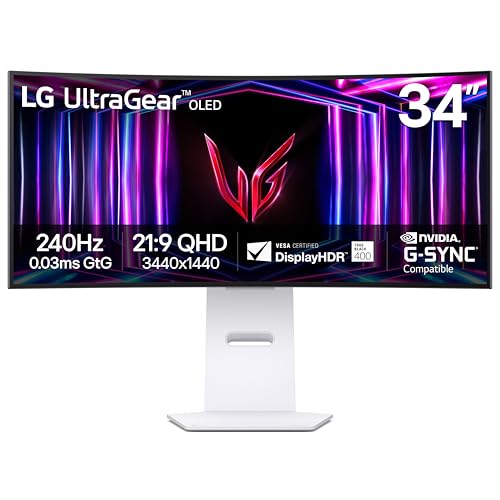
LG 34-Inch UltraGear Curved OLED Gaming Monitor
Best for: Competitive gamers wanting fast OLED response
- Size
- 34 Inch (what this guide is about)
- Screen Size
- 34"
- Resolution
- WQHD 1440p
- Refresh Rate
- 240Hz
- Panel Type
- OLED
- Aspect Ratio
- 21:9
View on Amazon: LG 34-Inch UltraGear Curved OLED Gaming Monitor
This 34-inch ultrawide monitor pairs an OLED panel with a WQHD 1440p resolution and a fast 240Hz refresh rate. Its steep 800R curve wraps around your field of view, while a 0.03ms response time keeps motion clear. Both AMD FreeSync Premium Pro and NVIDIA G-Sync support eliminate screen tearing. It suits you if you want responsive gaming performance and deep contrast.
Pros
- Fast 240Hz refresh rate and 0.03ms response time
- OLED panel with 1,500,000:1 contrast ratio and DisplayHDR True Black 400
- HDMI 2.1 and DisplayPort 1.4 video inputs
- AMD FreeSync Premium Pro and NVIDIA G-Sync support
Cons
- Aggressive 800R curve may distort flat desktop layouts
- No USB-C connectivity listed in specifications
- Display unit is heavy at 20.5 pounds
Good fit if
- You want an ultra-fast 240Hz refresh rate with near-instant 0.03ms response times.
- You prefer an aggressive 800R curvature for immersive field-of-view coverage.
- You need variable refresh rate support across both AMD and NVIDIA graphics cards.
Skip if
- You require a flat screen or subtle curve for standard productivity work.
- You need single-cable USB-C video input and laptop power delivery.
Verdict: LG 34-Inch Curved OLED Gaming Monitor combines an ultra-fast 240Hz OLED panel with an aggressive 800R curve for high-speed, immersive gameplay. Its dual HDMI 2.1 ports and variable refresh rate certifications ensure peak performance on modern graphics cards.

ASUS ProArt 34-Inch Curved USB-C Monitor
Best for: laptop docking and color-accurate creative work
- Size
- 34 Inch (what this guide is about)
- Screen Size
- 34.1-inch
- Resolution
- 1440p
- Panel Type
- IPS
- Aspect Ratio
- 21:9
- Connectivity
- USB-C, DisplayPort, HDMI, USB, RJ45
The ASUS ProArt 34-Inch Curved IPS Monitor gives you a 34.1-inch ultrawide workspace running at 1440p resolution with a gentle 3800R curve. It is built for color-accurate productivity, featuring 100% sRGB coverage and factory calibration with Delta E under 2. You get extensive single-cable docking through a 96W USB-C port, DisplayPort daisy-chaining, and an RJ45 LAN port, making it ideal for laptop-centered desk setups.
Pros
- USB-C port supplies 96W Power Delivery alongside DisplayPort video
- Calman Verified color accuracy with Delta E < 2 and 100% sRGB
- Built-in RJ45 Ethernet port and DisplayPort daisy-chaining support
- Full ergonomic stand with height, tilt, and swivel adjustments
Cons
- Gentle 3800R curvature provides less wrap-around than tighter curves
- No high gaming refresh rate or adaptive sync specifications listed
- Heavy display profile weighing 23.8 pounds
Good fit if
- You need a single USB-C cable to deliver 96W power, video, and wired network access to your laptop.
- You require color-critical accuracy with factory-calibrated 100% sRGB coverage for editing.
- You plan to daisy-chain multiple displays using DisplayPort.
Skip if
- You prioritize high refresh rates for competitive gaming over color accuracy.
- You prefer an aggressive curve such as 1500R or 1000R for deeper peripheral immersion.
Verdict: ASUS ProArt 34-Inch Curved IPS Monitor provides exceptional workstation docking and factory-calibrated color accuracy for productivity-focused setups. Its 96W USB-C connection and integrated Ethernet eliminate the need for a separate desktop dock.

Z-Edge 34-Inch Curved Ultrawide Monitor
Best for: high-refresh ultrawide gaming and split-screen multitasking
- Size
- 34 Inch (what this guide is about)
- Screen Size
- 34 inch
- Resolution
- 3440x1440
- Refresh Rate
- 200Hz
- Aspect Ratio
- 21:9
- Response Time
- 1ms
This Z-Edge display is a 34-inch curved gaming monitor featuring a 3440x1440 resolution across a 21:9 aspect ratio. It offers a 1500R curve, a 1ms response time, and refresh rate support reaching up to 200Hz with standard 144Hz modes. With integrated picture-in-picture and picture-by-picture modes, it suits you if you want high-frame-rate ultrawide gameplay paired with side-by-side multitasking.
Pros
- 3440x1440 UWQHD resolution across a 21:9 ultrawide panel
- High refresh rate support up to 200Hz with 1ms response time
- Hardware PIP and PBP split-screen viewing modes
- 1500R curved screen design
Cons
- No built-in speakers listed in specifications
- Stand ergonomics such as height adjustment not specified
Good fit if
- You want a 34-inch 1500R curved screen for high-refresh-rate gaming.
- You need PIP or PBP split-screen capability to view two sources simultaneously.
Skip if
- You require integrated speakers for onboard audio playback.
- You prefer a flat monitor panel over a 1500R curvature.
Verdict: Z-Edge 34-Inch Curved 1440p Gaming Monitor delivers a 1500R curved UWQHD panel with high refresh capabilities and built-in split-screen modes. It provides responsive gaming performance and ultrawide workspace efficiency.

Gawfolk 34-Inch Curved 100Hz IPS Monitor
Best for: everyday multitasking and moderate 100Hz gaming
- Size
- 34 Inch (what this guide is about)
- Screen Size
- 34 Inch
- Resolution
- 3440x1440
- Refresh Rate
- 100Hz
- Panel Type
- IPS
- Aspect Ratio
- 21:9
The Gawfolk 34-Inch Curved 100Hz IPS Monitor gives you a 3440x1440 WQHD workspace with a gentle 3800R curve and wide 178-degree viewing angles. Its 100Hz refresh rate and AMD FreeSync provide smoother motion than standard 60Hz displays. With dual HDMI 2.0 and dual DisplayPort 1.2 ports plus built-in speakers, it suits you if you juggle multiple video sources across work tasks and casual gaming.
Pros
- 3440x1440 IPS panel with 178-degree viewing angles
- Four display inputs including two HDMI 2.0 and two DP 1.2 ports
- 100Hz refresh rate paired with AMD FreeSync support
- Integrated stereo speakers and 3.5mm audio jack
Cons
- Stand provides tilt adjustment only, with no height or swivel movement
- 100Hz refresh rate is lower than the 144Hz to 240Hz speeds found on dedicated gaming ultrawides
- Uses a 75x75mm mounting pattern rather than standard 100x100mm VESA
Good fit if
- You want an IPS ultrawide display for multitasking across four connected input devices.
- You prefer a subtle 3800R curve instead of an aggressive wrap-around profile.
- You want smoother 100Hz desktop and gaming motion without overtaxing your graphics card.
Skip if
- You need high-refresh gaming performance beyond 100Hz.
- You require a stand with height or swivel adjustments for ergonomic positioning.
- You prefer a deep 1000R or 1500R curve for complete field-of-view immersion.
Verdict: Gawfolk 34-Inch Curved 100Hz IPS Monitor provides a 3440x1440 IPS panel with 100Hz motion and four video inputs for versatile workspace use. It balances everyday productivity and casual gaming without demanding high-end PC hardware.
Specifications side by side
| Spec | SANSUI 34-Inch Curved 200Hz Ultrawide Monitor | Sceptre 34-Inch Curved 240Hz Ultrawide Monitor | SANSUI 34-Inch 240Hz Curved Ultrawide Monitor | Amzfast 34" Curved 200Hz Ultrawide Monitor | LG 34-Inch UltraGear OLED Curved Monitor | KTC 34-Inch Curved 180Hz Ultrawide Monitor | Samsung 34-Inch ViewFinity 1000R Curved Monitor | KTC 34-Inch Curved 180Hz Ultrawide | Acer Nitro 34-Inch 1000R Curved Ultrawide Monitor | Hikers 34-Inch 240Hz Curved Ultrawide Monitor | Gawfolk 34-Inch Curved 165Hz Ultrawide Monitor | LG 34-Inch UltraGear Curved OLED Gaming Monitor | ASUS ProArt 34-Inch Curved USB-C Monitor | Z-Edge 34-Inch Curved Ultrawide Monitor | Gawfolk 34-Inch Curved 100Hz IPS Monitor |
|---|---|---|---|---|---|---|---|---|---|---|---|---|---|---|---|
| Screen Size | 34-Inch | 34" | 34 Inch | 34" | 34" | 34 inch | 34” | 34 Inch | 34" | 34" | 34 Inch | 34" | 34.1-inch | 34 inch | 34 Inch |
| Resolution | 3440 x 1440 | 3440 x 1440 | 3440x1440 | 3440x1440 | WQHD 1440p | 3440X1440 | not specified | 3440x1440 | 3440 x 1440 | 3440x1440 | 3440 x 1440 | WQHD 1440p | 1440p | 3440x1440 | 3440x1440 |
| Refresh Rate | 200Hz | up to 240Hz | 240Hz | 200Hz | 240Hz | 180Hz | 100Hz | 180Hz | 120Hz | 240Hz | 165 Hz | 240Hz | not specified | 200Hz | 100Hz |
| Panel Type | Fast VA | not specified | Fast VA | not specified | OLED | not specified | not specified | HVA | not specified | Fast VA | not specified | OLED | IPS | not specified | IPS |
| Aspect Ratio | 21:9 | not specified | 21:9 | not specified | 21:9 | 21:9 | 21:9 | 21:9 | 21:9 | 21:9 | 21:9 | 21:9 | 21:9 | 21:9 | 21:9 |
| Response Time | OD 1ms | 1ms | 1ms MRPT | 1ms (OD) | 0.03ms GtG | not specified | not specified | 1ms MPRT | 1ms VRB | 1ms MPRT | not specified | 0.03ms GTG | not specified | 1ms | not specified |
| Sync Technology | VRR | not specified | FreeSync, VRR | Adaptive Sync, FreeSync | G-SYNC Compatible, FreeSync Premium Pro | adaptive sync | AMD FreeSync | adaptive sync | AMD FreeSync Premium | FreeSync | Adaptive Sync (AMD FreeSync) | AMD FreeSync Premium Pro, NVIDIA G-Sync | not specified | not specified | AMD FreeSync |
| Connectivity | DP 1.4, HDMI 2.1 X 2, Earphone | DisplayPort x2, HDMI x2, Audio Out | HDMI 2.1 x2, DP 1.4 x2, Earphone | DP 1.4, HDMI 2.1 | HDMI 2.1, DisplayPort 1.4 | HDMI 2.0 ×2, DP 1.4 ×2 | USB-C, LAN | HDMI 2.0 x 2, DP 1.4 x 2 | 2x DisplayPort 1.2, 2x HDMI 2.0 | 2x HDMI 2.1, 2x DisplayPort 1.4 | HDMI 2.0, DP 1.4 | HDMI 2.1, DisplayPort 1.4 | USB-C, DisplayPort, HDMI, USB, RJ45 | not specified | Dual HDMI 2.0, Dual DP 1.2 |
| Size | 34 Inch | 34 Inch | 34 Inch | 34 Inch | 34 Inch | 34 Inch | 34 Inch | 34 Inch | 34 Inch | 34 Inch | 34 Inch | 34 Inch | 34 Inch | 34 Inch | 34 Inch |
| Dimensions | 8.6 × 31.8 × 18 inches | 8.5 × 31.8 × 18 inches | 7.48 × 31.8 × 17.9 inches | 10.8 × 31.8 × 21.5 inches | 11 × 30.9 × 23.1 inches | 5.31 × 32.5 × 21.2 inches | 9.49 × 31.8 × 22.1 inches | 6.22 × 27.9 × 20.4 inches | 9.13 × 31.8 × 18.7 inches | 31.2 × 7.48 × 17.9 inches | 5.5 × 17.7 × 36 inches | 11 × 30.9 × 23.1 inches | 34 × 8 × 10 inches | 9.45 × 32 × 20.3 inches | 8.6 × 32.2 × 17.5 inches |
| Weight | 15.4 pounds | 14 pounds | not specified | not specified | 20.5 pounds | 21.9 pounds | 11.5 pounds | 16.8 pounds | 21.5 pounds | not specified | not specified | 20.5 pounds | 23.8 pounds | 13 pounds | 10.8 pounds |
| Color | Black | Machine Black | Black | Black | Green/Red | Black | Black | Black | Black | black | Black | White | BLACK | Black | Black |
| Model | ES-G34C5 | C345B-QU240T | ES-G34C5 PRO | AMZG34C8 | 34GS95QE-B.AUS | H34S5 | LS34C654UANXGO | H34S5 | EDA343CUR J0bmiippx | G34H1Q Pro | GF340C | 34GS95QE-W.AUS | PA34VCNV | UG34 | GFTY986 |
Is a 34-Inch Ultrawide Monitor Worth It?
A 34-inch ultrawide monitor provides between 27.9 and 36 inches of horizontal width. This screen size enables split-screen multitasking and wide desktop layouts across multiple video sources. At this scale, 3440 x 1440 panels maintain clarity for detailed work and high-refresh gaming. Display curves ranging from 800R to 1500R bring the outer edges inward to expand your field of view. These dimensions require between 3 and 11.4 inches of desk depth to accommodate the included stands.
Worth it if
- You want a wide desktop workspace for split-screen multitasking from multiple input sources.
- You want an immersive field of view for high-refresh gaming using curved panels up to 800R.
Skip it if
- You have a compact desk that cannot accommodate displays measuring up to 36 inches wide.
- You prefer a lightweight display setup, as these 34-inch units weigh up to 23.8 pounds.
If you need a compact secondary screen for travel alongside your desk setup, the best 16 Inch portable monitors offer smaller dual-display options.
How We Picked These Monitors
To help you choose a 34-inch ultrawide monitor, we locate models that confirm a 34-inch display size in their title or feature list. We present only one model per product family to keep your options distinct among these 15 picks. Every detail comes strictly from published specifications and feature lists. We do not physically handle the displays.
You will find products in stock first, then by Amazon sales rank (better-selling products first). We also evaluate published specifications like refresh rate and screen resolution against our guide criteria. Stock availability updates at least daily on the page.
How to Choose a 34-Inch Ultrawide Monitor
-
Select the Right Panel Type
Check the display panel technology before choosing a monitor. Standard IPS panels offer broad viewing angles for daily desktop workflows and graphic design tasks. If you prioritize deep black levels and immediate pixel response times, look for OLED technology. The LG 34GS95QE-B.AUS features an OLED panel with a 0.03ms response time that eliminates motion blur during fast gameplay. For balanced contrast during gaming and media playback, compare published contrast ratios to ensure the panel matches your visual demands.
-
Match Refresh Rate to Tasks
Refresh rates on 34-inch monitors range from 100Hz up to 240Hz across this category. A 100Hz screen provides adequate smoothness for office productivity, text editing, and casual frame rendering. If you play competitive shooters or high-speed racing titles, target at least 180Hz or 240Hz to reduce display latency and improve input precision. The Sceptre C345B-QU240T provides a 240Hz refresh rate to maximize frame delivery. Match this specification directly to your computer hardware capabilities so your graphics card can drive the target frame rate consistently.
-
Evaluate Screen Curvature Rating
Ultrawide screens use different curvature ratings measured in millimeters of radius. A tight curve, such as 1000R or 800R, brings the far edges into your peripheral field of view, reducing neck rotation. The Samsung LS34C654UANXGO uses a 1000R curve tailored for immersive desktop coverage. Conversely, a gentler 1500R curve offers subtle depth without distorting straight lines, while flat panels suit straight-line drafting and spreadsheets. Choose a tighter curve if you sit close to your desk and want full field coverage across the entire horizontal display area.
-
Measure Physical Stand Depth
A 34-inch monitor requires considerable desktop real estate, especially front to back. Listed depth measurements range between 3 inches on flat models up to 11.4 inches on monitors with deep support stands. The ViewSonic VX3418C-2K measures 11.4 inches in length, requiring a deeper desk surface to maintain healthy eye distance. If you have a shallow desk, check the stand depth before buying or verify if you can mount the display. Choosing a shallower profile preserves keyboard and mouse space while keeping the screen far enough away for comfortable viewing.
-
Verify Port Bandwidth Specifications
High-refresh ultrawide monitors often require specific display interfaces to reach advertised speeds. Certain models limit their maximum refresh rate when connected over older HDMI revisions, reserving peak performance for DisplayPort connections. For instance, the Gawfolk GF340C requires a DisplayPort connection to achieve its full 165Hz refresh rate at 3440 x 1440 resolution. Check which video outputs your PC or laptop provides before deciding on a display. Ensuring your output ports match the monitor specifications guarantees you achieve the full refresh potential without running into hardware bandwidth bottlenecks.
-
Confirm Variable Refresh Synchronization
Variable refresh rate technology synchronizes the monitor refresh cycle with your graphics card frame output to eliminate visual tearing and stutter. Standard formats include AMD FreeSync, NVIDIA G-SYNC, and general Adaptive Sync. If you switch between different graphics platforms or run hardware from both vendors, look for broad synchronization coverage. The LG 34GS95QE-W.AUS supports both FreeSync and G-SYNC synchronization protocols. Confirming synchronization support prevents image disruption during intense visual sequences where rendering speeds fluctuate below the peak refresh rate of your panel.
Frequently asked questions
What is the highest refresh rate available on a 34-inch ultrawide monitor?
The highest refresh rate among these 34-inch models is 240Hz. Displays such as the Sceptre C345B-QU240T, Amzfast AMZG34C8 Pro, and LG 34GS95QE-B.AUS reach 240Hz for competitive gaming. These monitors update the screen 240 times per second, rendering motion noticeably smoother than standard 60Hz or 100Hz panels when paired with capable PC hardware.
Can a 34-inch ultrawide monitor connect multiple computers simultaneously?
Yes, specific 34-inch ultrawide models include integrated hardware designed for managing multiple systems at once. The Samsung ViewFinity LS34C654UANXGO features a built-in KVM switch alongside Ethernet and USB-C connectivity. This setup lets you control two connected computers using one keyboard and mouse without adding external switches or swapping display cables on your desk.
Which 34-inch ultrawide monitors support both FreeSync and G-SYNC?
The LG UltraGear OLED models, including the 34GS95QE-B.AUS and 34GS95QE-W.AUS, explicitly support both FreeSync and G-SYNC variable refresh rate technologies. Dual synchronization ensures the display synchronizes its 240Hz refresh rate directly with AMD or NVIDIA graphics cards. This synchronization eliminates screen tearing and minimizes input lag during fast-paced gaming without requiring manual software adjustments.
What cable connection is required to reach maximum refresh rates?
You typically need a DisplayPort connection or an HDMI 2.1 cable to achieve maximum refresh rates on 34-inch ultrawide screens. For example, the Gawfolk GF340C requires DisplayPort to attain its full 165Hz speed. Similarly, monitors like the SANSUI ES-G34C5 PRO and Amzfast models supply HDMI 2.1 or DisplayPort inputs to support full 240Hz bandwidth at UWQHD resolutions.
Can you charge a laptop directly from a 34-inch ultrawide monitor?
Yes, you can charge a laptop directly if the monitor provides power delivery over USB-C. The ASUS ProArt PA34VCNV delivers up to 96W of power through its single USB-C connection while carrying display data and network signals via integrated Ethernet. This single-cable configuration charges compatible laptops while transferring video and peripherals simultaneously.
How fast is the response time on a 34-inch OLED gaming monitor?
An OLED 34-inch gaming monitor provides response times as low as 0.03ms. Both the black and white variants of the LG 34-Inch UltraGear OLED (34GS95QE models) feature this 0.03ms spec paired with a 240Hz refresh rate. In practice, this near-instant pixel transition practically removes motion blur and trailing behind fast-moving objects in competitive gameplay.
What does a 1500R or 1000R curve rating mean on a 34-inch screen?
A curvature rating indicates the radius of the circle the monitor curve forms in millimeters. A 1000R monitor like the Samsung ViewFinity curves more aggressively than a 1500R monitor like the Sceptre or Z-Edge models. The smaller the number, the tighter the curve, bringing the outer edges of the 34-inch ultrawide screen closer into your peripheral vision.