6 Best 40 Inch Ultrawide Monitors, Compared
As an Amazon Associate we earn from qualifying purchases. Links on this page are affiliate links.
Choosing the best 40 Inch ultrawide monitors requires focusing on key specifications rather than marketing claims. We compared 6 models to find the right fit for your setup. The Deco Gear 40-Inch 5K2K Curved Ultrawide Monitor leads this list because its 5K2K resolution offers superior clarity for productivity and creative work. All selections are based strictly on the published specifications on the product listings. This guide helps you decide which display matches your specific needs for resolution, refresh rate, and connectivity.
Quick picks
The best fit for you
- You need the best overall productivity monitor Deco Gear 40-Inch 5K2K Curved Ultrawide Monitor Its 5K2K resolution offers precise color and multi-device management for creative work.
- You want the fastest refresh rate for gaming Samsung 40-Inch Odyssey G7 Curved Gaming Monitor This Samsung model delivers top-tier speed and motion clarity for fast-paced ultrawide gaming.
- You need Thunderbolt 5 connectivity for data transfer Samsung 40-Inch ViewFinity 5K2K Curved Monitor It provides exceptional clarity and fast data transfer via Thunderbolt 5 for professionals.
- You want a budget-friendly 144Hz IPS option Z-Edge 40-Inch 144Hz Ultrawide Monitor The Z-Edge delivers solid 1440p performance and multitasking features for value-conscious users.
Our 6 picks
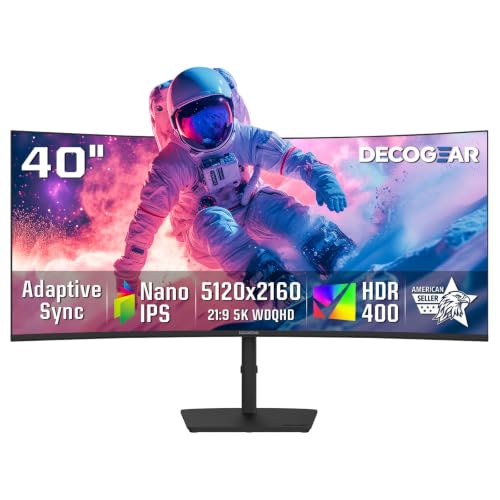
Deco Gear 40-Inch 5K2K Curved Ultrawide Monitor
Best for: productivity and creative work
- Size
- 40 Inch (what this guide is about)
- Screen Size
- 40"
- Resolution
- 5120x2160
- Refresh Rate
- 75Hz
- Panel Type
- Nano IPS
- Aspect Ratio
- 21:9
View on Amazon: Deco Gear 40-Inch 5K2K Curved Ultrawide Monitor Affiliate link
The Deco Gear 40-inch monitor offers 5120x2160 resolution on an IPS panel. It provides 75Hz refresh rates with 1ms MPRT response time. The display covers 100% sRGB color space. A 90W USB-C port supports laptop charging and data. KVM switching and PIP/PBP modes enhance multitasking. This screen suits designers and office workers needing sharp visuals and wide workspace.
Pros
- 5120x2160 5K2K resolution for sharp detail
- 90W USB-C for laptop power and data
- Built-in KVM switch for multi-device control
- 100% sRGB color coverage for accurate images
- Adjustable stand with height, tilt, and swivel
Cons
- 75Hz refresh rate limits high-speed gaming
- No mention of HDR support or certification
- Adaptive Sync instead of branded FreeSync/G-Sync
Good fit if
- You need a wide canvas for spreadsheets and timelines
- You want a single cable for laptop power and video
- You work with multiple computers and need KVM control
Skip if
- You require high refresh rates for competitive gaming
- You need HDR10 or Dolby Vision for media
- You prefer G-Sync Compatible certification over Adaptive Sync
Verdict: Deco Gear 40" 5K2K Ultrawide is a productivity-focused display for professionals who value resolution and connectivity over high refresh rates. It fits users who need precise color and multi-device management.

Samsung 40-Inch Odyssey G7 Curved Gaming Monitor
Best for: fast-paced ultrawide gaming
- Size
- 40 Inch (what this guide is about)
- Screen Size
- 40"
- Resolution
- WUHD
- Refresh Rate
- 180Hz
- Aspect Ratio
- 21:9
- Response Time
- 1ms GtG
View on Amazon: Samsung 40-Inch Odyssey G7 Curved Gaming Monitor Affiliate link
The Samsung 40-inch Odyssey G7 features a 21:9 WUHD resolution on a 1000R curved panel. It offers an 180Hz refresh rate and 1ms GtG response time for smooth gameplay. VESA DisplayHDR 600 enhances contrast in dark scenes. This monitor suits gamers seeking high speed and immersion in a large ultrawide format.
Pros
- 180Hz refresh rate for ultra-smooth motion
- 1ms GtG response time minimizes lag
- VESA DisplayHDR 600 for better contrast
- 1000R curved screen wraps around vision
Cons
- 21:9 aspect ratio limits vertical space
- Curved panel may not suit all desk setups
- Large physical footprint requires ample desk space
Good fit if
- You want high refresh rates for competitive gaming
- You prefer immersive curved displays
- You need WUHD resolution for detailed visuals
Skip if
- You prefer flat screens for design work
- You have limited desk space
- You need standard 16:9 aspect ratio
Verdict: Samsung 40" Odyssey G7 180Hz WUHD delivers top-tier speed and immersion for gamers who prioritize motion clarity and a wide field of view.

Z-Edge 40-Inch 144Hz Ultrawide Monitor
Best for: Budget-conscious multitaskers and gamers
- Size
- 40 Inch (what this guide is about)
- Screen Size
- 40 inch
- Resolution
- 3440×1440
- Refresh Rate
- 144Hz
- Panel Type
- IPS
- Aspect Ratio
- 21:9
View on Amazon: Z-Edge 40-Inch 144Hz Ultrawide Monitor Affiliate link
The Z-Edge 40 inch ultrawide monitor offers a 3440x1440 resolution on a 21:9 IPS panel. You get a 144Hz refresh rate via DisplayPort for smooth motion. The screen includes PIP/PBP modes for multitasking and a fully adjustable stand. It also features built-in speakers and USB-C connectivity. This setup suits users who want a large workspace without the premium price of higher resolutions.
Pros
- 144Hz refresh rate for fluid gaming
- IPS panel with 178-degree viewing angles
- PIP and PBP split-screen multitasking
- Fully adjustable ergonomic stand
- Built-in dual speakers
Cons
- Lower 1440p resolution compared to 5K2K competitors
- No HDR specification listed in data
- No mention of USB-C power delivery
Good fit if
- You need a large screen for multitasking on a budget
- You prefer IPS color accuracy over VA contrast
- You want built-in speakers to keep your desk clean
Skip if
- You require 5K2K resolution for detailed work
- You need high refresh rates over HDMI
- You want HDR support for media consumption
Verdict: Z-Edge 40 Inch 144Hz IPS Ultrawide delivers solid 1440p performance and multitasking features for users prioritizing value and screen real estate over maximum pixel density.

INNOCN 40-Inch 5K 115Hz IPS Ultrawide Monitor
Best for: color-accurate creative work and multitasking
- Size
- 40 Inch (what this guide is about)
- Screen Size
- 40"
- Resolution
- 5120 x 2160
- Refresh Rate
- 115Hz
- Panel Type
- IPS
- Aspect Ratio
- 21:9
View on Amazon: INNOCN 40-Inch 5K 115Hz IPS Ultrawide Monitor Affiliate link
This 40-inch ultrawide monitor delivers 5120 x 2160 resolution on an IPS panel. It features a 115Hz refresh rate with AMD FreeSync and HDR400 support. The USB-C port provides 65W charging and video signal. Factory calibration ensures 99% sRGB coverage. It suits creators needing color accuracy and multitasking space without manual tuning.
Pros
- 5120 x 2160 resolution for extensive multitasking
- 115Hz refresh rate with AMD FreeSync
- 65W USB-C connectivity for single-cable setup
- Factory-calibrated 99% sRGB color gamut
- Height-adjustable stand with tilt and swivel
Cons
- Lower 115Hz refresh rate compared to 144Hz competitors
- Only HDR400 certification, lacking higher dynamic range
- No mention of built-in KVM switch functionality
Good fit if
- You need high-resolution color accuracy for creative work
- You want a single-cable USB-C connection for laptops
- You prefer factory-calibrated displays without manual adjustment
Skip if
- You require high refresh rates for competitive gaming
- You need HDR1000 or higher dynamic range performance
- You prioritize KVM switching for multiple computers
Verdict: INNOCN 40" 5K 115Hz USB-C Monitor fits professionals who prioritize color precision and clean desk setups over high-speed gaming performance.
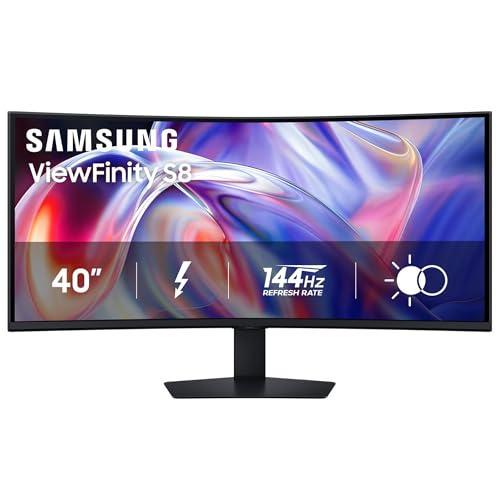
Samsung 40-Inch ViewFinity 5K2K Curved Monitor
Best for: Multitasking with 5K2K clarity and Thunderbolt 5
- Size
- 40 Inch (what this guide is about)
- Screen Size
- 40"
- Resolution
- 5120 x 2160
- Refresh Rate
- 144Hz
- Sync Technology
- AMD FreeSync Premium
- Connectivity
- Thunderbolt 5, LAN
View on Amazon: Samsung 40-Inch ViewFinity 5K2K Curved Monitor Affiliate link
The Samsung ViewFinity S8 is a 40-inch curved ultrawide monitor with 5K2K (5120 x 2160) resolution. It features a 144Hz refresh rate and AMD FreeSync Premium for smooth visuals. Thunderbolt 5 connectivity supports up to 140W charging and high-speed data transfer. A built-in KVM switch lets you control two devices with one keyboard and mouse. This monitor suits users who need high resolution and efficient multitasking.
Pros
- 5120 x 2160 5K2K resolution for sharp detail
- 144Hz refresh rate with AMD FreeSync Premium
- Thunderbolt 5 with up to 140W charging
- Built-in KVM switch for dual device control
Cons
- Curved display may not suit all desk setups
- No HDR10+ certification listed in key specs
- Limited to single Thunderbolt 5 port for connectivity
Good fit if
- You need high-resolution multitasking with 5K2K clarity
- You use Thunderbolt 5 devices requiring fast data transfer
- You want to control two computers with one keyboard and mouse
Skip if
- You require a flat panel for precise alignment
- You need multiple high-bandwidth video inputs
- You prefer a standard 16:9 aspect ratio
Verdict: Samsung ViewFinity S8 40" 5K2K Monitor delivers exceptional clarity and connectivity for professionals who need precise multitasking and fast data transfer via Thunderbolt 5.

INNOCN 40-Inch 144Hz Ultrawide Monitor
Best for: Gaming and productivity with USB-C
- Size
- 40 Inch (what this guide is about)
- Screen Size
- 40"
- Resolution
- 3440 x 1440p
- Refresh Rate
- 144Hz
- Panel Type
- IPS
- Aspect Ratio
- 21:9
View on Amazon: INNOCN 40-Inch 144Hz Ultrawide Monitor Affiliate link
The INNOCN 40C1R is a 40-inch ultrawide monitor featuring a 21:9 aspect ratio and 1440p resolution. It delivers a 144Hz refresh rate via DisplayPort and supports AMD FreeSync Premium for smoother gameplay. The IPS panel offers 95% DCI-P3 color coverage and HDR400 certification. You get versatile connectivity including USB-C, DisplayPort, and dual HDMI ports. This display suits users who need a large workspace and high refresh rates for gaming or productivity tasks.
Pros
- 144Hz refresh rate for smooth motion
- USB-C connectivity for single-cable setup
- 95% DCI-P3 color gamut coverage
- Ergonomic stand with height adjustment
- HDR400 certification for improved contrast
Cons
- 100Hz refresh rate limit on HDMI
- Resolution is 1440p, not 5K2K
- No mention of built-in speakers
Good fit if
- You want a high refresh rate for gaming
- You need USB-C connectivity for laptops
- You prefer an IPS panel for color accuracy
Skip if
- You require 5K2K resolution
- You need 144Hz over HDMI
- You want a curved screen
Verdict: The INNOCN 40C1R 40-Inch Ultrawide Monitor offers a solid balance of speed and color for desktop users. It fits those who prioritize USB-C convenience and 144Hz gaming over ultra-high resolution.
Specifications side by side
| Spec | Deco Gear 40-Inch 5K2K Curved Ultrawide Monitor | Samsung 40-Inch Odyssey G7 Curved Gaming Monitor | Z-Edge 40-Inch 144Hz Ultrawide Monitor | INNOCN 40-Inch 5K 115Hz IPS Ultrawide Monitor | Samsung 40-Inch ViewFinity 5K2K Curved Monitor | INNOCN 40-Inch 144Hz Ultrawide Monitor |
|---|---|---|---|---|---|---|
| Screen Size | 40" | 40" | 40 inch | 40" | 40" | 40" |
| Resolution | 5120x2160 | WUHD | 3440×1440 | 5120 x 2160 | 5120 x 2160 | 3440 x 1440p |
| Refresh Rate | 75Hz | 180Hz | 144Hz | 115Hz | 144Hz | 144Hz |
| Panel Type | Nano IPS | not stated | IPS | IPS | not stated | IPS |
| Aspect Ratio | 21:9 | 21:9 | 21:9 | 21:9 | not stated | 21:9 |
| Response Time | 1ms MPRT | 1ms GtG | MPRT 1ms | not stated | not stated | not stated |
| Sync Technology | Adaptive Sync | AMD FreeSync Premium Pro | not stated | AMD FreeSync | AMD FreeSync Premium | FreeSync Premium |
| Connectivity | HDMI 2.0, DP 1.4, USB-C, USB-B, USB-A | not stated | 1x DP, 2x HDMI, 1x USB-C | USB-C, HDMI 2.1, DisplayPort | Thunderbolt 5, LAN | USB Type-C, DP, HDMI |
| Size | 40 Inch | 40 Inch | 40 Inch | 40 Inch | 40 Inch | 40 Inch |
| Dimensions | 9.57 × 37.3 × 23.7 inches | 12 × 36.6 × 23.6 inches | 37.2 × 11.3 × 23.5 inches | 2.32 × 37.2 × 16.5 inches | 14.3 × 36.6 × 23.6 inches | 5.71 × 5.71 × 15.7 inches |
| Weight | 17.8 pounds | 24.9 pounds | 23 pounds | not stated | 39 pounds | not stated |
| Color | Black | Black | Black | Black | Black | black |
| Model | WKDGEDGE401 | LS40FG75DENXZA | UG40S | 40B2U | LS40H850TANXZA | 40C1R |
Is a 40 Inch Screen Worth the Space?
A 40 Inch panel provides significant horizontal real estate, typically measuring around 37 inches wide. This width accommodates 5K2K resolutions for sharp text or 1440p panels for high refresh rates. You gain enough room to run multiple windows side-by-side without overlapping. However, the footprint is large, often exceeding 36 inches in width and weighing up to 39 pounds. You must ensure your desk can support this width and that your viewing distance allows you to see the entire field without straining your neck.
Worth it if
- You need to run multiple applications side-by-side for productivity.
- You want immersive gaming with a wide field of view.
- You have a large desk that can support a 37-inch width.
Skip it if
- You have a small desk with limited width.
- You sit too close to see the full screen comfortably.
- You prefer a lighter monitor under 20 pounds.
How we picked 40 Inch monitors
We identified these displays by checking Amazon listings for the exact 40 Inch size. Only one variant from each product family made the cut. Every detail comes from the published specifications on the listing. We did not handle these units or test them physically. You can trust the data we present here.
We ordered the list by availability first. Then we used the listing's overall rating weighted by the number of ratings. Finally, we ranked by how many of our criteria the specs meet. This method ensures you see the most relevant 40 Inch ultrawide options first, based on clear, objective metrics.
How to Choose the Right 40 Inch Ultrawide
-
Check Resolution for Clarity
Resolution determines how sharp text and images appear. The Deco Gear offers 5K2K resolution, which provides high pixel density for detailed creative work. In contrast, the Z-Edge uses 1440p resolution. This lower resolution is sufficient for gaming and general multitasking. You should choose 5K2K if you read a lot of text or edit photos. Select 1440p if you prioritize a higher refresh rate over pixel sharpness. Match the resolution to your primary daily tasks.
-
Prioritize Refresh Rate for Gaming
Refresh rate affects motion smoothness. The Samsung Odyssey G7 features a high refresh rate suitable for fast-paced games. The Deco Gear has a 75Hz refresh rate, which is standard for office use. If you play competitive shooters, look for models with 144Hz or higher. The Z-Edge and INNOCN 40C1R both offer 144Hz. This ensures smoother visuals during rapid movement. Casual gamers may find 75Hz adequate. Professionals working with static content do not need high refresh rates.
-
Evaluate Connectivity Options
Connectivity dictates how you link devices. The Samsung ViewFinity includes Thunderbolt 5 for fast data transfer. The INNOCN 40B2U uses USB-C for clean desk setups. The INNOCN 40C1R supports HDMI and USB-C. You should check if your computer has the required ports. Thunderbolt 5 offers the highest bandwidth. USB-C simplifies single-cable connections for laptops. HDMI remains common for gaming consoles. Ensure the monitor has the ports your devices require for a seamless workflow.
-
Consider Panel Type for Color
Panel type influences color accuracy and viewing angles. The Z-Edge and INNOCN 40C1R use IPS panels. IPS technology provides consistent colors from different angles. This is important for creative work and shared viewing. The Deco Gear and Samsung models do not list their panel type in the provided data. You should assume IPS is standard for color-critical tasks. If color fidelity is vital, confirm the panel type. IPS panels generally offer better color reproduction than older TN or VA technologies.
-
Assess Physical Dimensions
Size affects desk space and ergonomics. The Deco Gear measures 37.3 inches wide and weighs 17.8 pounds. The Samsung ViewFinity is wider at 36.6 inches but weighs 39 pounds. The Z-Edge is 37.2 inches wide. You must measure your desk to ensure the monitor fits. Heavier models may require a sturdy stand or VESA mount. The INNOCN 40B2U has a slim profile at 2.32 inches deep. Check the width and height to ensure it fits your setup comfortably.
Frequently asked questions
Which 40 Inch ultrawide monitor is best for creative work?
The Deco Gear 40-Inch 5K2K Curved Ultrawide Monitor is the top choice for productivity and creative tasks. Its 5K2K resolution ensures sharp text and precise color reproduction. This model prioritizes image clarity and multi-device management over high refresh rates, making it ideal for professionals who need detailed visual output.
What is the fastest refresh rate available on these displays?
The Samsung 40-Inch Odyssey G7 Curved Gaming Monitor offers the highest speed with an 180Hz refresh rate. This specification delivers top-tier motion clarity for fast-paced ultrawide gaming. It is designed for gamers who prioritize immersion and a wide field of view, providing a smoother visual experience than standard 60Hz or 75Hz panels.
Does any 40 Inch monitor support Thunderbolt 5 connectivity?
Yes, the Samsung 40-Inch ViewFinity 5K2K Curved Monitor supports Thunderbolt 5. This connectivity allows for fast data transfer and efficient multitasking with 5K2K clarity. It is designed for professionals who require robust connection options to manage multiple devices and high-resolution workflows without compromising on screen real estate or image quality.
Which model is the best budget option for multitasking?
The Z-Edge 40-Inch 144Hz Ultrawide Monitor is the best budget choice for multitaskers and gamers. It features a 1440p resolution and an IPS panel, offering solid performance for users who prioritize value and screen size. This model provides a good balance of refresh rate and clarity without the premium cost of higher-resolution displays.
Are there 40 Inch monitors with USB-C connectivity?
Several models include USB-C ports for convenient connectivity. The INNOCN 40-Inch 5K 115Hz IPS Ultrawide Monitor and the INNOCN 40-Inch 144Hz Ultrawide Monitor both support USB-C. These ports allow for clean desk setups and direct device connections. The INNOCN 144Hz model also includes FreeSync technology for smoother gaming performance alongside its connectivity options.
How wide is a 40 Inch ultrawide monitor?
A 40 Inch ultrawide monitor typically measures around 37 inches in width. For example, the Deco Gear model is 37.3 inches wide, while the Samsung Odyssey G7 is 36.6 inches wide. This significant horizontal space accommodates 5K2K resolutions for sharp text or 1440p panels for high refresh rates, providing ample room for multiple windows.
What panel type do the budget 1440p models use?
The Z-Edge 40-Inch 144Hz Ultrawide Monitor and the INNOCN 40-Inch 144Hz Ultrawide Monitor both use IPS panels. IPS technology provides accurate colors and wide viewing angles, which is beneficial for both gaming and productivity. These panels deliver solid 1440p performance, making them suitable for users who need good visual quality without the pixel density of 5K2K screens.