Best Ultrawide Monitors Under $1500 in 2026: 14 Picks Ranked by Specs
As an Amazon Associate we earn from qualifying purchases. Links on this page are affiliate links.
Finding the right ultrawide monitor under 1500 depends on your target resolution, refresh rate, and desk space. This guide compares 14 displays based strictly on the specifications published on their listings. The ASUS 32-Inch 4K Dual-Mode OLED Monitor takes the top spot because its switchable 4K 240Hz and FHD 480Hz modes let you alternate between high pixel density and extreme frame rates.
Whether you need an expansive 5K2K workspace, a rapid 240Hz curved panel, or deep OLED contrast, this comparison helps you choose the right balance of screen dimensions, connectivity, and refresh speed for your setup.
Quick picks
The best fit for you
- You want switchable 4K and high refresh rates ASUS 32-Inch 4K Dual-Mode OLED Monitor It features dual-mode switching between 4K at 240Hz and FHD at 480Hz on an OLED panel.
- You need massive desktop width for dual 4K gaming Samsung 57-Inch Odyssey Neo G9 Dual UHD The 57-inch Dual 4K panel provides a 240Hz refresh rate and Mini-LED local dimming across a 52.3-inch frame.
- You need high-resolution ultrawide screen space for detailed productivity Dell 40-Inch 5K2K Curved Ultrawide Monitor Its 40-inch curved panel delivers 5K2K resolution and 600 nits of brightness for sharp multi-window workflows.
- You want fast 1440p ultrawide motion for competitive gaming LG 39-Inch Curved OLED Gaming Monitor The 39-inch OLED panel pairs a 240Hz refresh rate with a 0.03ms response time and an 800R curve.
Our 14 picks

ASUS 32-Inch 4K Dual-Mode OLED Monitor
Best for: dual-mode competitive and high-resolution gaming
- Screen Size
- 32"
- Resolution
- 3840 x 2160
- Refresh Rate
- 240Hz
- Panel Type
- WOLED
- Sync Technology
- G-SYNC Compatible
- Connectivity
- USB-C
This ASUS display is a 32-inch 4K OLED gaming monitor designed for flexible performance. It features a dual-mode display engine that lets you switch between 4K resolution at 240Hz and Full HD at 480Hz. It includes G-SYNC compatibility, a custom heatsink for passive cooling, and uniform brightness options. This setup suits you if you want ultra-high refresh rates for fast titles alongside sharp 4K detail.
Pros
- Dual-mode capability supports 4K at 240Hz or FHD at 480Hz
- Passive custom heatsink cooling helps prevent burn-in
- Three-year warranty covers both burn-in and ARR
- G-SYNC support with OLED anti-flicker technology
Cons
- Full 480Hz refresh rate requires lowering resolution to FHD
- Screen uses a standard 16:9 3840 x 2160 format instead of an ultrawide width
Good fit if
- You want the choice between 4K at 240Hz and FHD at 480Hz.
- You need burn-in protection backed by hardware heatsinks and a three-year warranty.
- You use NVIDIA G-SYNC for tear-free gaming.
Skip if
- You want a wide 21:9 or 32:9 aspect ratio.
- You expect 480Hz refresh rates while remaining at native 4K resolution.
Verdict: ASUS 32-Inch 4K Dual-Mode OLED Monitor delivers high-end versatility with its switchable 4K 240Hz and FHD 480Hz modes. It pairs fluid OLED motion handling with G-SYNC support and a comprehensive three-year burn-in warranty.

Samsung 57-Inch Odyssey Neo G9 Dual UHD
Best for: ultra-wide dual 4K gaming setups
- Screen Size
- 57"
- Refresh Rate
- 240Hz
- Panel Type
- Quantum Mini LED
- Response Time
- 1ms (GTG)
- Sync Technology
- AMD FreeSync Premium Pro
- Connectivity
- DisplayPort 2.1, HDMI 2.1, USB
The Samsung 57-Inch Odyssey Neo G9 Dual UHD is an ultrawide gaming monitor delivering the screen area of two side-by-side UHD displays. It features a 1000R curvature, a 240Hz refresh rate, and a 1ms response time over DisplayPort 2.1. Backed by Quantum Mini-LED technology with 2,392 local dimming zones and VESA DisplayHDR 1000, it suits you if you demand maximum display space and fast performance.
Pros
- 57-inch Dual UHD display with 1000R curvature
- 240Hz refresh rate with 1ms GTG response time
- Quantum Mini-LED backlighting with 2,392 local dimming zones
- DisplayPort 2.1 and HDMI 2.1 input support
- VESA DisplayHDR 1000 with 1,000 nit peak brightness
Cons
- Weighs 41.9 pounds, requiring heavy-duty desk support
- Measures 52.3 inches wide, requiring substantial desk surface area
Good fit if
- You want the workspace of two 4K screens in a single curved panel.
- You have high-bandwidth hardware capable of DisplayPort 2.1 at 240Hz.
- You require high-contrast Mini-LED backlighting with deep black levels.
Skip if
- You have a small or narrow desk that cannot fit a 52.3-inch frame.
- You use a monitor arm with a low weight rating unable to hold 41.9 pounds.
Verdict: Samsung 57-Inch Odyssey Neo G9 Dual UHD delivers massive Dual 4K screen real estate with a fast 240Hz refresh rate and advanced Mini-LED local dimming. It requires a dedicated, heavy-duty desk setup to support its 52.3-inch width and 41.9-pound weight.

Dell 40-Inch 5K2K Curved Ultrawide Monitor
Best for: high-resolution productivity and bright office setups
- Screen Size
- 39.7"
- Resolution
- 5K2K WUHD
- Aspect Ratio
- 21:9
- Response Time
- 5 ms
- Connectivity
- USB Type-C
- Dimensions
- 4.3 × 37.3 × 16.5 inches
This Dell curved display gives you a 39.7-inch viewable screen with 5K2K WUHD resolution and a 21:9 aspect ratio. It features 600 nits of brightness to keep visuals visible in bright rooms, alongside a USB Type-C connection for data transfer. With a 5 ms response time, it suits you if you need expansive desktop space for sharp productivity workflows, media viewing, and casual gaming.
Pros
- 5K2K WUHD resolution on a 39.7-inch curved panel
- 600 nits brightness for high ambient light visibility
- USB Type-C connectivity for data transfer
- 21:9 ultrawide aspect ratio
Cons
- 5 ms response time is slower than dedicated gaming panels
- Heavy total weight at 41.93 pounds
Good fit if
- You want a 39.7-inch 5K2K workspace with USB Type-C data support.
- You work in bright rooms that require 600 nits of brightness.
Skip if
- You require sub-millisecond response times for competitive esports.
- You need a lightweight display that weighs under 40 pounds.
Verdict: Dell 40-Inch 5K2K Curved Ultrawide Monitor delivers extensive 5K2K screen real estate and 600 nits of brightness for detailed productivity setups. Its 5 ms response time and 41.93-pound weight make it better suited for desk work than high-speed competitive gaming.

ASUS ROG 32-Inch 4K OLED Gaming Monitor
Best for: high-refresh 4K gaming and color-accurate workflows
- Screen Size
- 32"
- Resolution
- 3840 x 2160
- Refresh Rate
- 240Hz
- Panel Type
- QD-OLED
- Response Time
- 0.03ms
- Sync Technology
- G-SYNC Compatible
This 32-inch display pairs a 4K UHD resolution of 3840 x 2160 with a 240Hz refresh rate and a 0.03ms response time on an OLED panel. You get high-bandwidth DisplayPort 2.1 UHBR20 and USB-C with 90-watt Power Delivery alongside HDMI 2.1 ports. It covers 99.5% of the DCI-P3 color space. It suits you if you want ultra-fast response times and precise color accuracy on a standard widescreen panel.
Pros
- 240Hz refresh rate with 0.03ms response time
- DisplayPort 2.1 UHBR20 with 80Gbps bandwidth and USB-C with 90W Power Delivery
- 99.5% DCI-P3 color gamut with Delta E<2 and true 10-bit color
- BlackShield Film technology for 2.5X better scratch resistance
- 3-year warranty including burn-in coverage
Cons
- Standard 16:9 aspect ratio rather than an ultrawide format
- Total weight is 19.18 pounds
- No built-in speakers listed in specifications
Good fit if
- You want a 4K 240Hz OLED display with full 80Gbps DisplayPort 2.1 connectivity.
- You need 90-watt USB-C Power Delivery to power and connect a laptop.
- You require color precision with 99.5% DCI-P3 coverage and Delta E<2 accuracy.
Skip if
- You prefer an ultrawide 21:9 or 32:9 aspect ratio instead of 16:9.
- You need a lightweight display under 19 pounds for mounting.
Verdict: ASUS ROG 32-Inch 4K OLED Gaming Monitor delivers top-tier 240Hz speed, 0.03ms response, and full DisplayPort 2.1 bandwidth in a 16:9 form factor. It gives you precise color coverage and high-speed motion handling if you do not require an ultrawide aspect ratio.

LG 45-Inch 5K2K Curved OLED Gaming Monitor
Best for: dual-mode 5K2K high-refresh ultrawide gaming
- Screen Size
- 45"
- Resolution
- 5120 x 2160
- Refresh Rate
- 165Hz, 330Hz
- Panel Type
- OLED
- Aspect Ratio
- 21:9
- Response Time
- 0.03ms (GtG)
This 45-inch curved OLED monitor gives you a 5120 x 2160 resolution at 165Hz with a 0.03ms response time. You can use its dual-mode switch to run Wide Full HD at 330Hz for faster games. It includes DisplayPort 2.1, HDMI 2.1, and 90W USB-C delivery. It suits you if you want high-density ultrawide OLED visuals for both work and competitive play.
Pros
- 5120 x 2160 resolution with 125 PPI pixel density
- Dual-mode hardware switch between 5K2K 165Hz and WFHD 330Hz
- DisplayPort 2.1 and USB-C with 90W power delivery
- 0.03ms GtG response time with 1.5M:1 contrast ratio
Cons
- Requires reducing resolution to WFHD to reach 330Hz
- 30.86-pound total weight requires substantial desk space
Good fit if
- You need 5120 x 2160 resolution across an ultrawide 21:9 curved OLED display.
- You want to toggle between high pixel density and a 330Hz refresh rate.
- You connect a laptop requiring single-cable USB-C video and 90W charging.
Skip if
- You want 330Hz frame rates without downscaling to Wide Full HD.
- You have a compact desk unable to hold a 30.86-pound footprint.
Verdict: LG 45-Inch 5K2K Curved OLED Gaming Monitor delivers top-tier 5120 x 2160 clarity alongside a 330Hz dual-refresh mode and DisplayPort 2.1 connectivity. It is a capable choice for demanding desktop gaming and productivity setups.

Apple 27-Inch 5K Studio Display
Best for: Mac workstations needing 5K clarity and conferencing
- Screen Size
- 27"
- Resolution
- 5K
- Connectivity
- Thunderbolt 5, USB-C
- Dimensions
- 1.22 × 14.3 × 24.5 inches
- Weight
- 25 pounds
The Apple 27-Inch 5K Studio Display gives you a 27-inch Retina screen with 14.7 million pixels, 600 nits of brightness, and P3 wide color. It includes two Thunderbolt 5 ports for daisy-chaining up to four displays, plus two USB-C ports for peripherals. Built-in equipment includes a 12MP Center Stage camera, three-mic array, and six speakers. It suits you if you want high-density Mac connectivity and integrated conferencing hardware on a tilt-adjustable base.
Pros
- 27-inch 5K Retina screen with 14.7 million pixels and 600 nits brightness
- Two Thunderbolt 5 ports supporting daisy-chaining up to four displays
- Integrated 12MP Center Stage camera with Desk View and three-mic array
- Six-speaker sound system with four force-cancelling woofers and Spatial Audio
Cons
- Included stand provides tilt adjustment without height adjustment
- Standard 27-inch screen size rather than an ultrawide panel format
Good fit if
- You need a 27-inch 5K panel with 600 nits brightness and P3 wide color for Mac setups.
- You want built-in video conferencing via a 12MP Center Stage camera and studio-quality mics.
- You plan to daisy-chain up to four displays using Thunderbolt 5 connectivity.
Skip if
- You require an ultrawide or curved screen for wide horizontal timelines.
- You need built-in height adjustment out of the box without changing stand configurations.
Verdict: Apple 27-Inch 5K Studio Display delivers high pixel density, 600 nits brightness, and Thunderbolt 5 connectivity for Mac workstations. Its integrated 12MP camera, six-speaker array, and daisy-chain capability make it a compact all-in-one desktop hub.

LG 32-Inch 6K Nano IPS Monitor
Best for: 6K creative workflows needing Thunderbolt 5 connectivity
- Screen Size
- 32"
- Resolution
- 6144 x 3456
- Refresh Rate
- 60Hz
- Panel Type
- Nano IPS Black
- Connectivity
- Thunderbolt 5, HDMI 2.1, DP 2.1, USB-C
- Dimensions
- 7.8 × 28.3 × 22.9 inches
The LG 32-Inch 6K Nano IPS Monitor delivers a 6144 x 3456 resolution across a 32-inch panel, providing a pixel density of 224 PPI. It features Thunderbolt 5 connectivity with 96W power delivery, DisplayPort 2.1, and a 60Hz refresh rate. Color coverage reaches 99.5% Adobe RGB and 98% DCI-P3. You get a workstation tool tailored for detailed creative tasks and photo or video editing.
Pros
- 6K resolution (6144 x 3456) with 224 PPI pixel density
- Thunderbolt 5 port with 96W power delivery and daisy-chain support
- 99.5% Adobe RGB and 98% DCI-P3 color coverage with 10-bit color depth
- DisplayPort 2.1 and HDMI video inputs
Cons
- Standard 60Hz refresh rate
- Standard 16:9 widescreen shape rather than an ultrawide aspect ratio
- No integrated speakers listed in specifications
Good fit if
- You need 6K resolution and 224 PPI for detailed photo or video editing.
- You require Thunderbolt 5 with 96W laptop charging and daisy-chain support.
- You work within color-managed Adobe RGB or DCI-P3 color profiles.
Skip if
- You want a high-refresh-rate panel above 60Hz for smooth gaming.
- You prefer an ultrawide 21:9 or 32:9 aspect ratio over a standard 16:9 format.
Verdict: LG 32-Inch 6K Nano IPS Monitor delivers extreme 6K clarity, professional color coverage, and Thunderbolt 5 connectivity for creative workstations. Its 60Hz limit and 16:9 panel focus strictly on precision productivity over gaming performance.

LG 39-Inch Curved OLED Gaming Monitor
Best for: immersive, high-speed 240Hz ultrawide gaming
- Screen Size
- 39 inches
- Resolution
- WQHD
- Refresh Rate
- 240Hz
- Panel Type
- OLED
- Aspect Ratio
- 21:9
- Response Time
- 0.03ms GtG
This 39-inch ultrawide OLED gaming monitor features an aggressive 800R curve and a 21:9 aspect ratio. You get a 240Hz refresh rate combined with a 0.03ms response time, along with DisplayHDR True Black 400 and a 1.5M:1 contrast ratio. It provides HDMI 2.1 and DisplayPort 1.4 inputs. This display suits you if you want fluid motion handling and steep curvature for immersive widescreen gaming.
Pros
- 240Hz refresh rate and 0.03ms response time
- Deep 800R curve on a 21:9 ultrawide panel
- DisplayHDR True Black 400 with 1.5M:1 contrast ratio
- Both HDMI 2.1 and DisplayPort 1.4 included
Cons
- 1440p resolution provides lower density than 4K at 39 inches
- Steep 800R curvature may distort lines in desktop design tasks
Good fit if
- You want a 240Hz refresh rate with ultra-fast 0.03ms pixel response times.
- You favor a pronounced 800R curve for deep peripheral immersion.
- You need HDMI 2.1 or DisplayPort 1.4 inputs with adaptive sync.
Skip if
- You want a 4K or 5K2K display for finer text sharpness.
- You prefer a flat screen or gentler curve for non-gaming workflows.
Verdict: LG 39-Inch Curved OLED Gaming Monitor delivers top-tier motion performance with its 240Hz refresh rate and 0.03ms OLED response time. Its dramatic 800R curve surrounds your vision, making it an excellent match for high-speed ultrawide gaming.
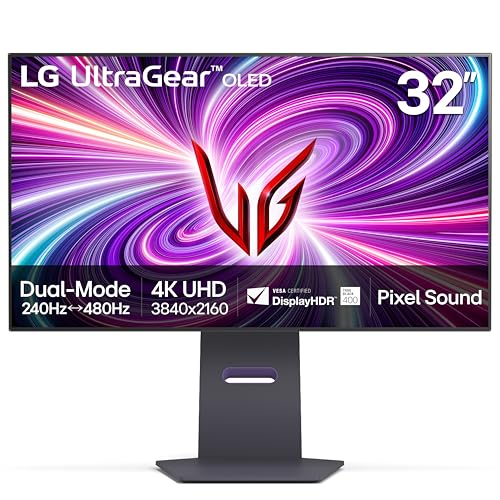
LG 32-Inch UltraGear OLED Dual-Mode Gaming Monitor
Best for: Dual-resolution competitive and high-refresh gaming
- Screen Size
- 32 inch
- Resolution
- 4K UHD
- Refresh Rate
- 240Hz
- Panel Type
- OLED
- Response Time
- 0.03ms GtG
- Sync Technology
- AMD FreeSync Premium Pro, NVIDIA G-Sync
View on Amazon: LG 32-Inch UltraGear OLED Dual-Mode Gaming Monitor
This 32-inch OLED monitor gives you a 4K UHD display with a 240Hz refresh rate and a 0.03ms response time. Its Dual Mode feature lets you switch between 4K resolution at 240Hz and Full HD resolution at 480Hz depending on your speed needs. With HDMI 2.1 and DisplayPort 1.4 connections, it suits you if you prioritize fast competitive frame rates alongside sharp visuals.
Pros
- Dual Mode toggles between 4K at 240Hz and Full HD at 480Hz
- 0.03ms GtG response time
- DisplayHDR True Black 400 with 1,500,000:1 contrast ratio
- HDMI 2.1 and DisplayPort 1.4 video connections
Cons
- 480Hz refresh rate drops resolution to Full HD
- No USB-C or Thunderbolt connectivity listed
Good fit if
- You want to switch between 4K at 240Hz and Full HD at 480Hz.
- You need low latency with a 0.03ms response time.
- You use NVIDIA G-SYNC or AMD FreeSync Premium Pro.
Skip if
- You need 480Hz refresh rates at resolutions higher than 1080p.
- You require single-cable USB-C video connectivity.
Verdict: LG 32-Inch UltraGear OLED Dual-Mode Gaming Monitor delivers flexible performance with its switchable 4K 240Hz and Full HD 480Hz modes. It provides fast 0.03ms response times and deep OLED contrast for dedicated gaming setups.

Samsung 49-Inch Odyssey G9 1000R Curved Monitor
Best for: immersive 32:9 high-refresh-rate ultrawide gaming
- Screen Size
- 49”
- Resolution
- Dual QHD
- Refresh Rate
- 240Hz
- Response Time
- 1ms(GtG)
- Sync Technology
- AMD FreeSync Premium Pro
- Connectivity
- DisplayPort, HDMI
View on Amazon: Samsung 49-Inch Odyssey G9 1000R Curved Monitor
The Samsung 49-Inch Odyssey G9 1000R Curved Monitor is a super-ultrawide display built for immersive gaming and heavy multitasking. You get a massive 49-inch screen with a 5120 x 1440 Dual QHD resolution, matching two standard displays. Its tight 1000R curve wraps around your peripheral vision, while the fast 240Hz refresh rate and 1ms response time deliver fluid motion.
Pros
- 5120 x 1440 Dual QHD resolution across a 49-inch panel
- 240Hz refresh rate with 1ms GtG response time
- VESA DisplayHDR 1000 with 1000 nit peak brightness
- Deep 1000R curvature matching peripheral vision
- Picture-by-Picture and Picture-in-Picture multitasking support
Cons
- Heavy 34.4-pound total weight requires substantial desk support
- Lacks USB-C or Thunderbolt connectivity for single-cable laptop docking
- Large 45.2-inch width requires significant physical desk space
Good fit if
- You want a seamless 32:9 dual-QHD workspace without a center bezel.
- You play fast-paced titles and need a high 240Hz refresh rate.
- You want deep peripheral immersion from an aggressive 1000R curve.
Skip if
- You have a shallow or narrow desk that cannot support a 45.2-inch wide frame.
- You need integrated USB-C video or power delivery for a laptop.
Verdict: Samsung 49-Inch Odyssey G9 1000R Curved Monitor delivers unmatched 32:9 desktop real estate backed by high-tier 240Hz gaming performance. It is a standout choice if you want wide Dual QHD immersion without multi-monitor gaps.

INNOCN 49-Inch Curved 144Hz Ultrawide Monitor
Best for: dual-input multitasking and super-ultrawide 144Hz gaming
- Screen Size
- 49"
- Resolution
- 3840 x 1080P
- Refresh Rate
- 144Hz
- Aspect Ratio
- 32:9
- Sync Technology
- Adaptive-Sync
- Connectivity
- DisplayPort, HDMI, USB-C
View on Amazon: INNOCN 49-Inch Curved 144Hz Ultrawide Monitor
This 49-inch ultrawide display gives you a 32:9 aspect ratio with a 3840 x 1080 resolution and a 144Hz refresh rate. Built with an 1800R curved VA panel, it delivers a 3000:1 contrast ratio alongside DisplayHDR 400 and Adaptive-Sync support. It suits you if you want expansive dual-FHD multitasking space and high-refresh gaming via DisplayPort 1.4, HDMI 2.1, or 65W USB-C without demanding 1440p or 4K computing power.
Pros
- 32:9 dual-FHD panel running at 144Hz refresh rate
- USB-C port with 65W power delivery and RJ45 ethernet
- 3000:1 static contrast ratio with 1800R curvature
- Built-in PIP and PBP split-screen multitasking modes
- Adjustable stand with tilt, swivel, and height modification
Cons
- 3840 x 1080 resolution limits vertical pixel density
- Color gamut coverage is limited to 99% sRGB
- HDR performance caps at basic DisplayHDR 400
Good fit if
- You want a super-ultrawide 32:9 display running at 144Hz.
- You need single-cable USB-C connectivity with 65W laptop charging.
- You view two distinct video sources at once using PIP or PBP.
Skip if
- You require sharp 1440p or 4K vertical screen resolution.
- You need wide color coverage beyond standard 99% sRGB.
Verdict: INNOCN 49-Inch Curved 144Hz Ultrawide Monitor delivers massive 32:9 screen real estate and fluid 144Hz output at dual-FHD resolution. It provides integrated docking and multi-source display modes for multi-device setups.

Dell UltraSharp 49-Inch Curved DQHD Monitor
Best for: dual-screen productivity setups and multitasking
- Screen Size
- 49"
- Resolution
- 5120 x 1440
- Panel Type
- LCD
- Aspect Ratio
- 32:9
- Response Time
- 5 ms GTG
- Connectivity
- USB Type-C
The Dell UltraSharp 49-Inch DQHD Curved Monitor gives you an expansive 32:9 workspace built across a 49-inch curved LCD panel. With its 5120 x 1440 resolution, you get the desktop area of two standard displays side by side without center bezels. The 350-nit brightness, Edge WLED backlight, and integrated USB Type-C connectivity suit you well if you manage large spreadsheets, multiple windows, or continuous data streams throughout your workday.
Pros
- Dual Quad HD 5120 x 1440 resolution across a 32:9 ultrawide canvas
- Single-cable USB Type-C connectivity for streamlined data workflow
- Consistent 350-nit brightness with Edge WLED backlighting
- 5 ms GTG response time for clear motion handling
Cons
- 5 ms GTG response time is slower than dedicated gaming panels
- Heavy 60.2-pound build demands substantial desk support
- Edge WLED backlight lacks local dimming capabilities
Good fit if
- You need a seamless 32:9 dual-monitor replacement for spreadsheets and multitasking.
- You want single-cable USB Type-C connection support for your workstation.
- You require 5120 x 1440 desktop resolution across a 49-inch curved surface.
Skip if
- You require sub-millisecond response times for competitive esports gaming.
- You have a small workspace unable to hold a 47.8-inch wide, 60.2-pound unit.
Verdict: Dell UltraSharp 49-Inch DQHD Curved Monitor delivers extensive 5120 x 1440 screen real estate and clean USB Type-C connectivity for multi-window productivity. It provides an expansive desktop workspace whenever spreadsheet management and multitasking matter more than competitive gaming speeds.

LG 52-Inch UltraGear 240Hz Curved 5K2K Monitor
Best for: high-refresh 5K2K ultrawide gaming
- Screen Size
- 52-inch
- Resolution
- 5K2K
- Refresh Rate
- 240Hz
- Aspect Ratio
- 21:9
- Response Time
- 1ms (GtG)
- Sync Technology
- AMD FreeSync Premium
View on Amazon: LG 52-Inch UltraGear 240Hz Curved 5K2K Monitor
This massive 52-inch display brings 5K2K resolution and a 240Hz refresh rate to an ultrawide 21:9 format. You get a deep 1000R curve, 1ms gray-to-gray response time, and AMD FreeSync Premium for fast motion. It connects through DisplayPort 2.1, HDMI 2.1, or USB Type-C with 90W power delivery. This monitor suits you if you want expansive desk coverage paired with high pixel density and rapid frame rates.
Pros
- 52-inch 5K2K 21:9 panel with 240Hz refresh rate
- DisplayPort 2.1, HDMI 2.1, and USB Type-C with 90W charging
- 1ms GtG response time and AMD FreeSync Premium support
- Deep 1000R curvature matched with 95% DCI-P3 color coverage
Cons
- Large footprint requires 46.2 inches of desk width
- Total weight is heavy at 37 pounds
- VESA DisplayHDR 600 limits peak HDR performance
Good fit if
- You want a massive 52-inch screen combining 5K2K resolution and 240Hz speed.
- You need 90W USB-C single-cable connectivity alongside DisplayPort 2.1.
- You prefer an aggressive 1000R curve to wrap your field of view.
Skip if
- You have a small workspace that cannot handle a 46.2-inch wide, 37-pound display.
- You prefer a flat ultrawide display over a curved 1000R panel.
Verdict: LG 52-Inch 5K2K 240Hz Curved Gaming Monitor combines expansive 5K2K canvas size with 240Hz speed and modern DisplayPort 2.1 connectivity. It provides extensive screen area for gaming and multitasking without compromising on fast pixel response.

Samsung 32-Inch Odyssey G8 6K Monitor
Best for: gamers wanting 6K clarity and dual-mode speed
- Screen Size
- 32"
- Resolution
- 6144 x 3456
- Refresh Rate
- 165Hz / 330Hz
- Panel Type
- Fast IPS
- Response Time
- 1ms
- Sync Technology
- NVIDIA G-SYNC, AMD FreeSync Premium
The Samsung Odyssey G8 is a 32-inch Fast IPS gaming monitor built around a 6K resolution of 6144 x 3456 at 224 PPI. Its dual-mode feature lets you run native 6K visuals at 165Hz or switch to 3K resolution at 330Hz with a 1ms response time. With DisplayPort 2.1 and HDMI 2.1 inputs, it suits you if you demand extreme pixel density alongside competitive refresh rates.
Pros
- Native 6K resolution (6144 x 3456) with 224 PPI density
- Dual-mode support for 6K at 165Hz or 3K at 330Hz
- DisplayPort 2.1 and HDMI 2.1 connectivity
- Fast IPS panel with 1ms response time and HDR10+ Gaming
- Ergonomic stand with height, tilt, swivel, and pivot adjustments
Cons
- Reaching 330Hz requires dropping resolution to 3K (3072 x 1728)
- Standard 16:9 aspect ratio rather than an ultrawide format
- No integrated speakers listed in specifications
Good fit if
- You want ultra-sharp 224 PPI visuals for detail-heavy work and games.
- You need the flexibility to toggle between 165Hz at 6K and 330Hz at 3K.
- You have modern hardware with DisplayPort 2.1 or HDMI 2.1 support.
Skip if
- You prefer an ultrawide 21:9 or 32:9 aspect ratio for peripheral field of view.
- You want native 6K resolution at refresh rates higher than 165Hz.
- You require built-in speakers in your monitor setup.
Verdict: Samsung 32-Inch Odyssey G8 6K Gaming Monitor pairs an ultra-sharp 224 PPI Fast IPS panel with dual-mode refresh rates up to 330Hz. It delivers extreme pixel density and high-speed motion handling for desks where an ultrawide format is not required.
Specifications side by side
| Spec | ASUS 32-Inch 4K Dual-Mode OLED Monitor | Samsung 57-Inch Odyssey Neo G9 Dual UHD | Dell 40-Inch 5K2K Curved Ultrawide Monitor | ASUS ROG 32-Inch 4K OLED Gaming Monitor | LG 45-Inch 5K2K Curved OLED Gaming Monitor | Apple 27-Inch 5K Studio Display | LG 32-Inch 6K Nano IPS Monitor | LG 39-Inch Curved OLED Gaming Monitor | LG 32-Inch UltraGear OLED Dual-Mode Gaming Monitor | Samsung 49-Inch Odyssey G9 1000R Curved Monitor | INNOCN 49-Inch Curved 144Hz Ultrawide Monitor | Dell UltraSharp 49-Inch Curved DQHD Monitor | LG 52-Inch UltraGear 240Hz Curved 5K2K Monitor | Samsung 32-Inch Odyssey G8 6K Monitor |
|---|---|---|---|---|---|---|---|---|---|---|---|---|---|---|
| Screen Size | 32" | 57" | 39.7" | 32" | 45" | 27" | 32" | 39 inches | 32 inch | 49” | 49" | 49" | 52-inch | 32" |
| Resolution | 3840 x 2160 | not specified | 5K2K WUHD | 3840 x 2160 | 5120 x 2160 | 5K | 6144 x 3456 | WQHD | 4K UHD | Dual QHD | 3840 x 1080P | 5120 x 1440 | 5K2K | 6144 x 3456 |
| Refresh Rate | 240Hz | 240Hz | not specified | 240Hz | 165Hz, 330Hz | not specified | 60Hz | 240Hz | 240Hz | 240Hz | 144Hz | not specified | 240Hz | 165Hz / 330Hz |
| Panel Type | WOLED | Quantum Mini LED | not specified | QD-OLED | OLED | not specified | Nano IPS Black | OLED | OLED | not specified | not specified | LCD | not specified | Fast IPS |
| Aspect Ratio | not specified | not specified | 21:9 | not specified | 21:9 | not specified | not specified | 21:9 | not specified | not specified | 32:9 | 32:9 | 21:9 | not specified |
| Response Time | not specified | 1ms (GTG) | 5 ms | 0.03ms | 0.03ms (GtG) | not specified | not specified | 0.03ms GtG | 0.03ms GtG | 1ms(GtG) | not specified | 5 ms GTG | 1ms (GtG) | 1ms |
| Sync Technology | G-SYNC Compatible | AMD FreeSync Premium Pro | not specified | G-SYNC Compatible | FreeSync Premium Pro, G-SYNC Compatible | not specified | not specified | AMD FreeSync Premium Pro, NVIDIA G-Sync | AMD FreeSync Premium Pro, NVIDIA G-Sync | AMD FreeSync Premium Pro | Adaptive-Sync | not specified | AMD FreeSync Premium | NVIDIA G-SYNC, AMD FreeSync Premium |
| Connectivity | USB-C | DisplayPort 2.1, HDMI 2.1, USB | USB Type-C | DisplayPort 2.1, HDMI 2.1, USB-C | DisplayPort 2.1, HDMI 2.1, USB Type-C | Thunderbolt 5, USB-C | Thunderbolt 5, HDMI 2.1, DP 2.1, USB-C | HDMI 2.1, DisplayPort 1.4 | HDMI 2.1, DisplayPort 1.4 | not specified | not specified | USB Type-C | DisplayPort 2.1, HDMI 2.1, USB Type-C | DP 2.1, HDMI 2.1, USB hub |
| Size | 9.37 | 57-inch | 16.5" x 37.3" x 4.3" | 16.3" x 28.3" x 2.6" | 45 Inch | Tilt-adjustable stand | 32 | 39 inches | 32 Inch | 240Hz Refresh Rate | 49 Inch (Pack of 2) | 14.4" x 47.8" x 4.4" | not specified | 32 Inch |
| Dimensions | 10.8 × 28.1 × 22.8 inches | 19.7 × 52.3 × 24 inches | 4.3 × 37.3 × 16.5 inches | 10.9 × 28.3 × 20.9 inches | 13.5 × 39 × 26.2 inches | 1.22 × 14.3 × 24.5 inches | 7.8 × 28.3 × 22.9 inches | 12.2 × 35 × 24.1 inches | 10.9 × 28.1 × 24.6 inches | 16.6 × 45.2 × 22.4 inches | 6.28 × 45.5 × 14.6 inches | 4.4 × 47.8 × 14.4 inches | 13.8 × 46.2 × 28.1 inches | 10.4 × 28.1 × 23.4 inches |
| Weight | 16.1 pounds | 41.9 pounds | 41.9 pounds | 19.2 pounds | 30.9 pounds | 25 pounds | 20.9 pounds | 22.9 pounds | 19.8 pounds | 34.4 pounds | not specified | 60.2 pounds | 37 pounds | 10.8 pounds |
| Color | BLACK | Black & White | Information Not Available | BLACK | Black | Studio Display | Silver | Black | Black | Black | black | Black | Black | Black |
| Model | PG32UCDP | FBASAMLS57CG952 | U4025QW | PG32UCDM3 | 45GX950A-B.AUS | MFEX4LL/A | 32U990A-S.AUS | 39GS95QE-B | 32GS95UE-B | FBASAMLS49CG954E | 49C1G | U4924DW | 52G930B-B.AUS | LS32HG802ESXZA |
Specification Trade-offs Under $1500
Displays in the Under $1500 tier require you to choose between resolution and motion performance. Choosing high-clarity 5K2K or 6K panels often limits you to 60Hz refresh rates or 5 ms response times on IPS screens. Selecting rapid 240Hz OLED panels frequently drops resolution down to 1440p or trades away ultrawide screen space for standard 32-inch 16:9 formats. Super-ultrawide 49-inch screens also make compromises, with select models reducing vertical resolution to 1080p to maintain 144Hz refresh rates.
- Refresh rate limits: Reaching 6K resolution lowers panel refresh rate to 60Hz.
- Lower display resolution: Select 39-inch and 49-inch curved panels step down to 1440p or 1080p resolution.
- Slower response times: Expansive 5K2K IPS options feature 5 ms response times instead of 0.03ms OLED speeds.
If you are assembling a full workstation around your display, selecting a compatible motherboard under 1500 ensures adequate PCIe bandwidth for your dedicated graphics card.
How We Picked These Monitors
To build this guide, we track Amazon listings that fit the Under $1500 range. You see only one size or variant from each product family. We evaluate every monitor strictly using specifications published on product listings, without physically handling the displays. This ensures each comparison reflects confirmed manufacturer hardware details.
The 14 picks are ordered with in-stock items first, then by Amazon sales rank with better-selling products first. Listings update live at least daily on the page. Monitors move into or out of the guide as listings change, keeping your choices accurate for 2026.
How to Choose the Best Ultrawide Monitor
-
Aspect Ratio Selection
Ultrawide displays expand your horizontal field of view compared to conventional sixteen-by-nine screens. A twenty-one-by-nine screen expands peripheral vision for immersive gaming and side-by-side application windows. A super-ultrawide thirty-two-by-nine display like the Samsung 49-Inch Odyssey G9 replaces two separate monitors with one seamless panel. If your primary tasks involve standard media playback or console gaming, a sixteen-by-nine monitor remains the standard fit. Verify your graphics card supports ultra-wide aspect ratios before you commit.
-
Select OLED or IPS
Panel type determines contrast, color accuracy, and pixel response. OLED panels provide individual pixel illumination, near-instant 0.03 millisecond response times, and true blacks. These panels excel in dark rooms and fast-paced competitive titles. In contrast, IPS panels like the LG 32-Inch 6K Nano IPS Monitor offer stable static image handling and consistent color coverage across wide viewing angles. Choose IPS if you spend long hours reading text, drafting spreadsheets, or editing photos in bright environments. Select OLED when deep black levels and motion clarity are your priorities.
-
Match Refresh Rate Needs
Refresh rate measures how many times the screen updates each second. Standard 60Hz monitors work fine for everyday desktop navigation and office applications. Gaming demands 144Hz, 165Hz, or 240Hz for fluid motion and lower input latency. Several displays feature dual-mode technology that shifts native resolutions to reach higher frame rates. For example, the LG 32-Inch UltraGear OLED Dual-Mode Gaming Monitor switches between 4K at 240Hz and Full HD at 480Hz. Choose dual-mode options if you play both detailed cinematic adventures and fast competitive shooters.
-
Verify Input Port Capabilities
High-resolution and high-refresh panels demand substantial display bandwidth. Check the ports on your monitor and computer before purchasing. HDMI 2.1 and DisplayPort 1.4 support high-speed transfers, but next-generation DisplayPort 2.1 provides uncompressed bandwidth for extreme resolution and refresh rate combinations. If you connect an Apple computer or modern workstation, look for Thunderbolt ports. The Apple 27-Inch 5K Studio Display includes Thunderbolt connectivity alongside high-speed data transmission and peripheral charging. Ensure your graphics card outputs match the input version of your monitor so you can run native resolutions without signal compromises.
-
Check Adaptive Sync Support
Adaptive sync technology aligns your monitor refresh rate with your graphics processor output. This process eliminates screen tearing and stuttering during variable framerate drops. Look for FreeSync or G-SYNC support depending on your graphics hardware. Displays like the LG 39-Inch Curved OLED Gaming Monitor include dual certification for both FreeSync and G-SYNC compatibility. If you run an NVIDIA graphics card, verify G-SYNC certification to prevent visual artifacts. If you use an AMD card, check for FreeSync support. Picking a monitor with certified adaptive sync ensures smooth, tear-free motion during intense gaming sessions.
-
Evaluate Resolution and Pixel Density
Resolution dictates screen sharpness and how much desktop content fits in your view. A 1080p resolution across an expansive 49-inch screen produces a low pixel density, which can make fine text look soft. Moving up to 5120 x 1440 provides sharp text and expansive space for complex workflows. If your work involves micro-detail, choose a 5K2K display like the Dell 40-Inch 5K2K Curved Ultrawide Monitor. Higher pixel density delivers razor-sharp clarity for text and spreadsheets, though it requires more processing power from your graphics card to push native imagery.
Frequently asked questions
What display inputs are needed for modern high-resolution ultrawide setups?
Modern high-resolution displays rely on high-bandwidth connections like DisplayPort 2.1, Thunderbolt 5, and USB-C. The LG 45-Inch OLED and LG 52-Inch UltraGear feature DisplayPort 2.1 to drive fast refresh rates at 5K2K resolution. Creative workstations like the Apple Studio Display and LG 32-Inch 6K utilize Thunderbolt 5, while models like the Dell UltraSharp 49-Inch use USB-C for single-cable display and productivity connections.
What is the difference between 5K2K and standard 4K UHD resolutions?
A 5K2K display expands horizontal pixel count to 5120 x 2160 while maintaining standard 2160 vertical lines. This gives you extra horizontal workspace compared to a standard 3840 x 2160 4K UHD monitor. Models like the LG 45-Inch Curved OLED, Dell 40-Inch Curved, and LG 52-Inch UltraGear use 5K2K resolutions to display more content across an ultrawide canvas without sacrificing vertical detail.
How do pixel response times impact gaming on ultrawide monitors?
Pixel response times dictate how quickly individual pixels switch colors, directly impacting motion blur and trailing. OLED panels like the LG 39-Inch Curved OLED and ASUS ROG 32-Inch achieve 0.03ms response times, preventing smearing in fast-action scenes. Productivity-focused monitors like the Dell 40-Inch Curved Ultrawide feature a 5 ms response time, which is designed for desktop applications rather than competitive fast-motion gaming.
What refresh rates can you expect on 49-inch super-ultrawide monitors?
Super-ultrawide 49-inch monitors typically feature refresh rates ranging between 144Hz and 240Hz. The INNOCN 49-Inch Curved Ultrawide provides a 144Hz refresh rate at 1080p dual-FHD resolution. For higher motion fluidness and sharper detail, the Samsung 49-Inch Odyssey G9 delivers a 240Hz refresh rate at 5120 x 1440 resolution, ensuring smoother frame transitions during fast gameplay.
How do curvature ratings like 800R and 1000R compare on ultrawide monitors?
The curvature number indicates the radius of the screen arc in millimeters, where smaller numbers represent tighter curves. An 800R curve, found on the LG 39-Inch Curved OLED, pulls the outer screen edges closer to your direct line of sight. A 1000R curve, featured on the Samsung 49-Inch Odyssey G9, creates a slightly wider bend across broader 32:9 desktop workspaces.
Can ultrawide monitors display multiple computer inputs at the same time?
Yes, several large ultrawide models include multi-source connectivity to handle simultaneous video inputs. The INNOCN 49-Inch Curved monitor provides multi-source display modes alongside DisplayPort, HDMI, and USB-C inputs. The Dell UltraSharp 49-Inch curved monitor also integrates USB Type-C connectivity to support dual-screen multitasking and multi-window productivity setups across its 5120 x 1440 screen.
What panel technologies are used across these high-end monitors?
Monitors in this guide feature OLED, IPS, Fast IPS, and Mini-LED technologies. OLED models like the ASUS 32-Inch and LG 45-Inch provide fast pixel response and high contrast. Nano IPS on the LG 32-Inch 6K and Fast IPS on the Samsung 32-Inch Odyssey G8 emphasize high pixel density and color precision, while the Samsung 57-Inch Odyssey Neo G9 incorporates Mini-LED local dimming.