15 Best 49 Inch Ultrawide Monitors, Compared
As an Amazon Associate we earn from qualifying purchases. Links on this page are affiliate links.
Choosing among the best 49 Inch ultrawide monitors requires balancing screen size, pixel density, and refresh rates. This guide compares 15 displays based strictly on the specifications published on their listings. The Amzfast 49-Inch 120Hz DQHD Curved Monitor leads the list because its 5120 x 1440 Dual QHD resolution and 120Hz refresh rate provide sharp visuals and fluid motion for multitasking setups.
Use this comparison to match panel resolutions, refresh rates up to 240Hz, and port options to your daily workflow and gaming hardware.
Quick picks
The best fit for you
- You want a balanced dual QHD screen for multitasking Amzfast 49-Inch 120Hz DQHD Curved Monitor It combines a 5120x1440 Dual QHD resolution with a 120Hz refresh rate for clear window management.
- You need single-cable laptop docking and charging capability Samsung 49-Inch Curved DQHD 120Hz Monitor Built-in 90W USB-C connectivity delivers power, video, and data over a single connection.
- You want maximum refresh rate for fast-motion gaming Gawfolk 49-Inch 240Hz Curved Ultrawide Monitor The panel delivers a 240Hz refresh rate at 5120x1440 resolution via DisplayPort 2.0.
- You prefer lighter graphics demand across a 32:9 screen INNOCN 49-Inch Curved 144Hz Ultrawide Monitor A 1080p resolution paired with a 144Hz refresh rate reduces rendering load on your system.
Our 15 picks

Amzfast 49-Inch 120Hz DQHD Curved Monitor
Best for: Dual QHD multitasking and curved gaming setups
- Size
- 49 Inch (what this guide is about)
- Screen Size
- 49"
- Resolution
- 5120 x 1440
- Refresh Rate
- 120Hz
- Response Time
- 1ms MPRT
- Sync Technology
- Adaptive Sync
This 49-inch curved ultrawide monitor pairs a 5120 x 1440 Dual QHD resolution with a 32:9 aspect ratio and a 1500R curve. You get a 120Hz refresh rate over DisplayPort 1.4, a 3000:1 contrast ratio, and built-in PIP and PBP modes. It suits you if you want expansive desktop real estate for side-by-side multitasking or immersive gaming across multiple video inputs.
Pros
- Dual QHD 5120 x 1440 resolution on a 32:9 aspect ratio panel
- 120Hz refresh rate via DisplayPort with Adaptive Sync support
- High 3000:1 static contrast ratio with 1500R curvature
- Four video inputs with two DisplayPort 1.4 and two HDMI 2.0 ports
- Adjustable stand with height, tilt, and swivel support
Cons
- 120Hz refresh rate is limited exclusively to DisplayPort connections
- No USB Type-C connectivity or USB hub ports listed
- Uses a 75x75mm VESA pattern rather than standard 100x100mm
Good fit if
- You need two 1440p displays combined into a single seamless 32:9 screen.
- You plan to run two separate device inputs simultaneously via PIP or PBP.
- You want high static contrast paired with a tight 1500R field-of-view curve.
Skip if
- You need single-cable USB-C connectivity with laptop power delivery.
- You require refresh rates above 120Hz for fast-paced competitive esports.
- You connect your primary gaming system exclusively through HDMI cables.
Verdict: Amzfast 49-Inch DQHD 120Hz Curved Monitor delivers expansive Dual QHD screen space, deep contrast, and versatile split-screen inputs for productivity and immersive gaming. Its 120Hz ceiling and lack of USB-C keep it focused on standard DisplayPort workstation and PC setups.

Samsung 49-Inch Curved DQHD 120Hz Monitor
Best for: laptop docking and full-width productivity
- Size
- 49 Inch (what this guide is about)
- Screen Size
- 49"
- Resolution
- Dual QHD
- Refresh Rate
- 120Hz
- Aspect Ratio
- 32:9
- Connectivity
- DisplayPort, HDMI, USB, USB Type-C
The Samsung 49-Inch Curved 120Hz Dual QHD Monitor gives you an expansive 32:9 workspace with a tight 1000R curve. It pairs a 5120 x 1440 resolution with a 120Hz refresh rate for clear text and smooth motion. With built-in speakers and USB-C connectivity providing 90W power delivery, you can run and charge a laptop over one cable. It suits professionals and multitaskers who need a clean, single-screen workstation hub.
Pros
- USB-C port supplies up to 90W device charging
- Aggressive 1000R curve matches your natural field of view
- Dual QHD 5120 x 1440 resolution delivers detailed desktop space
- Integrated speakers eliminate external desktop audio gear
Cons
- Refresh rate is capped at 120Hz
- Heavy build weighing 32.2 pounds
- DisplayHDR 400 offers only base-level dynamic range
Good fit if
- You want 90W USB-C charging to run and power your laptop through one cable.
- You prefer a deep 1000R curve that fills your peripheral vision.
- You need a 5120 x 1440 resolution to replace a dual-display workstation.
Skip if
- You want higher refresh rates like 165Hz or 240Hz for competitive gaming.
- You prefer a flatter screen curve or a flat ultrawide panel.
Verdict: Samsung 49-Inch Curved 120Hz Dual QHD Monitor combines a wrap-around 1000R design with 90W USB-C docking to anchor a clutter-free dual-monitor replacement setup.

CRUA 49-Inch 165Hz Curved Ultrawide Monitor
Best for: high-refresh ultrawide multitasking and gaming
- Size
- 49 Inch (what this guide is about)
- Screen Size
- 49"
- Resolution
- 5120x1440
- Refresh Rate
- 144Hz/165Hz
- Aspect Ratio
- 32:9
- Sync Technology
- AMD FreeSync
The CRUA 49-Inch DQHD 165Hz Curved Monitor provides a 32:9 ultrawide workspace with a 5120x1440 resolution and a 1500R curve. It pairs a 165Hz refresh rate with AMD FreeSync to eliminate screen tearing during gaming sessions. With 120% sRGB coverage, a 3000:1 contrast ratio, and a height-adjustable stand, it suits you if you need expansive desktop space for multitasking, content editing, or fast-paced gaming.
Pros
- 5120x1440 DQHD resolution on a 32:9 aspect ratio panel
- Fast 165Hz refresh rate with AMD FreeSync support
- Equipped with modern HDMI 2.1 and DisplayPort 1.4 inputs
- Stand includes both height and tilt adjustments
Cons
- No built-in speakers included
- Lacks USB-C video or data hub connectivity
Good fit if
- You want a 5120x1440 ultrawide display running up to 165Hz.
- You connect modern PCs via DisplayPort 1.4 or HDMI 2.1.
- You need ergonomic height and tilt adjustability without buying a separate arm.
Skip if
- You require integrated speakers for audio output.
- You need a single-cable USB-C connection to charge and display from a laptop.
Verdict: CRUA 49-Inch DQHD 165Hz Curved Monitor delivers sharp 5120x1440 visuals alongside high-refresh gaming performance and modern video inputs. It provides expansive screen real estate for demanding workflows, provided you supply your own speakers.

Gawfolk 49-Inch 240Hz Curved Ultrawide Monitor
Best for: high-refresh Dual QHD multi-device gaming
- Size
- 49 Inch (what this guide is about)
- Screen Size
- 49"
- Resolution
- 5120x1440
- Refresh Rate
- 240Hz
- Aspect Ratio
- 32:9
- Sync Technology
- FreeSync, G-SYNC Compatible
View on Amazon: Gawfolk 49-Inch 240Hz Curved Ultrawide Monitor
This Gawfolk 49-inch curved ultrawide display gives you a 5120x1440 Dual QHD resolution across a 32:9 aspect ratio. It features a fast 240Hz refresh rate, a 1500R curve, and a 3000:1 contrast ratio from its 10-bit VA panel. With two DisplayPort 2.0 inputs and two HDMI 2.1 ports, it suits you if you want high refresh rates for fast-paced gaming across multiple modern consoles or PC setups.
Pros
- 240Hz refresh rate with FreeSync and G-SYNC Compatible support
- Dual HDMI 2.1 and dual DisplayPort 2.0 video inputs
- 3000:1 native contrast ratio on a 10-bit VA panel
- Full-motion stand with height, tilt, swivel, and pivot adjustments
Cons
- No USB-C connectivity or USB hub ports listed
- No integrated speakers included
- Uses a 75x75mm VESA pattern rather than standard 100x100mm
Good fit if
- You need a 240Hz refresh rate for fast-paced simulation or competitive gaming.
- You run multiple systems needing HDMI 2.1 and DisplayPort 2.0 bandwidth.
- You want deep black levels provided by a 3000:1 VA display.
Skip if
- You require single-cable USB-C display and power delivery for a laptop.
- You rely on built-in monitor speakers for daily audio.
Verdict: Gawfolk 49-Inch 240Hz Curved Ultrawide Monitor delivers high-bandwidth DisplayPort 2.0 inputs and a fast 240Hz refresh rate on a sharp 5120x1440 panel. It is a capable choice for multi-platform gaming setups that demand high motion clarity.
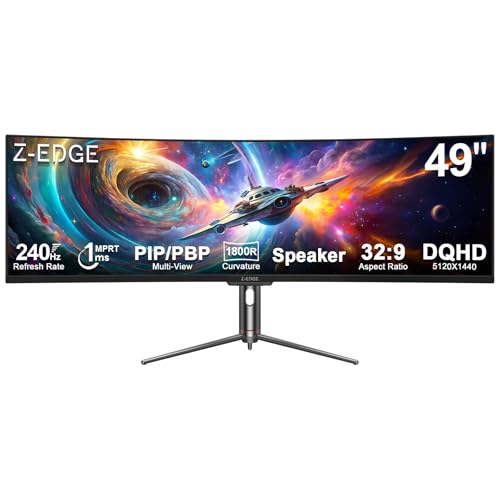
Z-Edge 49-Inch 240Hz Curved Ultrawide Monitor
Best for: dual-source multitasking and high-refresh-rate ultrawide gaming
- Size
- 49 Inch (what this guide is about)
- Screen Size
- 49 Inch
- Resolution
- 5120x1440
- Refresh Rate
- 240Hz
- Response Time
- 1ms
- Sync Technology
- FreeSync
View on Amazon: Z-Edge 49-Inch 240Hz Curved Ultrawide Monitor
This 49-inch curved monitor gives you a 5120x1440 DQHD resolution across an 1800R curve. It pairs a fast 240Hz refresh rate and 1ms response time with FreeSync support for smooth high-frame-rate gaming. You also get built-in PIP and PBP modes alongside USB-C, DisplayPort, and HDMI 2.1 inputs. It suits you if you want expansive screen real estate for simultaneous tasks alongside fast visual performance for competitive play.
Pros
- 240Hz refresh rate with 1ms response time and FreeSync
- 5120x1440 DQHD resolution on an 1800R curved panel
- Modern display connectivity with HDMI 2.1, two DisplayPort 1.4, and USB-C
- Built-in PIP and PBP hardware split-screen modes
- 3000:1 contrast ratio with Delta E under 2 color accuracy
Cons
- USB-C port lists video input without specified Power Delivery charging wattage
- No downstream USB-A hub ports for desktop peripherals
Good fit if
- You play fast-paced games that benefit from a 240Hz refresh rate at 5120x1440.
- You connect two computers simultaneously using hardware PIP or PBP modes.
- You want an 1800R curved display with a high 3000:1 contrast ratio.
Skip if
- You need a monitor that powers and charges your laptop over USB-C.
- You require built-in USB-A pass-through ports for your keyboard and mouse.
Verdict: Z-Edge 49-Inch 240Hz Curved DQHD Monitor combines high-speed 240Hz gaming specs with a spacious 5120x1440 panel and versatile video inputs. It delivers fluid motion and expansive screen area for fast gaming and multi-source productivity.

Z-Edge 49-Inch 165Hz Curved Ultrawide Monitor
Best for: dual-system productivity and 165Hz ultrawide gaming
- Size
- 49 Inch (what this guide is about)
- Screen Size
- 49"
- Resolution
- 5120x1440
- Refresh Rate
- 165Hz
- Aspect Ratio
- 32:9
- Response Time
- 1ms MPRT
View on Amazon: Z-Edge 49-Inch 165Hz Curved Ultrawide Monitor
The Z-Edge 49-inch curved monitor gives you a 32:9 workspace with a 5120x1440 Dual QHD resolution. It features a 1500R curve, a 165Hz refresh rate, and FreeSync support with a 1ms MPRT response time. Built-in KVM, Picture-by-Picture, and HDMI 2.1 ports allow you to control two inputs easily. This screen suits you if you need expansive desktop space for multitasking and fast-motion gaming without separate displays.
Pros
- 5120x1440 Dual QHD resolution on a 32:9 panoramic panel
- 165Hz refresh rate and FreeSync support via HDMI 2.1 or DP 1.4
- Built-in KVM switch with PIP and PBP multi-device support
- Ergonomic stand with height and tilt adjustments plus integrated speakers
Cons
- No USB-C connectivity listed in specifications
- Stand provides height and tilt adjustments but lacks swivel
- 1ms response time rating is MPRT rather than GtG
Good fit if
- You want to control two separate computers with one keyboard and mouse using the integrated KVM switch.
- You need a 165Hz refresh rate over HDMI 2.1 or DisplayPort 1.4 for smooth gameplay.
- You plan to replace dual 1440p monitors with a single seamless 1500R curved display.
Skip if
- You require a USB-C connection to video-link or power a laptop.
- You need horizontal swivel adjustments on the factory stand.
Verdict: Z-Edge 49-Inch Curved 165Hz DQHD Monitor delivers 5120x1440 resolution, 165Hz refresh rate, and an integrated KVM switch for multi-device setups. It provides a balanced combination of productivity tools and gaming performance on an expansive 1500R curved screen.

INNOCN 49-Inch 120Hz Curved Ultrawide Monitor
Best for: dual-computer productivity setups and everyday gaming
- Size
- 49 Inch (what this guide is about)
- Screen Size
- 49"
- Resolution
- 5120 x 1440P
- Refresh Rate
- 120Hz
- Aspect Ratio
- 32:9
- Sync Technology
- Adaptive-Sync
View on Amazon: INNOCN 49-Inch 120Hz Curved Ultrawide Monitor
This 49-inch curved ultrawide display delivers a 5120 x 1440 Dual QHD resolution across an expansive 32:9 VA panel with an 1800R curve. You get a 120Hz refresh rate with Adaptive-Sync, paired with an integrated hub featuring 65W USB-C power delivery and wired RJ45 ethernet. Built-in PIP and PBP modes let you view two inputs side by side, making it a practical hub for multitasking and casual gaming.
Pros
- Dual QHD (5120 x 1440) resolution with 3000:1 contrast ratio
- USB-C port with 65W power delivery and wired RJ45 ethernet
- Built-in PIP and PBP support for dual-source viewing
- Adjustable stand with tilt, swivel, and height control
Cons
- 120Hz refresh rate is lower than 165Hz or 240Hz alternatives
- 65W USB-C output may not keep high-draw laptops charged under heavy load
Good fit if
- You want a single-cable setup with 65W USB-C charging and wired RJ45 ethernet.
- You plan to display two source devices simultaneously using split-screen PBP.
- You prefer a gentle 1800R curve for productivity work and wide spreadsheets.
Skip if
- You prioritize high refresh rates like 165Hz or 240Hz for competitive gaming.
- You require more than 65W of USB power delivery for your primary laptop.
Verdict: INNOCN 49-Inch 120Hz Curved Ultrawide Monitor combines sharp Dual QHD real estate with integrated docking features and multi-device display modes. It provides a balanced workstation display for daily productivity and casual gaming.

Gawfolk 49-Inch 120Hz Curved DQHD Monitor
Best for: Dual QHD multitasking and multi-device desktop setups
- Size
- 49 Inch (what this guide is about)
- Screen Size
- 49"
- Resolution
- 5120x1440
- Refresh Rate
- 120Hz
- Aspect Ratio
- 32:9
- Connectivity
- 2x HDMI 2.1, 2x DisplayPort 1.4
This 49-inch curved monitor combines a 5120x1440 Dual QHD resolution with a 120Hz refresh rate and a tight 1500R curve. You get four display inputs via two HDMI 2.1 and two DisplayPort 1.4 ports, supported by Picture-by-Picture and Picture-in-Picture modes. Built-in 5W speakers and an adjustable stand complete the setup. It suits you if you need expansive 32:9 desktop space for daily multitasking and smooth gaming.
Pros
- 5120x1440 Dual QHD resolution across a 32:9 aspect ratio
- Four video inputs with two HDMI 2.1 and two DisplayPort 1.4 ports
- Pronounced 1500R curve for immersive panoramic field of view
- Integrated Picture-by-Picture, Picture-in-Picture, and 5W speakers
Cons
- 120Hz refresh rate is lower than 165Hz or 240Hz alternatives
- Color depth is limited to 8-bit (16.7 million colors)
- No USB-C connectivity provided
Good fit if
- You want Dual QHD sharpness across an expansive 32:9 desktop space.
- You need multiple modern inputs like HDMI 2.1 and DisplayPort 1.4 for multiple sources.
- You prefer a wrapped 1500R curve for viewing wide timelines or spreadsheets.
Skip if
- You want high-speed gaming refresh rates beyond 120Hz.
- You need a USB-C port to dock and power your laptop directly.
- You require true 10-bit color depth for color-critical media production.
Verdict: Gawfolk 49-Inch 120Hz DQHD Curved Monitor delivers sharp 5120x1440 screen real estate paired with flexible HDMI 2.1 and DisplayPort 1.4 connectivity. It provides reliable 32:9 multi-window multitasking and solid 120Hz visual performance.

Great voell 49-Inch 240Hz DQHD Curved Monitor
Best for: high-refresh 240Hz gaming and split-screen multitasking
- Size
- 49 Inch (what this guide is about)
- Screen Size
- 49"
- Refresh Rate
- 240Hz
- Aspect Ratio
- 32:9
- Response Time
- 1ms
- Sync Technology
- G-Sync, FreeSync
View on Amazon: Great voell 49-Inch 240Hz DQHD Curved Monitor
This 49-inch curved ultrawide monitor pairs a 5120 x 1440 DQHD resolution with a 32:9 aspect ratio. You get a rapid 240Hz refresh rate, a 1ms response time, and support for both G-Sync and FreeSync. The VA panel delivers 400 nits of brightness alongside 127% sRGB color coverage. It suits gamers and multitaskers who want high frame rates and split-screen PIP or PBP workflows via DisplayPort.
Pros
- 240Hz refresh rate with 1ms response time
- 5120 x 1440 DQHD resolution on a 32:9 VA panel
- G-Sync and FreeSync adaptive sync support
- Picture-in-Picture (PIP) and Picture-by-Picture (PBP) display modes
- 127% sRGB color gamut and HDR400 capability
Cons
- Stand adjustment is limited to tilt only
- HDMI connectivity uses HDMI 2.0 rather than HDMI 2.1
- No USB-C upstream or video input port
Good fit if
- You want a 240Hz refresh rate and 1ms response time for fast gaming.
- You need a 5120 x 1440 display with PIP and PBP multitasking support.
- You connect primarily via DisplayPort 1.4 for adaptive sync.
Skip if
- You need height or swivel adjustments from the factory stand.
- You require USB-C connectivity for a single-cable laptop setup.
- You want HDMI 2.1 bandwidth for modern consoles.
Verdict: Great voell 49-Inch 240Hz Curved DQHD Monitor provides high-refresh dual-QHD performance with PIP and PBP capabilities. It is a solid pick if you prioritize 240Hz speed and do not need USB-C or full stand ergonomics.

INNOCN 49-Inch Curved 144Hz Ultrawide Monitor
Best for: laptop docking and 1080p ultrawide multitasking
- Size
- 49 Inch (what this guide is about)
- Screen Size
- 49"
- Resolution
- 3840 x 1080P
- Refresh Rate
- 144Hz
- Aspect Ratio
- 32:9
- Sync Technology
- Adaptive-Sync
View on Amazon: INNOCN 49-Inch Curved 144Hz Ultrawide Monitor
This 49-inch curved display pairs a 32:9 aspect ratio with a 3840 x 1080 resolution and a 144Hz refresh rate. It includes USB-C connectivity with 65W power delivery and an integrated RJ45 Ethernet port alongside HDMI 2.1 and DisplayPort 1.4. You get an 1800R curve and built-in PIP and PBP modes. It suits you if you want high-refresh ultrawide multitasking and single-cable laptop docking without driving a heavier 1440p resolution.
Pros
- USB-C port with 65W power delivery and RJ45 Ethernet
- 144Hz refresh rate paired with Adaptive-Sync
- 1800R curved VA panel with 3000:1 contrast ratio
- Built-in PIP and PBP split-screen support
Cons
- Lower 3840 x 1080 resolution than Dual QHD alternatives
- HDR performance limited to DisplayHDR 400
Good fit if
- You need a USB-C dock connection with wired RJ45 networking for your laptop.
- You prefer a 1080p vertical resolution to maintain higher frame rates at 144Hz.
- You use PIP or PBP to view two distinct video sources simultaneously.
Skip if
- You want a sharper 5120 x 1440 Dual QHD panel.
- You require higher than DisplayHDR 400 brightness performance.
Verdict: INNOCN 49-Inch Curved 144Hz Ultrawide Monitor delivers super-ultrawide multitasking and 144Hz performance paired with a versatile docking hub. Its 3840 x 1080 resolution reduces graphics load while maintaining full 32:9 desktop space.

ASUS ROG 49-Inch Curved 144Hz Gaming Monitor
Best for: high-refresh gaming at 1080p resolution
- Size
- 49 Inch (what this guide is about)
- Screen Size
- 49"
- Resolution
- 3840 x 1080
- Refresh Rate
- 144Hz
- Sync Technology
- FreeSync 2 HDR
- Connectivity
- DisplayPort, HDMI
View on Amazon: ASUS ROG 49-Inch Curved 144Hz Gaming Monitor
This ASUS 49-inch curved gaming display features a 3840 x 1080 DFHD resolution across an 1800R curve. It pairs a 144Hz refresh rate with FreeSync 2 HDR to keep motion smooth across fast-paced games. The screen covers 90% DCI-P3 color space and carries DisplayHDR 400 certification. It suits you if you run high-frame-rate simulations or games without demanding the higher GPU overhead of a 1440p ultrawide panel.
Pros
- 144Hz refresh rate with FreeSync 2 HDR
- 1800R curved panel with 90% DCI-P3 color coverage
- DisplayHDR 400 certified
- Full ergonomic adjustment with swivel, tilt, and height options
Cons
- Lower 1080p vertical resolution than 1440p models
- No USB-C connectivity listed
Good fit if
- You want 144Hz ultrawide gaming without rendering at 1440p resolution.
- You need ergonomic height, tilt, and swivel adjustments built into the stand.
- You want 90% DCI-P3 color coverage for gaming.
Skip if
- You prefer higher-density 5120 x 1440 resolution.
- You require single-cable USB-C video input.
Verdict: ASUS 49-Inch 144Hz Curved Gaming Monitor delivers broad 32:9 viewing with high-frame-rate performance for setups prioritizing speed over dense pixel counts. Its adjustable stand and FreeSync 2 HDR support make it a practical pick for dedicated gaming rigs.

Gawfolk 49-Inch 120Hz DQHD Curved Monitor
Best for: Dual QHD multitasking and 120Hz gaming
- Size
- 49 Inch (what this guide is about)
- Screen Size
- 49"
- Resolution
- 5120x1440
- Refresh Rate
- 120Hz
- Aspect Ratio
- 32:9
- Sync Technology
- AMD FreeSync Premium
This Gawfolk 49-inch curved monitor combines a 5120x1440 Dual QHD resolution with a 32:9 aspect ratio and a 1500R curve. You get a 120Hz refresh rate supported by AMD FreeSync Premium for tear-free output across HDMI 2.1 and DisplayPort 1.4. An included stand adjusts for height, tilt, and swivel. It suits you if you need expansive desktop space for split-screen multitasking or immersion without jumping to higher refresh rates.
Pros
- 5120x1440 Dual QHD resolution on an ultrawide 32:9 panel
- 120Hz refresh rate with AMD FreeSync Premium support
- HDMI 2.1 and DisplayPort 1.4 inputs
- Ergonomic stand with height, tilt, and swivel adjustments
Cons
- No built-in speakers
- Max refresh rate tops out at 120Hz
Good fit if
- You want 5120x1440 desktop space paired with a moderate 120Hz refresh rate.
- You require an ergonomic stand with height, tilt, and swivel options.
Skip if
- You need built-in speakers included inside the display housing.
- You want refresh rates above 120Hz for high-speed esports.
Verdict: Gawfolk 49-Inch 120Hz Curved DQHD Monitor delivers expansive 5120x1440 screen real estate and flexible stand adjustments for multi-window productivity and everyday gaming. Its 120Hz ceiling and lack of built-in speakers keep it focused strictly on display fundamentals.

DJiEX 49-Inch 165Hz DQHD Curved Ultrawide Monitor
Best for: high-refresh DQHD multitasking and simulation gaming
- Size
- 49 Inch (what this guide is about)
- Screen Size
- 49"
- Resolution
- 5120x1440
- Refresh Rate
- 165Hz
- Aspect Ratio
- 32:9
- Response Time
- 1ms MPRT
View on Amazon: DJiEX 49-Inch 165Hz DQHD Curved Ultrawide Monitor
The DJiEX 49-Inch 165Hz DQHD Curved Monitor gives you a 32:9 panoramic workspace with a 5120x1440 resolution. It features a VA panel with a 3000:1 contrast ratio, 165Hz refresh rate, and 1ms MPRT response time for smooth gaming and detailed multitasking. With support for both FreeSync and G-Sync alongside height, tilt, and swivel ergonomics, it suits you if you want expansive screen real estate for simulation games, coding dashboards, or video editing.
Pros
- 5120x1440 DQHD resolution across a 32:9 VA panel
- 165Hz refresh rate with FreeSync and G-Sync support
- 3000:1 contrast ratio and 127% sRGB coverage
- Ergonomic stand with height, tilt, and swivel adjustments
Cons
- No USB-C connectivity listed
- No integrated speakers included
Good fit if
- You need a dual-QHD 32:9 display for wide spreadsheets, editing timelines, or gaming.
- You want high refresh rates with adaptive sync using DisplayPort or HDMI.
- You require a fully adjustable stand with height, tilt, and swivel range.
Skip if
- You need a single-cable USB-C connection to charge and connect your laptop.
- You want built-in speakers without connecting external audio via the earphone jack.
Verdict: DJiEX 49-Inch 165Hz DQHD Curved Monitor delivers sharp 5120x1440 visuals and smooth adaptive-sync performance on an adjustable stand. It provides an expansive 32:9 workspace for gaming and productivity setups that rely on HDMI or DisplayPort connections.

INNOCN 49-Inch 240Hz Curved Ultrawide Monitor
Best for: dual-purpose 240Hz gaming and laptop docking
- Size
- 49 Inch (what this guide is about)
- Screen Size
- 49"
- Resolution
- 5120 x 1440
- Refresh Rate
- 240Hz
- Aspect Ratio
- 32:9
- Sync Technology
- Adaptive-Sync
View on Amazon: INNOCN 49-Inch 240Hz Curved Ultrawide Monitor
This 49-inch curved ultrawide monitor pairs a Dual QHD 5120 x 1440 resolution with a fast 240Hz refresh rate. Its 32:9 VA panel features an 1800R curve and a 3000:1 contrast ratio for deep blacks. You also get a USB-C port with 65W power delivery and an RJ45 Ethernet port. It suits you if you want high-speed gaming performance alongside wired docking connectivity for your laptop.
Pros
- 240Hz refresh rate with Adaptive-Sync support
- Dual QHD 5120 x 1440 resolution on a 32:9 VA panel
- USB-C port with 65W power delivery and RJ45 Ethernet
- Fully adjustable stand with tilt, swivel, and height adjustments
Cons
- 65W USB-C power delivery may be low for power-hungry laptops
- DisplayHDR 400 offers entry-level dynamic range performance
Good fit if
- You want a 240Hz refresh rate for fast-paced gaming at 5120 x 1440.
- You need integrated RJ45 Ethernet and USB-C laptop charging at your desk.
- You plan to display two devices at once using PIP or PBP modes.
Skip if
- You require more than 65W of USB-C power delivery to charge your laptop.
- You prefer a tighter 1000R or 1500R screen curve over an 1800R radius.
Verdict: INNOCN 49-Inch Curved 240Hz DQHD Monitor combines high-speed 240Hz gaming with versatile desktop docking, including USB-C and wired Ethernet. It is an excellent Dual QHD choice if you switch between high-framerate play and laptop productivity.

Samsung 49" Odyssey G9 Curved QD-OLED Monitor
Best for: QD-OLED ultrawide gaming and high contrast
- Size
- 49 Inch (what this guide is about)
- Screen Size
- 49"
- Resolution
- 5120 x 1440
- Refresh Rate
- 144Hz
- Panel Type
- QD-OLED
- Aspect Ratio
- 32:9
View on Amazon: Samsung 49" Odyssey G9 Curved QD-OLED Monitor
The Samsung 49-Inch Odyssey G9 QD-OLED Monitor combines a 32:9 curved layout with a 5120 x 1440 Dual QHD QD-OLED display. You get a 144Hz refresh rate, an ultra-fast 0.03ms gray-to-gray response time, and VESA DisplayHDR True Black 400 certification. Connectivity includes HDMI 2.1, DisplayPort, and USB-C. This display suits you if you want deep contrast, wide desktop space, and rapid pixel responsiveness.
Pros
- QD-OLED panel with 0.03ms GtG response time
- 5120 x 1440 Dual QHD resolution at 144Hz
- VESA DisplayHDR True Black 400 certified
- HDMI 2.1, Micro HDMI, DisplayPort, and USB-C connectivity
Cons
- 144Hz refresh rate is lower than 240Hz ultrawide options
- No HDMI cable included in the box
- Heavy 27.8-pound weight requires a sturdy desk
Good fit if
- You want true black levels and high contrast from a QD-OLED panel.
- You need near-instant 0.03ms response times for fast-action gaming.
- You use multiple devices requiring HDMI 2.1, DisplayPort, and USB-C.
Skip if
- You prefer a 240Hz refresh rate for competitive gameplay.
- You have a small or lightweight desk unable to hold 27.8 pounds.
Verdict: Samsung 49-Inch Odyssey G9 QD-OLED Monitor delivers deep black levels and near-instant 0.03ms response times across an expansive 32:9 panel. It offers balanced productivity and gaming performance with versatile port selection and certified HDR support.
Specifications side by side
| Spec | Amzfast 49-Inch 120Hz DQHD Curved Monitor | Samsung 49-Inch Curved DQHD 120Hz Monitor | CRUA 49-Inch 165Hz Curved Ultrawide Monitor | Gawfolk 49-Inch 240Hz Curved Ultrawide Monitor | Z-Edge 49-Inch 240Hz Curved Ultrawide Monitor | Z-Edge 49-Inch 165Hz Curved Ultrawide Monitor | INNOCN 49-Inch 120Hz Curved Ultrawide Monitor | Gawfolk 49-Inch 120Hz Curved DQHD Monitor | Great voell 49-Inch 240Hz DQHD Curved Monitor | INNOCN 49-Inch Curved 144Hz Ultrawide Monitor | ASUS ROG 49-Inch Curved 144Hz Gaming Monitor | Gawfolk 49-Inch 120Hz DQHD Curved Monitor | DJiEX 49-Inch 165Hz DQHD Curved Ultrawide Monitor | INNOCN 49-Inch 240Hz Curved Ultrawide Monitor | Samsung 49" Odyssey G9 Curved QD-OLED Monitor |
|---|---|---|---|---|---|---|---|---|---|---|---|---|---|---|---|
| Screen Size | 49" | 49" | 49" | 49" | 49 Inch | 49" | 49" | 49" | 49" | 49" | 49" | 49" | 49" | 49" | 49" |
| Resolution | 5120 x 1440 | Dual QHD | 5120x1440 | 5120x1440 | 5120x1440 | 5120x1440 | 5120 x 1440P | 5120x1440 | not specified | 3840 x 1080P | 3840 x 1080 | 5120x1440 | 5120x1440 | 5120 x 1440 | 5120 x 1440 |
| Refresh Rate | 120Hz | 120Hz | 144Hz/165Hz | 240Hz | 240Hz | 165Hz | 120Hz | 120Hz | 240Hz | 144Hz | 144Hz | 120Hz | 165Hz | 240Hz | 144Hz |
| Panel Type | not specified | not specified | not specified | not specified | not specified | not specified | not specified | not specified | not specified | not specified | not specified | not specified | not specified | not specified | QD-OLED |
| Aspect Ratio | not specified | 32:9 | 32:9 | 32:9 | not specified | 32:9 | 32:9 | 32:9 | 32:9 | 32:9 | not specified | 32:9 | 32:9 | 32:9 | 32:9 |
| Response Time | 1ms MPRT | not specified | not specified | not specified | 1ms | 1ms MPRT | not specified | not specified | 1ms | not specified | not specified | not specified | 1ms MPRT | not specified | 0.03ms GtG |
| Sync Technology | Adaptive Sync | not specified | AMD FreeSync | FreeSync, G-SYNC Compatible | FreeSync | FreeSync | Adaptive-Sync | not specified | G-Sync, FreeSync | Adaptive-Sync | FreeSync 2 HDR | AMD FreeSync Premium | G-Sync, FreeSync | Adaptive-Sync | AMD FreeSync Premium Pro |
| Connectivity | 2 x HDMI 2.0, 2 x DP 1.4 | DisplayPort, HDMI, USB, USB Type-C | HDMI 2.1, DP 1.4, 3.5mm audio | HDMI 2.1, DP 2.0, headphone jack | 1x HDMI 2.1, 2x DP 1.4, 1x USB-C | HDMI 2.1, DP 1.4 | DP 1.4, USB-C 65W, HDMI 2.1, RJ45 | 2x HDMI 2.1, 2x DisplayPort 1.4 | HDMI 2.0, USB 2.0, DP 1.4 | DP 1.4, USB-C 65W, HDMI 2.1, RJ45 | DisplayPort, HDMI | HDMI 2.1, DP 1.4, 3.5mm Audio Jack | HDMI, DisplayPort | DP 1.4, USB-C, HDMI 2.1, RJ45 | HDMI 2.1, Micro HDMI, DP, USB-C |
| Size | 49 Inch | 49 Inch | 49 Inch | 49 Inch | 49 Inch | 49 Inch | 49 Inch | 49 Inch | 49 Inch | 49 Inch | 49 Inch | 49 Inch | 49 Inch | 49 Inch | 49 Inch |
| Dimensions | 11.6 × 46.7 × 22.3 inches | 22.4 × 45.2 × 16.6 inches | 1.9 × 46 × 16 inches | 1.9 × 46 × 19 inches | 11.4 × 47.2 × 22.3 inches | 10.9 × 46.8 × 21.4 inches | 6.28 × 45.5 × 14.6 inches | 11.6 × 22.3 × 46.7 inches | 6.91 × 46.8 × 19.4 inches | 6.28 × 45.5 × 14.6 inches | 47 × 20.8 × 13.6 inches | 50 × 19 × 9 inches | 6.91 × 46.8 × 19.4 inches | 6.28 × 45.5 × 14.6 inches | 11.2 × 47 × 20.8 inches |
| Weight | 24.1 pounds | 32.2 pounds | not specified | 17 pounds | not specified | not specified | not specified | 16.5 pounds | not specified | not specified | 21.4 pounds | 20.2 pounds | not specified | not specified | 27.8 pounds |
| Color | Black | 0 | Black | black | Black | Black | black | Black | Black | black | Black | Black | Black | Black | White |
| Model | AMZG49C7U | LS49C954UANXZA | CR490QB | GFTY994 | UG49P | UG49W | H3CQR-P | GF490E | Q49B5G | 49C1G | XG49VQ | GF490B | Q49B5D | 49C1S | E90SAMLS49DG910SNXZA |
Is a 49-inch monitor worth it?
A 49-inch display provides an expansive 32:9 aspect ratio that functions like two screens placed side by side without a center bezel. This width lets you arrange multiple full-sized application windows simultaneously or manage two source devices via picture-by-picture and picture-in-picture modes. These panels require substantial physical room, with listing widths ranging from 45 to 50 inches and weights reaching up to 32.2 pounds. Most units incorporate curved designs between 1000R and 1500R to bring the outer edges inward, while flat models maintain standard geometry.
Worth it if
- You want a continuous 32:9 workspace to arrange several full-sized windows side by side without center borders.
- You have a large desk that can accommodate display widths between 45 and 50 inches.
- You need picture-by-picture or picture-in-picture capabilities to display two separate computers simultaneously.
Skip it if
- You have a compact desk unable to fit a display spanning up to 50 inches wide.
- You use an arm or desk mount rated below the 32.2-pound maximum weight of these displays.
If you need mobile screen space alongside a large stationary panel, compare the best 16 Inch portable monitors for compact secondary display options.
How We Picked 49-Inch Monitors
You find monitors in this guide based strictly on their published specifications. Every model was chosen because its Amazon listing states a 49-inch display size in the title or feature list. We show only one variant from each product family to make your comparison straightforward. Products are not physically handled, and all details come directly from published product specifications.
The 15 monitors are ordered with products in stock first, then by Amazon sales rank, with better-selling products first. Published specifications such as Dual QHD resolution, refresh rates between 120Hz and 240Hz, and video inputs help you evaluate which model fits your desk.
How to Choose a 49-Inch Monitor
-
Pick Your Refresh Rate
Refresh rates on 49-inch displays range from 120Hz up to 240Hz. If you primarily manage spreadsheets or run everyday office applications, 120Hz delivers smooth cursor tracking and standard video playback. For fast-paced games where frame pacing matters, higher frequencies offer clearer motion rendering. Displays such as the Gawfolk 49-Inch 240Hz Curved Ultrawide Monitor provide 240Hz capability to maximize fluidity. Check your graphics card specifications to confirm it can drive 5120 x 1440 resolution at 240Hz over supported display cables.
-
Select Flat or Curved Screens
Most 49-inch monitors feature curved profiles to keep the outer edges within your natural line of sight. Curved designs reduce the head turning required across a broad horizontal field. However, curved glass can introduce minor optical warping into straight reference lines. If you produce technical drawings, architectural plans, or color-accurate graphic designs, flat geometry provides exact visual proportions. The INNOCN 49-Inch Flat DQHD 165Hz Monitor offers a completely flat panel layout that maintains straight horizontal lines across the entire 49-inch width without edge distortion.
-
Measure Desk Depth and Width
A 49-inch monitor requires considerable physical desktop real estate. Widths for these displays typically range between 45 and 50 inches, which occupies the full span of standard office desks. Pay close attention to the stand depth and base length in the dimensions list. A stand base with an 11.6-inch depth, like that on the Amzfast 49-Inch 120Hz DQHD Curved Monitor, pushes the panel forward into your workspace. Measure your desktop depth to ensure you maintain sufficient distance between your eyes and the screen for comfortable everyday viewing.
-
Evaluate Built-in KVM Switches
If you connect both a work laptop and a personal desktop to the same ultrawide display, look for an integrated KVM switch. A built-in KVM allows you to control two separate computer systems using one set of keyboard and mouse peripherals. Switching between systems happens directly through the monitor menu or hotkeys, removing the need for external switch boxes and tangled cables. The Z-Edge 49-Inch 165Hz Curved Ultrawide Monitor includes an integrated KVM switch, making it an efficient choice for managing dual-system workflows on a single screen.
-
Check Adaptive Sync Support
Screen tearing occurs when your monitor refresh rate does not match the frame output from your graphics processor. Hardware variable refresh rate technology synchronizes the panel refresh cycle dynamically with your GPU. If you run graphic-intensive games or simulation software, verify adaptive synchronization support in the monitor specifications. The CRUA 49-Inch 165Hz Curved Ultrawide Monitor features FreeSync synchronization technology to eliminate stuttering and frame tearing during fast action. Selecting a monitor with matching sync technology ensures stable visual rendering without dropped frames.
-
Review Docking Network Ports
When planning a single-cable workstation setup around a laptop, examine the specific ports integrated into the monitor chassis. Standard video connections like HDMI and DisplayPort handle image and sound, but comprehensive docking hubs also carry data signals. If you require stable local network access without relying on office Wi-Fi, look for monitors with built-in wired Ethernet. The INNOCN 49-Inch 240Hz Curved Ultrawide Monitor integrates wired Ethernet networking directly into its docking interface, allowing your connected computer to access high-speed local networks through the display connection.
Frequently asked questions
Can you get a flat 49-inch ultrawide monitor?
Yes, you can choose a flat panel such as the INNOCN 49-Inch Flat DQHD Monitor (model 4952R). While most 49-inch screens feature curves between 1000R and 1500R, this Mini LED model has a flat design. It provides a 5120 x 1440 resolution at 165Hz. This layout prevents curvature distortion, which helps if you perform precision graphic design, video editing, or detailed CAD work across the entire display.
What is the difference between 1080p and DQHD resolution on a 49-inch screen?
A 1080p ultrawide panel uses 3840 x 1080 pixels, while a Dual QHD screen provides 5120 x 1440 pixels. Models like the ASUS ROG XG49VQ and INNOCN 49C1G run at 1080p, which demands less graphics processing power for gaming. In contrast, 5120 x 1440 panels, found on displays like the Amzfast AMZG49C7U, offer noticeably higher pixel density, rendering sharper text and finer window details for your daily productivity tasks.
Can a 49-inch ultrawide monitor provide a wired network connection?
Yes, certain 49-inch monitors include integrated Ethernet ports to supply wired network access to your computer. The INNOCN 49-Inch Curved 240Hz DQHD Monitor (model 49C1S) features an onboard RJ45 Ethernet jack alongside its USB-C docking hub. When you connect your laptop through the USB-C cable, the monitor passes stable wired local network data directly to your machine without extra USB network adapters on your desk.
Do all 49-inch ultrawide monitors have built-in audio speakers?
No, several 49-inch monitors omit built-in speakers entirely. Models like the CRUA CR490QB and Gawfolk GF490B require you to connect external speakers or headphones to hear audio from your computer. If you plan to use your setup for gaming or video calls without extra desktop clutter, verify whether the monitor includes sound output or if you need dedicated audio hardware on your desk.
Can you control two computers with one keyboard and mouse on a 49-inch monitor?
Yes, you can control two systems if the monitor includes an integrated KVM switch. The Z-Edge UG49W features a built-in KVM switch designed for dual-system setups. This hardware connects your peripheral mouse and keyboard directly to the monitor. When you switch between your connected video inputs or use split-screen modes, the monitor automatically routes your USB inputs between both computers without requiring external switching boxes or manual cable swaps.
How wide of a desk do you need for a 49-inch monitor?
You typically need a desk surface at least 48 to 55 inches wide. Published widths for 49-inch panels range from 45.2 inches on the Samsung LS49C954UANXZA to 47.2 inches on the Z-Edge UG49P. Stand depth also requires space, with base lengths reaching 10.9 to 22.4 inches. Measuring your desk ensures the display edges do not overhang your workspace and leaves room for accessories.
What video cables support 240Hz on a 5120x1440 ultrawide monitor?
You need high-bandwidth DisplayPort cables to run 5120 x 1440 resolution at 240Hz. Displays like the Gawfolk GFTY994 include DisplayPort 2.0 connectivity to handle this high data throughput smoothly. Standard cables or older HDMI ports may restrict your refresh rate to 60Hz or 120Hz. Verifying that your computer graphics card and video cable match the monitor input bandwidth ensures you achieve full 240Hz motion clarity.