Best 45 Inch Ultrawide Monitors in 2026: 7 Picks Ranked by Specs
As an Amazon Associate we earn from qualifying purchases. Links on this page are affiliate links.
Finding the best 45 Inch ultrawide monitors requires comparing strict specifications to match your workflow. We analyzed 7 listings to rank these displays by their published data. The LG 45-Inch 240Hz Curved OLED Monitor leads because its 240Hz refresh rate and OLED panel deliver superior motion clarity for high-speed gaming. These picks are based solely on the technical specs found on each product page. Use this guide to decide which screen resolution and connectivity options fit your desktop setup.
Quick picks
The best fit for you
- You want the fastest refresh rate for gaming LG 45-Inch 240Hz Curved OLED Monitor It offers a 240Hz refresh rate for smooth motion clarity.
- You need the sharpest image for productivity LG 45-Inch 5K2K Curved OLED Gaming Monitor Its 5K2K resolution provides 125 PPI for crisp desktop details.
- You want high refresh rates on a budget Gawfolk 45-Inch 200Hz Curved Ultrawide Monitor It delivers 200Hz performance with an HDMI 2.1 connection.
- You need a hub for multiple devices INNOCN 45-Inch 120Hz Curved Ultrawide Monitor It includes a 65W USB-C port and RJ45 input.
- You want deep contrast with high speed LG 45-Inch Curved OLED Gaming Monitor It combines OLED panel technology with a 240Hz refresh rate.
Our 7 picks

LG 45-Inch 240Hz Curved OLED Monitor
Best for: high-speed ultrawide gaming with deep contrast
- Size
- 45 Inch (what this guide is about)
- Screen Size
- 45-Inch
- Resolution
- 3440 x 1440
- Refresh Rate
- 240Hz
- Panel Type
- OLED
- Aspect Ratio
- 21:9
This 45-inch display features an OLED panel with a 3440 x 1440 resolution, an aggressive 800R curve, and a 240Hz refresh rate. With its 0.03ms response time and support for both NVIDIA G-SYNC and AMD FreeSync Premium Pro, it handles fast motion with minimal blur. You get HDMI 2.1, DisplayPort 1.4, and USB-C connectivity. It suits you if you want high-frame-rate ultrawide gaming on a deep curve without driving a higher resolution.
Pros
- 240Hz refresh rate and 0.03ms GtG response time
- OLED panel with 1.5M:1 contrast ratio and DisplayHDR True Black 400
- HDMI 2.1, DisplayPort 1.4, and USB-C connectivity
- AMD FreeSync Premium Pro and NVIDIA G-SYNC support
Cons
- 3440 x 1440 resolution yields lower pixel density on a 45-inch display than 5K2K options
- Aggressive 800R curve may distort straight lines for desktop productivity
- Deep 13.3-inch footprint and 29.8-pound weight require substantial desk space
Good fit if
- You want 240Hz speed and 0.03ms response times for fast-paced gaming.
- You want true blacks and high contrast via an OLED panel.
- You prefer a deep 800R curve that wraps around your field of view.
Skip if
- You need higher pixel density, such as 5120 x 2160, for detailed text work.
- You prefer a flat display or gentle curve for design and office tasks.
- You have a shallow desk that cannot support a 13.3-inch stand depth.
Verdict: LG 45-Inch 240Hz Curved OLED Monitor delivers rapid 240Hz performance, near-instant 0.03ms response times, and deep contrast on an immersive 800R curve. It is built strictly for high-speed ultrawide gaming where motion clarity matters more than high pixel density.

LG 45-Inch 5K2K Curved OLED Gaming Monitor
Best for: dual-resolution productivity and high-refresh competitive gaming
- Size
- 45 Inch (what this guide is about)
- Screen Size
- 45"
- Resolution
- 5120 x 2160
- Refresh Rate
- 165Hz, 330Hz
- Panel Type
- OLED
- Aspect Ratio
- 21:9
This 45-inch curved OLED monitor gives you a sharp 5120 x 2160 WUHD resolution with 125 pixels per inch. Its dual-mode feature lets you switch between 5K2K resolution at 165Hz and Wide Full HD at 330Hz for faster frame rates. With a 0.03ms response time, DisplayPort 2.1, and 90W USB-C delivery, it suits you if you want high pixel density and fast competitive speeds on an expansive 21:9 display.
Pros
- 5120 x 2160 WUHD resolution with 125 PPI text clarity
- Dual-mode operation switches between 165Hz 5K2K and 330Hz WFHD
- Rapid 0.03ms GtG response time on an OLED panel
- DisplayPort 2.1, two HDMI 2.1 ports, and 90W USB-C connectivity
Cons
- Reaching the 330Hz maximum refresh rate requires lowering resolution to WFHD
- Heavy build weighing 30.9 pounds
- No integrated speakers listed in specifications
Good fit if
- You need high pixel density for sharp text alongside deep OLED black levels
- You want to switch between 165Hz 5K2K immersion and 330Hz competitive esports speeds
- You use devices that benefit from DisplayPort 2.1 or 90W USB-C laptop charging
Skip if
- You require full 5120 x 2160 resolution running at refresh rates higher than 165Hz
- You need a lightweight display that is easy to move or mount on standard arms
Verdict: LG 45-Inch UltraGear 5K2K OLED Curved Monitor delivers sharp 125 PPI pixel density and flexible dual-mode refresh rates for demanding desktop setups. It pairs high-resolution 5120 x 2160 OLED imagery with modern DisplayPort 2.1 connectivity.

Gawfolk 45-Inch 200Hz Curved Ultrawide Monitor
Best for: high-refresh super ultrawide gaming and multitasking
- Size
- 45 Inch (what this guide is about)
- Screen Size
- 45"
- Resolution
- 5120x1440
- Refresh Rate
- 200Hz
- Aspect Ratio
- 32:9
- Sync Technology
- AMD FreeSync, NVIDIA G-Sync
View on Amazon: Gawfolk 45-Inch 200Hz Curved Ultrawide Monitor
This 45-inch curved display pairs a 5120x1440 DQHD resolution across a 32:9 aspect ratio with a 200Hz refresh rate. You get a 1500R curve, a 3000:1 contrast ratio VA panel, and support for both AMD FreeSync and NVIDIA G-Sync. With two HDMI 2.1 ports and two DisplayPort 1.4 inputs, it suits you if you need massive dual-screen desktop space or fast ultrawide gaming.
Pros
- 200Hz refresh rate with AMD FreeSync and NVIDIA G-Sync compatibility
- 5120x1440 DQHD resolution across a 32:9 ultrawide aspect ratio
- Four display inputs including two HDMI 2.1 and two DisplayPort 1.4 ports
- High 3000:1 static contrast ratio on a 1500R curved VA panel
Cons
- Stand adjustment is limited to tilt only, with no height or swivel adjustments
- Color gamut tops out at 85% NTSC with 16.7 million colors
Good fit if
- You want a 200Hz refresh rate for fast-paced gaming at 5120x1440 resolution.
- You need Picture-in-Picture or Picture-by-Picture multitasking from two separate PC sources.
- You prefer the higher contrast of a 3000:1 VA panel over standard IPS displays.
Skip if
- You need ergonomic height or swivel adjustments built into the monitor stand.
- You require wide professional color gamuts beyond 85% NTSC for color-critical work.
Verdict: Gawfolk 45-Inch 200Hz DQHD Curved Monitor delivers exceptional desktop real estate and high-refresh speed via its 5120x1440 panel and modern HDMI 2.1 connectivity. It is a capable choice if you prioritize gaming fluidity and dual-source multitasking over full ergonomic stand adjustments.

INNOCN 45-Inch Dual QHD Curved Ultrawide
Best for: multi-device productivity and 32:9 Dual QHD multitasking
- Size
- 45 Inch (what this guide is about)
- Screen Size
- 45"
- Resolution
- 5120 x 1440p
- Refresh Rate
- 120hz
- Aspect Ratio
- 32:9
- Sync Technology
- Adaptive-Sync
The INNOCN 45-Inch Dual QHD Curved Ultrawide gives you an expansive 32:9 display with a 5120 x 1440 resolution. It features a 1500R curved VA panel running at a 120Hz refresh rate with Adaptive-Sync. Connectivity includes HDMI 2.1, DisplayPort 1.4, an RJ45 Ethernet port, and USB-C with power delivery. Built-in picture-in-picture and picture-by-picture modes make it suitable if you need side-by-side workspace from two separate computers on one screen.
Pros
- 5120 x 1440 Dual QHD resolution on a 32:9 aspect ratio panel
- Versatile connectivity with USB-C, DisplayPort 1.4, HDMI 2.1, and RJ45
- Hardware PIP and PBP support for viewing two sources at once
- Fully adjustable stand with height, tilt, and swivel support
Cons
- 120Hz maximum refresh rate falls behind 165Hz and 200Hz options
- DisplayHDR 400 delivers entry-level dynamic range performance
Good fit if
- You need a 32:9 Dual QHD display to view two input sources side by side via PIP or PBP.
- You want single-cable USB-C video input and integrated RJ45 wired networking.
- You prefer an ergonomic stand with tilt, swivel, and height adjustments.
Skip if
- You require refresh rates above 120Hz for fast-motion gaming.
- You want higher HDR brightness tiers beyond DisplayHDR 400 specifications.
Verdict: INNOCN 45-Inch Dual QHD Curved Ultrawide delivers an expansive 32:9 workspace with 5120 x 1440 clarity and built-in USB-C docking connectivity. Its 120Hz Adaptive-Sync VA panel and split-screen features make it a capable hub for multi-source daily workflows.
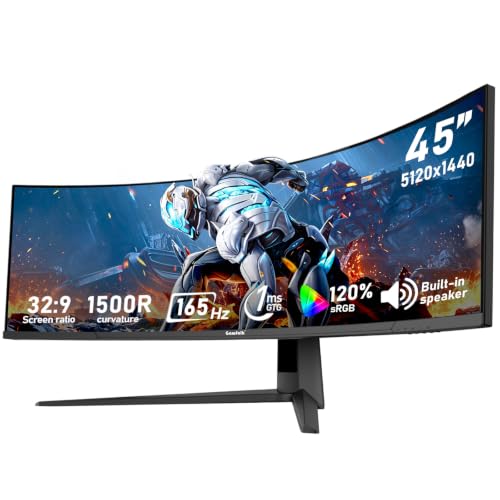
Gawfolk 45-Inch 165Hz DQHD Curved Monitor
Best for: multi-device 32:9 multitasking and high-refresh gaming
- Size
- 45 Inch (what this guide is about)
- Screen Size
- 45"
- Resolution
- 5120*1440
- Refresh Rate
- 165Hz
- Aspect Ratio
- 32:9
- Connectivity
- HDMI 2.1, DP 1.4
This 45-inch display features a 32:9 aspect ratio and a 5120 x 1440 DQHD resolution. It pairs a 165Hz refresh rate with Adaptive Sync to prevent tearing during fast motion. With a 3000:1 contrast ratio, 350 cd/m² brightness, and four video inputs (two HDMI 2.1 and two DisplayPort 1.4), it suits you if you want a dual-QHD workspace for multi-window productivity and smooth PC gaming without swapping cables.
Pros
- 5120 x 1440 DQHD resolution across an ultrawide 32:9 panel
- 165Hz refresh rate with Adaptive Sync support
- Four display inputs including two HDMI 2.1 and two DisplayPort 1.4 ports
- 3000:1 native contrast ratio with 350 cd/m² brightness
Cons
- No USB-C connectivity or power delivery listed
- No built-in speakers specified
Good fit if
- You need a 32:9 DQHD resolution to view multiple windows side by side without a center bezel.
- You connect up to four source devices via HDMI 2.1 and DisplayPort 1.4.
- You want a 165Hz refresh rate with Adaptive Sync for fast-paced PC gaming.
Skip if
- You require single-cable USB-C video input and laptop charging.
- You want integrated desktop audio built directly into the display.
Verdict: Gawfolk 45-Inch 165Hz DQHD Curved Monitor delivers an expansive 32:9 workspace, high-bandwidth HDMI 2.1 and DisplayPort 1.4 connections, and a fast 165Hz refresh rate for multitaskers and gamers.

LG 45-Inch Curved OLED Gaming Monitor
Best for: high-refresh competitive ultrawide gaming at 1440p
- Size
- 45 Inch (what this guide is about)
- Screen Size
- 45 inch
- Resolution
- WQHD
- Refresh Rate
- 240Hz
- Panel Type
- OLED
- Aspect Ratio
- 21:9
This 45-inch LG ultrawide display combines an OLED panel with a WQHD 1440p resolution and a steep 800R curvature. You get a rapid 240Hz refresh rate alongside a 0.03ms response time for fast gaming. Connectivity includes HDMI 2.1 and DisplayPort 1.4, supported by AMD FreeSync Premium Pro and NVIDIA G-Sync compatibility. It suits you if you want high-speed motion clarity and deep contrast without demanding 5K driving power.
Pros
- Fast 240Hz refresh rate with 0.03ms GtG response time
- OLED panel featuring DisplayHDR True Black 400 and a 1.5M:1 contrast ratio
- Dual sync support with NVIDIA G-Sync compatibility and AMD FreeSync Premium Pro
- Modern display inputs with HDMI 2.1 and DisplayPort 1.4
Cons
- WQHD resolution provides lower pixel density across 45 inches than DQHD or 5K alternatives
- Typical SDR brightness is limited to 275 nits
- Steep 800R curvature may feel too tight for general desktop tasks
Good fit if
- You want high-speed 240Hz gaming performance paired with near-instant 0.03ms response times.
- You prefer the pure black levels and high contrast of an OLED display.
- You run a 1440p gaming setup that favors high frame rates over dense resolutions.
Skip if
- You need higher text clarity and resolution found on 5K2K or DQHD panels.
- You work in bright environments where a 275-nit typical brightness is insufficient.
- You prefer a flat or gently curved monitor for shared viewing and general tasks.
Verdict: LG 45-Inch Curved OLED Gaming Monitor offers class-leading 240Hz motion performance and deep OLED black levels. Its 1440p ultrawide resolution is tailored for gamers who want large-scale immersion without overburdening their graphics hardware.
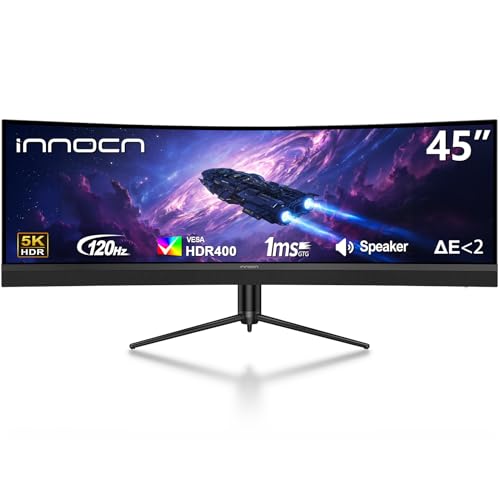
INNOCN 45-Inch 120Hz Curved Ultrawide Monitor
Best for: dual-device productivity and 120Hz ultrawide gaming
- Size
- 45 Inch (what this guide is about)
- Screen Size
- 45"
- Resolution
- 5120 x 1440p
- Refresh Rate
- 120Hz
- Aspect Ratio
- 32:9
- Sync Technology
- Adaptive-Sync
View on Amazon: INNOCN 45-Inch 120Hz Curved Ultrawide Monitor
This INNOCN 45-inch display features a 32:9 aspect ratio with a 5120 x 1440 resolution and a 120Hz refresh rate. It uses a 1500R curved VA panel offering a 3000:1 contrast ratio, DisplayHDR 400, and Adaptive-Sync support. Connectivity includes HDMI 2.1, DisplayPort 1.4, an RJ45 port, and USB-C with 65W power delivery. It suits you if you need expansive desktop space, integrated peripheral docking, and built-in split-screen modes.
Pros
- 5120 x 1440 Dual QHD resolution across a 32:9 ultrawide VA panel
- USB-C port with 65W power delivery alongside an RJ45 network jack
- High 3000:1 static contrast ratio with DisplayHDR 400 support
- Hardware PIP and PBP support for multi-source viewing
- Adjustable stand supporting tilt, swivel, and height modifications
Cons
- 120Hz refresh rate is lower than faster gaming-focused alternatives
- 65W USB-C output may not charge high-power laptops at full speed
- DisplayHDR 400 provides entry-level peak brightness performance
Good fit if
- You want a 32:9 Dual QHD display with a 120Hz refresh rate for work and gaming.
- You need a single-cable USB-C setup that supplies 65W power and wired RJ45 networking.
- You use two input devices simultaneously via built-in PIP or PBP modes.
Skip if
- You need faster refresh rates beyond 120Hz for competitive gaming.
- You require more than 65W of USB-C power delivery to charge your laptop.
- You prefer a flat display instead of a 1500R curvature.
Verdict: INNOCN 45-Inch 120Hz Dual QHD Curved Monitor provides a massive 32:9 workspace balanced with smooth 120Hz output and comprehensive hub connectivity. Its 65W USB-C port, RJ45 input, and PBP modes make it a capable centerpiece for dual-source desktop workflows.
Specifications side by side
| Spec | LG 45-Inch 240Hz Curved OLED Monitor | LG 45-Inch 5K2K Curved OLED Gaming Monitor | Gawfolk 45-Inch 200Hz Curved Ultrawide Monitor | INNOCN 45-Inch Dual QHD Curved Ultrawide | Gawfolk 45-Inch 165Hz DQHD Curved Monitor | LG 45-Inch Curved OLED Gaming Monitor | INNOCN 45-Inch 120Hz Curved Ultrawide Monitor |
|---|---|---|---|---|---|---|---|
| Screen Size | 45-Inch | 45" | 45" | 45" | 45" | 45 inch | 45" |
| Resolution | 3440 x 1440 | 5120 x 2160 | 5120x1440 | 5120 x 1440p | 5120*1440 | WQHD | 5120 x 1440p |
| Refresh Rate | 240Hz | 165Hz, 330Hz | 200Hz | 120hz | 165Hz | 240Hz | 120Hz |
| Panel Type | OLED | OLED | not specified | not specified | not specified | OLED | not specified |
| Aspect Ratio | 21:9 | 21:9 | 32:9 | 32:9 | 32:9 | 21:9 | 32:9 |
| Response Time | 0.03ms (GtG) | 0.03ms (GtG) | not specified | not specified | not specified | 0.03ms GtG | not specified |
| Sync Technology | AMD FreeSync Premium Pro, NVIDIA G-SYNC | FreeSync Premium Pro, G-SYNC Compatible | AMD FreeSync, NVIDIA G-Sync | Adaptive-Sync | not specified | AMD FreeSync Premium Pro, NVIDIA G-Sync | Adaptive-Sync |
| Connectivity | HDMI 2.1, DisplayPort 1.4, USB Type-C | DisplayPort 2.1, HDMI 2.1, USB Type-C | 2 x HDMI 2.1, 2 x DisplayPort 1.4 | DP 1.4, USB-C, HDMI 2.1, USB, RJ45 | HDMI 2.1, DP 1.4 | HDMI 2.1, DisplayPort 1.4 | DP 1.4, USB-C 65W, HDMI 2.1, RJ45 |
| Size | 45 Inch | 45 Inch | 45 Inch | 45 Inch | 45 Inch | 45 Inch | 45 Inch |
| Dimensions | 13.3 × 39.1 × 26.1 inches | 13.5 × 39 × 26.2 inches | 26 × 17 × 7 inches | 10 × 47 × 18 inches | 10.6 × 42.9 × 17.3 inches | 14.3 × 39.1 × 25.5 inches | 10 × 47 × 18 inches |
| Weight | 29.8 pounds | 30.9 pounds | not specified | not specified | 17.2 pounds | 24 pounds | not specified |
| Color | Black | Black | black | Black | Black | Black | Black |
| Model | 45GX900A-B.AUS | 45GX950A-B.AUS | GFTY993 | 45C1R | GFTY99A | 45GS95QE-B.AUS | 45E3R |
Is a 45 Inch Ultrawide Monitor Worth the Upgrade?
A 45-inch display expands your workspace into a 32:9 format. You gain massive horizontal real estate for multitasking or immersive gaming. The LG 5K2K OLED delivers sharp 5120 x 2160 imagery for detailed work. Other models like the Gawfolk offer 5120 x 1440 for broader compatibility. This size demands desk depth. Most units measure over 40 inches wide. You need space for the physical footprint and viewing distance to enjoy the curve without strain.
Worth it if
- You need a single screen for dual-source productivity workflows
- You want immersive 32:9 gaming without bezel gaps
- Your desk supports displays over 40 inches wide
Skip it if
- Your desk depth is less than 24 inches
- You prefer compact setups for small rooms
- Your GPU cannot drive high resolutions at fast refresh rates
If you track nursery feeds while working, compare display resolution across the best 5 Inch security monitors.
How We Picked These
We selected these monitors by filtering Amazon listings for the 45-inch size. We verified this dimension in the title or feature list. Only one variant per product family is included. All data comes directly from published specifications. We do not handle or test the hardware ourselves. You rely on the listed specs for accuracy.
The list is ordered by availability first. Then, we use the listing's overall rating weighted by the number of ratings. Finally, we rank by how many of our core criteria the specs meet. This ensures you see the most relevant 45-inch ultrawide options first. The order reflects current stock and spec alignment, not personal preference.
How to Choose the Right One
-
Match Panel Type to Use
OLED panels deliver near-instant 0.03ms response times and deep contrast, making them ideal for high-speed gaming. The LG 45-Inch 240Hz Curved OLED Monitor uses this technology for superior motion clarity. In contrast, VA panels like the one in the INNOCN 45-Inch Dual QHD offer 120Hz Adaptive-Sync for productivity. Choose OLED if you prioritize visual fidelity and speed. Select VA if you need a versatile hub for multi-source workflows without the premium cost associated with OLED technology.
-
Check Resolution Against GPU
You must align your graphics card power with the panel resolution. The LG 45-Inch 240Hz OLED uses 3440 x 1440 resolution, which is easier for GPUs to drive at high frame rates. The LG 5K2K OLED jumps to 5120 x 2160 pixels for sharper text but requires more hardware strength. If you want smooth gaming without heavy hardware demands, stick to the 1440p ultrawide format. For detailed desktop work, the 5K2K option provides higher pixel density.
-
Verify Connectivity Standards
Modern monitors rely on specific ports for high performance. The LG 5K2K OLED features DisplayPort 2.1 to handle its high-resolution data needs. The Gawfolk 45-Inch 200Hz model uses HDMI 2.1 for fast refresh rates. The INNOCN 45-Inch 120Hz includes a 65W USB-C port for docking. Ensure your PC or laptop supports these standards. Mismatched cables or ports can limit your refresh rate or prevent you from using the monitor’s full resolution capabilities effectively.
-
Consider Sync Technology Needs
Sync technology prevents screen tearing during fast motion. The LG 45-Inch 240Hz Curved OLED supports G-SYNC for consistent frame delivery. The LG 45-Inch Curved OLED Gaming Monitor offers both FreeSync and G-SYNC compatibility. If you use an NVIDIA graphics card, G-SYNC is often the preferred choice. AMD users typically benefit from FreeSync. Check which protocol your hardware supports before buying to ensure smooth gameplay without visual artifacts or stuttering during intense sessions.
-
Assess Physical Desk Space
A 45-inch monitor requires significant desk real estate. The LG 45-Inch 5K2K OLED measures 39 inches wide and weighs 30.9 pounds. The INNOCN 45-Inch Dual QHD is wider at 47 inches. Ensure your desk can support this width and weight. The Gawfolk 45-Inch 165Hz model weighs 17.2 pounds, which is lighter for mounting. Measure your available space carefully. These displays are large and heavy, so proper support is essential for stability and safe long-term use.
Frequently asked questions
What is the difference between 1440p and 5K2K resolution on a 45-inch monitor?
Resolution determines pixel density and workload. The LG 240Hz OLED uses 3440 x 1440 pixels for high frame rates. The LG 5K2K OLED offers 5120 x 2160 pixels for sharper text. Higher resolution requires more GPU power but provides clearer desktop details.
Which 45-inch monitor has the fastest refresh rate for gaming?
Two models lead with 240Hz performance. The LG 45-Inch 240Hz Curved OLED Monitor delivers rapid motion clarity. The LG 45-Inch Curved OLED Gaming Monitor also offers 240Hz for competitive play. These rates reduce motion blur during fast-paced scenes.
Do these monitors support both FreeSync and G-SYNC?
Sync technology compatibility varies by model. The LG 5K2K OLED supports both FreeSync and G-SYNC. The LG 240Hz OLED includes G-SYNC. The LG 1440p OLED supports both standards. Check your graphics card brand to ensure compatibility with the selected sync technology.
Can a 45-inch ultrawide monitor work as a USB-C hub?
Yes, several models include docking features. The INNOCN 45-Inch 120Hz model provides a 65W USB-C port and RJ45 input. The INNOCN 45-Inch Dual QHD also uses USB-C for connectivity. These ports allow single-cable connections for data, video, and power delivery.
How does OLED technology affect response times on these displays?
OLED panels provide near-instant response times. The LG 240Hz OLED achieves 0.03ms response times for superior motion clarity. This technology eliminates ghosting in fast games. VA panels, like those in some INNOCN models, may have slower response speeds compared to OLED.
Which monitor is best for dual-source productivity workflows?
The INNOCN 45-Inch 120Hz model is designed for this. It features Picture-by-Picture modes for dual-device use. It also offers a massive 32:9 workspace. The INNOCN 45-Inch Dual QHD supports similar multitasking with split-screen features and hub connectivity for daily workflows.
What connectivity ports are available on the LG 5K2K OLED?
This model prioritizes modern high-bandwidth connections. It includes DisplayPort 2.1 for its 5K2K resolution. It also features USB-C connectivity. These ports support the high data rates needed for its 5120 x 2160 pixel count and flexible refresh rates.
Is a 45-inch monitor too large for a standard desk?
Dimensions vary by model. The LG 240Hz OLED measures 39.1 inches wide. The INNOCN 45-Inch 120Hz is wider at 47 inches. Consider your desk depth. The LG 1440p OLED weighs 24 pounds, while the INNOCN models are lighter. Ensure your workspace accommodates the width.