Best Sceptre Ultrawide Monitors: 14 Models Compared
As an Amazon Associate we earn from qualifying purchases. Links on this page are affiliate links.
Finding the right sceptre ultrawide monitor depends on your space and display requirements. Sceptre offers flat and curved LED and IPS displays ranging from 24 inches to 39.7 inches. The Sceptre 27-Inch 75Hz LED Monitor takes the top position because it provides reliable full HD output for everyday office tasks and dual-HDMI setups.
We compared 14 models using only the specifications published on their listings. Review these refresh rates, panel sizes, and port options to find the right display for your desk.
Quick picks
Our 14 picks

Sceptre 27-Inch 75Hz LED Monitor
Best for: everyday office tasks and dual-HDMI setups
- Screen Size
- 27"
- Resolution
- 1920 x 1080
- Refresh Rate
- Up to 75Hz, 100Hz
- Sync Technology
- Adaptive Sync
- Connectivity
- 2x HDMI, 1x VGA
- Dimensions
- 24.6 × 18 × 8.27 inches
The Sceptre 27-Inch 1080p 75Hz Monitor is a full HD display designed for general desktop tasks and light entertainment. It features a 1920 x 1080 resolution, a 75Hz refresh rate with Adaptive Sync support, and 99% sRGB color gamut coverage. Dual HDMI ports and a VGA port give you flexible connectivity. Built-in speakers handle basic audio, making this display suitable if you want an accessible everyday workstation screen.
Pros
- 1920 x 1080 resolution with 99% sRGB color gamut
- Dual HDMI ports and a legacy VGA input
- Built-in speakers for desktop audio
- Adaptive Sync support up to 75Hz
Cons
- No DisplayPort input included
- Stand provides tilt only, without height or swivel adjustment
- 75Hz refresh rate is limited compared to dedicated gaming displays
Good fit if
- You need dual HDMI ports and a VGA port for legacy and modern devices.
- You want built-in speakers for office calls and casual media.
- You prioritize a 27-inch 1080p screen with 99% sRGB color coverage.
Skip if
- You require a DisplayPort connection for your PC setup.
- You need ergonomic height or swivel adjustments on the included stand.
- You want high refresh rates beyond 75Hz for competitive gaming.
Verdict: Sceptre 27-Inch 1080p 75Hz Monitor delivers reliable full HD visuals with dual HDMI ports and integrated audio for standard workstations. It covers daily productivity basics well but lacks DisplayPort and advanced stand articulation.

Sceptre 32-Inch QHD 210Hz USB-C Monitor
Best for: High-refresh 1440p USB-C laptop and desktop gaming
- Screen Size
- 32"
- Resolution
- 2560 x 1440
- Refresh Rate
- 210Hz
- Response Time
- 1ms BR
- Sync Technology
- AMD FreeSync Premium
- Connectivity
- HDMI, DisplayPort, USB Type-C
This 32-inch Sceptre monitor pairs a 2560 x 1440 QHD VA panel with a 210Hz refresh rate over DisplayPort and USB Type-C. You get 115% sRGB color gamut coverage, dual HDMI inputs capped at 144Hz, and built-in speakers. If you want a fast 1440p display that links directly to your USB-C laptop without needing separate display adapters, this screen fits your desk.
Pros
- USB Type-C and DisplayPort inputs support refresh rates up to 210Hz
- 2560 x 1440 QHD resolution with 115% sRGB color gamut coverage
- Integrated stereo speakers and audio output jack
- 1ms Blur Reduction response time with VA panel
Cons
- HDMI ports cap maximum refresh rate at 144Hz instead of 210Hz
- Standard 16:9 aspect ratio provides less horizontal area than 21:9 ultrawides
Good fit if
- You connect modern laptops or PCs using a direct USB Type-C video connection.
- You want 1440p gaming at up to 210Hz over DisplayPort or USB-C.
- You need built-in audio without adding separate external desk speakers.
Skip if
- You want a true 21:9 ultrawide aspect ratio for wider multitasking space.
- You require the full 210Hz refresh rate across HDMI connections.
Verdict: Sceptre 32-Inch 1440p 210Hz USB-C Monitor delivers high-speed 1440p playback and versatile connectivity through its 210Hz USB-C and DisplayPort inputs. It is a solid choice when you need fast gaming performance paired with direct laptop video input.

Sceptre 32" Curved 240Hz Gaming Monitor
Best for: competitive gamers wanting 240Hz curved action
- Screen Size
- 32"
- Resolution
- 1080p
- Refresh Rate
- 240Hz
- Response Time
- 1ms MPRT
- Sync Technology
- AMD FreeSync Premium
- Connectivity
- HDMI x3, DisplayPort
This Sceptre display combines a 32-inch curved screen with a fast 240Hz refresh rate and a 1ms MPRT response time. It delivers full 1080p resolution across an 1800R curve, accompanied by AMD FreeSync Premium to reduce visual stuttering. With DisplayPort and three HDMI ports, plus built-in speakers, you get a high-speed setup tailored for fast-paced competitive gameplay where speed matters more than high pixel density.
Pros
- Up to 240Hz refresh rate via DisplayPort and HDMI 1
- 1ms MPRT response time reduces motion blur
- 1800R curved 32-inch panel
- AMD FreeSync Premium support
- Integrated built-in speakers
Cons
- 1080p resolution results in lower pixel density on a 32-inch panel
- HDMI 2 and HDMI 3 ports cap at 144Hz instead of 240Hz
Good fit if
- You prioritize high frame rates up to 240Hz for competitive gaming.
- You want an 1800R curved 32-inch display with built-in speakers.
- You use DisplayPort or HDMI 1 to achieve maximum refresh rates.
Skip if
- You prefer sharper 1440p or 4K resolution on a 32-inch screen.
- You plan to run 240Hz across all HDMI input ports.
Verdict: Sceptre 32-Inch Curved 240Hz Gaming Monitor delivers rapid refresh rates and an immersive 1800R curve for competitive gaming. It favors smooth frame rates over fine pixel density.

Sceptre 27-Inch 180Hz Curved Gaming Monitor
Best for: multi-device curved gaming desk setups
- Screen Size
- 27"
- Refresh Rate
- 180Hz
- Response Time
- 1ms BR
- Connectivity
- DisplayPort x2, HDMI x2, Audio Out
- Size
- 27 Inch
- Dimensions
- 7.7 × 24.4 × 17.9 inches
This 27-inch curved gaming display features a 1500R curvature and a 180Hz refresh rate. It includes two HDMI ports and two DisplayPort connections, alongside 100% sRGB color gamut coverage and built-in speakers. With a 1ms blur reduction response, it provides fast visual output for everyday play. You will find it fits well if you want a compact curved setup for high-frame-rate gaming and multi-device desktop connectivity.
Pros
- 180Hz refresh rate supported over DisplayPort and HDMI
- Four video inputs featuring two DisplayPort and two HDMI connections
- 1500R curved display panel with 100% sRGB color gamut
- Built-in stereo speakers and dedicated audio output jack
Cons
- No USB ports or USB-C connectivity provided
- Stand height and swivel adjustments are not specified
Good fit if
- You want a 180Hz curved screen for fast-paced gaming.
- You need to connect up to four video sources simultaneously.
- You prefer integrated desktop audio without extra external speakers.
Skip if
- You need USB-C video input or device charging on your desk.
- You require an ergonomic stand with confirmed height adjustments.
Verdict: Sceptre 27-Inch Curved 180Hz Gaming Monitor delivers high-refresh performance and four-port input flexibility on a 1500R curved panel. It serves well as a dedicated gaming screen with built-in audio.

Sceptre 24-Inch Curved 75Hz Monitor
Best for: compact curved desktop setups
- Screen Size
- 24"
- Resolution
- 1080p
- Refresh Rate
- 75Hz
- Connectivity
- HDMI, VGA, PC audio in
- Size
- 24 Inch
- Dimensions
- 16 × 21.6 × 9.06 inches
The Sceptre 24-Inch Curved 1080p Monitor gives you a 1080p resolution display with a 75Hz refresh rate and a curved panel. It includes two HDMI ports, a VGA connection, and built-in speakers. With a 24-inch diagonal measurement and VESA mount support, it suits you if you need a compact display for basic daily tasks, video viewing, or casual use alongside the larger options in this guide.
Pros
- Curved 1080p screen
- 75Hz refresh rate
- Dual HDMI ports and VGA input
- Integrated audio speakers
- VESA wall mount compatibility
Cons
- No DisplayPort input
- Refresh rate peaks at 75Hz
- Compact 24-inch viewing area
Good fit if
- You want a compact 24-inch curved screen with 1080p resolution.
- You need legacy VGA alongside dual HDMI connections.
- You require built-in speakers and VESA wall mounting.
Skip if
- You need a DisplayPort connection for your PC.
- You want a refresh rate higher than 75Hz.
- You prefer a display larger than 24 inches.
Verdict: Sceptre 24-Inch Curved 1080p Monitor provides essential 1080p viewing with dual HDMI ports and an integrated speaker setup. It serves compact workstations and basic computing setups efficiently.

Sceptre 34-Inch UWQHD Ultrawide Monitor
Best for: everyday 34-inch ultrawide multitasking and media viewing
- Screen Size
- 34-inch
- Resolution
- 3440 x 1440
- Refresh Rate
- Up to 115Hz
- Aspect Ratio
- 21:9
- Connectivity
- DisplayPort, HDMI
- Dimensions
- 7.29 × 32.3 × 19 inches
The Sceptre 34-inch ultrawide monitor gives you a 21:9 aspect ratio with a 3440 x 1440 resolution. It features four video inputs, including two DisplayPort connections that support up to 115Hz and two HDMI ports reaching 100Hz. With 103% sRGB coverage and built-in speakers, this display suits you if you need expansive horizontal screen space for daily multitasking, timeline editing, or widescreen media playback on a single screen.
Pros
- 3440 x 1440 UWQHD resolution across a 21:9 panel
- Dual DisplayPort inputs supporting up to 115Hz
- Dual HDMI inputs supporting up to 100Hz
- 103% sRGB color gamut coverage
- Integrated speakers and audio output jack
Cons
- Maximum refresh rate caps at 115Hz over DisplayPort
- HDMI connectivity tops out at 100Hz
- No USB ports or USB-C connectivity listed
Good fit if
- You want a 3440 x 1440 ultrawide desktop for side-by-side windows.
- You connect multiple devices using four DisplayPort and HDMI ports.
- You prefer built-in speakers to save desk space.
Skip if
- You need gaming refresh rates higher than 115Hz.
- You require USB-C video input or laptop charging.
Verdict: Sceptre 34-Inch UWQHD Ultrawide Monitor delivers sharp 3440 x 1440 productivity space with versatile four-port video connectivity. It serves as a practical ultrawide workstation display if you do not require refresh rates beyond 115Hz.

Sceptre 32-Inch QHD 144Hz IPS Monitor
Best for: 1440p high-refresh gaming and ergonomic desk setups
- Screen Size
- 32 inch
- Resolution
- 2560x1440
- Refresh Rate
- 144Hz
- Panel Type
- IPS
- Response Time
- 1ms
- Connectivity
- DisplayPort, HDMI
This 32-inch display provides a 2560x1440 resolution on an IPS panel with a 144Hz refresh rate and 1ms response time. You get 120% sRGB color coverage alongside HDR400 support and a height-adjustable stand. It features one DisplayPort and three HDMI ports, though only HDMI 1 reaches 144Hz. It suits you if you want a large 1440p gaming screen with accurate viewing angles and ergonomic adjustment.
Pros
- IPS panel with 120% sRGB color gamut
- 144Hz refresh rate and 1ms response time via DisplayPort and HDMI 1
- Height-adjustable stand included
- HDR400 dynamic contrast support
Cons
- HDMI ports 2 and 3 cap at 75Hz refresh rate
- Heavy total weight of 19.44 pounds
Good fit if
- You want a flat 32-inch 1440p IPS screen with 144Hz speed.
- You need a height-adjustable stand to align your viewing height.
- You connect multiple sources via DisplayPort and three HDMI ports.
Skip if
- You need 144Hz support on every HDMI port.
- You prefer an ultrawide 21:9 aspect ratio over standard 16:9 widescreen.
Verdict: Sceptre 32-Inch QHD 144Hz IPS Monitor combines a 1440p IPS panel, 1ms response, and an adjustable stand. It delivers reliable high-refresh visuals across multiple inputs.

Sceptre 30-Inch Curved 200Hz Ultrawide Monitor
Best for: high-refresh 1080p ultrawide gaming
- Screen Size
- 30"
- Resolution
- 2560 x 1080
- Refresh Rate
- Up to 200Hz
- Aspect Ratio
- 21:9
- Response Time
- 5ms GTG
- Sync Technology
- AMD Free Sync
View on Amazon: Sceptre 30-Inch Curved 200Hz Ultrawide Monitor
This Sceptre 30-inch curved ultrawide display delivers a 2560 x 1080 resolution across a 21:9 aspect ratio. You get up to a 200Hz refresh rate over DisplayPort alongside AMD FreeSync support to keep high-speed frames tear-free. It suits you if you want high-frame-rate gaming on an ultrawide canvas without pushing demanding 1440p graphics, backed by built-in speakers and standard VESA mounting compatibility.
Pros
- 200Hz refresh rate through DisplayPort connection
- 21:9 curved ultrawide 2560 x 1080 panel
- AMD FreeSync support for tear-free frames
- Integrated speakers and VESA wall mount compatibility
Cons
- HDMI port caps output at 120Hz
- Typical brightness limited to 250
- 5ms GTG response time rather than 1ms
Good fit if
- You want a 200Hz refresh rate using DisplayPort on an ultrawide setup.
- You prefer a 2560 x 1080 resolution that requires less GPU power than 1440p.
- You want built-in speakers and standard VESA mount readiness.
Skip if
- You primarily connect via HDMI and require refresh rates above 120Hz.
- You need a response time faster than 5ms for competitive play.
- You require a display brighter than the 250 typical rating.
Verdict: Sceptre 30-Inch Curved 200Hz Ultrawide Monitor provides fast 200Hz DisplayPort gaming and a 21:9 field of view at 2560 x 1080. It delivers high refresh rates and AMD FreeSync without demanding 1440p graphics hardware.
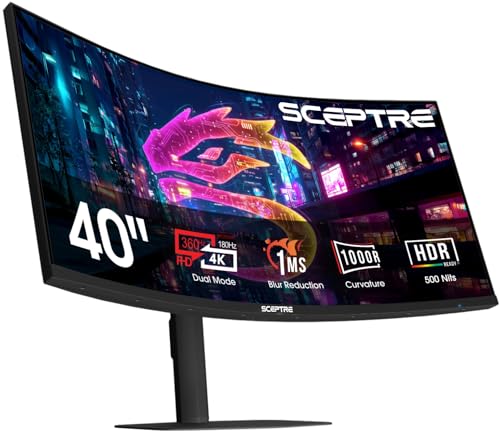
Sceptre 39.7-Inch Curved 5K2K Gaming Monitor
Best for: 5K2K clarity and dual-mode high-refresh gaming
- Screen Size
- 39.7"
- Resolution
- 5120 x 2160
- Refresh Rate
- 180Hz, 360Hz
- Aspect Ratio
- 21:9
- Response Time
- 1ms
- Connectivity
- DisplayPort, HDMI
View on Amazon: Sceptre 39.7-Inch Curved 5K2K Gaming Monitor
This 39.7-inch curved ultrawide monitor gives you a 5120 x 2160 resolution at up to 180Hz or a 2560 x 1080 mode at 360Hz. It features a tight 1000R curvature, a 1ms response time, and a 21:9 aspect ratio. It suits you if you want high-resolution workspace for detailed visuals alongside high-refresh rate options for fast competitive play. Integrated speakers and dual DisplayPort connections round out the setup.
Pros
- 5120 x 2160 native resolution at up to 180Hz
- Dual Mode option for 2560 x 1080 at 360Hz
- Curved 1000R 39.7-inch ultrawide panel
- Two DisplayPort and HDMI video inputs
Cons
- Large desktop footprint measuring 36 inches wide and 9 inches deep
- No USB hubs or Type-C connectivity listed in specs
Good fit if
- You need 5120 x 2160 resolution for sharp 21:9 screen real estate.
- You play competitive games that benefit from switching to 360Hz at 1080p.
- You prefer a deep 1000R curve on a wide 39.7-inch display.
Skip if
- You have a shallow or narrow desk that cannot fit a 36-inch wide frame.
- You require single-cable USB-C connectivity for a laptop.
Verdict: Sceptre 39.7-Inch Curved 5K2K Gaming Monitor combines a high-density 5120 x 2160 display with an optional 360Hz 1080p mode for specialized workloads. Its 1000R curvature and multiple DisplayPort inputs support both detailed productivity and fast gaming.

Sceptre 27-Inch 240Hz IPS Gaming Monitor
Best for: high-refresh-rate gaming with accurate color reproduction
- Screen Size
- 27"
- Refresh Rate
- 240Hz
- Panel Type
- IPS
- Connectivity
- HDMI, DisplayPort, Audio Out
- Dimensions
- 7.6 × 24.1 × 17.2 inches
This Sceptre display pairs a 27-inch IPS panel with a 240Hz refresh rate. It delivers 100% sRGB color coverage alongside built-in speakers and dedicated FPS and RTS presets. With two DisplayPort inputs and one HDMI port, you can connect multiple devices directly. If you want high-frame-rate gaming with accurate colors and integrated audio, this monitor fits your desk neatly.
Pros
- 240Hz maximum refresh rate
- IPS panel with 100% sRGB color gamut
- Dual DisplayPort inputs alongside one HDMI port
- Built-in speakers plus an audio output jack
Cons
- Only one HDMI input provided
- No integrated USB ports listed
Good fit if
- You want a 240Hz refresh rate for fast-action gaming.
- You need 100% sRGB color reproduction on an IPS panel.
- You use multiple DisplayPort sources on one screen.
Skip if
- You need multiple HDMI ports for your gear.
- You require integrated USB data connectivity.
Verdict: Sceptre 27-Inch 240Hz IPS Gaming Monitor delivers smooth 240Hz playback and 100% sRGB color reproduction for responsive gaming. Its dual DisplayPort connections and built-in speakers provide practical multi-device functionality.
Sceptre 27-Inch 180Hz Gaming Monitor
Best for: fast-paced 1080p gaming with multi-device setups
- Screen Size
- 27"
- Resolution
- 1080p FHD
- Refresh Rate
- Up to 180Hz
- Response Time
- 1ms BR
- Sync Technology
- FreeSync
- Connectivity
- DisplayPort, HDMI x3
This Sceptre 27-inch display gives you a Full HD 1080p resolution paired with a 180Hz refresh rate and a 1ms blur reduction response time. It includes AMD FreeSync support to reduce screen tearing during fast gameplay. With three HDMI ports and a DisplayPort connection, you can link multiple video sources easily. It suits you if you need a responsive high-refresh screen for competitive gaming without extra complexity.
Pros
- 180Hz refresh rate with 1ms blur reduction
- AMD FreeSync support
- Three HDMI ports and one DisplayPort
- Integrated speakers
- VESA wall mount compatible
Cons
- Limited to 1080p resolution
- No USB or USB-C connectivity listed
Good fit if
- You prioritize high frame rates up to 180Hz for gaming.
- You need multiple HDMI ports to connect several devices at once.
- You plan to mount your display using a VESA pattern.
Skip if
- You want a sharper 1440p or 4K resolution on a 27-inch panel.
- You need an ultrawide 21:9 aspect ratio.
Verdict: Sceptre 27-Inch 180Hz Gaming Monitor delivers fast refresh speeds and versatile input connectivity for smooth 1080p gaming setups.
Sceptre 27-Inch 1080p 165Hz IPS Gaming Monitor
Best for: high-refresh Full HD competitive gaming
- Screen Size
- 27-inch
- Resolution
- 1080p
- Refresh Rate
- 165Hz
- Panel Type
- IPS
- Response Time
- 1ms BR
- Sync Technology
- FreeSync
View on Amazon: Sceptre 27-Inch 1080p 165Hz IPS Gaming Monitor
This Sceptre display is a 27-inch 1080p gaming monitor built with an IPS panel and AMD FreeSync support. You get refresh rates reaching up to 165Hz alongside a 1ms Blur Reduction response time for smooth action. The screen covers 99% of the sRGB color space and includes integrated speakers. It fits you well if you want high-frame-rate Full HD gaming with solid color reproduction on a standard flat display.
Pros
- Up to 165Hz refresh rate with AMD FreeSync
- IPS panel with 99% sRGB color gamut
- 1ms Blur Reduction response time
- Built-in audio speakers
- VESA wall mount compatible
Cons
- Standard 1080p resolution limits pixel density at 27 inches
- Standard 16:9 aspect ratio rather than ultrawide
- No USB ports or USB-C connectivity included
Good fit if
- You prioritize high refresh rates and FreeSync for responsive gaming.
- You want wide viewing angles and 99% sRGB coverage from an IPS panel.
- You plan to mount your screen using a standard VESA pattern.
Skip if
- You want a true 21:9 ultrawide field of view.
- You require sharper 1440p or 4K resolution on a 27-inch screen.
Verdict: Sceptre 27-Inch 1080p 165Hz IPS Gaming Monitor delivers fluid high-refresh gameplay and accurate IPS colors in a straightforward package. It is an effective choice if you prioritize speed and color coverage over higher resolutions or ultrawide screen space.

Sceptre 27-Inch 165Hz Gaming Monitor
Best for: Fast-paced gaming on a standard-aspect screen
- Screen Size
- 27-inch
- Refresh Rate
- 165Hz
- Response Time
- 1ms
- Sync Technology
- AMD FreeSync Premium
- Connectivity
- HDMI, DisplayPort
- Dimensions
- 24.1 × 17.8 × 7.4 inches
The Sceptre 27-Inch 165Hz Gaming Monitor is a standard 16:9 gaming display built for fast frame output. It provides a refresh rate up to 165Hz, a 1ms response time, and AMD FreeSync Premium support to eliminate screen tearing. The panel reaches 300 cd/m² brightness and covers 93% of the DCI-P3 color space. This setup suits you if you need a competitive gaming screen with built-in speakers and DisplayPort connectivity.
Pros
- Up to 165Hz refresh rate with 1ms response time
- AMD FreeSync Premium support
- 93% DCI-P3 color gamut coverage
- Integrated audio speakers
Cons
- Standard 27-inch format lacks ultrawide aspect ratio
- No integrated USB-C or USB hub connectivity
Good fit if
- You prioritize fast refresh rates up to 165Hz for gaming.
- You want built-in speakers without adding external audio hardware.
- You need AMD FreeSync Premium to reduce visual tearing.
Skip if
- You require an ultrawide 21:9 or curved workspace.
- You need single-cable USB-C video or device charging.
Verdict: Sceptre 27-Inch 165Hz Gaming Monitor delivers high-refresh performance and solid color gamut coverage for fast-paced play. It fits desk setups that require fluid motion rather than an ultrawide form factor.

Sceptre 27-Inch Curved 165Hz Gaming Monitor
Best for: curved 1080p gaming with AMD FreeSync
- Screen Size
- 27"
- Resolution
- 1920 x 1080
- Refresh Rate
- 165Hz
- Response Time
- 3ms
- Sync Technology
- AMD FreeSync Premium
- Connectivity
- HDMI, DisplayPort, 3.5mm Audio
This Sceptre display is a 27-inch curved gaming monitor featuring a 1920 x 1080 resolution and an 1800R curve. It delivers refresh rates up to 165Hz over DisplayPort and 144Hz through HDMI, paired with AMD FreeSync Premium and a 3ms response time. If you want a curved screen for smooth 1080p gaming across multiple HDMI and DisplayPort inputs without demanding high system hardware, this panel fits your setup.
Pros
- Up to 165Hz refresh rate via DisplayPort
- AMD FreeSync Premium support
- 1800R curved 1080p panel
- Dual HDMI ports and one DisplayPort input
Cons
- 3ms response time rather than 1ms
- HDMI connection limited to 144Hz
- Color gamut coverage limited to 95% sRGB
Good fit if
- You prioritize high refresh rates up to 165Hz on a 1080p curved screen.
- You use an AMD graphics card and need FreeSync Premium synchronization.
- You need to connect multiple devices across two HDMI ports and one DisplayPort.
Skip if
- You require a 1ms response time for fast-paced competitive esports.
- You want a resolution higher than 1080p on a 27-inch panel.
- You plan to run 165Hz exclusively through an HDMI cable.
Verdict: Sceptre 27-Inch Curved 165Hz Gaming Monitor pairs an 1800R curve with smooth 165Hz DisplayPort performance and AMD FreeSync Premium. It provides solid FHD gaming specs across dual HDMI and DisplayPort inputs for everyday desktop play.
Specifications side by side
| Spec | Sceptre 27-Inch 75Hz LED Monitor | Sceptre 32-Inch QHD 210Hz USB-C Monitor | Sceptre 32" Curved 240Hz Gaming Monitor | Sceptre 27-Inch 180Hz Curved Gaming Monitor | Sceptre 24-Inch Curved 75Hz Monitor | Sceptre 34-Inch UWQHD Ultrawide Monitor | Sceptre 32-Inch QHD 144Hz IPS Monitor | Sceptre 30-Inch Curved 200Hz Ultrawide Monitor | Sceptre 39.7-Inch Curved 5K2K Gaming Monitor | Sceptre 27-Inch 240Hz IPS Gaming Monitor | Sceptre 27-Inch 180Hz Gaming Monitor | Sceptre 27-Inch 1080p 165Hz IPS Gaming Monitor | Sceptre 27-Inch 165Hz Gaming Monitor | Sceptre 27-Inch Curved 165Hz Gaming Monitor |
|---|---|---|---|---|---|---|---|---|---|---|---|---|---|---|
| Screen Size | 27" | 32" | 32" | 27" | 24" | 34-inch | 32 inch | 30" | 39.7" | 27" | 27" | 27-inch | 27-inch | 27" |
| Resolution | 1920 x 1080 | 2560 x 1440 | 1080p | not specified | 1080p | 3440 x 1440 | 2560x1440 | 2560 x 1080 | 5120 x 2160 | not specified | 1080p FHD | 1080p | not specified | 1920 x 1080 |
| Refresh Rate | Up to 75Hz, 100Hz | 210Hz | 240Hz | 180Hz | 75Hz | Up to 115Hz | 144Hz | Up to 200Hz | 180Hz, 360Hz | 240Hz | Up to 180Hz | 165Hz | 165Hz | 165Hz |
| Panel Type | not specified | not specified | not specified | not specified | not specified | not specified | IPS | not specified | not specified | IPS | not specified | IPS | not specified | not specified |
| Aspect Ratio | not specified | not specified | not specified | not specified | not specified | 21:9 | not specified | 21:9 | 21:9 | not specified | not specified | not specified | not specified | not specified |
| Response Time | not specified | 1ms BR | 1ms MPRT | 1ms BR | not specified | not specified | 1ms | 5ms GTG | 1ms | not specified | 1ms BR | 1ms BR | 1ms | 3ms |
| Sync Technology | Adaptive Sync | AMD FreeSync Premium | AMD FreeSync Premium | not specified | not specified | not specified | not specified | AMD Free Sync | not specified | not specified | FreeSync | FreeSync | AMD FreeSync Premium | AMD FreeSync Premium |
| Connectivity | 2x HDMI, 1x VGA | HDMI, DisplayPort, USB Type-C | HDMI x3, DisplayPort | DisplayPort x2, HDMI x2, Audio Out | HDMI, VGA, PC audio in | DisplayPort, HDMI | DisplayPort, HDMI | HDMI, DisplayPort | DisplayPort, HDMI | HDMI, DisplayPort, Audio Out | DisplayPort, HDMI x3 | DisplayPort, HDMI | HDMI, DisplayPort | HDMI, DisplayPort, 3.5mm Audio |
| Size | 27 | 32 Inch | 32 | 27 Inch | 24 Inch | 34" Prime | 32" IPS QHD | 30 | 39.7 inches | not specified | 27 | 27" IPS | not specified | 27 |
| Dimensions | 24.6 × 18 × 8.27 inches | 8.32 × 28.2 × 19.5 inches | 28.3 × 20.9 × 8.3 inches | 7.7 × 24.4 × 17.9 inches | 16 × 21.6 × 9.06 inches | 7.29 × 32.3 × 19 inches | 9.75 × 28.3 × 23.7 inches | 27.8 × 16.1 × 7.4 inches | 9 × 36 × 25 inches | 7.6 × 24.1 × 17.2 inches | 5.4 × 24.1 × 17.2 inches | 24.1 × 17.1 × 5.44 inches | 24.1 × 17.8 × 7.4 inches | 6.38 × 24.3 × 17.6 inches |
| Weight | 8.8 pounds | 10.1 pounds | 12.6 pounds | not specified | 6 pounds | 9.7 pounds | 19.4 pounds | 12.2 pounds | not specified | not specified | 8 pounds | 7.25 pounds | 14.1 pounds | 9.26 pounds |
| Color | Metallic Black | Machine Black | Machine Black | Machine Black | Metal Black | Machine Black | Black | Metal Black | Machine Black | Machine Black | Machine Black | Machine Black | Black | Machine Black |
| Model | E275W-19203R | E325B-QW200D | C325B-FWD240 | C275B-FW180T | C248W-1920RN | E345W-QU120D | E325B-QPN168 | C305B-200UN1T.1 | C415B-UUS360 | E275B-FP240T | E275B-FPT165.A1 | E275B-FPT165 | E275B-FWD168 | C275B-1858RN |
Understanding The Sceptre Monitor Lineup
The lineup divides into standard 16:9 screens and wide-format ultrawide panels. If you need expansive horizontal workspace or immersive simulation, ultrawide options fit best. The Sceptre 30-Inch Curved 200Hz Ultrawide Monitor delivers 2560 x 1080 frames for fast gaming, while the Sceptre 34-Inch UWQHD Ultrawide Monitor offers 3440 x 1440 resolution for detailed desktop productivity.
For extreme resolution, the Sceptre 39.7-Inch Curved 5K2K Gaming Monitor suits creators needing 5120 x 2160 clarity alongside high refresh rates. Alternatively, standard 16:9 models with 1080p resolution, like the Sceptre 24-Inch Curved 75Hz Monitor, serve you well if you operate in tight desk spaces and only require essential HDMI connectivity.
Who the Sceptre Lineup Suits
Sceptre accommodates setups requiring panel sizes from 24 inches up to 39.7 inches. You choose between flat panels and curved profiles ranging from 1000R to 1800R. Visual options include standard LED and IPS panels supporting refresh rates between 75Hz and 240Hz across 1080p, 1440p, and 5K2K resolutions.
Important feature gaps exist across this selection. You will not find OLED or Mini-LED backlighting. Standard 16:9 4K resolution is absent, as are display sizes between 34 inches and 39.7 inches. Most models rely on DisplayPort and HDMI, with only one screen offering USB-C and none featuring Thunderbolt.
For other screens, see our list of best 1080p security monitors.
How to Choose the Right Sceptre Monitor
-
Screen Resolution Selection
Resolution determines visual clarity and desktop workspace. Sceptre models range from 1080p up to 5K2K. Standard 1080p displays match basic daily computing and entry-level gaming tasks. Stepping up to 1440p or 3440 x 1440 expands your horizontal workspace significantly for side-by-side windows. For wide spreadsheets and timeline editing, the Sceptre 34-Inch UWQHD Ultrawide Monitor provides 3440 x 1440 pixels. High-density 5K2K options offer maximum fine detail. Match panel resolution directly to your graphics card output capability before choosing your screen.
-
Refresh Rate Needs
Refresh rate measures how many frames the monitor draws per second. Basic desktop tasks and video viewing function smoothly at standard 75Hz rates. Fast action games benefit from higher refresh frequencies. Sceptre offers panels reaching 144Hz, 180Hz, 200Hz, and 240Hz. The Sceptre 32" Curved 240Hz Gaming Monitor targets competitive motion clarity where rapid target tracking matters. Check your personal usage needs. Standard document workflows require only 75Hz, while fast-paced gaming requires 144Hz or higher for fluid motion tracking.
-
Port Compatibility Check
Examine your computer video outputs before picking an input configuration. Sceptre monitors include ports like HDMI, DisplayPort, USB-C, and legacy VGA. Standard HDMI connects modern consoles, media players, and desktop towers. DisplayPort is necessary to unlock maximum refresh speeds on high-bandwidth gaming models. If you use a modern laptop, the Sceptre 32-Inch QHD 210Hz USB-C Monitor accepts direct video input over a single USB-C cable. Confirm that your source computer ports match the monitor inputs to avoid needing external adapters.
-
Panel Type Selection
Monitor panel structure dictates viewing angles and color consistency. Standard LED screens handle general web browsing, text processing, and basic entertainment well. In contrast, IPS panels provide wider viewing angles without shifting hues when you view the display off-center. For color-critical viewing or multi-angle multi-monitor desks, consider an IPS model like the Sceptre 27-Inch 240Hz IPS Gaming Monitor with 100% sRGB color support. If your desk setup keeps you directly centered at all times, standard LED panels meet basic computing demands reliably.
-
Adaptive Sync Support
Screen tearing occurs when your graphics processor frame output desynchronizes from the monitor refresh cycles. Variable refresh rate features like AMD FreeSync resolve this by dynamically synchronizing panel timing to your GPU frame delivery. Gaming screens like the Sceptre 27-Inch Curved 165Hz Gaming Monitor feature FreeSync to keep fast motion artifact-free during variable frame rate drops. If you run competitive shooters or action games, verify that the monitor specifies FreeSync support. For simple spreadsheet or office software tasks, adaptive sync is unnecessary.
-
Physical Desk Footprint
Large ultrawide displays take up substantial desk depth and surface width. Measure your available desk area before choosing larger panel sizes. Compact screens fit smaller tables easily, while wide formats require ample clearance. For example, the Sceptre 39.7-Inch Curved 5K2K Gaming Monitor measures 36 inches wide, 25 inches high, and 9 inches deep. In addition, check monitor weight if you plan to mount the display on an aftermarket arm. Ensuring your desktop or mounting bracket can support the exact dimensions prevents stability and clearance issues.
Frequently asked questions
Which Sceptre ultrawide monitor offers the highest resolution for productivity?
The Sceptre 39.7-Inch Curved 5K2K Gaming Monitor provides the highest resolution in this lineup. It features a 5120 x 2160 display that delivers exceptional clarity for detailed work. This model also supports a 360Hz mode in 1080p for specialized gaming needs. It is the best choice if you require maximum screen real estate and sharp visuals.
Does Sceptre offer an ultrawide monitor with USB-C connectivity?
No Sceptre ultrawide monitor in this list includes USB-C connectivity. The Sceptre 32-Inch QHD 210Hz USB-C Monitor does feature this port, but it is a standard 16:9 aspect ratio screen, not an ultrawide. All ultrawide options here rely on DisplayPort and HDMI inputs for video signal transmission.
What is the fastest refresh rate available on a Sceptre ultrawide display?
The Sceptre 39.7-Inch Curved 5K2K Gaming Monitor supports up to 360Hz when switched to its 1080p mode. The Sceptre 30-Inch Curved 200Hz Ultrawide Monitor offers a native 200Hz refresh rate at 2560 x 1080 resolution. These models prioritize speed for competitive gaming over higher pixel density.
Which Sceptre ultrawide monitor has the most immersive curve?
The Sceptre 39.7-Inch Curved 5K2K Gaming Monitor features a 1000R curvature. This deep curve wraps around your field of view for maximum immersion. The Sceptre 30-Inch Curved 200Hz Ultrawide Monitor also provides a curved experience, though specific curvature details are not listed in its attributes.
Are there Sceptre ultrawide monitors with FreeSync support?
The Sceptre 30-Inch Curved 200Hz Ultrawide Monitor explicitly lists AMD FreeSync support in its attributes. This technology helps synchronize the monitor's refresh rate with the graphics card to reduce screen tearing. Other ultrawide models in this list do not have FreeSync mentioned in their provided specifications.
What is the largest Sceptre ultrawide monitor size available?
The Sceptre 39.7-Inch Curved 5K2K Gaming Monitor is the largest ultrawide option listed. It measures 36 inches in width and 25 inches in height. This substantial size provides extensive horizontal workspace for multitasking or immersive media consumption compared to smaller 30-inch or 34-inch ultrawide alternatives.
Does the Sceptre 34-inch ultrawide monitor support high refresh rates?
The Sceptre 34-Inch UWQHD Ultrawide Monitor is designed for productivity rather than high-speed gaming. Its attributes do not list a refresh rate beyond standard levels, and the verdict notes it serves well if you do not require refresh rates beyond 115Hz. It prioritizes 3440 x 1440 clarity over speed.
Can I connect multiple devices to a Sceptre ultrawide monitor?
Yes, most Sceptre ultrawide monitors offer multiple input ports. The Sceptre 30-Inch Curved 200Hz Ultrawide Monitor includes both DisplayPort and HDMI inputs. The Sceptre 39.7-Inch Curved 5K2K model also features multiple DisplayPort inputs alongside HDMI connections. This flexibility allows you to link gaming PCs, laptops, or consoles.