Looking Beyond the Dell 32-Inch 4K USB-C Hub? 6 Alternatives Worth a Look
As an Amazon Associate we earn from qualifying purchases. Links on this page are affiliate links.
If you are searching for dell p3223qe 32 inch 2160p UHD alternatives, you likely want to compare specific display specifications. The Dell P3223QE offers a 32-inch IPS panel with 4K resolution and robust USB-C connectivity. It supports up to 90W power delivery and includes a full docking station with RJ45 Ethernet. These features make it a strong choice for productivity-focused setups that need a tidy desk and reliable connectivity.
You might look elsewhere if you need a different refresh rate, a curved screen, or higher pixel density. Some users prefer Nano IPS panels for better color gamuts or QD-OLED technology for deeper contrast. This guide lists 6 options that share core specifications like the 32-inch size, 4K resolution, and USB-C support. Each alternative is selected because its published specs overlap with the Dell model, allowing you to compare panel types, sync technologies, and connectivity ports directly. You can choose based on whether you prioritize gaming speed, creative accuracy, or dual-monitor workflows.
Our top pick: Dell 32-Inch 4K USB-C Hub Monitor.
How each alternative compares
LG 32-Inch 4K IPS Monitor with USB-C
The LG 32UP83AK-W shares the same 32-inch IPS panel and 4K resolution as the Dell, but it drops the RJ45 Ethernet port found on the Dell P3223QE. You still get USB-C connectivity for docking, yet the LG model lacks the 90W power delivery specification listed for the Dell. It offers a white finish instead of black, which may suit lighter desks better. This monitor targets users who prioritize color clarity and casual gaming over the full docking station features of the Dell. If you do not need wired internet through the monitor, this LG unit provides similar image quality with a different aesthetic.
LG 32-Inch 6K Nano IPS Monitor
The LG 32U990A steps up significantly with a 6K resolution on the same 32-inch screen size, offering nearly double the pixel density of the Dell P3223QE. It uses Nano IPS Black technology for improved contrast compared to the standard IPS panel in the Dell. While it retains USB-C connectivity, it emphasizes Thunderbolt 5 support for high-bandwidth data transfer, catering to creative professionals. The Dell provides 90W power delivery and Ethernet, which this LG model does not explicitly list. You should choose this alternative if you need extreme clarity for color grading or detailed design work, accepting the higher price point for superior resolution and connectivity.
LG 32-Inch 4K IPS Monitor with USB-C
The LG 32UP83A is another 32-inch 4K IPS option similar to the Dell P3223QE, but it omits the RJ45 Ethernet port. It features USB-C connectivity for video and data, though the specific power delivery wattage is not listed in the data. The Dell includes a power sync feature and 90W charging, which this model does not specify. This LG monitor comes in a white and silver color scheme, differing from the Dell’s black finish. It is a practical choice for those who want 4K productivity clarity and USB-C convenience without the full docking station capabilities of the Dell. It suits users who do not require wired network integration through the display.
HP 32-Inch 4K UHD Dual Monitor Pack
The HP 732pk is a dual-pack of 32-inch 4K IPS monitors, whereas the Dell P3223QE is a single unit. This gives you two aligned displays for extended workflows, a significant advantage for multitasking. Both options feature USB-C connectivity and 4K resolution. The Dell offers 90W power delivery and an RJ45 port, which are not explicitly detailed for the HP pack. The HP model focuses on ergonomic flexibility and multi-device management for professional environments. If your workflow demands two screens simultaneously, this pack is the logical alternative. You gain double the screen real estate but may need to manage power and connectivity differently than with the all-in-one docking features of the Dell.
MSI 32-Inch 4K QD-OLED Gaming Monitor
The MSI MPG 321URX QD-OLED diverges sharply with a QD-OLED panel type, offering superior contrast and color accuracy compared to the Dell’s IPS panel. It supports a 240Hz refresh rate, far exceeding the Dell’s standard productivity focus. While both monitors offer 4K resolution and USB-C connectivity, the MSI prioritizes speed and visual fidelity for gaming and creative work. The Dell provides 90W power delivery and Ethernet, features not listed for this MSI model. You should pick this alternative if you need high-speed performance and OLED contrast. It suits users who value gaming capabilities and color precision over the docking station convenience and wired networking of the Dell.
MSI 32-Inch Curved 4K QD-OLED Monitor
The MSI MPG 321CURX QD-OLED introduces a curved design, unlike the flat panel of the Dell P3223QE. It also features a QD-OLED panel with 240Hz refresh rate and G-SYNC support, targeting competitive gamers. The Dell offers a flat IPS screen with 90W USB-C power delivery and RJ45 Ethernet, which this MSI model does not list. Both provide 4K resolution and USB-C connectivity. The MSI emphasizes response time and contrast for gaming, while the Dell focuses on productivity and connectivity. Choose this alternative if you prefer a curved immersive experience and high-speed gaming performance. It is ideal for users who prioritize visual speed and G-SYNC compatibility over the docking features of the Dell.
Quick picks
Our 7 picks

Dell 32-Inch 4K USB-C Hub Monitor
Best for: Productivity setups needing USB-C docking
- Screen Size
- 32-inch
- Resolution
- 2160p
- Panel Type
- IPS
- Connectivity
- HDMI, DisplayPort, USB-C, RJ45, USB Hub
- Dimensions
- 28 × 9 × 24 inches
View on Amazon: Dell 32-Inch 4K USB-C Hub Monitor Affiliate link
The Dell P3223QE is a 32-inch 4K UHD monitor with an IPS panel. It includes a full docking station with USB-C, HDMI, DisplayPort, and RJ45 Ethernet. The stand adjusts height by 150mm, tilts, swivels, and pivots. USB-C delivers up to 90W power. ComfortView Plus reduces blue light. It suits users needing a clean, connected workspace with strong color accuracy and ergonomic flexibility.
Pros
- 32-inch 4K UHD IPS panel for sharp detail
- USB-C port with up to 90W power delivery
- Built-in RJ45 Ethernet and full USB hub
- Height adjustable stand up to 150mm with pivot
Cons
- No high refresh rate data provided; likely 60Hz
- No HDR specification listed in the data
- No mention of built-in speakers
Good fit if
- You need a single-cable connection for video, data, and power
- You require ergonomic adjustments like height and pivot
- You want a large 4K display for productivity work
Skip if
- You need a high refresh rate for fast gaming
- You require HDR support for media consumption
- You want a monitor with built-in speakers
Verdict: Dell P3223QE 32-inch 4K USB-C Monitor is ideal for professionals who value a tidy desk and strong connectivity. It fits users who need reliable 4K clarity and ergonomic adjustability for long work sessions.

LG 32-Inch 4K IPS Monitor with USB-C
Best for: Productivity and casual gaming with USB-C
- Screen Size
- 32"
- Resolution
- 3840 x 2160
- Refresh Rate
- 60Hz
- Panel Type
- IPS
- Connectivity
- HDMI, DisplayPort, USB-C
- Size
- 32 Inch
View on Amazon: LG 32-Inch 4K IPS Monitor with USB-C Affiliate link
This LG monitor delivers 4K UHD resolution on a 32-inch IPS panel. It supports 60Hz refresh rates and HDR10 for improved color and brightness. You get USB-C connectivity for video, data, and 60W charging. The stand allows height, tilt, and pivot adjustments. It suits users who need sharp images and versatile connectivity without a high refresh rate.
Pros
- 3840 x 2160 resolution for high detail
- IPS panel with wide viewing angles
- USB-C port with 60W charging
- Ergonomic stand with height and pivot adjustment
- HDR10 support for enhanced contrast
Cons
- 60Hz refresh rate limits motion smoothness
- No mention of adaptive sync technology
- No built-in KVM switch listed
Good fit if
- You need a single-cable USB-C solution for laptops
- You prioritize color accuracy and viewing angles over speed
- You want ergonomic adjustments like height and pivot
Skip if
- You require a high refresh rate for competitive gaming
- You need built-in KVM switching for multiple devices
- You want a curved display for immersion
Verdict: LG 32UP83AK-W 32-inch 4K IPS Monitor is a solid choice for professionals and casual gamers who value image clarity and convenient USB-C connectivity over high-speed refresh rates.

LG 32-Inch 6K Nano IPS Monitor
Best for: Creative professionals needing 6K clarity and Thunderbolt 5
- Screen Size
- 32"
- Resolution
- 6144 x 3456
- Refresh Rate
- 60Hz
- Panel Type
- Nano IPS Black
- Connectivity
- Thunderbolt 5, HDMI 2.1, DP 2.1, USB-C
- Dimensions
- 7.8 × 28.3 × 22.9 inches
View on Amazon: LG 32-Inch 6K Nano IPS Monitor Affiliate link
This LG 32-inch monitor delivers 6K resolution with 6144 x 3456 pixels. It uses Nano IPS Black technology for sharp 224 PPI clarity. Thunderbolt 5 connectivity supports 96W power delivery and daisy chaining. The panel covers 99.5% Adobe RGB and 98% DCI-P3. It is designed for creative professionals who need high pixel density and color accuracy on a 32-inch screen.
Pros
- 6K resolution provides 156% more pixels than standard 4K
- Nano IPS Black panel offers 99.5% Adobe RGB coverage
- Thunderbolt 5 enables 96W power delivery and daisy chaining
- Supports DisplayHDR 600 for better contrast and highlights
Cons
- 60Hz refresh rate limits suitability for fast-paced gaming
- Heavier build at 20.9 pounds compared to standard 4K monitors
- Premium pricing tier for specialized 6K professional use
Good fit if
- You edit 6K video or require extreme pixel density for detailed work
- You need Thunderbolt 5 for high-speed data and single-cable connectivity
- You prioritize color accuracy with 99.5% Adobe RGB coverage
Skip if
- You primarily play fast-paced competitive games requiring high refresh rates
- You are on a tight budget for a standard 4K display
- You need a lightweight monitor for frequent travel
Verdict: LG 32U990A 6K Nano IPS Black Monitor is the right choice for creative professionals who need 6K clarity and Thunderbolt 5 connectivity for precise color work.
LG 32-Inch 4K IPS Monitor with USB-C
Best for: 4K productivity and casual gaming with USB-C
- Screen Size
- 32-inch
- Resolution
- 3840 x 2160
- Refresh Rate
- 60Hz
- Panel Type
- IPS
- Sync Technology
- AMD FreeSync
- Connectivity
- USB Type-C, HDMI, DisplayPort
View on Amazon: LG 32-Inch 4K IPS Monitor with USB-C Affiliate link
The LG 32UP83A-W is a 32-inch 4K UHD monitor featuring an IPS panel. It supports AMD FreeSync and HDR10 for improved color and contrast. You get USB Type-C connectivity with 60W power delivery over a single cable. This model suits users who need reliable color accuracy and versatile connection options for work and casual gaming.
Pros
- 3840 x 2160 resolution on a 32-inch IPS panel
- USB Type-C port with 60W power delivery
- Supports AMD FreeSync and HDR10
- 95% DCI-P3 color gamut coverage
Cons
- 60Hz refresh rate limits high-speed gaming
- No mention of NVIDIA G-Sync compatibility
- Lacks built-in speakers in the provided data
Good fit if
- You need USB-C connectivity for a single-cable setup
- You prioritize color accuracy for creative work
- You want a 4K display with FreeSync support
Skip if
- You require a high refresh rate above 60Hz
- You need NVIDIA G-Sync certified hardware
- You prefer a smaller 27-inch form factor
Verdict: LG 32UP83A-W 32-inch 4K IPS Monitor delivers solid 4K performance with USB-C convenience, making it a practical choice for professionals and casual gamers who value color fidelity over speed.

HP 32-Inch 4K UHD Dual Monitor Pack
Best for: Dual 4K professional workflows with docking
- Screen Size
- 32"
- Resolution
- 3840 x 2160
- Panel Type
- IPS
- Connectivity
- HDMI, DisplayPort, Thunderbolt 4, RJ-45
- Dimensions
- 21.2 × 19.8 × 7.4 inches
View on Amazon: HP 32-Inch 4K UHD Dual Monitor Pack Affiliate link
This bundle includes two 32-inch 4K UHD IPS monitors designed for professional workflows. It features Thunderbolt 4 connectivity with up to 100W power delivery, allowing a single-cable docking solution. The monitors include a built-in KVM switch to control two devices with one keyboard and mouse. The panels offer low blue light technology and flicker-free viewing for extended use.
Pros
- Includes two 32-inch 4K UHD IPS panels
- Thunderbolt 4 port supports up to 100W power delivery
- Built-in KVM switch for dual-device control
- Ergonomic stand with height, tilt, swivel, and pivot adjustments
Cons
- Bundle contains two units rather than a single display
- HDMI version is limited to 2.0
- No mention of high refresh rate gaming capabilities
Good fit if
- You need a dual-monitor setup for productivity
- You require Thunderbolt 4 daisy-chaining for a clean desk
- You work with professional design or business applications
Skip if
- You prefer a single screen over a dual setup
- You need high refresh rates for fast-paced gaming
- You want a monitor without a KVM switch
Verdict: HP 732pk Dual 32-Inch 4K IPS Monitor is ideal for professionals who need two aligned 4K displays with robust docking capabilities. It suits users who prioritize ergonomic flexibility and multi-device management over standalone gaming performance.

MSI 32-Inch 4K QD-OLED Gaming Monitor
Best for: high-speed gaming and color-critical work
- Screen Size
- 32"
- Resolution
- 3840 x 2160
- Refresh Rate
- 240Hz
- Panel Type
- QD-OLED
- Response Time
- 0.03ms GtG
- Connectivity
- HDMI 2.1, DP 1.4a, USB Type-C
View on Amazon: MSI 32-Inch 4K QD-OLED Gaming Monitor Affiliate link
This 32-inch QD-OLED monitor delivers 4K UHD resolution with a 240Hz refresh rate and 0.03ms response time. It covers 99% of the DCI-P3 color gamut with Delta E ≤2 accuracy. The panel supports HDMI 2.1 and DisplayPort 1.4a. You get a 4-way adjustable stand and KVM functionality. This setup suits gamers who need high speed and precise color reproduction for professional or leisure use.
Pros
- 240Hz refresh rate for smooth motion
- 0.03ms GtG response time
- 99% DCI-P3 color gamut coverage
- Delta E ≤2 color accuracy
- HDMI 2.1 connectivity
Cons
- 27.2 pounds is heavier than IPS LCD alternatives
- No built-in USB hub mentioned in specifications
- OLED panel requires careful brightness management
Good fit if
- You prioritize high refresh rates for competitive gaming
- You need accurate color grading for creative work
- You want HDMI 2.1 for next-gen console features
Skip if
- You prefer a lighter monitor for easy desk movement
- You need a USB hub built into the monitor
- You want a budget-friendly IPS LCD option
Verdict: MSI MPG 321URX QD-OLED combines 4K clarity with 240Hz speed for gamers and creators who demand precision. It fits users who value color accuracy and fast response times over weight savings.
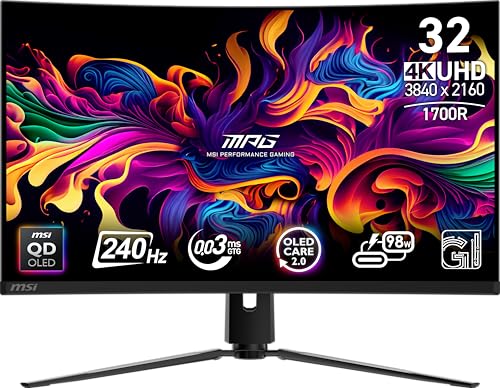
MSI 32-Inch Curved 4K QD-OLED Monitor
Best for: competitive gaming and OLED contrast
- Screen Size
- 32"
- Refresh Rate
- 240Hz
- Panel Type
- QD-OLED
- Response Time
- 0.03ms GTG
- Sync Technology
- G-SYNC Compatible
- Connectivity
- HDMI 2.1, DP 1.4a, USB C (98W PD)
View on Amazon: MSI 32-Inch Curved 4K QD-OLED Monitor Affiliate link
The MSI MPG 321CURX QD-OLED is a 32-inch 4K UHD monitor featuring a 240Hz refresh rate and 0.03ms response time. It uses a QD-OLED panel with VESA DisplayHDR True Black 400 certification. The display supports G-SYNC Compatible sync and includes HDMI 2.1 for 4K at 240Hz. This model suits gamers who need high speed and vivid color accuracy on a 32-inch screen.
Pros
- 240Hz refresh rate for smooth motion
- 0.03ms GtG response time
- QD-OLED panel with Delta E≤2 color accuracy
- HDMI 2.1 supports 4K at 240Hz
- G-SYNC Compatible sync technology
Cons
- OLED panel carries inherent burn-in risk despite MSI OLED Care 2.0
- VESA DisplayHDR True Black 400 is lower than many IPS competitors
- 27.1 pounds weight makes it heavier than standard 32-inch LCDs
Good fit if
- You want the fastest response times available for competitive gaming
- You prefer OLED contrast and color over IPS brightness
- You need HDMI 2.1 for next-gen console high refresh rates
Skip if
- You require high peak brightness for bright rooms
- You are concerned about OLED burn-in risks
- You need a lighter monitor for easy desk mounting
Verdict: MSI MPG 321CURX QD-OLED 32-Inch delivers top-tier speed and contrast for gamers who prioritize response time and color fidelity over peak brightness.
Specifications side by side
| Spec | Dell 32-Inch 4K USB-C Hub Monitor | LG 32-Inch 4K IPS Monitor with USB-C | LG 32-Inch 6K Nano IPS Monitor | LG 32-Inch 4K IPS Monitor with USB-C | HP 32-Inch 4K UHD Dual Monitor Pack | MSI 32-Inch 4K QD-OLED Gaming Monitor | MSI 32-Inch Curved 4K QD-OLED Monitor |
|---|---|---|---|---|---|---|---|
| Screen Size | 32-inch | 32" | 32" | 32-inch | 32" | 32" | 32" |
| Resolution | 2160p | 3840 x 2160 | 6144 x 3456 | 3840 x 2160 | 3840 x 2160 | 3840 x 2160 | not specified |
| Refresh Rate | not specified | 60Hz | 60Hz | 60Hz | not specified | 240Hz | 240Hz |
| Panel Type | IPS | IPS | Nano IPS Black | IPS | IPS | QD-OLED | QD-OLED |
| Response Time | not specified | not specified | not specified | not specified | not specified | 0.03ms GtG | 0.03ms GTG |
| Sync Technology | not specified | not specified | not specified | AMD FreeSync | not specified | not specified | G-SYNC Compatible |
| Connectivity | HDMI, DisplayPort, USB-C, RJ45, USB Hub | HDMI, DisplayPort, USB-C | Thunderbolt 5, HDMI 2.1, DP 2.1, USB-C | USB Type-C, HDMI, DisplayPort | HDMI, DisplayPort, Thunderbolt 4, RJ-45 | HDMI 2.1, DP 1.4a, USB Type-C | HDMI 2.1, DP 1.4a, USB C (98W PD) |
| Size | b) Dell P3223QE 32-inch | 32 Inch | 32 | 32 Inch | not specified | not specified | 32" |
| Dimensions | 28 × 9 × 24 inches | 9.4 × 28.1 × 23.5 inches | 7.8 × 28.3 × 22.9 inches | 28.1 × 9.4 × 19.2 inches | 21.2 × 19.8 × 7.4 inches | 28 × 9.5 × 19 inches | 9.53 × 28.3 × 19 inches |
| Weight | not specified | 18.3 pounds | 20.9 pounds | 18.3 pounds | not specified | 27.2 pounds | 27.1 pounds |
| Color | Black | White | Silver | White/Silver | Silver | Black | Black |
| Model | P3223QE | 32UP83AK-W.AUS | 32U990A-S.AUS | 32UP83A-W | 732pk | MPG 321URX QD-OLED | MPG 321CURX QD-OLED |
Frequently asked questions
Is there a 6K alternative to the Dell P3223QE for creative work?
Yes, the LG 32U990A offers 6K clarity with a Nano IPS Black panel. It features Thunderbolt 5 connectivity for high-speed data transfer. This model is ideal for professionals needing precise color work and higher resolution than standard 4K displays.
Which monitor provides the fastest refresh rate for gaming?
The MSI MPG 321URX QD-OLED and MPG 321CURX QD-OLED both offer a 240Hz refresh rate. They use QD-OLED panels for superior contrast and response times. These models suit gamers who prioritize speed and color fidelity over basic productivity tasks.
Can I get a dual monitor setup with USB-C docking?
The HP 732pk provides two 32-inch 4K IPS monitors in one pack. It supports robust docking capabilities via USB-C. This setup is designed for professionals who need aligned displays and multi-device management for complex workflows.
Does the LG 32UP83AK-W include USB-C connectivity?
Yes, the LG 32UP83AK-W includes USB-C connectivity alongside DisplayPort and HDMI. It features a 60Hz refresh rate and 4K UHD resolution. This monitor is suitable for productivity and casual gaming, offering convenient docking options for connected devices.
Is G-SYNC support available in these 32-inch alternatives?
The MSI MPG 321CURX QD-OLED supports G-SYNC technology. It delivers high-speed performance with a 240Hz refresh rate and QD-OLED panel. This feature ensures smooth gameplay for competitive gamers who require synchronized frame rates and high contrast.
What panel type do these 32-inch monitors use?
Most listed models use IPS panels, including the Dell P3223QE and LG 32UP83AK-W. The MSI options utilize QD-OLED technology for enhanced color and contrast. The LG 32U990A employs a Nano IPS Black panel for improved black levels and color accuracy.
Which monitor is best for a tidy desk with docking?
The Dell P3223QE is ideal for productivity setups needing USB-C docking. It offers a 32-inch 4K IPS panel with strong connectivity. This model fits users who value a clean workspace and reliable performance for long work sessions.
Are there white-colored options available for these displays?
Yes, the LG 32UP83AK-W and 32UP83A-W come in white finishes. The HP 732pk and LG 32U990A are available in silver. These color options allow you to match your monitor to a specific desk aesthetic while maintaining professional features.