Dell Pro 32-Inch QHD USB-C Alternatives: 6 Similar Picks Compared
As an Amazon Associate we earn from qualifying purchases. Links on this page are affiliate links.
The Dell Pro 32 Plus QHD USB-C Hub Monitor offers a 31.5-inch IPS panel with QHD resolution and 100Hz refresh rate. If you are searching for dell pro 32 plus qhd alternatives, you likely need different specs or a different brand. This monitor provides USB-C connectivity with 90W power delivery and an integrated RJ45 port. It also features TÜV Rheinland eye comfort certification and 99% sRGB color coverage.
You might prefer a different screen size, such as the 27-inch or 34-inch options. Some users may want higher refresh rates for gaming or a curved display for multitasking. Others might prioritize OLED technology or a more compact portable design. The 6 alternatives listed here were chosen because their specifications overlap with the original. They share common traits like QHD resolution, USB-C connectivity, and similar refresh rates. This selection helps you find a monitor that fits your specific workflow and hardware requirements.
Our top pick: Dell Pro 32-Inch QHD USB-C Hub Monitor.
How these alternatives compare
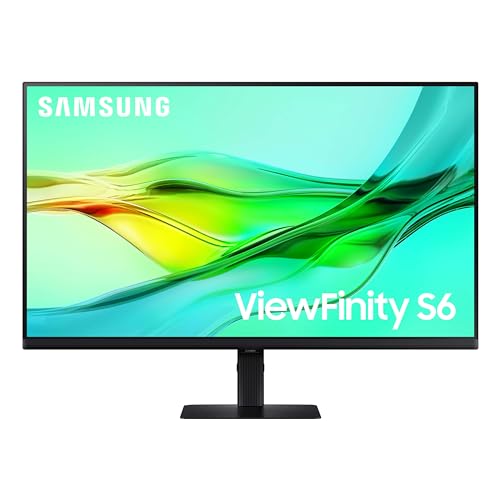
Samsung 32-Inch ViewFinity QHD Monitor
The Samsung ViewFinity S6 matches the Dell’s 32-inch QHD size and 100Hz refresh rate but shifts the focus to office connectivity. It includes KVM switching, allowing you to control multiple computers with one keyboard and mouse. This feature is absent on the Dell, which relies on its integrated RJ45 Ethernet port for network stability. The Samsung weighs less at 15.9 pounds compared to the Dell’s 20.9 pounds, making it easier to move. If you need to switch between devices frequently, the KVM is a significant advantage. If you require built-in wired networking, the Dell remains the stronger choice for single-cable simplicity.
LG 34-Inch Curved Ultrawide USB-C Monitor
The LG 34-inch Curved Ultrawide offers a wider 34-inch screen with WQHD resolution, providing more horizontal space for multitasking than the Dell’s standard 16:9 aspect ratio. It uses a VA panel instead of the Dell’s IPS, which typically delivers deeper blacks but narrower viewing angles. The LG includes USB-C connectivity for charging, similar to the Dell, but lacks the integrated Ethernet jack. This monitor suits users who prioritize screen real estate and color accuracy over the precise color consistency of IPS panels. If you work with wide timelines or multiple side-by-side windows, the ultrawide format offers a distinct productivity boost.
MSI 27-Inch QD-OLED Gaming Monitor
The MSI MAG 271QP QD-OLED diverges significantly with its QD-OLED panel technology, offering perfect blacks and vibrant colors that surpass the Dell’s IPS capabilities. It features a much higher 280Hz refresh rate, making it suitable for fast-paced gaming, whereas the Dell is limited to 100Hz. The screen is smaller at 27 inches, reducing the workspace area. This monitor is ideal for creators and gamers who need top-tier contrast and speed. It lacks the Dell’s USB-C hub features and Ethernet port, focusing instead on pure visual performance. If you prioritize image quality and motion clarity over productivity connectivity, this is the superior option.
InnoView 18.5" 2K 100Hz Dual Portable Monitor
The InnoView 18.5-inch Dual Portable Monitor is designed for mobility, offering two screens in a compact, foldable package. It is significantly smaller and lighter than the Dell, weighing just 5.15 pounds. This monitor is not a direct desk replacement but an expansion tool for travelers. It supports USB-C connectivity for power and video, similar to the Dell’s single-cable approach. If you need a second screen while working remotely or in coffee shops, this portable solution is practical. It does not offer the large, static workspace of the Dell. It is best for users who value portability and expanded screen count over a primary high-resolution display.
Deco Gear 39" White QHD 165Hz
The Deco Gear 39-inch Curved Monitor provides a massive 16:10 aspect ratio with QHD resolution and a 165Hz refresh rate. It uses a VA panel for deeper contrast compared to the Dell’s IPS. The high refresh rate makes it better for gaming, while the large curved screen offers immersive multitasking. It includes USB-C connectivity for laptop docking, similar to the Dell. However, it lacks the integrated Ethernet port found on the Dell. This monitor is ideal for users who want a single, expansive screen for both work and play. It is heavier and larger than the Dell, requiring more desk space.
Dell 27 Plus QHD USB-C Monitor
The Dell S2725DC is a smaller 27-inch variant from the same brand, featuring a 144Hz refresh rate. It retains the QHD resolution and USB-C connectivity with power delivery, matching the Dell Pro 32 Plus’s core functionality. The key difference is the size and speed. The 27-inch screen offers less workspace, but the higher refresh rate benefits gaming and smooth motion. It lacks the integrated RJ45 Ethernet port found on the larger model. This monitor suits users who want Dell’s build quality and connectivity in a compact form factor. If you have limited desk space or prefer a faster refresh rate, this smaller Dell is a practical alternative.
Quick picks
Our 7 picks

Dell Pro 32-Inch QHD USB-C Hub Monitor
Best for: productivity setups with USB-C hubs
- Screen Size
- 31.5-inch
- Resolution
- 2560x1440
- Refresh Rate
- 100Hz
- Panel Type
- IPS
- Response Time
- 8ms
- Connectivity
- USB-C, HDMI, DisplayPort, RJ45, USB-A
View on Amazon: Dell Pro 32-Inch QHD USB-C Hub Monitor Affiliate link
The Dell Pro 32 Plus QHD is a 31.5-inch monitor with 2560x1440 resolution and a 100Hz refresh rate. It uses IPS panel technology for wide viewing angles and includes USB-C connectivity with up to 90W power delivery. The display covers 99% of the sRGB color gamut and features an integrated RJ45 port. This setup suits users who need a single-cable solution for productivity and eye comfort certification.
Pros
- USB-C port delivers up to 90W power delivery
- IPS panel with 99% sRGB color coverage
- Integrated RJ45 Ethernet port for hub connectivity
- TÜV Rheinland 4-star eye comfort certification
Cons
- 8ms response time is slower than gaming monitors
- 100Hz refresh rate limits high-speed motion clarity
- 1500:1 contrast ratio is lower than VA panels
Good fit if
- You want a single USB-C cable for power and data
- You need an integrated Ethernet port for your desk
- You prioritize color accuracy and eye comfort for work
Skip if
- You require a 144Hz or higher refresh rate for gaming
- You need deep blacks and high contrast for media
- You prefer a faster 1ms response time for competitive play
Verdict: The Dell Pro 32 Plus QHD USB-C Monitor is a practical choice for professionals who value connectivity and color fidelity. It fits users who want to reduce cable clutter with USB-C power delivery and built-in Ethernet, rather than gamers seeking high refresh rates.
Samsung 32-Inch ViewFinity QHD Monitor
Best for: productivity tasks and laptop docking
- Screen Size
- 32"
- Resolution
- 2560x1440
- Refresh Rate
- 100Hz
- Connectivity
- USB-C, LAN
- Size
- 32 Inch
- Dimensions
- 8.66 × 28.1 × 23 inches
View on Amazon: Samsung 32-Inch ViewFinity QHD Monitor Affiliate link
The Samsung ViewFinity S6 is a 32-inch QHD monitor designed for productivity. It features a 100Hz refresh rate and HDR10 support for clearer visuals. A USB-C port delivers 90W charging and data transfer, while a built-in LAN port adds Ethernet connectivity. The included KVM switch lets you control two sources with one keyboard and mouse. This setup suits users who need a clean, tool-free desk arrangement with strong connectivity options.
Pros
- USB-C port provides 90W charging and data transfer
- Built-in LAN port for direct Ethernet connectivity
- KVM switch controls two sources with one keyboard and mouse
- Tool-free Easy Setup Stand for quick assembly
- Pivoting screen supports 90-degree rotation for documents
Cons
- 100Hz refresh rate is lower than 165Hz or 210Hz gaming monitors
- No mention of adaptive sync technologies like FreeSync or G-Sync
- 32-inch size is larger than the 27-inch standard for QHD
Good fit if
- You need a USB-C monitor with 90W charging for your laptop
- You want to control two computers with a single keyboard and mouse
- You prefer a tool-free stand setup for your desk
Skip if
- You require a high refresh rate above 100Hz for fast-paced gaming
- You need a smaller 27-inch footprint for a compact desk
- You prioritize a curved display for immersive viewing
Verdict: The Samsung ViewFinity S6 32" QHD fits users who need a productivity-focused display with robust USB-C charging and KVM switching capabilities. It is a practical choice for office setups where connectivity and screen real estate matter more than high refresh rates.

LG 34-Inch Curved Ultrawide USB-C Monitor
Best for: multitasking and color-accurate work
- Screen Size
- 34"
- Resolution
- 3440 × 1440
- Refresh Rate
- 100Hz
- Aspect Ratio
- 21:9
- Response Time
- 5ms
- Connectivity
- USB-C 65W, 2 x HDMI, DisplayPort
View on Amazon: LG 34-Inch Curved Ultrawide USB-C Monitor Affiliate link
This 34-inch ultrawide monitor offers a 21:9 aspect ratio with WQHD resolution, giving you more horizontal space for multitasking than the 16:9 screens in this guide. It features a VA panel with 100Hz refresh rate and covers 99% of the sRGB color gamut. The USB-C port delivers 65W of power delivery, allowing you to charge laptops while connected. It includes height and tilt adjustments for ergonomic positioning.
Pros
- 34-inch WQHD (3440x1440) ultrawide display
- USB-C with 65W power delivery
- 99% sRGB color coverage
- Height and tilt adjustable stand
Cons
- 5ms response time is slower than gaming monitors
- 100Hz refresh rate limits high-speed gaming
- VA panel may show slower black response
Good fit if
- You need extra horizontal screen real estate for productivity
- You want a single cable for display and laptop charging
- You prioritize color accuracy for creative work
Skip if
- You require high refresh rates for competitive gaming
- You prefer a standard 16:9 aspect ratio
- You need a smaller 27-inch footprint
Verdict: LG 34" Curved WQHD USB-C Monitor provides a wide, color-accurate workspace with convenient USB-C charging, making it ideal for multitaskers who do not need high-speed gaming performance.

MSI 27-Inch QD-OLED Gaming Monitor
Best for: OLED gaming and color-accurate content creation
- Screen Size
- 27-Inch
- Resolution
- 2560x1440
- Refresh Rate
- 280Hz
- Panel Type
- Quantum Dot OLED
- Response Time
- 0.03ms (GtG)
- Connectivity
- DisplayPort 1.4a, HDMI 2.1, USB Type-C
View on Amazon: MSI 27-Inch QD-OLED Gaming Monitor Affiliate link
This 27-inch monitor uses a Quantum Dot OLED panel for deep blacks and 1.07 billion colors. It delivers a 280Hz refresh rate and 0.03ms response time for fast gaming. The display supports 99% DCI-P3 color gamut with VESA DisplayHDR True Black 400 certification. You get USB-C with 15W power delivery, HDMI 2.1, and DisplayPort 1.4a. It includes a 4-way adjustable stand for ergonomic positioning.
Pros
- Quantum Dot OLED panel with 10-bit color depth
- 280Hz refresh rate with 0.03ms GtG response time
- USB-C connectivity with 15W power delivery
- VESA DisplayHDR True Black 400 certification
Cons
- 27-inch screen is smaller than the 31.5-inch Dell Pro 32 Plus
- USB-C port provides only 15W power delivery
- No built-in USB hub or Ethernet port listed
Good fit if
- You prioritize OLED image quality and high refresh rates
- You want precise color accuracy for creative work
- You need a compact 27-inch display for your desk
Skip if
- You need a larger 32-inch screen for productivity
- You require high-wattage USB-C charging for laptops
- You prefer IPS panels over OLED technology
Verdict: MSI MAG 271QP QD-OLED 27" 280Hz suits gamers and creators who want top-tier OLED contrast and speed in a compact 27-inch form factor.

InnoView 18.5" 2K 100Hz Dual Portable Monitor
Best for: mobile dual-screen productivity
- Screen Size
- 18.5"
- Resolution
- 2560x1440
- Refresh Rate
- 100Hz
- Panel Type
- IPS
- Connectivity
- DP, USB-C, HDMI
- Dimensions
- 0.96 × 16.7 × 10.2 inches
View on Amazon: InnoView 18.5" 2K 100Hz Dual Portable Monitor Affiliate link
This dual-screen setup offers two 18.5-inch IPS panels with 2560 x 1440 resolution and 100Hz refresh rates. It features 100% sRGB color coverage and USB-C connectivity for direct power and signal. The foldable design allows for a 315° rotating top screen and 0–180° adjustable stand. It suits users needing expanded workspace on the go, providing sharp visuals and flexible positioning for mobile productivity.
Pros
- Dual 18.5-inch IPS panels with 2560 x 1440 resolution
- 100% sRGB gamut for accurate color reproduction
- 100Hz refresh rate for smooth motion
- USB-C connectivity for power and data
- Foldable design with 315° rotating top screen
Cons
- Small 18.5-inch screen size limits immersive viewing
- Limited to 100Hz refresh rate compared to gaming monitors
- No mention of HDR support or high brightness specs
Good fit if
- You need a portable dual-screen setup for travel
- You prioritize color accuracy for creative work
- You want flexible screen positioning with a foldable design
Skip if
- You require a large single display for desktop use
- You need high refresh rates for competitive gaming
- You prefer a standard 27-inch or larger monitor
Verdict: InnoView 18.5" Dual Portable Monitor fits mobile professionals who need expanded workspace in a compact, foldable form factor. It is ideal for users who value color accuracy and portability over screen size.

Deco Gear 39" White QHD 165Hz
Best for: large-format high-refresh gaming and laptop multitasking
- Screen Size
- 39"
- Resolution
- 2560x1440
- Refresh Rate
- 165Hz
- Aspect Ratio
- 21:9
- Response Time
- 1ms MPRT
- Sync Technology
- Adaptive Sync
View on Amazon: Deco Gear 39" White QHD 165Hz Affiliate link
This Deco Gear display provides a 39-inch curved VA panel with a 2560x1440 resolution. It pairs a fast 165Hz refresh rate and 1ms MPRT with a 65W USB-C connection, DisplayPort 1.4, and HDMI 2.0 inputs. Built-in PIP and PBP features let you view two systems simultaneously. It suits you if you want high-refresh gaming and single-cable laptop docking on an expansive screen.
Pros
- Fast 165Hz refresh rate with 1ms MPRT and Adaptive Sync
- 65W USB-C port supplies video and laptop power delivery
- PIP and PBP support for managing two video inputs simultaneously
- Wide 99% sRGB color coverage with HDR400
Cons
- Lower pixel density due to spreading 2560x1440 resolution across a 39-inch display
- Heavy 25.6-pound weight requires a large and sturdy desk setup
- HDMI connectivity is limited to HDMI 2.0 rather than HDMI 2.1
Good fit if
- You want a fast 165Hz refresh rate for responsive PC gaming.
- You need a 65W USB-C connection to charge and display a laptop.
- You want an expansive 39-inch curved screen for split-screen multitasking.
Skip if
- You need high pixel density for sharp text rendering.
- You have a small workstation unable to hold a 25.6-pound monitor.
- You require HDMI 2.1 ports for newer game consoles.
Verdict: Deco Gear 39-Inch Curved 165Hz Monitor delivers smooth high-refresh gameplay and single-cable laptop connectivity for users who want an extra-large curved workstation.

Dell 27 Plus QHD USB-C Monitor
Best for: Compact 144Hz QHD setups with USB-C
- Screen Size
- 27"
- Resolution
- 2560x1440
- Refresh Rate
- 144Hz
- Response Time
- 1ms MPRT
- Sync Technology
- AMD FreeSync
- Connectivity
- USB-C, HDMI, DisplayPort 1.4
View on Amazon: Dell 27 Plus QHD USB-C Monitor Affiliate link
The Dell S2725DC is a 27-inch QHD monitor with a 144Hz refresh rate and 1ms MPRT response time. It features USB-C connectivity with up to 65W power delivery. The panel includes AMD FreeSync and dual 3W speakers. It suits users needing a compact, high-refresh display with simplified single-cable setup for laptops or desktops.
Pros
- 144Hz refresh rate for smooth motion
- 1ms MPRT response time reduces blur
- USB-C with 65W power delivery
- Built-in dual 3W speakers
Cons
- 27-inch size is smaller than the 32-inch Dell Pro
- 1500:1 contrast ratio is lower than VA panels
- No mention of height adjustment or pivot in specs
Good fit if
- You want a 144Hz QHD display in a compact 27-inch form factor
- You need USB-C connectivity with power delivery for a laptop
- You prefer a minimalist setup with integrated speakers
Skip if
- You require a 32-inch screen for more workspace
- You need a high-contrast VA panel for dark room viewing
- You require height-adjustable stand or pivot functionality
Verdict: Dell S2725DC 27-Inch QHD 144Hz Monitor is a solid pick for users who prioritize a high refresh rate and USB-C convenience in a smaller footprint. It fits those who do not need the larger canvas of a 32-inch display.
Specifications side by side
| Spec | Dell Pro 32-Inch QHD USB-C Hub Monitor | Samsung 32-Inch ViewFinity QHD Monitor | LG 34-Inch Curved Ultrawide USB-C Monitor | MSI 27-Inch QD-OLED Gaming Monitor | InnoView 18.5" 2K 100Hz Dual Portable Monitor | Deco Gear 39" White QHD 165Hz | Dell 27 Plus QHD USB-C Monitor |
|---|---|---|---|---|---|---|---|
| Screen Size | 31.5-inch | 32" | 34" | 27-Inch | 18.5" | 39" | 27" |
| Resolution | 2560x1440 | 2560x1440 | 3440 × 1440 | 2560x1440 | 2560x1440 | 2560x1440 | 2560x1440 |
| Refresh Rate | 100Hz | 100Hz | 100Hz | 280Hz | 100Hz | 165Hz | 144Hz |
| Panel Type | IPS | not stated | not stated | Quantum Dot OLED | IPS | not stated | not stated |
| Aspect Ratio | not stated | not stated | 21:9 | not stated | not stated | 21:9 | not stated |
| Response Time | 8ms | not stated | 5ms | 0.03ms (GtG) | not stated | 1ms MPRT | 1ms MPRT |
| Sync Technology | not stated | not stated | not stated | not stated | not stated | Adaptive Sync | AMD FreeSync |
| Connectivity | USB-C, HDMI, DisplayPort, RJ45, USB-A | USB-C, LAN | USB-C 65W, 2 x HDMI, DisplayPort | DisplayPort 1.4a, HDMI 2.1, USB Type-C | DP, USB-C, HDMI | HDMI 2.0, DisplayPort 1.4, USB-C | USB-C, HDMI, DisplayPort 1.4 |
| Size | not stated | 32 Inch | 100Hz-USB Type C 65W/DP/HDMI | not stated | 18.5 inch 2K 100Hz | 39 Inch-165-W | 27 Inch |
| Dimensions | 8.46 × 28.1 × 18.5 inches | 8.66 × 28.1 × 23 inches | 10.2 × 31.9 × 22.4 inches | 23.9 × 9.52 × 16.4 inches | 0.96 × 16.7 × 10.2 inches | 11.3 × 34.6 × 25.4 inches | 7.95 × 24.1 × 15.4 inches |
| Weight | 20.9 pounds | 15.9 pounds | not stated | 24 pounds | 5.15 pounds | 25.6 pounds | 14.3 pounds |
| Color | Black | Black | Black-Tilt/Height | Black | black | White | Ash White |
| Model | R02G3 | LS32D606UANXGO | LG 34inch monitor | MAG 271QP QD-OLED X28 | INVPM809 | WKDGEDGE391WHT | S2725DC |
Looking beyond this list? See remarkable paper pro marker plus alternatives.
Frequently asked questions
Which monitor offers the best USB-C connectivity for productivity?
The Dell Pro 32 Plus QHD USB-C Monitor is the top choice for professionals needing robust connectivity. It features a 31.5-inch QHD panel with a 100Hz refresh rate. The USB-C port allows for single-cable setup, reducing desk clutter. This model is ideal for users who prioritize color fidelity and hub functionality over high-speed gaming performance.
Is there a budget-friendly alternative to the Dell Pro 32?
The Samsung ViewFinity S6 serves as the best budget option in this comparison. It matches the Dell’s 32-inch QHD size and 100Hz refresh rate. This monitor includes KVM switching, letting you control multiple computers with one keyboard and mouse. It is a practical choice for office setups where connectivity matters more than high refresh rates.
Can I get a wider screen for multitasking instead of a 32-inch display?
The LG 34-Inch Curved Ultrawide Monitor provides a wider workspace for multitasking. It features a 34-inch VA panel with WQHD resolution and a 100Hz refresh rate. The curved design enhances immersion for color-accurate work. This USB-C monitor is suitable for users who need extra screen real estate but do not require high-speed gaming performance.
Which option is best for OLED gaming and content creation?
The MSI MAG 271QP QD-OLED is the best QD-OLED pick. It features a 27-inch panel with 1440p resolution and a 280Hz refresh rate. The QD-OLED panel delivers top-tier contrast and speed. This compact monitor suits gamers and creators who want premium image quality in a smaller form factor rather than a large productivity display.
What is a good portable dual-monitor solution for mobile work?
The InnoView 18.5" Dual Portable Monitor is ideal for mobile professionals. It offers two 18.5-inch screens in a compact, foldable design weighing 5.15 pounds. The device supports 100Hz refresh rates and connects via DisplayPort, HDMI, or USB-C. It is best for users who value portability and expanded workspace over large stationary screen sizes.
Which monitor has the highest refresh rate for smooth gameplay?
The Deco Gear 39-Inch Curved Monitor offers a 165Hz refresh rate for smooth gameplay. It features a 39-inch VA panel with QHD resolution. The large curved screen provides an immersive experience for gaming and laptop multitasking. It includes USB-C connectivity for single-cable laptop setups, making it a strong choice for users wanting an extra-large curved workstation.
Is there a smaller Dell alternative with a higher refresh rate?
The Dell S2725DC is a compact 27-inch QHD monitor with a 144Hz refresh rate. It features Ash White coloring and includes USB-C connectivity. This model is solid for users who prioritize high refresh rates and convenience in a smaller footprint. It fits those who do not need the larger canvas of a 32-inch display but want Dell reliability.