Looking Beyond the Dell UltraSharp 27-Inch 120Hz Monitor? 6 Alternatives Worth a Look
As an Amazon Associate we earn from qualifying purchases. Links on this page are affiliate links.
The Dell UltraSharp 27 U2724D delivers a smooth 120Hz refresh rate and an ambient light sensor for consistent brightness. Its InfinityEdge design and full ergonomic stand support color-accurate creative work and office tasks. If you need these specific features, this monitor remains a strong option. However, you might seek different specifications, such as a larger screen size or higher resolution. You may also prefer a different brand or a curved display for gaming. In that case, exploring dell ultrasharp 27 monitor alternatives can help you find a better fit.
We selected 6 alternatives because their core specs overlap with the original. Some options offer 4K resolution for sharper text and media. Others provide ultrawide formats or higher refresh rates for gaming. This list includes models from Dell, SANSUI, AOC, Amzfast, and ASUS. Each entry highlights distinct advantages like Mini-LED technology or USB-C connectivity. You can compare these options to decide which display matches your workflow. Whether you prioritize color accuracy, speed, or screen real estate, there is a suitable choice here.
Our top pick: Dell UltraSharp 27-Inch 120Hz Monitor.
How these alternatives compare
Dell 32-Inch 4K 120Hz Monitor
The Dell S3225QS offers a larger 32-inch screen with 4K UHD resolution, compared to the Dell U2724D’s 27-inch panel. This VA panel type provides deeper contrast for media consumption, though it may not match the viewing angles of an IPS display. Both monitors share a 120Hz refresh rate for smooth motion. The S3225QS supports FreeSync technology, which helps reduce screen tearing during compatible use. You gain more screen real estate and visual depth, but you lose the ambient light sensor and the compact footprint of the 27-inch model. This option suits users who prioritize screen size and color accuracy for productivity or media over the specific ergonomic features of the UltraSharp line.
SANSUI 27-Inch 4K Dual-Mode Gaming Monitor
The SANSUI ES-G27D1U features a 27-inch 4K UHD display, matching the Dell U2724D’s diagonal size but offering higher pixel density. While the Dell model specifies a 120Hz refresh rate, the SANSUI unit is designed for dual-mode gaming, allowing you to switch between 4K and FHD resolutions to boost frame rates. This versatility benefits gamers who want crisp visuals in 4K or high refresh rates in FHD. The SANSUI monitor lacks the ambient light sensor and the specific ergonomic stand adjustments found on the Dell UltraSharp. You trade the consistent brightness optimization and color management software for gaming-focused flexibility. This choice fits players who value resolution switching over the steady, office-oriented performance of the Dell.
SANSUI 34-Inch 240Hz Curved Ultrawide Monitor
The SANSUI ES-G34C5 PRO is a 34-inch ultrawide monitor with a 240Hz refresh rate, significantly differing from the 27-inch 120Hz Dell U2724D. This curved display provides a wider field of view for immersive gaming, whereas the Dell offers a standard aspect ratio better suited for productivity. The SANSUI model delivers much higher speed for competitive gaming, but it lacks the color accuracy features and ambient light sensor of the UltraSharp. You gain an expansive, fast screen for gaming, but you lose the ergonomic stand adjustments and the color management capabilities of the Dell. This alternative is ideal for users who prioritize ultrawide immersion and high refresh rates over the precise color work and office ergonomics of the Dell.
AOC 27-Inch 320Hz Mini-LED Monitor
The AOC Q27G4SLM/WS is a 27-inch 1440p monitor with a 320Hz refresh rate and Mini-LED technology, contrasting with the Dell U2724D’s 120Hz and likely standard LED backlight. This AOC model targets competitive gamers with its high speed and HDR brightness, while the Dell focuses on color accuracy and office ergonomics. The AOC lacks the ambient light sensor and the full ergonomic stand found on the Dell UltraSharp. You gain superior motion clarity and peak brightness for gaming, but you sacrifice the consistent brightness optimization and color management tools of the Dell. This option suits players who value raw speed and HDR performance over the steady, color-accurate workflow supported by the Dell.
Amzfast 32-Inch Curved 4K 120Hz Monitor
The Amzfast AMZG32C3U provides a 32-inch 4K UHD curved display with a 120Hz refresh rate, differing from the 27-inch flat Dell U2724D. The larger screen and curvature offer a more immersive experience for console gaming and multitasking, while the Dell remains flat for precise alignment tasks. Both monitors share the 120Hz refresh rate, but the Amzfast lacks the ambient light sensor and the specific ergonomic adjustments of the Dell. You gain a larger, curved surface for media and gaming, but you lose the compact footprint and color management features of the UltraSharp. This monitor fits users who prioritize screen size and immersion over the specific office-focused features and color accuracy of the Dell.
ASUS 27-Inch 4K USB-C Monitor
The ASUS VA27UCPS is a 27-inch 4K UHD IPS monitor with USB-C connectivity, matching the Dell U2724D’s size but offering higher resolution. This ASUS model includes USB-C for simplified laptop connections, a feature not specified for the Dell. Both monitors support color-accurate work, but the Dell includes an ambient light sensor and a full ergonomic stand with height adjustment. The ASUS lacks the ambient light sensor and may not offer the same range of physical adjustments. You gain higher pixel density and convenient USB-C connectivity, but you lose the brightness optimization and ergonomic flexibility of the Dell. This option suits users who value 4K clarity and cable management over the specific ambient and ergonomic features of the UltraSharp.
Quick picks
Our 7 picks

Dell UltraSharp 27-Inch 120Hz Monitor
Best for: color-accurate creative work and office tasks
- Screen Size
- 27"
- Refresh Rate
- 120 Hz
- Panel Type
- IPS Black
- Dimensions
- 24.1 × 7.57 × 21.1 inches
- Weight
- 9.9 pounds
View on Amazon: Dell UltraSharp 27-Inch 120Hz Monitor Affiliate link
The Dell UltraSharp 27 U2724D is a 27-inch monitor with a 120Hz refresh rate. It features an IPS panel with 99% sRGB coverage and an ambient light sensor. The stand offers tilt, swivel, pivot, and height adjustments. This monitor suits users who need color accuracy and ergonomic flexibility for daily tasks.
Pros
- 120Hz refresh rate for smoother motion
- Built-in ambient light sensor
- Height, tilt, swivel, and pivot adjustments
- 99% sRGB color gamut
Cons
- 27-inch size limits vertical space
- No USB-C connectivity listed
- Standard IPS panel, not Mini-LED
Good fit if
- You prioritize color accuracy for creative work
- You need ergonomic stand adjustments
- You want a 120Hz refresh rate
Skip if
- You require USB-C connectivity
- You need a larger 32-inch screen
- You want Mini-LED HDR performance
Verdict: Dell UltraSharp 27 U2724D fits users who value color accuracy and ergonomic flexibility. It is a solid choice for creative professionals and office workers who need a reliable, adjustable display.

Dell 32-Inch 4K 120Hz Monitor
Best for: 4K media consumption and color-critical productivity
- Screen Size
- 31.5in
- Resolution
- 3840x2160
- Refresh Rate
- 120Hz
- Response Time
- 0.03ms
- Sync Technology
- AMD FreeSync Premium
- Connectivity
- HDMI, DisplayPort
View on Amazon: Dell 32-Inch 4K 120Hz Monitor Affiliate link
The Dell S3225QS is a 32-inch 4K UHD monitor with a VA panel and 120Hz refresh rate. It features AMD FreeSync Premium and a 0.03ms response time for smooth visuals. The display offers 99% sRGB coverage and a 1500:1 contrast ratio for deep blacks. This model suits users seeking high resolution and color accuracy in a larger format, particularly those who value immersive contrast over fast pixel switching.
Pros
- 4K UHD resolution on a 32-inch VA panel
- 99% sRGB and 95% DCI-P3 color coverage
- 120Hz refresh rate with AMD FreeSync Premium
- Ultra-thin 0.03ms response time
- Improved ComfortView Plus reduces blue light to ≤35%
Cons
- VA panel contrast ratio of 1500:1 is lower than IPS alternatives
- Limited to HDMI connectivity in this specific variation
- Heavier build at 19.3 pounds compared to lighter 27-inch models
Good fit if
- You want a large 32-inch screen for detailed work or media
- You prioritize high contrast and deep blacks for dark room viewing
- You need 4K resolution with 120Hz smoothness for mixed use
Skip if
- You require USB-C connectivity for single-cable docking
- You need an IPS panel for wider viewing angles
- You prefer a lighter monitor under 15 pounds for easy mounting
Verdict: Dell S3225QS 32-inch 4K VA Monitor delivers strong color accuracy and contrast for media and productivity, making it a solid choice for users who value screen real estate and visual depth over ultra-fast gaming response times.
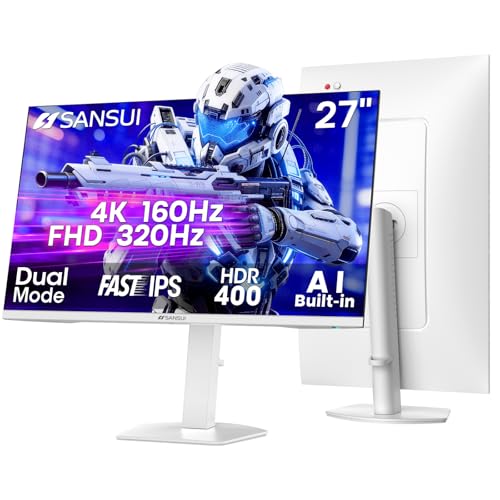
SANSUI 27-Inch 4K Dual-Mode Gaming Monitor
Best for: Gamers switching between 4K and FHD modes
- Screen Size
- 27 Inch
- Resolution
- 4K UHD
- Refresh Rate
- 160Hz / 320Hz
- Panel Type
- Fast IPS
- Response Time
- 1ms(OD)
- Sync Technology
- FreeSync Premium
View on Amazon: SANSUI 27-Inch 4K Dual-Mode Gaming Monitor Affiliate link
The SANSUI 27-inch monitor offers a dual-mode panel that switches between 4K UHD at 160Hz and FHD at 320Hz. You get a Fast IPS screen with 93% DCI-P3 color coverage and 400 nits brightness. It includes FreeSync Premium and built-in speakers. This setup suits gamers who want high refresh rates in lower resolutions or crisp 4K visuals for mixed use.
Pros
- Dual-mode resolution: 4K at 160Hz or FHD at 320Hz
- Fast IPS panel with 93% DCI-P3 color gamut
- Ergonomic stand with pivot, swivel, and height adjustment
- Built-in speakers and 3.5mm audio jack
Cons
- HDR400 certification limits high dynamic range performance
- 1ms MPRT response time relies on strobing, not native gray-to-gray
- No mention of USB-C connectivity or KVM switching
Good fit if
- You want 4K clarity at 160Hz for single-player games
- You need 320Hz refresh rates for competitive esports titles
- You prefer an IPS panel for accurate color reproduction
Skip if
- You require true HDR1000 brightness for cinematic content
- You need USB-C connectivity for laptop docking
- You want a native 1ms gray-to-gray response time
Verdict: SANSUI 27" 4K Gaming Monitor delivers versatile refresh rates and solid color accuracy for gamers who switch between resolution modes. It fits players who prioritize high frame rates in FHD or crisp visuals in 4K over premium HDR performance.

SANSUI 34-Inch 240Hz Curved Ultrawide Monitor
Best for: High-refresh ultrawide gaming and side-by-side multitasking
- Screen Size
- 34 Inch
- Resolution
- 3440x1440
- Refresh Rate
- 240Hz
- Panel Type
- Fast VA
- Aspect Ratio
- 21:9
- Response Time
- 1ms MPRT
View on Amazon: SANSUI 34-Inch 240Hz Curved Ultrawide Monitor Affiliate link
This SANSUI display gives you a 34-inch curved Fast VA panel with a 21:9 ultrawide aspect ratio and 3440x1440 resolution. Instead of the standard 120Hz refresh rate found on 27-inch office screens, you receive a 240Hz refresh rate and a 1ms MPRT response time. It suits you if you want extra horizontal workspace alongside high-frame-rate gaming capabilities.
Pros
- 3440x1440 UWQHD resolution across a 21:9 curved panel
- 240Hz refresh rate with 1ms MPRT response time
- Two HDMI 2.1 and two DisplayPort 1.4 inputs
- Hardware PIP and PBP multitasking support
Cons
- Stand adjustment is limited to tilt from -5 to 15 degrees
- VRR functionality only operates over HDMI 2.1 connections
- Free replacement and money-back warranty coverage spans 30 days
Good fit if
- You want an ultrawide 21:9 screen with a 240Hz refresh rate.
- You connect multiple video sources using PIP or PBP modes.
- You use a VESA 100x100mm mount for ergonomic adjustment.
Skip if
- You need height or swivel adjustment from the factory stand.
- You require Variable Refresh Rate over DisplayPort.
Verdict: SANSUI 34-Inch Curved 240Hz Ultrawide Monitor fits users who need a wide 1440p canvas paired with fast 240Hz motion clarity. Its tilt-only base means you should plan on a separate VESA arm if you need height adjustability.

AOC 27-Inch 320Hz Mini-LED Monitor
Best for: Competitive 1440p gaming with high HDR brightness
- Screen Size
- 27"
- Resolution
- 2560 x 1440
- Refresh Rate
- 320Hz
- Panel Type
- Mini-LED IPS
- Response Time
- 1ms GtG
- Sync Technology
- Adaptive Sync
View on Amazon: AOC 27-Inch 320Hz Mini-LED Monitor Affiliate link
This 27-inch QHD monitor uses a Mini-LED IPS panel with 1152 local dimming zones for high contrast. It reaches 320Hz refresh rates and 1200 nits peak brightness, certified DisplayHDR 1000. The white design includes full ergonomic adjustments. It suits competitive gamers who want high speed and vivid HDR visuals on a standard 1440p screen.
Pros
- 320Hz refresh rate for ultra-smooth motion
- 1152 local dimming zones for deep contrast
- 1200 nits peak brightness with HDR1000
- 1ms GtG response time
- Full ergonomic stand with pivot
Cons
- 2560x1440 resolution is lower than 4K alternatives
- White finish may clash with dark setups
- No mention of USB-C connectivity
Good fit if
- You prioritize high refresh rates for competitive gaming
- You want HDR1000 brightness on a 27-inch screen
- You prefer a white aesthetic for your desk
Skip if
- You need 4K UHD resolution for detailed work
- You require USB-C connectivity for docking
- You prefer a black monitor design
Verdict: AOC 27" 320Hz Mini-LED Gaming Monitor delivers top-tier speed and HDR brightness for competitive players who value 1440p clarity and a white design.

Amzfast 32-Inch Curved 4K 120Hz Monitor
Best for: console gaming and multitasking on a large screen
- Screen Size
- 32"
- Resolution
- 3840x2160
- Refresh Rate
- 120Hz
- Sync Technology
- Adaptive Sync, VRR
- Connectivity
- HDMI 2.1, DP 1.4, audio jack
- Size
- 32 Inch
View on Amazon: Amzfast 32-Inch Curved 4K 120Hz Monitor Affiliate link
This 32-inch curved monitor delivers 4K UHD resolution at 120Hz. It features Adaptive Sync and VRR to reduce motion blur. The panel covers 131% of the sRGB color gamut with 3000:1 contrast. You get PIP/PBP split-screen modes for multitasking. Built-in 3W speakers and a VESA mount add convenience. It targets console gamers and users needing a large, high-refresh display.
Pros
- 3840x2160 resolution on a 32-inch curved panel
- 120Hz refresh rate with HDMI 2.1 and DP 1.4
- Adaptive Sync and VRR support for smooth gameplay
- 131% sRGB color coverage and 3000:1 contrast ratio
- PIP/PBP split-screen functionality for multitasking
Cons
- 3000:1 contrast ratio is lower than IPS alternatives
- 300 nits peak brightness limits HDR effectiveness
- Only includes 3W speakers with limited audio output
Good fit if
- You want a large 32-inch screen for console gaming
- You need 4K resolution with 120Hz refresh rate
- You prefer curved displays for immersive viewing
Skip if
- You require high HDR brightness above 300 nits
- You need professional color accuracy beyond sRGB
- You prefer flat panels over curved designs
Verdict: Amzfast 32-inch 4K 120Hz Curved Monitor fits console gamers who want a large, smooth display with solid color coverage. It is a practical option for those prioritizing screen size and refresh rate over peak HDR performance.

ASUS 27-Inch 4K USB-C Monitor
Best for: office tasks and color-accurate work
- Screen Size
- 27 Inch
- Resolution
- 3840 x 2160
- Panel Type
- IPS
- Connectivity
- USB-C, HDMI, DisplayPort, USB hub
- Dimensions
- 24.2 × 8.8 × 20.6 inches
- Weight
- 15.2 pounds
View on Amazon: ASUS 27-Inch 4K USB-C Monitor Affiliate link
This 27-inch monitor uses an IPS panel to deliver 4K UHD resolution with 99% sRGB color coverage. It features a USB-C port that provides 65W power delivery alongside video signals. The stand offers full ergonomic adjustments including height, tilt, swivel, and pivot. It includes TÜV Rheinland-certified flicker-free and low blue light technologies for eye comfort during long work sessions.
Pros
- IPS panel with 178-degree wide viewing angles
- USB-C port supports 65W laptop charging
- Full ergonomic stand with height and pivot adjustment
- 99% sRGB color gamut coverage
Cons
- No high refresh rate listed, limiting gaming use
- No HDR certification beyond HDR-10 support
- No built-in speakers mentioned in data
Good fit if
- You need a single cable for video and power
- You prioritize color accuracy for professional work
- You require adjustable stand height and tilt
Skip if
- You need a high refresh rate for gaming
- You require built-in speakers for audio
- You want a curved display surface
Verdict: ASUS 27" 4K IPS Business Monitor is a solid choice for office workers who value color accuracy and clean desk setups. It suits users who want ergonomic flexibility and USB-C connectivity for their laptops.
Specifications side by side
| Spec | Dell UltraSharp 27-Inch 120Hz Monitor | Dell 32-Inch 4K 120Hz Monitor | SANSUI 27-Inch 4K Dual-Mode Gaming Monitor | SANSUI 34-Inch 240Hz Curved Ultrawide Monitor | AOC 27-Inch 320Hz Mini-LED Monitor | Amzfast 32-Inch Curved 4K 120Hz Monitor | ASUS 27-Inch 4K USB-C Monitor |
|---|---|---|---|---|---|---|---|
| Screen Size | 27" | 31.5in | 27 Inch | 34 Inch | 27" | 32" | 27 Inch |
| Resolution | not stated | 3840x2160 | 4K UHD | 3440x1440 | 2560 x 1440 | 3840x2160 | 3840 x 2160 |
| Refresh Rate | 120 Hz | 120Hz | 160Hz / 320Hz | 240Hz | 320Hz | 120Hz | not stated |
| Panel Type | IPS Black | not stated | Fast IPS | Fast VA | Mini-LED IPS | not stated | IPS |
| Aspect Ratio | not stated | not stated | not stated | 21:9 | not stated | not stated | not stated |
| Response Time | not stated | 0.03ms | 1ms(OD) | 1ms MPRT | 1ms GtG | not stated | not stated |
| Sync Technology | not stated | AMD FreeSync Premium | FreeSync Premium | FreeSync | Adaptive Sync | Adaptive Sync, VRR | not stated |
| Connectivity | not stated | HDMI, DisplayPort | 2×HDMI 2.1, 2×DisplayPort 1.4, 3.5mm | HDMI 2.1 x 2, DP 1.4 x 2, Earphone | HDMI 2.1, DP 1.4, Earphone Out | HDMI 2.1, DP 1.4, audio jack | USB-C, HDMI, DisplayPort, USB hub |
| Size | One Size | S3225QS | 26.9999 | 34 Inch | 27" 320Hz Mini-LED White | 32 Inch | 27 Inch |
| Dimensions | 24.1 × 7.57 × 21.1 inches | 8.73 × 28.1 × 17.6 inches | 5.63 × 27 × 19.3 inches | 7.48 × 31.8 × 17.9 inches | 28.7 × 18.9 × 7.4 inches | 7.48 × 28.2 × 20.1 inches | 24.2 × 8.8 × 20.6 inches |
| Weight | 9.9 pounds | 19.3 pounds | 11.2 pounds | not stated | not stated | not stated | 15.2 pounds |
| Color | Silver | Ash White | White | Black | Black | Black | BLACK |
| Model | U2724D | S3225QS | ES-G27D1U | ES-G34C5 PRO | Q27G4SLM/WS | AMZG32C3U | VA27UCPS |
For a related comparison, read dell 27 all in one desktop alternatives.
Frequently asked questions
Is there a better ultrawide option than the Dell UltraSharp 27?
Yes, the SANSUI 34-inch 240Hz Curved Ultrawide Monitor offers a wider field of view for immersive gaming. This model features a 240Hz refresh rate and a curved design. It prioritizes speed and screen width over the standard 16:9 aspect ratio found in the Dell U2724D.
What is the best budget alternative to the Dell 27-inch monitor?
The Dell S3225QS is the recommended budget choice. It provides a larger 32-inch screen with 4K UHD resolution and a 120Hz refresh rate. The VA panel type delivers strong contrast for media consumption, making it suitable for users who value screen real estate over ultra-fast response times.
Which monitor offers the highest refresh rate for competitive gaming?
The AOC 27-inch 320Hz Mini-LED Monitor provides the highest speed on this list. It features a 1440p resolution and Mini-LED technology for high HDR brightness. This setup is designed for competitive players who need top-tier speed and clarity in a 27-inch form factor.
Can I get a 4K monitor with USB-C connectivity?
The ASUS 27-inch 4K IPS Business Monitor includes USB-C connectivity. It features a 27-inch IPS panel with 4K UHD resolution. This model supports ergonomic flexibility and clean desk setups, making it a practical option for office workers who need reliable color accuracy and laptop connectivity.
Is there a curved 4K option for console gaming?
The Amzfast 32-inch Curved 4K 120Hz Monitor is designed for this use case. It combines a large 32-inch screen with a 120Hz refresh rate and 4K UHD resolution. This curved design offers a smooth display for console gamers who prioritize screen size and refresh rate over peak HDR performance.
Which monitor allows switching between 4K and FHD modes?
The SANSUI 27-inch 4K Dual-Mode Gaming Monitor supports switching between resolution modes. It delivers versatile refresh rates and solid color accuracy. This feature fits players who prioritize high frame rates in FHD or crisp visuals in 4K, offering flexibility that the standard Dell UltraSharp does not provide.
What is the largest screen size available in this list?
The largest option is the 32-inch Dell S3225QS or the Amzfast 32-inch Curved Monitor. Both models provide a 32-inch display with 4K UHD resolution. These larger screens offer more visual depth and screen real estate compared to the 27-inch panels found in the Dell UltraSharp and other alternatives.