ASUS 24-Inch Webcam Monitor Alternatives: 6 Similar Picks Compared
As an Amazon Associate we earn from qualifying purchases. Links on this page are affiliate links.
The ASUS 24-Inch Webcam Monitor is a practical choice for professionals who need integrated video conferencing tools and a highly adjustable stand. If you are looking for asus 24 inch webcam alternatives, this list compares 6 similar picks that share key specifications with the original. These alternatives were chosen because their specs overlap with the original, such as screen size, resolution, and connectivity options. You can find models that prioritize different features while maintaining a familiar footprint.
The original model offers a 24-inch 1080p IPS panel with a 100Hz refresh rate and a built-in webcam. It also includes ergonomic adjustments like height, tilt, swivel, and pivot. Some buyers might want a higher refresh rate for smoother motion in gaming or video playback. Others may prefer a curved display for better immersion or a VA panel for deeper contrast. You might also need USB-C docking for a single-cable laptop setup or legacy VGA connectivity for older computers. This guide helps you compare these spec differences to find the right monitor for your specific needs.
How each alternative compares
Sceptre 24-Inch Curved 180Hz Gaming Monitor
The Sceptre 24-Inch Curved 180Hz Gaming Monitor replaces the webcam and ergonomic stand with a curved VA panel and 180Hz refresh rate. You give up video conferencing tools and height adjustment for smoother motion and deeper contrast. This monitor fits gamers who prioritize fluid gameplay over color accuracy or built-in audio. It lacks USB-C connectivity and legacy VGA ports. If you need a dedicated gaming display without the bulk of a webcam module, this curved option delivers higher refresh rates at a lower cost. The trade-off is a fixed stand and narrower viewing angles compared to the IPS panel of the original.
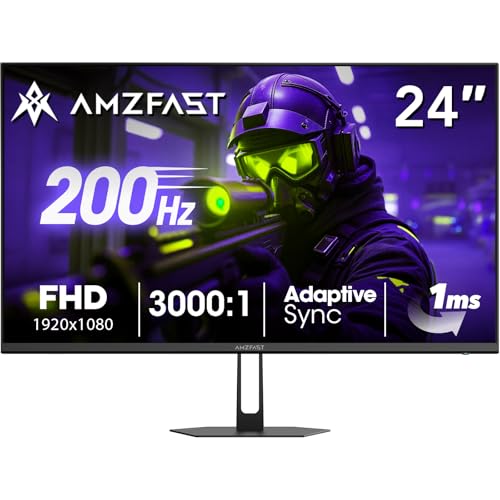
Amzfast 24-Inch 200Hz Gaming Monitor
The Amzfast 24-Inch 200Hz Gaming Monitor offers a higher 200Hz refresh rate and wide color coverage compared to the 100Hz IPS panel of the ASUS. You sacrifice the integrated webcam, microphone array, and adjustable stand for pure speed and color fidelity. This pick suits competitive gamers who need fast response times and do not require video conferencing features. It lacks USB-C docking and legacy connectivity options. The monitor provides a streamlined design focused on performance. If your workflow involves gaming rather than video calls, the Amzfast delivers superior motion clarity and color accuracy without the constraints of an all-in-one conferencing solution.
ASUS 24-Inch 1080p 120Hz IPS Monitor
The ASUS VA249QG 24-Inch 1080p 120Hz Monitor provides VGA connectivity and 120Hz refresh rates, replacing the webcam and USB-C options with legacy support. You gain compatibility with older computers but lose the integrated video conferencing suite and height-adjustable stand. This model fits users who need D-Sub connections and eye-care features in a compact form. It lacks the ergonomic flexibility of the original BE249QFK. The IPS panel ensures good color accuracy, similar to the original. If you prioritize legacy ports and basic eye care over modern conferencing tools, this ASUS variant offers a straightforward display solution without the premium features of the webcam model.
ASUS TUF Gaming 24-Inch 165Hz Monitor
The ASUS TUF Gaming VG247Q1A 24-inch 165Hz Monitor delivers 165Hz refresh rates and FreeSync support, replacing the webcam and ergonomic stand with gaming-focused performance. You gain smoother motion and adaptive sync technology but lose video conferencing tools and height adjustment. This pick suits gamers who want pure performance without extra features. It lacks USB-C connectivity and legacy VGA ports. The monitor is lighter and more compact than the original. If you need a dedicated gaming display with high refresh rates and low response times, this TUF model offers essential gaming specs. It is a solid choice for those who prioritize speed over integrated conferencing capabilities.
KTC 24-inch 180Hz Curved Monitor
The KTC 24-inch 180Hz Curved Monitor replaces the flat IPS panel and webcam with a curved VA screen and 180Hz refresh rate. You gain immersive contrast and smoother motion but lose color accuracy, wide viewing angles, and integrated video conferencing tools. This monitor fits players who value immersion and high refresh rates over professional features. It lacks USB-C docking and legacy connectivity. The fixed stand offers no height adjustment. If you prioritize curved visuals and fast refresh rates for gaming, the KTC delivers strong motion clarity. It is a dedicated gaming display that sacrifices the versatility of the original ASUS webcam monitor.
ASUS 24-Inch 120Hz USB-C Docking Monitor
The ASUS BE249CGN 24-inch 120Hz USB-C Monitor replaces the webcam and VGA ports with USB-C docking and Ethernet connectivity. You gain high-power USB-C support for laptop docking but lose the integrated webcam, microphone, and legacy D-Sub connections. This pick suits professionals who need Ethernet and USB-C hubs in a compact 24-inch form. It lacks the ergonomic flexibility of the original BE249QFK. The 120Hz refresh rate matches the ASUS VA249QG but offers modern connectivity. If you prioritize USB-C docking and wired networking over video conferencing tools, this ASUS variant provides a practical solution for laptop users who need a streamlined desk setup.
Quick picks
Our 7 picks

ASUS 24-Inch Webcam Monitor
Best for: remote work and video conferencing
- Screen Size
- 23.8-inch
- Resolution
- 1920x1080
- Refresh Rate
- 100Hz
- Panel Type
- IPS
- Connectivity
- DisplayPort, HDMI, D-sub
- Size
- 24 Inch
View on Amazon: ASUS 24-Inch Webcam Monitor Affiliate link
The ASUS BE249QFK is a 24-inch monitor with a 1080p IPS panel and 100Hz refresh rate. It includes a full HD webcam, microphone array, and stereo speakers for video calls. The stand offers height, tilt, swivel, and pivot adjustments. It supports DisplayPort and HDMI connections. This model suits users who need an all-in-one solution for work and light gaming.
Pros
- Integrated 1080p webcam with mic array and stereo speakers
- 100Hz refresh rate on a 1080p IPS panel
- Ergonomic stand with 130mm height adjustment and pivot
- 99% sRGB color accuracy
Cons
- 100Hz refresh rate is lower than the 150Hz-200Hz options in this list
- No USB-C connectivity mentioned in specifications
- D-sub port is an older analog standard
Good fit if
- You need a built-in webcam for video conferencing
- You want an ergonomic stand with height and pivot adjustments
- You prioritize color accuracy over high refresh rates
Skip if
- You require a refresh rate above 120Hz for gaming
- You need USB-C connectivity for single-cable docking
- You prefer a curved screen for immersion
Verdict: The ASUS BE249QFK 24-Inch Webcam Monitor is a practical choice for professionals who need integrated video conferencing tools and a highly adjustable stand. It fits users who value color accuracy and convenience over high-speed gaming performance.

Sceptre 24-Inch Curved 180Hz Gaming Monitor
Best for: Gaming on a budget with built-in audio
- Screen Size
- 24"
- Resolution
- 1080p
- Refresh Rate
- up to 180Hz
- Response Time
- 1ms BR
- Connectivity
- DisplayPort x2, HDMI x2, Audio Out
- Size
- 24 Inch
View on Amazon: Sceptre 24-Inch Curved 180Hz Gaming Monitor Affiliate link
This Sceptre monitor offers a 24-inch curved display with a 1080p resolution and 180Hz refresh rate. It includes two HDMI and two DisplayPort inputs for flexible connectivity. The 1ms response time supports fast-paced gaming. Built-in speakers add convenience, while 100% sRGB coverage ensures accurate colors. It is a practical option for users seeking high refresh rates on a budget.
Pros
- 180Hz refresh rate for smooth motion
- 100% sRGB color gamut for accurate visuals
- Built-in speakers reduce desk clutter
- Blue-Light Shift technology for eye comfort
Cons
- No USB-C connectivity for video or power
- 1080p resolution limits sharpness on larger screens
- 24-inch size is small for multitasking
Good fit if
- You want a high refresh rate for gaming
- You need built-in audio for simplicity
- You prefer a curved screen for immersion
Skip if
- You require USB-C connectivity
- You need 4K resolution for detailed work
- You want a large screen for productivity
Verdict: Sceptre 24-Inch 180Hz Curved Gaming Monitor fits gamers who prioritize smooth motion and built-in audio over high resolution. It is a solid choice for those who do not need USB-C connectivity.
Amzfast 24-Inch 200Hz Gaming Monitor
Best for: Fast-paced gaming on a 24-inch screen
- Screen Size
- 24"
- Resolution
- 1920 x 1080
- Refresh Rate
- 200Hz
- Panel Type
- Fast VA
- Response Time
- 1ms
- Sync Technology
- Adaptive Sync, FreeSync, G-SYNC
View on Amazon: Amzfast 24-Inch 200Hz Gaming Monitor Affiliate link
This 24-inch monitor uses a fast VA panel to deliver a 1920 x 1080 resolution at 200Hz. It includes 1ms adaptive sync and covers 129% of the sRGB color gamut. The display supports both FreeSync and G-SYNC to reduce tearing. You get HDMI 2.1 and DisplayPort 1.4 connectivity along with eye-care features like flicker-free technology. It is designed for gamers who want high refresh rates on a standard screen size.
Pros
- 200Hz refresh rate for smooth motion
- 129% sRGB color gamut coverage
- Adaptive Sync compatible with FreeSync and G-SYNC
- HDMI 2.1 and DisplayPort 1.4 inputs
Cons
- VA panel has slower pixel response than IPS
- No built-in webcam for video calls
- Limited to 24-inch screen size
Good fit if
- You want a high refresh rate on a 24-inch screen
- You need compatibility with both AMD and NVIDIA cards
- You prefer a fast VA panel for contrast
Skip if
- You require a built-in webcam
- You need a 1440p or 4K resolution
- You want an IPS panel for faster pixel transitions
Verdict: Amzfast 24 Inch 200Hz Gaming Monitor offers high refresh rates and wide color coverage for competitive gaming. It fits players who prioritize speed and color accuracy over a larger display or webcam integration.

ASUS 24-Inch 1080p 120Hz IPS Monitor
Best for: Users needing VGA support and color accuracy
- Screen Size
- 24 Inch
- Resolution
- 1080p
- Refresh Rate
- 120Hz
- Panel Type
- IPS
- Response Time
- 1ms MPRT
- Sync Technology
- Adaptive-Sync
View on Amazon: ASUS 24-Inch 1080p 120Hz IPS Monitor Affiliate link
The ASUS VA249QG is a 24-inch 1080p IPS monitor designed for clear visuals and smooth motion. It features a 120Hz refresh rate and 1ms MPRT response time to reduce blur. The panel covers 99% sRGB for consistent color. You get HDMI, DisplayPort, and VGA connectivity. Eye Care technology minimizes flicker and blue light. This model suits users who want a reliable, frameless display for daily tasks and casual gaming.
Pros
- IPS panel with 99% sRGB color coverage
- 120Hz refresh rate for smoother motion
- 1ms MPRT response time reduces blur
- Multiple ports including HDMI, DisplayPort, and VGA
- Flicker-free and low blue light certification
Cons
- 120Hz refresh rate is lower than the 150Hz to 200Hz found on other list options
- No USB-C connectivity unlike the ASUS BE249CGN
- Includes VGA port which is less modern than digital-only connections
Good fit if
- You need flexible connectivity with legacy VGA support
- You prioritize color accuracy and viewing angles for work or media
- You want a frameless design for multi-monitor setups
Skip if
- You require USB-C connectivity for docking stations
- You need a refresh rate above 120Hz for competitive gaming
- You prefer a curved screen for immersive gaming
Verdict: ASUS VA249QG 24-Inch 1080p 120Hz Monitor is a solid choice for users who value color accuracy and legacy connectivity over high refresh rates. It fits well in home offices or dorm rooms where VGA support and eye care features matter most.

ASUS TUF Gaming 24-Inch 165Hz Monitor
Best for: Gaming on a budget with high refresh rates
- Screen Size
- 24"
- Resolution
- 1920 x 1080
- Refresh Rate
- 165Hz
- Response Time
- 1ms MPRT
- Sync Technology
- Adaptive-sync, FreeSync Premium
- Connectivity
- HDMI, DisplayPort
View on Amazon: ASUS TUF Gaming 24-Inch 165Hz Monitor Affiliate link
The ASUS VG247Q1A is a 24-inch Full HD gaming monitor with a 165Hz refresh rate. It features a 1ms MPRT response time and FreeSync Premium support to reduce screen tearing. Shadow Boost technology brightens dark areas in games. It connects via HDMI and DisplayPort. This monitor suits players who want smooth motion and low input lag without needing built-in webcams or USB-C hubs found in other options.
Pros
- 165Hz refresh rate for smooth gameplay
- 1ms MPRT response time with ELMB technology
- FreeSync Premium and Adaptive-Sync compatibility
- Shadow Boost enhances visibility in dark scenes
Cons
- No built-in webcam unlike ASUS BE249QFK
- No USB-C connectivity unlike ASUS BE249CGN
- Flat panel design unlike curved Sceptre or KTC models
Good fit if
- You prioritize high refresh rates over built-in peripherals
- You use NVIDIA or AMD graphics cards for sync support
- You want a compact 24-inch display for desk space
Skip if
- You need a monitor with an integrated webcam
- You require USB-C connectivity for device charging
- You prefer a curved screen for immersion
Verdict: The ASUS VG247Q1A 24-inch 165Hz Monitor delivers essential gaming specs like 165Hz refresh and 1ms response time. It fits buyers who want pure performance without the bulk or cost of extra features like webcams or USB-C hubs.

KTC 24-inch 180Hz Curved Monitor
Best for: immersive 1080p gaming with high refresh rates
- Screen Size
- 24"
- Resolution
- 1080p
- Refresh Rate
- 180Hz
- Response Time
- 1ms
- Sync Technology
- Adaptive Sync, FreeSync
- Connectivity
- HDMI 2.0, DisplayPort 1.4, audio out
View on Amazon: KTC 24-inch 180Hz Curved Monitor Affiliate link
This KTC 24-inch monitor uses a VA panel with 1500R curvature. It offers 1080p resolution and a 180Hz refresh rate. The 1ms response time helps reduce motion blur. You get 90% DCI-P3 color coverage and Adaptive Sync support. Connectivity includes two HDMI 2.0 ports and one DisplayPort 1.4. It weighs 6.17 pounds and supports VESA mounting.
Pros
- 180Hz refresh rate for smooth gameplay
- 1500R curved VA panel for depth
- 90% DCI-P3 color gamut coverage
- 1ms response time reduces blur
Cons
- Lower dynamic contrast ratio than IPS panels
- No built-in webcam or USB-C hub
- Limited to 1080p resolution on 24-inch screen
Good fit if
- You want a curved display for immersive gaming
- You need high refresh rates for fast-paced titles
- You prefer VA panel contrast for dark scenes
Skip if
- You require a built-in webcam for video calls
- You need USB-C connectivity for single-cable setups
- You prefer flat screens for precise alignment
Verdict: KTC 24-inch 180Hz VA Curved Monitor delivers strong motion clarity and color depth for gamers who value immersion. It fits players prioritizing refresh rates and contrast over flat-panel precision or integrated webcam features.

ASUS 24-Inch 120Hz USB-C Docking Monitor
Best for: USB-C laptop docking with Ethernet connectivity
- Screen Size
- 23.8-inch
- Resolution
- 1920x1080
- Refresh Rate
- 120Hz
- Panel Type
- IPS
- Connectivity
- HDMI, USB-C, DisplayPort, RJ45
- Size
- 24 Inch
View on Amazon: ASUS 24-Inch 120Hz USB-C Docking Monitor Affiliate link
This 24-inch IPS monitor offers 1080p resolution at a 120Hz refresh rate. It features a USB-C port with 96W power delivery for single-cable laptop docking. The display includes an RJ45 LAN port and DisplayPort out for daisy-chaining. You get ergonomic adjustments like height and pivot. This setup suits users who need a compact desk footprint with robust connectivity.
Pros
- USB-C port provides 96W power delivery for laptop charging
- 120Hz refresh rate on a 24-inch IPS panel
- Includes RJ45 LAN port and DisplayPort out for daisy-chaining
- Supports 90-degree pivot and 150mm height adjustment
Cons
- No built-in webcam unlike the ASUS BE249QFK
- 1080p resolution on a 24-inch screen limits pixel density
- 120Hz refresh rate is lower than the 150Hz-200Hz options available
Good fit if
- You want a single USB-C cable for video, data, and power
- You need an RJ45 Ethernet port on the monitor itself
- You prefer a frameless design with flexible ergonomic adjustments
Skip if
- You require a built-in webcam for video calls
- You need a refresh rate of 150Hz or higher for gaming
- You want a 4K resolution for sharper text and images
Verdict: The ASUS BE249CGN 24-inch 120Hz USB-C Monitor is a practical pick for professionals who need Ethernet connectivity and high-power USB-C docking in a compact 24-inch form factor.
Specifications side by side
| Spec | ASUS 24-Inch Webcam Monitor | Sceptre 24-Inch Curved 180Hz Gaming Monitor | Amzfast 24-Inch 200Hz Gaming Monitor | ASUS 24-Inch 1080p 120Hz IPS Monitor | ASUS TUF Gaming 24-Inch 165Hz Monitor | KTC 24-inch 180Hz Curved Monitor | ASUS 24-Inch 120Hz USB-C Docking Monitor |
|---|---|---|---|---|---|---|---|
| Screen Size | 23.8-inch | 24" | 24" | 24 Inch | 24" | 24" | 23.8-inch |
| Resolution | 1920x1080 | 1080p | 1920 x 1080 | 1080p | 1920 x 1080 | 1080p | 1920x1080 |
| Refresh Rate | 100Hz | up to 180Hz | 200Hz | 120Hz | 165Hz | 180Hz | 120Hz |
| Panel Type | IPS | not stated | Fast VA | IPS | not stated | not stated | IPS |
| Response Time | not stated | 1ms BR | 1ms | 1ms MPRT | 1ms MPRT | 1ms | not stated |
| Sync Technology | not stated | not stated | Adaptive Sync, FreeSync, G-SYNC | Adaptive-Sync | Adaptive-sync, FreeSync Premium | Adaptive Sync, FreeSync | not stated |
| Connectivity | DisplayPort, HDMI, D-sub | DisplayPort x2, HDMI x2, Audio Out | HDMI 2.1 TMDS, DisplayPort 1.4 | HDMI, DisplayPort, VGA | HDMI, DisplayPort | HDMI 2.0, DisplayPort 1.4, audio out | HDMI, USB-C, DisplayPort, RJ45 |
| Size | 24 Inch | 24 Inch | 24 Inch | 24 Inch | 15.53 x 21.3 x 6.85 inches | 24 Inch | 24 Inch |
| Dimensions | 8.3 × 21.3 × 19.4 inches | 7.6 × 21.6 × 16.3 inches | 5.91 × 21.3 × 16.4 inches | 7.4 × 21.3 × 16 inches | 15.5 × 21.3 × 6.85 inches | 24 × 18 × 5 inches | 8.8 × 21.3 × 19.9 inches |
| Weight | 11.6 pounds | not stated | not stated | 6.7 pounds | 7.34 pounds | 6.17 pounds | 12.4 pounds |
| Color | BLACK | Machine Black | Black | BLACK | BLACK | black | BLACK |
| Model | BE249QFK | C248B-FW180T | AMZG24X1 | VA249QG | VG247Q1A | 99 Null 5 | BE249CGN |
Frequently asked questions
Can I use a 24-inch gaming monitor for video calls?
Yes, but you must use an external webcam. Most alternatives like the Sceptre 180Hz or Amzfast 200Hz lack built-in cameras. You can connect a USB webcam to the DisplayPort or HDMI adapter setup. This gives you flexibility but adds desk clutter compared to the ASUS model with integrated tools.
Which monitor has the highest refresh rate for smooth motion?
The Amzfast 24-Inch 200Hz Gaming Monitor offers the highest refresh rate at 200Hz. This provides smoother motion for fast-paced games compared to the standard 60Hz or 120Hz options. The Sceptre and KTC models also reach 180Hz. These high rates reduce blur during rapid scene changes.
Do any of these alternatives include USB-C connectivity?
Only the ASUS BE249CGN includes USB-C connectivity. It supports laptop docking and Ethernet connections. All other listed models, including the Sceptre and Amzfast, rely on DisplayPort and HDMI. If you need a single-cable solution for power and video, the BE249CGN is your only choice here.
Is there a curved option available in this list?
Yes, the Sceptre 24-Inch Curved 180Hz and the KTC 24-inch 180Hz VA Curved Monitor both feature curved screens. These designs offer deeper contrast and immersion for gaming. The other models, such as the ASUS BE249QFK and VA249QG, use flat panels for precise color accuracy and wider viewing angles.
Which monitor is best for legacy VGA support?
The ASUS VA249QG 120Hz Monitor is best for legacy support. It includes VGA connectivity alongside DisplayPort and HDMI. This allows you to connect older computers without adapters. Most other alternatives in this list focus on modern digital connections and lack the older VGA port entirely.
How much space does the ASUS webcam monitor take up?
The ASUS BE249QFK measures 21.3 inches wide and 19.4 inches tall. It weighs 11.6 pounds. This is heavier than the KTC 24-inch VA, which weighs only 6.17 pounds. The ASUS model is also taller than the Sceptre 180Hz, which stands at 16.3 inches high.
Does the ASUS 24-inch webcam monitor support FreeSync?
The provided data does not list FreeSync for the ASUS BE249QFK. However, the ASUS VG247Q1A 165Hz Monitor explicitly supports FreeSync. This technology helps reduce screen tearing during gaming. If variable refresh rate is critical, the VG247Q1A is a verified option, whereas the webcam model focuses on conferencing.