Looking Beyond the ASUS Computer Monitors? 6 Alternatives Worth a Look
As an Amazon Associate we earn from qualifying purchases. Links on this page are affiliate links.
If you are looking for asus computer monitors alternatives, you likely want to compare specifications before buying. The ASUS Professional Monitor 90LM05L1 offers reliable performance and versatile connectivity for daily productivity tasks. It features a compact design with a 11.6-inch height and 11-pound weight. This makes it a stable choice for users who prioritize consistent daily use over high-end gaming features.
However, you might need a different screen size or resolution. Some buyers prefer larger displays for media consumption or higher refresh rates for gaming. The alternatives in this list were chosen because their specs overlap with the original. This includes options with USB-C connectivity, 4K resolution, or high-speed gaming panels. You can find models ranging from 27 inches to 32 inches. Each option addresses specific needs, such as color accuracy or competitive gaming speed. This guide helps you find a monitor that fits your exact workspace requirements.
Key Differences in Specs
Dell 32-Inch 4K 120Hz Monitor
The Dell S3225QS shifts focus from compact productivity to immersive media consumption. It features a 32-inch VA panel with 4K UHD resolution and a 120Hz refresh rate. This large screen size and high pixel density benefit creative work and video playback. It lacks the small footprint of the ASUS 90LM05L1, measuring 28.1 inches wide and weighing 19.3 pounds. The inclusion of FreeSync technology adds smoothness for casual gaming. You should choose this model if you prioritize screen real estate and color accuracy over space-saving design and basic office tasks.
Dell 27-Inch 1440p USB-C Monitor
The Dell S2722DC offers a significant upgrade in connectivity and resolution. It provides a 27-inch WQHD display with 1440p resolution, which is sharper than standard HD monitors. Its key advantage is USB-C connectivity, allowing for single-cable laptop docking. This simplifies desk setups for professionals. It runs at 75Hz with FreeSync support. While it weighs slightly more at 11.9 pounds, its 24.1-inch width remains manageable. This monitor is ideal for users who need high-resolution visuals and efficient laptop integration. It trades the basic connectivity of the ASUS model for modern, streamlined workspace capabilities.
AOC 27-Inch 300Hz Mini-LED Gaming Monitor
The AOC Q27G4SMN targets competitive gamers with high-speed performance. It features a 27-inch 1440p Mini-LED panel with a massive 300Hz refresh rate. This speed reduces motion blur significantly compared to standard office monitors. The Mini-LED technology provides better HDR contrast than the ASUS model. It weighs 12.8 pounds and measures 24.2 inches wide. This monitor sacrifices productivity features for top-tier gaming performance. It is best for users who need rapid response times and vivid HDR visuals. It does not offer the versatile connectivity or compact design of the ASUS 90LM05L1, focusing entirely on gaming speed.
SANSUI 27-Inch 4K Dual-Mode Gaming Monitor
The SANSUI ES-G27D1U provides versatility through dual-mode functionality. It supports both 4K UHD and 1080p resolutions on a 27-inch panel. This allows switching between high-resolution productivity and high-speed gaming modes. It weighs 11.2 pounds and has a white finish. Unlike the ASUS model, it offers multiple resolution options for different tasks. The 27-inch screen provides more workspace than the compact ASUS unit. This monitor suits users who want flexibility in their display settings. It trades the simple, reliable design of the ASUS monitor for adaptable performance across gaming and work workflows.
ASUS ProArt 27-Inch 1440p USB-C Monitor
The ASUS ProArt PA278CGRV focuses on color accuracy and creative work. It features a 27-inch 1440p panel with a 144Hz refresh rate and USB-C connectivity. This combination supports smooth multitasking and precise color reproduction. It weighs 14.6 pounds and measures 24.1 inches wide. The silver finish distinguishes it from the black ASUS Professional Monitor. This model is ideal for designers and editors who need reliable color output. It offers better connectivity and higher refresh rates than the base ASUS model. It sacrifices the compact size for professional-grade display features and ergonomic flexibility.
ASUS TUF 27-Inch 1440p 165Hz IPS Gaming Monitor
The ASUS VG27AQ targets gamers with G-SYNC compatibility and a 165Hz refresh rate. It features a 27-inch 1440p IPS panel for clear images and wide viewing angles. This monitor delivers smooth motion for fast-paced titles. It weighs 12.8 pounds and measures 24.4 inches wide. While it shares the ASUS brand, it focuses on gaming performance rather than basic productivity. It lacks the USB-C connectivity of some alternatives but offers superior sync technology. This model is best for gamers who value G-SYNC support and high refresh rates over the simple, versatile design of the ASUS Professional Monitor.
Quick picks
Our 7 picks

ASUS Professional Monitor 90LM05L1
Best for: productivity and versatile connectivity
- Dimensions
- 3.41 × 7.29 × 11.6 inches
- Weight
- 11 pounds
This ASUS monitor is built for clear viewing and productivity. It features a black design with dimensions of 7.29 inches in width and 11.6 inches in height. The unit weighs 11 pounds. It offers versatile connectivity to support multiple devices in your workspace. You get reliable performance from quality components for consistent daily use. This setup suits those who need a stable display for work tasks.
Pros
- Professional design for clear viewing
- Versatile connectivity for multiple devices
- Reliable performance for daily use
Cons
- No refresh rate specified
- No resolution details provided
- No HDR support mentioned
Good fit if
- You need a reliable display for productivity
- You want versatile connectivity for multiple devices
- You prefer a professional black design
Skip if
- You require a high refresh rate for gaming
- You need 4K resolution for detailed work
- You want HDR support for media
Verdict: ASUS Professional Monitor 90LM05L1 fits users who prioritize stable performance and versatile connectivity for daily productivity tasks over high-end gaming or media features.

Dell 32-Inch 4K 120Hz Monitor
Best for: media consumption and creative work
- Screen Size
- 31.5in
- Resolution
- 3840x2160
- Refresh Rate
- 120Hz
- Response Time
- 0.03ms
- Sync Technology
- AMD FreeSync Premium
- Connectivity
- HDMI, DisplayPort
This 32-inch Dell monitor delivers 4K UHD resolution on a VA panel with 99% sRGB color coverage. It features a 120Hz refresh rate and AMD FreeSync Premium for smooth visuals. The display includes ComfortView Plus to reduce blue light and offers a 1500:1 contrast ratio. Its ultra-thin bezel and ash white finish provide a minimalist look for your desk setup.
Pros
- 4K UHD resolution for sharp detail
- 120Hz refresh rate with AMD FreeSync Premium
- 99% sRGB and 95% DCI-P3 color coverage
- ComfortView Plus reduces blue light to ≤35%
- Ultra-thin bezel design in ash white
Cons
- Only HDMI connectivity listed, lacking USB-C
- VA panel has slower pixel response than IPS
- No mention of built-in speakers or audio out
Good fit if
- You want a large 32-inch screen for media
- You prioritize color accuracy for creative work
- You prefer a minimalist ash white aesthetic
Skip if
- You need USB-C connectivity for your laptop
- You require high refresh rates for competitive gaming
- You need IPS panel response times for motion
Verdict: Dell S3225QS 32-inch 4K Monitor suits users who want a large, color-accurate display for media consumption rather than high-speed gaming. Its 4K resolution and 120Hz refresh rate offer a balanced experience for work and casual play.

Dell 27-Inch 1440p USB-C Monitor
Best for: laptop users needing USB-C connectivity and ergonomic adjustability
- Screen Size
- 27-inch
- Resolution
- 2560x1440
- Refresh Rate
- 75Hz
- Response Time
- 4Ms
- Sync Technology
- AMD FreeSync
- Connectivity
- USB Type-C, USB 3.2 Gen 1 Type-A
The Dell S2722DC is a 27-inch WQHD monitor with a 75Hz refresh rate and 4ms response time. It uses AMD FreeSync to reduce screen tearing. The standout feature is USB-C connectivity with 65W power delivery, allowing you to charge your laptop while connecting video and data through a single cable. It includes a height-adjustable stand and built-in speakers.
Pros
- USB-C port with 65W power delivery for single-cable laptop connection
- Height-adjustable stand with tilt, swivel, and pivot capabilities
- AMD FreeSync technology for tear-free gaming at 75Hz
- Built-in speakers for basic audio output
Cons
- 75Hz refresh rate is lower than the 120Hz to 320Hz options on this list
- 27-inch size is smaller than the 32-inch and 34-inch alternatives
- No mention of HDR support or high refresh rate gaming capabilities
Good fit if
- You need a single-cable USB-C solution to charge and connect your laptop
- You prefer a compact 27-inch screen for office or light gaming use
- You want a monitor with a fully adjustable stand for ergonomic comfort
Skip if
- You require high refresh rates above 120Hz for competitive gaming
- You need a larger display area for multitasking or immersive gaming
- You are looking for HDR10 or Mini-LED display technology
Verdict: Dell S2722DC 27-inch WQHD USB-C Monitor suits users who prioritize clean desk setups and laptop connectivity over high-speed gaming performance.

AOC 27-Inch 300Hz Mini-LED Gaming Monitor
Best for: Competitive gamers wanting high refresh and HDR contrast
- Screen Size
- 27"
- Resolution
- 2560x1440
- Refresh Rate
- 300Hz
- Panel Type
- Mini-LED VA
- Response Time
- 1ms GtG
- Sync Technology
- Adaptive-Sync
The AOC Q27G4SMN is a 27-inch QHD gaming monitor featuring a Mini-LED VA panel with 1152 local dimming zones. It delivers a 300Hz refresh rate and 1ms response time for smooth gameplay. DisplayHDR 1000 certification ensures bright highlights. The monitor covers 150.2% sRGB for vivid colors. It includes an ergonomic stand with height, tilt, swivel, and pivot adjustments. This setup suits competitive gamers seeking high speed and strong contrast.
Pros
- 300Hz refresh rate for ultra-smooth motion
- Mini-LED VA panel with 1152 local dimming zones
- DisplayHDR 1000 certification for enhanced brightness
- 150.2% sRGB color gamut coverage
- Ergonomic stand with height and pivot adjustment
Cons
- VA panel may exhibit slower pixel response in dark transitions compared to IPS
- No USB hub or built-in speakers listed in specifications
- 27-inch size limits screen real estate for multitasking
Good fit if
- You prioritize high refresh rates for competitive gaming
- You want strong contrast and HDR performance without OLED burn-in risk
- You need an adjustable stand for ergonomic comfort
Skip if
- You require an IPS panel for faster pixel response times
- You need a larger screen for productivity or immersive simulation
- You prefer a budget-friendly option with lower refresh rates
Verdict: AOC 27-inch 300Hz Mini-LED Gaming Monitor delivers top-tier speed and contrast for competitive players who value HDR performance and ergonomic flexibility. It is ideal for those who want high refresh rates without the maintenance concerns of OLED displays.
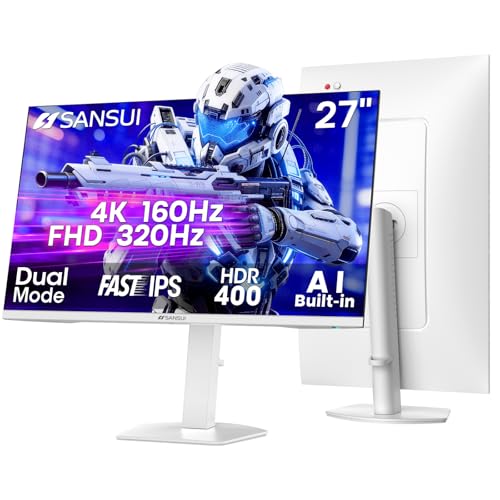
SANSUI 27-Inch 4K Dual-Mode Gaming Monitor
Best for: Versatile gaming and productivity workflows
- Screen Size
- 27 Inch
- Resolution
- 4K UHD
- Refresh Rate
- 160Hz / 320Hz
- Panel Type
- Fast IPS
- Response Time
- 1ms(OD)
- Sync Technology
- FreeSync Premium
This SANSUI monitor offers a unique dual-mode panel. You can switch between 4K UHD at up to 160Hz and 1080p at up to 320Hz. It uses a Fast IPS panel with 93% DCI-P3 color coverage and HDR400 support. The stand allows for height, tilt, and pivot adjustments. It includes FreeSync Premium and built-in speakers. This setup suits gamers who need high resolution for work and high refresh rates for competitive play.
Pros
- Dual-mode resolution: 4K at 160Hz or 1080p at 320Hz
- Fast IPS panel with 93% DCI-P3 color gamut
- Ergonomic stand with pivot, height, and tilt adjustments
- FreeSync Premium sync technology for smooth visuals
Cons
- 1080p resolution on a 27-inch screen yields low pixel density
- HDR400 rating offers limited high dynamic range performance
- Built-in speakers are basic and lack audio quality
Good fit if
- You want a single monitor for both work and gaming
- You need high refresh rates for competitive shooters
- You value color accuracy for creative tasks
Skip if
- You require true 4K sharpness on a 27-inch display
- You need advanced HDR performance for media consumption
- You prefer a larger screen size for immersion
Verdict: SANSUI 27" Dual-Mode 4K/1080p Monitor fits users who prioritize versatility over pure image sharpness. It is ideal for those who switch between high-resolution productivity and high-speed gaming on one screen.

ASUS ProArt 27-Inch 1440p USB-C Monitor
Best for: Color-accurate creative work and dual-device setups
- Screen Size
- 27 Inch
- Resolution
- 2560 x 1440
- Refresh Rate
- 144Hz
- Panel Type
- IPS
- Sync Technology
- AMD FreeSync
- Connectivity
- USB-C, HDMI, DisplayPort, USB Hub
This 27-inch monitor offers a QHD IPS panel with a 144Hz refresh rate and AMD FreeSync. It covers 97% of the DCI-P3 gamut with factory calibration for Delta E < 2 accuracy. The USB-C port delivers 96W power delivery and includes a built-in USB hub. An Auto KVM feature allows switching between two computers with one keyboard and mouse. It is designed for creators who need color precision and smooth motion.
Pros
- 144Hz refresh rate with AMD FreeSync
- 97% DCI-P3 and 100% sRGB color gamut
- USB-C with 96W power delivery
- Built-in Auto KVM for dual devices
- Factory calibrated with Delta E < 2
Cons
- Only supports AMD FreeSync, not NVIDIA G-SYNC
- No mention of HDR support or brightness nits
- 27-inch size may be small for some workflows
Good fit if
- You need high color accuracy for photo or video editing
- You want to connect a laptop via USB-C with power delivery
- You switch between two computers frequently using one keyboard and mouse
Skip if
- You require NVIDIA G-SYNC compatibility
- You need a higher resolution like 4K UHD
- You prefer a larger screen size for immersive gaming
Verdict: ASUS ProArt 27in 1440p 144Hz is a solid choice for color-accurate creative work and smooth multitasking. It fits users who value USB-C convenience and precise color reproduction over high-end gaming sync technologies.

ASUS TUF 27-Inch 1440p 165Hz IPS Gaming Monitor
Best for: Gamers needing G-SYNC and ergonomic flexibility
- Screen Size
- 27"
- Resolution
- 2560 x 1440
- Refresh Rate
- 165Hz
- Panel Type
- IPS
- Response Time
- 1ms MPRT
- Sync Technology
- G-SYNC Compatible
View on Amazon: ASUS TUF 27-Inch 1440p 165Hz IPS Gaming Monitor
The ASUS VG27AQ is a 27-inch IPS monitor delivering WQHD resolution and a 165Hz refresh rate. It features a 1ms MPRT response time and G-SYNC compatibility for smooth visuals. Shadow Boost technology enhances details in dark scenes. The stand offers full ergonomic adjustments, including pivot, tilt, swivel, and height. This setup suits gamers who prioritize motion clarity and color accuracy over ultra-high refresh rates.
Pros
- 27-inch IPS panel with 2560x1440 resolution
- 165Hz overclocked refresh rate and 1ms MPRT response
- G-SYNC compatibility reduces screen tearing
- Shadow Boost enhances visibility in dark areas
- Ergonomic stand with height, tilt, swivel, and pivot
Cons
- Only 165Hz refresh rate, lower than 260Hz or 300Hz competitors
- HDMI v2.0 limits bandwidth compared to newer standards
- No mention of USB-C connectivity for single-cable setup
Good fit if
- You want a 165Hz IPS panel with G-SYNC support
- You need full ergonomic adjustments for your desk
- You play fast-paced games and value motion clarity
Skip if
- You require USB-C connectivity for your devices
- You prefer refresh rates above 200Hz for competitive play
- You are looking for a monitor with HDR1000 certification
Verdict: The ASUS VG27AQ 27-inch QHD 165Hz monitor is a solid choice for gamers who value G-SYNC compatibility and ergonomic flexibility over maximum refresh rates. It delivers clear images and smooth motion for most titles.
Specifications side by side
| Spec | ASUS Professional Monitor 90LM05L1 | Dell 32-Inch 4K 120Hz Monitor | Dell 27-Inch 1440p USB-C Monitor | AOC 27-Inch 300Hz Mini-LED Gaming Monitor | SANSUI 27-Inch 4K Dual-Mode Gaming Monitor | ASUS ProArt 27-Inch 1440p USB-C Monitor | ASUS TUF 27-Inch 1440p 165Hz IPS Gaming Monitor |
|---|---|---|---|---|---|---|---|
| Screen Size | not specified | 31.5in | 27-inch | 27" | 27 Inch | 27 Inch | 27" |
| Resolution | not specified | 3840x2160 | 2560x1440 | 2560x1440 | 4K UHD | 2560 x 1440 | 2560 x 1440 |
| Refresh Rate | not specified | 120Hz | 75Hz | 300Hz | 160Hz / 320Hz | 144Hz | 165Hz |
| Panel Type | not specified | not specified | not specified | Mini-LED VA | Fast IPS | IPS | IPS |
| Response Time | not specified | 0.03ms | 4Ms | 1ms GtG | 1ms(OD) | not specified | 1ms MPRT |
| Sync Technology | not specified | AMD FreeSync Premium | AMD FreeSync | Adaptive-Sync | FreeSync Premium | AMD FreeSync | G-SYNC Compatible |
| Connectivity | not specified | HDMI, DisplayPort | USB Type-C, USB 3.2 Gen 1 Type-A | DisplayPort, HDMI | 2×HDMI 2.1, 2×DisplayPort 1.4, 3.5mm | USB-C, HDMI, DisplayPort, USB Hub | DisplayPort 1.2, HDMI 2.0 |
| Size | not specified | S3225QS | 27 Inch | 27" 300Hz Mini-LED | 26.9999 | 27 Inch | 27” 2K WQHD IPS |
| Dimensions | 3.41 × 7.29 × 11.6 inches | 8.73 × 28.1 × 17.6 inches | 6.88 × 24.1 × 15.8 inches | 9.45 × 24.2 × 20.3 inches | 5.63 × 27 × 19.3 inches | 7.5 × 24.1 × 21.1 inches | 20 × 24.4 × 8.31 inches |
| Weight | 11 pounds | 19.3 pounds | 11.9 pounds | not specified | 11.2 pounds | 14.6 pounds | 12.8 pounds |
| Color | Black | Ash White | Platinum Silver | Black | White | SILVER | Black |
| Model | 90LM05L1-B03370 | S3225QS | S2722DC | Q27G4SMN | ES-G27D1U | PA278CGRV | VG27AQ |
If you prefer a smaller display, evaluate sansui computer monitor 24 inch alternatives to compare refresh rates and panel types.
Frequently asked questions
What is the best large monitor for media consumption?
The Dell 32-Inch 4K 120Hz Monitor is the top choice for a large screen. It features a 32-inch VA panel with 4K UHD resolution. The 120Hz refresh rate provides smooth motion for video playback. This setup suits users who prioritize color accuracy and immersive visuals over high-speed gaming performance.
Which monitor offers the highest refresh rate for competitive gaming?
The AOC 27-Inch 300Hz Mini-LED Gaming Monitor delivers the highest speed on this list. It features a 27-inch 1440p display with a 300Hz refresh rate. The Mini-LED technology provides strong HDR contrast. This model is ideal for players who need top-tier response times without the maintenance concerns of OLED displays.
Is there a versatile monitor that switches between 4K and 1080p?
Yes, the SANSUI 27-Inch 4K Dual-Mode Gaming Monitor supports both resolutions. It allows you to switch between 4K UHD for productivity and 1080p for faster gaming. This dual-mode capability suits users who want versatility on a single screen. It is a practical option for those who alternate between high-resolution work and high-speed play.
Which monitor provides USB-C connectivity for laptop users?
The Dell 27-Inch 1440p USB-C Monitor is designed for clean desk setups. It features USB-C connectivity to simplify connections for laptops. The 27-inch WQHD display offers 1440p resolution at 75Hz. This model suits users who prioritize ergonomic adjustability and streamlined connectivity over high refresh rates for gaming.
What is the best option for color-accurate creative work?
The ASUS ProArt 27-Inch 1440p USB-C Monitor is built for precise color reproduction. It features a 27-inch 1440p display with a 144Hz refresh rate. USB-C connectivity supports dual-device setups efficiently. This monitor is a solid choice for creative professionals who value color accuracy and smooth multitasking over high-end gaming sync technologies.
Which monitor supports G-SYNC for smoother gaming?
The ASUS TUF 27-Inch 1440p 165Hz IPS Gaming Monitor supports G-SYNC compatibility. It features a 27-inch 2K WQHD IPS panel with a 165Hz refresh rate. This combination delivers clear images and smooth motion for most titles. It is a reliable option for gamers who value adaptive sync and ergonomic flexibility over maximum speed.