Looking Beyond the ASUS ProArt 32-Inch 4K IPS? 6 Alternatives Worth a Look
As an Amazon Associate we earn from qualifying purchases. Links on this page are affiliate links.
You might be considering the ASUS ProArt 32-Inch 4K IPS Monitor for its factory-calibrated color accuracy and 98% DCI-P3 coverage. If you need those specific professional specs, this display delivers. However, you may also be searching for asus proart display 32 alternatives that better suit your workflow or budget. The original model focuses on creative precision with a 31.5-inch IPS panel and USB-C connectivity, but it lacks the high refresh rates or wider aspect ratios some users prefer.
The 6 alternatives listed here were chosen because their specifications overlap with the original in meaningful ways. Some options offer higher refresh rates for gaming, while others provide larger screens for multitasking. You will find compact 27-inch 4K OLED panels, ultrawide 49-inch curved displays, and fast QHD monitors. Each choice prioritizes different specs like panel type, resolution, or sync technology. This list helps you compare those technical details side by side so you can find the monitor that matches your exact needs.
Key Differences in Specs
AOC Agon Pro 27-Inch 360Hz QHD Monitor
The AOC Agon Pro 27-Inch shifts focus from color precision to raw speed. It uses a 27-inch QHD IPS panel with a 360Hz refresh rate and G-SYNC support, targeting competitive esports players. You give up the 4K resolution and 98% DCI-P3 color gamut of the ASUS ProArt. This monitor is smaller at 27 inches and weighs significantly less at 12.4 pounds. It is ideal if you prioritize frame rates over pixel density. The 1440p resolution offers a different visual experience compared to the 3840 x 2160 panel. Choose this if gaming speed is your main requirement.
Amzfast 49-Inch 120Hz DQHD Curved Monitor
The Amzfast 49-Inch Monitor provides a massive 32:9 ultrawide canvas with 5120 x 1440 resolution and a 120Hz refresh rate. It offers double the horizontal screen real estate of the 32-inch ASUS model, ideal for immersive gaming or multitasking. You trade the 4K pixel density and professional color accuracy for a wider field of view. The curved design enhances immersion but changes viewing angles. It weighs 24.1 pounds and requires more desk space. This alternative suits users who value screen width and refresh rate over color precision. It is not a direct replacement for color-critical work.
Alienware 27-Inch 4K QD-OLED Gaming Monitor
The Alienware 27-Inch 4K QD-OLED Monitor combines 4K resolution with OLED technology and a 240Hz refresh rate. It delivers superior contrast and faster response times than the ASUS IPS panel. You gain OLED black levels and 240Hz speed but lose the specific 98% DCI-P3 factory calibration. The 27-inch size is more compact, weighing just 9.48 pounds. This model fits gamers who want high performance in a smaller footprint. It also supports color work but with different panel characteristics. Choose this if you need OLED contrast and high refresh rates in a 4K format.
Alienware 25-Inch 500Hz Gaming Monitor
The Alienware AW2524HF is a 25-inch FHD monitor with a 500Hz refresh rate and FreeSync support. It prioritizes extreme speed over resolution and color accuracy. You give up 4K resolution and professional color gamuts for the fastest possible response. The 25-inch size is smaller than the 32-inch ASUS model. It weighs 12.4 pounds and uses an IPS panel. This monitor is designed for competitive esports athletes who view the screen closely. It is not suitable for color-critical creative work. Choose this if you need maximum refresh rates on a compact screen.
Samsung Odyssey 27-Inch 360Hz QD-OLED Monitor
The Samsung Odyssey 27-Inch QD-OLED Monitor offers 1440p resolution with a 360Hz refresh rate and FreeSync technology. It provides elite speed and OLED contrast for QHD gaming. You trade the 4K resolution and professional color calibration of the ASUS ProArt for higher refresh rates and OLED benefits. The 27-inch size is smaller and weighs 15.2 pounds. It includes anti-glare features for better visibility. This model suits QHD gamers who need top-tier performance. It is not ideal for users requiring 4K pixel density or specific DCI-P3 color coverage. Choose this for competitive QHD gaming.
KTC 27-Inch 4K Mini-LED Monitor
The KTC 27-Inch 4K Mini-LED Monitor features a 27-inch 4K panel with Mini-LED backlighting. It offers a dual-mode design for both high-fidelity creative work and high-speed gaming. You gain local dimming performance and 4K resolution but with a different panel technology than the ASUS IPS. The 27-inch size is more compact, weighing 15.4 pounds. It suits users who need color accuracy and local dimming in a smaller form factor. This monitor bridges the gap between creative work and gaming. Choose this if you want Mini-LED benefits in a 4K 27-inch package.
Quick picks
Our 7 picks

ASUS ProArt 32-Inch 4K IPS Monitor
Best for: Color-accurate professional creative work
- Screen Size
- 32” (31.5" viewable)
- Resolution
- 3840 x 2160
- Panel Type
- IPS
- Connectivity
- DP over USB-C, DisplayPort, HDMI, USB
- Dimensions
- 28.1 × 9.45 × 19.2 inches
- Weight
- 21.8 pounds
The ASUS ProArt PA329CRV is a 31.5-inch 4K IPS monitor designed for professional color work. It covers 98% of the DCI-P3 color gamut and arrives factory calibrated with Delta E < 2 accuracy. Connectivity includes USB-C with 96W power delivery, DisplayPort, and HDMI. This display suits users who need precise color reproduction and reliable connectivity for creative workflows.
Pros
- 3840 x 2160 resolution on a 31.5-inch IPS panel
- 98% DCI-P3 color gamut coverage
- Factory calibrated with Delta E < 2 accuracy
- USB-C port with 96W power delivery
Cons
- Renewed condition rather than new
- Not a gaming monitor with high refresh rates
- No mention of HDR certification in specs
Good fit if
- You need accurate color for photo or video editing
- You want USB-C connectivity with power delivery
- You prefer a 4K IPS panel for professional work
Skip if
- You require a high refresh rate for competitive gaming
- You need a brand new unit with full warranty
- You are looking for a curved ultrawide display
Verdict: ASUS ProArt 32-inch 4K IPS Monitor delivers factory-calibrated color accuracy and USB-C convenience for creative professionals. It fits users who prioritize Delta E < 2 precision and 98% DCI-P3 coverage over gaming speed.
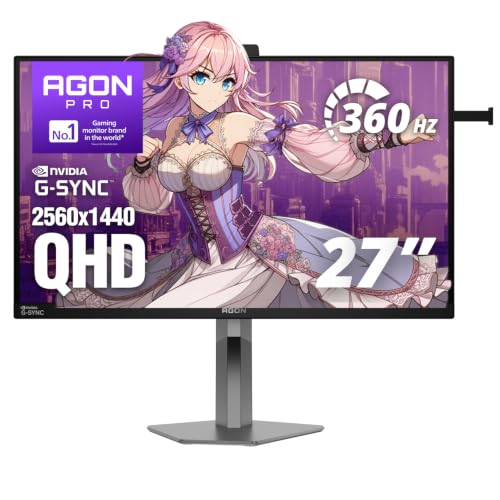
AOC Agon Pro 27-Inch 360Hz QHD Monitor
Best for: competitive esports gaming
- Screen Size
- 27"
- Resolution
- 2560x1440
- Refresh Rate
- 360Hz
- Panel Type
- IPS
- Response Time
- 1ms
- Sync Technology
- NVIDIA G-SYNC Pulsar
This 27-inch QHD IPS monitor targets competitive gamers with a 360Hz refresh rate and 1ms response time. It uses NVIDIA G-SYNC Pulsar for smooth motion. The panel offers wide viewing angles and R5 HDR support. You get built-in speakers and a headphone holder for desk organization. Connectivity includes HDMI 2.1 and DisplayPort. It suits players who prioritize speed over resolution.
Pros
- 360Hz refresh rate for high-FPS esports
- NVIDIA G-SYNC Pulsar technology
- QHD IPS panel with wide viewing angles
- Built-in speakers and headphone holder
Cons
- 1440p resolution is lower than 4K alternatives
- No mention of USB-C connectivity
- Built-in speakers are basic for immersive audio
Good fit if
- You play competitive shooters at high frame rates
- You prefer a 27-inch screen size
- You want G-SYNC compatibility
Skip if
- You need 4K resolution for content creation
- You prefer OLED or Mini-LED panels
- You want a 49-inch ultrawide display
Verdict: AOC Agon Pro 27" 360Hz Gaming Monitor delivers top-tier speed for esports enthusiasts. It fits players who value refresh rate and G-SYNC support over higher pixel density.

Amzfast 49-Inch 120Hz DQHD Curved Monitor
Best for: immersive ultrawide gaming and multitasking
- Screen Size
- 49"
- Resolution
- 5120 x 1440
- Refresh Rate
- 120Hz
- Response Time
- 1ms MPRT
- Sync Technology
- Adaptive Sync
- Connectivity
- 2 x HDMI 2.0, 2 x DP 1.4
The Amzfast 49-inch monitor offers a 5120x1440 resolution on a curved VA panel. Its 120Hz refresh rate and 1ms MPRT response time support smooth visuals. The 1500R curvature and 32:9 aspect ratio provide an immersive field of view. You can split the screen using PIP or PBP technology. This setup suits users seeking a large, single-screen workspace or gaming display.
Pros
- 5120x1440 Dual QHD resolution
- 120Hz refresh rate via DisplayPort 1.4
- 1500R curved VA panel
- PIP and PBP split-screen support
Cons
- VA panel has lower contrast than OLED or Mini-LED options
- 1ms MPRT response time is not as fast as TN panels
- HDMI ports are limited to version 2.0
Good fit if
- You want a single large screen for multitasking
- You play immersive FPS or RPG games
- You need PIP or PBP split-screen functionality
Skip if
- You require native 4K resolution
- You need the fastest possible response times
- You prefer a flat display surface
Verdict: Amzfast 49 Inch Curved Ultrawide Monitor delivers a wide 32:9 canvas for users who prioritize screen real estate and immersion over pixel density.

Alienware 27-Inch 4K QD-OLED Gaming Monitor
Best for: Compact 4K OLED gaming and color work
- Screen Size
- 27"
- Resolution
- 3840 x 2160
- Refresh Rate
- 240Hz
- Panel Type
- QD-OLED
- Response Time
- 0.03ms GTG
- Sync Technology
- G-SYNC Compatible, FreeSync Premium Pro
This 27-inch monitor uses a QD-OLED panel for 4K resolution and 99% DCI-P3 color coverage. It runs at 240Hz with a 0.03ms response time. The display supports VESA DisplayHDR True Black 400 and Dolby Vision. You get G-SYNC Compatible and FreeSync Premium Pro for smooth motion. Connectivity includes DisplayPort 1.4, HDMI, and USB-C with 15W power delivery.
Pros
- QD-OLED panel with 99% DCI-P3 color gamut
- 240Hz refresh rate and 0.03ms GTG response time
- VESA DisplayHDR True Black 400 and Dolby Vision support
- Adjustable stand with height, tilt, swivel, and pivot
Cons
- 27-inch screen is smaller than the 31.5-inch ProArt and 49-inch ultrawide options
- USB-C port provides only 15W power delivery
- No mention of built-in speakers
Good fit if
- You want a compact 27-inch 4K display with OLED contrast
- You prioritize high refresh rates and fast response times for gaming
- You need precise color accuracy for creative work
Skip if
- You need a larger screen for immersive ultrawide viewing
- You require a professional monitor with a larger 31.5-inch viewable area
- You need high-power USB-C charging for laptops
Verdict: Alienware 27-inch 4K QD-OLED Gaming Monitor delivers sharp 4K visuals and rapid 240Hz performance in a compact 27-inch frame. It fits gamers who want OLED contrast without the bulk of larger ultrawide panels. It also suits creators who need color accuracy in a smaller footprint.

Alienware 25-Inch 500Hz Gaming Monitor
Best for: competitive esports and fast-paced shooters
- Screen Size
- 24"
- Resolution
- FHD
- Refresh Rate
- 500Hz (OC) / 480Hz (Native)
- Panel Type
- Fast IPS
- Response Time
- 0.5ms (GtG min)
- Sync Technology
- AMD FreeSync Premium, AdaptiveSync
The Alienware AW2524HF is a 24-inch Fast IPS monitor designed for competitive gaming. It offers a native 480Hz refresh rate, overclocking to 500Hz, paired with a 0.5ms gray-to-gray response time. The panel covers 99% of the sRGB color space and includes TUV ComfortView Plus to reduce blue light. It supports AMD FreeSync Premium and VESA AdaptiveSync for tear-free performance. This model suits players prioritizing speed over resolution.
Pros
- 500Hz overclocked refresh rate for extreme motion clarity
- 0.5ms gray-to-gray response time minimizes ghosting
- Fast IPS panel with 99% sRGB color coverage
- AMD FreeSync Premium and VESA AdaptiveSync support
Cons
- FHD resolution is lower than the 4K and QHD options on this list
- 24-inch screen size is smaller than the 27-inch and larger alternatives
- Requires DisplayPort connection to achieve refresh rates above 255Hz
Good fit if
- You prioritize maximum frame rates and lowest latency above image resolution
- You play competitive shooters where 500Hz refresh rate provides a clear advantage
- You prefer a smaller 24-inch desk footprint for closer viewing distance
Skip if
- You need 4K resolution for detailed creative work or immersive gaming
- You want a larger 27-inch or ultrawide display for multitasking
- You are using HDMI-only setups and cannot use DisplayPort for high refresh rates
Verdict: Alienware AW2524HF 24" FHD 500Hz is built for esports athletes who need the fastest possible response and refresh rates on a compact screen. It fits players who view the monitor closely and value speed over pixel density.

Samsung Odyssey 27-Inch 360Hz QD-OLED Monitor
Best for: competitive QHD gaming
- Screen Size
- 27"
- Resolution
- QHD
- Refresh Rate
- 360Hz
- Panel Type
- QD-OLED
- Response Time
- 0.03ms (GtG)
- Sync Technology
- AMD FreeSync Premium Pro
View on Amazon: Samsung Odyssey 27-Inch 360Hz QD-OLED Monitor
The Samsung 27" Odyssey OLED G6 is a QD-OLED gaming monitor with a 360Hz refresh rate and 0.03ms response time. It features AMD FreeSync Premium Pro for smooth visuals. The panel includes Glare Free technology to reduce external light interference. Dynamic cooling and thermal modulation systems help manage heat. This model suits competitive gamers who need high speed and OLED contrast.
Pros
- QD-OLED panel with superior brightness and contrast
- 360Hz refresh rate for high-speed gaming
- 0.03ms response time (GtG)
- AMD FreeSync Premium Pro support
- Glare Free technology reduces external light interference
Cons
- QHD resolution may not satisfy 4K preference
- Dynamic cooling system adds bulk to the build
- Thermal modulation reduces brightness to prevent heat
Good fit if
- You prioritize high refresh rates for competitive gaming
- You want OLED contrast with QD color technology
- You play at QHD resolution
Skip if
- You require 4K resolution
- You prefer IPS panels for static content
- You want a smaller physical footprint
Verdict: Samsung 27" Odyssey OLED G6 360Hz delivers elite speed and OLED quality for QHD gamers. It fits those who need 360Hz performance and anti-glare features.

KTC 27-Inch 4K Mini-LED Monitor
Best for: Dual-mode 4K gaming and color-critical creative work
- Screen Size
- 27"
- Resolution
- 4K, 1080p
- Refresh Rate
- 160Hz, 320Hz
- Response Time
- 1ms MPRT
- Sync Technology
- Adaptive Sync
- Connectivity
- 2x HDMI 2.1, 1x DP 1.4, 1x 65W Type-C
The KTC M27P6S is a 27-inch 4K Mini-LED monitor designed for users who need both high resolution and high speed. It offers a dual-mode capability, allowing you to switch between 4K at 160Hz and 1080p at 320Hz. With 2304 local dimming zones and DisplayHDR 1400 certification, it delivers deep blacks and high peak brightness. It also covers 99% of the DCI-P3 color gamut with Delta E less than 2 accuracy, making it suitable for both gaming and creative work.
Pros
- Dual mode supports 4K at 160Hz or 1080p at 320Hz
- 2304-zone Mini-LED backlighting for precise light control
- DisplayHDR 1400 certified with 1400 nits peak brightness
- 99% DCI-P3 color coverage with Delta E less than 2 accuracy
- Includes 65W USB Type-C port alongside HDMI 2.1 and DP 1.4
Cons
- 1ms MPRT response time is slower than the 0.03ms GTG found on some OLED competitors
- 27-inch size is smaller than the 31.5-inch and 49-inch options on this list
- Adaptive Sync is listed without specifying G-Sync or FreeSync Premium compatibility
Good fit if
- You want 4K resolution but also need high refresh rates for competitive gaming
- You need accurate color reproduction for creative tasks alongside gaming
- You prefer a smaller 27-inch screen over larger ultrawide or 32-inch options
Skip if
- You require a larger screen size than 27 inches
- You need native 4K at 320Hz without resolution downscaling
- You are looking for a specific certified sync technology like G-Sync
Verdict: The KTC M27P6S 27" 4K Mini-LED Gaming Monitor fits users who need a compact screen that handles both high-fidelity creative work and high-speed gaming through its dual-mode design. It is a strong choice for those prioritizing color accuracy and local dimming performance in a 27-inch form factor.
Specifications side by side
| Spec | ASUS ProArt 32-Inch 4K IPS Monitor | AOC Agon Pro 27-Inch 360Hz QHD Monitor | Amzfast 49-Inch 120Hz DQHD Curved Monitor | Alienware 27-Inch 4K QD-OLED Gaming Monitor | Alienware 25-Inch 500Hz Gaming Monitor | Samsung Odyssey 27-Inch 360Hz QD-OLED Monitor | KTC 27-Inch 4K Mini-LED Monitor |
|---|---|---|---|---|---|---|---|
| Screen Size | 32” (31.5" viewable) | 27" | 49" | 27" | 24" | 27" | 27" |
| Resolution | 3840 x 2160 | 2560x1440 | 5120 x 1440 | 3840 x 2160 | FHD | QHD | 4K, 1080p |
| Refresh Rate | not specified | 360Hz | 120Hz | 240Hz | 500Hz (OC) / 480Hz (Native) | 360Hz | 160Hz, 320Hz |
| Panel Type | IPS | IPS | not specified | QD-OLED | Fast IPS | QD-OLED | not specified |
| Response Time | not specified | 1ms | 1ms MPRT | 0.03ms GTG | 0.5ms (GtG min) | 0.03ms (GtG) | 1ms MPRT |
| Sync Technology | not specified | NVIDIA G-SYNC Pulsar | Adaptive Sync | G-SYNC Compatible, FreeSync Premium Pro | AMD FreeSync Premium, AdaptiveSync | AMD FreeSync Premium Pro | Adaptive Sync |
| Connectivity | DP over USB-C, DisplayPort, HDMI, USB | DisplayPort, HDMI 2.1, USB hub | 2 x HDMI 2.0, 2 x DP 1.4 | DisplayPort 1.4, HDMI, USB-C | DisplayPort, HDMI, USB 3.2 Hub | HDMI 2.1, DisplayPort | 2x HDMI 2.1, 1x DP 1.4, 1x 65W Type-C |
| Size | not specified | 27" 360Hz Pulsar | 49 Inch | not specified | not specified | 27 Inch | 27" 4K Mini-LED |
| Dimensions | 28.1 × 9.45 × 19.2 inches | 9.45 × 24 × 21.7 inches | 11.6 × 46.7 × 22.3 inches | 24 × 8.27 × 16 inches | 21.9 × 9.6 × 19.7 inches | 10.4 × 24.1 × 21.8 inches | 8.31 × 24.3 × 21.5 inches |
| Weight | 21.8 pounds | 12.4 pounds | 24.1 pounds | 9.48 pounds | 12.4 pounds | 15.2 pounds | 15.4 pounds |
| Color | BLACK | Black | Black | Black | Black | Silver | White |
| Model | PA329CRV | AG276QSG2 | AMZG49C7U | AW2725Q | AW2524HF | LS27DG602SNXZA | M27P6S |
Frequently asked questions
Which monitor is best for competitive esports gaming?
The AOC Agon Pro 27-Inch 360Hz QHD Monitor is the top choice for speed. It features a 360Hz refresh rate and G-SYNC support on a 27-inch IPS panel. This setup suits players who prioritize frame rate over pixel density. The Alienware 25-Inch 500Hz Gaming Monitor offers even faster response times for fast-paced shooters on a compact screen.
What is the best ultrawide option for immersive multitasking?
The Amzfast 49-Inch 120Hz DQHD Curved Monitor provides a massive 32:9 canvas. It delivers a 5120 x 1440 resolution for users who value screen real estate and immersion. This ultrawide display connects via DisplayPort and HDMI. It is ideal for those who prioritize width and multitasking capabilities over higher pixel density found in smaller panels.
Are there compact 4K OLED alternatives to the 32-inch model?
Yes, the Alienware 27-Inch 4K QD-OLED Gaming Monitor offers sharp visuals in a smaller frame. It combines 4K UHD resolution with a 240Hz refresh rate. This QD-OLED panel suits gamers and creators who want contrast and color accuracy without the bulk of larger ultrawide displays. It fits users who view the screen closely and need a compact footprint.
Which 27-inch monitor offers the best OLED performance?
The Samsung Odyssey 27-Inch 360Hz QD-OLED Monitor delivers elite speed and quality for QHD gamers. It features a 1440p resolution with FreeSync support. This display is designed for those who need 360Hz performance and anti-glare features. It combines OLED contrast with high refresh rates, making it a strong option for competitive play on a 27-inch screen.
Is there a dual-mode monitor for both gaming and creative work?
The KTC 27-Inch 4K Mini-LED Monitor supports dual-mode design for versatile use. It handles high-fidelity creative work and high-speed gaming through its Mini-LED technology. This 27-inch model prioritizes color accuracy and local dimming performance. It is a strong choice for users who need a compact screen that manages both professional tasks and gaming effectively.
Which monitor is best for color-accurate professional creative work?
The ASUS ProArt 32-Inch 4K IPS Monitor remains the standard for color precision. It delivers factory-calibrated accuracy with Delta E < 2 and 98% DCI-P3 coverage. This model fits users who prioritize professional standards over gaming speed. It offers USB-C convenience and is designed for creative professionals who need reliable color reproduction in a 32-inch format.