Looking Beyond the ASUS ProArt 24-Inch 1080p USB-C? 6 Alternatives Worth a Look
As an Amazon Associate we earn from qualifying purchases. Links on this page are affiliate links.
The ASUS ProArt PA247CV is a 24-inch 1080p monitor built for color-critical work. It features an IPS panel with 100% sRGB coverage and factory calibration for Delta E < 2 accuracy. This model also offers USB-C connectivity with 65W power delivery and a five-year warranty. If you are searching for asus proart pa247cv 24 inch alternatives, you may need different specifications. Some users prefer higher refresh rates for smoother visuals. Others might require integrated webcams for remote work. You may also want more powerful laptop charging or built-in Ethernet for a cleaner desk setup. The monitors on this list share key traits with the original. They all use 24-inch 1080p panels and include USB-C ports. We selected these options because their core specifications overlap with your needs. You can compare their refresh rates, connectivity options, and physical dimensions to find the best fit for your workflow. Each entry focuses on specific practical advantages rather than general features.
Our top pick: ASUS ProArt 24-Inch 1080p USB-C Monitor.
How these models differ from the ProArt
ASUS 24-Inch 120Hz USB-C Docking Monitor
The ASUS BE249CGN replaces the ProArt’s professional color focus with productivity features. It offers a 120Hz refresh rate for smoother visuals, whereas the ProArt stays at 60Hz. This model provides 96W USB-C power delivery, beating the ProArt’s 65W. It also includes wired Ethernet connectivity, which the ProArt lacks. You give up the ProArt’s Calman-verified Delta E < 2 accuracy for this higher refresh rate and networking capability. Choose this if you need a single-cable docking station with fast charging and internet access for office tasks rather than color-critical design work.
ViewSonic 24-Inch 1080p USB-C Conferencing Monitor
The ViewSonic VG2441V shifts focus from color accuracy to video conferencing. It includes an integrated webcam and microphone, features absent on the ProArt. This model also supports a 120Hz refresh rate, offering smoother motion compared to the ProArt’s 60Hz. You trade the ProArt’s 100% sRGB coverage and factory calibration for these communication tools. The ViewSonic is lighter at 9.9 pounds versus the ProArt’s 13.9 pounds. Pick this alternative if you work remotely and prioritize clear video calls and ergonomic flexibility over precise color reproduction for creative projects.
ViewSonic 24-Inch ColorPro USB-C Monitor
The ViewSonic VP2456A mirrors the ProArt’s professional intent but adds a 120Hz refresh rate. It maintains color accuracy for designers while providing smoother visuals for general use. Both monitors offer USB-C connectivity, but the VP2456A targets those who want professional color standards with a higher refresh rate. It is slightly heavier at 14.2 pounds. You gain fluid motion compared to the ProArt’s standard 60Hz. Choose this if you need reliable color performance for design work but also value a smoother desktop experience for everyday tasks and light media consumption.
BenQ 24-Inch USB-C 1080p Monitor
The BenQ GW2486TC prioritizes eye comfort and casual use over professional color grading. It features a 100Hz refresh rate, which is faster than the ProArt’s 60Hz. This model includes BenQ’s eye-care technologies, which the ProArt does not emphasize. It offers USB-C connectivity but with less power delivery than some competitors. You sacrifice the ProArt’s Delta E < 2 accuracy for a monitor designed for long hours of office work and casual gaming. Select this if you want reduced eye strain and a cleaner aesthetic for general computing rather than strict color fidelity.
ASUS 24-Inch 1080p Video Conferencing Monitor
The ASUS BE24ECSNK bundles a webcam, microphone, and USB-C docking into one unit. This integrates communication tools that the ProArt lacks entirely. It offers a 1080p resolution like the ProArt but focuses on remote work convenience. You give up the ProArt’s superior color accuracy and 65W power delivery for this all-in-one communication hub. The BE24ECSNK is designed for users who need video conferencing hardware built-in. Choose this if your workflow relies heavily on online meetings and you want a simplified setup with fewer external peripherals.
ViewSonic 24-Inch USB-C Docking Monitor
The ViewSonic VG2456 emphasizes office functionality with wired Ethernet and USB-C docking. It lacks the integrated peripherals of the conferencing models but adds network connectivity. This monitor supports a 1080p resolution on an IPS panel, similar to the ProArt. You trade the ProArt’s professional color calibration for robust single-cable docking and internet access. The VG2456 is heavier at 14.1 pounds. Pick this if you need a clean desk setup with wired networking and USB-C power for your laptop, prioritizing connectivity and stability over color-critical display performance.
Quick picks
Our 7 picks

ASUS ProArt 24-Inch 1080p USB-C Monitor
Best for: color-accurate 1080p professional work
- Screen Size
- 24"
- Resolution
- 1920 x 1080
- Panel Type
- IPS
- Connectivity
- USB-C, DisplayPort, HDMI, USB 3.1
- Size
- 24 Inch
- Dimensions
- 21.2 × 13.5 × 8.32 inches
This 24-inch IPS monitor delivers 1080p resolution with 100% sRGB coverage and Delta E < 2 accuracy. It features USB-C connectivity with 65W power delivery and a DisplayPort hub. The panel supports daisy-chaining for multi-display setups. You get a 5-year warranty and factory calibration. It suits professionals needing color precision and reliable connectivity in a compact form factor.
Pros
- 100% sRGB and Rec. 709 color gamut
- Delta E < 2 factory calibration
- USB-C with 65W power delivery
- DisplayPort daisy-chain support
- 5-year warranty coverage
Cons
- 1080p resolution limits sharpness
- No high refresh rate listed
- Smaller 24-inch screen size
Good fit if
- You need accurate color for photo or video work
- You want USB-C connectivity with power delivery
- You prefer a compact 24-inch workspace
Skip if
- You require 1440p or 4K resolution
- You need a high refresh rate for gaming
- You want a larger 27-inch display
Verdict: ASUS ProArt PA247CV 24-inch 1080p USB-C offers professional color accuracy and solid connectivity. It fits designers who prioritize precision over pixel density.

ASUS 24-Inch 120Hz USB-C Docking Monitor
Best for: laptop docking with wired network connectivity
- Screen Size
- 23.8-inch
- Resolution
- 1920x1080
- Refresh Rate
- 120Hz
- Panel Type
- IPS
- Connectivity
- HDMI, USB-C, DisplayPort, RJ45
- Size
- 24 Inch
This 24-inch monitor features a 1080p IPS panel with a 120Hz refresh rate. It serves as a desktop docking station, supplying 96W power delivery over USB-C alongside an integrated RJ45 Ethernet port and DisplayPort daisy-chain output. If you need single-cable laptop connectivity, fluid motion, and extensive ergonomic adjustment for daily office multitasking, this display fits your desk setup.
Pros
- 96W USB-C power delivery charges connected laptops through a single cable
- 120Hz refresh rate provides smooth motion across the 1080p IPS panel
- Built-in RJ45 LAN port and DisplayPort daisy-chain output expand connectivity
- Full ergonomic stand offers 150mm height adjustment, tilt, 180-degree swivel, and 90-degree pivot
Cons
- 1920x1080 Full HD resolution offers standard pixel density rather than higher-resolution clarity
- Weight of 12.4 pounds is comparatively heavy for a 24-inch display
Good fit if
- You need 96W laptop charging and wired Ethernet through a single USB-C cord.
- You want a 120Hz refresh rate for smoother motion than conventional 60Hz screens.
- You run dual displays and require DisplayPort daisy-chaining support.
Skip if
- You require a higher resolution than 1080p for fine graphic detail.
- You plan to mount the display on a light-duty monitor arm sensitive to a 12.4-pound load.
Verdict: ASUS 24-Inch 120Hz USB-C Docking Monitor delivers robust 96W laptop charging, wired networking, and fluid 120Hz visuals for productivity workers building a single-cable workstation.

ViewSonic 24-Inch 1080p USB-C Conferencing Monitor
Best for: remote workers needing integrated video tools
- Screen Size
- 24 Inch
- Refresh Rate
- 120Hz
- Connectivity
- USB C, HDMI, DisplayPort
- Resolution
- 1080p
- Dimensions
- 8.11 × 21.3 × 15.2 inches
- Weight
- 9.9 pounds
View on Amazon: ViewSonic 24-Inch 1080p USB-C Conferencing Monitor
This 24-inch 1080p IPS display features a 120Hz refresh rate for smooth visuals. It includes a built-in 5MP camera with Windows Hello support, a physical privacy shutter, and integrated audio. The stand offers full ergonomic adjustments, including height, tilt, swivel, and rotation. Connectivity covers HDMI, DisplayPort, and USB-C with a hub. It targets professionals needing reliable video conferencing tools in a compact form factor.
Pros
- 120Hz refresh rate on a 24-inch 1080p IPS panel
- Built-in 5MP camera with Windows Hello facial recognition
- Physical privacy shutter for camera security
- Full ergonomic stand with height, tilt, swivel, and rotation
- USB-C connectivity with integrated hub
Cons
- 1080p resolution limits sharpness on a 24-inch screen
- Built-in speakers likely lack audio depth for media
- No mention of color accuracy certifications like sRGB or Adobe RGB
Good fit if
- You need a dedicated webcam and microphone for daily video calls
- You value Windows Hello facial recognition for quick login
- You require a fully adjustable stand for ergonomic comfort
Skip if
- You require 4K resolution for detailed graphic work
- You need professional color accuracy for photo editing
- You prefer a monitor without built-in cameras or sensors
Verdict: ViewSonic VG2441V 24" 120Hz Webcam Monitor is a practical hub for remote workers who prioritize video conferencing hardware and ergonomic flexibility over high-resolution clarity.
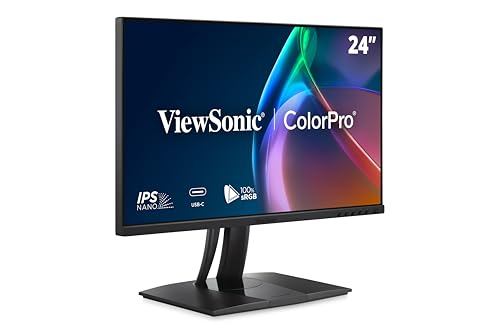
ViewSonic 24-Inch ColorPro USB-C Monitor
Best for: Designers needing accurate color and USB-C connectivity
- Screen Size
- 24 Inch
- Resolution
- 1920 x 1080
- Refresh Rate
- 120Hz
- Panel Type
- IPS
- Connectivity
- USB-C, HDMI, DisplayPort
- Dimensions
- 8.46 × 21.2 × 20.4 inches
This 24-inch 1080p IPS monitor delivers 120Hz refresh rates and professional color accuracy. It features Pantone Validation and a 14-bit 3D LUT for precise color reproduction. The integrated 90W USB-C dock simplifies connectivity. You get flicker-free technology and blue light filters for comfort. It suits designers needing reliable color fidelity and efficient desk setups.
Pros
- 120Hz refresh rate on 1080p IPS panel
- 90W USB-C charging and data transfer
- Pantone Validated color precision
- 14-bit 3D LUT for 4.39 trillion colors
Cons
- 1080p resolution limits sharpness compared to higher-end options
- 24-inch size is smaller than many alternatives
- No built-in webcam for video conferencing
Good fit if
- You need accurate color reproduction for design work
- You want a single-cable USB-C connection for your laptop
- You prefer a 120Hz refresh rate for smooth motion
Skip if
- You require 4K resolution for detailed text
- You need a built-in webcam for meetings
- You prefer a larger screen for immersive viewing
Verdict: ViewSonic VP2456A 24-Inch 120Hz ColorPro is a solid choice for professionals who prioritize color accuracy and clean desk setups over high resolution or large screens.
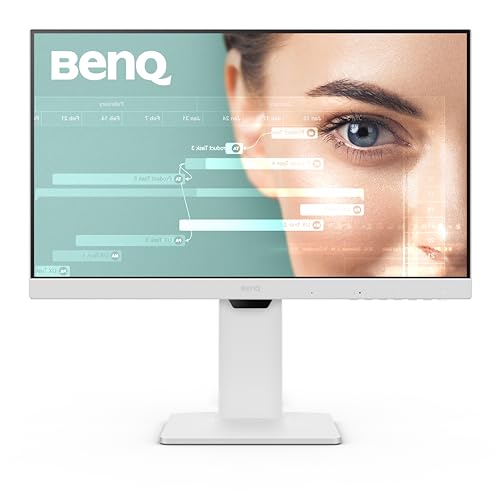
BenQ 24-Inch USB-C 1080p Monitor
Best for: office work and casual gaming
- Screen Size
- 24"
- Resolution
- 1080p FHD
- Panel Type
- IPS
- Connectivity
- USB-C
- Refresh Rate
- 100Hz
- Size
- 24 Inch
The BenQ GW2486TC is a 24-inch 1080p IPS monitor with a 100Hz refresh rate. It includes USB-C connectivity with 60W power delivery and a built-in microphone with noise cancellation. Eye-care technology and adaptive brightness help reduce fatigue. This model suits users who need a compact display for office work or casual gaming with reliable color reproduction and convenient connectivity.
Pros
- 100Hz refresh rate on IPS panel
- USB-C with 60W power delivery
- Built-in noise cancellation microphone
- Eye-care technology and adaptive brightness
Cons
- 100Hz refresh rate is lower than 120Hz or 144Hz competitors
- Microphone only works via USB-C connection
- 60W power delivery is less than 90W or 96W options
Good fit if
- You need a compact 24-inch display for office tasks
- You want USB-C connectivity with moderate power delivery
- You value eye-care features for long work sessions
Skip if
- You require a refresh rate of 120Hz or higher
- You need 90W or more power delivery from USB-C
- You want a microphone that works with HDMI connections
Verdict: BenQ GW2486TC 24-Inch 100Hz Monitor fits users who prioritize eye comfort and USB-C convenience over high refresh rates or maximum power delivery.

ASUS 24-Inch 1080p Video Conferencing Monitor
Best for: remote workers needing integrated video conferencing tools
- Screen Size
- 24"
- Resolution
- 1920x1080
- Panel Type
- IPS
- Connectivity
- HDMI, USB-C, DisplayPort, RJ45
- Size
- 24 Inch
- Dimensions
- 21.3 × 8.32 × 15.8 inches
View on Amazon: ASUS 24-Inch 1080p Video Conferencing Monitor
This 24-inch monitor features a 1080p IPS panel designed for video conferencing. It includes an integrated Full HD webcam, AI noise-canceling microphone, and stereo speakers. You get USB-C docking with charging, HDMI, DisplayPort, and an RJ45 LAN port. The frameless design suits small desks. It is a practical choice for remote workers who need a complete communication setup in one device.
Pros
- Integrated Full HD webcam with face auto exposure
- ASUS AI noise-canceling microphone array
- USB-C docking with laptop charging
- Built-in stereo speakers
- RJ45 Ethernet port for stable connection
Cons
- 1080p resolution is lower than 1440p or 4K alternatives
- No mention of height-adjustable stand in specifications
- 24-inch screen is smaller than many modern standards
Good fit if
- You need a built-in webcam and microphone for calls
- You want USB-C docking for a single-cable laptop setup
- You work in a small space with limited desk area
Skip if
- You require high-resolution 1440p or 4K visuals
- You need a height-adjustable stand for ergonomic comfort
- You prioritize color accuracy for professional photo editing
Verdict: The ASUS BE24ECSNK 24-inch 1080p Webcam Monitor fits remote workers who prioritize communication tools over high resolution. It bundles a webcam, mic, and USB-C docking into a compact frame.

ViewSonic 24-Inch USB-C Docking Monitor
Best for: Office setups needing Ethernet and single-cable docking
- Screen Size
- 24 Inch
- Resolution
- 1920 x 1080
- Panel Type
- IPS
- Connectivity
- USB-C, RJ45, HDMI, DisplayPort
- Dimensions
- 16 × 8 × 21.2 inches
- Weight
- 14.1 pounds
The ViewSonic VG2456 is a 24-inch 1080p IPS monitor designed for professional workspaces. It features a built-in USB-C docking station with 60W charging and an RJ45 Ethernet port. The stand offers full ergonomic adjustments, including tilt, swivel, rotation, and height changes. It supports daisy-chaining via DisplayPort-out. This model suits users who need a compact, organized setup with wired networking and single-cable connectivity for their laptop.
Pros
- 24-inch 1080p IPS panel for accurate color and wide viewing angles
- USB-C port delivers 60W power delivery to charge your laptop
- Integrated RJ45 Ethernet port for stable wired networking
- Ergonomic stand with tilt, swivel, rotate, and height adjustment
- DisplayPort-out allows daisy-chaining multiple monitors
Cons
- 60W USB-C charging is lower than the 90W or 96W found on other options
- 60Hz refresh rate is standard and not suited for gaming
- No built-in webcam or speakers for video conferencing
Good fit if
- You need a reliable wired Ethernet connection for your workspace
- You want to connect your laptop with a single USB-C cable
- You require an ergonomic stand with height and rotation adjustments
Skip if
- You need high refresh rates for gaming
- You require a built-in webcam for meetings
- You want faster 90W or higher USB-C charging
Verdict: ViewSonic VG2456 24 Inch 1080p Docking Monitor is a practical choice for office workers who prioritize wired networking and clean desk setups over high refresh rates or built-in peripherals.
Specifications side by side
| Spec | ASUS ProArt 24-Inch 1080p USB-C Monitor | ASUS 24-Inch 120Hz USB-C Docking Monitor | ViewSonic 24-Inch 1080p USB-C Conferencing Monitor | ViewSonic 24-Inch ColorPro USB-C Monitor | BenQ 24-Inch USB-C 1080p Monitor | ASUS 24-Inch 1080p Video Conferencing Monitor | ViewSonic 24-Inch USB-C Docking Monitor |
|---|---|---|---|---|---|---|---|
| Screen Size | 24" | 23.8-inch | 24 Inch | 24 Inch | 24" | 24" | 24 Inch |
| Resolution | 1920 x 1080 | 1920x1080 | not specified | 1920 x 1080 | 1080p FHD | 1920x1080 | 1920 x 1080 |
| Refresh Rate | not specified | 120Hz | 120Hz | 120Hz | not specified | not specified | not specified |
| Panel Type | IPS | IPS | not specified | IPS | IPS | IPS | IPS |
| Connectivity | USB-C, DisplayPort, HDMI, USB 3.1 | HDMI, USB-C, DisplayPort, RJ45 | USB C, HDMI, DisplayPort | USB-C, HDMI, DisplayPort | USB-C | HDMI, USB-C, DisplayPort, RJ45 | USB-C, RJ45, HDMI, DisplayPort |
| Size | 24 Inch | 24 Inch | 24 Inch | 24 Inch | 24 Inch | 24 Inch | 24 Inch |
| Dimensions | 21.2 × 13.5 × 8.32 inches | 8.8 × 21.3 × 19.9 inches | 8.11 × 21.3 × 15.2 inches | 8.46 × 21.2 × 20.4 inches | 2.4 × 13.5 × 21.3 inches | 21.3 × 8.32 × 15.8 inches | 16 × 8 × 21.2 inches |
| Weight | 13.9 pounds | 12.4 pounds | 9.9 pounds | 14.2 pounds | 13.7 pounds | 11.4 pounds | 14.1 pounds |
| Color | BLACK | BLACK | Black | Black | White | BLACK | Black |
| Model | PA247CV | BE249CGN | VS20456 | VP2456A | GW2486TC | BE24ECSNK | VG2456 |
Frequently asked questions
Which 24-inch monitor offers the highest refresh rate for smoother visuals?
The ASUS BE249CGN and ViewSonic VP2456A both feature a 120Hz refresh rate. This is higher than the standard 60Hz found on many professional displays. It provides smoother motion for general productivity and casual gaming. The BenQ GW2486TC also offers a 100Hz refresh rate as a solid middle ground.
Which alternative provides the strongest laptop charging capability?
The ASUS BE249CGN delivers 96W of power through its USB-C port. This exceeds the 65W output of the ASUS ProArt PA247CV. It allows you to charge compatible laptops quickly while using a single cable. Other models in this list provide USB-C connectivity but do not specify higher wattage delivery.
Are there options with built-in webcams for remote work?
Yes, the ViewSonic VG2441V and ASUS BE24ECSNK include integrated webcams. These monitors bundle video conferencing hardware directly into the frame. They are ideal for remote workers who need communication tools without extra peripherals. Other models focus on color accuracy or docking rather than built-in cameras.
Which monitors include Ethernet ports for wired internet?
The ASUS BE249CGN and ViewSonic VG2456 support wired networking. They provide Ethernet connectivity alongside USB-C docking. This setup ensures stable internet connections for office environments. It allows for a cleaner desk by reducing the number of cables needed for both power and data.
Which display is best for color-accurate design work?
The ViewSonic VP2456A is highlighted as the best premium choice for designers. It prioritizes color accuracy and clean setups. While the original ProArt is known for Delta E < 2 accuracy, the VP2456A offers a modern 120Hz refresh rate with similar professional focus. It suits those needing precision without sacrificing smoothness.
Do any alternatives offer an IPS panel type?
The BenQ GW2486TC and ViewSonic VG2456 explicitly list IPS panel technology. IPS panels typically offer better color reproduction and wider viewing angles. This makes them suitable for both office work and creative tasks. Most other models in this category also use IPS technology, though it is not always listed in the primary attributes.
Which monitor is the lightest for easy portability?
The ViewSonic VS20456 weighs 9.9 pounds, making it the lightest option. It is followed by the ASUS BE24ECSNK at 11.4 pounds. These lighter frames are easier to move or adjust on a desk. Heavier models like the ASUS ProArt PA247CV weigh 13.9 pounds and prioritize stability over minimal weight.