6 Best Alternatives to the ASUS TUF Gaming 27" FHD (2026)
As an Amazon Associate we earn from qualifying purchases. Links on this page are affiliate links.
You might be looking for asus tuf gaming 27 fhd alternatives if you need a different screen size or resolution. The ASUS TUF 27" 280Hz Curved FHD offers a high 280Hz refresh rate and 1ms response time on a curved 1500R IPS panel. It supports AMD FreeSync and includes Shadow Boost for better visibility in dark scenes. This setup suits competitive gamers who prioritize speed and immersion on a 27-inch 1080p display.
You may want another monitor if you prefer a flat screen, higher pixel density, or dual sync compatibility. The alternatives in this list were chosen because their specifications overlap with the original ASUS model. You can find options with 1440p resolution, G-SYNC support, or dual-mode capabilities. Each pick maintains the core focus on fast refresh rates and IPS panels. You can select a device that matches your specific needs for clarity, frame rate, or ergonomic flexibility without losing the performance standards set by the ASUS TUF series.
How alternatives compare to the ASUS TUF
Dell 27-Inch 240Hz IPS Gaming Monitor
The Dell SE2726HG keeps the 27-inch IPS panel and 1080p resolution but lowers the refresh rate to 240Hz. It drops the curved 1500R design for a flat screen, which changes your field of view. You still get AMD FreeSync support and DisplayPort connectivity. This model is lighter and more compact than the ASUS TUF. It suits players who prefer a flat display for precise aim tracking. The lower refresh rate is negligible for most competitive shooters. You gain a simpler stand and smaller footprint. This is a solid choice if you want high speed without the curve.
SANSUI 27-Inch 1440p 180Hz Fast IPS Monitor
The SANSUI ES-G27F6Q moves you from Full HD to 1440p resolution. It uses a Fast IPS panel with an 180Hz refresh rate. This is slower than the ASUS 280Hz but offers much sharper image clarity. You get FreeSync support and DisplayPort connectivity. The monitor is slightly heavier and taller. It fits users who value pixel density over extreme frame rates. The 1440p resolution provides more screen real estate for tasks beyond gaming. You trade the high refresh rate for better visual detail. This is ideal for gamers who play both competitive and immersive titles.
LG 27-Inch QHD 144Hz IPS Monitor
The LG 27GL83A-B offers 1440p resolution on a 27-inch IPS panel with a 144Hz refresh rate. It supports both FreeSync and G-SYNC certified adaptive sync. This gives you broader compatibility with different GPUs compared to the ASUS TUF. The monitor is heavier and larger. It lacks the curved design and high 280Hz speed. You gain certified sync stability and higher resolution. This is best for players who prioritize color accuracy and smooth motion over maximum frame rates. The dual sync support ensures tear-free gaming across NVIDIA and AMD systems. It is a reliable choice for versatile gaming setups.
KOORUI 27" 4K 160Hz Dual Mode
The KOORUI G2741L is a dual-mode monitor that switches between 4K at 160Hz and FHD at 320Hz. It offers the highest resolution option here. You get both FreeSync and G-SYNC support. The panel is IPS. It is heavier and taller than the ASUS TUF. You gain the flexibility to choose between immersive 4K gaming or ultra-fast FHD competitive play. The 320Hz mode in FHD exceeds the ASUS 280Hz speed. This is perfect for users who want one monitor for both high-fidelity and high-speed gaming. You trade the dedicated curved design for resolution versatility.
LG UltraGear 27-Inch 180Hz QHD Monitor
The LG 27GS75Q-B provides 1440p resolution with an 180Hz refresh rate on an IPS panel. It supports both FreeSync and G-SYNC. This monitor is heavier and has a different stand design. You lose the curved 1500R form factor and the 280Hz speed. You gain higher resolution and broader sync compatibility. The 1440p clarity is superior to the ASUS FHD panel. This is suitable for gamers who want a balance of speed and image quality. The ergonomic stand allows for more adjustability. It is a strong alternative if you prefer a flat QHD display with high refresh rates.
LG 27-Inch UltraGear 144Hz QHD IPS Monitor
The LG 27GN800-B features 1440p resolution and a 144Hz refresh rate on an IPS panel. It supports both FreeSync and G-SYNC. This monitor is lighter than the ASUS TUF but lacks the curved design. You gain higher pixel density and certified sync support. The 144Hz rate is lower than the ASUS 280Hz. This is ideal for players who value crisp 1440p visuals and smooth motion over extreme frame rates. The dual sync technology ensures compatibility with various graphics cards. It is a balanced choice for gamers who do not need the highest possible refresh rate.
Quick picks
Our 7 picks

ASUS TUF 27" 280Hz Curved FHD
Best for: high-frame-rate competitive gaming on a curved display
- Screen Size
- 27"
- Resolution
- FHD
- Refresh Rate
- 280Hz
- Panel Type
- IPS
- Response Time
- 1ms
- Sync Technology
- AMD FreeSync
This ASUS TUF curved monitor pairs a 27-inch 1080p panel with a 280Hz refresh rate and a 1ms response time. The screen uses a 1500R curve and an IPS display with 90 percent DCI-P3 color coverage. It suits you if you prioritize maximum frame rates and tear-free motion in fast competitive titles over higher screen resolutions.
Pros
- 280Hz refresh rate with 1ms response time
- 1500R curved IPS panel with 90% DCI-P3 coverage
- AMD FreeSync Premium and ELMB motion blur reduction
- Three display inputs including DisplayPort and dual HDMI ports
Cons
- Full HD resolution rather than 1440p or 4K
- Stand provides tilt adjustment only without height adjustments
Good fit if
- You play fast-paced competitive games that benefit from 280Hz frame rates.
- You want a 1500R curved IPS display for your setup.
- You connect multiple devices using DisplayPort and dual HDMI.
Skip if
- You prefer a sharper 1440p or 4K resolution on a 27-inch monitor.
- You need a stand with height and swivel adjustments.
Verdict: ASUS TUF 27-Inch Curved 280Hz Gaming Monitor fits esports players who want high refresh rates, low latency, and FreeSync tear reduction on a curved 1080p screen.

Dell 27-Inch 240Hz IPS Gaming Monitor
Best for: competitive 1080p gaming
- Screen Size
- 27"
- Resolution
- 1920x1080
- Refresh Rate
- 240Hz
- Panel Type
- Fast IPS
- Response Time
- 0.5ms
- Sync Technology
- AMD FreeSync Premium
The Dell SE2726HG is a 27-inch FHD monitor featuring a Fast IPS panel and a 240Hz refresh rate. It offers a 0.5ms response time and AMD FreeSync Premium for smooth gameplay. The display covers 99% sRGB and holds TÜV Rheinland certification for eye comfort. This model suits players who prioritize high refresh rates and low input lag over higher resolution.
Pros
- 240Hz refresh rate for fluid motion
- 0.5ms response time reduces input lag
- Fast IPS panel with 99% sRGB coverage
- AMD FreeSync Premium eliminates tearing
Cons
- 1920x1080 resolution is lower than the 1440P and 4K options on this list
- 27-inch screen size results in lower pixel density at FHD
- Limited to HDMI and DisplayPort 1.4 connectivity
Good fit if
- You want the highest possible refresh rate for competitive gaming
- You prefer the color accuracy of an IPS panel
- You play at 1080p and need fast response times
Skip if
- You require a 1440P or 4K resolution for sharper images
- You want a curved screen for immersion
- You need a monitor with a built-in USB hub
Verdict: Dell SE2726HG 27-inch 240Hz Monitor delivers top-tier speed for 1080p competitive shooters. It is the right choice if you value refresh rate and response time above pixel count.

SANSUI 27-Inch 1440p 180Hz Fast IPS Monitor
Best for: Fast-paced 1440p gaming and color work
- Screen Size
- 27"
- Resolution
- 2560 x 1440
- Refresh Rate
- 200Hz
- Panel Type
- Fast IPS
- Response Time
- OD 1ms
- Sync Technology
- AMD FreeSync, Adaptive Sync
This 27-inch monitor delivers WQHD resolution at 200Hz using a Fast IPS panel. It features AMD FreeSync and a 1ms OD response time to reduce motion blur. The stand offers full ergonomic adjustments, including pivot, height, and swivel. You get high color coverage with 95% DCI-P3 and 130% sRGB. It connects via two DisplayPort 1.4 and two HDMI 2.0 ports. This setup suits gamers who want high refresh rates and color accuracy in a compact form.
Pros
- 200Hz refresh rate on a 27-inch Fast IPS panel
- 1ms OD response time with MPRT low motion blur
- 95% DCI-P3 and 130% sRGB color coverage
- Ergonomic stand with pivot, height, and swivel adjustments
- Dual DisplayPort 1.4 and HDMI 2.0 inputs
Cons
- HDMI ports are limited to 144Hz max
- No mention of USB-C connectivity
- No HDR certification details provided
Good fit if
- You want a high refresh rate for competitive gaming
- You need a monitor that rotates to portrait mode
- You prioritize color accuracy for creative work
Skip if
- You require USB-C connectivity for single-cable docking
- You need HDMI 2.1 for next-gen console features
- You prefer a curved screen for immersion
Verdict: SANSUI 27" 1440p 200Hz Fast IPS Monitor provides a strong balance of speed and color for 1440p gamers. It fits users who value ergonomic flexibility and high refresh rates over HDR certification.

LG 27-Inch QHD 144Hz IPS Monitor
Best for: Color-accurate gaming with certified sync support
- Screen Size
- 27-Inch
- Resolution
- 2560 x 1440
- Refresh Rate
- 144Hz
- Panel Type
- IPS
- Response Time
- 1ms (GtG)
- Sync Technology
- NVIDIA G-SYNC, FreeSync Premium
The LG 27GL83A-B is a 27-inch IPS gaming monitor with a 2560 x 1440 resolution. It offers a 144Hz refresh rate and a 1ms GtG response time. The panel covers 99% of the sRGB color gamut. It features NVIDIA G-SYNC compatibility and AMD FreeSync Premium. This monitor suits players who want accurate colors and smooth motion without the high refresh rates of faster alternatives.
Pros
- IPS panel with 99% sRGB coverage for vivid colors
- NVIDIA G-SYNC Compatible and AMD FreeSync Premium support
- 1ms (GtG) response time for fast action
- Height, tilt, and pivot adjustable stand
Cons
- 144Hz refresh rate is lower than the 180Hz and 280Hz options on this list
- No mention of USB hubs or built-in speakers in the data
- 20.3 pounds weight makes it bulkier than some competitors
Good fit if
- You prioritize color accuracy and wide viewing angles for gaming
- You want official NVIDIA G-SYNC compatibility without buying an expensive card
- You need a monitor with height and pivot adjustments for comfort
Skip if
- You require a refresh rate of 180Hz or higher for competitive play
- You prefer a 4K resolution for sharper text and images
- You need built-in speakers or USB connectivity for peripherals
Verdict: LG 27GL83A-B 27-inch QHD Gaming Monitor delivers reliable color accuracy and certified sync technologies for players who value visual fidelity over maximum frame rates.

KOORUI 27" 4K 160Hz Dual Mode
Best for: Gamers wanting 4K and high refresh rates
- Screen Size
- 27"
- Resolution
- 4K UHD, FHD
- Refresh Rate
- 160Hz, 320Hz
- Panel Type
- Fast IPS
- Response Time
- 1ms
- Sync Technology
- FreeSync Premium, G-SYNC Compatible
This 27-inch monitor offers a unique dual-mode design. You can switch between 4K UHD at 160Hz for immersive visuals and FHD at 320Hz for competitive speed. It uses a Fast IPS panel with 1ms response time. The display covers 95% DCI-P3 color space. It supports FreeSync Premium and G-SYNC Compatible. This setup suits gamers who want high resolution and high refresh rates in one device.
Pros
- Dual mode: 4K UHD 160Hz or FHD 320Hz
- Fast IPS panel with 1ms response time
- 95% DCI-P3 color gamut coverage
- HDMI 2.1 and DisplayPort 1.4 connectivity
- Ergonomic stand with height, tilt, and pivot adjustments
Cons
- Requires manual mode switching between resolutions
- FHD mode reduces pixel density compared to 4K
- 27-inch screen size may feel cramped at 4K resolution
Good fit if
- You want 4K clarity for single-player games
- You need high refresh rates for competitive FPS titles
- You prefer one monitor for both gaming styles
Skip if
- You need native 4K at 144Hz or higher
- You want seamless mode switching without manual input
- You prefer a standard 1440p resolution
Verdict: KOORUI 27" Dual Mode 4K 160Hz / FHD 320Hz fits players who value both resolution and speed. It serves those who switch between immersive and competitive gaming.

LG UltraGear 27-Inch 180Hz QHD Monitor
Best for: gamers wanting QHD speed and ergonomic flexibility
- Screen Size
- 27"
- Resolution
- 2560x1440
- Refresh Rate
- 180Hz (O/C 200Hz)
- Panel Type
- IPS
- Response Time
- 1ms GtG
- Sync Technology
- NVIDIA G-SYNC Compatible, AMD FreeSync
The LG 27GS75Q-B offers a 27-inch QHD (2560x1440) IPS panel with an 180Hz refresh rate, overclockable to 200Hz. It features 1ms GtG response time and supports both NVIDIA G-SYNC Compatible and AMD FreeSync technologies. The monitor includes a height, tilt, and pivot adjustable stand, along with a 99% sRGB color gamut and HDR10 support for enhanced visuals.
Pros
- 2560x1440 QHD resolution on a 27-inch IPS panel
- 180Hz refresh rate, overclockable to 200Hz
- 1ms GtG response time with Dynamic Action Sync
- NVIDIA G-SYNC Compatible and AMD FreeSync support
- Height, tilt, and pivot adjustable stand
Cons
- Only two HDMI ports and one DisplayPort for connectivity
- No mention of USB hub or built-in speakers
- Overclocking to 200Hz may not be stable for all systems
Good fit if
- You want high resolution and smooth motion for competitive gaming
- You need a monitor with height and pivot adjustability
- You use both NVIDIA and AMD graphics cards
Skip if
- You require more than three video inputs
- You prefer a 4K resolution over QHD
- You need built-in speakers or a USB hub
Verdict: LG 27GS75Q-B 27-inch QHD Gaming Monitor is a solid choice for gamers seeking a balance of resolution and speed, especially those who value ergonomic adjustability and broad sync technology compatibility.
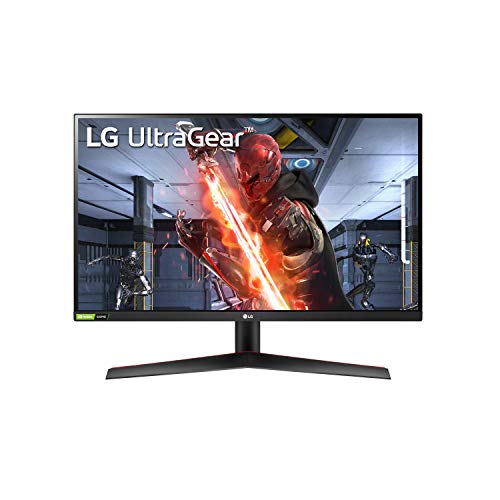
LG 27-Inch UltraGear 144Hz QHD IPS Monitor
Best for: QHD clarity and balanced sync support
- Screen Size
- 27 inch
- Resolution
- 2560x1440
- Refresh Rate
- 144Hz
- Panel Type
- IPS
- Response Time
- 1-millisecond (GtG)
- Sync Technology
- NVIDIA G-SYNC, AMD FreeSync Premium
The LG 27GN800-B offers a 27-inch QHD (2560x1440) IPS panel with a 144Hz refresh rate and 1ms GtG response time. It supports both NVIDIA G-SYNC and AMD FreeSync Premium for tear-free gaming. The display covers 99% of the sRGB color gamut with wide 178-degree viewing angles. This monitor suits players who prioritize color accuracy and resolution over the highest possible frame rates found in other alternatives.
Pros
- 2560x1440 QHD resolution for sharper images
- 144Hz refresh rate with 1ms GtG response
- 99% sRGB color accuracy for vivid visuals
- Dual sync support: G-SYNC and FreeSync Premium
- 178-degree horizontal and vertical viewing angles
Cons
- 144Hz refresh rate is lower than 200Hz+ competitors
- No built-in USB hub or headphone jack listed
- Standard stand without height adjustment mentioned
Good fit if
- You want sharp 1440p visuals for gaming
- You use both NVIDIA and AMD graphics cards
- You value color accuracy for creative work
Skip if
- You need refresh rates above 144Hz
- You require a 4K resolution display
- You prefer curved screens for immersion
Verdict: LG 27GN800-B 27-inch QHD IPS Monitor balances high resolution with smooth motion. It fits gamers who want crisp 1440p clarity and reliable sync technology without chasing extreme frame rates.
Specifications side by side
| Spec | ASUS TUF 27" 280Hz Curved FHD | Dell 27-Inch 240Hz IPS Gaming Monitor | SANSUI 27-Inch 1440p 180Hz Fast IPS Monitor | LG 27-Inch QHD 144Hz IPS Monitor | KOORUI 27" 4K 160Hz Dual Mode | LG UltraGear 27-Inch 180Hz QHD Monitor | LG 27-Inch UltraGear 144Hz QHD IPS Monitor |
|---|---|---|---|---|---|---|---|
| Screen Size | 27" | 27" | 27" | 27-Inch | 27" | 27" | 27 inch |
| Resolution | FHD | 1920x1080 | 2560 x 1440 | 2560 x 1440 | 4K UHD, FHD | 2560x1440 | 2560x1440 |
| Refresh Rate | 280Hz | 240Hz | 200Hz | 144Hz | 160Hz, 320Hz | 180Hz (O/C 200Hz) | 144Hz |
| Panel Type | IPS | Fast IPS | Fast IPS | IPS | Fast IPS | IPS | IPS |
| Response Time | 1ms | 0.5ms | OD 1ms | 1ms (GtG) | 1ms | 1ms GtG | 1-millisecond (GtG) |
| Sync Technology | AMD FreeSync | AMD FreeSync Premium | AMD FreeSync, Adaptive Sync | NVIDIA G-SYNC, FreeSync Premium | FreeSync Premium, G-SYNC Compatible | NVIDIA G-SYNC Compatible, AMD FreeSync | NVIDIA G-SYNC, AMD FreeSync Premium |
| Connectivity | DisplayPort, 2 x HDMI | HDMI, DisplayPort 1.4 | 2 x Display Port 1.4, 2 x HDMI 2.0 | HDMI, DisplayPort | HDMI 2.1, DisplayPort 1.4 | HDMI, DisplayPort | HDMI, DisplayPort |
| Size | DisplayPort & 2 x HDMI | SE2725HG | 27 Inch | 27 Inch | 27" Dual Mode (4K 160Hz / FHD 320Hz) | 27 Inch | 14.4"x24.2"x2.1" |
| Dimensions | 24 × 18 × 6 inches | 7.4 × 24.1 × 17.8 inches | 5.63 × 27 × 19.3 inches | 8.2 × 29.2 × 20.6 inches | 8.99 × 24 × 20 inches | 10 × 24.2 × 22.7 inches | 24.2 × 8.9 × 17.9 inches |
| Weight | 14 pounds | 8.2 pounds | 11.2 pounds | 20.3 pounds | 16.3 pounds | 13.2 pounds | 13.2 pounds |
| Color | Black | Black | Black | Black | Black | Black | Black |
| Model | not specified | SE2726HG | ES-G27F6Q | 27GL83A-B | G2741L | 27GS75Q-B.AUS | 27GN800-B |
Frequently asked questions
Which monitor has the highest refresh rate for competitive gaming?
The ASUS TUF 27" 280Hz Curved FHD leads with a 280Hz refresh rate. It uses an IPS panel and FreeSync support to reduce tearing. This curved 1080p display is ideal for esports players seeking high frame rates and low latency on a compact screen.
Is there a budget-friendly 27-inch option with high speed?
The Dell SE2726HG is a strong budget choice for 1080p competitive shooters. It features a 240Hz refresh rate and FreeSync support on a flat IPS panel. You get top-tier speed for the price, prioritizing response time and frame rate over pixel count or curved immersion.
Can I find a 27-inch monitor with 1440p resolution?
Several options offer 1440p resolution on a 27-inch screen. The SANSUI ES-G27F6Q provides 180Hz on a Fast IPS panel. The LG 27GL83A-B and LG 27GS75Q-B also deliver QHD clarity with 144Hz or 180Hz refresh rates for smoother motion and sharper images.
Do any of these monitors support both FreeSync and G-SYNC?
Yes, multiple monitors support both adaptive sync technologies. The LG 27GL83A-B, KOORUI G2741L, LG 27GS75Q-B, and LG 27GN800-B all list compatibility with both FreeSync and G-SYNC. This broad support ensures smooth gameplay regardless of whether you use an AMD or NVIDIA graphics card.
Which monitor offers the best balance of resolution and speed?
The KOORUI G2741L offers a unique dual-mode capability. It runs at 4K UHD at 160Hz for immersive gaming or switches to FHD at 320Hz for competitive play. This flexibility allows you to prioritize visual fidelity or maximum frame rates depending on your current gaming needs.
Are there ergonomic options for long gaming sessions?
The LG 27GS75Q-B and SANSUI ES-G27F6Q are noted for ergonomic flexibility. The LG model specifically highlights ergonomic adjustability alongside its 180Hz QHD performance. These stands likely allow height, tilt, or swivel adjustments to help you maintain a comfortable viewing position during extended use.
Which monitor is best for color-accurate gaming?
The LG 27GL83A-B is designed for users who value visual fidelity. It delivers reliable color accuracy on a QHD IPS panel. While it runs at 144Hz, it is the top choice for players who prioritize sharp, true-to-life colors and certified sync support over extreme frame rates.
What connectivity ports are standard on these 27-inch monitors?
All listed monitors include DisplayPort and HDMI connectivity. This standard setup allows you to connect to various gaming consoles and PCs. You can easily switch between devices or daisy-chain components without needing additional adapters for basic display output.