Best LG 34" Ultrawide Monitors: 15 Spec-Based Picks
As an Amazon Associate we earn from qualifying purchases. Links on this page are affiliate links.
Finding the best LG 34 ultrawide monitors requires evaluating panel types, refresh rates, and port selections for your desk. This guide compares 15 models based strictly on the specifications published on their listings. The LG 34-Inch UltraGear OLED Curved Monitor leads the lineup with its 240Hz refresh rate and OLED panel engineered for fast motion handling.
Use this comparison to decide between high-refresh gaming displays, single-cable USB-C laptop hubs, and standard productivity screens for your daily work.
Our top pick: LG 34-Inch UltraGear Curved OLED Gaming Monitor.
Quick picks
The best fit for you
- You want the fastest response for competitive gaming LG 34-Inch UltraGear Curved OLED Gaming Monitor Its 240Hz refresh rate and OLED panel deliver top-tier speed and contrast.
- You need a budget-friendly ultrawide for multitasking LG 34-Inch UltraWide 1080p IPS Monitor This 100Hz IPS model offers a 21:9 workspace with USB-C connectivity.
- You want standalone streaming without a PC LG 34-Inch Curved Smart Ultrawide Monitor It features built-in webOS for independent media playback and productivity.
- You prefer a 60Hz panel for office work LG 34-Inch Curved IPS Ultrawide Monitor The 60Hz refresh rate and tilt-only stand suit daily desktop tasks.
Our 15 picks
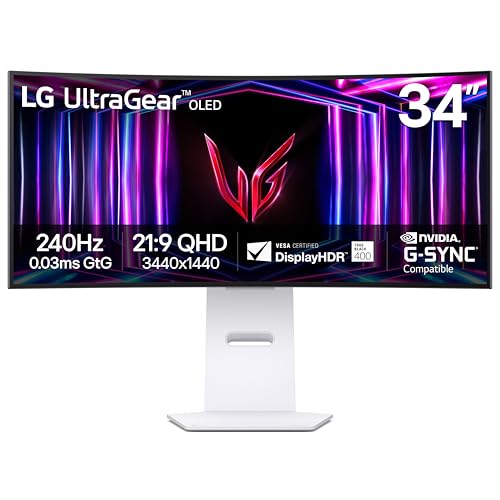
LG 34-Inch UltraGear Curved OLED Gaming Monitor
Best for: Competitive ultrawide gaming and high-contrast visuals
- Screen Size
- 34" (what this guide is about)
- Resolution
- WQHD 1440p
- Refresh Rate
- 240Hz
- Panel Type
- OLED
- Aspect Ratio
- 21:9
- Response Time
- 0.03ms GTG
View on Amazon: LG 34-Inch UltraGear Curved OLED Gaming Monitor
This 34-inch ultrawide OLED monitor delivers a 3440 x 1440 resolution with an aggressive 800R curvature. You get a 240Hz refresh rate, a 0.03ms response time, and DisplayHDR True Black 400 with a 1.5M:1 contrast ratio. It includes HDMI 2.1 and DisplayPort 1.4 inputs with FreeSync Premium Pro and G-Sync compatibility. It suits you if you prioritize fast motion handling and deep black levels for high-end gaming.
Pros
- 240Hz refresh rate and 0.03ms response time
- OLED panel with 1.5M:1 contrast and DisplayHDR True Black 400
- Dual HDMI 2.1 and DisplayPort 1.4 video inputs
- NVIDIA G-Sync and AMD FreeSync Premium Pro support
Cons
- Steep 800R curve may not suit standard office tasks
- No USB-C connectivity listed
- No integrated speakers included
Good fit if
- You play fast-paced titles requiring a 240Hz refresh rate and 0.03ms response time.
- You want deep black levels and high contrast from an OLED panel.
- You connect modern graphics cards via HDMI 2.1 or DisplayPort 1.4.
Skip if
- You prefer a flat or gently curved panel for desktop productivity.
- You need a single-cable USB-C connection for a laptop.
Verdict: LG 34-Inch Curved OLED Gaming Monitor pairs an ultra-fast 240Hz panel with a steep 800R curve for immersive, motion-heavy play. It lacks USB-C connectivity, but delivers top-tier response speeds and OLED contrast.

LG 34-Inch UltraGear OLED Curved Monitor
Best for: high-refresh competitive ultrawide gaming
- Screen Size
- 34" (what this guide is about)
- Resolution
- WQHD 1440p
- Refresh Rate
- 240Hz
- Panel Type
- OLED
- Aspect Ratio
- 21:9
- Response Time
- 0.03ms GtG
This 34-inch curved ultrawide monitor pairs an OLED panel with a 240Hz refresh rate and a 0.03ms response time. Its WQHD 1440p resolution provides sharp visuals, while the steep 800R curve wraps the display across your peripheral vision. DisplayHDR True Black 400 and HDMI 2.1 support enable high-fidelity connectivity. It suits you if you need peak motion clarity and deep contrast for competitive gaming.
Pros
- OLED panel with 240Hz refresh rate and 0.03ms GtG response time
- Steep 800R curvature for wide field-of-view coverage
- DisplayHDR True Black 400 with 1,500,000:1 contrast ratio
- Dual HDMI 2.1 and DisplayPort 1.4 video inputs
Cons
- No USB-C or USB hub connectivity listed
- Steep 800R curve may not suit standard productivity tasks
Good fit if
- You play fast-paced games requiring a 240Hz refresh rate and near-instant response times.
- You want true black levels and high contrast from an OLED display.
- You prefer a deep 800R curve for maximum visual immersion.
Skip if
- You need a single-cable USB-C setup for laptop display and power delivery.
- You prefer a flatter screen for productivity and editing work.
Verdict: LG 34-Inch 240Hz OLED Curved Monitor delivers top-tier speed and deep contrast for gaming setups. Its pairing of an OLED panel, 240Hz refresh rate, and HDMI 2.1 interfaces sets it apart in performance.

LG 34-Inch UltraGear Curved 160Hz Monitor
Best for: high-refresh curved ultrawide PC gaming
- Screen Size
- 34" (what this guide is about)
- Resolution
- 3440 x 1440
- Refresh Rate
- 160Hz
- Response Time
- 1ms MBR
- Sync Technology
- AMD FreeSync Premium
- Connectivity
- HDMI 2.1, DisplayPort
This curved 34-inch ultrawide monitor gives you a 3440 x 1440 WQHD resolution paired with a 160Hz refresh rate and an 1800R screen curve. It features AMD FreeSync Premium, 1ms Motion Blur Reduction, and 99% sRGB color gamut coverage alongside HDR10 support. With HDMI 2.1 and DisplayPort inputs, it suits you if you want high-refresh ultrawide PC gaming with smooth motion handling and expansive desktop real estate.
Pros
- 160Hz refresh rate with AMD FreeSync Premium
- 3440 x 1440 WQHD resolution with 1800R curvature
- 1ms Motion Blur Reduction and Dynamic Action Sync
- HDMI 2.1 and DisplayPort connectivity
Cons
- No USB-C connectivity or power delivery listed
- Color gamut limited to 99% sRGB coverage
Good fit if
- You want a 160Hz 3440 x 1440 curved display for fast-paced gaming.
- You need AMD FreeSync Premium and 1ms MBR to minimize motion blur.
- You plan to connect using HDMI 2.1 or DisplayPort.
Skip if
- You require a single-cable USB-C connection to dock and charge a laptop.
- You need wide DCI-P3 color gamut coverage for color-critical work.
Verdict: LG 34-Inch Curved 160Hz Gaming Monitor balances a 160Hz refresh rate, 1800R curve, and sharp WQHD resolution for fluid gameplay. It delivers responsive gaming performance if you do not need USB-C connectivity.

LG 34-Inch UltraWide 1080p IPS Monitor
Best for: everyday multitasking on a 1080p ultrawide screen
- Screen Size
- 34" (what this guide is about)
- Resolution
- 2560 x 1080
- Refresh Rate
- 100Hz
- Panel Type
- IPS
- Aspect Ratio
- 21:9
- Connectivity
- HDMI, DisplayPort, USB Type-C
This 34-inch ultrawide monitor pairs an IPS panel with a 2560 x 1080 resolution and a 100Hz refresh rate. It includes USB-C connectivity for display and data, DisplayHDR 400 support, and integrated stereo speakers. If you want an expansive 21:9 workspace for split-screen daily multitasking and smooth video calls without needing high-end graphics hardware, this display fits your desk.
Pros
- 100Hz refresh rate for smoother motion than standard 60Hz panels
- USB-C port supports display output and data transfer
- IPS panel with 99% sRGB color gamut coverage
- Built-in stereo speakers with Waves MaxxAudio
Cons
- 2560 x 1080 resolution provides lower pixel density than 1440p models
- USB-C spec does not list laptop charging power delivery
Good fit if
- You want a 34-inch 21:9 IPS display with a 100Hz refresh rate.
- You need USB-C, HDMI, and DisplayPort connectivity with built-in audio.
- You prefer running an ultrawide desktop at 2560 x 1080 resolution.
Skip if
- You require a sharper 3440 x 1440 (WQHD) resolution for fine detail.
- You prefer a curved panel over a flat screen.
Verdict: LG 34-Inch UltraWide 100Hz IPS Monitor provides a 21:9 workspace with 100Hz motion, USB-C connectivity, and built-in speakers for everyday productivity. It delivers broad screen real estate if you do not need 1440p resolution.

LG 34-Inch Curved Ultrawide USB-C Monitor
Best for: laptop multitasking and dual-source productivity setups
- Screen Size
- 34" (what this guide is about)
- Resolution
- 3440 x 1440
- Refresh Rate
- 100Hz
- Aspect Ratio
- 21:9
- Response Time
- 5ms
- Connectivity
- HDMI, DisplayPort, USB Type-C, USB
This 34-inch curved ultrawide monitor features a 3440 x 1440 WQHD resolution and a 100Hz refresh rate. It includes a USB Type-C port with 65W power delivery, two HDMI inputs, and a DisplayPort connection. Picture-by-Picture capability lets you view two devices simultaneously on one screen. It suits you if you work across two computers or want single-cable power and video for a laptop setup.
Pros
- USB Type-C port with 65W power delivery
- 3440 x 1440 WQHD resolution at 100Hz refresh rate
- Hardware Picture-by-Picture support for dual video sources
- Ergonomic stand with height and tilt adjustability
Cons
- 5ms response time is slower than dedicated gaming panels
- 100Hz refresh rate is lower than 120Hz or 144Hz models
- Stand provides height and tilt but lacks swivel adjustments
Good fit if
- You need a USB-C port to connect and charge a laptop up to 65W.
- You want to view two separate video sources side by side using Picture-by-Picture.
- You prefer a 3440 x 1440 curved panel with an adjustable-height stand.
Skip if
- You require a high refresh rate above 100Hz for fast-paced gaming.
- You need a 1ms response time to reduce motion blur.
Verdict: LG 34-Inch Curved Ultrawide with USB-C delivers a practical 3440 x 1440 workspace with 65W laptop charging and dual-input Picture-by-Picture functionality. It offers reliable multitasking connectivity for home office setups.

LG 34-Inch Curved Ultrawide 144Hz Monitor
Best for: hybrid productivity and 144Hz gaming setups
- Screen Size
- 34" (what this guide is about)
- Resolution
- 3440 x 1440
- Refresh Rate
- 144Hz
- Aspect Ratio
- 21:9
- Response Time
- 5ms
- Sync Technology
- AMD FreeSync Premium
This 34-inch ultrawide monitor combines a 3440x1440 WQHD resolution with a 144Hz refresh rate and an 1800R curve. It includes USB-C with 65W power delivery, a built-in KVM switch, and AMD FreeSync Premium support. If you want a wide 21:9 workspace for dual-PC productivity along with fluid gaming performance, this display provides the essential speed and connectivity for your setup.
Pros
- 144Hz refresh rate with AMD FreeSync Premium
- USB-C port supplies display, data, and 65W charging
- Built-in KVM switch allows control of two PCs
- Detailed 3440x1440 WQHD resolution on an 1800R curve
Cons
- 5ms response time is slower than dedicated gaming panels
- 65W USB-C power delivery cannot fully charge high-wattage laptops
Good fit if
- You need a 144Hz refresh rate for smooth gaming and desktop motion.
- You control two PCs simultaneously and want integrated KVM switching.
- You require single-cable USB-C video, data, and charging up to 65W.
Skip if
- You require response times faster than 5ms for competitive gaming.
- You use a heavy-duty laptop that requires more than 65W over USB-C.
Verdict: LG 34" Curved 144Hz WQHD Monitor combines smooth 144Hz visuals with 65W USB-C and dual-PC KVM controls. It serves mixed productivity and gaming setups that prioritize fluid motion alongside clean single-cable connectivity.

LG 34-Inch Curved Smart Ultrawide Monitor
Best for: standalone streaming and everyday home office multitasking
- Screen Size
- 34" (what this guide is about)
- Resolution
- 3440x1440
- Refresh Rate
- 100Hz
- Aspect Ratio
- 21:9
- Connectivity
- HDMI, USB
- Dimensions
- 8.79 × 31.9 × 19 inches
This 34-inch ultrawide display pairs a 3440 x 1440 resolution with built-in webOS smart features. You get an 1800R curved screen with a 100Hz refresh rate and 99% sRGB coverage for your daily tasks. Built-in streaming apps and cloud PC support let you stream video or edit documents without a separate computer connected. It suits you if you want a standalone workstation and media screen in one display.
Pros
- Built-in webOS with standalone streaming and cloud PC apps
- Sharp 3440 x 1440 resolution on an 1800R curved panel
- Apple AirPlay 2 and HomeKit compatibility for wireless casting
- 100Hz refresh rate with 99% sRGB color gamut coverage
Cons
- No DisplayPort input listed in connectivity specs
- No USB-C display or power delivery connection listed
Good fit if
- You want to stream media or access cloud applications without turning on a PC.
- You use Apple hardware and need built-in AirPlay 2 mirroring.
- You need a sharp 3440 x 1440 curved workspace for everyday office multitasking.
Skip if
- You need higher refresh rates than 100Hz for fast-paced gaming.
- You rely on DisplayPort or single-cable USB-C connections for your computer setup.
Verdict: LG 34-Inch Curved Smart Ultrawide Monitor delivers practical 3440 x 1440 productivity alongside standalone webOS streaming. It is a solid choice if you want independent media and work capabilities without always powering on a computer.

LG 34-Inch Curved 1440p Ultrawide Monitor
Best for: 120Hz productivity and balanced desktop gaming
- Screen Size
- 34" (what this guide is about)
- Resolution
- 3440×1440
- Refresh Rate
- 120Hz
- Aspect Ratio
- 21:9
- Response Time
- 5ms
- Connectivity
- DisplayPort, HDMI, headphone jack
This 34-inch curved display pairs a 3440x1440 WQHD resolution with a 120Hz refresh rate across a 21:9 aspect ratio. An 1800R curvature and 99% sRGB color coverage support extended viewing comfort and accurate visuals. With tilt and height adjustability alongside DisplayPort and HDMI inputs, you get smooth navigation and flexible placement for everyday work, multitasking across wide layouts, and moderate refresh-rate gaming.
Pros
- 120Hz refresh rate with 3440x1440 WQHD resolution
- Subtle 1800R curve with 99% sRGB color coverage
- Stand supports both tilt and height adjustability
- LG Switch software enables up to 11 screen split layouts
Cons
- 5ms response time is slower than dedicated gaming panels
- No USB-C connectivity or USB hub ports listed
- No built-in speakers included
Good fit if
- You want a 120Hz 1440p ultrawide display for work and balanced gaming.
- You need an adjustable stand with height and tilt controls.
- You prefer a gentle 1800R curve for everyday productivity.
Skip if
- You require USB-C connectivity for single-cable laptop docking.
- You want faster 1ms response times for competitive esports.
Verdict: LG 34-Inch Curved 120Hz UltraWide Monitor delivers smooth 120Hz performance and sharp WQHD resolution on an ergonomic stand. It suits users who prioritize fluid desktop motion and productivity over competitive gaming speeds.

LG 34-Inch Curved WQHD IPS Monitor
Best for: single-cable laptop productivity and everyday multitasking
- Screen Size
- 34" (what this guide is about)
- Resolution
- 3440×1440
- Refresh Rate
- 100Hz
- Panel Type
- IPS
- Aspect Ratio
- 21:9
- Response Time
- 5ms
This 34-inch display pairs a 3440 x 1440 WQHD IPS panel with a 100Hz refresh rate and a gentle 3800R curve. It includes USB-C connectivity with 96W power delivery, DisplayPort, HDMI, and integrated speakers. You get wide viewing angles and 99% sRGB color coverage for daily work and media tasks. It suits you if you want a sharp productivity workspace that charges your laptop over one cable.
Pros
- USB-C port supplies video, data, and up to 96W laptop charging
- 3440 x 1440 WQHD resolution on a color-accurate IPS panel
- 100Hz refresh rate provides smoother motion than standard 60Hz panels
- Built-in speakers with DepthSound reduce desk clutter
Cons
- 5ms response time is slower than dedicated gaming monitors
- Subtle 3800R curvature offers less immersion than tighter curves
Good fit if
- You want single-cable USB-C docking with up to 96W power delivery.
- You need a sharp 1440p IPS screen with 99% sRGB coverage for desktop work.
- You prefer a subtle curve rather than an aggressive wrap-around display.
Skip if
- You want high-speed gaming specs beyond 100Hz and 5ms.
- You prefer a deep curvature such as 1800R or 800R.
Verdict: LG 34-Inch Curved IPS Ultrawide Monitor provides a sharp 1440p workspace with capable 96W USB-C charging and 100Hz smoothness. It is a well-rounded pick for daily productivity and clean single-cable laptop setups.

LG 34-Inch Curved UltraWide IPS Monitor
Best for: color-accurate office work and productivity multitasking
- Screen Size
- 34" (what this guide is about)
- Resolution
- 3440x1440
- Refresh Rate
- 60Hz
- Panel Type
- IPS
- Sync Technology
- Dynamic Action Sync
- Dimensions
- 8.8 × 32.2 × 19.1 inches
This curved 34-inch ultrawide display gives you a 3440 x 1440 resolution paired with an IPS panel. You get 99% sRGB color coverage, HDR 10 support, and wide 178-degree viewing angles. It runs at a standard 60Hz refresh rate and includes Dynamic Action Sync and OnScreen Control software. This monitor fits office productivity work, photo editing, and content creation where sharp details and accurate color output matter more than fast gaming speeds.
Pros
- Crisp 3440 x 1440 QHD resolution across a 34-inch curved screen
- IPS panel with 99% sRGB coverage and 178-degree viewing angles
- HDR 10 support for compatible dynamic range content
- OnScreen Control and Dual Controller screen-splitting software
Cons
- Standard 60Hz refresh rate is lower than gaming-focused alternatives
- No USB-C connectivity included in the technical specifications
Good fit if
- You need 3440 x 1440 screen real estate with 99% sRGB color accuracy.
- You use screen-splitting workflows via OnScreen Control and Dual Controller.
- You want consistent color viewing angles from an ultrawide IPS panel.
Skip if
- You require a high refresh rate above 60Hz for fast-paced gaming.
- You need single-cable USB-C docking and power delivery for your laptop.
Verdict: LG 34-Inch Curved WQHD IPS Monitor delivers sharp 3440 x 1440 clarity and dependable color accuracy for multitasking and media production. Its 60Hz refresh rate makes it an everyday productivity tool rather than a high-speed gaming display.

LG 34-Inch 100Hz Ultrawide IPS Monitor
Best for: productivity multitasking and casual media
- Screen Size
- 34" (what this guide is about)
- Resolution
- 2560 x 1080
- Refresh Rate
- 100Hz
- Panel Type
- IPS
- Aspect Ratio
- 21:9
- Response Time
- 5ms
This 34-inch ultrawide monitor features a 2560 x 1080 resolution and a 100Hz refresh rate. The IPS panel covers 99% of the sRGB color gamut and supports AMD FreeSync. It includes VESA DisplayHDR 400 certification and a 5ms response time. You get a wide viewing area for multitasking with a minimalist design that saves desk space. It suits users who need horizontal screen real estate for productivity or casual media consumption.
Pros
- 34-inch 21:9 aspect ratio for expanded multitasking
- 100Hz refresh rate with 5ms response time
- 99% sRGB color coverage on IPS panel
- VESA DisplayHDR 400 certification
- Includes LG Switch app for screen layout
Cons
- WFHD resolution is lower than the QHD standard of other picks
- No USB-C connectivity listed in specifications
- Only supports HDMI and DisplayPort inputs
Good fit if
- You need a wide screen for document multitasking
- You prefer IPS panels for consistent viewing angles
- You want a 100Hz refresh rate for smooth video
Skip if
- You require QHD (3440 x 1440) resolution
- You need USB-C connectivity for your setup
- You want OLED display technology
Verdict: LG 34" WFHD IPS 100Hz Monitor offers a budget-friendly ultrawide experience with solid color accuracy and a high refresh rate for its class. It fits users who prioritize horizontal workspace over pixel density.

LG 34-Inch Curved WQHD USB-C Monitor
Best for: USB-C productivity and casual gaming
- Screen Size
- 34" (what this guide is about)
- Resolution
- 3440x1440
- Refresh Rate
- 100Hz
- Sync Technology
- AMD FreeSync
- Connectivity
- USB Type-C
- Dimensions
- 10.2 × 31.9 × 22.4 inches
This 34-inch curved monitor features a 3440 x 1440 WQHD resolution with an ultrawide aspect ratio and a 100Hz refresh rate. It includes USB-C connectivity, HDR 10 support, and AMD FreeSync technology to prevent screen tearing. The expansive display gives you extra horizontal room for side-by-side windows. It suits you if you need a sharp ultrawide screen for everyday multitasking, productivity tasks, and casual gaming.
Pros
- 3440 x 1440 WQHD resolution
- USB-C connectivity
- 100Hz refresh rate
- AMD FreeSync support
- HDR 10 support
Cons
- 100Hz refresh rate is lower than high-refresh alternatives
- No built-in speakers listed in specifications
Good fit if
- You want a 3440 x 1440 curved ultrawide display for multitasking.
- You need USB-C connectivity to hook up your computer.
- You want AMD FreeSync with a 100Hz refresh rate.
Skip if
- You require a refresh rate higher than 100Hz for competitive gaming.
- You prefer a flat monitor over a curved screen.
Verdict: LG 34-Inch Curved USB-C Ultrawide Monitor delivers 3440 x 1440 resolution, 100Hz FreeSync support, and USB-C connectivity on a 34-inch curved screen. It provides a balanced set of core features for daily work and casual gaming.

LG 34-Inch UltraWide WFHD IPS Monitor
Best for: Everyday multitasking and single-cable laptop setups
- Screen Size
- 34" (what this guide is about)
- Resolution
- 2560 x 1080
- Refresh Rate
- 100Hz
- Panel Type
- IPS
- Aspect Ratio
- 21:9
- Connectivity
- USB Type-C, HDMI, DisplayPort
This 34-inch ultrawide monitor gives you a 21:9 IPS display running at a 2560 x 1080 resolution with a 100Hz refresh rate. It includes a USB Type-C port that handles display output and data transfer from your laptop, alongside DisplayPort and HDMI inputs. It suits you if you need expansive horizontal screen space for side-by-side windows, integrated stereo speakers, and ergonomic height, tilt, and swivel adjustments.
Pros
- USB Type-C port handles video input and data transfer
- IPS panel with 99% sRGB color coverage and DisplayHDR 400
- 100Hz refresh rate for smoother motion than standard 60Hz screens
- Ergonomic L-shaped stand supports tilt, height, and swivel
- Built-in stereo speakers with Waves MaxxAudio processing
Cons
- WFHD 2560 x 1080 resolution yields lower pixel density on a 34-inch screen
- 100Hz maximum refresh rate falls behind faster gaming-focused displays
Good fit if
- You want a single USB-C cable connection for your laptop's display and data.
- You need an adjustable stand offering height, swivel, and tilt flexibility.
- You want ultrawide multitasking screen space without requiring a 1440p graphics workload.
Skip if
- You need a sharp 3440 x 1440 resolution for detailed creative work or fine text.
- You require high-frame-rate gaming performance beyond 100Hz.
Verdict: LG 34-Inch 100Hz WFHD IPS Ultrawide Monitor delivers practical 21:9 desktop workspace with versatile USB-C connectivity, integrated audio, and flexible ergonomic adjustments. It is an effective solution for everyday productivity if you prefer lighter GPU demands over high pixel density.

LG 34-Inch Curved IPS KVM Monitor
Best for: dual-PC productivity and laptop charging
- Screen Size
- 34" (what this guide is about)
- Resolution
- 3440 x 1440
- Panel Type
- IPS
- Aspect Ratio
- 21:9
- Connectivity
- USB Type-C, HDMI, DisplayPort, USB
- Dimensions
- 0.84 × 32.2 × 21.4 inches
This 34-inch curved ultrawide monitor gives you a 3440 x 1440 IPS display with a subtle 3800R curve. It includes a built-in KVM switch, Picture-by-Picture support, and a USB-C port supplying up to 90W of power delivery. You also get integrated MaxxAudio speakers and full stand adjustments. It suits you if you run two computers simultaneously and want a single-cable workstation hub.
Pros
- Built-in KVM switch and Picture-by-Picture for controlling two PCs
- USB-C port with up to 90W power delivery
- 3440 x 1440 IPS panel with 99% sRGB color gamut
- Ergonomic stand with height, tilt, and swivel adjustments
Cons
- Mild 3800R curve provides minimal curvature compared to 1800R panels
- Refresh rate and response time are not specified in product data
Good fit if
- You switch between two computers and need an integrated KVM switch.
- You want to charge a laptop over a single USB-C cable up to 90W.
- You prefer an IPS panel with wide viewing angles and 99% sRGB color.
Skip if
- You need verified high-refresh-rate gaming specifications.
- You prefer a deep curvature such as 1800R or 1500R.
Verdict: LG 34-Inch Curved IPS Monitor with KVM delivers dual-source workflow management and 90W laptop charging for multitasking professionals. Its combination of an IPS panel and built-in KVM fits desks running work and personal machines simultaneously.

LG 34-Inch Curved IPS Ultrawide Monitor
Best for: everyday productivity and color-accurate office work
- Screen Size
- 34" (what this guide is about)
- Resolution
- 3440x1440
- Refresh Rate
- 60Hz
- Panel Type
- IPS
- Aspect Ratio
- 21:9
- Sync Technology
- AMD FreeSync
This 34-inch curved display pairs an IPS panel with a 3440 x 1440 resolution and a standard 60Hz refresh rate. It delivers 99% sRGB coverage, HDR10 support, and wide 178-degree viewing angles across a 21:9 aspect ratio. With DisplayPort and HDMI inputs plus AMD FreeSync, it provides reliable workspace and multitasking performance. You will find it suits daily productivity, office workflows, and color-focused desktop tasks requiring dependable wide-screen screen real estate.
Pros
- 3440 x 1440 QHD resolution on an ultrawide IPS panel
- 99% sRGB color gamut coverage with HDR10 support
- AMD FreeSync, Dynamic Action Sync, and Black Stabilizer support
- Dual Controller and OnScreen Control split-screen software tools
Cons
- 60Hz refresh rate lacks support for high-frame-rate gaming
- Stand provides tilt adjustment without height or swivel functionality
Good fit if
- You need a sharp 3440 x 1440 IPS screen for multitasking and office software.
- You want accurate color reproduction with 99% sRGB coverage for creative work.
- You connect your system via standard DisplayPort or HDMI ports.
Skip if
- You require refresh rates above 60Hz for fast-paced gaming.
- You need built-in ergonomic height adjustment directly on the included stand.
Verdict: LG 34-Inch Curved IPS Ultrawide Monitor delivers crisp 3440 x 1440 visuals and dependable sRGB coverage for daily productivity. Its 60Hz panel and tilt-only stand make it better suited for desktop multitasking than high-speed competitive gaming.
Specifications side by side
| Spec | LG 34-Inch UltraGear Curved OLED Gaming Monitor | LG 34-Inch UltraGear OLED Curved Monitor | LG 34-Inch UltraGear Curved 160Hz Monitor | LG 34-Inch UltraWide 1080p IPS Monitor | LG 34-Inch Curved Ultrawide USB-C Monitor | LG 34-Inch Curved Ultrawide 144Hz Monitor | LG 34-Inch Curved Smart Ultrawide Monitor | LG 34-Inch Curved 1440p Ultrawide Monitor | LG 34-Inch Curved WQHD IPS Monitor | LG 34-Inch Curved UltraWide IPS Monitor | LG 34-Inch 100Hz Ultrawide IPS Monitor | LG 34-Inch Curved WQHD USB-C Monitor | LG 34-Inch UltraWide WFHD IPS Monitor | LG 34-Inch Curved IPS KVM Monitor | LG 34-Inch Curved IPS Ultrawide Monitor |
|---|---|---|---|---|---|---|---|---|---|---|---|---|---|---|---|
| Screen Size | 34" | 34" | 34-inch | 34" | 34" | 34-inch | 34" | 34-inch | 34-inch | 34" | 34" | 34" | 34" | 34" | 34" |
| Resolution | WQHD 1440p | WQHD 1440p | 3440 x 1440 | 2560 x 1080 | 3440 x 1440 | 3440 x 1440 | 3440x1440 | 3440×1440 | 3440×1440 | 3440x1440 | 2560 x 1080 | 3440x1440 | 2560 x 1080 | 3440 x 1440 | 3440x1440 |
| Refresh Rate | 240Hz | 240Hz | 160Hz | 100Hz | 100Hz | 144Hz | 100Hz | 120Hz | 100Hz | 60Hz | 100Hz | 100Hz | 100Hz | not specified | 60Hz |
| Panel Type | OLED | OLED | not specified | IPS | not specified | not specified | not specified | not specified | IPS | IPS | IPS | not specified | IPS | IPS | IPS |
| Aspect Ratio | 21:9 | 21:9 | not specified | 21:9 | 21:9 | 21:9 | 21:9 | 21:9 | 21:9 | not specified | 21:9 | not specified | 21:9 | 21:9 | 21:9 |
| Response Time | 0.03ms GTG | 0.03ms GtG | 1ms MBR | not specified | 5ms | 5ms | not specified | 5ms | 5ms | not specified | 5ms | not specified | not specified | not specified | not specified |
| Sync Technology | AMD FreeSync Premium Pro, NVIDIA G-Sync | G-SYNC Compatible, FreeSync Premium Pro | AMD FreeSync Premium | not specified | not specified | AMD FreeSync Premium | not specified | not specified | not specified | Dynamic Action Sync | AMD FreeSync | AMD FreeSync | not specified | not specified | AMD FreeSync |
| Connectivity | HDMI 2.1, DisplayPort 1.4 | HDMI 2.1, DisplayPort 1.4 | HDMI 2.1, DisplayPort | HDMI, DisplayPort, USB Type-C | HDMI, DisplayPort, USB Type-C, USB | HDMI, DisplayPort, USB Type-C, USB | HDMI, USB | DisplayPort, HDMI, headphone jack | USB-C, DisplayPort, HDMI | not specified | HDMI, DisplayPort | USB Type-C | USB Type-C, HDMI, DisplayPort | USB Type-C, HDMI, DisplayPort, USB | DisplayPort, HDMI |
| Size | 34 Inch | 34 Inch | not specified | not specified | not specified | not specified | not specified | not specified | 34 | 34-60Hz | 100Hz-DP/HDMI | 34-curved | 34-100Hz | not specified | 60Hz-HDMI/DP |
| Dimensions | 11 × 30.9 × 23.1 inches | 11 × 30.9 × 23.1 inches | 9.8 × 31.9 × 18.5 inches | 9.1 × 32.1 × 21 inches | 10.2 × 31.9 × 22.4 inches | 8.7 × 31.9 × 18.3 inches | 8.79 × 31.9 × 19 inches | 9.4 × 31.8 × 18 inches | 9.1 × 32.2 × 21.1 inches | 8.8 × 32.2 × 19.1 inches | 8.7 × 32.1 × 19.2 inches | 10.2 × 31.9 × 22.4 inches | 9.1 × 32.1 × 21 inches | 0.84 × 32.2 × 21.4 inches | 8.8 × 32.3 × 19.1 inches |
| Weight | 20.5 pounds | 20.5 pounds | 22 pounds | 19.4 pounds | 15.2 pounds | 17 pounds | 13.5 pounds | 13.7 pounds | 22.3 pounds | not specified | not specified | 12.1 pounds | not specified | 24.3 pounds | not specified |
| Color | White | Green/Red | Black | White | Black | Black | White | Black | Black | BLACK | Black-Tilt | black | WHITE | Black | Black-Tilt |
| Model | 34GS95QE-W.AUS | 34GS95QE-B.AUS | 34G600A-B.AUS | 34U530A-W.AUS | 34WR55QK-B.AUS | 34U640B-B.AUS | 34SR60QC-W.AUS | 34U60ZB-B.AUSQ | 34U650A-B.AUS | B0FZ8HS9ZR | not specified | AMZE1LG34WR55QCB | not specified | 34U65ZA-B.AUS | 34WN80C-B |
If you need a portable display, see our list of the best MAGICRAVEN portable monitors for your mobile setup.
Key Specs for LG 34 Ultrawide Monitors
-
Evaluate Native Display Resolution
Screen resolution dictates text sharpness on a 34-inch ultrawide display. A 2560 x 1080 resolution offers lower pixel density, which requires less graphical processing power and works well for basic document reading. In contrast, a 3440 x 1440 WQHD panel provides significantly sharper text and more horizontal desktop real estate for side-by-side windows. If you manage detailed spreadsheets or edit media, select 3440 x 1440. If your computer hardware has modest graphical capabilities, a 1080p display like the LG 34-Inch UltraWide 1080p IPS Monitor reduces processing strain while keeping the wide aspect ratio.
-
Verify USB-C Power Delivery
USB-C connectivity streamlines your workspace by combining video transmission, data transfer, and laptop charging into a single cable. Check the wattage specification before selecting a display. A monitor delivering 65W works reliably for standard ultrabooks and compact office laptops. High-performance mobile workstations require higher wattage to prevent battery drain under heavy computing loads. The LG 34-Inch Curved WQHD IPS Monitor delivers 96W through USB-C, ensuring larger laptops charge during operation. If you connect only a desktop computer through DisplayPort or HDMI, USB-C power delivery is an unnecessary feature to prioritize.
-
Compare Panel Technologies
Panel type determines color presentation, contrast, and response behavior. IPS panels offer wide viewing angles and consistent color representation across the full width of the screen. They suit office tasks, code editing, and graphic production where static interface elements remain visible for hours. OLED panels produce self-lit pixels that achieve pure black levels and instant pixel transition speeds, eliminating motion blur during fast gameplay. If your primary focus is general desktop productivity, an IPS display such as the LG 34-Inch Curved IPS Ultrawide Monitor provides reliable performance without image retention considerations.
-
Match Variable Refresh Tech
Variable refresh rate technology syncs the display refresh cycle with the frame output of your graphics card to prevent screen tearing and stutter. Review the listed sync technology to ensure compatibility with your graphics card. Basic AMD FreeSync handles tear-free output for compatible GPUs across standard refresh rates. Competitive gaming displays add dual compatibility. The LG 34-Inch UltraGear OLED Curved Monitor supports both FreeSync and NVIDIA G-SYNC protocols. If you use the monitor solely for productivity software or media consumption, adaptive sync specifications will not impact your daily workflow.
-
Measure Desk Depth Requirements
Ultrawide monitors require substantial desk space due to their physical footprint and stand depth. Measure your desktop surface before purchasing. Standard stands on these 34-inch models range from 8.7 inches to 11 inches in depth, occupying significant area forward of the rear edge. Weight also varies substantially across models. The LG 34-Inch Curved OLED 240Hz Gaming Monitor reaches 31.7 pounds, demanding a sturdy desktop surface or a heavy-duty mounting arm. For shallow desks under 24 inches in depth, verify stand dimensions to maintain an ergonomic viewing distance from the screen.
Frequently asked questions
Which LG 34-inch monitor is best for competitive gaming?
The LG 34-Inch UltraGear Curved OLED Gaming Monitor is the top choice. It features a 240Hz refresh rate and an OLED panel for high-contrast visuals. The 800R curve enhances immersion during fast-paced play. It supports both FreeSync and G-SYNC for smooth frame delivery.
Do LG 34-inch ultrawide monitors support USB-C connectivity?
Several models include USB-C ports for simplified connectivity. The LG 34-Inch Curved Ultrawide USB-C Monitor offers 65W laptop charging and Picture-by-Picture functionality. Other options like the LG 34-Inch Curved IPS Ultrawide Monitor provide up to 96W charging. These ports allow single-cable setups for data and power.
What is the difference between OLED and IPS panels on these monitors?
OLED panels, found in the UltraGear series, deliver deeper contrast and faster response times ideal for gaming. IPS panels, used in productivity models, offer reliable color accuracy and wider viewing angles. The OLED models reach 240Hz, while IPS options typically range from 60Hz to 100Hz for office work.
Can I connect two computers to a single LG 34-inch monitor?
Yes, specific models include KVM switch functionality. The LG 34-Inch Curved Ultrawide 144Hz Monitor allows dual-PC control with a single keyboard and mouse. The LG 34-Inch Curved IPS KVM Monitor also supports dual-source workflow management. This feature simplifies switching between work and personal machines.
Are there LG 34-inch monitors with built-in streaming apps?
The LG 34-Inch Curved Smart Ultrawide Monitor features standalone webOS streaming capabilities. You can access media services without powering on a computer. This model provides 100Hz refresh rates and 3440 x 1440 resolution, making it suitable for both independent media consumption and desktop multitasking.
Which LG 34-inch monitor is best for everyday multitasking?
The LG 34-Inch UltraWide 1080p IPS Monitor is ideal for budget-conscious multitasking. It provides a 21:9 workspace with 100Hz motion and USB-C connectivity. For higher resolution needs, the LG 34-Inch Curved IPS Ultrawide Monitor offers 3440 x 1440 clarity. Both models prioritize screen real estate over gaming speed.
What resolutions are available on LG 34-inch ultrawide monitors?
Most models offer WQHD resolution at 3440 x 1440 pixels for sharp text and images. Some budget-oriented options use 2560 x 1080 resolution, which reduces GPU demand. The 1440p models provide higher pixel density, benefiting detailed work and immersive gaming experiences compared to the lower resolution WFHD alternatives.