6 Best Alternatives to the Dell 32 4K USB-C Hub (2026)
As an Amazon Associate we earn from qualifying purchases. Links on this page are affiliate links.
You may be looking for dell 32 4k USB c hub alternatives if the Dell P3223QE does not fit your exact needs. This monitor offers 4K UHD resolution and USB-C connectivity, which supports sharp text and simplified desk setups. It is a solid choice for office workers who prioritize screen real estate and connection simplicity over gaming performance. However, you might want a different size, refresh rate, or brand to better suit your workflow.
The alternatives listed here were chosen because their specifications overlap with the original product. You can find options with higher refresh rates like 120Hz or 144Hz for smoother visuals. Other models offer different screen sizes, such as 27-inch or portable 19-inch and 15.6-inch displays. Some provide additional connectivity options or specific panel types like IPS for better color accuracy. This list covers various forms factors and performance levels while maintaining the core 4K and USB-C features you likely value.
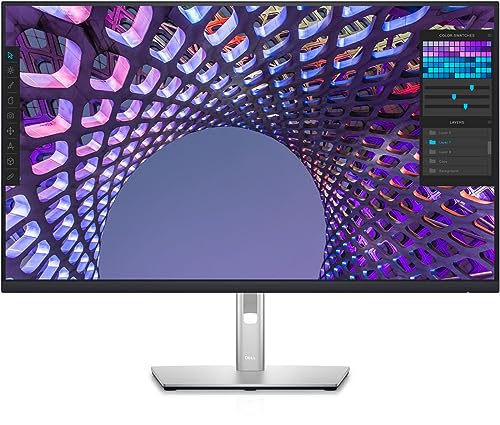
Our top pick: Dell P3223QE 32-inch 4K USB-C Hub Monitor.
How each alternative compares
Dell 27-Inch 4K 120Hz USB-C Monitor
The Dell S2725QC offers 120Hz refresh rates, which is a significant upgrade from the standard 60Hz found on the P3223QE. This makes motion smoother for gaming and general desktop use. You get this performance in a slightly smaller 27-inch frame, which saves desk space. The IPS panel ensures good viewing angles, similar to the Dell original. You also retain USB-C connectivity for easy cable management. However, you sacrifice the larger 32-inch screen real estate that the P3223QE provides. If you prioritize smooth visuals over maximum workspace, this compact option is a strong choice.
ASUS ProArt 27-Inch 4K USB-C Monitor
The ASUS ProArt PA279CV focuses on professional color accuracy rather than high refresh rates. It matches the 4K UHD resolution of the Dell P3223QE but comes in a 27-inch size. This monitor is designed for content creators who need precise color reproduction. You still get USB-C connectivity, which simplifies your desk setup by allowing single-cable connections for data and power. The trade-off is the smaller screen size and the lack of high-speed gaming features. If your work involves photo or video editing, this model offers better color precision than the standard Dell office monitor.
VisionOwl 19-Inch 4K 144Hz Portable Monitor
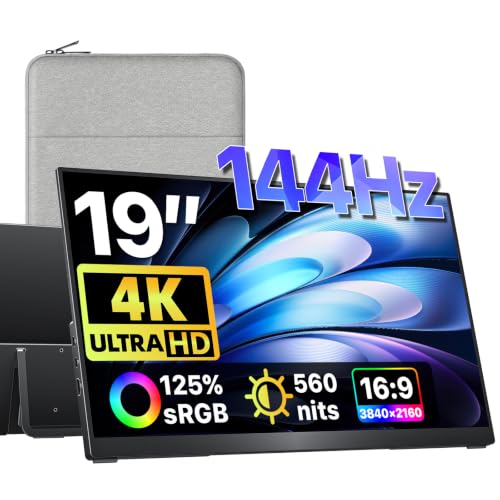
The VisionOwl V19UH is a portable 19-inch monitor with a 144Hz refresh rate. It offers much higher speed than the 60Hz Dell P3223QE, making it excellent for gaming on the go. You get 4K UHD resolution in a very compact package that weighs only 2.35 pounds. It supports both HDMI and USB-C connections, giving you flexibility. However, the screen is significantly smaller, which is not ideal for productivity tasks that require large workspace. It is a specialized tool for travelers who need a bright, high-speed secondary display rather than a primary desktop monitor.
LG 27-Inch 4K UHD USB-C Monitor
The LG 27UP850K-W provides strong USB-C power delivery, which is useful for charging laptops directly. It features an IPS panel and 4K UHD resolution, matching the clarity of the Dell P3223QE. The 27-inch size is slightly smaller but offers a different form factor. You get built-in audio, which the Dell model may lack depending on the specific configuration. This monitor is designed for office and media use, prioritizing color accuracy and connectivity over gaming performance. If you need to power your laptop through the monitor and value good color fidelity, this LG option is a reliable alternative.
ASUS 27-Inch 4K USB-C Monitor
The ASUS VA27UCPS is a business-focused monitor with 4K UHD resolution and USB-C connectivity. It matches the Dell P3223QE in resolution but offers a 27-inch screen size. This model includes multiple ports, including DisplayPort and HDMI, in addition to USB-C. It is designed for professional workspaces that need accurate colors and ergonomic flexibility. You get a comfortable viewing experience for extended work sessions. However, you give up the larger 32-inch display of the Dell original. If you need a versatile monitor with strong connectivity options for a professional environment, this ASUS model is a solid choice.
Yxk 15.6-Inch 4K 60Hz Portable Monitor
The Yxk Y156U1 is a 15.6-inch portable monitor with 4K UHD resolution and 60Hz refresh rate. It matches the resolution of the Dell P3223QE but is much smaller and lighter. It supports HDMI and USB-C connections, making it easy to connect to various devices. This monitor is ideal for travelers who need a secondary display with high clarity. You sacrifice significant screen real estate and desktop stability for portability. If you primarily need a compact, high-resolution screen for travel or as a secondary monitor, this Yxk option provides excellent value and convenience.
Quick picks
Our 7 picks
Dell P3223QE 32-inch 4K USB-C Hub Monitor
Best for: Productivity tasks requiring large 4K workspace
- Resolution
- 4K
- Connectivity
- USB-C
View on Amazon: Dell P3223QE 32-inch 4K USB-C Hub Monitor Affiliate link
The Dell P3223QE is a 31.5-inch 4K UHD monitor designed for productivity. It features USB-C connectivity, allowing you to connect devices and potentially power them through a single cable. The large screen size offers ample workspace for multitasking. This monitor suits users who need a high-resolution display with convenient hub functionality for their setup.
Pros
- 31.5-inch 32-inch screen size for ample workspace
- 4K UHD resolution for sharp text and images
- USB-C connectivity for simplified device connection
Cons
- No refresh rate or response time listed in specifications
- No color gamut coverage data provided
- No HDR support mentioned in specs
Good fit if
- You need a large screen for detailed work
- You want to reduce cable clutter with USB-C
- You prioritize resolution over high refresh rates
Skip if
- You require a high refresh rate for gaming
- You need verified color accuracy for professional design
- You prefer a smaller desktop footprint
Verdict: Dell P3223QE 32-inch 4K USB-C Hub Monitor is a solid choice for office workers who value screen real estate and connection simplicity. It fits users who prioritize sharp text and clean desk setups over gaming performance.

Dell 27-Inch 4K 120Hz USB-C Monitor
Best for: 120Hz 4K performance in a 27-inch frame
- Screen Size
- 27"
- Resolution
- 3840x2160
- Refresh Rate
- 120Hz
- Panel Type
- IPS
- Response Time
- 4ms
- Sync Technology
- AMD FreeSync Premium
View on Amazon: Dell 27-Inch 4K 120Hz USB-C Monitor Affiliate link
The Dell S2725QC is a 27-inch 4K UHD IPS monitor featuring a 120Hz refresh rate and AMD FreeSync Premium. It includes USB-C connectivity with 65W power delivery and ComfortView Plus blue light reduction. This model suits users seeking a smooth, high-resolution display for both work and gaming with a single-cable setup.
Pros
- 120Hz refresh rate for smooth motion
- 4K UHD IPS panel with 99% sRGB
- USB-C with 65W power delivery
- AMD FreeSync Premium sync technology
Cons
- 4ms response time is slower than 1ms gaming monitors
- 27-inch size is smaller than the 32-inch Dell alternative
- No built-in speakers listed in specifications
Good fit if
- You need a 120Hz refresh rate for smoother gameplay
- You want USB-C connectivity for a single-cable desk setup
- You prefer a 27-inch 4K display over a larger 32-inch screen
Skip if
- You require a 32-inch screen size
- You need a sub-1ms response time for competitive esports
- You prefer HDMI-only connectivity without USB-C
Verdict: Dell S2725QC 27-inch 120Hz 4K delivers high refresh rate performance in a compact 27-inch frame, making it ideal for users who prioritize smooth visuals and USB-C convenience over larger screen real estate.

ASUS ProArt 27-Inch 4K USB-C Monitor
Best for: Professional color work and single-cable setups
- Screen Size
- 27"
- Resolution
- 4K UHD
- Panel Type
- IPS
- Response Time
- 5.0 ms
- Connectivity
- USB-C, DisplayPort, HDMI, USB 3.1
- Size
- 27 Inch
View on Amazon: ASUS ProArt 27-Inch 4K USB-C Monitor Affiliate link
The ASUS ProArt PA279CV is a 27-inch 4K UHD IPS monitor designed for professional color work. It covers 100% sRGB and 100% Rec. 709 with Delta E < 2 accuracy. You get 65W USB-C power delivery, DisplayPort, and HDMI. The 5ms response time suits office tasks. This model includes a 5-year warranty. It fits creators who need precise color reproduction and reliable connectivity for their workflow.
Pros
- 100% sRGB and 100% Rec. 709 color gamut coverage
- Factory calibrated with Delta E < 2 accuracy
- 65W USB-C power delivery and USB 3.1 hub
- 5-year warranty coverage
Cons
- 5ms response time is slower than gaming monitors
- No mention of HDR certification or high refresh rate
- 27-inch size may be small for some 4K workflows
Good fit if
- You need accurate color reproduction for photo or video editing
- You want a single USB-C cable for display and power
- You value a longer warranty period for professional use
Skip if
- You require high refresh rates for competitive gaming
- You need HDR support for media consumption
- You prefer a larger screen size for multitasking
Verdict: ASUS ProArt PA279CV 27-inch 4K USB-C Monitor delivers professional-grade color accuracy and convenient connectivity for content creators who prioritize precision over speed.
VisionOwl 19-Inch 4K 144Hz Portable Monitor
Best for: Portable gaming and bright travel setups
- Screen Size
- 19"
- Resolution
- 3840x2160
- Refresh Rate
- 144Hz
- Connectivity
- USB-C, HDMI
- Dimensions
- 0.47 × 16.9 × 10.2 inches
- Weight
- 2.35 pounds
View on Amazon: VisionOwl 19-Inch 4K 144Hz Portable Monitor Affiliate link
This 19-inch portable monitor delivers 4K UHD resolution at 144Hz. It features 560 nits of peak brightness and 125% sRGB coverage. The metal build includes a built-in kickstand and VESA mount points. You can connect via USB-C or HDMI. It suits travelers and gamers needing a high-refresh secondary screen for consoles or PCs on the go.
Pros
- 144Hz refresh rate for smooth motion
- 560 nits peak brightness
- 125% sRGB color gamut
- Built-in adjustable kickstand
- VESA 75x75mm mountable
Cons
- 19-inch screen is smaller than standard desktop monitors
- Single USB-C cable caps brightness at 60%
- Requires separate power adapter for full brightness
Good fit if
- You need a high-refresh portable screen for gaming
- You want a bright secondary display for travel
- You prefer a metal build with VESA support
Skip if
- You require a screen larger than 19 inches
- You need full brightness on a single cable connection
- You are looking for a primary desktop monitor
Verdict: VisionOwl 19-inch 4K Portable Monitor is a compact, high-refresh option for travelers who need a bright, color-accurate second screen. It fits users who prioritize portability and gaming smoothness over large desktop real estate.

LG 27-Inch 4K UHD USB-C Monitor
Best for: Users needing 90W USB-C power and color accuracy
- Screen Size
- 27-inch
- Resolution
- 3840 x 2160
- Refresh Rate
- 60Hz
- Panel Type
- IPS
- Connectivity
- USB Type-C, DisplayPort, HDMI
- Dimensions
- 9.4 × 24.2 × 22.4 inches
View on Amazon: LG 27-Inch 4K UHD USB-C Monitor Affiliate link
The LG 27UP850K-W is a 27-inch 4K UHD IPS monitor with DisplayHDR 400 support. It features a 95% DCI-P3 color gamut for accurate visuals. You get USB-C connectivity with 90W power delivery, along with HDMI and DisplayPort inputs. Built-in stereo speakers with Waves MaxxAudio add audio without extra gear. The Switch App allows screen splitting for multitasking. This model suits users who need color accuracy and connectivity in a compact form.
Pros
- 4K UHD (3840 x 2160) IPS panel
- USB-C with 90W power delivery
- 95% DCI-P3 color gamut
- DisplayHDR 400 certification
- Built-in stereo speakers with Waves MaxxAudio
Cons
- 120Hz refresh rate is not listed, limiting high-speed gaming compared to 120Hz+ alternatives
- No mention of height-adjustable stand in specifications
- Weight of 13 pounds makes it less portable than laptop displays
Good fit if
- You need 90W USB-C power delivery for laptops
- You prioritize color accuracy with 95% DCI-P3 coverage
- You want built-in speakers to reduce desk clutter
Skip if
- You require a height-adjustable stand
- You need a refresh rate higher than 60Hz
- You prefer a portable display under 10 pounds
Verdict: LG 27UP850K-W 27-inch 4K USB-C Monitor delivers solid color accuracy and strong connectivity for office and media use, making it a reliable option for users who value USB-C power delivery and built-in audio over high refresh rates.

ASUS 27-Inch 4K USB-C Monitor
Best for: Professional workspaces needing accurate colors and USB-C connectivity
- Screen Size
- 27 Inch
- Resolution
- 3840 x 2160
- Panel Type
- IPS
- Connectivity
- USB-C, HDMI, DisplayPort, USB hub
- Dimensions
- 24.2 × 8.8 × 20.6 inches
- Weight
- 15.2 pounds
View on Amazon: ASUS 27-Inch 4K USB-C Monitor Affiliate link
The ASUS VA27UCPS is a 27-inch 4K UHD IPS monitor designed for professional workspaces. It features a 99% sRGB color gamut and HDR-10 support for accurate visuals. The USB-C port delivers 65W power delivery and video signal through a single cable. You get full ergonomic adjustments, including height, tilt, swivel, and pivot. This monitor suits users who need reliable color accuracy and flexible connectivity for their daily tasks.
Pros
- 27-inch 4K UHD IPS panel with 99% sRGB coverage
- USB-C port with 65W power delivery and data transmission
- Full ergonomic stand with height, tilt, swivel, and pivot adjustments
- TÜV Rheinland-certified Flicker-free and Low Blue Light technologies
Cons
- No built-in speakers despite the title mentioning them
- 65W power delivery may not support high-power laptops
- No mention of DisplayHDR certification beyond HDR-10 support
Good fit if
- You need a single-cable USB-C solution for your laptop
- You require precise color accuracy for professional work
- You want full ergonomic adjustments for your desk setup
Skip if
- You need built-in speakers for audio output
- You require high refresh rates for gaming
- You want a larger 32-inch screen size
Verdict: ASUS VA27UCPS 27-inch 4K Business Monitor is a solid choice for professionals who prioritize color accuracy and ergonomic flexibility. It fits users who need reliable USB-C connectivity and a comfortable viewing experience for extended work sessions.

Yxk 15.6-Inch 4K 60Hz Portable Monitor
Best for: portable 4K secondary displays
- Screen Size
- 15.6 Inch
- Resolution
- 3840x2160
- Refresh Rate
- 60Hz
- Connectivity
- USB-C, mini HDMI
- Dimensions
- 16 × 2.3 × 10 inches
View on Amazon: Yxk 15.6-Inch 4K 60Hz Portable Monitor Affiliate link
The Yxk 15.6-inch portable monitor delivers 4K UHD resolution at 60Hz with 100% sRGB color coverage. It features dual USB-C 3.1 ports and a mini HDMI input for versatile connectivity. At 1.8 lbs, it is designed for travel and secondary display use. You get 400 nits brightness and a 1200:1 contrast ratio. This compact screen suits users needing a high-resolution mobile setup.
Pros
- 4K UHD resolution (3840x2160) for sharp visuals
- 100% sRGB color gamut for accurate colors
- Dual USB-C 3.1 and mini HDMI ports
- Lightweight 1.8 lbs design for portability
Cons
- Small 15.6-inch screen limits workspace
- 60Hz refresh rate is not for fast gaming
- No built-in stand or height adjustment
Good fit if
- You need a high-res second screen for travel
- You want 4K clarity on a laptop setup
- You prioritize color accuracy for content work
Skip if
- You require a large primary display
- You need high refresh rates for gaming
- You want a monitor with a built-in stand
Verdict: Yxk 15.6" 4K Portable Monitor is a compact solution for travelers who need 4K clarity. It fits users who value portability and color accuracy over screen size and speed.
Specifications side by side
| Spec | Dell P3223QE 32-inch 4K USB-C Hub Monitor | Dell 27-Inch 4K 120Hz USB-C Monitor | ASUS ProArt 27-Inch 4K USB-C Monitor | VisionOwl 19-Inch 4K 144Hz Portable Monitor | LG 27-Inch 4K UHD USB-C Monitor | ASUS 27-Inch 4K USB-C Monitor | Yxk 15.6-Inch 4K 60Hz Portable Monitor |
|---|---|---|---|---|---|---|---|
| Screen Size | not specified | 27" | 27" | 19" | 27-inch | 27 Inch | 15.6 Inch |
| Resolution | 4K | 3840x2160 | 4K UHD | 3840x2160 | 3840 x 2160 | 3840 x 2160 | 3840x2160 |
| Refresh Rate | not specified | 120Hz | not specified | 144Hz | 60Hz | not specified | 60Hz |
| Panel Type | not specified | IPS | IPS | not specified | IPS | IPS | not specified |
| Response Time | not specified | 4ms | 5.0 ms | not specified | not specified | not specified | not specified |
| Sync Technology | not specified | AMD FreeSync Premium | not specified | not specified | not specified | not specified | not specified |
| Connectivity | USB-C | USB-C, HDMI, DisplayPort | USB-C, DisplayPort, HDMI, USB 3.1 | USB-C, HDMI | USB Type-C, DisplayPort, HDMI | USB-C, HDMI, DisplayPort, USB hub | USB-C, mini HDMI |
| Size | not specified | S2725QC | 27 Inch | 19 inch | 27-inch and USB-C | 27 Inch | 15.6" |
| Dimensions | not specified | 7.89 × 24.1 × 15.3 inches | 20.6 × 24.2 × 8.97 inches | 0.47 × 16.9 × 10.2 inches | 9.4 × 24.2 × 22.4 inches | 24.2 × 8.8 × 20.6 inches | 16 × 2.3 × 10 inches |
| Weight | not specified | 14.8 pounds | 19 pounds | 2.35 pounds | 13 pounds | 15.2 pounds | not specified |
| Color | not specified | Ash White | BLACK | Black | White | BLACK | black |
| Model | not specified | S2725QC | PA279CV | V19UH | 27UP850K-W | VA27UCPS | Y156U1 |
Frequently asked questions
What is the best large 4K USB-C monitor alternative to the Dell P3223QE?
The Dell P3223QE remains the top pick for those who want a 32-inch 4K display with USB-C hub features. It is designed for office workers who value screen real estate and connection simplicity. If you need a larger workspace, this model fits your need for sharp text and a clean desk setup.
Which 27-inch 4K monitor offers a higher refresh rate than the Dell 32?
The Dell S2725QC is the best choice for higher refresh rates in a 27-inch frame. It features a 120Hz panel, which provides smoother visuals compared to standard 60Hz displays. It also includes FreeSync technology and USB-C connectivity, making it ideal for users who prioritize smooth motion over large screen size.
Are there portable 4K USB-C monitors available as alternatives?
Yes, the VisionOwl V19UH and Yxk Y156U1 are portable options. The VisionOwl offers a 19-inch 4K screen with 144Hz refresh rates for gaming on the go. The Yxk provides a 15.6-inch 4K display at 60Hz. Both support USB-C and HDMI connections, fitting users who need compact, high-clarity secondary screens for travel.
Which monitor is best for professional color work and content creation?
The ASUS ProArt PA279CV is the best budget option for professional color accuracy. It features a 27-inch 4K panel with USB-C connectivity for single-cable setups. It is designed for content creators who prioritize precision over speed. The ASUS VA27UCPS is also suitable for professional workspaces needing ergonomic flexibility and accurate colors.
Does the LG 27UP850K provide strong USB-C power delivery?
The LG 27UP850K is a reliable option for users needing strong USB-C power. It delivers 90W of power delivery to charge your devices while connected. It features a 27-inch 4K IPS panel for solid color accuracy. This model is ideal for office and media use where built-in audio and connectivity are important.
What is the difference between the ASUS ProArt and the ASUS VA27UCPS?
The ASUS ProArt PA279CV is positioned as the best budget choice for professional color work. The ASUS VA27UCPS is an also-great option for business environments. The VA27UCPS includes DisplayPort and HDMI inputs alongside USB-C, offering more connection variety. Both are 27-inch 4K monitors, but the VA27UCPS emphasizes ergonomic flexibility for extended work sessions.