Looking Beyond the Dell 27-Inch 4K Thunderbolt Monitor? 6 Alternatives Worth a Look
As an Amazon Associate we earn from qualifying purchases. Links on this page are affiliate links.
The Dell 27-Inch 4K Thunderbolt Monitor offers a clean desk setup with factory-calibrated color accuracy and Thunderbolt hub connectivity. If you are searching for dell ultrasharp 27 4k thunderbolt alternatives, you might want a different screen size, higher refresh rate, or a lower price point. This guide compares 6 options that share key specifications with the original model.
Each alternative was selected because its specs overlap with the Dell U2725QE. You will find choices with larger 32-inch displays, faster 180Hz gaming panels, or budget-friendly IPS screens. Some options prioritize USB-C charging, while others focus on pure 4K clarity without the Thunderbolt premium. You can compare resolution, panel type, and connectivity to find the right fit for your workflow. These monitors cover professional color work, mixed media use, and versatile gaming needs. You decide which spec matters most to you.
How each alternative compares
Dell 32-Inch 4K 120Hz Monitor
The Dell S3225QS shifts your focus from a 27-inch workspace to a larger 32-inch canvas. You gain a bigger screen area for multitasking, but the panel type changes to VA. This means deeper blacks but potentially slower pixel response times compared to the Dell U2725QE. Connectivity also simplifies, dropping the Thunderbolt hub for standard HDMI. You lose the single-cable laptop connection and daisy-chaining capability. However, you gain a 120Hz refresh rate and FreeSync support. This monitor suits users who prioritize physical screen real estate and color fidelity over the streamlined connectivity and faster response speeds of the Thunderbolt model. It is a solid choice for mixed work and media use where size matters more than hub features.
Alienware 27-Inch 4K Dual-Resolution Gaming Monitor
The Alienware AW2725QF targets gamers who need speed alongside 4K clarity. You get a significantly higher 180Hz refresh rate compared to the Dell U2725QE, which is critical for fast-paced gaming. It also features G-SYNC technology for smoother visuals. However, you sacrifice the Thunderbolt hub connectivity. This monitor relies on DisplayPort and HDMI, meaning you cannot charge your laptop or connect peripherals through a single cable. The design is also more gaming-focused, lacking the ergonomic stand adjustability of the Dell. You should pick this alternative if you switch between high-resolution work and high-frame-rate gaming. It offers versatile performance for those who value speed and clarity over the clean desk setup provided by the Thunderbolt hub.
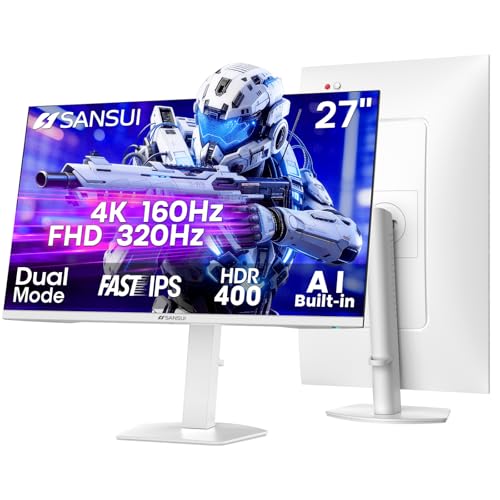
SANSUI 27-Inch 4K Dual-Mode Gaming Monitor
The SANSUI ES-G27D1U offers dual-mode flexibility that the Dell U2725QE does not provide. You can switch between 4K resolution and 1080p FHD to boost refresh rates significantly in gaming scenarios. This monitor is designed for gamers who value high frame rates at both resolutions. It includes an adjustable stand for ergonomic comfort. However, it lacks the Thunderbolt hub connectivity and factory-calibrated color accuracy of the Dell. You get a more budget-friendly option with versatile inputs, but you give up the professional color precision and simplified laptop connection. This alternative is best for users who need a single display to handle both high-resolution tasks and high-speed gaming without investing in a dedicated gaming monitor. It provides practical flexibility for mixed usage.
Samsung 27-Inch ViewFinity S7 4K Monitor
The Samsung LS27H710EANXZA provides a solid 4K IPS experience for professionals on a budget. You get a 27-inch screen with good color accuracy and eye comfort features. However, you lose the Thunderbolt hub connectivity entirely. This monitor does not support daisy-chaining or single-cable laptop charging. You must connect your computer via standard video inputs. The stand is also less adjustable than the Dell U2725QE. You should pick this alternative if you prioritize color performance and eye comfort over connectivity features. It fits users who do not need the streamlined desk setup of the Thunderbolt model. It is a practical choice for professional work where the extra cost of a hub is not justified. You get essential 4K performance without the premium connectivity options.
ASUS ProArt 27-Inch 4K USB-C Monitor
The ASUS PA279CV offers USB-C connectivity similar to the Dell U2725QE, allowing for laptop charging and data transfer. You get professional color accuracy suitable for content creation. However, it lacks the Thunderbolt protocol, which may limit bandwidth and daisy-chaining capabilities. The model is designed for designers who prioritize precision over gaming speed. It also lacks the extensive ergonomic adjustability of the Dell stand. You should choose this alternative if you need USB-C charging but do not require Thunderbolt speeds. It is a solid choice for creative work where color accuracy is paramount. You give up the premium hub features for a more focused professional tool. This monitor fits users who want reliable connectivity and color performance without the full Thunderbolt ecosystem.
LG 27-Inch 4K UHD IPS Monitor
The LG 27US500-W delivers solid 4K color accuracy for creative tasks using an IPS panel. You get a 27-inch display with good visual fidelity. However, it lacks the ergonomic stand and connectivity found on the Dell U2725QE. This monitor does not include a Thunderbolt hub or USB-C charging. You must use DisplayPort and HDMI for connections. It is a more basic option for users who do not need advanced connectivity. You should pick this alternative if you prioritize color accuracy and a lower price point over hub features. It fits users who want essential 4K performance for content creation without the premium stand adjustability. You give up the streamlined desk setup for a simpler, more affordable display solution. It is a practical choice for basic professional work.
Quick picks
Our 7 picks

Dell 27-Inch 4K Thunderbolt Monitor
Best for: Professional color work and clean desk setups
- Screen Size
- 27"
- Resolution
- 3840x2160
- Connectivity
- Thunderbolt, USB-C, USB-A
- Dimensions
- 6.1 × 17.8 × 32.1 inches
- Weight
- 15.6 pounds
View on Amazon: Dell 27-Inch 4K Thunderbolt Monitor Affiliate link
The Dell UltraSharp U2725QE is a 27-inch 4K UHD monitor designed for professional workflows. It features a Thunderbolt hub for single-cable connectivity and daisy-chaining. The panel covers 100% of the sRGB and Display P3 color spaces with factory calibration. It includes a fully adjustable stand for ergonomic positioning. This monitor suits designers and users who prioritize color accuracy and clean desk setups over high refresh rates.
Pros
- Thunderbolt hub with daisy-chaining support
- 100% sRGB and Display P3 coverage
- Factory-calibrated color accuracy
- Fully adjustable stand with pivot
Cons
- Not listed as a high-refresh gaming panel
- 27-inch size limits screen real estate
- No mention of built-in speakers
Good fit if
- You need precise color reproduction for creative work
- You want to reduce cable clutter with a single Thunderbolt connection
- You require a monitor that supports daisy-chaining peripherals
Skip if
- You prioritize high refresh rates for competitive gaming
- You need a larger display for multitasking
- You require built-in audio without external speakers
Verdict: Dell UltraSharp U2725QE 27-Inch 4K is a practical choice for professionals who need color-critical accuracy and streamlined connectivity. It fits users who value factory calibration and desk simplicity over gaming performance.

Dell 32-Inch 4K 120Hz Monitor
Best for: Users wanting a large 32-inch 4K display
- Screen Size
- 31.5in
- Resolution
- 3840x2160
- Refresh Rate
- 120Hz
- Response Time
- 0.03ms
- Sync Technology
- AMD FreeSync Premium
- Connectivity
- HDMI, DisplayPort
View on Amazon: Dell 32-Inch 4K 120Hz Monitor Affiliate link
The Dell S3225QS is a 32-inch 4K UHD monitor featuring a VA panel and a 120Hz refresh rate. It includes AMD FreeSync Premium and a 0.03ms response time for smooth visuals. The display offers 99% sRGB and 95% DCI-P3 color coverage with a 1500:1 contrast ratio. It is designed for users seeking larger screen real estate with solid color accuracy and eye comfort features.
Pros
- 32-inch 4K UHD VA panel
- 120Hz refresh rate with AMD FreeSync Premium
- 99% sRGB and 95% DCI-P3 color coverage
- 0.03ms response time
- Improved ComfortView Plus reduces blue light to ≤35%
Cons
- VA panel has slower pixel transitions than IPS or OLED
- Connectivity limited to HDMI in this variation
- Heavier build at 19.3 pounds
Good fit if
- You want a larger 32-inch screen for productivity
- You need high color accuracy for creative work
- You prefer VA panel contrast for media consumption
Skip if
- You require USB-C connectivity
- You need the fastest response times for competitive gaming
- You prefer IPS panel viewing angles
Verdict: Dell S3225QS 32-Inch 4K VA Monitor fits users who prioritize screen size and color fidelity over the fastest pixel response times. It is a solid choice for mixed work and media use.

Alienware 27-Inch 4K Dual-Resolution Gaming Monitor
Best for: Gamers needing dual-resolution speed and color accuracy
- Screen Size
- 27"
- Resolution
- 3840x2160, 1920x1080
- Refresh Rate
- 180Hz, 360Hz
- Panel Type
- IPS
- Response Time
- 0.5ms GTG, 1ms GTG
- Sync Technology
- NVIDIA G-SYNC Compatible, AdaptiveSync
View on Amazon: Alienware 27-Inch 4K Dual-Resolution Gaming Monitor Affiliate link
The Alienware AW2725QF is a 27-inch IPS gaming monitor that supports dual-resolution output. You can play at native 4K with a 180Hz refresh rate, or switch to FHD for 360Hz. It features a 0.5ms response time, 95% DCI-P3 color coverage, and Dolby Vision support. This setup suits gamers who want high frame rates without sacrificing image clarity or color accuracy.
Pros
- Dual-resolution mode for 4K at 180Hz or FHD at 360Hz
- IPS panel with 95% DCI-P3 color coverage
- 0.5ms GTG response time for fast motion
- Dolby Vision and VESA DisplayHDR 600 certification
- NVIDIA G-SYNC Compatible and AdaptiveSync support
Cons
- Only 27-inch screen size limits immersion for some users
- No built-in USB hub or Thunderbolt connectivity listed
- FHD mode reduces resolution to 1920x1080 pixels
Good fit if
- You want high refresh rates in both 4K and FHD modes
- You value color accuracy with 95% DCI-P3 coverage
- You need tear-free gaming with G-SYNC support
Skip if
- You need a larger screen than 27 inches
- You require a USB hub or Thunderbolt connectivity
- You prefer a VA panel for higher contrast ratios
Verdict: Alienware 27 4K 180Hz Gaming Monitor delivers versatile performance for gamers who need speed and clarity. It fits those who switch between high-resolution and high-frame-rate gaming.
SANSUI 27-Inch 4K Dual-Mode Gaming Monitor
Best for: Gamers wanting high refresh rates at 4K and FHD
- Screen Size
- 27 Inch
- Resolution
- 4K UHD
- Refresh Rate
- 160Hz / 320Hz
- Panel Type
- Fast IPS
- Response Time
- 1ms(OD)
- Sync Technology
- FreeSync Premium
View on Amazon: SANSUI 27-Inch 4K Dual-Mode Gaming Monitor Affiliate link
This SANSUI monitor offers a 27-inch Fast IPS panel with a unique dual-mode capability. You can run 4K UHD at 160Hz or drop to FHD for 320Hz. It includes FreeSync Premium and HDR400 support. The stand allows height, tilt, swivel, and pivot adjustments. It connects via two HDMI 2.1 and two DisplayPort 1.4 ports. This setup suits gamers who want high refresh rates at different resolutions.
Pros
- Dual mode: 4K at 160Hz or FHD at 320Hz
- Fast IPS panel with 93% DCI-P3 color coverage
- Ergonomic stand with pivot and height adjustment
- Two HDMI 2.1 and two DisplayPort 1.4 inputs
Cons
- HDR400 is basic compared to higher-tier HDR standards
- Built-in speakers are included but likely low quality
- 1ms MPRT response time is not as fast as native GTG
Good fit if
- You want high refresh rates at 4K resolution
- You need flexible connectivity with multiple HDMI 2.1 ports
- You prefer an ergonomic stand with pivot capability
Skip if
- You require true HDR1000 or OLED brightness
- You need native sub-millisecond response times
- You want a monitor with USB-C connectivity
Verdict: SANSUI 27" 4K Dual Mode Monitor provides a flexible refresh rate option for gamers who value high frame rates at both 4K and 1080p. It is a solid choice for those who need versatile inputs and an adjustable stand.

Samsung 27-Inch ViewFinity S7 4K Monitor
Best for: Budget 4K professional work
- Screen Size
- 27"
- Resolution
- 3840 x 2160
- Panel Type
- IPS
- Connectivity
- HDMI, DP
- Size
- 27 Inch
- Dimensions
- 8.11 × 24.1 × 18.3 inches
View on Amazon: Samsung 27-Inch ViewFinity S7 4K Monitor Affiliate link
The Samsung ViewFinity S7 is a 27-inch 4K UHD monitor with an IPS panel. It offers 3840 x 2160 resolution and HDR10 support for better contrast and color accuracy. The display includes Eye Saver Mode to reduce blue light and Game Mode for clearer visuals. It connects via HDMI and DisplayPort. This monitor suits professionals needing high pixel density for detailed work without the cost of premium hubs.
Pros
- 4K UHD (3840 x 2160) resolution for high detail
- IPS panel for accurate color representation
- HDR10 support for improved contrast
- Eye Saver Mode certified by TÜV
- Game Mode for clearer scenes
Cons
- Lacks Thunderbolt connectivity found in the Dell U2725QE
- No mention of USB-C hub functionality
- Standard HDMI and DP ports only
Good fit if
- You need 4K clarity for design work
- You prefer IPS color accuracy
- You want a budget-friendly 4K option
Skip if
- You require Thunderbolt 4 connectivity
- You need a built-in USB hub
- You want a 32-inch display
Verdict: Samsung 27" ViewFinity S7 4K IPS Monitor provides solid 4K performance for professionals who do not need Thunderbolt hubs. It fits users prioritizing color accuracy and eye comfort over connectivity features.

ASUS ProArt 27-Inch 4K USB-C Monitor
Best for: Professional color work and laptop charging
- Screen Size
- 27"
- Resolution
- 4K UHD
- Panel Type
- IPS
- Response Time
- 5.0 ms
- Connectivity
- USB-C, DisplayPort, HDMI, USB 3.1
- Size
- 27 Inch
View on Amazon: ASUS ProArt 27-Inch 4K USB-C Monitor Affiliate link
The ASUS ProArt PA279CV is a 27-inch 4K UHD IPS monitor designed for professional color work. It covers 100% sRGB and Rec. 709 with factory calibration ensuring Delta E < 2 accuracy. You get versatile connectivity via USB-C with 65W power delivery, plus DisplayPort and HDMI. This model suits creators needing precise color reproduction and reliable hardware for daily tasks.
Pros
- 100% sRGB and Rec. 709 color coverage
- Factory calibrated with Delta E < 2 accuracy
- USB-C port with 65W power delivery
- IPS panel with 178-degree viewing angles
Cons
- 5.0 millisecond response time limits high-speed gaming
- No mention of HDR support in specifications
- No built-in speakers listed in features
Good fit if
- You need accurate color for photo or video editing
- You want to charge your laptop through the monitor
- You prefer a professional-grade IPS display
Skip if
- You require high refresh rates for competitive gaming
- You need HDR brightness for media consumption
- You want a monitor with integrated audio
Verdict: The ASUS ProArt 27-inch 4K USB-C Monitor delivers professional color accuracy and convenient charging for content creators. It is a solid choice for designers who prioritize precision over gaming speed.

LG 27-Inch 4K UHD IPS Monitor
Best for: Color-accurate 4K content creation
- Screen Size
- 27-Inch
- Resolution
- 3840x2160
- Panel Type
- IPS
- Connectivity
- HDMI, DisplayPort
- Dimensions
- 8.46 × 24.2 × 17.9 inches
- Weight
- 12.1 pounds
View on Amazon: LG 27-Inch 4K UHD IPS Monitor Affiliate link
The LG 27US500-W is a 27-inch 4K UHD monitor with an IPS panel. It supports HDR10 and covers up to 90% of the DCI-P3 color gamut. The display includes Reader Mode and Flicker Safe features. You get HDMI and DisplayPort connectivity. The stand allows tilt adjustment only. This monitor suits users who need accurate colors and a borderless design for creative work.
Pros
- 27-inch 4K UHD (3840x2160) resolution
- IPS panel with wide viewing angles
- 90% DCI-P3 color gamut coverage
- HDR10 support for enhanced contrast
- Borderless design for multi-monitor setups
Cons
- Tilt-only stand lacks height or pivot adjustment
- No USB-C hub or built-in speakers
- 1000:1 contrast ratio is lower than VA panels
Good fit if
- You need accurate colors for photo or video editing
- You want a borderless 4K display for a dual-monitor setup
- You prefer HDMI and DisplayPort connections over USB-C
Skip if
- You require height-adjustable or ergonomic stand options
- You need a built-in USB hub for peripherals
- You want a high-refresh-rate gaming monitor
Verdict: LG 27US500-W 27-Inch 4K IPS Monitor delivers solid 4K color accuracy for creative tasks but lacks the ergonomic stand and connectivity found on higher-end alternatives like the Dell U2725QE.
Specifications side by side
| Spec | Dell 27-Inch 4K Thunderbolt Monitor | Dell 32-Inch 4K 120Hz Monitor | Alienware 27-Inch 4K Dual-Resolution Gaming Monitor | SANSUI 27-Inch 4K Dual-Mode Gaming Monitor | Samsung 27-Inch ViewFinity S7 4K Monitor | ASUS ProArt 27-Inch 4K USB-C Monitor | LG 27-Inch 4K UHD IPS Monitor |
|---|---|---|---|---|---|---|---|
| Screen Size | 27" | 31.5in | 27" | 27 Inch | 27" | 27" | 27-Inch |
| Resolution | 3840x2160 | 3840x2160 | 3840x2160, 1920x1080 | 4K UHD | 3840 x 2160 | 4K UHD | 3840x2160 |
| Refresh Rate | not stated | 120Hz | 180Hz, 360Hz | 160Hz / 320Hz | not stated | not stated | not stated |
| Panel Type | not stated | not stated | IPS | Fast IPS | IPS | IPS | IPS |
| Response Time | not stated | 0.03ms | 0.5ms GTG, 1ms GTG | 1ms(OD) | not stated | 5.0 ms | not stated |
| Sync Technology | not stated | AMD FreeSync Premium | NVIDIA G-SYNC Compatible, AdaptiveSync | FreeSync Premium | not stated | not stated | not stated |
| Connectivity | Thunderbolt, USB-C, USB-A | HDMI, DisplayPort | HDMI, DP, USB 3.2 Gen1 | 2×HDMI 2.1, 2×DisplayPort 1.4, 3.5mm | HDMI, DP | USB-C, DisplayPort, HDMI, USB 3.1 | HDMI, DisplayPort |
| Size | not stated | S3225QS | not stated | 26.9999 | 27 Inch | 27 Inch | not stated |
| Dimensions | 6.1 × 17.8 × 32.1 inches | 8.73 × 28.1 × 17.6 inches | 24.1 × 20.4 × 9.59 inches | 5.63 × 27 × 19.3 inches | 8.11 × 24.1 × 18.3 inches | 20.6 × 24.2 × 8.97 inches | 8.46 × 24.2 × 17.9 inches |
| Weight | 15.6 pounds | 19.3 pounds | 4.75 pounds | 11.2 pounds | not stated | 19 pounds | 12.1 pounds |
| Model | DELL-U2725QE | S3225QS | AW2725QF | ES-G27D1U | LS27H710EANXZA | PA279CV | 27US500-W.AUS |
| Color | not stated | Ash White | Black | White | Black | BLACK | White |
Another guide worth a look: hp omnistudio x 27 4k alternatives.
Frequently asked questions
Which Dell monitor is best for a larger 4K screen?
The Dell S3225QS is the top choice for users wanting a 32-inch display. It features a VA panel with 120Hz refresh rates and FreeSync support. This model prioritizes screen size and color fidelity over fast pixel response times. It fits mixed work and media use well.
What is the best gaming monitor for 4K speed?
The Alienware AW2725QF offers 180Hz refresh rates and G-SYNC compatibility. It supports dual-resolution modes, allowing you to switch between 4K and high-frame-rate gaming. This makes it ideal for gamers who need both speed and clarity without sacrificing visual quality during fast-paced sessions.
Is there a budget-friendly 4K monitor with high refresh rates?
The SANSUI ES-G27D1U is a strong budget option. It supports dual-mode operation, letting you play at high frame rates in both 4K and 1080p resolutions. It includes versatile inputs and an adjustable stand, making it a flexible choice for gamers who value performance over premium build materials.
Which 27-inch monitor is best for professional color work?
The ASUS ProArt PA279CV is designed for content creators. It offers 4K resolution and USB-C connectivity for convenient laptop charging. This monitor delivers professional color accuracy, making it a solid choice for designers who prioritize precision and connectivity over gaming speed or high refresh rates.
Can I get a 4K monitor without Thunderbolt connectivity?
Yes, the Samsung LS27H710EANXZA provides solid 4K performance without Thunderbolt hubs. It uses an IPS panel for good color accuracy and eye comfort. This model fits users who prioritize display quality and ergonomic features over the advanced connectivity options found in higher-end Thunderbolt-enabled monitors.
Which monitor is best for color-accurate content creation?
The LG 27US500-W delivers solid 4K color accuracy for creative tasks. It features an IPS panel and standard DisplayPort and HDMI connectivity. While it lacks the ergonomic stand and advanced connectivity of premium alternatives, it remains a reliable option for professionals focused on visual fidelity and basic functionality.