6 Best Alternatives to the ViewSonic 27-Inch 1440p QHD Monitor (2026)
As an Amazon Associate we earn from qualifying purchases. Links on this page are affiliate links.
The ViewSonic VA2715 2K MHD 27 Inch 1440p Alternatives list helps you find monitors that match its 2560 x 1440 resolution and 27-inch size. You might look for different refresh rates, connectivity options, or panel technologies than the 100Hz VESA Adaptive Sync found in the original. These alternatives were chosen because their core specifications overlap with the ViewSonic model, ensuring a similar visual baseline while offering distinct advantages.
The original monitor excels at productivity with Flicker-Free technology, Blue Light Filters, and DisplayPort-out for daisy-chaining multiple screens. It is ideal for office work but less suited for high-speed gaming or color-critical creative tasks. If you need faster motion clarity, USB-C docking, or premium HDR contrast, these options provide better fit for your specific needs. Each selection on this 6 list shares the 1440p resolution but varies in refresh rate, panel type, and connectivity to suit different workflows.
Our top pick: ViewSonic 27-Inch 1440p QHD Monitor.
How Alternatives Differ From ViewSonic
Dell 27-Inch 1440p USB-C Monitor
The Dell S2722DC replaces the ViewSonic’s HDMI and DisplayPort inputs with USB-C connectivity. This allows you to connect a single cable for both video and power, simplifying desk setups for laptop users. It runs at 75Hz, which is slower than the ViewSonic’s 100Hz refresh rate. You also get FreeSync support instead of VESA Adaptive Sync. The Dell model is heavier and slightly taller, offering more ergonomic adjustability. If you prioritize clean cable management and docking capabilities over a higher refresh rate, this monitor fits your workflow. It sacrifices gaming speed for professional convenience and streamlined connectivity options.
ASUS 27-Inch 240Hz Glossy OLED Gaming Monitor
The ASUS ROG XG27AQDMGR uses an OLED panel, providing infinite contrast and perfect blacks compared to the ViewSonic’s LED backlight. It supports a 240Hz refresh rate, which is significantly faster than the ViewSonic’s 100Hz. This makes it ideal for competitive gaming where motion clarity matters. The glossy screen offers vibrant colors but may reflect more ambient light. It is heavier and thicker than the ViewSonic. You give up the matte finish and daisy-chaining feature for superior image quality and speed. If you are a gamer who values visual fidelity and high frame rates, this premium choice is a substantial upgrade in performance and picture quality.
AOC 27-Inch Mini-LED 1440p Gaming Monitor
The AOC Q27G3XMN features Mini-LED technology, delivering much higher brightness and deeper blacks than the ViewSonic’s standard LED panel. It supports 180Hz refresh rates, offering smoother motion than the ViewSonic’s 100Hz. This monitor is designed for HDR gaming, providing better contrast ratios for visual impact. It is heavier and bulkier than the ViewSonic. You lose the daisy-chaining capability and eye-care features like flicker-free technology. If you want high-contrast HDR performance and faster refresh rates for gaming, this budget-friendly option improves visual fidelity significantly. It trades professional office features for enhanced gaming visuals and brightness.
SANSUI 27-Inch 1440p 180Hz Fast IPS Monitor
The SANSUI ES-G27F6Q offers a 180Hz refresh rate, nearly double the ViewSonic’s 100Hz speed. It uses a Fast IPS panel for better color accuracy and viewing angles. FreeSync support ensures smooth visuals without tearing. The monitor is slightly wider and heavier than the ViewSonic. It lacks the ViewSonic’s daisy-chaining feature and specific eye-care technologies. You gain significant gaming performance and color quality. If you are a gamer who wants faster refresh rates and accurate colors without spending too much, this monitor is a strong alternative. It prioritizes speed and image quality over the productivity-focused features of the ViewSonic.
SANSUI 27-Inch 1440p 260Hz Fast IPS Monitor
The SANSUI ESA-G27F6Q PRO pushes refresh rates to 260Hz, far exceeding the ViewSonic’s 100Hz. It uses a Fast IPS panel for rapid response times. FreeSync technology is included for smooth gameplay. The monitor is wider and heavier than the ViewSonic. It does not offer daisy-chaining or advanced eye-care features. You get exceptional speed for competitive gaming. If you need the highest possible refresh rates and fast response times, this model is ideal. It sacrifices office-friendly features like daisy-chaining for raw performance. This choice is best for gamers who prioritize frame rates and motion clarity over productivity tools.
ASUS ProArt 27-Inch 1440p USB-C Monitor
The ASUS ProArt PA278CGRV provides USB-C connectivity, allowing for single-cable docking similar to the Dell but with a focus on color accuracy. It supports 144Hz, which is faster than the ViewSonic’s 100Hz. The monitor is designed for creative work, offering precise color reproduction. It is heavier and taller than the ViewSonic. You lose the daisy-chaining feature and specific gaming-oriented presets. If you are a creator who needs color accuracy and modern connectivity, this monitor is a professional choice. It trades gaming speed and office convenience for high-end color performance and USB-C functionality.
Quick picks
Our 7 picks
ViewSonic 27-Inch 1440p QHD Monitor
Best for: Productivity and daisy-chained multi-monitor setups
- Screen Size
- 27"
- Resolution
- 2560 x 1440
- Refresh Rate
- 100Hz
- Sync Technology
- VESA Adaptive Sync
- Connectivity
- HDMI, DisplayPort
- Dimensions
- 8.9 × 24.1 × 18 inches
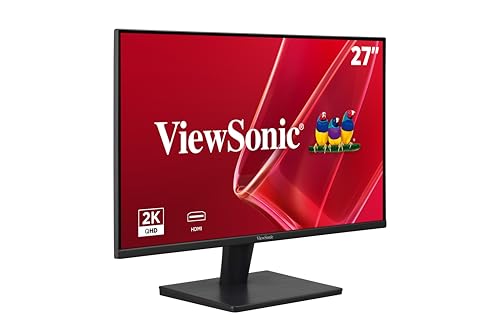
The ViewSonic VA2715-2K-MHD is a 27-inch QHD monitor designed for productivity and casual use. It features a 100Hz refresh rate with VESA Adaptive Sync for smooth visuals. The panel includes eye-care technologies like Flicker-Free and a Blue Light Filter. You can connect multiple devices via HDMI and DisplayPort, and daisy-chain displays using DisplayPort-out. This monitor suits users who prioritize clarity and comfort over high-speed gaming performance.
Pros
- 2560 x 1440 resolution for crisp details
- 100Hz refresh rate with VESA Adaptive Sync
- DisplayPort-out for monitor daisy-chaining
- Flicker-Free and Blue Light Filter for eye comfort
- Five ViewMode presets for different tasks
Cons
- 100Hz refresh rate is lower than the 180Hz-260Hz options on this list
- No mention of HDR support or high brightness ratings
- No USB hub or built-in speakers listed
Good fit if
- You need a clear 1440p display for work or study
- You want to daisy-chain monitors with a single cable
- You prefer eye-care features for long sessions
Skip if
- You require high refresh rates for competitive gaming
- You need HDR performance for media consumption
- You want built-in speakers or a USB hub
Verdict: ViewSonic VA2715 27-Inch 1440p Monitor offers a solid 1440p experience with eye-care features and daisy-chaining, making it ideal for office setups rather than high-speed gaming.

Dell 27-Inch 1440p USB-C Monitor
Best for: USB-C laptop docking and office work
- Screen Size
- 27-inch
- Resolution
- 2560x1440
- Refresh Rate
- 75Hz
- Response Time
- 4Ms
- Sync Technology
- AMD FreeSync
- Connectivity
- USB Type-C, USB 3.2 Gen 1 Type-A
The Dell S2722DC is a 27-inch WQHD monitor with a 75Hz refresh rate and 4ms response time. It features AMD FreeSync for tear-free visuals and a USB-C port delivering 65W power delivery. This single-cable solution connects your laptop while reducing desk clutter. The adjustable stand offers height, tilt, swivel, and pivot options. It suits users who prioritize connectivity and ergonomics over high-speed gaming performance.
Pros
- USB-C port with 65W power delivery
- Height-adjustable stand with pivot capability
- AMD FreeSync for smooth visuals
- Quick-access USB 3.2 Gen 1 Type-A port
Cons
- 75Hz refresh rate is low for gaming
- 4ms response time is slower than competitors
- No mention of HDR support
Good fit if
- You need a single-cable USB-C connection for your laptop
- You prioritize ergonomic adjustability for long work sessions
- You use the monitor for office tasks and media consumption
Skip if
- You require high refresh rates for competitive gaming
- You need HDR performance for content creation
- You want a built-in webcam for video calls
Verdict: Dell S2722DC 27-inch USB-C Monitor is ideal for professionals who value clean desk setups and ergonomic flexibility. It fits users who connect via USB-C and do not require high refresh rates.

ASUS 27-Inch 240Hz Glossy OLED Gaming Monitor
Best for: competitive gaming with premium image quality
- Screen Size
- 26.5"
- Resolution
- 2560 x 1440
- Refresh Rate
- 240 Hz
- Panel Type
- WOLED
- Response Time
- 0.03ms GTG
- Sync Technology
- ELMB Sync
View on Amazon: ASUS 27-Inch 240Hz Glossy OLED Gaming Monitor
This 27-inch QHD monitor uses a glossy WOLED panel for deep blacks and vivid color. It delivers a 240Hz refresh rate with a 0.03ms response time for smooth motion. The display covers 99% of the DCI-P3 gamut with true 10-bit color accuracy. It includes OLED Care Pro to manage burn-in risks. This model suits gamers who prioritize image quality and speed over matte finishes.
Pros
- 240Hz refresh rate on a 27-inch QHD WOLED panel
- 0.03ms gray-to-gray response time for fast motion
- 99% DCI-P3 color gamut with Delta E < 2 accuracy
- ASUS DisplayWidget Center software for easy settings adjustment
- 3-year warranty including burn-in coverage
Cons
- Glossy screen finish reflects ambient light
- No matte coating for glare reduction
- Requires desktop software for full OLED management
Good fit if
- You want the fastest response times available for competitive gaming
- You prefer high contrast and deep blacks from an OLED panel
- You have a controlled lighting environment to manage screen glare
Skip if
- You need a matte finish to reduce reflections in bright rooms
- You prefer a monitor that does not require additional software for basic operation
- You are on a tight budget and need a lower-cost alternative
Verdict: ASUS ROG XG27AQDMGR 27" 240Hz OLED is a premium choice for gamers who prioritize image fidelity and speed. It delivers exceptional motion clarity and color accuracy for those who can manage a glossy screen.

AOC 27-Inch Mini-LED 1440p Gaming Monitor
Best for: High-contrast HDR gaming on a budget
- Screen Size
- 27 Inch
- Resolution
- 2560x1440
- Refresh Rate
- 180Hz
- Response Time
- 1ms GtG
- Sync Technology
- Adaptive-Sync
- Connectivity
- DP 1.4, HDMI 2.1, USB 3.2
The AOC Q27G3XMN is a 27-inch QHD monitor featuring Mini-LED backlighting with 336 dimming zones. It delivers a 180Hz refresh rate and 1ms GtG response time on a VA panel. This setup provides high contrast and VESA DisplayHDR 1000 certification. You will get sharp 1440p images with deep blacks. It suits gamers who want high brightness and fast motion handling without the cost of premium OLEDs.
Pros
- Mini-LED backlight with 336 individual dimming zones
- 180Hz refresh rate via DisplayPort 1.4
- VESA DisplayHDR 1000 certification
- 134% sRGB color gamut coverage
Cons
- VA panel may exhibit slower pixel transitions than IPS
- 15.6 pounds weight adds bulk to your desk
- Overclocked refresh rate requires DP 1.4 connection
Good fit if
- You want high contrast and deep blacks
- You need HDR brightness for dark rooms
- You play fast-paced competitive games
Skip if
- You require the fastest possible response times
- You need an IPS panel for wide viewing angles
- You prefer a lighter, more compact monitor
Verdict: The AOC Q27G3XMN 27-Inch Mini-LED Gaming Monitor offers exceptional contrast and brightness for the price. It fits players who prioritize visual fidelity and HDR performance over absolute speed. You should buy it if you value deep blacks and vivid colors in your gaming sessions.

SANSUI 27-Inch 1440p 180Hz Fast IPS Monitor
Best for: Gamers seeking high refresh rates and ergonomic flexibility
- Screen Size
- 27"
- Resolution
- 2560 x 1440
- Refresh Rate
- 200Hz
- Panel Type
- Fast IPS
- Response Time
- OD 1ms
- Sync Technology
- AMD FreeSync, Adaptive Sync
The SANSUI 27-inch monitor delivers 1440p resolution on a Fast IPS panel with a 200Hz refresh rate. It includes AMD FreeSync to reduce screen tearing. The stand offers full ergonomic adjustments, including pivot mode. Color coverage reaches 95% DCI-P3. This setup suits gamers who want high speed and good color accuracy without spending more than premium options.
Pros
- 200Hz refresh rate on a 27-inch Fast IPS panel
- 95% DCI-P3 color gamut coverage for accurate visuals
- Full ergonomic stand with pivot, height, and swivel adjustments
- OD 1ms response time for reduced motion blur
Cons
- HDMI ports are limited to version 2.0, capping refresh rates at 144Hz
- Brightness is rated at 400 nits, which is modest for HDR
- No mention of USB-C connectivity for single-cable power and data transfer
Good fit if
- You want a high refresh rate for competitive gaming
- You need an ergonomic stand with pivot capability
- You prioritize color accuracy with 95% DCI-P3 coverage
Skip if
- You require HDMI 2.1 for next-gen console features
- You need USB-C connectivity for simplified desk setup
- You want a higher brightness level for bright HDR content
Verdict: SANSUI 27" 1440p 200Hz Fast IPS Monitor provides a strong balance of speed and color for gamers who value ergonomic flexibility and high refresh rates over premium HDR brightness.

SANSUI 27-Inch 1440p 260Hz Fast IPS Monitor
Best for: competitive gamers needing high refresh rates
- Screen Size
- 27"
- Resolution
- 2560 x 1440P
- Refresh Rate
- 260Hz
- Panel Type
- Fast IPS
- Response Time
- MPRT 1ms
- Sync Technology
- FreeSync Premium
This SANSUI monitor offers a 27-inch Fast IPS panel with a 2560 x 1440 resolution. It supports up to 260Hz refresh rates and includes FreeSync Premium technology. The display covers 98% of the DCI-P3 color gamut and 130% of sRGB. You get two DisplayPort 1.4 and two HDMI 2.0 ports. It provides high-speed performance for competitive gaming.
Pros
- 260Hz maximum refresh rate on Fast IPS panel
- 98% DCI-P3 and 130% sRGB color coverage
- Two DisplayPort 1.4 and two HDMI 2.0 inputs
- MPRT 1ms response time for low motion blur
Cons
- Brightness is limited to 320 nits
- No HDR certification listed in specifications
- Only tilt adjustment (-5° to 20°)
Good fit if
- You want high refresh rates for fast-paced games
- You need multiple DisplayPort 1.4 connections
- You prioritize wide color gamut coverage
Skip if
- You require HDR1000 or higher brightness levels
- You need height or swivel stand adjustments
- You prefer monitors with certified HDR support
Verdict: SANSUI 27-Inch 260Hz WQHD Monitor suits gamers who need high frame rates and accurate colors. It fits users who value connectivity options over advanced ergonomic features or high brightness.

ASUS ProArt 27-Inch 1440p USB-C Monitor
Best for: Color-accurate creative work with USB-C connectivity
- Screen Size
- 27 Inch
- Resolution
- 2560 x 1440
- Refresh Rate
- 144Hz
- Panel Type
- IPS
- Sync Technology
- AMD FreeSync
- Connectivity
- USB-C, HDMI, DisplayPort, USB Hub
The ASUS ProArt PA278CGRV is a 27-inch QHD monitor designed for color-critical work. It features an IPS panel with 97% DCI-P3 coverage and factory calibration for Delta E < 2 accuracy. You get a 144Hz refresh rate with AMD FreeSync for smooth motion. The USB-C port delivers up to 96W of power delivery. It also includes an Auto KVM for switching between two computers.
Pros
- 144Hz refresh rate with AMD FreeSync
- 97% DCI-P3 and 100% sRGB color gamut
- USB-C with 96W power delivery
- Factory calibrated with Delta E < 2 accuracy
- Built-in Auto KVM functionality
Cons
- 144Hz refresh rate is lower than the 200Hz to 260Hz options on this list
- Glossy or matte finish is not specified in the data
- HDR support is not mentioned in the specifications
Good fit if
- You need high color accuracy for professional design work
- You want to connect a laptop via USB-C with power delivery
- You need to switch between two computers using one keyboard and mouse
Skip if
- You require a high refresh rate above 144Hz for competitive gaming
- You need HDR performance for media consumption
- You prefer a monitor with a built-in HDR standard like HDR1000
Verdict: ASUS ProArt 27in 1440p 144Hz USB-C is a solid choice for creators who prioritize color accuracy and connectivity over high-speed gaming performance.
Specifications side by side
| Spec | ViewSonic 27-Inch 1440p QHD Monitor | Dell 27-Inch 1440p USB-C Monitor | ASUS 27-Inch 240Hz Glossy OLED Gaming Monitor | AOC 27-Inch Mini-LED 1440p Gaming Monitor | SANSUI 27-Inch 1440p 180Hz Fast IPS Monitor | SANSUI 27-Inch 1440p 260Hz Fast IPS Monitor | ASUS ProArt 27-Inch 1440p USB-C Monitor |
|---|---|---|---|---|---|---|---|
| Screen Size | 27" | 27-inch | 26.5" | 27 Inch | 27" | 27" | 27 Inch |
| Resolution | 2560 x 1440 | 2560x1440 | 2560 x 1440 | 2560x1440 | 2560 x 1440 | 2560 x 1440P | 2560 x 1440 |
| Refresh Rate | 100Hz | 75Hz | 240 Hz | 180Hz | 200Hz | 260Hz | 144Hz |
| Panel Type | not specified | not specified | WOLED | not specified | Fast IPS | Fast IPS | IPS |
| Response Time | not specified | 4Ms | 0.03ms GTG | 1ms GtG | OD 1ms | MPRT 1ms | not specified |
| Sync Technology | VESA Adaptive Sync | AMD FreeSync | ELMB Sync | Adaptive-Sync | AMD FreeSync, Adaptive Sync | FreeSync Premium | AMD FreeSync |
| Connectivity | HDMI, DisplayPort | USB Type-C, USB 3.2 Gen 1 Type-A | not specified | DP 1.4, HDMI 2.1, USB 3.2 | 2 x Display Port 1.4, 2 x HDMI 2.0 | 2 x Display Port 1.4, 2 x HDMI 2.0 | USB-C, HDMI, DisplayPort, USB Hub |
| Size | 14.2" x 24.1" x 1.6" | 27 Inch | 14.5" x 23.8" x 2.5" | 27" 180Hz Mini-LED | 27 Inch | 27.01 | 27 Inch |
| Dimensions | 8.9 × 24.1 × 18 inches | 6.88 × 24.1 × 15.8 inches | 7.4 × 23.8 × 19.7 inches | 10.2 × 23.8 × 20.9 inches | 5.63 × 27 × 19.3 inches | 5.63 × 27 × 19.3 inches | 7.5 × 24.1 × 21.1 inches |
| Weight | 7.94 pounds | 11.9 pounds | 14.6 pounds | 15.6 pounds | 11.2 pounds | 11.2 pounds | 14.6 pounds |
| Color | Black | Platinum Silver | BLACK | Black | Black | Black | SILVER |
| Model | VA2715-2K-MHD | S2722DC | XG27AQDMGR | Q27G3XMN | ES-G27F6Q | ESA-G27F6Q PRO | PA278CGRV |
Frequently asked questions
Which monitor offers the highest refresh rate for competitive gaming?
The ASUS ROG XG27AQDMGR provides a 240Hz refresh rate. This OLED panel delivers exceptional motion clarity and speed. It suits gamers who prioritize image fidelity and fast response times over other features.
Can I use a single cable for video and power on an alternative?
Yes, the Dell S2722DC and ASUS ProArt PA278CGRV both feature USB-C connectivity. This allows you to connect a single cable for both video and power. It simplifies desk setups for laptop users significantly.
Is there a budget option with high contrast and HDR performance?
The AOC Q27G3XMN is a Mini-LED monitor that offers exceptional contrast and brightness. It provides deep blacks and vivid colors for HDR gaming. This makes it ideal for players who value visual fidelity.
Which monitors are best for color-accurate creative work?
The ASUS ProArt PA278CGRV is designed for creators who prioritize color accuracy. It combines 1440p resolution with USB-C connectivity. This setup supports professional workflows while maintaining a clean desk environment for your workstation.
Do any alternatives include FreeSync technology?
The Dell S2722DC, SANSUI ES-G27F6Q, and SANSUI ESA-G27F6Q PRO all support FreeSync. This technology reduces screen tearing during gameplay. It ensures smoother visuals by syncing the monitor refresh rate with your graphics output.
Which monitor is the lightest and easiest to move?
The ViewSonic VA2715-2K-MHD weighs only 7.94 pounds. It is the lightest option in this group. This makes it easy to adjust or move between different desk setups without requiring heavy lifting.
Is there a monitor with daisy-chaining capabilities?
The ViewSonic VA2715 supports daisy-chaining for multi-monitor setups. This feature allows you to connect multiple displays in a series. It is ideal for office environments where you need expanded screen real estate efficiently.
Which panel type offers the best color accuracy for gaming?
The ASUS XG27AQDMGR uses an OLED panel type. OLED technology delivers superior color accuracy and contrast ratios. This results in exceptional image fidelity for competitive gaming sessions where visual precision is critical for performance.