ViewSonic 32-Inch 1440p IPS USB-C Alternatives: 6 Similar Picks Compared
As an Amazon Associate we earn from qualifying purchases. Links on this page are affiliate links.
You are looking for viewsonic vx3267u 2k 32 inch 1440p alternatives that match its core specifications. The original model offers a 32-inch IPS panel with 1440p resolution and USB-C connectivity. It provides 65W charging and HDR10 support for a clean, efficient desk setup. These features make it ideal for professionals who want to reduce cable clutter while maintaining color accuracy. However, you might prefer a different refresh rate, a different size, or a different brand. Some users need higher speeds for gaming, while others prioritize 4K clarity or budget-friendly options. We selected 6 similar picks because their published specs overlap with the original. This list covers variations in refresh rates, resolution, and connectivity options. You can compare these monitors to find the best fit for your specific workflow and display needs.
Our top pick: ViewSonic 32-Inch 1440p IPS USB-C Monitor.
Comparing 32-inch 1440p IPS Alternatives
ViewSonic 32-Inch 1440p IPS Monitor
The ViewSonic VS3225-2K shares the 32-inch IPS panel and 1440p resolution of the original but drops USB-C connectivity and 65W charging. You get a simpler setup focused on productivity rather than a single-cable solution. It lacks the versatile input options of the VX3267U-2K, offering only basic video connections. This monitor is ideal if you prioritize cost savings over convenience. It suits office workers who use separate docks or hubs for their devices. The absence of USB-C means you manage more cables on your desk. Choose this if you do not need laptop charging or high-speed data transfer through the display.
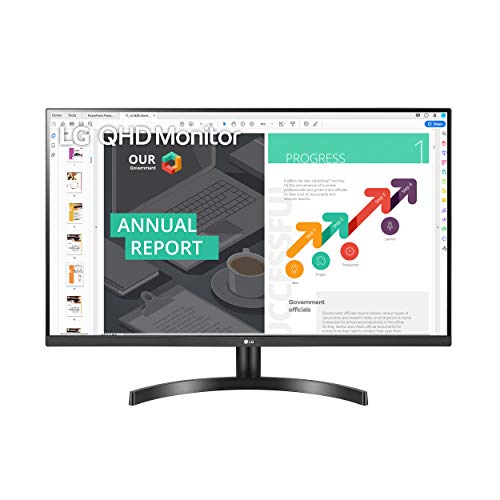
LG 32-Inch QHD IPS Monitor
The LG 32QN600-B provides a 32-inch IPS display with 1440p resolution, matching the original screen size and clarity. It includes FreeSync technology for smoother gaming visuals, which the ViewSonic model does not explicitly list. However, it lacks USB-C connectivity, so you cannot charge your laptop through the monitor. You must use separate cables for power and data. This model is best for users who value adaptive sync for gaming over the convenience of a single cable. It offers solid color accuracy for work and casual play. Pick this if you want gaming features without the USB-C requirement.
LG 32-Inch 4K IPS Monitor with USB-C
The LG 32UP83AK-W steps up to 4K UHD resolution on a 32-inch IPS panel, offering significantly sharper images than the 1440p original. It retains USB-C connectivity for convenient charging and data transfer. You gain much higher pixel density for detailed work but lose the specific 1440p balance of the ViewSonic model. This monitor is heavier and taller, requiring more desk space. It is ideal for professionals who need crisp text and high-res media viewing. Choose this if you prioritize image clarity and modern connectivity over the lower resolution and simpler design of the original.
BenQ 32-Inch 4K IPS Designer Monitor
The BenQ PD3205U offers a 32-inch IPS panel with 4K UHD resolution, delivering superior detail for creative work compared to the 1440p original. It includes USB-C connectivity for streamlined desk setups. You gain professional-grade color accuracy and higher resolution but pay with increased weight and size. This monitor is designed for designers who need precise color reproduction. It lacks the gaming-focused features of some competitors. Pick this if you prioritize image fidelity and USB-C convenience over the original's specific 1440p resolution and HDR10 support.
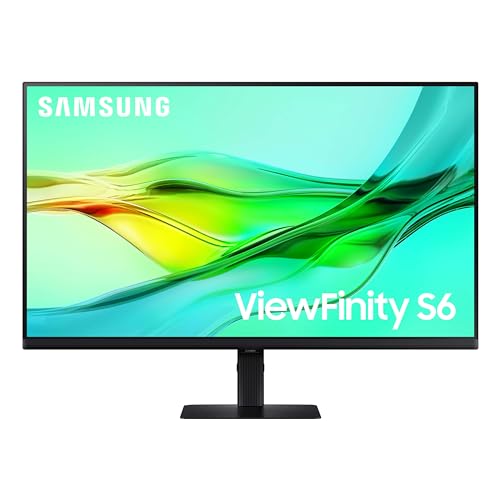
Samsung 32-Inch ViewFinity QHD Monitor
The Samsung ViewFinity S6 matches the 32-inch IPS panel and 1440p resolution of the original while adding 100Hz refresh rate support. It includes USB-C connectivity for charging and data transfer, similar to the ViewSonic model. You gain slightly smoother motion for casual gaming and desktop fluidity. This monitor is taller and heavier, requiring more vertical desk space. It is ideal for users who want USB-C convenience with a touch of higher refresh rate. Choose this if you value ergonomic flexibility and modern connectivity over the original's specific HDR10 and eye-care feature set.
Z-Edge 32-Inch QHD IPS Gaming Monitor
The Z-Edge UG32 provides a 32-inch IPS panel with 1440p resolution, matching the original screen size and clarity. It offers a much higher 165Hz refresh rate, making it better for fast-paced gaming. However, it lacks USB-C connectivity, so you cannot charge your laptop through the monitor. You must use separate cables for power and video. This model is best for PC gamers who prioritize speed over desk simplicity. Pick this if you want high refresh rates and do not need the USB-C charging convenience of the original.
Quick picks
Our 7 picks

ViewSonic 32-Inch 1440p IPS USB-C Monitor
Best for: Clean desk setups with USB-C laptops
- Screen Size
- 32"
- Resolution
- 2560 x 1440
- Panel Type
- IPS
- Connectivity
- USB-C, HDMI, DisplayPort
- Size
- 32 Inch
- Dimensions
- 9.2 × 28.1 × 19.6 inches
This 32-inch ViewSonic monitor delivers 1440p resolution on an IPS panel. It features 65W USB-C connectivity for single-cable charging and data transfer. HDR10 support enhances contrast for media. Flicker-free technology and a blue light filter reduce eye strain during long sessions. It suits users needing a clean desk setup with a large, color-accurate display for work or casual gaming.
Pros
- 32-inch 2560 x 1440 IPS panel for sharp detail
- 65W USB-C port for video, data, and laptop charging
- HDR10 support for improved contrast and color
- Flicker-free and blue light filter for eye comfort
- Multiple inputs including HDMI and DisplayPort
Cons
- No high refresh rate listed for gaming
- No mention of adjustable stand height or tilt
- No built-in speakers or audio output mentioned
Good fit if
- You want a single-cable USB-C connection for your laptop
- You need a large 32-inch screen for productivity
- You prefer IPS color accuracy for media consumption
Skip if
- You require a high refresh rate for competitive gaming
- You need built-in speakers for audio
- You want a 4K resolution display
Verdict: ViewSonic 32-Inch 1440p IPS USB-C Monitor is ideal for professionals and casual users who prioritize a clutter-free desk with USB-C charging and a large, color-accurate display. It fits those who value eye comfort features over high-speed gaming performance.

ViewSonic 32-Inch 1440p IPS Monitor
Best for: productivity and multi-monitor daisy-chaining
- Screen Size
- 32 inch
- Resolution
- 2560 x 1440
- Refresh Rate
- 75Hz
- Panel Type
- SuperClear IPS
- Response Time
- 4ms
- Sync Technology
- Variable Refresh Rate
The ViewSonic VS3225-2K is a 32-inch QHD monitor with a 75Hz refresh rate and IPS panel. It offers 2560 x 1440 resolution for clear visuals. AMD FreeSync reduces screen tearing. Eye care features like Flicker-Free and Blue Light Filter help during long sessions. Daisy-chaining via DisplayPort-out simplifies multi-monitor setups. This model suits users prioritizing color accuracy and wide viewing angles over high refresh rates.
Pros
- 32-inch IPS panel delivers wide viewing angles and consistent colors
- 2560 x 1440 QHD resolution provides sharp image detail
- AMD FreeSync technology minimizes screen tearing for smoother video
- DisplayPort-out allows daisy-chaining multiple monitors for a clean desk
- Integrated Flicker-Free and Blue Light Filter reduce eye fatigue
Cons
- 75Hz refresh rate is lower than the 144Hz+ options on this list
- Lacks USB-C connectivity found in the primary comparison model
- No HDR support specified in the published specifications
Good fit if
- You need a large 32-inch screen for productivity tasks
- You prefer IPS panel technology for better color accuracy
- You want to daisy-chain monitors using DisplayPort-out
Skip if
- You require a high refresh rate for competitive gaming
- You need USB-C connectivity for laptop docking
- You are looking for HDR display capabilities
Verdict: ViewSonic 32-Inch 1440p IPS Monitor is a solid choice for office workers who value color accuracy and multi-monitor setups over high-speed gaming performance.
LG 32-Inch QHD IPS Monitor
Best for: Color-accurate work and casual gaming
- Screen Size
- 32"
- Resolution
- 2560x1440
- Panel Type
- IPS
- Sync Technology
- AMD FreeSync
- Size
- 32 Inch
- Dimensions
- 8.2 × 28.1 × 20.2 inches
The LG 32QN600-B offers a 32-inch 1440p IPS panel with AMD FreeSync support. It covers 99% of the sRGB spectrum and includes HDR 10 compatibility. The display features Reader Mode and Flicker Safe technology to reduce eye strain. This monitor suits users seeking accurate colors and smooth visuals for work and gaming without high refresh rates.
Pros
- 32-inch IPS panel with 2560x1440 resolution
- AMD FreeSync for reduced screen tearing
- 99% sRGB color coverage
- HDR 10 compatibility
- Reader Mode and Flicker Safe for eye comfort
Cons
- Refresh rate limited to 75Hz or 100Hz
- No mention of USB-C connectivity
- No built-in speakers listed in specifications
Good fit if
- You want accurate colors for photo or graphic work
- You need a large 32-inch 1440p display
- You play games with AMD Radeon graphics cards
Skip if
- You require a high refresh rate above 100Hz
- You need USB-C video and power delivery
- You prefer a 4K resolution screen
Verdict: LG 32-Inch 1440p IPS FreeSync Monitor delivers solid color accuracy and eye-care features for professionals and casual gamers who do not need high refresh rates.

LG 32-Inch 4K IPS Monitor with USB-C
Best for: 4K productivity and casual gaming
- Screen Size
- 32"
- Resolution
- 3840 x 2160
- Refresh Rate
- 60Hz
- Panel Type
- IPS
- Connectivity
- HDMI, DisplayPort, USB-C
- Size
- 32 Inch
This LG monitor delivers 4K UHD resolution on a 32-inch IPS panel with a 60Hz refresh rate. It supports HDR10 and includes a USB-C port for 60W charging and display output. The stand allows height, tilt, and pivot adjustments. You get consistent viewing angles and reduced input lag for gaming. It suits users who prioritize sharp static images and connectivity over high refresh rates.
Pros
- 3840 x 2160 4K UHD resolution for high detail
- USB-C port with 60W power delivery
- Ergonomic stand with height, tilt, and pivot adjustment
- HDR10 support for enhanced color and brightness
- Dynamic Action Sync reduces input lag
Cons
- 60Hz refresh rate limits smooth motion for fast gaming
- No mention of built-in speakers in specs
- No mention of built-in webcam
Good fit if
- You need a sharp 4K display for creative work
- You want a single cable for video and charging via USB-C
- You prefer ergonomic adjustability for desk setup
Skip if
- You require a high refresh rate for competitive gaming
- You need a 1440p resolution option
- You are looking for a budget-friendly 2K alternative
Verdict: LG 32UP83AK-W 32-Inch 4K IPS Monitor is ideal for professionals and casual gamers who value image clarity and versatile connectivity over speed. It fits users who prioritize a crisp 4K picture and convenient USB-C charging.

BenQ 32-Inch 4K IPS Designer Monitor
Best for: color-accurate creative work and design
- Screen Size
- 31.5"
- Resolution
- 3840x2160
- Panel Type
- IPS
- Connectivity
- USB-C, HDMI 2.0, DisplayPort 1.4
- Size
- 32 Inch
- Dimensions
- 3.98 × 11.1 × 9.13 inches
The BenQ PD3205U is a 32-inch 4K UHD IPS monitor built for color accuracy. It covers 99% of sRGB and Rec.709 with Pantone validation. You get USB-C with 90W power delivery, HDMI 2.0, and DisplayPort 1.4. It includes a KVM switch and Hotkey Puck G2 for workflow control. This display suits creative professionals who need precise color reproduction and reliable connectivity for their devices.
Pros
- 32-inch 4K UHD (3840x2160) IPS panel
- 99% sRGB and Rec.709 color coverage
- USB-C with 90W power delivery
- Pantone Validated and Calman Verified
- Includes KVM switch and Hotkey Puck G2
Cons
- No high refresh rate listed for gaming
- Heavier at 20.7 pounds
- No mention of built-in speakers
Good fit if
- You need Pantone-validated color accuracy
- You want USB-C with 90W charging
- You require a KVM switch for multiple computers
Skip if
- You need a high refresh rate for fast gaming
- You prefer a lighter portable display
- You want a lower resolution for better performance
Verdict: BenQ PD3205U 32-Inch 4K Creator Monitor delivers professional color fidelity and robust connectivity for designers. It fits users who prioritize accuracy and workflow efficiency over gaming speed.
Samsung 32-Inch ViewFinity QHD Monitor
Best for: productivity and USB-C laptop users
- Screen Size
- 32"
- Resolution
- 2560x1440
- Refresh Rate
- 100Hz
- Connectivity
- USB-C, LAN
- Size
- 32 Inch
- Dimensions
- 8.66 × 28.1 × 23 inches
The Samsung ViewFinity S6 offers a 32-inch QHD display with a 100Hz refresh rate. It includes USB-C connectivity for 90W charging and a built-in LAN port. The monitor features a tool-free stand and supports daisy-chaining. You get HDR10 support and ergonomic adjustments. This setup suits users needing reliable productivity tools with smooth visuals.
Pros
- 32-inch QHD (2560x1440) resolution
- 100Hz refresh rate for smooth visuals
- USB-C with 90W charging and LAN port
- Built-in KVM switch for dual sources
- Tool-free Easy Setup Stand
Cons
- 100Hz refresh rate is lower than the 200Hz option on the list
- No mention of adaptive sync technology like FreeSync or G-Sync
- Base model lacks the 4K resolution found in other list picks
Good fit if
- You need a USB-C monitor with 90W charging for laptops
- You want a 32-inch screen with a 100Hz refresh rate
- You prefer a tool-free setup with an ergonomic stand
Skip if
- You require 4K resolution for detailed work
- You need a high refresh rate above 100Hz for gaming
- You want a monitor with built-in adaptive sync technology
Verdict: Samsung ViewFinity S6 32-Inch QHD 100Hz fits users who prioritize USB-C connectivity and ergonomic flexibility over high refresh rates or 4K resolution. It is a practical choice for productivity-focused setups.

Z-Edge 32-Inch QHD IPS Gaming Monitor
Best for: high-refresh 1440p DisplayPort gaming setups
- Screen Size
- 32"
- Resolution
- 2560x1440
- Refresh Rate
- 200Hz
- Panel Type
- Fast IPS
- Response Time
- 1ms MPRT
- Sync Technology
- FreeSync
This 32-inch gaming monitor pairs a 2560x1440 QHD resolution with an IPS panel for wide viewing angles. It supports a refresh rate up to 200Hz over DisplayPort, alongside a 1ms response time and dual HDMI inputs. It suits you if you want high-frame-rate 1440p gameplay on a large screen without sacrificing color stability.
Pros
- Up to 200Hz refresh rate via DisplayPort
- Fast 1ms response time
- IPS panel with 178-degree viewing angles
- Four video inputs with two DisplayPort and two HDMI ports
Cons
- HDMI ports are limited to a 144Hz maximum refresh rate
- 1200:1 contrast ratio produces standard IPS black levels
Good fit if
- You want high-speed gaming up to 200Hz over DisplayPort.
- You need stable 178-degree viewing angles across a 32-inch 1440p panel.
- You want to connect four sources using dual HDMI and dual DisplayPort inputs.
Skip if
- You need a 200Hz refresh rate specifically over an HDMI connection.
- You want higher contrast than a 1200:1 IPS panel provides.
Verdict: Z-Edge 32-Inch 1440p Gaming Monitor gives PC players fast 200Hz DisplayPort gaming with stable IPS viewing angles.
Specifications side by side
| Spec | ViewSonic 32-Inch 1440p IPS USB-C Monitor | ViewSonic 32-Inch 1440p IPS Monitor | LG 32-Inch QHD IPS Monitor | LG 32-Inch 4K IPS Monitor with USB-C | BenQ 32-Inch 4K IPS Designer Monitor | Samsung 32-Inch ViewFinity QHD Monitor | Z-Edge 32-Inch QHD IPS Gaming Monitor |
|---|---|---|---|---|---|---|---|
| Screen Size | 32" | 32 inch | 32" | 32" | 31.5" | 32" | 32" |
| Resolution | 2560 x 1440 | 2560 x 1440 | 2560x1440 | 3840 x 2160 | 3840x2160 | 2560x1440 | 2560x1440 |
| Refresh Rate | not specified | 75Hz | not specified | 60Hz | not specified | 100Hz | 200Hz |
| Panel Type | IPS | SuperClear IPS | IPS | IPS | IPS | not specified | Fast IPS |
| Response Time | not specified | 4ms | not specified | not specified | not specified | not specified | 1ms MPRT |
| Sync Technology | not specified | Variable Refresh Rate | AMD FreeSync | not specified | not specified | not specified | FreeSync |
| Connectivity | USB-C, HDMI, DisplayPort | Dual HDMI 1.4, DisplayPort, audio out | not specified | HDMI, DisplayPort, USB-C | USB-C, HDMI 2.0, DisplayPort 1.4 | USB-C, LAN | DisplayPort, HDMI |
| Size | 32 Inch | 32 Inch | 32 Inch | 32 Inch | 32 Inch | 32 Inch | 32 Inch |
| Dimensions | 9.2 × 28.1 × 19.6 inches | 30.3 × 4.92 × 20.1 inches | 8.2 × 28.1 × 20.2 inches | 9.4 × 28.1 × 23.5 inches | 3.98 × 11.1 × 9.13 inches | 8.66 × 28.1 × 23 inches | 1.9 × 28 × 19.7 inches |
| Weight | 15 pounds | 15 pounds | 15.9 pounds | 18.3 pounds | 20.7 pounds | 15.9 pounds | not specified |
| Color | Black | Black | Black | White | Metallic Grey | Black | Black |
| Model | VX3267U-2K | VS3225-2K | 32QN600-B | 32UP83AK-W.AUS | PD3205U | LS32D606UANXGO | UG32 |
Frequently asked questions
Which alternative offers the highest refresh rate for gaming?
The Z-Edge 32-Inch QHD IPS Gaming Monitor is the fastest option on this list. It supports a 165Hz refresh rate via DisplayPort, which provides smoother motion for PC gamers. This model prioritizes speed over the USB-C connectivity found in other picks, making it ideal for high-refresh 1440p setups.
Can I find a 32-inch monitor with 4K resolution and USB-C?
Yes, the LG 32UP83AK-W and the BenQ PD3205U both offer 4K UHD resolution and USB-C connectivity. The LG model includes DisplayPort and HDMI ports alongside USB-C, while the BenQ focuses on color accuracy for creative work. Both provide higher pixel density than the standard 1440p options.
Which monitor supports FreeSync technology?
The LG 32-Inch QHD IPS Monitor includes FreeSync technology to reduce screen tearing during gameplay. It features a 32-inch IPS panel with 1440p resolution, similar to the ViewSonic baseline but without USB-C. This makes it a solid choice for color-accurate work and casual gaming without requiring a high refresh rate.
Is there a 32-inch 1440p monitor with a 100Hz refresh rate?
The Samsung ViewFinity S6 offers a 100Hz refresh rate on its 32-inch QHD panel. It includes USB-C connectivity for laptop users and supports ergonomic adjustments. This model sits between standard 60Hz productivity monitors and high-speed gaming displays, providing a balanced experience for productivity and moderate gaming.
Which option is best for a clean desk with a single cable?
The ViewSonic 32-Inch 1440p IPS USB-C Monitor remains the top choice for clean desk setups. It features USB-C connectivity that allows for video and power delivery in one cable. This model is ideal for professionals and casual users who prioritize a clutter-free workspace over high-speed gaming performance.
Which monitor is the lightest among the 32-inch options?
The Z-Edge 32-Inch QHD IPS Gaming Monitor is the lightest option listed. It weighs approximately 15 pounds, matching the weight of the ViewSonic and Samsung models. The LG 4K model is heavier at 18.3 pounds, while the BenQ designer monitor is the heaviest at 20.7 pounds.
Does any alternative match the original ViewSonic model exactly?
No other monitor on this list matches the ViewSonic VX3267U-2K exactly. While the ViewSonic VS3225-2K shares the 32-inch size, 1440p resolution, and IPS panel, it lacks USB-C connectivity. The other options vary in resolution, refresh rate, or connection types, requiring you to choose based on your specific priority.