Acer Nitro 24-Inch 180Hz IPS Review: Specs, Pros and Cons
As an Amazon Associate we earn from qualifying purchases. Links on this page are affiliate links.
This acer nitro 24 inch 180hz ips review covers the Acer Nitro KG241Y. It is a 23.8-inch Full HD display built for gaming. The two defining specs are its 180Hz refresh rate and IPS panel type. This combination delivers smooth motion and wide viewing angles. The monitor supports AMD FreeSync Premium to reduce screen tearing. It also features a 1ms response time for quick pixel transitions. You get a Zero-Frame design that looks clean on your desk. The included ports ensure easy connection to your PC. This listing focuses on performance and visual clarity for competitive play.
What stands out
- 180Hz refresh rate for fluid motion
- IPS panel with 99% sRGB color gamut
- 1ms (G to G) response time, down to 0.5ms
- AMD FreeSync Premium technology
- VESA 100x100mm mount compatible
Who it fits
Good fit for
This monitor suits competitive gamers who prioritize speed and color accuracy. The 180Hz refresh rate and 1ms response time help you react faster in fast-paced titles. The IPS panel offers better color reproduction than TN panels, making it good for both gaming and media. The Zero-Frame design is ideal for multi-monitor setups. You will appreciate the tilt adjustment and VESA mounting for ergonomic flexibility. If you play on a standard 1080p setup, this display delivers the performance you need.
Who should skip it
You should look at another option if you need higher resolution. This is a 1920x1080 monitor, so text may not be as sharp as on 1440p or 4K screens. It lacks USB hubs or built-in speakers, so you must use external devices. If you require HDR with high brightness, note that this is HDR10 support, which is basic. It is not for users who want a 32-inch screen or curved display. The fixed stand limits height adjustment, so a VESA mount is necessary for vertical changes.
Verdict: The Acer Nitro KG241Y is a solid choice for 1080p gamers seeking high refresh rates and accurate colors. It delivers the performance needed for competitive play without unnecessary extras.
Key specs explained for this monitor
Refresh Rate: 180Hz
This value indicates how many times the screen updates each second. A higher rate reduces motion blur in fast-paced games. You will notice smoother transitions during rapid camera movements. This is faster than the standard 60Hz found on office displays. It suits competitive gamers who need clear visuals. Compare this to lower refresh rates when choosing your next gaming setup.
Panel Type: IPS
In-Plane Switching technology provides accurate colors and wide viewing angles. You can view the screen from the side without color shift. This is ideal for shared gaming sessions or creative work. IPS panels generally offer better color reproduction than TN alternatives. The trade-off is often slightly slower response times. Check this spec if color accuracy matters to you.
Response Time: 0.5ms - 1ms GTG
Gray-to-Gray response time measures how quickly a pixel changes color. Lower numbers mean less ghosting behind moving objects. A 1ms rating is standard for modern gaming monitors. The 0.5ms figure suggests excellent performance in fast action. This reduces visual artifacts during intense gameplay. Compare this against older monitors with higher millisecond values.
Resolution: 1920 x 1080
Full HD resolution offers 1920 pixels horizontally and 1080 vertically. This is the standard for most gaming monitors. It balances sharpness with performance on most graphics cards. You get a clear image without demanding high-end hardware. This is less detailed than 1440p or 4K displays. Choose this if you prioritize frame rate over pixel density.
Design and Build Quality
The Acer Nitro KG241Y features a zero-frame design that minimizes bezels around the display area. This layout allows for cleaner multi-monitor setups if you plan to stack or side-by-side units. The overall finish is black, which provides a neutral look that fits most desk environments. According to the listing, the monitor weighs 9.13 pounds and measures 21.3 inches wide by 16 inches tall. These dimensions indicate a compact footprint suitable for standard gaming desks without consuming excessive space.
The stand offers ergonomic tilt adjustments ranging from -5° to 15°. This range allows you to angle the screen for comfortable viewing positions without needing a separate monitor arm. If you prefer a different height or angle, the unit is VESA mounting compliant with a 100 x 100mm pattern. This compatibility gives you flexibility to use third-party arms or wall mounts.
Port placement includes one DisplayPort 1.2 and two HDMI 2.0 inputs. An HDMI cable is included in the box, which simplifies initial setup for console or PC connections. The layout keeps connections accessible without requiring awkward cable management solutions. The build focuses on functional simplicity rather than premium materials. You get a straightforward, durable structure designed for daily gaming use.
Setup and Daily Use Guide
Setting up the Acer Nitro KG241Y involves connecting the included HDMI cable or using the DisplayPort 1.2 input. The monitor supports both HDMI 2.0 and DisplayPort, giving you flexibility depending on your graphics card. You will need to adjust the tilt to find a comfortable viewing angle, as the stand allows for -5° to 15° adjustment. This range helps reduce neck strain during long sessions. The physical footprint measures 21.3 inches wide, 16 inches high, and 9.13 inches deep. These dimensions fit well on standard desks without taking up excessive space. The zero-frame design ensures minimal distraction when you are focused on the game. For those who prefer wall mounting, the unit is VESA compliant with a 100 x 100mm pattern. This allows you to use standard arms for better positioning. In daily use, the 180Hz refresh rate provides smooth motion for fast-paced titles. The 1ms response time, ranging up to 0.5ms GTG, helps minimize ghosting during quick movements. The IPS panel ensures consistent colors from various angles, which is useful if you play with friends nearby. The 99% sRGB color gamut delivers accurate visuals for most gaming scenarios. HDR10 support is included, though the display is Full HD. This resolution is standard for 23.8-inch screens, offering a balance between clarity and performance. The monitor is ready to use once you select the correct input source.
Before You Buy This Monitor
You are looking at a 23.8-inch Full HD display, not an ultrawide. If you want wider horizontal space for productivity or immersive racing games, this unit will feel narrow. It fits best in a multi-monitor array where the zero-frame design helps blend screens together. Check your GPU outputs. You have two HDMI 2.0 ports and one DisplayPort 1.2. Ensure your card supports 180Hz at 1080p through these inputs. The stand offers tilt adjustment from -5 to 15 degrees. If you need height or swivel, you will need a VESA mount. The panel is VESA compliant at 100 x 100mm. Keep the screen clean with a microfiber cloth. Avoid harsh chemicals. This monitor competes with other 180Hz IPS panels. It lacks HDR brightness punch, so manage your expectations for dark scenes. It is a solid choice for competitive shooters where speed matters more than cinematic visuals.
Check before you buy
- Confirm your GPU supports 180Hz at 1080p via HDMI 2.0 or DisplayPort 1.2
- Decide if Full HD is wide enough or if you need ultrawide resolution
- Check if your desk setup requires VESA mounting for height adjustment
- Verify your games benefit from 180Hz refresh rates over standard 60Hz
- Ensure you have space for a 21.3-inch wide display on your desk
The product at a glance
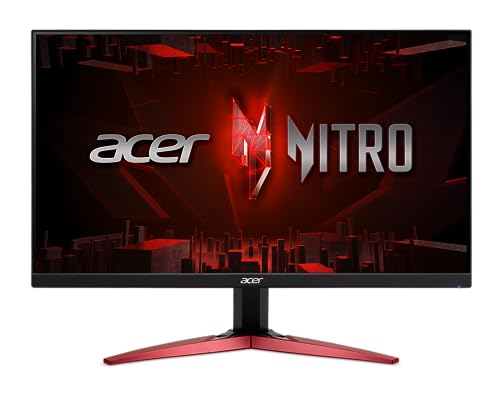
Acer Nitro 24-Inch 180Hz IPS Gaming Monitor
Best for: Competitive gaming on a standard HD screen
- Screen Size
- 23.8"
- Resolution
- 1920 x 1080
- Refresh Rate
- 180Hz
- Panel Type
- IPS
- Response Time
- 0.5ms
- Sync Technology
- AMD FreeSync Premium
View on Amazon: Acer Nitro 24-Inch 180Hz IPS Gaming Monitor Affiliate link
This Acer Nitro monitor features a 23.8-inch IPS panel with Full HD resolution. It delivers a 180Hz refresh rate and 1ms response time for smooth gameplay. AMD FreeSync Premium reduces screen tearing. The display covers 99% of the sRGB color gamut and supports HDR10. It includes HDMI 2.0 and DisplayPort 1.2 inputs. This setup suits competitive gamers who need fast response times and reliable color accuracy on a standard screen size.
Pros
- 180Hz refresh rate for fluid motion
- IPS panel with 99% sRGB coverage
- 1ms (GTG) response time
- AMD FreeSync Premium technology
- VESA 100x100mm mounting support
Cons
- Full HD resolution on a 23.8-inch screen
- Limited tilt adjustment range of -5 to 15 degrees
- No USB hub or built-in speakers listed
Good fit if
- You prioritize high refresh rates for competitive gaming
- You want accurate colors from an IPS panel
- You need a VESA-mountable display for your desk setup
Skip if
- You require 4K resolution for detailed work
- You need a large ultrawide screen for multitasking
- You want built-in speakers or a USB hub
Verdict: Acer Nitro 23.8" 180Hz IPS Monitor fits players who need fast refresh rates and solid color accuracy without needing a larger screen. It delivers the speed and panel quality required for competitive titles.
Specifications side by side
| Spec | Acer Nitro 24-Inch 180Hz IPS Gaming Monitor |
|---|---|
| Screen Size | 23.8" |
| Resolution | 1920 x 1080 |
| Refresh Rate | 180Hz |
| Panel Type | IPS |
| Response Time | 0.5ms |
| Sync Technology | AMD FreeSync Premium |
| Connectivity | 1 x DisplayPort 1.2, 2 x HDMI 2.0 |
| Dimensions | 9.13 × 21.3 × 16 inches |
| Size | 23.8-inch IPS |
| Color | Black |
| Model | UM.QX1AA.303 |
Frequently asked questions
Is the Acer Nitro 24-Inch 180Hz IPS monitor good for competitive gaming?
Yes, it is well-suited for competitive gaming. The 180Hz refresh rate reduces motion blur, allowing you to track fast-moving targets more easily. The IPS panel provides solid color accuracy and wide viewing angles. This combination ensures smooth transitions during rapid camera movements, which is essential for fast-paced titles.
What is the screen size of the Acer Nitro 24-Inch monitor?
The screen size is 23.8 inches. It is a standard HD display, not an ultrawide. This size fits well in multi-monitor setups due to its zero-frame design. It is ideal if you prefer a compact footprint on your desk while still getting high refresh rates for gaming.
Does this monitor support DisplayPort connections?
Yes, it supports DisplayPort 1.2 inputs. You can also use HDMI 2.0 connections for flexibility. This allows you to connect to various graphics cards depending on your system setup. Ensure you use the included cables or compatible adapters to achieve the full 180Hz performance.
What type of panel does the Acer Nitro KG241Y use?
It uses an IPS panel type. IPS technology offers wide viewing angles and consistent colors from different positions. This is beneficial if you play with friends or move around your desk. The panel delivers the speed required for gaming while maintaining visual quality.
Is the Acer Nitro 24-Inch monitor suitable for office work?
It can work for office tasks, but it is not an ultrawide. The 23.8-inch HD screen may feel narrow for productivity compared to larger displays. However, the IPS panel provides good color accuracy. It is best used in a multi-monitor array where the zero-frame design helps create a clean look.
What are the physical dimensions of the Acer Nitro monitor?
The monitor measures 21.3 inches in width, 16 inches in height, and 9.13 inches in length. It features a black finish for a neutral look. The zero-frame design minimizes bezels, making it easier to stack or place units side-by-side for extended desktop real estate.