ViewSonic 27-Inch 1440p IPS Monitor vs ViewSonic 27-Inch Curved 200Hz Gaming: Spec Comparison
As an Amazon Associate we earn from qualifying purchases. Links on this page are affiliate links.
The viewsonic 27 inch 1440p ips monitor vs 27 inch curved 200hz gaming comparison highlights two distinct 27-inch displays. Both offer eye-care features and multiple connectivity ports. However, they target different use cases. One prioritizes sharp text and color accuracy for productivity. The other focuses on speed and immersion for fast-paced gaming. Understanding these spec differences helps you pick the right screen for your desk.
Key differences
| Aspect | ViewSonic 27-Inch 1440p IPS Monitor | ViewSonic 27-Inch Curved 200Hz Gaming Monitor |
|---|---|---|
| Resolution | 2560 x 1440 (QHD) | 1920 x 1080 (FHD) |
| Refresh Rate | 100Hz | 180Hz (listed as 200Hz in attributes) |
| Panel Type | IPS | Not listed |
| Curvature | Flat | 1500R Curved |
| Sync Technology | VESA Adaptive Sync | AMD FreeSync Premium |
| Response Time | Not listed | 1ms (MPRT) |
Which one should you choose?
Choose ViewSonic 27-Inch 1440p IPS Monitor if
- You need sharper text and images for work or creative tasks.
- You prefer wider viewing angles and consistent color reproduction.
- You want a flat screen for seamless multi-monitor setups.
Choose ViewSonic 27-Inch Curved 200Hz Gaming Monitor if
- You play fast-paced games and need higher frame rates.
- You want a curved screen for a more immersive field of view.
- You prioritize a faster response time for competitive gaming.
Verdict: Choose the 1440p IPS model if your priority is visual clarity and color accuracy for general use. Select the curved 1080p model if you need higher refresh rates and a more immersive experience for gaming. Each monitor excels in its specific design niche.
Resolution and refresh rate tradeoffs
Resolution clarity
The ViewSonic VS2725-2K delivers a Quad HD resolution of 2560 by 1440 pixels. This higher pixel count provides sharper text and more detailed images on the 27-inch panel. It is ideal for productivity tasks where clarity matters. The ViewSonic VX2718-PC-MHD uses a Full HD resolution of 1920 by 1080 pixels. On a 27-inch screen, this results in lower pixel density. Text may appear less crisp compared to the 1440p model. If you need sharp visuals for work or media, the higher resolution is a clear advantage. The lower resolution is better suited for gaming where pixel density is less critical.
Refresh rate speed
Gaming performance often depends on how fast the screen updates. The ViewSonic VX2718-PC-MHD features a high refresh rate of 200Hz. This allows for smoother motion in fast-paced games and reduces motion blur. The ViewSonic VS2725-2K offers a refresh rate of 100Hz. While smooth for general use and casual gaming, it is significantly slower than the 200Hz option. For competitive shooters or racing games, the higher refresh rate provides a tangible benefit. The 100Hz panel is sufficient for standard desktop tasks and slower-paced titles.
Panel type colors
The viewing experience is heavily influenced by the panel technology. The ViewSonic VS2725-2K uses an IPS panel. IPS technology is known for accurate colors and wide viewing angles. This makes it suitable for photo editing, design work, and group viewing. The ViewSonic VX2718-PC-MHD does not explicitly list its panel type in the provided data. However, curved gaming monitors often use VA panels for higher contrast. Without confirmed specs, we cannot compare color accuracy directly. If you prioritize color fidelity and wide angles, the confirmed IPS panel is the safer choice for professional work.
Sync technology
Screen tearing can disrupt gaming immersion. The ViewSonic VX2718-PC-MHD supports AMD FreeSync Premium. This technology synchronizes the refresh rate with the GPU to eliminate stuttering. It is optimized for smooth gameplay in supported games. The ViewSonic VS2725-2K uses VESA Adaptive Sync. This standard also helps reduce tearing and ensures consistent frame rates. Both monitors offer synchronization to improve visual fluidity. FreeSync Premium may offer slightly better optimization for AMD GPUs, while VESA Adaptive Sync is a broader standard. Both are effective for their respective target audiences.
Design and ergonomics
Physical design affects desk space and setup aesthetics. The ViewSonic VS2725-2K features a frameless design with ultra-thin bezels. This allows for seamless multi-monitor setups with minimal visual distraction. It also includes DisplayPort-out for daisy-chaining displays. The ViewSonic VX2718-PC-MHD has a curved 1500R screen for immersion. Its bezels are not described as frameless in the data. The curved design wraps around your field of view, which some gamers prefer. The flat, frameless design is better for productivity and multi-monitor arrangements. Both include eye-care features like flicker-free technology.
Choose your monitor by priority
Office workers needing sharp text
You need crisp visuals for spreadsheets and documents. The 2560 by 1440 resolution provides higher pixel density than 1080p. The IPS panel ensures consistent colors and wide viewing angles. This setup reduces eye strain during long workdays with Flicker-Free technology and Blue Light Filters.
Users building multi-monitor desks
Your workspace requires seamless screen expansion. This model features a frameless design with ultra-thin bezels. It supports DisplayPort-out daisy chaining for connecting multiple displays. The 100Hz refresh rate and VESA Adaptive Sync provide smooth visuals for general productivity and casual media consumption without clutter.
Competitive gamers seeking speed
You prioritize frame rate and responsiveness. This curved display offers a 180Hz refresh rate and 1ms MPRT response time. AMD FreeSync Premium synchronizes the refresh rate with your GPU to eliminate screen tearing. The 1500R curve enhances immersion, while game presets optimize settings for FPS titles.
Players wanting immersive visuals
You prefer a curved screen for gaming. The 1500R curvature wraps around your field of view. Although the 1920 by 1080 resolution is lower, the high refresh rate delivers fluid motion. Eye-care features like Flicker-Free technology help reduce fatigue during extended gaming sessions on your PC or console.
The products compared

ViewSonic 27-Inch 1440p IPS Monitor
Best for: productivity and casual gaming
- Screen Size
- 27 Inch
- Resolution
- 2560 x 1440
- Refresh Rate
- 100Hz
- Panel Type
- IPS
- Response Time
- 1ms
- Sync Technology
- VESA Adaptive Sync
View on Amazon: ViewSonic 27-Inch 1440p IPS Monitor Affiliate link
The ViewSonic VS2725-2K is a 27-inch monitor with a 1440p IPS panel and 100Hz refresh rate. It features VESA Adaptive Sync for smooth visuals and a frameless design for multi-monitor setups. Eye care includes Flicker-Free tech and a Blue Light Filter. This model suits users prioritizing color accuracy and desk space over high-speed gaming performance.
Pros
- 2560 x 1440 QHD resolution on an IPS panel
- Frameless design for seamless multi-monitor setups
- VESA Adaptive Sync reduces screen tearing
- Flicker-Free and Blue Light Filter for eye comfort
- Daisy-chain DisplayPort-out for streamlined connectivity
Cons
- 100Hz refresh rate is lower than 144Hz or 200Hz gaming monitors
- No mention of height adjustment or tilt range in specs
- Limited to 100Hz despite being a gaming-oriented brand
Good fit if
- You need a sharp 1440p display for office work
- You want a frameless monitor for a dual-screen setup
- You prioritize color accuracy and eye comfort over high refresh rates
Skip if
- You require a 144Hz or higher refresh rate for competitive gaming
- You need a curved screen for immersive viewing
- You want a monitor with built-in height adjustment
Verdict: ViewSonic 27-Inch 1440p IPS Monitor is a solid choice for productivity and casual gaming, offering sharp 1440p visuals and eye-care features, but its 100Hz refresh rate limits its appeal for high-speed gaming enthusiasts.
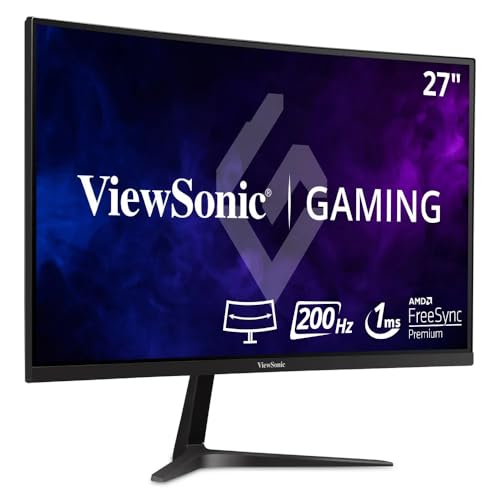
ViewSonic 27-Inch Curved 200Hz Gaming Monitor
Best for: fast-paced gaming on a budget
- Screen Size
- 27"
- Resolution
- 1080p
- Refresh Rate
- 200Hz
- Response Time
- 1ms
- Sync Technology
- FreeSync Premium
- Connectivity
- DisplayPort, HDMI
View on Amazon: ViewSonic 27-Inch Curved 200Hz Gaming Monitor Affiliate link
This 27-inch curved monitor delivers a 200Hz refresh rate and 1ms response time for fluid motion. It features 1080p resolution and AMD FreeSync Premium to reduce screen tearing. The 1500R curve enhances immersion for gaming. It includes Flicker-Free technology and a Blue Light Filter for comfort. You get HDMI and DisplayPort connectivity for versatile setup options.
Pros
- 200Hz refresh rate for smooth gameplay
- 1500R curved screen for immersion
- AMD FreeSync Premium support
- 1ms MPRT response time
Cons
- 1080p resolution on a 27-inch panel
- No USB-C connectivity listed
- No mention of height adjustment stand
Good fit if
- You prioritize high refresh rates over pixel density
- You want a curved display for immersion
- You play fast-paced competitive games
Skip if
- You need sharp 1440p clarity
- You require USB-C connectivity
- You prefer a flat screen design
Verdict: ViewSonic 27-Inch 200Hz Curved Gaming Monitor suits players who value speed and immersion over resolution. It is ideal for those who want a smooth experience without the need for higher pixel counts.
Specifications side by side
| Spec | ViewSonic 27-Inch 1440p IPS Monitor | ViewSonic 27-Inch Curved 200Hz Gaming Monitor |
|---|---|---|
| Screen Size | 27 Inch | 27" |
| Resolution | 2560 x 1440 | 1080p |
| Refresh Rate | 100Hz | 200Hz |
| Panel Type | IPS | not stated |
| Response Time | 1ms | 1ms |
| Sync Technology | VESA Adaptive Sync | FreeSync Premium |
| Connectivity | HDMI, DisplayPort | DisplayPort, HDMI |
| Size | 27 Inch | 27 Inch |
| Dimensions | 27.1 × 5.04 × 19.2 inches | 8.8 × 24 × 18.7 inches |
| Weight | 7.9 pounds | 10.8 pounds |
| Color | Black | Black |
| Model | VS2725-2K | VX2718-PC-MHD |
Frequently asked questions
Which ViewSonic monitor is better for office work?
The ViewSonic VS2725-2K is the better choice for office tasks. It features a 1440p resolution that provides sharper text and clearer details on your screen. This higher pixel density makes reading documents and spreadsheets much easier. The IPS panel also offers consistent colors and wide viewing angles, which reduces eye strain during long workdays.
Is the 200Hz refresh rate worth it for gaming?
If you play fast-paced games, the 200Hz refresh rate on the VX2718-PC-MHD provides smoother motion. This high refresh rate reduces blur and input lag, giving you a competitive edge. However, this monitor only offers 1080p resolution, so images may appear less sharp than on the 1440p model. Choose this if speed matters more to you than pixel clarity.
Does the curved monitor provide better immersion?
Yes, the ViewSonic VX2718-PC-MHD features a curved design that wraps around your field of view. This curvature can enhance immersion in games and movies by making the screen feel more expansive. The 27-inch screen size combined with the curve creates a more engaging visual experience, especially for single-player titles or racing games where being
Which monitor has the higher resolution?
The ViewSonic VS2725-2K has the higher resolution. It displays 2560 by 1440 pixels, which is Quad HD. The ViewSonic VX2718-PC-MHD only displays 1920 by 1080 pixels. The 1440p model offers significantly more detail and sharpness. This makes the VS2725-2K superior for tasks requiring precise visuals, such as photo editing or detailed design work.
Are both monitors the same screen size?
Both monitors have a 27-inch screen size. However, their physical dimensions differ due to their designs. The flat VS2725-2K is thinner and lighter, measuring 5.04 inches in width and weighing 7.9 pounds. The curved VX2718-PC-MHD is deeper at 8.8 inches and heavier at 10.8 pounds. Check your desk space to ensure the curved model fits your setup.
Which monitor is lighter and easier to move?
The ViewSonic VS2725-2K is the lighter option. It weighs 7.9 pounds, making it easier to lift and adjust. The curved VX2718-PC-MHD weighs 10.8 pounds due to its different build. If you frequently move your monitor or have a lightweight stand, the flat 1440p model is more convenient. Its compact depth also saves space on your desk.
Can I use the 100Hz monitor for casual gaming?
Yes, the ViewSonic VS2725-2K supports a 100Hz refresh rate, which is suitable for casual gaming. While it cannot match the smoothness of a 200Hz display, it is still faster than standard 60Hz monitors. This makes it a good middle ground for productivity and occasional gaming. You get sharp 1440p visuals with improved motion handling compared to basic office monitors.
What is the main trade-off between these two models?
The main trade-off is resolution versus refresh rate. The VS2725-2K prioritizes image clarity with 1440p resolution and 100Hz speed. The VX2718-PC-MHD prioritizes speed with 200Hz refresh rate but only offers 1080p resolution. You must decide if sharp text and detailed images are more important to you than ultra-smooth motion in fast-paced games.