GIGABYTE 32-Inch Curved 1440p Gaming or GIGABYTE 27-Inch Curved 1080p Gaming? Which GIGABYTE Model to Buy
As an Amazon Associate we earn from qualifying purchases. Links on this page are affiliate links.
This gigabyte 32 inch curved 1440p gaming vs 27 inch curved 1080p gaming comparison looks at two distinct GIGABYTE VA monitors. Both models share a 180Hz refresh rate, 1ms MPRT response time, 1500R curvature, and HDR10 support. They also both use AMD FreeSync technology. The main difference lies in resolution and screen size. The 32-inch model offers QHD clarity, while the 27-inch model provides FHD sharpness. You need to decide which pixel density fits your setup.
Key differences
| Aspect | GIGABYTE 32-Inch Curved 1440p Gaming Monitor | GIGABYTE 27-Inch Curved 1080p Gaming Monitor |
|---|---|---|
| Screen Size | 31.5 inches | 27 inches |
| Resolution | 1440p | 1080p |
| Contrast Ratio | 3500:1 | 3000:1 |
| Color Gamut | 120% sRGB | 108% sRGB |
| Sync Technology | AMD FreeSync | AMD FreeSync Premium |
| Weight | 12.9 pounds | 9.98 pounds |
Which one should you choose?
Choose GIGABYTE 32-Inch Curved 1440p Gaming Monitor if
- You prefer a larger 32-inch display for immersive gaming.
- You want higher resolution 1440p for sharper image detail.
- You value a wider color gamut and higher contrast ratio.
Choose GIGABYTE 27-Inch Curved 1080p Gaming Monitor if
- You want a smaller 27-inch monitor that saves desk space.
- You need AMD FreeSync Premium for enhanced variable refresh rate performance.
- You prefer a lighter monitor that is easier to mount or move.
Verdict: Choose the 32-inch 1440p model if you prioritize screen real estate and image sharpness. Pick the 27-inch 1080p model if you need a compact footprint and the extra features of FreeSync Premium. Both monitors deliver the same fast 180Hz performance for smooth gameplay.
32-Inch 1440p vs 27-Inch 1080p Specs
Screen resolution and clarity
The GIGABYTE 32-Inch Curved 1440p Gaming Monitor offers a QHD resolution of 2560x1440 pixels on a 31.5-inch display. This provides significantly sharper image detail and more screen real estate for multitasking or immersive gaming. The GIGABYTE 27-Inch Curved 1080p Gaming Monitor uses a Full HD resolution of 1920x1080 pixels on a 27-inch screen. While the 27-inch model maintains a standard pixel density, the 32-inch 1440p model delivers superior clarity and detail. You will notice a clearer picture with the higher resolution on the larger panel, making it better for high-definition content.
Refresh rate and motion
Both monitors share identical motion performance specifications. The GIGABYTE 32-Inch Curved 1440p Gaming Monitor and the GIGABYTE 27-Inch Curved 1080p Gaming Monitor both feature a 180Hz refresh rate. They also both list a 1ms MPRT response time. This means both displays can handle fast-paced action with smooth frame delivery and minimal blur. There is no technical difference in how fast the panels update or how quickly pixels change color. You get the same competitive advantage in speed regardless of which size you choose.
Color gamut coverage
The GIGABYTE 32-Inch Curved 1440p Gaming Monitor covers 120% of the sRGB color gamut. The GIGABYTE 27-Inch Curved 1080p Gaming Monitor covers 108% of the sRGB color gamut. Both use 8-bit color depth and HDR10 support. The 32-inch model offers a wider range of colors, which results in more vibrant and accurate visuals. The 27-inch model still provides wide color coverage, but the 32-inch version has a measurable advantage in color reproduction. If color accuracy is important to you, the larger monitor performs better.
Sync technology features
The GIGABYTE 32-Inch Curved 1440p Gaming Monitor supports standard AMD FreeSync. The GIGABYTE 27-Inch Curved 1080p Gaming Monitor supports AMD FreeSync Premium. FreeSync Premium typically includes stricter requirements for low frame rate compensation and minimum refresh rates. This can reduce screen tearing and stuttering more effectively in lower frame scenarios. Both technologies aim to keep gameplay smooth, but the Premium tier on the 27-inch model offers enhanced synchronization features. You get a slight edge in sync quality with the smaller monitor.
Physical size and weight
The GIGABYTE 32-Inch Curved 1440p Gaming Monitor is larger, measuring 19.6 inches wide and 19.6 inches high. It weighs 12.9 pounds. The GIGABYTE 27-Inch Curved 1080p Gaming Monitor is more compact, measuring 24 inches wide and 19.2 inches high. It weighs 9.98 pounds. The 27-inch model takes up less desk space and is lighter to move. The 32-inch model requires a larger desk area and more robust stand support. You should choose the 27-inch model if space is limited or if you prefer a lighter display.
Which GIGABYTE monitor suits your needs?
Players wanting sharper 1440p visuals
You should choose the 32-inch model if you prioritize image clarity. It offers 1440p resolution on a larger 31.5-inch screen, delivering sharper details than the 1080p alternative. The 120% sRGB color gamut and 3500:1 contrast ratio provide richer colors and deeper blacks, enhancing immersion for single-player games or slower-paced titles where resolution matters most.
Competitive esports gamers needing tactical tools
The 27-inch 1080p monitor is better for fast-paced competitive play. It includes AMD FreeSync Premium and specific tactical features like OSD Sidekick, timers, and crosshairs. These tools help you track game time and focus on enemies. The smaller screen size also keeps your field of view consistent with many competitive shooters, while maintaining the same 180Hz speed.
Users wanting a compact, lighter setup
If desk space or weight is a concern, the 27-inch model is the practical choice. It weighs under 10 pounds and has a smaller footprint than the heavier 32-inch version. It offers the same 180Hz refresh rate and 1ms response time in a more compact form factor, making it easier to fit on smaller desks or move around.
The products compared

GIGABYTE 32-Inch Curved 1440p Gaming Monitor
Best for: Players wanting larger 32-inch 1440p screen
- Screen Size
- 31.5"
- Resolution
- 2560x1440
- Refresh Rate
- 180Hz
- Response Time
- 1ms MPRT
- Sync Technology
- AMD FreeSync
- Connectivity
- 2X HDMI 2.0, DP 1.4
View on Amazon: GIGABYTE 32-Inch Curved 1440p Gaming Monitor Affiliate link
This GIGABYTE monitor offers a 32-inch VA curved panel with 1440p resolution. It runs at 180Hz with a 1ms MPRT response time for smooth motion. The display covers 120% of the sRGB color gamut and supports AMD FreeSync. It is designed for immersive gaming with HDR10 compatibility. You get a larger screen than the 27-inch 1080p alternative, making it suitable for players who prioritize visual clarity and field of view.
Pros
- 32-inch VA curved panel for immersion
- 1440p resolution for sharp detail
- 180Hz refresh rate for smooth gameplay
- 120% sRGB color gamut coverage
- AMD FreeSync support reduces tearing
Cons
- 1ms MPRT response time may cause motion blur
- VA panel has slower pixel response than IPS
- No mention of USB hub or headphone jack
Good fit if
- You want a larger 32-inch screen for gaming
- You prefer 1440p resolution over 1080p
- You play fast-paced games needing high refresh rates
Skip if
- You need a 27-inch monitor for limited desk space
- You require IPS panel for faster pixel response
- You prefer 1080p resolution for higher frame rates
Verdict: GIGABYTE 32-Inch 1440p Curved Gaming Monitor fits players who want a larger 32-inch screen with 1440p clarity and 180Hz speed, rather than the smaller 27-inch 1080p option.
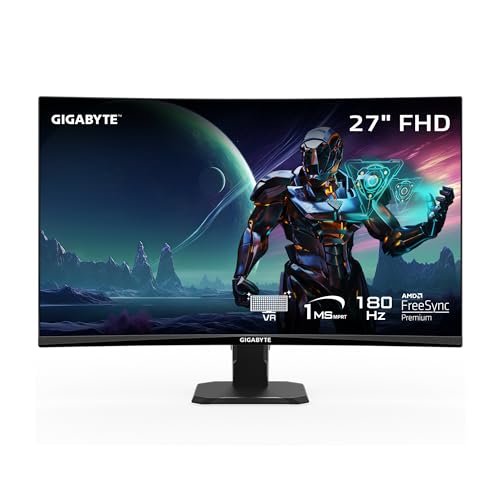
GIGABYTE 27-Inch Curved 1080p Gaming Monitor
Best for: Fast-paced esports gaming on a budget
- Screen Size
- 27"
- Resolution
- 1920 x 1080
- Refresh Rate
- 180Hz
- Response Time
- 1ms (MPRT)
- Sync Technology
- AMD FreeSync Premium
- Connectivity
- 1x DisplayPort 1.4, 2x HDMI 2.0
View on Amazon: GIGABYTE 27-Inch Curved 1080p Gaming Monitor Affiliate link
The GIGABYTE GS27FC is a 27-inch curved VA gaming monitor with a 1920 x 1080 resolution. It features a 1500R curve and supports a 180Hz refresh rate with 1ms MPRT response time. AMD FreeSync Premium helps reduce screen tearing. The panel covers 108% sRGB and includes HDR10. This model suits players who want a smooth, immersive experience in esports titles without needing high-resolution clarity.
Pros
- 180Hz refresh rate for smooth motion
- 1500R curved VA panel for immersion
- 108% sRGB color gamut coverage
- AMD FreeSync Premium support
- Built-in tactical features like crosshairs
Cons
- 1080p resolution on 27 inches lowers pixel density
- Tilt-only stand lacks height adjustment
- 1ms MPRT response time uses backlight strobing
Good fit if
- You play fast-paced esports games
- You prefer a curved display for immersion
- You prioritize high refresh rates over resolution
Skip if
- You need 1440p clarity for detailed visuals
- You require height-adjustable monitor stand
- You want IPS panel color accuracy
Verdict: GIGABYTE GS27FC 27-inch 1080p Curved Monitor is a solid option for competitive gamers who value speed and immersion. It fits those who want a smooth 180Hz experience in a curved form factor. It is less ideal for users who need sharp 1440p text or precise color work.
Specifications side by side
| Spec | GIGABYTE 32-Inch Curved 1440p Gaming Monitor | GIGABYTE 27-Inch Curved 1080p Gaming Monitor |
|---|---|---|
| Screen Size | 31.5" | 27" |
| Resolution | 2560x1440 | 1920 x 1080 |
| Refresh Rate | 180Hz | 180Hz |
| Response Time | 1ms MPRT | 1ms (MPRT) |
| Sync Technology | AMD FreeSync | AMD FreeSync Premium |
| Connectivity | 2X HDMI 2.0, DP 1.4 | 1x DisplayPort 1.4, 2x HDMI 2.0 |
| Panel Type | VA | VA |
| Dimensions | 9.37 × 19.6 × 19.6 inches | 5.8 × 24 × 19.2 inches |
| Weight | 12.9 pounds | 9.98 pounds |
| Size | VA Curved Panel | not stated |
| Color | Black | Black |
| Model | GS32QCA | GS27FC US |
Frequently asked questions
Is the 32-inch GIGABYTE monitor better for gaming?
Yes, if you prefer larger visuals. The 32-inch model provides 1440p resolution, offering sharper details than the 1080p option. It fits players who want a bigger screen with high clarity. Both monitors share a 180Hz refresh rate, ensuring smooth motion. Choose the 32-inch version for immersive gaming experiences on a larger display surface.
Does the 27-inch GIGABYTE monitor support FreeSync?
Yes, it does. The 27-inch 1080p model uses AMD FreeSync technology to reduce screen tearing. This sync technology pairs with its 180Hz refresh rate for smoother gameplay. It is a solid choice for competitive gamers who value speed. The curved VA panel enhances immersion while maintaining responsive performance during fast-paced sessions.
What is the refresh rate on these GIGABYTE monitors?
Both monitors feature a 180Hz refresh rate. This high speed allows for fluid motion and reduced blur in games. Whether you pick the 32-inch or 27-inch model, you get this performance level. It ensures smooth visuals for gaming. The 1ms MPRT response time further supports rapid action without ghosting artifacts on either screen.
Is the 32-inch screen too big for my desk?
It depends on your space. The 32-inch monitor measures 19.6 inches wide and weighs 12.9 pounds. It requires more desk real estate than the 27-inch model. The 27-inch version is narrower at 24 inches wide and lighter at 9.98 pounds. Consider your desk depth and viewing distance before deciding.
Which model has better resolution for text?
The 32-inch model is better for text. It offers 1440p resolution, which provides significantly sharper image detail. This clarity helps with reading and multitasking. The 27-inch 1080p option is less ideal for precise text work due to its lower pixel count. Choose the 32-inch version if sharpness matters most.
Do both monitors have curved screens?
Yes, both feature curved VA panels. They share a 1500R curvature radius for immersion. This design wraps the view around you, enhancing gaming focus. The curve is consistent across both the 32-inch and 27-inch models. It provides a similar visual experience regardless of the size you choose.
Can I use the 27-inch monitor for esports?
Yes, it is designed for that purpose. The 27-inch model is best for fast-paced esports gaming. Its 180Hz refresh rate and FreeSync support deliver smooth, tear-free visuals. The compact 27-inch size fits competitive setups well. It prioritizes speed and responsiveness over the higher resolution of the larger model.
What panel type do these GIGABYTE monitors use?
Both monitors use VA panel technology. This type offers high contrast ratios and deep blacks. The VA panels are curved in both models. They provide good color reproduction and viewing angles suitable for gaming. The 32-inch model highlights 1440p clarity, while the 27-inch focuses on speed within the same panel technology.