Acer Nitro 27-Inch 540Hz IPS Review: Who It Fits and Who Should Skip It
As an Amazon Associate we earn from qualifying purchases. Links on this page are affiliate links.
This acer nitro 27 inch 540hz ips review covers the Acer Nitro XV273U. It is a 27-inch IPS gaming monitor with a 2560 x 1440 resolution. The display supports a 540Hz refresh rate at native resolution. It also offers Dynamic Frequency and Resolution (DFR) to reach 1000Hz at 1280 x 720. The panel delivers 95% DCI-P3 color coverage and 0.5ms response time. You get AMD FreeSync Premium for tear-free gameplay. This setup targets competitive players who need speed.
What stands out
- 540Hz refresh rate at 2560 x 1440 resolution
- 1000Hz refresh rate at 1280 x 720 via DFR
- 95% DCI-P3 color gamut with Delta E<2
- 0.5ms GTG response time with VRB Pro
- VESA DisplayHDR 600 certification with 600nits peak brightness
Who it fits
Good fit for
You should buy this monitor if you play fast-paced competitive shooters. The 540Hz refresh rate reduces input lag and motion blur. The 1000Hz DFR mode helps if you can drop resolution for higher frame rates. The 27-inch size fits standard desks well. The ergonomic stand allows tilt, swivel, pivot, and height adjustment. You will appreciate the sharp WQHD clarity and accurate colors for gaming.
Who should skip it
You should skip this monitor if you need a 4K display. The resolution is fixed at 1440p. You should also look elsewhere if you want a curved screen. This model uses a flat IPS panel. If you require USB-C connectivity, note that this unit only has DisplayPort and HDMI ports. You might also prefer a standard 27-inch monitor if you do not need refresh rates above 240Hz, as this premium speed comes with a specific niche focus.
Verdict: This monitor delivers extreme speed and sharp visuals for competitive gamers. It is a strong choice for those prioritizing high refresh rates and color accuracy.
Acer Nitro XV273U Key Specs
Panel Type: IPS
In-plane switching panels offer wide viewing angles and consistent color accuracy from almost any position. You get reliable performance for both gaming and creative work. This technology ensures that the image does not shift in brightness or hue when you move around your desk. It is a standard choice for high-end gaming monitors that prioritize visual fidelity.
Refresh Rate: 540Hz DFR 1000Hz
The monitor updates the image 540 times per second at native resolution, reducing motion blur significantly. Dynamic Frequency and Resolution allows you to drop to 720p for a 1000Hz rate in competitive titles. This flexibility lets you choose between visual detail or maximum responsiveness based on the game you are playing. Higher rates provide smoother motion for fast-paced action.
Resolution: 2560 x 1440
Quad HD resolution provides a sharp image with more pixel density than 1080p on a 27-inch screen. You gain clarity in text and detailed textures without the heavy GPU load required for 4K. This balance makes it ideal for most gaming setups. It offers enough screen real estate for multitasking while maintaining a comfortable viewing distance for long sessions.
Response Time: Up to 0.5ms GTG
Gray-to-gray response time measures how quickly a pixel changes color. A 0.5ms rate minimizes trailing artifacts behind fast-moving objects. This speed helps maintain clarity during intense gameplay moments. It ensures that rapid movements do not leave ghostly smears on the screen. This specification is crucial for competitive gamers who need precise visual feedback.
Sync Technology: AMD FreeSync Premium
Adaptive sync technology matches the monitor's refresh rate to your graphics card's frame output. This prevents screen tearing and stuttering for a smoother experience. The Premium tier often includes low framerate compensation to keep motion smooth even when performance drops. You benefit from consistent visuals without the need to force frame rate caps. It works best with compatible AMD or supported NVIDIA cards.
Design and build overview
The Acer Nitro XV273U features a white finish and a zero-frame design. This aesthetic choice removes thick bezels, maximizing your screen space from edge to edge. The monitor measures 24.3 inches in width, 18.5 inches in height, and 8.2 inches in depth. These dimensions define the physical footprint it occupies on your desk.
According to the listing, the stand is ergonomically designed to support flexible positioning. You can adjust the height by 5.9 inches. The stand also allows for -5° to 25° tilt, plus or minus 20° swivel, and plus or minus 90° pivot. This range lets you rotate the screen vertically for portrait mode or tilt it for comfortable viewing angles.
The build prioritizes adjustability over minimalism. The substantial height adjustment and pivot capabilities suggest this unit is intended for users who need to customize their setup for different tasks. Whether you are gaming or working, the stand helps you find an ideal viewing position without requiring a separate monitor arm. The white color may require more frequent cleaning to maintain its appearance, but it offers a distinct look compared to standard black monitors.
Setup and everyday use guide
Setting up the Acer Nitro XV273U requires connecting it to a compatible graphics card. You have four video inputs available. The connectivity includes two DisplayPort 1.4 ports and two HDMI 2.1 ports. These ports allow you to link modern GPUs to reach the monitor’s maximum performance. The stand offers significant ergonomic flexibility. You can adjust the height by up to 5.9 inches. This helps you align the screen with your eye level. The stand also allows for tilting from -5 to 25 degrees. You can swivel the screen plus or minus 20 degrees. It also pivots plus or minus 90 degrees. This lets you switch to portrait mode if needed. During daily use, the monitor runs at 540Hz at its native 2560 x 1440 resolution. If you need higher frame rates, you can use Dynamic Frequency and Resolution. This feature lowers the resolution to 1280 x 720 to reach 1000Hz. The 0.5ms GTG response time helps reduce motion blur. AMD FreeSync Premium syncs the refresh rate with your GPU. This prevents screen tearing. The IPS panel provides consistent colors across wide viewing angles. You get 95% DCI-P3 coverage with Delta E less than 2. The monitor supports VESA DisplayHDR 600. Native brightness is 400 nits, peaking at 600 nits in HDR mode. The zero-frame design minimizes bezel distraction. This creates a seamless look for multi-monitor setups. The white finish fits modern desk aesthetics. The ergonomic adjustments ensure comfortable long-term use.
Before You Buy This Monitor
Owning this monitor means you need a powerful PC. The 540Hz refresh rate at 1440p demands high frame rates. You must check that your graphics card can push those numbers. If you play competitive shooters, this setup is ideal. The zero-frame design saves desk space. It sits well among other high-refresh gaming monitors on our site. You will need to manage heat, as high speeds generate warmth. Keep the vents clear. Cleaning requires a soft, dry cloth. Do not use harsh chemicals on the IPS panel. The ergonomic stand helps with posture. Adjust the height and tilt for your setup. This monitor suits fast-paced gamers who prioritize speed over color grading. It is less ideal for video editors who need wider color coverage. Check your GPU drivers for the latest FreeSync support. Ensure your cables are high-speed HDMI 2.1 or DisplayPort 1.4. This ensures you get the full 540Hz experience without bottlenecks.
Check before you buy
- Verify your GPU can sustain high frame rates at 1440p.
- Check for HDMI 2.1 or DisplayPort 1.4 compatibility.
- Ensure your desk has enough space for the stand.
- Confirm your room lighting suits the 600-nit HDR mode.
The product at a glance
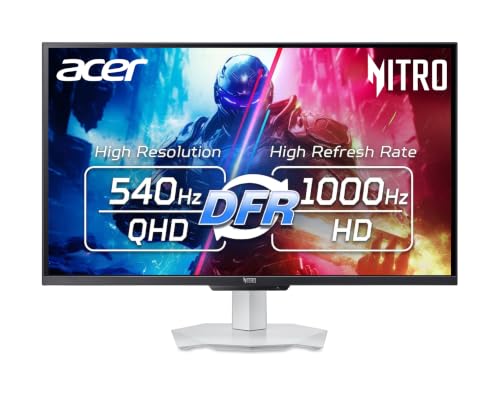
Acer Nitro 27-Inch 540Hz IPS Monitor
Best for: Competitive FPS gamers seeking 1440p speed
- Screen Size
- 27"
- Resolution
- 2560 x 1440
- Refresh Rate
- 540Hz, 1000Hz
- Panel Type
- IPS
- Aspect Ratio
- 16:9
- Response Time
- 0.5ms GTG
View on Amazon: Acer Nitro 27-Inch 540Hz IPS Monitor Affiliate link
The Acer Nitro XV273U F5 is a 27-inch IPS gaming monitor with a 2560 x 1440 resolution. It offers a 540Hz refresh rate at native resolution, expanding to 1000Hz via Dynamic Frequency and Resolution (DFR) at 720p. The panel covers 95% of the DCI-P3 color gamut and reaches 600 nits in HDR mode. You get a fully adjustable stand and AMD FreeSync Premium for smooth gameplay. This setup suits competitive gamers who prioritize speed and color accuracy.
Pros
- 540Hz refresh rate at 1440p resolution
- 95% DCI-P3 color gamut coverage
- VESA DisplayHDR 600 certification
- 0.5ms GTG response time
- Full ergonomic stand with height adjustment
Cons
- 1000Hz refresh rate requires dropping to 720p resolution
- Native brightness is limited to 400 nits
- Only supports AMD FreeSync Premium technology
Good fit if
- You want high refresh rates at 1440p
- You need accurate colors for creative work
- You prefer an adjustable ergonomic stand
Skip if
- You require 4K resolution
- You need NVIDIA G-Sync compatibility
- You want full HDR performance above 600 nits
Verdict: Acer Nitro 27in 540Hz IPS Monitor delivers top-tier speed for competitive FPS players who value 1440p clarity. It is ideal for users who need precise color reproduction alongside high frame rates.
Specifications side by side
| Spec | Acer Nitro 27-Inch 540Hz IPS Monitor |
|---|---|
| Screen Size | 27" |
| Resolution | 2560 x 1440 |
| Refresh Rate | 540Hz, 1000Hz |
| Panel Type | IPS |
| Aspect Ratio | 16:9 |
| Response Time | 0.5ms GTG |
| Sync Technology | AMD FreeSync Premium, NVIDIA G-Sync |
| Connectivity | 2 x Display Port 1.4, 2 x HDMI 2.1 |
| Dimensions | 8.2 × 24.3 × 18.5 inches |
| Color | White |
| Model | XV273U F5wmiipprx |
Frequently asked questions
Is this monitor good for competitive FPS games?
Yes. It is best for competitive FPS gamers seeking 1440p speed. The 540Hz refresh rate delivers top-tier speed. You get precise color reproduction alongside high frame rates. This makes it ideal for users who need both clarity and performance in fast-paced shooters.
What resolution does the Acer Nitro 27-Inch support?
It supports 1440p resolution. The display offers 2560 x 1440 pixels at native resolution. This provides sharp image clarity. You benefit from detailed visuals without compromising the high refresh rate needed for smooth gaming performance on modern systems.
Does it have an IPS panel?
Yes. It uses an IPS panel type. In-plane switching ensures wide viewing angles. You get consistent color accuracy from almost any position. This technology prevents the image from shifting in brightness or contrast, making it suitable for both gaming and creative work.
What is the model number of this Acer monitor?
The model is XV273U F5wmiipprx. This specific identifier helps you find the exact product online. It corresponds to the white-finish version of the Nitro series. You can use this code to verify compatibility with your setup or find replacement parts.
Is the frame around the screen visible?
No. It features a zero-frame design. This aesthetic choice removes thick bezels. You maximize your screen space from edge to edge. The lack of visible borders creates a seamless look, which is helpful if you plan to use multiple monitors side by side.
What colors is this monitor available in?
It is available in white. The exterior features a white finish. This color choice allows it to blend into modern desk setups. You get a clean aesthetic that matches other white computer peripherals or furniture in your gaming room or office.