Acer Nitro 27-Inch QHD 180Hz Review (2026): A Spec-Based Look
As an Amazon Associate we earn from qualifying purchases. Links on this page are affiliate links.
This acer nitro 27 inch qhd 180hz review focuses on the Acer Nitro XV271U M3bmiiprx. It is a 27-inch QHD gaming monitor that delivers a 2560 x 1440 resolution on an IPS panel. The display supports an 180Hz refresh rate via DisplayPort, ensuring smooth motion for fast-paced titles. You get a 1ms gray-to-gray response time to reduce blur. The ergonomic stand offers height, tilt, swivel, and pivot adjustments. This combination of sharp visuals and high speed defines the core experience for users seeking balance.
What stands out
- IPS panel delivers 2560 x 1440 QHD resolution for sharp image clarity
- 180Hz refresh rate via DisplayPort for fluid motion in competitive games
- 1ms (G to G) response time minimizes ghosting and motion blur
- Ergostand includes height adjustment, tilt, swivel, and pivot for flexible positioning
- AMD FreeSync Premium technology reduces screen tearing and stuttering
Who it fits
Good fit for
This monitor suits gamers who want crisp visuals without sacrificing speed. The 27-inch QHD screen is ideal for desktop setups where you sit relatively close. You will appreciate the high refresh rate and low response time if you play shooters or racing games. The fully adjustable stand helps you find a comfortable viewing angle for long sessions. It is also a solid choice for users who value color accuracy from the IPS panel while needing smooth performance.
Who should skip it
You should look elsewhere if you need HDMI 2.1 features or a higher refresh rate. This model only reaches 144Hz over HDMI, so it may not satisfy users demanding the maximum 180Hz on that port. It lacks USB-C connectivity, which limits charging and data transfer options from a single cable. If you require HDR performance beyond standard SDR, this basic IPS panel may not meet your needs. Buyers seeking a curved screen will also find this a flat display only.
Verdict: The Acer Nitro XV271U M3bmiiprx offers a balanced mix of QHD clarity and 180Hz speed. It is a practical choice for gamers who prioritize sharp visuals and smooth motion.
Acer Nitro Key Specs Explained
Panel Type: IPS
IPS panels offer wide viewing angles and consistent color reproduction from the side. You will see accurate colors even if you sit off-center. This is ideal for creative work or group viewing. Unlike VA panels, IPS avoids the black smearing seen in dark scenes. It provides a reliable baseline for image quality in gaming and general use.
Resolution: 2560 x 1440
QHD resolution delivers sharp text and detailed images on a 27-inch screen. You get more desktop real estate than 1080p without the heavy GPU load of 4K. This balance suits most gaming PCs. It ensures clear UI elements and crisp game textures. It is the standard sweet spot for modern gaming monitors.
Refresh Rate: 180Hz
An 180Hz refresh rate updates the image 180 times per second. This reduces motion blur and makes fast-paced games feel smoother. You benefit in shooters or racing games where split-second reactions matter. It is faster than the standard 60Hz or 144Hz. Check your GPU can sustain these frame rates for full effect.
Response Time: 1ms (G to G)
The 1ms gray-to-gray response time minimizes ghosting behind moving objects. You see cleaner motion trails in fast scenes. This spec works with the high refresh rate to reduce input lag. It ensures pixels change color quickly. This is crucial for competitive gaming where clarity during rapid movement impacts your performance.
Sync Technology: AMD FreeSync Premium
FreeSync Premium synchronizes the monitor's refresh rate with your GPU's frame output. This prevents screen tearing and stuttering. You get smoother visuals without frame drops. It adapts to fluctuating performance. This technology is essential for maintaining immersion. It ensures the display matches the game's output dynamically for a seamless experience.
Design and Build Overview
According to the listing, this monitor is finished in black and measures 24.2 inches wide by 18 inches tall, with a depth of 9.2 inches. The unit weighs 12.1 pounds. This mass suggests a sturdy chassis that can handle frequent adjustments without wobbling. You will find the stand base occupies a moderate footprint on your desk, which is practical for most standard setups.
The stand includes an ergonomic base that allows tilt adjustment from -5° to 25°. You can raise the screen by up to 4.7 inches for better eye alignment. The design also supports swivel up to 360° and pivot rotation of plus or minus 90°. These mechanical features let you switch between landscape and portrait modes easily. This flexibility is useful if you code or read long documents. The build supports VESA mounting with a 100 x 100mm pattern. You can remove the stand to mount the display on a wall or arm if you prefer a cleaner look.
Controls and ports are located on the rear or side. You get one DisplayPort 1.2 and two HDMI 2.0 inputs. There is also an audio out port. The listing notes that two 2-watt speakers are included. This basic audio setup is sufficient for casual use, though you may want external speakers for immersive gaming. The overall design prioritizes functional adjustability over premium materials.
Setup and Everyday Use Guide
Setting up this monitor begins with connecting your graphics card. You must use the included DisplayPort 1.2 cable to achieve the maximum 180Hz refresh rate. This is the only way to unlock the full speed listed in the specifications. If you choose to use one of the two HDMI 2.0 ports instead, the refresh rate drops to 144Hz. You will also find an audio out port for connecting external speakers or headphones. The listing confirms that two 2-watt speakers are built into the unit, providing basic sound without extra hardware. For placement, the stand offers significant flexibility. You can adjust the height by up to 4.7 inches. The tilt range moves from -5 to 25 degrees. You can also swivel the screen 360 degrees or pivot it by plus or minus 90 degrees. This allows you to position the 27-inch display for comfortable viewing in various orientations. The monitor is VESA mount compliant with a 100 x 100mm pattern. This means you can remove the stand and attach it to a third-party arm if you prefer a cleaner desk setup. The AMD FreeSync Premium technology works with compatible GPUs to reduce screen tearing. This feature operates alongside the high refresh rate to keep motion smooth. The IPS panel ensures that colors remain consistent even if you shift your viewing angle slightly. The 1ms response time, measured in gray-to-gray transitions, helps minimize motion blur during fast-paced gameplay. The pixel pitch is 0.233mm, which determines the sharpness of the image at your typical viewing distance.
Before You Buy This Monitor
This monitor is a solid entry in the 1 options we track for gaming setups. You should verify your GPU supports FreeSync Premium to avoid screen tearing. The included cables cover basic connectivity, but you may need a longer DisplayPort 1.2 cable if your desk setup requires extra reach. Since it lacks HDMI 2.1, next-gen console features like 4K at high refresh rates are not supported. Stick to PC gaming for the best experience. Cleaning the IPS screen requires a microfiber cloth and mild solution. Avoid harsh chemicals that can damage the panel coating. The ergonomic stand allows height and pivot adjustments, which helps reduce neck strain during long sessions. Keep the vents clear for proper airflow. This model fits well if you prioritize smooth motion and color accuracy over ultra-high resolution. It is a practical choice for competitive gamers who value response time and refresh rate stability.
Check before you buy
- Confirm your GPU supports AMD FreeSync Premium
- Check if your desk fits the 24.2 inch width
- Verify you have a DisplayPort 1.2 cable
- Ensure your chair allows full pivot adjustment
The product at a glance
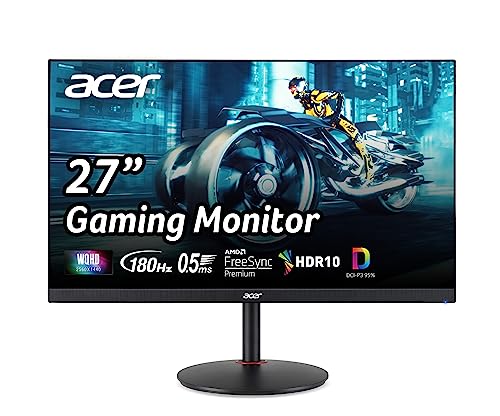
Acer Nitro 27-Inch QHD 180Hz IPS Gaming Monitor
Best for: Competitive gamers seeking 1440p fluidity
- Screen Size
- 27"
- Resolution
- 2560 x 1440
- Refresh Rate
- 180Hz DP / 144Hz HDMI
- Panel Type
- IPS
- Response Time
- 1ms GTG (up to 0.5ms)
- Sync Technology
- AMD FreeSync Premium
View on Amazon: Acer Nitro 27-Inch QHD 180Hz IPS Gaming Monitor Affiliate link
The Acer Nitro XV271U M3bmiiprx is a 27-inch IPS monitor with a 2560 x 1440 resolution. It offers a 180Hz refresh rate via DisplayPort and 1ms response times. AMD FreeSync Premium ensures smooth visuals. The stand provides height, tilt, swivel, and pivot adjustments. This setup suits gamers who want high clarity and fluid motion on a standard desktop.
Pros
- 27-inch IPS panel with 2560 x 1440 resolution
- 180Hz refresh rate using DisplayPort
- 1ms (G to G) response time
- Ergonomic stand with height and pivot adjustment
- AMD FreeSync Premium technology
Cons
- Refresh rate drops to 144Hz on HDMI ports
- Only includes 2W speakers per channel
- DisplayPort version is limited to 1.2
Good fit if
- You need a high refresh rate for competitive gaming
- You prefer IPS panel color accuracy
- You want full ergonomic stand adjustments
Skip if
- You rely exclusively on HDMI for connections
- You require 4K resolution
- You need built-in speakers louder than 2W
Verdict: Acer Nitro 27-Inch QHD 180Hz Monitor delivers sharp 1440p visuals and fast 180Hz performance for gamers who prioritize smooth motion and accurate colors.
Specifications side by side
| Spec | Acer Nitro 27-Inch QHD 180Hz IPS Gaming Monitor |
|---|---|
| Screen Size | 27" |
| Resolution | 2560 x 1440 |
| Refresh Rate | 180Hz DP / 144Hz HDMI |
| Panel Type | IPS |
| Response Time | 1ms GTG (up to 0.5ms) |
| Sync Technology | AMD FreeSync Premium |
| Connectivity | 1 x DP 1.2, 2 x HDMI 2.0, audio out |
| Size | 27 Inch |
| Dimensions | 9.2 × 24.2 × 18 inches |
| Weight | 12.1 pounds |
| Color | Black |
| Model | UM.HX1AA.301 |
Frequently asked questions
Is the Acer Nitro 27-inch QHD 180Hz monitor good for competitive gaming?
Yes, this display is well-suited for competitive play. It features a 180Hz refresh rate and 1440p resolution, which helps reduce motion blur. The IPS panel provides accurate colors and wide viewing angles, allowing you to maintain visual clarity even during fast-paced scenes. This combination supports smooth motion for fast-paced titles.
What resolution does the Acer Nitro XV271U M3bmiiprx use?
The monitor uses a QHD resolution, which equals 2560 x 1440 pixels. This provides sharper images than standard 1080p displays. Combined with the 27-inch screen size, it offers a balanced pixel density that enhances text clarity and visual detail without requiring excessive GPU power for every game.
How do I achieve the maximum 180Hz refresh rate on this Acer monitor?
You must connect your PC using a DisplayPort 1.2 cable to unlock the full 180Hz speed. The included cables cover basic connectivity, but you may need a longer DisplayPort cable if your desk setup requires more reach. Using other connections may limit the refresh rate to lower values.
Does this 27-inch monitor support FreeSync technology?
You should verify that your graphics card supports FreeSync Premium to avoid screen tearing. While the monitor is designed for smooth motion, compatibility with your GPU is essential for adaptive sync features to function correctly. Ensure your system settings enable FreeSync to match the monitor's capabilities.
What are the physical dimensions of the Acer Nitro 27-inch monitor?
The unit measures 24.2 inches wide by 18 inches tall, with a depth of 9.2 inches. It weighs 12.1 pounds, suggesting a sturdy chassis that can handle frequent adjustments. These dimensions allow it to fit standard desk setups while providing a substantial 27-inch viewing area for immersive gameplay.
Is the IPS panel on this Acer monitor suitable for color accuracy?
Yes, the IPS panel offers wide viewing angles and consistent color reproduction from the side. You will see accurate colors even if you sit off-center. This makes it ideal for creative work or group viewing, ensuring that visual content remains vibrant and true to source across the entire screen surface.