Acer Nitro 27-Inch 4K IPS Review: Specs, Pros and Cons
As an Amazon Associate we earn from qualifying purchases. Links on this page are affiliate links.
This acer nitro kg272k l1bmiipx 27 review covers a 27-inch IPS gaming monitor that balances detail with speed. The panel delivers 4K UHD resolution, offering sharp visuals for both work and play. It also features variable refresh rates, switching between 72Hz and 144Hz via DFR technology. This flexibility lets you prioritize smooth motion in fast games or static clarity in other tasks. The monitor uses AMD FreeSync to reduce tearing. Its zero-frame design minimizes bezels for multi-monitor setups. We break down these specs to help you decide if this display fits your desk.
What stands out
- 4K UHD (3840 x 2160) IPS panel for high detail
- Dynamic Frame Rate (DFR) technology allowing 72Hz or 144Hz modes
- 0.5ms GTG response time for smooth motion
- 95% DCI-P3 color gamut for accurate colors
- Zero-frame design for seamless multi-monitor views
Who it fits
Good fit for
You should consider this monitor if you want a single display for mixed use. The 4K resolution benefits graphic designers, photographers, and office workers who need sharp text and images. The DFR feature is useful for gamers who switch between slow-paced strategy games and fast shooters. If you value color accuracy, the 95% DCI-P3 coverage helps. The zero-frame bezels make it a good choice for users building a dual-monitor setup who want a clean, uninterrupted look across screens.
Who should skip it
Skip this option if you need high refresh rates for competitive esports. The 144Hz mode is only available in 4K via DFR; standard modes may be lower. If you require 240Hz or higher for fast-paced FPS gaming, this panel is not fast enough. You also might want to skip it if you need HDMI 2.1 ports for next-gen consoles, as this model only has HDMI 2.0. The 27-inch size can make UI elements small in 4K without scaling, which may bother users with less powerful GPUs.
Verdict: The Acer Nitro KG272K offers a versatile blend of 4K clarity and variable speed for mixed-use setups. Its DFR technology provides flexibility, though it is best suited for casual gaming and creative work rather than high-end competitive play.
Acer Nitro Key Specs Explained
Resolution: 3840 x 2160
This 4K UHD resolution packs nearly four million pixels onto the screen. You get sharp text for office work and detailed images for media. Compared to standard 1080p monitors, you see significantly more screen real estate without scaling issues. This level of detail benefits users who need clarity for design or want immersive visuals in single-player games.
Panel Type: IPS
IPS panels offer wide viewing angles and consistent color reproduction from almost any position. You will not see color shifts when looking at the screen from the side. This makes the monitor suitable for collaborative work or casual gaming with friends. It generally provides better color accuracy than VA panels, which is important for photo editing or video production.
Refresh Rate: Up to 72Hz / 144Hz (DFR)
This monitor uses Dynamic Refresh Rate technology to switch between 72Hz and 144Hz. You get smooth motion in fast-paced games at 144Hz, while 72Hz saves power for desktop tasks. This flexibility adapts to your activity. Most standard gaming monitors offer a fixed rate, so this dynamic feature allows you to balance performance and efficiency without manual switching.
Response Time: Up to 0.5ms (G to G)
A 0.5ms gray-to-gray response time means pixels change color very quickly. This reduces motion blur and ghosting during fast scenes. You see clearer action in competitive shooters or racing games. Compared to slower panels, this speed ensures that fast movements remain distinct, which is critical for tracking targets and maintaining visual clarity in high-speed gameplay.
Sync Technology: AMD FreeSync
AMD FreeSync synchronizes the monitor refresh rate with your graphics card output. This prevents screen tearing and stuttering when frame rates fluctuate. You get smoother gameplay without the visual artifacts common in non-synced displays. This feature is essential for gamers using compatible AMD graphics cards to ensure a fluid and uninterrupted visual experience.
Acer Nitro Monitor Build and Design
According to the listing, this monitor measures 24.2 inches wide, 18.1 inches high, and 8.28 inches deep. It weighs 10.4 pounds. The chassis is finished in black. The design features a zero-frame bezel. This near bezel-less look minimizes visual distraction. You can place multiple units side by side for a seamless view. The thin frame frees up desk space. It suits users who want a clean, unified display setup.
The panel is IPS, which supports 4K UHD resolution. This combination provides sharp text and detailed images. The monitor includes one DisplayPort 1.4 and two HDMI 2.0 ports. An audio out jack is also present. These connections allow you to link standard PCs or consoles. The listing notes AMD FreeSync technology. This syncs the frame rate with your graphics card. It reduces stuttering and tearing during gameplay. The variable refresh rate, or DFR, lets you switch between 72Hz and 144Hz. This flexibility helps you balance smooth motion for games with high resolution for office work. The 0.5ms gray-to-gray response time aims to reduce ghosting. This keeps fast-moving action clear. The build focuses on practical connectivity and a slim profile. It is designed for users who need a versatile screen for both productivity and entertainment.
Setup And Everyday Use
Setup begins by connecting the display to your source device. The Acer Nitro KG272K L1bmiipx provides one DisplayPort 1.4 and two HDMI 2.0 ports. You also have an audio out jack for external speakers or headphones. The monitor weighs 10.4 pounds and measures 24.2 inches wide. Its zero-frame bezel design allows you to place multiple units side by side. This creates a seamless, uninterrupted view across screens, which is useful for productivity workflows.
Daily use relies on the monitor’s variable refresh rate capabilities. The listing states it supports AMD FreeSync technology. This syncs the monitor’s frame rate with your graphics card’s output. The result is reduced screen tearing and stuttering during gameplay. You can adjust the refresh rate between 72Hz and 144Hz using DFR technology. This flexibility lets you choose between higher resolution for office work or higher refresh rates for fast-paced FPS and racing games.
The 27-inch IPS panel delivers 3840 x 2160 resolution. This 4K UHD detail supports sharp text and clear images. The monitor covers 95% of the DCI-P3 color gamut. This accuracy benefits graphic designers, photographers, and film editors who need precise color reproduction. HDR 10 support further enhances contrast and color depth. The response time is listed as up to 0.5ms GTG. This minimizes smearing and ghosting during fast transitions. You get a responsive experience whether you are editing video or playing games.
Before you buy this monitor
You should verify your PC can drive 4K at high refresh rates. The Acer Nitro KG272K switches between 72Hz and 144Hz using DFR technology. This means you must select the correct mode for your needs. Gaming benefits from the higher rate, while work may prefer the standard resolution. Your graphics card must support the required bandwidth over HDMI 2.0 or DisplayPort 1.4. Check your cable quality to ensure stable signal transmission at 3840 x 2160. This monitor sits alongside other gaming displays in the 1 options reviewed here. Unlike many ultrawide models, it offers a traditional 16:9 aspect ratio. This suits users who prefer standard proportions over expansive horizontal views. Keep the screen clean with a microfiber cloth. Avoid harsh chemicals. The zero-frame design makes multi-monitor setups easier, but ensure your desk has enough depth for the 8.28-inch depth. This unit weighs 10.4 pounds, so a sturdy stand is essential.
Check before you buy
- Confirm your GPU supports 4K at 144Hz via DFR.
- Check if you prefer 16:9 over ultrawide aspect ratios.
- Ensure your desk depth handles the 8.28-inch monitor depth.
- Verify your cables support HDMI 2.0 or DP 1.4.
The product at a glance
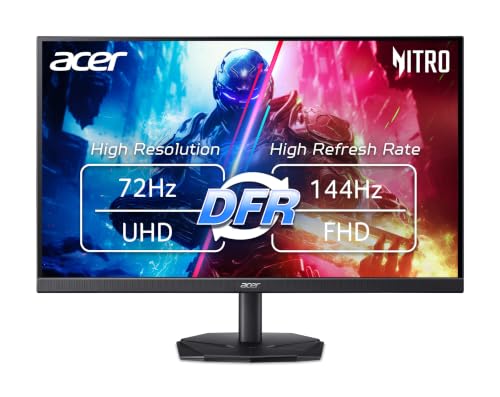
Acer Nitro 27-Inch 4K IPS Gaming Monitor
Best for: 4K gaming and color-critical creative tasks
- Screen Size
- 27"
- Resolution
- 3840 x 2160
- Refresh Rate
- Up to 72Hz / 144Hz (DFR)
- Panel Type
- IPS
- Aspect Ratio
- 16:9
- Response Time
- 1ms (G to G) - Up to 0.5ms (G to G)
View on Amazon: Acer Nitro 27-Inch 4K IPS Gaming Monitor Affiliate link
The Acer Nitro KG272K is a 27-inch 4K UHD IPS monitor with a 16:9 aspect ratio. It offers a variable refresh rate up to 144Hz via Dynamic Frame Rate technology and supports AMD FreeSync. The panel covers 95% of the DCI-P3 color gamut and includes HDR10. With a 0.5ms response time and a zero-frame design, it suits gamers and creators who need high resolution and color accuracy.
Pros
- 4K UHD 3840 x 2160 resolution
- IPS panel with 95% DCI-P3 color coverage
- Up to 144Hz refresh rate via DFR
- 0.5ms Gray to Gray response time
- Zero-frame bezel design
Cons
- Limited to HDMI 2.0 connectivity
- Refresh rate is not a fixed 144Hz
- No DisplayPort 1.4 HDR support mentioned
Good fit if
- You want 4K resolution on a 27-inch screen
- You need accurate colors for creative work
- You play games with AMD FreeSync
Skip if
- You require a fixed 144Hz refresh rate
- You need DisplayPort 1.4 for high bandwidth
- You prefer a smaller 24-inch display
Verdict: Acer Nitro KG272K 27" 4K IPS is a solid choice for users who prioritize sharp 4K visuals and wide color gamuts. It fits gamers who can adapt to variable refresh rates and creators needing reliable color reproduction.
Specifications side by side
| Spec | Acer Nitro 27-Inch 4K IPS Gaming Monitor |
|---|---|
| Screen Size | 27" |
| Resolution | 3840 x 2160 |
| Refresh Rate | Up to 72Hz / 144Hz (DFR) |
| Panel Type | IPS |
| Aspect Ratio | 16:9 |
| Response Time | 1ms (G to G) - Up to 0.5ms (G to G) |
| Sync Technology | AMD FreeSync |
| Connectivity | 1 x DP 1.4, 2 x HDMI 2.0, Audio Out |
| Dimensions | 8.28 × 24.2 × 18.1 inches |
| Weight | 10.4 pounds |
| Color | Black |
| Model | KG272K L1bmiipx |
Frequently asked questions
Is the Acer Nitro KG272K good for creative work?
Yes, this monitor suits color-critical tasks. It uses an IPS panel, which provides wide viewing angles and consistent color reproduction across the screen. The 4K UHD resolution offers sharp details for photo editing or video work. You get reliable color accuracy for professional projects alongside gaming performance.
What is the refresh rate of this 27-inch monitor?
The Acer Nitro KG272K features variable refresh rates. It operates at 72Hz in standard mode and can reach 144Hz using Dynamic Frame Rate (DFR) technology. You must select the correct mode in your settings to access the higher speed. This flexibility helps balance smooth motion with power efficiency.
Does this monitor have a bezel?
It features a zero-frame bezel design. This near bezel-less look minimizes visual distraction when you view content. It also allows you to place multiple units side by side for a multi-monitor setup. The slim frame helps keep your focus on the screen content rather than the hardware.
How heavy is the Acer Nitro 27-inch display?
The monitor weighs 10.4 pounds. It measures 24.2 inches wide, 18.1 inches high, and 8.28 inches deep. These dimensions fit standard desk setups. The black chassis provides a neutral look that blends with most gaming or office environments. You can mount it on compatible VESA stands.
What ports are available on the back of the monitor?
You get one DisplayPort 1.4 and two HDMI 2.0 inputs. These allow you to connect modern PCs or consoles. There is also an audio out jack for external speakers or headphones. This setup lets you manage your video sources and audio output from a single device connection.
Is the screen size suitable for a small desk?
The 27-inch panel offers a balance of detail and space. At 24.2 inches wide, it fits most standard desks without overwhelming the area. The 4K resolution ensures text and images remain sharp at this size. You get plenty of screen real estate for multitasking while keeping your workspace tidy.