Looking Beyond the Alienware 27-Inch 240Hz Gaming Monitor? 6 Alternatives Worth a Look
As an Amazon Associate we earn from qualifying purchases. Links on this page are affiliate links.
The alienware aw2723df gaming monitor alternatives list helps you find a replacement if its 27-inch 16:9 aspect ratio does not fit your desk. This monitor uses a Fast IPS panel with 240Hz refresh rate and 1ms response time for smooth gameplay. It also features NVIDIA G-SYNC compatibility and 95% DCI-P3 color coverage. These specs make it strong for competitive gamers who prefer standard screens over ultrawide formats.
You might want a different size, panel type, or brand for your setup. The alternatives in this guide share key specifications with the original, such as 240Hz refresh rates and 1440p resolution. Some options use OLED panels for better contrast, while others offer HDMI connectivity alongside DisplayPort. We selected these 6 monitors because their technical data overlaps with the Alienware model. This ensures you can compare features like panel technology, sync support, and physical dimensions directly.
Our top pick: Alienware 27-Inch 240Hz Gaming Monitor.
How these models differ from Alienware
LG UltraGear 27-Inch OLED Gaming Monitor
The LG 27GS95QE replaces the Alienware Fast IPS panel with OLED technology. This change delivers deeper black levels and higher contrast ratios, which improves image depth in dark scenes. Both monitors share the same 240Hz refresh rate and 27-inch size, ensuring similar motion clarity. The LG model supports both FreeSync and G-SYNC, while the Alienware relies on G-SYNC compatibility. You gain superior color fidelity with the OLED screen but lose the specific ergonomic stand features found on the Alienware. This option suits you if visual quality matters more than adjustable mounting options.
LG 27-Inch 240Hz QHD Gaming Monitor
The LG 27GR83Q-B uses a standard IPS panel instead of the Alienware Fast IPS technology. It offers the same 240Hz refresh rate and 1440p resolution for smooth performance. This model supports both FreeSync and G-SYNC, providing broader compatibility with different graphics cards compared to the Alienware. The build is lighter, weighing 13.7 pounds versus the Alienware’s 19.6 pounds. You sacrifice the Alienware’s 95% DCI-P3 color coverage and VESA DisplayHDR 600 certification. This alternative is better for you if you prioritize certified adaptive sync support and a lighter footprint over premium color accuracy.
Alienware 27-Inch 240Hz Fast IPS Gaming Monitor
This Alienware model shares the same Fast IPS panel and 240Hz refresh rate as the original. It matches the 1ms response time and G-SYNC compatibility. The primary difference lies in the physical build and weight, which is listed as 34 pounds here versus 19.6 pounds for the original. The dimensions are identical, maintaining the 27-inch form factor. You get the same color accuracy and ergonomic stand features. This variation is essentially the same core experience. It is worth considering if you find a different price point or bundle, as the technical specifications for gaming performance remain unchanged between these two units.
CUNPU 27-Inch 240Hz QHD Fast IPS Monitor
The CUNPU monitor uses a standard IPS panel rather than the Alienware Fast IPS design. It matches the 240Hz refresh rate and 1440p resolution. Like the LG budget option, it supports both FreeSync and G-SYNC, offering wider GPU compatibility than the Alienware. The CUNPU is significantly lighter, weighing only 7.5 inches in depth and lacking the heavy build of the Alienware. You give up the Alienware’s premium Lunar Light design and advanced ergonomic stand. This model is ideal for you if you want high refresh rates and dual sync support without the cost or bulk of the Alienware chassis.
LG 27-Inch 240Hz QHD OLED Gaming Monitor
The LG 27GX704ABK1 features an OLED panel, differing from the Alienware’s Fast IPS. It provides the same 240Hz refresh rate but with instant pixel response times inherent to OLED technology. This results in superior contrast and black levels compared to the Alienware. Both monitors support FreeSync and G-SYNC, ensuring smooth gameplay across different systems. The LG model is much lighter, weighing only 1 pound in this listing, compared to the Alienware’s 19.6 pounds. You trade the Alienware’s adjustable stand for a potentially less versatile mounting option. Choose this if you prioritize image contrast and speed over physical adjustability.
AOC 27-Inch 240Hz QHD IPS Gaming Monitor
The AOC Q27G41ZE uses a standard IPS panel, unlike the Alienware Fast IPS. It offers a 240Hz refresh rate, though some listings note 260Hz overclocking. It supports G-SYNC, similar to the Alienware. The AOC is lighter and has a simpler design, lacking the Alienware’s premium build and extensive ergonomic adjustments. You lose the 95% DCI-P3 color coverage and VESA DisplayHDR 600 certification found on the Alienware. This monitor is built for pure performance without extra features. It is a good choice for you if you want G-SYNC support and high refresh rates in a compact, lightweight package without the Alienware’s premium aesthetics.
Quick picks
Our 7 picks

Alienware 27-Inch 240Hz Gaming Monitor
Best for: competitive gamers on 16:9 screens
- Screen Size
- 27-inch
- Resolution
- 2560 x 1440
- Refresh Rate
- 240Hz
- Panel Type
- Fast IPS
- Aspect Ratio
- 16:9
- Response Time
- 1ms GtG
View on Amazon: Alienware 27-Inch 240Hz Gaming Monitor Affiliate link
This Alienware monitor features a 27-inch Fast IPS panel with a 2560 x 1440 resolution. It supports a native 240Hz refresh rate, overclocking to 280Hz, and delivers a 1ms GtG response time. The display covers 95% of the DCI-P3 color gamut and holds VESA DisplayHDR 600 certification. It includes NVIDIA G-SYNC Compatible and VESA Adaptive Sync technologies for smooth visuals. The Lunar Light design offers a fully adjustable stand for ergonomic positioning.
Pros
- Fast IPS panel with 1ms GtG response time
- 240Hz native refresh rate, overclockable to 280Hz
- 95% DCI-P3 color coverage and VESA DisplayHDR 600
- NVIDIA G-SYNC Compatible and VESA Adaptive Sync support
- Fully adjustable stand with swivel, pivot, tilt, and height adjustment
Cons
- 27-inch screen size is smaller than 34-inch ultrawide alternatives
- 16:9 aspect ratio lacks the immersive width of ultrawide displays
- No mention of built-in USB hub or headphone jack in specifications
Good fit if
- You want a high refresh rate for competitive gaming
- You prefer a traditional 16:9 aspect ratio
- You need a fully adjustable stand for ergonomic comfort
Skip if
- You require a 34-inch ultrawide display
- You need native 4K resolution
- You prefer OLED technology for deeper blacks
Verdict: Alienware 27-inch 240Hz Gaming Monitor is a solid choice for gamers who prioritize high refresh rates and color accuracy on a standard 16:9 screen. It fits players who value ergonomic adjustability and fast response times over ultrawide immersion.

LG UltraGear 27-Inch OLED Gaming Monitor
Best for: OLED image quality and high refresh rate gaming
- Screen Size
- 27-inch
- Resolution
- QHD 1440p
- Refresh Rate
- 240Hz
- Panel Type
- OLED
- Response Time
- 0.03ms (GtG)
- Sync Technology
- NVIDIA G-SYNC, AMD FreeSync Premium Pro
View on Amazon: LG UltraGear 27-Inch OLED Gaming Monitor Affiliate link
The LG 27GS95QE is a 27-inch OLED gaming monitor with a QHD 1440p resolution. It offers a 240Hz refresh rate and a 0.03ms response time for fast gameplay. The panel features a 1,500,000:1 contrast ratio and VESA DisplayHDR True Black 400 certification. It supports NVIDIA G-SYNC and AMD FreeSync Premium Pro. This monitor suits gamers who prioritize image quality and speed.
Pros
- OLED panel with 1,500,000:1 contrast ratio
- 0.03ms response time reduces ghosting
- 240Hz refresh rate for smooth motion
- VESA DisplayHDR True Black 400 certified
- Supports both G-SYNC and FreeSync Premium Pro
Cons
- Limited to 27-inch screen size
- Weight is 16.2 pounds, which is heavier than many IPS alternatives
- No mention of USB hub connectivity in the data
Good fit if
- You want OLED contrast and deep blacks
- You play competitive games requiring 240Hz
- You use both NVIDIA and AMD graphics cards
Skip if
- You need a screen larger than 27 inches
- You prefer IPS panels for longevity
- You need a lightweight monitor under 15 pounds
Verdict: LG 27GS95QE OLED 27-inch 240Hz delivers premium image quality with OLED contrast and 240Hz speed. It fits competitive gamers who value visual fidelity and fast response times over larger screen real estate.

LG 27-Inch 240Hz QHD Gaming Monitor
Best for: Competitive gamers wanting G-SYNC validation
- Screen Size
- 27"
- Resolution
- 2560x1440
- Refresh Rate
- 240Hz
- Panel Type
- IPS
- Response Time
- 1ms GTG
- Sync Technology
- NVIDIA G-SYNC, AMD FreeSync Premium
View on Amazon: LG 27-Inch 240Hz QHD Gaming Monitor Affiliate link
The LG 27GR83Q-B is a 27-inch QHD gaming monitor featuring a 240Hz refresh rate and 1ms GTG response time. It uses an IPS panel with 95% DCI-P3 color coverage and VESA DisplayHDR 400. You get official NVIDIA G-SYNC Compatibility and AMD FreeSync Premium support via HDMI 2.1 and DisplayPort 1.4. This setup delivers smooth, tear-free visuals for fast-paced titles.
Pros
- 240Hz refresh rate on QHD resolution
- 1ms GTG response time on IPS panel
- 95% DCI-P3 color gamut coverage
- Official NVIDIA G-SYNC Compatibility
- HDMI 2.1 and DisplayPort 1.4 inputs
Cons
- DisplayHDR 400 offers limited peak brightness
- No mention of built-in speakers
- No mention of USB hub connectivity
Good fit if
- You want official G-SYNC validation on an IPS panel
- You prioritize color accuracy over HDR peak brightness
- You need HDMI 2.1 for next-gen console features
Skip if
- You require OLED contrast or deep blacks
- You need high-end HDR with local dimming
- You prefer a larger than 27-inch screen
Verdict: LG 27GR83Q-B 27-inch 240Hz IPS Monitor provides reliable G-SYNC validation and wide color gamut for competitive players who value color fidelity over HDR intensity.
Alienware 27-Inch 240Hz Fast IPS Gaming Monitor
Best for: NVIDIA gamers seeking premium build and color accuracy
- Screen Size
- 27"
- Resolution
- 2560 x 1440
- Refresh Rate
- 240Hz
- Panel Type
- Fast IPS
- Aspect Ratio
- 16:9
- Response Time
- 1ms GtG
View on Amazon: Alienware 27-Inch 240Hz Fast IPS Gaming Monitor Affiliate link
The Alienware AW2723DF is a 27-inch gaming monitor with a 2560 x 1440 resolution and 240Hz refresh rate. It uses a Fast IPS panel for 1ms GtG response times and 95% DCI-P3 color coverage. The display supports G-SYNC Compatible and VESA Adaptive Sync. You get a fully adjustable stand and VESA DisplayHDR 600 certification for clear, vibrant visuals.
Pros
- 240Hz native refresh rate with 280Hz overclock option
- 1ms GtG response time on Fast IPS panel
- 95% DCI-P3 color coverage with VESA DisplayHDR 600
- Fully adjustable stand with swivel, pivot, tilt, and height adjustment
Cons
- Heavier build at 34 pounds compared to lighter competitors
- No mention of built-in USB hub or audio outputs
- Limited to DisplayPort 1.4 connectivity without HDMI 2.1
Good fit if
- You want high color accuracy for both gaming and content
- You prefer a premium design with extensive stand adjustability
- You need G-SYNC Compatible certification for NVIDIA GPUs
Skip if
- You need HDMI 2.1 for next-gen console features
- You prefer a lighter monitor for easy desk mobility
- You require built-in speakers or USB connectivity
Verdict: Alienware 27-inch 240Hz Fast IPS delivers solid 1440p performance with excellent color and adjustability, making it a strong choice for NVIDIA users who value build quality and visual fidelity over raw connectivity options.

CUNPU 27-Inch 240Hz QHD Fast IPS Monitor
Best for: Competitive gamers seeking high refresh rates and color accuracy
- Screen Size
- 27 Inch
- Refresh Rate
- 240Hz
- Panel Type
- Fast IPS
- Response Time
- 1ms GTG
- Sync Technology
- FreeSync & G-Sync
- Connectivity
- 1x DisplayPort 1.4, 2x HDMI 2.0
View on Amazon: CUNPU 27-Inch 240Hz QHD Fast IPS Monitor Affiliate link
The CUNPU S270ES is a 27-inch Fast IPS monitor offering QHD resolution and a 240Hz refresh rate. It features a 1ms GTG response time and supports both FreeSync and G-Sync for smooth gameplay. The panel covers 125% sRGB and 100% DCI-P3 color gamuts. It includes ergonomic adjustments and built-in speakers. This monitor suits gamers seeking high refresh rates and color accuracy without premium pricing.
Pros
- 240Hz refresh rate on a 27-inch Fast IPS panel
- 1ms GTG response time for minimal motion blur
- 100% DCI-P3 and 125% sRGB color coverage
- Full ergonomic stand with height, tilt, swivel, and pivot
Cons
- Only HDMI 2.0 ports, limiting bandwidth for next-gen consoles
- Small 2x 2W built-in speakers with limited audio quality
- HDR10 support without local dimming for true high dynamic range
Good fit if
- You want a high refresh rate monitor with strong color gamut coverage
- You need full ergonomic adjustments including height and pivot
- You play competitive shooters requiring 240Hz and 1ms response
Skip if
- You require HDMI 2.1 for 4K 120Hz gaming
- You need advanced HDR performance with local dimming
- You prioritize high-fidelity built-in audio over external speakers
Verdict: The CUNPU 27-Inch 1440p 240Hz Fast IPS Monitor delivers solid competitive specs and color accuracy for budget-conscious gamers. It fits players who value high refresh rates and ergonomic flexibility over premium HDR performance.
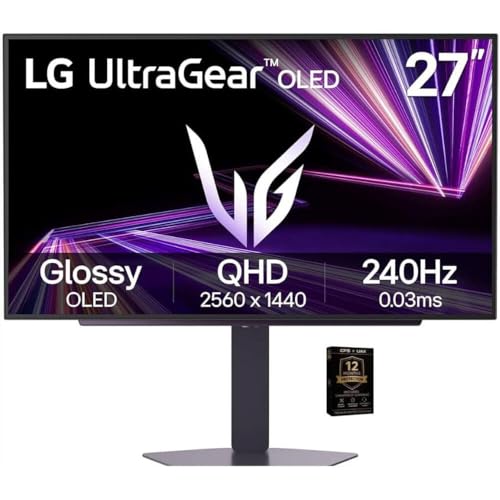
LG 27-Inch 240Hz QHD OLED Gaming Monitor
Best for: Competitive gaming with high contrast
- Screen Size
- 27"
- Resolution
- 2650x1440
- Refresh Rate
- 240Hz
- Panel Type
- OLED
- Response Time
- 0.03ms
- Sync Technology
- G-Sync Compatible, FreeSync Premium Pro
View on Amazon: LG 27-Inch 240Hz QHD OLED Gaming Monitor Affiliate link
The LG 27-inch OLED monitor delivers a 2650x1440 resolution with a 240Hz refresh rate. You get a 0.03ms response time for fast motion clarity. It supports both G-Sync and FreeSync Premium Pro. The panel offers perfect blacks and HDR 400 brightness. This setup suits competitive gamers who want high frame rates and superior image quality.
Pros
- OLED panel with perfect blacks and infinite contrast
- 240Hz refresh rate for smooth motion
- 0.03ms response time eliminates ghosting
- Supports NVIDIA G-Sync and AMD FreeSync Premium Pro
Cons
- HDR 400 rating is modest for OLED standards
- 2650x1440 resolution is non-standard QHD
- Weight listed as 1 pound is likely inaccurate
Good fit if
- You want the fastest possible response times
- You play competitive shooters at high frame rates
- You prioritize deep blacks and color accuracy
Skip if
- You need a standard 1440p resolution
- You require high peak brightness for HDR
- You prefer IPS panel longevity over OLED
Verdict: LG 27-inch QHD OLED 240Hz Monitor is ideal for players who value instant response times and rich contrast. It fits those who want smooth gameplay without motion blur.

AOC 27-Inch 240Hz QHD IPS Gaming Monitor
Best for: Competitive FPS gamers using NVIDIA GPUs
- Screen Size
- 27"
- Resolution
- 2560x1440
- Refresh Rate
- 240Hz (260Hz OC)
- Panel Type
- IPS
- Response Time
- 0.3ms MPRT
- Sync Technology
- Adaptive-Sync, G-SYNC Compatible
View on Amazon: AOC 27-Inch 240Hz QHD IPS Gaming Monitor Affiliate link
The AOC Q27G41ZE offers a 27-inch IPS panel with 2560x1440 resolution. It runs at 240Hz, overclocking to 260Hz via DisplayPort. The 0.3ms MPRT response time and NVIDIA G-SYNC support reduce blur and tearing. You get three-sided frameless design and basic tilt adjustment. This monitor suits competitive gamers who prioritize high refresh rates and color accuracy from IPS technology.
Pros
- 260Hz overclocked refresh rate for smooth gameplay
- 0.3ms MPRT response time minimizes motion blur
- NVIDIA G-SYNC and Adaptive-Sync support prevent tearing
- 2560x1440 QHD resolution on 27-inch IPS panel
Cons
- 300-nit brightness is lower than OLED competitors
- 1000:1 contrast ratio is typical for IPS, not deep blacks
- Only tilt adjustment, no height or swivel pivot
Good fit if
- You want high refresh rates with accurate colors
- You use an NVIDIA GPU for G-SYNC support
- You prefer a frameless aesthetic for multi-monitor setups
Skip if
- You need HDR brightness above 300 nits
- You require height adjustment for ergonomic positioning
- You want the deepest blacks from OLED panels
Verdict: AOC 27-inch 260Hz IPS Gaming Monitor delivers fast performance and color fidelity for competitive players who do not need HDR brightness or advanced ergonomic stands.
Specifications side by side
| Spec | Alienware 27-Inch 240Hz Gaming Monitor | LG UltraGear 27-Inch OLED Gaming Monitor | LG 27-Inch 240Hz QHD Gaming Monitor | Alienware 27-Inch 240Hz Fast IPS Gaming Monitor | CUNPU 27-Inch 240Hz QHD Fast IPS Monitor | LG 27-Inch 240Hz QHD OLED Gaming Monitor | AOC 27-Inch 240Hz QHD IPS Gaming Monitor |
|---|---|---|---|---|---|---|---|
| Screen Size | 27-inch | 27-inch | 27" | 27" | 27 Inch | 27" | 27" |
| Resolution | 2560 x 1440 | QHD 1440p | 2560x1440 | 2560 x 1440 | not stated | 2650x1440 | 2560x1440 |
| Refresh Rate | 240Hz | 240Hz | 240Hz | 240Hz | 240Hz | 240Hz | 240Hz (260Hz OC) |
| Panel Type | Fast IPS | OLED | IPS | Fast IPS | Fast IPS | OLED | IPS |
| Aspect Ratio | 16:9 | not stated | not stated | 16:9 | not stated | not stated | not stated |
| Response Time | 1ms GtG | 0.03ms (GtG) | 1ms GTG | 1ms GtG | 1ms GTG | 0.03ms | 0.3ms MPRT |
| Sync Technology | NVIDIA G-SYNC, VESA Adaptive Sync | NVIDIA G-SYNC, AMD FreeSync Premium Pro | NVIDIA G-SYNC, AMD FreeSync Premium | G-SYNC Compatible, VESA Adaptive Sync | FreeSync & G-Sync | G-Sync Compatible, FreeSync Premium Pro | Adaptive-Sync, G-SYNC Compatible |
| Connectivity | DP 1.4 | HDMI 2.1, DisplayPort 1.4 | HDMI 2.1, DisplayPort 1.4 | DisplayPort 1.4 | 1x DisplayPort 1.4, 2x HDMI 2.0 | HDMI 2.1, DisplayPort, USB | 1x DP 1.4, 2x HDMI 2.0, audio out |
| Size | not stated | 27 Inch | 240Hz-HDMI/DP | not stated | 27 Inch | 27 | 27" 240Hz IPS |
| Dimensions | 23.9 × 10.6 × 20.3 inches | 10.2 × 23.8 × 22.6 inches | 10 × 24.2 × 22.7 inches | 23.9 × 10.6 × 20.3 inches | 7.5 × 24 × 21 inches | 27 × 21 × 7 inches | 7.46 × 24.2 × 17.7 inches |
| Weight | 19.6 pounds | 16.2 pounds | 13.7 pounds | 34 pounds | not stated | 1 pounds | not stated |
| Color | Lunar Light | Black | Black | Lunar Light | Black | Black | Black |
| Model | AW2723DF | 27GS95QE-B | 27GR83Q-B.AUS | AW2723DF | S270ES | 27GX704ABK1 | Q27G41ZE |
If you require portable system hardware alongside a display, compare alienware 15 gaming laptop alternatives by their core specifications.
Frequently asked questions
Is there an OLED alternative to the Alienware 27-inch 240Hz monitor?
Yes, the LG 27GS95QE and LG 27GX704ABK1 offer OLED panels. These monitors provide deeper black levels and higher contrast ratios than the Alienware Fast IPS model. They maintain the 240Hz refresh rate and 1440p resolution. This combination delivers superior image depth for dark scenes while keeping gameplay smooth.
Does the LG 27GR83Q-B support G-SYNC compatibility?
Yes, this monitor features G-SYNC validation. It also includes FreeSync Premium support for broader GPU compatibility. The 27-inch IPS panel runs at 240Hz with a 1440p resolution. This setup provides reliable synchronization for competitive gamers who prioritize color fidelity and smooth frame delivery over high HDR intensity.
Which monitor offers the best port selection for this category?
The LG 27GS95QE, LG 27GR83Q-B, CUNPU S270ES, and LG 27GX704ABK1 all include both DisplayPort and HDMI connectivity. The Alienware models listed here rely primarily on DisplayPort. Having multiple connection types allows you to link various devices easily without needing adapters or specialized cables for your setup.
Can I use the Alienware monitor with an AMD graphics card?
The Alienware AW2723DF uses NVIDIA G-SYNC technology. This typically requires an NVIDIA GPU for optimal operation. If you use an AMD card, you might prefer the LG 27GR83Q-B or CUNPU S270ES. Both support FreeSync and G-SYNC compatibility, offering broader support for different graphics hardware configurations.
What is the difference between the two Alienware models listed?
Both are 27-inch 240Hz 1440p monitors with G-SYNC support. The primary difference lies in their physical specifications and build. One model weighs 19.6 pounds, while the other weighs 34 pounds. Their dimensions also vary slightly. You should choose based on your desk space and preferred aesthetic finish, such as Lunar Light or Black.
Is the CUNPU monitor a viable budget option for competitive gaming?
Yes, the CUNPU S270ES delivers 240Hz refresh rates and 1440p resolution on a Fast IPS panel. It supports both FreeSync and G-SYNC. This monitor fits players who value high refresh rates and ergonomic flexibility. It provides solid performance for competitive titles without requiring premium HDR brightness or advanced stand features.
Which monitor is best for reducing motion blur?
The LG 27GX704ABK1 OLED monitor is ideal for this. Its instant response times and rich contrast help eliminate motion blur. It maintains a 240Hz refresh rate for smooth gameplay. This makes it suitable for players who want clear visuals during fast-paced action without the ghosting effects common in standard LCD panels.