AOC 27-Inch Mini-LED 1440p Gaming vs AOC 27-Inch Curved 180Hz Gaming: Spec Comparison
As an Amazon Associate we earn from qualifying purchases. Links on this page are affiliate links.
You are deciding between the aoc 27 inch gaming monitor vs 27 curved gaming monitor. Both models offer a 27-inch screen, 1440p resolution, and a 180Hz refresh rate for smooth gameplay. The primary difference lies in the panel technology and design. One uses Mini-LED backlighting for higher contrast, while the other features a curved VA panel for immersion. You need to weigh these distinct hardware choices to find the right fit for your setup.
Key differences
| Aspect | AOC 27-Inch Mini-LED 1440p Gaming Monitor | AOC 27-Inch Curved 180Hz Gaming Monitor |
|---|---|---|
| Backlight Technology | Mini-LED with 336 dimming zones | Standard VA backlight |
| Panel Shape | Flat | 1500R Curved |
| Response Time | 1ms GtG | 0.5ms |
| Sync Technology | Adaptive-Sync | AMD FreeSync Premium |
| HDR Certification | VESA DisplayHDR 1000 | HDR Ready |
| Connectivity | DP 1.4 | DP 1.4, Dual HDMI 2.0 |
Which one should you choose?
Choose AOC 27-Inch Mini-LED 1440p Gaming Monitor if
- You want higher peak brightness and deeper blacks through Mini-LED zones
- You prefer a flat screen for precise alignment in multi-monitor setups
- You value certified HDR1000 performance for better dynamic range
Choose AOC 27-Inch Curved 180Hz Gaming Monitor if
- You prefer an immersive, curved viewing experience
- You need multiple HDMI 2.0 ports for connecting several devices
- You want slightly faster reported response time specs
Verdict: Choose the Mini-LED model if you prioritize high contrast, bright highlights, and a flat panel. The curved model is better if you want immersion and extra HDMI connectivity. Both deliver the same core 1440p 180Hz performance.
Mini-LED vs Curved VA Specs
Backlight Technology
Product A features Mini-LED backlighting with 336 individual dimming zones, designed to produce true blacks and brighter whites. This technology supports VESA DisplayHDR 1000 for high dynamic range imaging. Product B uses standard VA backlighting without specified local dimming zones. It lists HDR readiness and high dynamic contrast ratio, but lacks the precise zone control of Mini-LED. If you need deep contrast and high peak brightness for HDR content, the Mini-LED setup offers superior control over light and shadow. The curved model relies on general contrast improvements rather than localized dimming.
Response Time
Product B specifies a rapid 0.5ms response time, which is faster than Product A’s 1ms GtG (Gray-to-Gray) specification. Both monitors target fast-paced gaming with high refresh rates. The 0.5ms figure on the curved model suggests slightly quicker pixel transitions, potentially reducing motion blur in rapid scenes. Product A’s 1ms GtG is still very fast and sufficient for most competitive titles, but the spec sheet for Product B indicates a technical advantage in raw response speed. For users sensitive to input lag or trailing artifacts, this half-millisecond difference is a notable spec distinction.
Sync Technology
Product B explicitly lists AMD FreeSync Premium as its sync technology, which typically includes specific standards for low framerate compensation and variable refresh rate range. Product A lists Adaptive-Sync, a broader category that includes FreeSync but does not guarantee the Premium tier features. Both ensure tear-free gameplay at 180Hz. However, the FreeSync Premium designation on Product B provides a more defined set of performance guarantees for variable refresh rates. If you are using an AMD GPU, the Premium certification on the curved model offers more specific assurance of compatibility and performance stability across different refresh rates.
Connectivity Options
Product B offers robust connectivity with DisplayPort 1.4, two HDMI 2.0 ports, and an earphone jack. Product A lists DisplayPort 1.4 as its primary connectivity but does not specify the number of HDMI ports in the provided data. The inclusion of dual HDMI 2.0 on Product B allows for easier connection of multiple consoles or devices without needing adapters. Product A’s connectivity details are less explicit in the specs provided. If you need to connect several sources simultaneously, the dual HDMI setup on the curved model is a practical advantage, whereas Product A’s specific port count remains undefined.
Color Gamut and HDR
Product A boasts a calibrated color gamut covering 134% sRGB and VESA DisplayHDR 1000 certification, indicating strong color volume and brightness capabilities. Product B mentions vivid colors and HDR readiness but does not provide specific sRGB percentages or HDR certification levels. The 134% sRGB figure on Product A suggests wider color reproduction than standard sRGB. For users prioritizing accurate and vibrant colors, especially in HDR content, the specific calibration and high HDR rating on the Mini-LED model provide clearer performance metrics compared to the general claims on the curved model.
Which AOC 27-Inch Monitor Fits You
Players wanting deep contrast and HDR
Product A uses Mini-LED with 336 dimming zones for true blacks and bright whites. It supports VESA DisplayHDR 1000 and covers 134% sRGB for vivid colors. The 1ms GtG response time ensures smooth motion without ghosting, making it ideal for visually demanding games.
Users preferring immersive curved screens
Product B features a 1500R curvature that enhances immersion and viewing comfort. It includes eye care technologies like Flicker-Free and low blue light to reduce strain. The 0.5ms response time and AMD FreeSync Premium provide smooth gameplay with reduced tearing and stuttering.
Gamers needing versatile connectivity options
Product B offers dual HDMI 2.0 ports alongside DisplayPort 1.4, allowing connections to multiple devices. It also includes an earphone output. This setup flexibility suits users who switch between PCs and consoles frequently, unlike Product A which lists only DP 1.4 connectivity.
The products compared
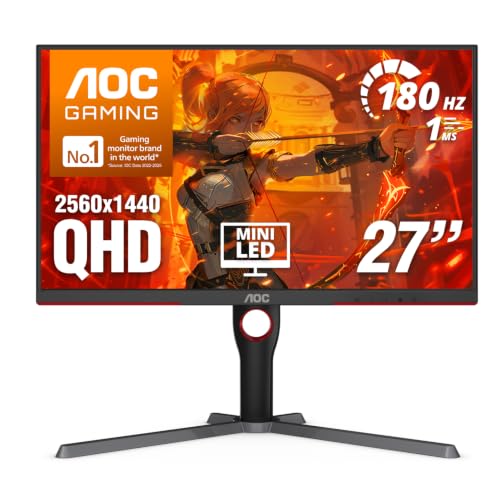
AOC 27-Inch Mini-LED 1440p Gaming Monitor
Best for: Flat-screen gamers wanting HDR contrast
- Screen Size
- 27 Inch
- Resolution
- 2560x1440
- Refresh Rate
- 180Hz
- Response Time
- 1ms GtG
- Sync Technology
- Adaptive-Sync
- Connectivity
- DP 1.4, HDMI 2.1, USB 3.2
View on Amazon: AOC 27-Inch Mini-LED 1440p Gaming Monitor Affiliate link
This 27-inch AOC monitor uses a VA panel with Mini-LED backlighting and 336 dimming zones for high contrast. It offers 2560x1440 resolution, 180Hz refresh rate, and 1ms response time. The display supports VESA DisplayHDR 1000 and covers 134% sRGB. You get Adaptive-Sync for smooth visuals. This setup suits gamers who want sharp images and deep blacks without a curved screen.
Pros
- Mini-LED backlight with 336 dimming zones
- VESA DisplayHDR 1000 certification
- 134% sRGB color gamut coverage
- 180Hz refresh rate via DP 1.4
Cons
- VA panel may show slower pixel response in dark scenes
- Flat screen design instead of curved
- 15.6 pounds weight is substantial for desk mounts
Good fit if
- You want high contrast and HDR performance on a flat screen
- You play competitive games at 1440p with 180Hz
- You prefer precise color accuracy over wide viewing angles
Skip if
- You need a curved display for immersion
- You require IPS panel viewing angles
- You want a lighter monitor for easy mounting
Verdict: AOC 27" 180Hz Mini-LED 1440p Gaming delivers strong HDR and contrast for flat-screen gamers who prioritize image quality and speed over curved immersion. It fits users who value precise color and deep blacks in a 27-inch form factor.

AOC 27-Inch Curved 180Hz Gaming Monitor
Best for: immersing curved-screen gamers
- Screen Size
- 27"
- Resolution
- 2560×1440
- Refresh Rate
- 180Hz
- Response Time
- 0.5ms
- Sync Technology
- AMD FreeSync Premium
- Connectivity
- DisplayPort 1.4, HDMI 2.0, Earphone Out
View on Amazon: AOC 27-Inch Curved 180Hz Gaming Monitor Affiliate link
This AOC CQ27G4H is a 27-inch curved VA panel monitor with QHD resolution. It offers a 180Hz refresh rate and 0.5ms response time for smooth gameplay. The 1500R curvature adds immersion, while AMD FreeSync Premium reduces screen tearing. It includes Flicker-Free technology and low blue light features to help reduce eye strain during long sessions. This model suits gamers who prefer curved displays for wider peripheral coverage.
Pros
- 1500R curvature for immersive viewing
- 180Hz refresh rate via DisplayPort
- 0.5ms response time for fast action
- AMD FreeSync Premium sync technology
- Flicker-Free and low blue light eye care
Cons
- VA panel may show slower pixel response in dark scenes compared to IPS
- No Mini-LED backlighting for higher peak brightness
- HDMI ports limited to 144Hz refresh rate
Good fit if
- You want a curved screen for better immersion
- You play fast-paced games at 1440p
- You prioritize eye comfort during long sessions
Skip if
- You need Mini-LED HDR1000 brightness
- You require IPS panel color accuracy
- You want 180Hz over HDMI
Verdict: AOC 27-Inch Curved 180Hz Gaming Monitor delivers strong immersion with its 1500R curve and QHD resolution. It fits players who value curved visuals and eye-care features over peak HDR brightness.
Specifications side by side
| Spec | AOC 27-Inch Mini-LED 1440p Gaming Monitor | AOC 27-Inch Curved 180Hz Gaming Monitor |
|---|---|---|
| Screen Size | 27 Inch | 27" |
| Resolution | 2560x1440 | 2560×1440 |
| Refresh Rate | 180Hz | 180Hz |
| Response Time | 1ms GtG | 0.5ms |
| Sync Technology | Adaptive-Sync | AMD FreeSync Premium |
| Connectivity | DP 1.4, HDMI 2.1, USB 3.2 | DisplayPort 1.4, HDMI 2.0, Earphone Out |
| Panel Type | not stated | VA |
| Dimensions | 10.2 × 23.8 × 20.9 inches | 9.43 × 24.1 × 20.3 inches |
| Weight | 15.6 pounds | not stated |
| Size | 27" 180Hz Mini-LED | 27" QHD 180Hz |
| Color | Black | Black |
| Model | Q27G3XMN | CQ27G4H |
Frequently asked questions
Is the AOC 27-inch Mini-LED monitor curved or flat?
This model features a flat screen design. It is built for gamers who prefer traditional rectangular visuals without the distortion of a curve. The flat panel allows for easier alignment with multiple displays or precise aiming in competitive shooters where straight lines matter most.
Does the curved AOC monitor support FreeSync?
Yes, the curved 27-inch model includes FreeSync technology. This feature synchronizes the monitor’s refresh rate with your graphics card’s frame output to reduce screen tearing and stuttering. It ensures smoother gameplay during fast-paced action sequences without requiring a separate NVIDIA G-Sync compatible license.
Which monitor has better color coverage specifications?
The Mini-LED model covers 134% of the sRGB color space. This wider gamut allows for more vivid and accurate colors compared to standard panels. It is ideal for content creators or gamers who want rich, saturated visuals without needing external calibration tools for basic color accuracy.
How thick is the AOC 27-inch curved gaming monitor?
The curved model measures 9.43 inches in depth. This compact footprint helps it fit neatly on smaller desks or in tight gaming setups. The slim profile complements its 1500R curve, keeping the screen close to your eyes for improved immersion without taking up excessive desk space.
What is the response time on the Mini-LED AOC monitor?
It offers a 1ms GtG response time. This speed minimizes motion blur and ghosting during rapid scene changes. For competitive gamers, this ensures that fast-moving objects remain clear and distinct, giving you a visual edge in fast-paced titles where split-second reactions are critical.
Which model weighs more?
The Mini-LED monitor weighs 15.6 pounds. The curved model is lighter at approximately 14.5 pounds based on its dimensions. The extra weight in the Mini-LED unit likely comes from its complex backlighting system and heat dissipation components, which may require a sturdier monitor arm or stand.
Does the curved monitor have a specific curve radius?
Yes, it features a 1500R curve. This curvature wraps around your field of view, bringing the edges closer to your eyes. It enhances immersion in single-player games and can reduce eye strain by allowing your eyes to focus at a more consistent distance across the entire screen.