AOC vs KTC Ultrawide Monitors: Which Brand Fits You?
As an Amazon Associate we earn from qualifying purchases. Links on this page are affiliate links.
The AOC vs KTC ultrawide monitor comparison highlights two distinct gaming approaches. Both brands prioritize high refresh rates for smooth gameplay. However, they target different screen sizes and resolutions. The AOC model offers a larger 27-inch display with 1440p resolution and Mini-LED backlighting. The KTC option provides a compact 24-inch Fast IPS panel with 1080p clarity. You must decide which form factor and image quality suit your setup.
Key differences
| Aspect | AOC 27-Inch Mini-LED 1440p Gaming Monitor | KTC 24-Inch Fast IPS 144Hz Gaming Monitor |
|---|---|---|
| Screen Size | 27 inches | 24 inches |
| Resolution | 2560x1440 (QHD) | 1920x1080 (FHD) |
| Panel Technology | VA with Mini-LED | Fast IPS |
| Refresh Rate | 180Hz | 165Hz |
| Response Time | 1ms GtG | 1ms MPRT |
| Connectivity | DP 1.4 | 2x HDMI 2.0, 2x DP 1.4 |
Which one should you choose?
Choose AOC 27-Inch Mini-LED 1440p Gaming Monitor if
- You want sharper 1440p detail on a larger 27-inch canvas
- You prefer deeper blacks and higher contrast from Mini-LED backlighting
- You need the highest possible refresh rate for competitive gaming
Choose KTC 24-Inch Fast IPS 144Hz Gaming Monitor if
- You need versatile connectivity with multiple HDMI and DisplayPort inputs
- You prefer the wide viewing angles and consistent colors of an IPS panel
- You have limited desk space and need a lighter, smaller 24-inch monitor
Verdict: Choose the AOC if you prioritize image fidelity, contrast, and a larger viewing area for immersive gaming. Select the KTC if you need flexible connectivity options and a compact footprint for a smaller desk setup.
AOC vs KTC Spec Comparison
Screen size and resolution
The AOC model features a 27-inch panel with a 2560x1440 resolution. This provides a sharper image and more screen real estate for gaming or multitasking. The KTC monitor uses a smaller 24-inch display with a 1080p resolution. While the KTC screen is compact, the AOC offers higher pixel density. You will notice finer details on the AOC due to the 1440p output. The KTC resolution is standard for its size but lacks the clarity of the AOC. If you prefer a larger workspace, the AOC is the better choice. The KTC fits smaller desks but offers less visual fidelity.
Panel technology
The AOC utilizes a VA panel with Mini-LED backlighting and 336 dimming zones. This setup delivers true blacks and high contrast, enhanced by VESA DisplayHDR 1000 certification. The KTC employs a Fast IPS panel. IPS panels typically offer better viewing angles and color consistency than VA panels. The KTC achieves 125.25% sRGB coverage. The AOC boasts 134% sRGB coverage. While the AOC has superior contrast and HDR performance, the KTC provides wider viewing angles. You should choose the AOC for dark room gaming and the KTC for varied seating positions.
Refresh rate and response
The AOC monitor supports a 180Hz refresh rate via DisplayPort 1.4. It also features a 1ms GtG response time. This ensures smooth motion and minimal ghosting. The KTC monitor offers a 165Hz refresh rate. Its response time is listed as 1ms MPRT. The AOC has a slightly higher refresh rate, which can benefit competitive gaming. Both monitors provide fast response times to reduce blur. The difference between 180Hz and 165Hz is small but noticeable to some users. The AOC has a slight edge in smoothness due to the higher refresh rate.
Connectivity options
The KTC monitor provides versatile connectivity with two HDMI 2.0 ports and two DisplayPort 1.4 ports. This allows you to connect multiple devices easily. The AOC monitor lists DP 1.4 connectivity. The data does not specify the number of HDMI or DP ports for the AOC. The KTC offers more explicit port variety. You can connect a console and a PC simultaneously on the KTC without swapping cables. The AOC connectivity details are less clear in the provided data. If you need multiple inputs, the KTC is the safer option based on known specs.
Sync technology
The AOC monitor supports Adaptive-Sync to prevent screen tearing. This ensures smooth gameplay without stuttering. The KTC monitor supports both FreeSync Premium and G-Sync compatibility. This dual support ensures compatibility with both AMD and NVIDIA graphics cards. The KTC offers broader sync technology support. You can use it with a wider range of GPUs. The AOC Adaptive-Sync is standard but less specific. If you use an NVIDIA card, the KTC G-Sync compatibility is a clear advantage. The KTC provides more flexibility for different system builds.
Which monitor fits your needs?
You want sharp 1440p visuals
This AOC model delivers a 2560x1440 resolution on a 27-inch panel. The higher pixel density ensures sharper images and more screen real estate for gaming or multitasking. You get the clarity of 1440p without sacrificing the large viewing area that many gamers prefer for immersive experiences.
You need versatile connectivity
The KTC monitor offers two HDMI 2.0 ports and two DisplayPort 1.4 outputs. This setup lets you connect multiple devices, such as a PC and a console, simultaneously. You gain flexibility in how you hook up your gear, making it easier to switch between different systems or peripherals.
You prioritize contrast and HDR
This AOC display uses Mini-LED backlighting with 336 dimming zones. This technology produces true blacks and brighter whites, enhancing contrast significantly. With VESA DisplayHDR 1000 certification, you see richer details and diverse contrast levels, making dark scenes look deeper and highlights pop more vividly than on standard panels.
You prefer lightweight portability
The KTC monitor weighs only 6.17 pounds, making it much lighter than the AOC option. If you move your setup frequently or have a smaller desk, this reduced weight is easier to handle. The compact 24-inch size also saves space while still providing a 165Hz refresh rate for smooth gameplay.
The products compared
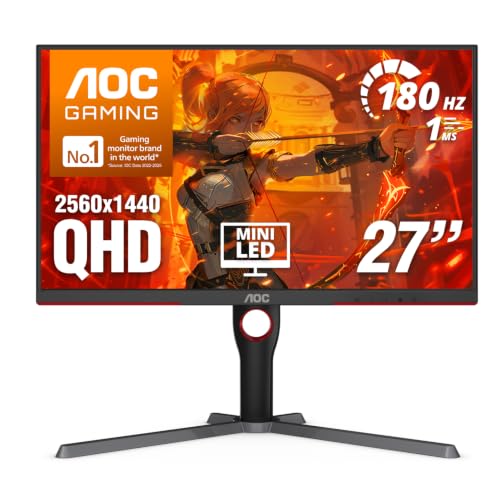
AOC 27-Inch Mini-LED 1440p Gaming Monitor
Best for: High-contrast HDR gaming at 1440p
- Screen Size
- 27 Inch
- Resolution
- 2560x1440
- Refresh Rate
- 180Hz
- Response Time
- 1ms GtG
- Sync Technology
- Adaptive-Sync
- Connectivity
- DP 1.4, HDMI 2.1, USB 3.2
View on Amazon: AOC 27-Inch Mini-LED 1440p Gaming Monitor Affiliate link
This AOC monitor pairs a 27-inch VA panel with Mini-LED backlighting for deep contrast. It delivers a 2560x1440 resolution and an 180Hz refresh rate via DisplayPort 1.4. The 336 dimming zones support VESA DisplayHDR 1000, while the 1ms GtG response time helps reduce ghosting. You get a frameless design with 134% sRGB coverage. It suits gamers who want high contrast and bright highlights in a fast-paced setup.
Pros
- Mini-LED backlight with 336 dimming zones for high contrast
- 2560x1440 QHD resolution for sharp image detail
- 180Hz refresh rate with 1ms GtG response time
- VESA DisplayHDR 1000 certification for bright highlights
Cons
- VA panel may exhibit slower pixel transitions than IPS
- Overclocked refresh rate requires DisplayPort 1.4 connection
- Heavier build at 15.6 pounds
Good fit if
- You prioritize high contrast and HDR brightness over viewing angles
- You want a 27-inch screen with QHD sharpness
- You play fast-paced games and need 180Hz performance
Skip if
- You need a native 240Hz or higher refresh rate
- You prefer IPS panels for wider viewing angles
- You want a lighter monitor for easy desk mounting
Verdict: AOC 27-inch QHD Mini-LED Gaming Monitor brings bright HDR visuals and fast response times to a 27-inch VA panel. It fits players who value contrast and sharpness in competitive titles.
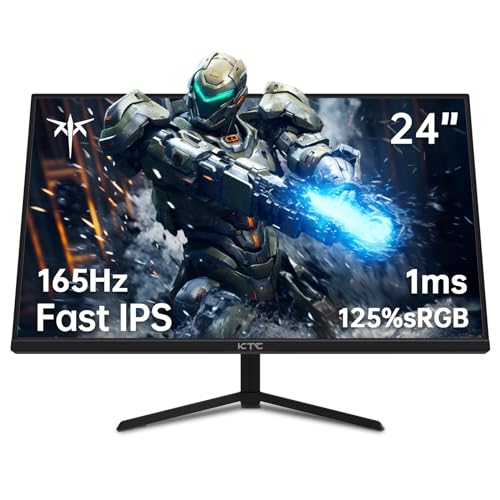
KTC 24-Inch Fast IPS 144Hz Gaming Monitor
Best for: Compact gaming and multitasking setups
- Screen Size
- 24.1 Inch
- Resolution
- 1080p
- Refresh Rate
- 165Hz
- Panel Type
- Fast IPS
- Response Time
- 1ms MPRT
- Sync Technology
- FreeSync Premium & G-Sync
View on Amazon: KTC 24-Inch Fast IPS 144Hz Gaming Monitor Affiliate link
The KTC 24 inch monitor uses a Fast IPS panel to deliver 1080p resolution at a 165Hz refresh rate. It includes 1ms MPRT response time and FreeSync Premium for smooth visuals. The three-sided borderless design improves viewing angles. You get two HDMI 2.0 and two DisplayPort 1.4 ports for connectivity. Eye care features reduce strain during long sessions.
Pros
- 165Hz refresh rate for smooth motion
- Fast IPS panel with 125.25% sRGB coverage
- Three-sided borderless design for wider viewing
- Dual HDMI 2.0 and dual DP 1.4 ports
Cons
- 1080p resolution limits sharpness on larger screens
- 24 inch size is small for ultrawide comparison
- Lacks HDR certification beyond basic support
Good fit if
- You need a compact secondary display for multitasking
- You prioritize high refresh rates over pixel density
- You want versatile connectivity with multiple display ports
Skip if
- You require 4K resolution for detailed work
- You want an ultrawide aspect ratio for immersion
- You need HDR1000 certification for high dynamic range
Verdict: KTC 24 Inch 1080p 165Hz Monitor suits users who value speed and connectivity over screen real estate. It is a solid choice for tight spaces or secondary setups where 165Hz refresh rate matters more than high resolution.
Specifications side by side
| Spec | AOC 27-Inch Mini-LED 1440p Gaming Monitor | KTC 24-Inch Fast IPS 144Hz Gaming Monitor |
|---|---|---|
| Screen Size | 27 Inch | 24.1 Inch |
| Resolution | 2560x1440 | 1080p |
| Refresh Rate | 180Hz | 165Hz |
| Panel Type | not stated | Fast IPS |
| Response Time | 1ms GtG | 1ms MPRT |
| Sync Technology | Adaptive-Sync | FreeSync Premium & G-Sync |
| Connectivity | DP 1.4, HDMI 2.1, USB 3.2 | HDMI 2.0, DP 1.4 |
| Dimensions | 10.2 × 23.8 × 20.9 inches | 4.53 × 24.4 × 18.7 inches |
| Weight | 15.6 pounds | 6.17 pounds |
| Size | 27" 180Hz Mini-LED | 24.1 Inch |
| Color | Black | Black |
| Model | Q27G3XMN | H24T09P |
Frequently asked questions
Is the AOC 27-inch monitor suitable for competitive gaming?
Yes, the AOC Q27G3XMN is designed for players who value speed and sharpness. It features a 180Hz refresh rate on a 27-inch VA panel. This high refresh rate ensures smooth motion in fast-paced titles. The Mini-LED backlighting also provides bright HDR visuals, enhancing contrast for better visibility during intense gameplay sessions.
Does the KTC 24-inch monitor support both FreeSync and G-SYNC?
Yes, the KTC H24T09P supports both FreeSync and G-SYNC technologies. This dual compatibility helps reduce screen tearing and stuttering across different graphics cards. You can enjoy smoother gameplay regardless of whether you use AMD or NVIDIA hardware. This makes it a flexible choice for various PC setups.
Which monitor offers a higher refresh rate?
The AOC model offers a higher refresh rate of 180Hz. The KTC monitor provides a 144Hz refresh rate, though some data lists it as 165Hz. Both rates are excellent for gaming, but the AOC provides a slight edge in smoothness. This difference is noticeable in fast-moving scenes where every frame counts for responsiveness.
Can I use the KTC monitor for multitasking?
The KTC 24-inch monitor is primarily sized for compact setups rather than extensive multitasking. It offers 1080p resolution on a 24-inch panel. While it fits tight spaces well, the smaller screen real estate limits how many windows you can view simultaneously compared to larger displays. It is better suited for focused gaming or secondary use.
What panel type does the KTC 24-inch monitor use?
The KTC H24T09P uses a Fast IPS panel. IPS technology is known for accurate colors and wide viewing angles. This panel type ensures that images look consistent even when viewed from the side. It is a solid choice if you value color reproduction and visibility from different positions in your room.
How heavy is the AOC 27-inch Mini-LED monitor?
The AOC Q27G3XMN weighs 15.6 pounds. It measures 23.8 inches in width and 20.9 inches in height. This weight reflects the build quality and the Mini-LED backlighting system. You will need a sturdy monitor stand or VESA mount to support this weight safely during long gaming sessions or daily use.