AOC vs SANSUI: Ultrawide Monitors Compared by Specs
As an Amazon Associate we earn from qualifying purchases. Links on this page are affiliate links.
This AOC vs SANSUI ultrawide monitor comparison highlights two distinct gaming displays. Both models offer a high 180Hz refresh rate and Adaptive Sync for smooth visuals. The main difference lies in their physical dimensions and resolution. You are comparing a larger 27-inch panel with higher pixel density against a more compact 24-inch Full HD option. Each serves different space and clarity needs for your setup.
Key differences
| Aspect | AOC 27-Inch Mini-LED 1440p Gaming Monitor | SANSUI 24-Inch 180Hz Gaming Monitor |
|---|---|---|
| Screen Size | 27 inches | 24 inches |
| Resolution | 2560x1440 (QHD) | 1920x1080 (Full HD) |
| Panel Technology | Mini-LED VA | Not listed |
| HDR Support | VESA DisplayHDR 1000 | Not listed |
| Connectivity | DP 1.4 | DP 1.4, HDMI 2.0 |
Which one should you choose?
Choose AOC 27-Inch Mini-LED 1440p Gaming Monitor if
- You want sharper images and more screen real estate for gaming
- You need high contrast and HDR performance for media
- You prioritize pixel density for detailed visuals
Choose SANSUI 24-Inch 180Hz Gaming Monitor if
- You prefer a smaller monitor that fits tight desks
- You need HDMI 2.0 connectivity for consoles
- You want a lighter display with simpler ergonomics
Verdict: Choose the AOC if you value higher resolution and advanced backlighting for immersive gaming. Pick the SANSUI if you need a compact footprint and versatile port options for mixed use. Your decision depends on whether screen size or connectivity matters more to you.
AOC vs SANSUI Spec Comparison
Screen size
The AOC Q27G3XMN features a 27-inch display, offering a larger viewing area for immersive gaming or multitasking. In contrast, the SANSUI ES-G24F4 uses a more compact 24-inch panel. The difference in physical dimensions is notable, with the AOC unit measuring 23.8 inches in width and 20.9 inches in height. The SANSUI model is slightly wider at 24.1 inches but significantly shorter in height at 15.7 inches. You will need more desk space for the AOC setup. The SANSUI option fits better in tighter workspaces. This size difference affects how much screen real estate you have for windows or game UIs.
Resolution
Image clarity differs significantly between these two monitors. The AOC model delivers a QHD resolution of 2560x1440 pixels, which provides sharper details and higher pixel density on its 27-inch panel. The SANSUI monitor sticks to Full HD, with a resolution of 1920x1080 pixels on its smaller 24-inch screen. Higher resolution allows you to see finer details in games and text. The AOC’s 1440p output is generally preferred for modern gaming. The SANSUI’s 1080p spec is standard but less sharp. If you prioritize crisp visuals and sharp edges, the AOC has the advantage. The SANSUI is adequate for basic tasks but less detailed.
Panel technology
The AOC utilizes a VA panel with Mini-LED backlighting. It includes 336 individual dimming zones to produce true blacks and brighter whites, supporting VESA DisplayHDR 1000. This technology enhances contrast and dynamic range. The SANSUI does not specify its panel type or backlight technology in the provided data. It does list a brightness of 300 nits and 110% sRGB color gamut. Without details on dimming zones or HDR certification, the SANSUI likely offers standard contrast levels. The AOC’s Mini-LED setup provides superior brightness control and deeper blacks. This makes the AOC better for high-contrast content and HDR gaming experiences.
Connectivity
Both monitors support DisplayPort 1.4 for high-bandwidth video signals. The SANSUI ES-G24F4 adds an HDMI 2.0 port, offering more versatility for connecting consoles or secondary devices. The AOC Q27G3XMN lists DP 1.4 as its connectivity option in the key specs. It does not explicitly list HDMI ports in the provided data. If you need to connect multiple devices with different cables, the SANSUI’s HDMI 2.0 support is a practical advantage. The AOC relies primarily on its DisplayPort connection. You should check the physical ports on the AOC unit if HDMI is required for your setup. The SANSUI is more flexible out of the box.
Refresh rate
Both the AOC and SANSUI monitors operate at a 180Hz refresh rate. The AOC achieves this via DisplayPort 1.4 overclocking. The SANSUI also lists 180Hz as its standard high refresh rate. This speed ensures smooth motion and reduces blur in fast-paced games. Since both models share this specification, there is no difference in frame rate capability. You will experience similar fluidity in gaming on either screen. The refresh rate is a tie between these two products. Both support Adaptive Sync or Adaptive-Sync to prevent screen tearing. This shared feature ensures stable visuals regardless of frame fluctuations. Neither model offers a higher refresh rate than the other.
Which monitor fits your needs
Gamers wanting sharp visuals and HDR
The AOC Q27G3XMN delivers 1440p resolution on a 27-inch screen for sharper images. Its Mini-LED backlight with 336 dimming zones supports VESA DisplayHDR 1000 for better contrast. You get a 134% sRGB color gamut and 1ms GtG response time for smooth, colorful gameplay without ghosting.
Players preferring compact desktop setups
The SANSUI ES-G24F4 offers a smaller 24-inch footprint, saving desk space. It features Full HD resolution and includes both DisplayPort 1.4 and HDMI 2.0 ports for flexible connectivity. You also get a 178-degree viewing angle and a tilt range of -5 to 15 degrees for comfortable positioning.
Users needing versatile input options
The SANSUI model provides HDMI 2.0 support alongside DisplayPort 1.4, allowing connections to consoles and laptops easily. The AOC relies on DisplayPort 1.4 for its 180Hz overclock. If you need HDMI for your setup, the SANSUI ES-G24F4 offers the necessary ports for broader device compatibility.
The products compared
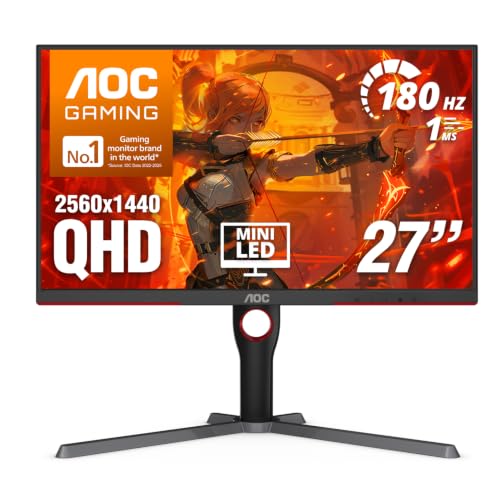
AOC 27-Inch Mini-LED 1440p Gaming Monitor
Best for: High-contrast 16:9 gaming
- Screen Size
- 27 Inch
- Resolution
- 2560x1440
- Refresh Rate
- 180Hz
- Response Time
- 1ms GtG
- Sync Technology
- Adaptive-Sync
- Connectivity
- DP 1.4, HDMI 2.1, USB 3.2
View on Amazon: AOC 27-Inch Mini-LED 1440p Gaming Monitor Affiliate link
This AOC monitor features a 27-inch VA panel with QHD 2560x1440 resolution. It uses Mini-LED backlighting with 336 dimming zones for high contrast and VESA DisplayHDR 1000 certification. The 180Hz refresh rate and 1ms GtG response time support fast gaming. Adaptive-Sync prevents screen tearing. It delivers sharp images and rich color with a 134% sRGB gamut.
Pros
- Mini-LED backlight with 336 dimming zones
- VESA DisplayHDR 1000 certification
- 180Hz refresh rate via DisplayPort 1.4
- 134% sRGB color gamut coverage
Cons
- VA panel may have slower pixel response than IPS
- 27-inch size is not ultrawide
- 15.6 pounds weight is heavy for desk mounts
Good fit if
- You want high contrast and HDR brightness
- You play fast-paced games at 1440p
- You prefer a 27-inch square aspect ratio
Skip if
- You need an ultrawide 21:9 aspect ratio
- You require IPS panel viewing angles
- You prefer a lighter monitor under 10 pounds
Verdict: AOC 27-inch 180Hz Mini-LED Monitor suits gamers who want high contrast and HDR in a standard 16:9 frame. It is not for those seeking ultrawide immersion.

SANSUI 24-Inch 180Hz Gaming Monitor
Best for: budget competitive gaming on small desks
- Screen Size
- 24"
- Resolution
- 1920 x 1080
- Refresh Rate
- 180Hz
- Response Time
- 1ms MPRT
- Sync Technology
- Adaptive Sync
- Connectivity
- DP 1.4, HDMI 2.0
View on Amazon: SANSUI 24-Inch 180Hz Gaming Monitor Affiliate link
This is a 24-inch Full HD gaming monitor with an 180Hz refresh rate. It uses Adaptive Sync to reduce screen tearing and offers a 1ms MPRT response time. The panel covers 110% of the sRGB color space and reaches 300 nits of brightness. You get DisplayPort 1.4 and HDMI 2.0 connections. It includes a tilt-adjustable stand and VESA mounting support for flexible setup.
Pros
- 180Hz refresh rate for smooth motion
- 110% sRGB color gamut coverage
- 1ms MPRT response time
- DisplayPort 1.4 and HDMI 2.0 ports
Cons
- Full HD resolution on a small screen
- No built-in speakers
- Limited tilt adjustment range
Good fit if
- You need a high refresh rate for competitive gaming
- You want a compact monitor for limited desk space
- You prefer a simple setup without extra features
Skip if
- You require 4K or ultrawide resolution
- You need built-in audio
- You want HDR support
Verdict: SANSUI ES-G24F4 24 Inch 180Hz Monitor suits budget gamers who prioritize speed over pixel density. It delivers fast refresh rates in a small form factor.
Specifications side by side
| Spec | AOC 27-Inch Mini-LED 1440p Gaming Monitor | SANSUI 24-Inch 180Hz Gaming Monitor |
|---|---|---|
| Screen Size | 27 Inch | 24" |
| Resolution | 2560x1440 | 1920 x 1080 |
| Refresh Rate | 180Hz | 180Hz |
| Response Time | 1ms GtG | 1ms MPRT |
| Sync Technology | Adaptive-Sync | Adaptive Sync |
| Connectivity | DP 1.4, HDMI 2.1, USB 3.2 | DP 1.4, HDMI 2.0 |
| Size | 27" 180Hz Mini-LED | 24 Inch |
| Dimensions | 10.2 × 23.8 × 20.9 inches | 5.24 × 24.1 × 15.7 inches |
| Weight | 15.6 pounds | not stated |
| Color | Black | Black |
| Model | Q27G3XMN | ES-G24F4 |
Frequently asked questions
Does the AOC monitor have an ultrawide aspect ratio?
No. The AOC Q27G3XMN uses a standard 16:9 aspect ratio. It features a 27-inch screen with 1440p resolution. This setup prioritizes high contrast and HDR performance over the immersive width of ultrawide displays. You should look elsewhere if you need a 21:9 or 32:9 format.
Is the SANSUI monitor suitable for ultrawide gaming?
No. The SANSUI ES-G24F4 is a compact 24-inch panel. It does not offer an ultrawide aspect ratio. This monitor is designed for budget competitive gaming on small desks. It focuses on speed with an 180Hz refresh rate rather than wide-screen immersion.
Which monitor offers better color accuracy for gaming?
The AOC Q27G3XMN provides better color performance. It covers 134% of the sRGB color gamut. The Mini-LED backlight also supports VESA DisplayHDR 1000 for improved contrast. The SANSUI model lacks these specific color and HDR specifications in its data.
What is the resolution difference between the two models?
The AOC model uses a 1440p resolution on its 27-inch screen. This provides sharper images than standard 1080p. The SANSUI 24-inch monitor does not list a specific resolution in the provided data, but its smaller size typically aligns with lower pixel counts.
How much desk space does the AOC monitor take up?
The AOC Q27G3XMN is larger and heavier. It measures 23.8 inches in width and weighs 15.6 pounds. You need a sturdier desk to support this weight. The SANSUI model is more compact at 24.1 inches wide and lighter.
Do both monitors support high refresh rates?
Yes. Both the AOC and SANSUI models operate at 180Hz. This high refresh rate ensures smooth visuals for fast-paced games. Both also support Adaptive Sync to reduce screen tearing. The AOC adds Mini-LED technology for better local dimming.