6 Best Alternatives to the ASUS 27-Inch 1080p Ergonomic IPS (2026)
As an Amazon Associate we earn from qualifying purchases. Links on this page are affiliate links.
The ASUS 27-Inch 1080p Ergonomic IPS Monitor offers a practical setup for office work, featuring a 27-inch 1080p IPS panel, 75Hz refresh rate, and extensive connectivity including a USB hub. Its stand provides full ergonomic adjustments, and it includes eye-care technologies like flicker-free and low blue light filters. If you are looking for asus 27 inch 1080p ergonomic ips alternatives, you might need different specs for your specific use case. Some users may prefer higher resolution for detailed work, faster refresh rates for gaming, or modern USB-C docking for simplified connectivity.
We selected these alternatives because their core specifications overlap with the original model. The list includes options with 1440p resolution and 144Hz or 180Hz refresh rates for gamers who need speed and clarity. Other picks feature USB-C ports for professionals who want a single-cable connection solution. You will also find displays with built-in webcams for remote work and dual-mode capabilities for versatile performance. Each option maintains the 27-inch form factor and IPS panel technology, ensuring similar viewing angles and color reproduction while offering distinct functional advantages.
How these alternatives compare
KTC 27-Inch Dual-Mode Mini LED Monitor
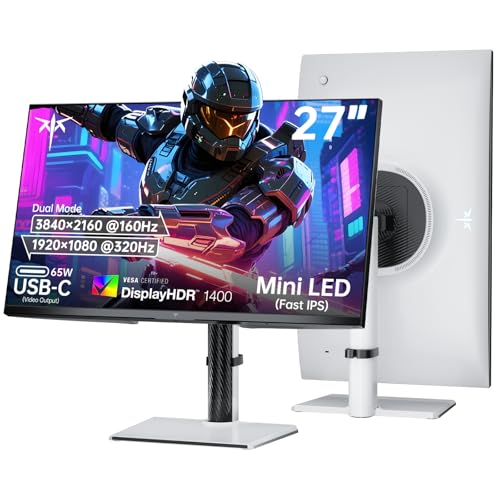
The KTC 27-inch Dual-Mode Mini LED Monitor switches from the ASUS 1080p baseline to a dual-resolution approach. You can toggle between 4K detail and 1080p speed, a flexibility the ASUS model lacks entirely. This Mini LED panel delivers higher contrast and brightness than standard IPS panels. However, you lose the integrated USB hub and the extensive ergonomic stand found on the ASUS. The KTC is heavier and bulkier. Pick this if you need high-resolution work and fast gaming in one device, but do not choose it if you require the plug-and-play convenience of the ASUS USB docking station.
ASUS 27-Inch 1080p USB-C Docking Monitor
The ASUS VA27ECPSN retains the 27-inch 1080p IPS panel and 75Hz refresh rate, keeping the core experience similar to the original. The main difference is the connectivity upgrade to USB-C docking. This allows for single-cable video and power delivery, which the original USB hub does not support. It also includes HDMI, adding port variety. The stand offers similar ergonomic adjustments, including height and tilt. Choose this model if you need modern USB-C connectivity for laptops. Otherwise, the original VA27DQSB remains a practical choice with its dedicated USB hub for peripherals.
SKitphrati 27-Inch 120Hz Webcam Monitor
The SKitphrati 27-inch 120Hz Webcam Monitor offers a significantly higher 120Hz refresh rate compared to the ASUS 75Hz panel. This provides smoother motion for casual gaming or desktop navigation. It also includes an integrated webcam, a feature absent on the ASUS. However, it sacrifices the ergonomic stand, offering only basic tilt adjustment. The build is lighter and less robust. You should pick this if you prioritize video conferencing and higher refresh rates. Avoid it if you need the full range of height, swivel, and pivot adjustments provided by the ASUS stand.
SANSUI 27-Inch 1440p 180Hz Fast IPS Monitor
The SANSUI 27-inch 1440p 180Hz Fast IPS Monitor steps up in both resolution and speed. You get 1440p clarity and an 180Hz refresh rate, far exceeding the ASUS 1080p 75Hz specs. This makes it suitable for gaming and detailed work. It supports FreeSync for tear-free visuals. However, it lacks the USB hub and the comprehensive ergonomic stand of the ASUS. The stand is simpler, offering limited adjustments. Choose this if you need higher pixel density and faster refresh rates. Do not choose it if you require the connectivity and ergonomic flexibility of the ASUS office setup.
SANSUI 27-Inch 1440p IPS Gaming Monitor
The SANSUI 27-inch 1440p IPS Gaming Monitor also offers 1440p resolution and 180Hz refresh rates, surpassing the ASUS 1080p 75Hz baseline. It uses a Fast IPS panel for quick response times. Like the other SANSUI model, it lacks the USB hub and the full ergonomic stand found on the ASUS. The stand provides basic tilt and height adjustments. This monitor is ideal for gamers who want higher resolution and speed. It is less suitable for office users who need the integrated USB connectivity and extensive stand adjustments of the ASUS VA27DQSB.
LG 27-Inch QHD 144Hz IPS Monitor
The LG 27GL83A-B offers 1440p resolution and a 144Hz refresh rate, providing a significant upgrade in speed and clarity over the ASUS 1080p 75Hz panel. It features certified G-SYNC and FreeSync compatibility, ensuring smooth gameplay. The IPS panel delivers accurate colors. However, it lacks the USB hub and the extensive ergonomic stand of the ASUS. The LG stand is sturdy but offers fewer adjustment options. Pick this if you are a gamer prioritizing certified sync technologies and higher resolution. Avoid it if you need the connectivity and ergonomic flexibility of the ASUS for office work.
Quick picks
Our 7 picks

ASUS 27-Inch 1080p Ergonomic IPS Monitor
Best for: office setups needing USB hub and ergonomics
- Screen Size
- 27"
- Resolution
- 1920 x 1080
- Refresh Rate
- 75Hz
- Panel Type
- IPS
- Sync Technology
- Adaptive-Sync
- Connectivity
- HDMI, DisplayPort, D-sub, USB
View on Amazon: ASUS 27-Inch 1080p Ergonomic IPS Monitor Affiliate link
This is a 27-inch Full HD IPS monitor designed for office and business use. It features a 75Hz refresh rate with Adaptive-Sync for smooth video playback. The standout feature is the built-in USB hub, which simplifies connectivity for laptops and peripherals. You get full ergonomic adjustments, including height, tilt, swivel, and pivot. Eye care technologies like flicker-free and low blue light help reduce strain during long work sessions.
Pros
- 27-inch 1920x1080 IPS panel with 178-degree viewing angles
- Built-in USB hub for convenient device connectivity
- Full ergonomic stand with height, tilt, swivel, and pivot adjustments
- 75Hz refresh rate with Adaptive-Sync technology
- TV Rheinland-certified flicker-free and low blue light filters
Cons
- 1080p resolution is lower than the 1440p or 4K options on this list
- 75Hz refresh rate is not suitable for fast-paced gaming
- Includes D-sub port which is an older analog standard
Good fit if
- You need a monitor with a built-in USB hub for easy docking
- You want full ergonomic adjustments including height and pivot
- You prioritize eye comfort features for long work hours
Skip if
- You require 1440p or 4K resolution for sharp text
- You are looking for a high refresh rate for gaming
- You prefer digital connections over older D-sub ports
Verdict: ASUS VA27DQSB 27-inch 1080p USB Docking Monitor is a practical office display for users who value ergonomic flexibility and integrated USB connectivity over high resolution or gaming performance.
KTC 27-Inch Dual-Mode Mini LED Monitor
Best for: Gamers needing 4K or 1080p speed
- Screen Size
- 27"
- Resolution
- 4K UHD, 1080P FHD
- Refresh Rate
- 160Hz, 320Hz
- Panel Type
- Fast IPS
- Sync Technology
- FreeSync, G-sync compatible
- Connectivity
- 65W Type-C, DP 1.4, 2 x HDMI 2.1
View on Amazon: KTC 27-Inch Dual-Mode Mini LED Monitor Affiliate link
This 27-inch monitor offers a unique dual-mode setup. You can switch between 4K UHD at 160Hz or 1080p FHD at 320Hz. It uses a Fast IPS panel with 1152 Mini LED dimming zones and HDR1400 support. The display includes FreeSync and G-Sync compatibility. It features a 65W Type-C port and adjustable stand. This setup suits users who need high resolution or extreme speed.
Pros
- Dual Mode: 4K at 160Hz or 1080p at 320Hz
- Mini LED with 1152 dimming zones
- HDR1400 and 145% sRGB color gamut
- 65W Type-C connectivity
Cons
- Higher price point than standard 1080p monitors
- Complexity of switching between modes
- Heavier build at 15 pounds
Good fit if
- You need 4K clarity for work
- You want 1080p for competitive FPS gaming
- You require HDR1400 visuals
Skip if
- You only need basic 1080p 60Hz performance
- You prefer a lighter display
- You want a simple single-mode screen
Verdict: KTC 27-inch Dual Mode Mini LED Monitor delivers versatile performance for users who value either 4K detail or 1080p speed. It is the right fit for gamers and professionals who need both high resolution and high refresh rates in one device.

ASUS 27-Inch 1080p USB-C Docking Monitor
Best for: Office setups requiring USB-C docking and ergonomic adjustments
- Screen Size
- 27"
- Resolution
- 1920 x 1080
- Refresh Rate
- 75Hz
- Panel Type
- IPS
- Sync Technology
- Adaptive-Sync, FreeSync
- Connectivity
- HDMI 1.4, DisplayPort 1.2, USB-C, RJ45
View on Amazon: ASUS 27-Inch 1080p USB-C Docking Monitor Affiliate link
This 27-inch monitor offers Full HD resolution on an IPS panel with a 75Hz refresh rate. It features extensive connectivity, including USB-C with 65W charging, HDMI, DisplayPort, and an RJ45 LAN port. The stand provides tilt, swivel, pivot, and height adjustments. ASUS Eye Care technology reduces flicker and blue light. It suits users who need a versatile display for office work and basic media consumption.
Pros
- 27-inch IPS panel with 1920 x 1080 resolution
- USB-C port delivers up to 65W power delivery
- Ergonomic stand with height, tilt, swivel, and pivot adjustments
- Includes RJ45 LAN port and USB hub connectivity
- 75Hz refresh rate with Adaptive-Sync and FreeSync support
Cons
- 1080p resolution on a 27-inch screen yields lower pixel density
- 75Hz refresh rate limits smoothness for fast-paced gaming
- HDMI port is version 1.4, limiting bandwidth for higher specs
Good fit if
- You need a single cable to connect, charge, and display from a laptop
- You require an ergonomic stand with full height and pivot adjustments
- You want built-in networking via an RJ45 port
Skip if
- You need high-resolution visuals for detailed creative work
- You prioritize high refresh rates for competitive gaming
- You prefer a smaller screen size for limited desk space
Verdict: ASUS VA27ECPSN 27" 1080p Docking Monitor is a practical office display for users who value connectivity and ergonomic flexibility over pixel density or high frame rates.

SKitphrati 27-Inch 120Hz Webcam Monitor
Best for: remote work and video conferencing
- Screen Size
- 27-inch
- Resolution
- 1080P
- Refresh Rate
- 120Hz
- Panel Type
- IPS
- Connectivity
- HDMI, DisplayPort, VGA, USB 2.0
- Dimensions
- 14.5 × 24.2 × 1.5 inches
View on Amazon: SKitphrati 27-Inch 120Hz Webcam Monitor Affiliate link
This 27-inch IPS monitor delivers 1080p resolution at a 120Hz refresh rate. It includes a built-in 3MP webcam and microphone array for video calls. Integrated stereo speakers and multiple ports like HDMI and DisplayPort add convenience. It suits professionals who want an all-in-one setup for work and video conferencing without extra peripherals.
Pros
- 27-inch IPS panel with 1080p resolution
- 120Hz refresh rate for smooth visuals
- Built-in 3MP adjustable webcam and mic
- Integrated stereo speakers
- HDMI, DisplayPort, and VGA connectivity
Cons
- 1080p resolution is lower than competitors
- USB 2.0 port limits data transfer speed
- No mention of USB-C connectivity
Good fit if
- You need a built-in webcam for calls
- You want a 120Hz refresh rate
- You prefer an all-in-one desk setup
Skip if
- You require 4K or 1440p resolution
- You need USB-C connectivity
- You want high-end gaming features
Verdict: SKitphrati 27-Inch 1080p Webcam Monitor fits remote workers who want a single device for display and video calls. It is less suitable for users needing higher resolution or faster data ports.

SANSUI 27-Inch 1440p 180Hz Fast IPS Monitor
Best for: Gamers seeking high refresh rates and ergonomic flexibility
- Screen Size
- 27"
- Resolution
- 2560 x 1440
- Refresh Rate
- 200Hz
- Panel Type
- Fast IPS
- Response Time
- OD 1ms
- Sync Technology
- AMD FreeSync, Adaptive Sync
View on Amazon: SANSUI 27-Inch 1440p 180Hz Fast IPS Monitor Affiliate link
This 27-inch monitor delivers a 2560 x 1440 resolution on a Fast IPS panel. It supports refresh rates up to 200Hz with AMD FreeSync. The stand offers full ergonomic adjustments, including pivot, swivel, and height settings. You get DCI-P3 95% color coverage and 1ms response times. It connects via two DisplayPort 1.4 and two HDMI 2.0 ports. This setup suits gamers who want high speed and color accuracy.
Pros
- 2560 x 1440 WQHD resolution on a 27-inch Fast IPS panel
- 200Hz refresh rate with 1ms OD response time
- Full ergonomic stand with pivot, swivel, and 130mm height adjustment
- DCI-P3 95% color gamut coverage
Cons
- HDMI 2.0 ports limit refresh rate to 144Hz
- No mention of USB-C connectivity for docking
- No built-in speakers listed in specifications
Good fit if
- You want a high refresh rate for fast-paced gaming
- You need a stand that pivots for portrait mode
- You prioritize color accuracy with DCI-P3 95% coverage
Skip if
- You require USB-C connectivity for a single-cable setup
- You need 4K resolution for detailed work
- You want built-in speakers for casual use
Verdict: SANSUI 27-inch 1440p 200Hz Gaming Monitor offers high-speed performance and a versatile stand. It fits users who value rapid refresh rates and full ergonomic control.
SANSUI 27-Inch 1440p IPS Gaming Monitor
Best for: Gamers seeking high refresh rates at 1440p
- Screen Size
- 27 Inch
- Resolution
- 2560 x 1440
- Refresh Rate
- 180Hz
- Panel Type
- Fast IPS
- Response Time
- 1ms
- Sync Technology
- Adaptive Sync
View on Amazon: SANSUI 27-Inch 1440p IPS Gaming Monitor Affiliate link
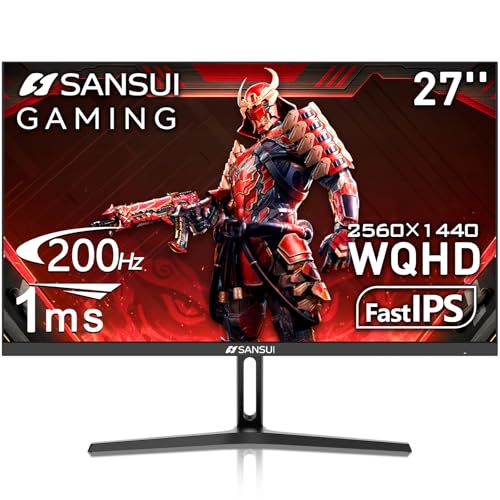
This SANSUI monitor offers a 27-inch IPS panel with a 2560 x 1440 resolution. It supports a 200Hz refresh rate via DisplayPort and 180Hz via HDMI. The display covers 120% of the sRGB color gamut and reaches 320 nits of brightness. You get two HDMI 2.0 and two DP 1.2 ports. It includes eye care features like low blue light and anti-flicker technology for comfortable viewing.
Pros
- 2560 x 1440 WQHD resolution
- 200Hz refresh rate on DisplayPort
- 120% sRGB color gamut coverage
- Dual HDMI 2.0 and DP 1.2 ports
Cons
- No built-in speakers
- Only 320 nits brightness
- No USB-C connectivity listed
Good fit if
- You want high refresh rates at 1440p
- You need multiple HDMI and DisplayPort inputs
- You prioritize color accuracy over peak brightness
Skip if
- You require built-in speakers
- You need USB-C connectivity
- You want a higher brightness level than 320 nits
Verdict: SANSUI 27" 1440p 200Hz IPS Monitor provides a solid balance of resolution and speed for gamers who value color accuracy and connectivity options without the need for integrated audio.

LG 27-Inch QHD 144Hz IPS Monitor
Best for: gamers seeking certified G-SYNC and color accuracy
- Screen Size
- 27-Inch
- Resolution
- 2560 x 1440
- Refresh Rate
- 144Hz
- Panel Type
- IPS
- Response Time
- 1ms (GtG)
- Sync Technology
- NVIDIA G-SYNC, FreeSync Premium
View on Amazon: LG 27-Inch QHD 144Hz IPS Monitor Affiliate link
The LG 27GL83A-B is a 27-inch IPS gaming monitor with a 2560 x 1440 resolution and a 144Hz refresh rate. It covers 99% of the sRGB color gamut for accurate visuals. The panel features a 1ms response time and supports both NVIDIA G-SYNC and AMD FreeSync Premium. This monitor offers a sturdy stand with tilt, height, and pivot adjustments for ergonomic comfort.
Pros
- 2560 x 1440 QHD resolution on a 27-inch IPS panel
- 144Hz refresh rate with 1ms (GtG) response time
- Officially NVIDIA G-SYNC Compatible and AMD FreeSync Premium certified
- 99% sRGB color coverage for vivid and accurate imagery
- Height, tilt, and pivot adjustable stand
Cons
- Resolution is 1440p, not 4K like the KTC option
- Refresh rate is 144Hz, lower than the 200Hz SANSUI models
- Connectivity limited to HDMI and DisplayPort without USB docking
Good fit if
- You want certified G-SYNC compatibility for smoother gameplay
- You need precise color accuracy with 99% sRGB coverage
- You prefer a monitor with height and pivot adjustments
Skip if
- You require a built-in webcam for video conferencing
- You need USB-C docking capabilities for your workstation
- You are looking for a 4K resolution display
Verdict: The LG 27GL83A-B 27-Inch 144Hz IPS Monitor is a solid choice for gamers who prioritize certified sync technologies and color accuracy over maximum refresh rates or 4K resolution.
Specifications side by side
| Spec | ASUS 27-Inch 1080p Ergonomic IPS Monitor | KTC 27-Inch Dual-Mode Mini LED Monitor | ASUS 27-Inch 1080p USB-C Docking Monitor | SKitphrati 27-Inch 120Hz Webcam Monitor | SANSUI 27-Inch 1440p 180Hz Fast IPS Monitor | SANSUI 27-Inch 1440p IPS Gaming Monitor | LG 27-Inch QHD 144Hz IPS Monitor |
|---|---|---|---|---|---|---|---|
| Screen Size | 27" | 27" | 27" | 27-inch | 27" | 27 Inch | 27-Inch |
| Resolution | 1920 x 1080 | 4K UHD, 1080P FHD | 1920 x 1080 | 1080P | 2560 x 1440 | 2560 x 1440 | 2560 x 1440 |
| Refresh Rate | 75Hz | 160Hz, 320Hz | 75Hz | 120Hz | 200Hz | 180Hz | 144Hz |
| Panel Type | IPS | Fast IPS | IPS | IPS | Fast IPS | Fast IPS | IPS |
| Response Time | not stated | not stated | not stated | not stated | OD 1ms | 1ms | 1ms (GtG) |
| Sync Technology | Adaptive-Sync | FreeSync, G-sync compatible | Adaptive-Sync, FreeSync | not stated | AMD FreeSync, Adaptive Sync | Adaptive Sync | NVIDIA G-SYNC, FreeSync Premium |
| Connectivity | HDMI, DisplayPort, D-sub, USB | 65W Type-C, DP 1.4, 2 x HDMI 2.1 | HDMI 1.4, DisplayPort 1.2, USB-C, RJ45 | HDMI, DisplayPort, VGA, USB 2.0 | 2 x Display Port 1.4, 2 x HDMI 2.0 | HDMI 2.0 x2, DP 1.2 x2, Audio Jack | HDMI, DisplayPort |
| Size | 27 Inch | 27 Inch | 27 Inch | 27 Inch | 27 Inch | 27 Inch | 27 Inch |
| Dimensions | 24.1 × 14.7 × 8.91 inches | 8.32 × 24.3 × 21.5 inches | 24.1 × 8.9 × 14.7 inches | 14.5 × 24.2 × 1.5 inches | 5.63 × 27 × 19.3 inches | 24.1 × 7.65 × 18.4 inches | 8.2 × 29.2 × 20.6 inches |
| Weight | 15 pounds | 15 pounds | 14.3 pounds | 12.1 pounds | 11.2 pounds | not stated | 20.3 pounds |
| Color | BLACK | White 4K | BLACK | Black | Black | Black | Black |
| Model | VA27DQSB | M27P6 | VA27ECPSN | HD-270 | ES-G27F6Q | ES-G27F2Q | 27GL83A-B |
Frequently asked questions
Which monitor offers the best connectivity for office work?
The ASUS VA27ECPSN provides USB-C docking, which simplifies your desk setup by handling data and video through a single cable. It also includes DisplayPort and HDMI inputs for flexible connections. This model is ideal if you need ergonomic adjustments alongside robust port options for daily office tasks.
Can I get a monitor with a built-in webcam?
Yes, the SKitphrati HD-270 includes an integrated webcam, making it a convenient choice for remote work and video conferencing. It combines a 27-inch 1080p IPS display with a 120Hz refresh rate. This single-device solution saves space on your desk while providing essential communication tools.
Which alternative has the highest refresh rate for gaming?
The SANSUI ES-G27F6Q and ES-G27F2Q both feature 180Hz refresh rates, providing smooth motion for fast-paced games. They use 1440p resolution and Fast IPS panels for quick response times. These monitors are designed for gamers who prioritize speed and fluid visuals over standard office performance.
Is there an option with 4K resolution?
The KTC M27P6 offers a dual-mode Mini LED panel that allows you to switch between 4K detail and 1080p speed. This flexibility lets you choose higher resolution for work or higher frame rates for gaming. It is the only option in this list that supports 4K output.
Which monitor supports NVIDIA G-SYNC?
The LG 27GL83A-B supports both FreeSync and certified G-SYNC technologies. This ensures smooth gameplay without screen tearing on compatible NVIDIA graphics cards. It delivers 1440p resolution at 144Hz, making it a strong choice for gamers who need certified sync reliability alongside accurate color reproduction.
Do these monitors have ergonomic stands?
The ASUS VA27DQSB and VA27ECPSN are specifically noted for their ergonomic flexibility. The VA27DQSB includes a USB hub for added convenience. The SANSUI models also offer versatile stands for full ergonomic control. These features allow you to adjust height, tilt, and swivel for comfortable long-term use.