ASUS ProArt 27-Inch 1440p USB-C Review: Who It Fits and Who Should Skip It
As an Amazon Associate we earn from qualifying purchases. Links on this page are affiliate links.
This asus proart 27 inch 1440p USB c review covers the ASUS ProArt PA278CGRV. It is a 27-inch QHD monitor designed for professional workflows. The display features a 144Hz refresh rate and a 97% DCI-P3 color gamut. These two specs define its balance of smooth motion and precise color reproduction. The panel is an IPS type with factory calibration. It targets users who need accuracy without sacrificing frame rate. The design includes comprehensive connectivity options for modern setups.
What stands out
- 144Hz variable refresh rate with AMD FreeSync for smooth rendering
- 97% DCI-P3 and 100% sRGB gamut with Delta E < 2 accuracy
- USB-C port delivering up to 96W power delivery
- MacBook Color Temperature matching for consistent cross-device color
- Built-in Auto KVM for switching between two computers
Who it fits
Good fit for
This monitor suits creative professionals who need accurate colors for video or photo editing. The 97% DCI-P3 coverage meets international standards. It also fits users who want a smooth desktop experience. The 144Hz refresh rate helps with fast rendering previews. The USB-C connection with 96W power delivery is ideal for MacBook users. You can connect a laptop and have it charge while displaying video. The Auto KVM feature helps those using two computers daily.
Who should skip it
You should look elsewhere if you need 4K resolution. This panel is limited to 1440p. It is not suitable for gamers seeking high-end competitive performance. While 144Hz is fast, it lacks advanced gaming features like NVIDIA G-Sync compatibility. It is also not for those who need a 32-inch screen. The 27-inch size is fixed. If you require a built-in webcam or speakers, this unit does not list those features. Stick to this model only if color accuracy and USB-C power are your main priorities.
Verdict: The ASUS ProArt PA278CGRV offers a strong mix of color accuracy and high refresh rates. It is a solid choice for creators who value precision and smooth motion.
Key specs explained for this monitor
27-inch QHD (2560 x 1440) IPS
This resolution provides a sharp image on a standard desk size. The IPS panel ensures consistent colors and wide viewing angles, which is vital for creative work. You get more screen real estate than 1080p without the scaling issues of 4K on smaller screens. This setup offers a practical balance for productivity and general use.
144Hz Refresh Rate with AMD FreeSync
A 144Hz refresh rate makes motion appear smoother than standard 60Hz monitors. AMD FreeSync reduces screen tearing during fast-paced content. This combination benefits users who switch between professional tasks and gaming. It ensures fluid visuals for video editing timelines and smooth gameplay, offering a versatile experience for hybrid workflows.
97% DCI-P3 and 100% sRGB Gamut
These color gamut covers ensure accurate color reproduction for digital content. 100% sRGB is standard for web design, while 97% DCI-P3 supports high-end video and cinema standards. This accuracy meets international color standards, making it suitable for photographers and video editors who need reliable color representation without constant manual calibration adjustments.
USB-C with up to 96W Power Delivery
USB-C connectivity allows you to connect your laptop with a single cable. The 96W power delivery charges your device while transmitting video and data. This simplifies your desk setup by reducing cable clutter. It is particularly useful for laptop users who want a clean workspace and efficient workflow without needing separate power adapters.
Design and build details
The ASUS ProArt PA278CGRV measures 24.1 inches wide, 21.1 inches high, and 7.5 inches deep. It weighs 14.6 pounds. The listing describes the finish as silver. This neutral color helps the monitor blend into professional office environments without drawing attention. The footprint is standard for a 27-inch display, meaning it fits most desks without requiring excessive space.
According to the listing, the monitor includes a built-in USB hub. This adds physical connectivity options on the desk surface. You can plug peripherals directly into the monitor rather than your computer. The design supports daisy-chaining via DisplayPort. This allows you to link multiple displays in a series, reducing cable clutter for complex setups.
The stand height is listed at 21.1 inches in the base configuration. Variations exist, with some options reaching 16.1 inches. The physical controls are managed through the ASUS DisplayWidget Center software. This means you adjust settings using your mouse rather than physical buttons. This layout keeps the monitor’s exterior clean and minimalist. The solid build supports heavy use in creative studios. The silver finish and compact depth make it suitable for tight workspaces where cable management matters.
Setup and everyday use
Setting up this monitor is straightforward thanks to its comprehensive connectivity. You can connect via USB-C, HDMI, or DisplayPort. The USB-C port delivers up to 96W of power delivery, which allows you to charge a laptop while transferring data and video through a single cable. This reduces desk clutter significantly. The DisplayPort supports daisy-chaining, letting you link additional monitors in a series. For daily use, the built-in USB hub simplifies peripheral connections. You can attach keyboards and mice directly to the display. The Auto KVM feature is particularly useful if you switch between two computers. It lets you control both systems with one keyboard and mouse set. You do not need to manually toggle inputs. The monitor also includes the ASUS DisplayWidget Center software. This tool lets you adjust on-screen display settings using your computer mouse rather than physical buttons. This makes fine-tuning brightness and color easier. The 144Hz refresh rate with AMD FreeSync ensures smooth motion for both creative rendering and casual gaming. The P3 color temperature match helps the display blend seamlessly with MacBook screens if you use Apple hardware. Overall, the connectivity and control options support a clean, efficient workflow without requiring complex manual adjustments.
Before you buy this monitor
You should verify your laptop’s USB-C port supports video output and at least 65W power delivery to utilize the monitor’s 96W capability. This ensures you can charge devices while connecting. The included ASUS DisplayWidget Center software simplifies on-screen display adjustments, so you do not need to press physical buttons frequently. If you use multiple computers, the Auto KVM feature lets you switch inputs with a single keyboard and mouse, which saves desk space. Keep the 27-inch screen clean with microfiber cloths; avoid harsh chemicals that might damage the IPS coating. This model sits alongside other professional displays in our 1 guide. Unlike many gaming-focused ultrawides, it prioritizes color accuracy and connectivity over extreme curvature. It fits well in mixed-use setups where creative work and smooth motion matter equally. Check your workspace dimensions before purchasing, as the 24.1-inch width requires adequate desk depth for proper viewing distance.
Check before you buy
- Verify your laptop supports USB-C video and power delivery
- Check if your desk fits the 24.1-inch width comfortably
- Ensure you have a USB-C cable for full functionality
- Confirm Auto KVM matches your multi-computer workflow needs
- Download DisplayWidget Center for easier settings management
The product at a glance
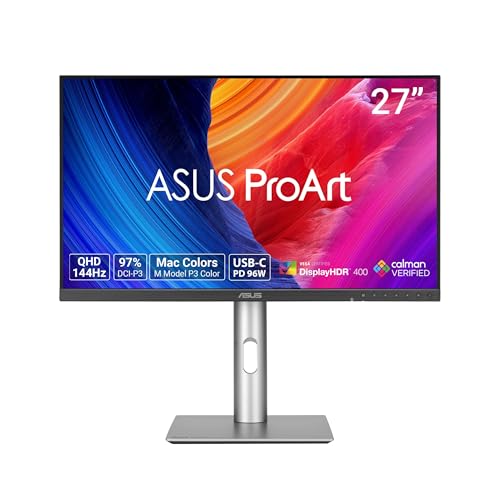
ASUS ProArt 27-Inch 1440p USB-C Monitor
Best for: color-accurate creative work and dual-computer workflows
- Screen Size
- 27 Inch
- Resolution
- 2560 x 1440
- Refresh Rate
- 144Hz
- Panel Type
- IPS
- Sync Technology
- AMD FreeSync
- Connectivity
- USB-C, HDMI, DisplayPort, USB Hub
View on Amazon: ASUS ProArt 27-Inch 1440p USB-C Monitor Affiliate link
The ASUS ProArt PA278CGRV is a 27-inch QHD monitor designed for creators who need precision and productivity. It features an IPS panel with 100% sRGB and 97% DCI-P3 coverage, factory calibrated for Delta E < 2 accuracy. You get 144Hz refresh rate with AMD FreeSync for smooth visuals. The USB-C port delivers 96W power delivery, while the built-in Auto KVM simplifies switching between two computers.
Pros
- Factory calibrated with Delta E < 2 color accuracy
- 100% sRGB and 97% DCI-P3 color gamut coverage
- USB-C with 96W power delivery and Auto KVM
- 144Hz refresh rate with AMD FreeSync support
Cons
- 27-inch screen size may be small for some workflows
- 1440p resolution offers lower pixel density than 4K
- No mention of HDR support or high brightness specs
Good fit if
- You need accurate color grading for photo or video work
- You want to connect a laptop via USB-C for power and display
- You switch between two computers frequently using one keyboard and mouse
Skip if
- You require 4K resolution for detailed text or design work
- You need HDR performance for gaming or media consumption
- You prefer a larger 32-inch or bigger display area
Verdict: ASUS ProArt 27in 1440p USB-C Monitor fits creators who prioritize color accuracy and efficient multi-device setups. It is ideal for professionals who need precise color reproduction and streamlined connectivity without the bulk of a larger screen.
Specifications side by side
| Spec | ASUS ProArt 27-Inch 1440p USB-C Monitor |
|---|---|
| Screen Size | 27 Inch |
| Resolution | 2560 x 1440 |
| Refresh Rate | 144Hz |
| Panel Type | IPS |
| Sync Technology | AMD FreeSync |
| Connectivity | USB-C, HDMI, DisplayPort, USB Hub |
| Size | 27 Inch |
| Dimensions | 7.5 × 24.1 × 21.1 inches |
| Weight | 14.6 pounds |
| Color | SILVER |
| Model | PA278CGRV |
Frequently asked questions
Is the ASUS ProArt 27-inch suitable for gaming?
Yes, the 144Hz refresh rate provides smooth motion for gaming alongside creative work. This high frame rate reduces motion blur and input lag significantly compared to standard 60Hz displays. You get a responsive experience for fast-paced titles while maintaining the color accuracy needed for professional tasks on the same screen.
Does this monitor support daisy-chaining multiple devices?
The product data does not mention DisplayPort out or MST support for daisy-chaining. You should verify your specific laptop or dock capabilities for multi-monitor setups. The USB-C port handles video, data, and power delivery for a single connected device efficiently without requiring additional hubs for basic operation.
How accurate are the colors on this display?
The monitor covers 97% of the DCI-P3 color gamut for professional-grade accuracy. This wide coverage ensures vibrant and precise colors for video editing and graphic design. The IPS panel further guarantees consistent color reproduction across wide viewing angles, which is essential when collaborating with clients or reviewing work.
Can I use this monitor as a laptop charger?
Yes, the USB-C port delivers up to 96W of power delivery. This allows you to charge compatible laptops while connected for video and data transfer. Ensure your laptop supports USB-C video output and accepts power via this standard to fully utilize the streamlined connectivity and reduce cable clutter on your desk.
What is the best resolution for this 27-inch screen?
The 1440p resolution offers a sharp image on a 27-inch panel. This QHD standard provides ample screen real estate for productivity without the scaling issues of 4K on smaller sizes. The pixel density is high enough for detailed work, ensuring text remains crisp and images look clean during extended use.
Is the stand adjustable for ergonomic positioning?
The specifications list the dimensions and weight but do not explicitly detail stand adjustability like height or tilt ranges. You should check the full manual for pivot or height options. The silver finish and compact footprint help it blend into office environments, but ergonomic flexibility depends on the specific stand mechanism included.
Who is this monitor primarily designed for?
It fits creators who prioritize color accuracy and efficient multi-device workflows. The combination of 1440p resolution and 144Hz refresh rate supports both professional design tasks and smooth media consumption. Professionals needing precise color reproduction and streamlined connectivity will find this balance ideal for daily creative and administrative duties.