ASUS ProArt 24-Inch 16:10 Monitor Review: Who It Fits and Who Should Skip It
As an Amazon Associate we earn from qualifying purchases. Links on this page are affiliate links.
This asus proart pa248qv 24 inch review focuses on a professional display built for color-critical work. The monitor features a 24-inch IPS panel with a 1920 x 1200 WUXGA resolution. It covers 100% of the sRGB and Rec.709 color spaces. This ensures accurate and vivid color reproduction for your projects. The screen also includes Calman Verified technology to maintain consistent hues. You get a sturdy stand that adjusts for height, tilt, swivel, and pivot. These specs make it a reliable tool for detailed visual tasks.
What stands out
- 100% sRGB and Rec.709 color space coverage
- DeltaE < 2 for precise color fidelity
- Calman Verified technology for consistency
- WUXGA 1920 x 1200 resolution
- Ergonomic stand with height, tilt, swivel, and pivot adjustments
Who it fits
Good fit for
This monitor suits graphic designers, photographers, and video editors who need reliable color accuracy on a compact desk. The 16:10 aspect ratio gives you more vertical space for timelines and toolbars. Its IPS panel provides wide viewing angles, which helps when collaborating or checking work from different positions. The included ergonomic stand reduces physical strain during long editing sessions. If you work primarily in standard HD color spaces, this display meets your needs without extra bulk.
Who should skip it
Look elsewhere if you need high refresh rates for fast-paced gaming. This panel is not designed for competitive play. You should also skip this if you require a larger screen for multitasking. The 24-inch size may feel cramped for complex layouts. Additionally, users needing USB-C connectivity or 4K resolution will find this model limiting. The available ports are DisplayPort, HDMI, and D-Sub, which may not suit all modern laptop setups without adapters.
Verdict: The ASUS ProArt PA248QV is a solid choice for professionals prioritizing color accuracy and ergonomics in a 24-inch form factor. It delivers reliable performance for standard creative workflows but lacks the speed and resolution needed for gaming or high-density tasks.
ASUS ProArt PA248QV Key Specs
Panel Type: IPS
In-plane switching technology provides wide viewing angles and consistent color accuracy from almost any position. This matters for designers who need to see true hues when moving around the screen. Unlike TN panels, IPS maintains image quality across the surface. It is a standard for professional work where color fidelity is critical for editing tasks.
Resolution: 1920 x 1200
This WUXGA resolution offers more vertical space than standard 1080p screens. It allows you to fit more code lines or document pages on the display without scrolling. While not as sharp as 4K, it balances clarity with performance. It is ideal for productivity tasks where screen real estate aids workflow efficiency in professional environments.
Screen Size: 24 inch
A twenty-four-inch display fits comfortably on most desks without dominating your workspace. It provides a balanced field of view for detailed work like photo editing or coding. Smaller than ultrawide monitors, it reduces eye movement. This size is practical for users who need precision and focus rather than expansive multitasking screens.
Aspect Ratio: 16:10
The 16:10 ratio adds extra vertical height compared to the common 16:9 format. This extra space is valuable for reading documents, browsing the web, or viewing timelines in video editing software. It maximizes usable screen area without increasing width. This format is preferred by professionals who need to see more content vertically.
Connectivity: DisplayPort, HDMI, D-Sub
Multiple ports allow connection to various computers and devices. DisplayPort and HDMI support digital signals for high-quality video. D-Sub provides compatibility with older systems. This flexibility ensures the monitor works with different setups. You can easily switch between devices without needing extra adapters or complex configuration steps for your workflow.
Design and Build Quality
The ASUS ProArt PA248QV is a compact 24-inch display. According to the listing, it measures 22.6 inches wide and 18.7 inches deep. The height is 7.56 inches without adjustments. The unit weighs 13.5 pounds. This light weight makes it easy to move between desks or mount on a single-arm stand. The black finish keeps the look professional and understated for office environments.
The stand offers full ergonomic flexibility. You can tilt, swivel, pivot, and adjust the height. This range allows you to position the screen at eye level or rotate it to portrait mode for coding or document review. Pivot support is essential for vertical content. Height adjustment reduces neck strain during long editing sessions. The physical layout prioritizes comfort over minimalism.
Connectivity includes DisplayPort, HDMI, and D-Sub ports. These inputs cover modern and legacy devices. You can connect a desktop PC via DisplayPort or a laptop via HDMI. The D-Sub port allows older computers to interface with the monitor. This mix ensures broad compatibility without needing adapters. The design focuses on utility and stability rather than flashy aesthetics. It fits well in tight spaces where a larger ultrawide would not.
Setup and Everyday Use Guide
You connect this monitor using DisplayPort, HDMI, or D-Sub ports. These options allow you to link it to various devices, from modern laptops to older desktops. The included stand supports tilt, swivel, and pivot adjustments. You can also raise or lower the screen height. This range of motion lets you position the 24-inch display at a comfortable eye level. The 16:10 aspect ratio gives you more vertical space than standard 16:9 screens. This extra height is useful for reading documents or viewing timelines in editing software. The IPS panel ensures that colors remain consistent even if you shift your viewing angle. This stability is important for color-critical work. You do not need to worry about hue shifts when moving around your workspace. The monitor covers 100% of the sRGB and Rec.709 color spaces. This coverage means images appear vivid and true to life without manual calibration for basic tasks. The Calman Verified technology confirms that the display delivers accurate hues out of the box. This saves you time during initial setup. The compact footprint fits easily on most desks. You can pivot the screen to portrait mode if your workflow requires it. The ergonomic stand reduces strain during long sessions. You can adjust the height to match your chair. This flexibility helps you maintain good posture. The connectivity choices make it simple to swap between computers. You can use the D-Sub port for legacy systems or HDMI for modern devices. The setup process is straightforward. You plug in the cable and adjust the stand. The monitor is ready for professional use immediately.
Who Should Buy This Monitor
You likely need a separate KVM switch or docking station if you manage multiple computers, as this model lacks built-in USB-C connectivity. Check your laptop’s output ports to ensure compatibility with the included DisplayPort, HDMI, or D-Sub connections. The 24-inch size fits well on standard desks, but verify your workspace depth. Cleaning requires a soft, dry cloth; avoid harsh chemicals to protect the IPS surface. This monitor sits apart from the 1 ultrawide and gaming options in this guide. It does not offer high refresh rates or ultra-wide formats. Instead, it prioritizes color fidelity for creative professionals. If you need expansive screen real estate for video editing timelines or immersive gaming, look at the wider models. For precise color work in a compact footprint, this unit provides a focused, reliable environment. It is a specialized tool rather than a general-purpose display.
Check before you buy
- Verify your device has HDMI, DisplayPort, or D-Sub outputs.
- Ensure your desk fits the 22.6-inch width and 18.7-inch depth.
- Confirm you need 16:10 aspect ratio for document or design work.
- Check if you require USB-C connectivity for single-cable setups.
The product at a glance
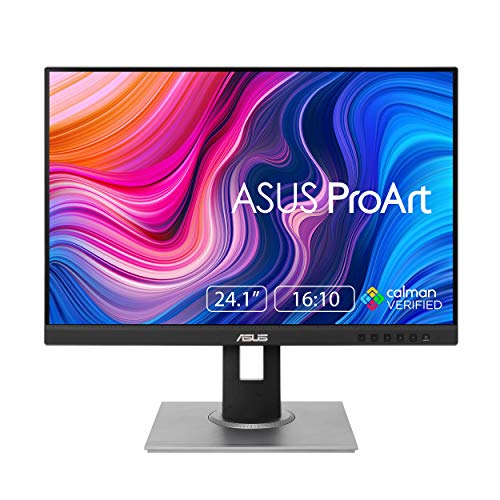
ASUS ProArt 24-Inch 16:10 Monitor
Best for: color-critical creative work
- Screen Size
- 24 Inch
- Resolution
- 1920 x 1200
- Panel Type
- IPS
- Aspect Ratio
- 16:10
- Connectivity
- DisplayPort, HDMI, D-Sub
- Dimensions
- 22.6 × 18.7 × 7.56 inches
View on Amazon: ASUS ProArt 24-Inch 16:10 Monitor Affiliate link
The ASUS ProArt PA248QV is a 24-inch professional monitor with a 16:10 aspect ratio and WUXGA resolution. It uses an IPS panel to deliver 100% sRGB and Rec.709 color space coverage. The display is Calman Verified with DeltaE less than 2 for high color fidelity. It includes a fully ergonomic stand and multiple connectivity ports. This monitor suits users who need accurate color reproduction for creative work.
Pros
- 100% sRGB and Rec.709 color space coverage
- Calman Verified with DeltaE < 2 accuracy
- Ergonomic stand with height, tilt, swivel, and pivot
- 5-year warranty with online registration
Cons
- WUXGA resolution is lower than 1440p or 4K options
- 24-inch screen size is small for multitasking
- Includes D-Sub port alongside DisplayPort and HDMI
Good fit if
- You need accurate color for photo or video editing
- You require a 16:10 aspect ratio for document work
- You want a fully adjustable ergonomic stand
Skip if
- You need high resolution for detailed graphics
- You want a larger screen for productivity
- You require USB-C connectivity for docking
Verdict: The ASUS ProArt PA248QV 24-Inch WUXGA is a precise tool for color-critical tasks. It fits professionals who prioritize color accuracy and ergonomics over screen size or resolution.
Specifications side by side
| Spec | ASUS ProArt 24-Inch 16:10 Monitor |
|---|---|
| Screen Size | 24 Inch |
| Resolution | 1920 x 1200 |
| Panel Type | IPS |
| Aspect Ratio | 16:10 |
| Connectivity | DisplayPort, HDMI, D-Sub |
| Size | 24 Inch |
| Dimensions | 22.6 × 18.7 × 7.56 inches |
| Weight | 13.5 pounds |
| Color | BLACK |
| Model | PA248QV |
Frequently asked questions
Is the ASUS ProArt PA248QV good for graphic design?
Yes, it is built for color-critical creative work. The monitor covers 100% of the sRGB and Rec.709 color spaces. This ensures accurate and vivid colors for designers. The IPS panel provides wide viewing angles, maintaining image quality from different positions. It is a precise tool for professionals who prioritize color accuracy.
What is the resolution of this 24-inch monitor?
The ASUS ProArt PA248QV features a 1920 x 1200 WUXGA resolution. This 16:10 aspect ratio provides more vertical space than standard 1080p displays. It offers sharp text and clear images suitable for detailed design tasks. The compact 24-inch size fits well on standard desks without taking up excessive space.
Does this monitor support USB-C connectivity?
No, this model lacks built-in USB-C connectivity. You must connect it using DisplayPort, HDMI, or D-Sub ports. If you need to manage multiple computers, you will likely require a separate KVM switch or docking station. Check your laptop’s output ports to ensure compatibility with the included connections.
How much space does the ASUS ProArt PA248QV take up?
The monitor measures 22.6 inches wide and 18.7 inches deep. The height is 7.56 inches without adjustments. It weighs 13.5 pounds, making it light enough for easy repositioning. The compact footprint allows it to fit comfortably on most standard workspaces while providing a dedicated area for creative tasks.
Can I adjust the viewing angle of this screen?
Yes, the included stand supports tilt, swivel, and pivot adjustments. You can also raise or lower the screen height to find your optimal viewing position. These ergonomic features allow you to customize the display for comfort during long design sessions. The stand ensures stability while you adjust the monitor to your needs.
Who should skip this monitor?
You should skip it if you need a larger screen or higher resolution. This model is designed for professionals who prioritize color accuracy and ergonomics over screen size. Gamers seeking high refresh rates will not find the necessary performance here. It is best suited for those who value precision in color-critical tasks.