6 Best Alternatives to the ASUS ProArt PA27UCGE 27 Inch (2026)
As an Amazon Associate we earn from qualifying purchases. Links on this page are affiliate links.
The ASUS ProArt PA27UCGE 27 Inch 4K delivers professional color accuracy with a 160Hz refresh rate in a compact frame. If you are researching asus proart pa27ucge 27 inch alternatives, you may want a different panel type or higher speed. Some buyers prefer OLED contrast for gaming or a lower price point for basic office work. Others might need a larger display or different connectivity options that the original does not provide.
This list includes 6 monitors that share key specifications with the ASUS model. We selected these alternatives because they overlap with the original’s 4K resolution, USB-C connectivity, and 27-inch size. You will find options ranging from budget-friendly IPS panels to premium QD-OLED displays. Each entry focuses on how its specific specs compare to the ProArt PA27UCGE. This approach helps you find a monitor that matches your exact technical requirements without unnecessary features.
How these alternatives compare
Samsung 27" Odyssey OLED G8 4K Gaming Monitor
The Samsung 27 Odyssey OLED G8 uses a QD-OLED panel instead of the ProArt’s IPS display. This gives you deeper blacks and higher contrast for media consumption. It also offers a 240Hz refresh rate, which is significantly faster than the 160Hz found on the PA27UCGE. You gain speed and visual pop, but you lose the built-in colorimeter and ambient light sensor that help maintain professional color accuracy. This monitor suits gamers who want premium visuals over the calibration tools provided by the ASUS.
ASUS ProArt 27-Inch 4K USB-C Monitor
The ASUS ProArt PA279CV replaces the high-speed 160Hz panel with a standard refresh rate, focusing purely on color accuracy for creators. It keeps the 4K resolution and USB-C connectivity but drops the advanced calibration hardware like the built-in colorimeter. You get a more affordable entry into professional color work without the gaming performance. This model is ideal for editors who prioritize Delta E accuracy and ergonomic flexibility over motion smoothness. It lacks the ambient light sensor found in the PA27UCGE, so color consistency relies on manual checks.
ASUS 27-Inch 4K USB-C Monitor
The ASUS VA27UCPS is a standard IPS 4K monitor that shares the USB-C connectivity but lacks the ProArt’s professional-grade color calibration features. It offers a similar 27-inch form factor but does not include the built-in colorimeter or ambient light sensor. You get reliable color reproduction for general professional tasks but miss out on the automated calibration tools. This monitor is best for users who need a clean, high-resolution display for office work and do not require the precise color management tools found in the PA27UCGE. It is a simpler, more functional choice.
ASUS ProArt 27-Inch 4K USB-C Monitor
The ASUS ProArt PA279CRV provides 4K resolution and USB-C connectivity similar to the PA27UCGE but operates at a lower refresh rate. It focuses on color accuracy for creative professionals without the high-speed gaming capabilities. You lose the 160Hz refresh rate and the advanced calibration hardware, including the built-in colorimeter. This model is suitable for designers who need reliable color data and a clean desk setup via USB-C. It lacks the ambient light sensor and auto-kvm features, making it a more basic option for those who prioritize core color performance over connectivity and speed.
ASUS ProArt 27-Inch 4K 120Hz QD-OLED Monitor
The ASUS ProArt PA279CDV uses a QD-OLED panel, offering superior contrast and color volume compared to the PA27UCGE’s IPS screen. It runs at 120Hz, which is slower than the 160Hz refresh rate of the original. You gain OLED’s infinite contrast ratio but lose the specific calibration tools and sensors present in the PA27UCGE. This monitor is designed for color-critical professionals who also value smooth motion and deep blacks. It is a strong choice for those who prioritize visual fidelity and modern panel technology over the higher refresh rate and automated calibration features of the ProArt.
ViewSonic 27-Inch 4K USB-C Monitor
The ViewSonic 27 4K USB-C Monitor offers a 4K IPS panel with USB-C connectivity, similar to the ProArt in resolution and portability. It lacks the high 160Hz refresh rate and the professional calibration hardware like the built-in colorimeter. You get a clean, high-resolution display for office work but miss out on the advanced color management tools. This monitor is best for users who prioritize cable management and display clarity over gaming speed or precise color calibration. It is a straightforward option for professionals who need reliable 4K output without the extra features of the PA27UCGE.
Quick picks
Our 7 picks
ASUS ProArt PA27UCGE 27 Inch 4K
Best for: Professional color work and smooth 4K gaming
- Screen Size
- 27 Inch
- Resolution
- 3840 x 2160
- Refresh Rate
- 160Hz
- Panel Type
- IPS
- Connectivity
- USB-C, DisplayPort, HDMI, USB hub
- Dimensions
- 7.9 × 24.1 × 22.6 inches
View on Amazon: ASUS ProArt PA27UCGE 27 Inch 4K Affiliate link
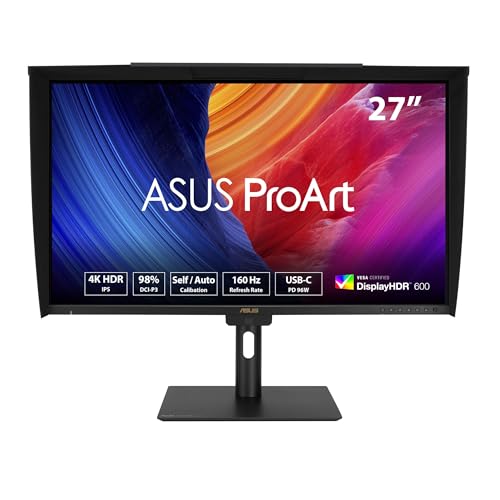
The ASUS ProArt PA27UCGE is a 27-inch 4K monitor with a 160Hz refresh rate. It uses an IPS panel with 98% DCI-P3 coverage and Delta E < 1 accuracy. A built-in colorimeter supports auto-calibration. It includes a 96W USB-C port and an Auto KVM for switching devices. This model suits professionals needing precise color and smooth motion.
Pros
- 160Hz refresh rate on a 4K IPS panel
- Built-in colorimeter for auto-calibration
- 96W USB-C power delivery
- Auto KVM for multi-device control
- 98% DCI-P3 color gamut coverage
Cons
- 27-inch size may feel small for some 4K workflows
- 14.1-pound weight adds bulk to the desk
- Requires manual calibration for best results without the built-in sensor
Good fit if
- You need high color accuracy for professional work
- You want a smooth 160Hz refresh rate for gaming
- You use multiple computers and need KVM switching
Skip if
- You prefer a larger screen for detailed editing
- You need a QD-OLED panel for deeper blacks
- You want a lightweight monitor for easy transport
Verdict: ASUS ProArt PA27UCGE 27-Inch 4K Monitor fits creative pros who need precise color and a 160Hz refresh rate in a compact 27-inch frame.

Samsung 27" Odyssey OLED G8 4K Gaming Monitor
Best for: 4K gaming with OLED contrast and speed
- Screen Size
- 27"
- Resolution
- 3840 x 2160
- Refresh Rate
- 240Hz
- Panel Type
- QD-OLED
- Response Time
- 0.03ms (GtG)
- Sync Technology
- AMD FreeSync Premium
View on Amazon: Samsung 27" Odyssey OLED G8 4K Gaming Monitor Affiliate link
The Samsung 27-inch Odyssey OLED G8 delivers 4K resolution on a QD-OLED panel. It features a 240Hz refresh rate and a 0.03ms response time for fast gaming. The display includes DP 2.1 connectivity and a USB-C port with up to 96W power delivery. This monitor suits users who need high-end color accuracy and rapid motion clarity in a compact 27-inch form factor.
Pros
- QD-OLED panel with 4K UHD resolution
- 240Hz refresh rate and 0.03ms response time
- USB-C port with up to 96W power delivery
- DisplayPort 2.1 for high bandwidth
Cons
- 27-inch screen size limits immersion compared to larger options
- OLED panels typically have lower peak brightness than high-end IPS
- No mention of built-in speakers or headphone jack
Good fit if
- You want 4K clarity with OLED contrast
- You need high refresh rates for competitive gaming
- You prefer a compact 27-inch desk footprint
Skip if
- You require a large 32-inch or wider display
- You need built-in speakers for media consumption
- You prefer IPS panels for static office work
Verdict: The Samsung 27" Odyssey OLED G8 Gaming Monitor offers premium QD-OLED visuals and 240Hz speed for gamers who prioritize sharpness and response time in a 27-inch frame.

ASUS ProArt 27-Inch 4K USB-C Monitor
Best for: Professional content creation and color-accurate work
- Screen Size
- 27"
- Resolution
- 4K UHD
- Panel Type
- IPS
- Response Time
- 5.0 ms
- Connectivity
- USB-C, DisplayPort, HDMI, USB 3.1
- Size
- 27 Inch
View on Amazon: ASUS ProArt 27-Inch 4K USB-C Monitor Affiliate link
This 27-inch 4K UHD monitor uses an IPS panel for wide viewing angles and accurate colors. It covers 100% sRGB and Rec. 709 standards with factory calibration ensuring Delta E < 2 accuracy. You get USB-C connectivity with 65W power delivery, plus HDMI and DisplayPort. It includes a 5-year warranty and a 3-month Adobe Creative Cloud subscription. This setup suits creators needing reliable color fidelity and solid build quality.
Pros
- 4K UHD resolution on a 27-inch IPS panel
- 100% sRGB and Rec. 709 color gamut coverage
- Delta E < 2 factory calibration for color accuracy
- USB-C port with 65W power delivery
- 5-year warranty with online registration
Cons
- 5.0 millisecond response time is slow for fast gaming
- Lacks HDR support or high refresh rate data
- Includes only a 3-month Adobe subscription, not lifetime access
Good fit if
- You need accurate colors for photo or video editing
- You want USB-C connectivity with laptop charging
- You prefer a standard 4K resolution for professional work
Skip if
- You require high refresh rates for competitive gaming
- You need HDR performance for media consumption
- You want a larger screen than 27 inches
Verdict: ASUS ProArt PA279CV 27-inch 4K Monitor is a solid choice for content creators who prioritize color accuracy and USB-C convenience over gaming speed. It delivers professional-grade visuals with a reliable 5-year warranty.

ASUS 27-Inch 4K USB-C Monitor
Best for: Professional 4K work with USB-C convenience
- Screen Size
- 27 Inch
- Resolution
- 3840 x 2160
- Panel Type
- IPS
- Connectivity
- USB-C, HDMI, DisplayPort, USB hub
- Dimensions
- 24.2 × 8.8 × 20.6 inches
- Weight
- 15.2 pounds
View on Amazon: ASUS 27-Inch 4K USB-C Monitor Affiliate link
The ASUS VA27UCPS is a 27-inch 4K UHD monitor built for professional clarity. It uses an IPS panel to deliver 99% sRGB color accuracy and wide viewing angles. A USB-C port provides 65W power delivery, allowing you to connect a laptop with a single cable for video and charging. The stand offers full ergonomic adjustments, including height and pivot, to support comfortable long-term use.
Pros
- 27-inch 4K UHD (3840 x 2160) resolution
- IPS panel with 99% sRGB color gamut coverage
- USB-C port supports 65W power delivery
- Ergonomic stand with height, tilt, swivel, and pivot adjustments
Cons
- No high refresh rate; standard 60Hz panel
- No HDR10 support listed in specifications
- No built-in speakers
Good fit if
- You need accurate colors for photo or video editing
- You want a clean desk setup with single-cable USB-C connectivity
- You require adjustable ergonomics for long work sessions
Skip if
- You require high refresh rates for competitive gaming
- You need HDR10 support for high dynamic range content
- You prefer a monitor with built-in speakers
Verdict: The ASUS VA27UCPS 27 Inch 4K IPS Monitor is a solid choice for professionals who prioritize color accuracy and ergonomic flexibility over gaming performance. It suits users who want a reliable 4K display with convenient USB-C connectivity.

ASUS ProArt 27-Inch 4K USB-C Monitor
Best for: Color-accurate creative work and laptop docking
- Screen Size
- 27-inch
- Resolution
- 3840 x 2160
- Panel Type
- IPS
- Connectivity
- USB-C, DisplayPort, HDMI, USB hub
- Dimensions
- 24.1 × 8.46 × 16.1 inches
- Weight
- 18.3 pounds
View on Amazon: ASUS ProArt 27-Inch 4K USB-C Monitor Affiliate link
The ASUS ProArt PA279CRV is a 27-inch 4K UHD IPS monitor designed for professional color work. It covers 99% of both Adobe RGB and DCI-P3 color spaces. Factory calibration ensures Delta E is under 2 for high accuracy. You get 96-watt USB-C power delivery and DisplayPort daisy-chain support. This setup suits photographers and designers who need precise color reproduction and efficient connectivity in a compact workspace.
Pros
- 99% Adobe RGB and DCI-P3 color gamut coverage
- Factory calibrated to Delta E < 2 accuracy
- 96-watt USB-C power delivery for laptops
- DisplayPort daisy-chain support for multi-monitor setups
- Full ergonomic stand with pivot and height adjustment
Cons
- Standard IPS panel lacks the high refresh rates of gaming monitors
- No mention of built-in speakers or audio output
- Limited to 27-inch screen size for larger workspace needs
Good fit if
- You require precise color matching for photo or video editing
- You want to connect a laptop via a single USB-C cable
- You need to daisy-chain multiple displays using DisplayPort
Skip if
- You prioritize high refresh rates for competitive gaming
- You need a larger screen size than 27 inches
- You require built-in speakers for media playback
Verdict: ASUS ProArt PA279CRV 27-inch 4K is a solid choice for color-critical professionals who value accuracy and clean desk setups. It fits users who need reliable color data and efficient laptop connectivity without extra cables.

ASUS ProArt 27-Inch 4K 120Hz QD-OLED Monitor
Best for: Color-critical work and smooth 120Hz visuals
- Screen Size
- 26.5"
- Resolution
- 3840x2160
- Refresh Rate
- 120Hz
- Panel Type
- QD-OLED
- Response Time
- 0.1ms GTG
- Connectivity
- HDMI, DisplayPort, USB-C
View on Amazon: ASUS ProArt 27-Inch 4K 120Hz QD-OLED Monitor Affiliate link
The ASUS ProArt PA279CDV is a 27-inch QD-OLED monitor featuring 4K resolution and a 120Hz refresh rate. It offers 1000 nits peak brightness and covers 99% of the DCI-P3 color gamut. Factory calibration ensures Delta E is less than 1.5. It includes USB-C with 96W power delivery and an Auto KVM switch. This display suits professionals who need accurate color and smooth motion.
Pros
- QD-OLED panel with 120Hz refresh rate
- 99% DCI-P3 color gamut coverage
- Delta E < 1.5 factory calibration
- 96W USB-C power delivery
- Built-in Auto KVM switch
Cons
- 26.5-inch screen is slightly smaller than the 27-inch standard
- No Thunderbolt connectivity listed in specifications
- No mention of a remote control
Good fit if
- You need precise color accuracy for professional work
- You want a high refresh rate for smooth visuals
- You require USB-C connectivity with high power delivery
Skip if
- You need a full 27-inch diagonal screen size
- You require Thunderbolt 4 connectivity
- You prefer IPS or VA panel technologies over OLED
Verdict: ASUS PA279CDV 27 Inch 4K OLED is a strong choice for color-critical professionals who also value smooth motion. It fits users who prioritize color accuracy and modern connectivity over a standard 27-inch panel size.

ViewSonic 27-Inch 4K USB-C Monitor
Best for: Home office setups with USB-C laptops
- Screen Size
- 27"
- Resolution
- 3840 x 2160
- Panel Type
- IPS
- Connectivity
- USB-C, HDMI, DisplayPort
- Size
- 27 Inch
- Dimensions
- 8.2 × 24.2 × 17.2 inches
View on Amazon: ViewSonic 27-Inch 4K USB-C Monitor Affiliate link
The ViewSonic VX2776-4K-MHDU is a 27-inch 4K UHD monitor with an IPS panel. It features HDR10 support and a 65W USB-C port for single-cable connectivity. This setup reduces desk clutter by delivering video, data, and power. It includes flicker-free technology and a blue light filter for comfort. It suits users who need a clean, high-resolution display for home office tasks.
Pros
- 27-inch 4K UHD (3840 x 2160) IPS display
- 65W USB-C port for video, data, and charging
- HDR10 support for enhanced contrast and color
- Flicker-free and blue light filter for eye comfort
Cons
- No mention of high refresh rate or gaming features
- No mention of adjustable stand or height control
- No mention of built-in speakers
Good fit if
- You want a single-cable USB-C connection for your laptop
- You need a high-resolution 4K display for productivity
- You prefer an IPS panel for consistent viewing angles
Skip if
- You require a high refresh rate for competitive gaming
- You need built-in speakers for audio output
- You want an adjustable stand for ergonomic positioning
Verdict: ViewSonic 27" 4K IPS USB-C Monitor offers a clean, high-resolution workspace for professionals who value cable management. It fits users who prioritize display clarity and connectivity over gaming performance or ergonomic adjustability.
Specifications side by side
| Spec | ASUS ProArt PA27UCGE 27 Inch 4K | Samsung 27" Odyssey OLED G8 4K Gaming Monitor | ASUS ProArt 27-Inch 4K USB-C Monitor | ASUS 27-Inch 4K USB-C Monitor | ASUS ProArt 27-Inch 4K USB-C Monitor | ASUS ProArt 27-Inch 4K 120Hz QD-OLED Monitor | ViewSonic 27-Inch 4K USB-C Monitor |
|---|---|---|---|---|---|---|---|
| Screen Size | 27 Inch | 27" | 27" | 27 Inch | 27-inch | 26.5" | 27" |
| Resolution | 3840 x 2160 | 3840 x 2160 | 4K UHD | 3840 x 2160 | 3840 x 2160 | 3840x2160 | 3840 x 2160 |
| Refresh Rate | 160Hz | 240Hz | not stated | not stated | not stated | 120Hz | not stated |
| Panel Type | IPS | QD-OLED | IPS | IPS | IPS | QD-OLED | IPS |
| Response Time | not stated | 0.03ms (GtG) | 5.0 ms | not stated | not stated | 0.1ms GTG | not stated |
| Sync Technology | not stated | AMD FreeSync Premium | not stated | not stated | not stated | not stated | not stated |
| Connectivity | USB-C, DisplayPort, HDMI, USB hub | DP 2.1, USB-C | USB-C, DisplayPort, HDMI, USB 3.1 | USB-C, HDMI, DisplayPort, USB hub | USB-C, DisplayPort, HDMI, USB hub | HDMI, DisplayPort, USB-C | USB-C, HDMI, DisplayPort |
| Size | 27 Inch | 27 Inch | 27 Inch | 27 Inch | 27 Inch | 27 Inch | 27 Inch |
| Dimensions | 7.9 × 24.1 × 22.6 inches | 10.4 × 24.1 × 22.2 inches | 20.6 × 24.2 × 8.97 inches | 24.2 × 8.8 × 20.6 inches | 24.1 × 8.46 × 16.1 inches | 7.4 × 24.1 × 16.1 inches | 8.2 × 24.2 × 17.2 inches |
| Weight | 14.1 pounds | 14.3 pounds | 19 pounds | 15.2 pounds | 18.3 pounds | 12.4 pounds | 8.6 pounds |
| Color | BLACK | Silver | BLACK | BLACK | BLACK | Black/Silver | Black |
| Model | PA27UCGE | LS27HG802SNXZA | PA279CV | VA27UCPS | PA279CRV | PA279CDV | VS19281 |
Frequently asked questions
Which monitor offers the highest refresh rate for gaming?
The Samsung 27 Odyssey OLED G8 provides the highest speed with a 240Hz refresh rate. This panel uses QD-OLED technology to deliver sharp visuals and fast response times. It suits gamers who prioritize smooth motion and high frame rates in a 27-inch form factor.
What is the best budget-friendly 4K option for creators?
The ASUS ProArt PA279CV is the top budget choice for content creation. It delivers 4K UHD resolution and USB-C connectivity for reliable color accuracy. This model is designed for professionals who need precise visuals without the premium price of higher-end OLED displays.
Which alternative uses a QD-OLED panel?
Both the Samsung 27 Odyssey OLED G8 and the ASUS PA279CDV feature QD-OLED panels. These displays offer superior contrast and deeper blacks compared to standard IPS screens. The Samsung model goes up to 240Hz, while the ASUS variant offers 120Hz for smoother motion.
Do these monitors support USB-C connectivity?
Most options on this list include USB-C ports for convenient laptop docking. The Samsung, ASUS ProArt PA279CV, ASUS VA27UCPS, ASUS ProArt PA279CRV, ASUS PA279CDV, and ViewSonic VS19281 all feature USB-C. This allows you to connect data, video, and power through a single cable.
Which monitor is the lightest to mount?
The ViewSonic VS19281 is the lightest option at 8.6 pounds. It is followed by the ASUS PA279CDV at 12.4 pounds. The ASUS ProArt PA27UCGE weighs 14.1 pounds. Lighter monitors are easier to adjust on VESA mounts and require less sturdy desk space.
Is there an IPS option with ergonomic flexibility?
The ASUS VA27UCPS is an IPS monitor designed for professional work. It emphasizes color accuracy and ergonomic flexibility over gaming performance. It includes DisplayPort, HDMI, and USB-C connections, making it a versatile choice for users who need a reliable 4K display with adjustable positioning.
Which model is best for clean desk setups?
The ASUS ProArt PA279CRV and ViewSonic VS19281 are ideal for clean setups. Both rely on USB-C connectivity to reduce cable clutter. The ASUS model focuses on color-critical work, while the ViewSonic option prioritizes display clarity and efficient laptop connectivity for home office environments.