ASUS ROG Swift 32-Inch 4K Review: Specs, Pros and Cons
As an Amazon Associate we earn from qualifying purchases. Links on this page are affiliate links.
This asus rog swift 32 inches review covers the PG32UQX, a 32-inch 4K gaming monitor. It combines a 144 Hz refresh rate with Mini LED backlighting. The panel uses an IPS matrix for wide viewing angles and color accuracy. This combination targets users who need high resolution without sacrificing speed. The monitor supports DisplayHDR 1400 certification, ensuring bright highlights and deep blacks. It also includes G-SYNC ULTIMATE for smooth frame delivery. This setup bridges the gap between casual viewing and competitive gaming. You get a large canvas with precise color reproduction. The hardware is built for professional gamers who demand both clarity and responsiveness.
What stands out
- 3840 x 2160 resolution on a 32-inch IPS panel
- 144 Hz refresh rate with G-SYNC ULTIMATE support
- 1152-zone Full Array Local Dimming for 1400 nits peak brightness
- 98% DCI-P3 color gamut using quantum-dot technology
- LiveDash OLED deco bar for system info or custom icons
Who it fits
Good fit for
This monitor suits competitive gamers who play at 4K and want high refresh rates. The G-SYNC ULTIMATE certification ensures tear-free gameplay. It also fits content creators who need accurate colors, thanks to the 98% DCI-P3 coverage. The Mini LED backlight helps in dark room environments by providing strong contrast. If you use an NVIDIA GPU, this display integrates seamlessly. The size works well for immersive single-player titles. You will appreciate the sharp text and detailed images on this 32-inch screen.
Who should skip it
You should look elsewhere if you use an AMD GPU, as this model relies on NVIDIA G-SYNC ULTIMATE. It may not offer the same seamless experience with non-NVIDIA cards. Also, skip this if you need an ultrawide aspect ratio. The 16:9 format limits horizontal field of view. If you prefer a smaller desk footprint, the 32-inch size might be too large. The weight and dimensions require a sturdy stand or VESA mount. Users seeking a budget option will find this too specialized for their needs.
Verdict: The ASUS ROG Swift PG32UQX delivers top-tier 4K performance with Mini LED brightness. It is an excellent choice for NVIDIA users seeking high-end gaming and color accuracy.
Key specs explained for this monitor
32-inch 4K (3840 x 2160)
You get a large screen with high pixel density. This resolution sharpens text and game details without needing scaling. It suits players who sit close to the display. You can compare this size and clarity against standard 27-inch 1440p monitors. The extra screen real estate helps with immersion in single-player games.
144 Hz
The panel updates the image 144 times per second. This creates smoother motion for fast-paced action. You benefit from reduced blur during rapid camera movements. This refresh rate is standard for high-end gaming monitors. You should compare it against 60 Hz office displays or 240 Hz models for competitive shooters.
G-SYNC ULTIMATE
This technology syncs the refresh rate with the GPU frame rate. It eliminates screen tearing and stuttering. You get consistent visual performance during variable frame rates. This certification requires specific NVIDIA hardware. You compare this against free sync solutions or older G-SYNC Compatible modes for better reliability.
1152 independent LED zones
The backlight divides into many zones for local dimming. This improves contrast by darkening blacks near bright objects. You see deeper shadows and brighter highlights. This feature enhances HDR content significantly. You compare this against edge-lit monitors that lack local dimming or have fewer zones for less precise control.
Design and Build Quality
The ASUS ROG Swift PG32UQX has a black finish. Its physical dimensions are 28.6 inches in length, 19.8 inches in width, and 12.1 inches in height. It weighs 24 pounds. This substantial mass suggests a sturdy internal chassis. You should plan for a desk or mount that can support this weight. The size requires adequate space on your desk surface. The footprint is significant for smaller setups.
The front features a deco bar with a LiveDash OLED display. According to the listing, this bar shows system info like CPU temperature or GPU data. You can also choose a custom icon. This adds a functional element to the monitor's design without cluttering the screen. The base includes a tripod thread screw. This allows you to attach the monitor to a standard tripod if needed. It also comes with wall mount screws for flexible installation options.
Connectivity ports are located on the rear or side. You get three HDMI 2.0 ports and one DisplayPort 1.4 with DSC. There are also USB 3.1 and USB 2.0 ports. The layout keeps cables organized. The box includes ROG branded cables for HDMI and DisplayPort. This reduces the need to source compatible cables separately. The build focuses on durability and connectivity for gaming rigs.
Setup and Everyday Use Guide
Setting up this monitor involves connecting the included DisplayPort 1.4 DSC and HDMI 2.0 cables. You have three HDMI ports for multiple devices. The package also includes a USB 3.1 upstream cable, allowing you to connect peripherals directly to the display. This simplifies desk cable management. The unit weighs 24 pounds, so you need a stable stand or VESA mount. The box contains wall mount screws and a tripod thread screw for flexible placement.
Daily use centers on the 144 Hz refresh rate and G-SYNC ULTIMATE technology. This sync standard pairs with NVIDIA graphics cards to eliminate screen tearing. The Mini LED backlighting with 1152 zones handles high contrast scenes. You will notice deep blacks and bright highlights, certified by DisplayHDR 1400. The IPS panel ensures colors remain consistent from different angles. The 98% DCI-P3 gamut provides accurate color reproduction for creative work or gaming.
The front deco bar features a LiveDash OLED screen. You can display custom icons or system info like GPU temperature. This adds a functional element to the design. Connectivity is robust with USB ports for fast data transfer. You can switch between inputs easily. The monitor supports high-resolution content at smooth frame rates. It is suitable for both competitive gaming and media consumption. The large 32-inch screen requires adequate desk space. Plan your setup to accommodate its 28.6-inch length.
Before You Buy This Monitor
Before you buy this ASUS ROG Swift PG32UQX, verify your GPU supports G-SYNC ULTIMATE. This monitor requires specific NVIDIA processors to function correctly. You also need a DisplayPort 1.4 cable to utilize DSC for the 4K 144Hz signal. HDMI 2.0 ports are present, but they may limit refresh rates. Check your desk space, as the unit weighs 24 pounds and measures 28.6 inches in length. Ensure your room lighting allows you to appreciate the 1152 local dimming zones. Mini LED technology offers high contrast, but it needs proper calibration. The included color calibration report helps, but you may want to adjust settings for your specific environment. This monitor sits alongside other high-end options in our 1 product guide. It targets users who prioritize HDR performance and color accuracy over pure speed. Consider if the 32-inch size fits your viewing distance. You should also check if your current setup includes the necessary cables. The box provides an ROG HDMI cable and DisplayPort cable, which simplifies initial setup. Regular cleaning of the OLED deco bar keeps the display looking sharp.
Check before you buy
- Verify your GPU supports G-SYNC ULTIMATE technology.
- Ensure you have a DisplayPort 1.4 cable for 4K 144Hz.
- Check if your desk can support the 24-pound weight.
- Confirm your viewing distance suits the 32-inch screen size.
- Review the included color calibration report for best results.
The product at a glance
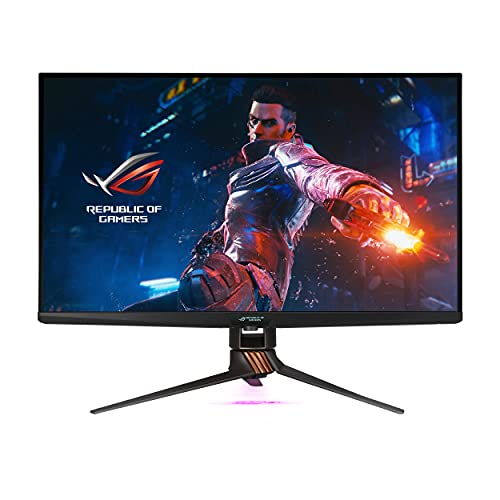
ASUS ROG Swift 32-Inch 4K Mini LED Gaming Monitor
Best for: HDR gaming and professional color work
- Screen Size
- 32 inches
- Resolution
- 3840 x 2160
- Refresh Rate
- 144 Hz
- Sync Technology
- G-SYNC ULTIMATE
- Connectivity
- DisplayPort 1.4 DSC, HDMI 2.0 x3
- Panel Type
- IPS
View on Amazon: ASUS ROG Swift 32-Inch 4K Mini LED Gaming Monitor Affiliate link
This 32-inch 4K IPS monitor uses Mini LED technology with 1152 local dimming zones. It reaches 1400 nits peak brightness and covers 98% of the DCI-P3 color gamut. The 144 Hz refresh rate and G-SYNC ULTIMATE support help reduce screen tearing. You get robust connectivity with three HDMI ports and DisplayPort 1.4. The front OLED bar displays system info or custom icons.
Pros
- 1152-zone Full Array Local Dimming for high contrast
- 1400 nits peak brightness with DisplayHDR 1400 certification
- 98% DCI-P3 color gamut for accurate colors
- G-SYNC ULTIMATE compatibility for smooth gameplay
- OLED front bar for status or custom icons
Cons
- HDMI ports are limited to version 2.0
- Heavy build at 24 pounds
- No mention of USB-C connectivity
Good fit if
- You want high peak brightness for HDR content
- You need G-SYNC ULTIMATE support for NVIDIA GPUs
- You prefer a 32-inch 4K display for gaming
Skip if
- You require HDMI 2.1 for next-gen console features
- You need USB-C connectivity for single-cable setups
- You prefer a lighter monitor under 20 pounds
Verdict: ASUS ROG Swift 32-inch 4K Mini LED delivers exceptional HDR performance with 1400 nits brightness and 1152 dimming zones. It fits gamers who prioritize visual fidelity and G-SYNC ULTIMATE support over modern HDMI standards.
Specifications side by side
| Spec | ASUS ROG Swift 32-Inch 4K Mini LED Gaming Monitor |
|---|---|
| Screen Size | 32 inches |
| Resolution | 3840 x 2160 |
| Refresh Rate | 144 Hz |
| Sync Technology | G-SYNC ULTIMATE |
| Connectivity | DisplayPort 1.4 DSC, HDMI 2.0 x3 |
| Panel Type | IPS |
| Dimensions | 28.6 × 19.8 × 12.1 inches |
| Weight | 24 pounds |
| Color | BLACK |
| Model | PG32UQX |
Frequently asked questions
Is the ASUS ROG Swift PG32UQX good for HDR gaming?
Yes, it delivers exceptional HDR performance. The Mini LED backlighting provides 1400 nits of peak brightness. It also features 1152 dimming zones for precise contrast control. This setup is ideal for gamers who prioritize visual fidelity and deep blacks in supported titles.
Does this monitor support G-SYNC?
Yes, it supports G-SYNC ULTIMATE. This technology ensures smooth gameplay by eliminating screen tearing and stuttering. You must verify that your NVIDIA GPU supports G-SYNC ULTIMATE before purchasing. This specific sync technology is a key feature for this model's performance.
What resolution does the ASUS ROG Swift 32-inch have?
It features a 4K UHD resolution of 3840 x 2160. This high pixel density sharpens text and game details. The 32-inch screen size pairs well with this resolution for users who sit close to the display. You get a clear, crisp image without needing scaling.
Can I use this monitor for professional color work?
Yes, it is suitable for professional color work. The IPS panel type offers wide viewing angles and accurate color reproduction. Combined with the high resolution and HDR capabilities, it fits users who need visual fidelity. The Mini LED technology further enhances color depth and range.
What connectivity options are available on this monitor?
It includes DisplayPort and HDMI connections. You have three HDMI ports for connecting multiple devices. The package includes a DisplayPort 1.4 DSC cable for high-bandwidth signals. A USB 3.1 upstream cable is also provided for peripheral connectivity. These options allow for flexible setup configurations.
How heavy is the ASUS ROG Swift PG32UQX?
The monitor weighs 24 pounds. Its dimensions are 28.6 inches in length, 19.8 inches in width, and 12.1 inches in height. This substantial mass suggests a sturdy internal chassis. You should plan for a robust stand or mount to support this weight securely on your desk.
What is the refresh rate of this 32-inch monitor?
It has a 144Hz refresh rate. This rate works with the 4K resolution to provide smooth motion. The IPS panel ensures consistent image quality across different viewing angles. This combination targets users who need both high resolution and fluid gameplay performance in their gaming or professional workflows.