ASUS TUF 27-Inch 240Hz Fast Review (2026): A Spec-Based Look
As an Amazon Associate we earn from qualifying purchases. Links on this page are affiliate links.
This asus tuf vg279qm5a 27 inch review covers a monitor designed for high-speed gaming. It features a 27-inch Fast IPS panel with a 1920 x 1080 resolution. The display supports a 240Hz refresh rate for smooth motion. ASUS Fast IPS technology enables a 0.3ms response time. This combination targets players who prioritize frame rates over pixel density. The monitor includes G-Sync compatibility and FreeSync Premium. These features help eliminate screen tearing during intense gameplay. You get a straightforward package focused on performance. The build includes standard connectivity and mounting options. This spec-based look explains who benefits from these choices.
What stands out
- 240Hz refresh rate on a 27-inch Fast IPS panel
- 0.3ms minimum response time for sharp visuals
- G-Sync Compatible and FreeSync Premium support
- ASUS Extreme Low Motion Blur Sync technology
- DisplayWidget Center for mouse-based OSD adjustments
Who it fits
Good fit for
This monitor suits competitive gamers who play fast-paced shooters. The 240Hz refresh rate and 0.3ms response time help you track targets quickly. If you use a G-Sync or FreeSync GPU, you get tear-free gameplay. The 27-inch size works well for standard desk setups. You do not need a high-end PC to drive the refresh rate at 1080p. This makes it a practical choice for esports titles. The ELMB Sync feature further reduces blur during rapid movement.
Who should skip it
You should look elsewhere if you need high resolution. The 1080p resolution on a 27-inch screen results in lower pixel density. Text and images may appear less sharp than on 1440p or 4K displays. If you do photo editing or video work, the limited color range of basic IPS panels may not meet your needs. This monitor is built for speed, not image fidelity. You might also prefer a larger screen if you watch movies. The 1080p clarity is best appreciated at closer viewing distances.
Verdict: This is a solid option for competitive gamers who prioritize speed and responsiveness over image sharpness. The high refresh rate and fast response time deliver a smooth experience for fast-paced titles.
Key specs explained
27-inch 1920 x 1080 Fast IPS
This resolution on a 27-inch screen results in a pixel density of approximately 81 PPI. You may notice visible pixelation if you sit close to the display. Fast IPS technology provides wide viewing angles and accurate colors, which benefits both gaming and media consumption. When shopping for ultrawide monitors, you will find higher resolutions like 1440p or 4K are common. This 1080p option prioritizes speed over sharpness, making it suitable for competitive gamers who value refresh rate over image clarity.
240Hz Refresh Rate
The screen updates 240 times per second, reducing motion blur and making fast-moving objects appear smoother. This high refresh rate is ideal for competitive shooters where reaction time matters. You will see a significant improvement over standard 60Hz or 144Hz displays. When comparing ultrawide monitors, note that many prioritize resolution over speed. This spec ensures fluid gameplay, provided your graphics card can output enough frames to utilize the full potential of the display.
0.3ms (min) Response Time
This is the time the panel takes to change pixel colors, minimizing ghosting and trailing artifacts. A 0.3ms response time is exceptionally fast, ensuring that fast actions remain sharp. You will benefit from clearer visuals during rapid camera movements. Compare this to standard IPS panels that may take 4ms to 5ms. This speed helps maintain image integrity during high-frame-rate gaming, reducing the visual smear that can obscure details in intense scenes.
FreeSync Premium, G-Sync Compatible
These technologies synchronize the monitor's refresh rate with the graphics card's frame output to prevent screen tearing. FreeSync Premium ensures a minimum refresh rate of 48Hz, reducing stuttering in slower scenes. G-Sync compatibility allows NVIDIA cards to use the same adaptive sync benefits. You get a seamless experience without the need for vertical sync. When buying ultrawide monitors, check for these certifications to ensure smooth performance across different GPU brands and varying frame rates.
Design and Build Overview
The listing describes the ASUS TUF VG279QM5A as a black monitor with a compact footprint. You get a base width of 24.2 inches and a depth of 7.6 inches. The height reaches 17.8 inches without the stand. The total weight sits at 9.92 pounds. This mass suggests a sturdy internal frame, though the plastic chassis keeps shipping costs manageable. You can place this unit on most standard desks without worrying about stability.
According to the listing, the monitor includes a DisplayPort cable, power cord, and an L-shaped screwdriver. You also receive a quick start guide and a warranty card. The package is straightforward, requiring no extra purchases for basic setup. The absence of a remote or complex mounting hardware keeps the focus on the screen itself. You likely have your own VESA mounts if you prefer wall or arm installation.
Controls are handled via on-screen display buttons, with DisplayWidget Center software allowing mouse-based adjustments. This layout favors users who want precise settings without digging through physical menus. The TUF Gaming branding signals a focus on durability. The matte black finish helps reduce glare in typical gaming environments. You get a clean, functional aesthetic that fits well in modern setups.
Setup and Everyday Use Guide
Setting up this monitor requires connecting the included DisplayPort cable and power cord. The package also contains an L-shaped screwdriver for stand assembly and a quick start guide. You can adjust settings using the on-screen display or the DisplayWidget Center software. This tool lets you change monitor settings with your mouse, which simplifies calibration without navigating physical buttons. The monitor supports FreeSync Premium and is G-Sync compatible. These technologies help eliminate screen tearing and stuttering when your graphics card output matches the display's refresh rate. The 240Hz refresh rate and 0.3ms response time work together to reduce motion blur. ASUS Extreme Low Motion Blur Sync (ELMB SYNC) allows you to use motion blur reduction alongside variable refresh rates. This combination aims to keep fast-paced visuals sharp. The TUF Gaming A.I technology provides features designed to enhance the gaming experience. You can use the included Adobe Creative Cloud subscription for creative tasks, though this offer has an expiration date. The monitor’s dimensions are 24.2 inches wide and 17.8 inches high. It weighs 9.92 pounds, making it stable on most desks. The 1920 x 1080 resolution on a 27-inch screen means pixels are visible if you sit close. For everyday use, the Fast IPS panel offers wide viewing angles. This ensures colors remain consistent even if you view the screen from the side. The black finish matches standard gaming setups. You do not need to worry about complex initial configuration, as the basic connections are straightforward. The software control adds convenience for frequent adjustments.
Before You Buy This Monitor
This ASUS TUF VG279QM5A is built for high refresh rates on a 27-inch screen. You should verify your GPU supports both G-Sync compatibility and FreeSync Premium. Your graphics card must handle 240Hz at 1080p to see the full benefit. The included DisplayPort cable ensures you get the best signal. You may need a sturdy desk, as the base takes up 24.2 inches of width. Cleaning the Fast IPS panel requires a soft, dry cloth. Avoid harsh chemicals to protect the coating. This monitor fits well in a multi-display setup if you prioritize speed over sharpness. It differs from the other 1 options by focusing on motion clarity rather than high resolution. You get a 3-month Adobe Creative Cloud subscription, which is useful for content creators. Keep the L-shaped screwdriver for future stand adjustments. This choice suits competitive gamers who value response time above all else.
Check before you buy
- Verify your GPU supports G-Sync and FreeSync Premium.
- Check if your desk has 24.2 inches of width.
- Ensure your graphics card handles 240Hz at 1080p.
- Confirm you have a DisplayPort cable or use the included one.
The product at a glance
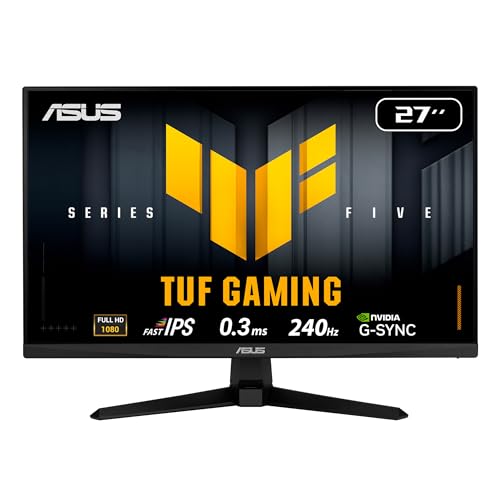
ASUS TUF 27-Inch 240Hz Fast IPS Monitor
Best for: Competitive esports and fast-paced gaming
- Screen Size
- 27 Inch
- Resolution
- 1920 x 1080
- Refresh Rate
- 240Hz
- Panel Type
- Fast IPS
- Response Time
- 0.3ms (min)
- Sync Technology
- FreeSync Premium, G-Sync Compatible
View on Amazon: ASUS TUF 27-Inch 240Hz Fast IPS Monitor Affiliate link
The ASUS TUF VG279QM5A is a 27-inch gaming monitor with a 1080p resolution and 240Hz refresh rate. It uses a Fast IPS panel for a 0.3ms response time. This setup supports FreeSync Premium and G-Sync Compatible for smooth visuals. It is ideal for competitive gamers who prioritize speed over pixel density. The monitor includes ELMB SYNC to reduce motion blur.
Pros
- 240Hz refresh rate for fast-paced gameplay
- 0.3ms minimum response time on Fast IPS panel
- Supports FreeSync Premium and G-Sync Compatible
- ASUS Extreme Low Motion Blur Sync reduces ghosting
Cons
- 1080p resolution on a 27-inch screen lowers pixel density
- No mention of built-in speakers or USB hub
- Limited to 1920 x 1080 resolution for detailed tasks
Good fit if
- You play competitive shooters and need high refresh rates
- You prefer Fast IPS color accuracy and viewing angles
- You want G-Sync compatibility without the premium cost
Skip if
- You need sharp text or detailed graphics for work
- You want a high-resolution display for media consumption
- You require built-in audio or USB connectivity
Verdict: The ASUS TUF VG279QM5A 27-Inch 240Hz Monitor suits competitive gamers who value speed and motion clarity over image sharpness. It delivers fast response times and smooth synchronization for high-frame-rate titles.
Specifications side by side
| Spec | ASUS TUF 27-Inch 240Hz Fast IPS Monitor |
|---|---|
| Screen Size | 27 Inch |
| Resolution | 1920 x 1080 |
| Refresh Rate | 240Hz |
| Panel Type | Fast IPS |
| Response Time | 0.3ms (min) |
| Sync Technology | FreeSync Premium, G-Sync Compatible |
| Connectivity | HDMI, DisplayPort |
| Dimensions | 7.6 × 24.2 × 17.8 inches |
| Weight | 9.92 pounds |
| Color | BLACK |
| Model | VG279QM5A |
Frequently asked questions
Is the ASUS TUF VG279QM5A suitable for competitive esports?
Yes, it is optimized for competitive gaming. The 240Hz refresh rate and G-SYNC compatibility provide smooth motion and reduce tearing. Fast IPS technology ensures quick response times, which helps you track fast-moving targets in high-frame-rate titles effectively.
What resolution does the VG279QM5A display?
It displays a 1920 x 1080 resolution. On a 27-inch screen, this results in a pixel density of approximately 81 PPI. You may notice visible pixelation if you sit close to the display, as the focus is on speed rather than sharpness.
Does this monitor support G-SYNC?
Yes, it features G-SYNC sync technology. This helps eliminate screen tearing and stuttering by synchronizing the refresh rate with your GPU. Ensure your graphics card supports G-Sync compatibility to utilize this feature for a smoother gaming experience.
How heavy is the ASUS TUF 27-inch monitor?
The unit weighs 9.92 pounds. It has a compact footprint with a base width of 24.2 inches and a depth of 7.6 inches. The height reaches 17.8 inches without the stand, making it suitable for standard desk setups.
What panel type does the VG279QM5A use?
It uses a Fast IPS panel. This technology provides wide viewing angles and accurate colors compared to older TN panels. The Fast IPS design also contributes to the monitor's fast response times, which is ideal for fast-paced gaming.
What is included in the box for setup?
The package contains a DisplayPort cable, a power cord, an L-shaped screwdriver, and a quick start guide. You can adjust settings using the on-screen display or the DisplayWidget Center software for convenient configuration without leaving your game.
Can I run this monitor at 240Hz?
Yes, the monitor supports a 240Hz refresh rate. Your graphics card must be capable of handling 240Hz at 1080p to see the full benefit. This high refresh rate ensures smooth motion, which is critical for competitive esports titles.