ASUS 22-Inch 100Hz IPS Gaming Review: Who It Fits and Who Should Skip It
As an Amazon Associate we earn from qualifying purchases. Links on this page are affiliate links.
This asus vp229qf 22 inch 1080p review covers a compact display built for basic desktop use. It features a 21.5-inch IPS panel with 1920x1080 resolution. The screen supports a 100Hz refresh rate, which helps keep motion smooth during gaming or video playback. You get a frameless design that saves desk space. Connectivity includes HDMI and DisplayPort inputs. The monitor also lists Adaptive-Sync to reduce screen tearing. This setup targets users who need a reliable, secondary screen or a simple primary display without complex features.
What stands out
- 100Hz refresh rate with Adaptive-Sync for smoother motion
- IPS panel with 178-degree wide viewing angles
- ASUS DisplayWidget Center app for mouse-based control
- TÜV Rheinland-certified Flicker-free and Low Blue Light technology
- VESA wall-mountable frameless design for space saving
Who it fits
Good fit for
You should consider this monitor if you need a small, affordable screen for office work, coding, or casual gaming. The 100Hz refresh rate is a nice upgrade over standard 60Hz panels, making scrolling and mouse movement feel more fluid. The IPS panel ensures colors remain consistent even if you view the screen from the side. Its compact 21.5-inch size fits well on smaller desks or in tight spaces. The included HDMI and DisplayPort connections cover most modern computers and consoles.
Who should skip it
Skip this model if you require high-end gaming performance or professional color accuracy. The 1080p resolution on a 22-inch screen offers standard pixel density, which may look blocky if you sit very close. It lacks a USB hub, built-in speakers, or height-adjustable stands. The 100Hz refresh rate is modest for competitive shooters where 144Hz or higher is preferred. If you need a large ultrawide display or 4K clarity for detailed creative work, this compact IPS panel will not meet your needs.
Verdict: This monitor offers solid value for basic tasks and casual use thanks to its 100Hz IPS panel. It is a practical choice for small desks but not for high-performance gaming.
ASUS VP229QF Key Specs Explained
Panel Type: IPS
IPS stands for In-Plane Switching. This panel technology provides wide viewing angles of 178 degrees. You can view the screen from the side without losing color accuracy or contrast. This is useful for collaborative work or shared gaming sessions. It differs from VA panels, which have deeper blacks but narrower viewing cones. IPS is the standard for accurate color reproduction in this size class.
Refresh Rate: 100Hz
The monitor updates the image 100 times per second. This is faster than the standard 60Hz found on most office monitors. Higher refresh rates reduce motion blur in fast-paced games or scrolling text. It works with Adaptive-Sync to synchronize the display with your graphics card. This helps prevent screen tearing. You will notice smoother motion compared to standard 60Hz displays, especially in action games.
Resolution: 1920x1080
This is Full HD resolution with 1920 pixels horizontally and 1080 vertically. On a 21.5-inch screen, pixel density is sufficient for clear text and images. It is not suitable for large ultrawide monitors where pixels become visible. This resolution is ideal for compact desks or secondary displays. It matches the native resolution of most standard graphics cards, ensuring smooth performance without demanding high-end hardware.
Sync Technology: Adaptive-Sync
Adaptive-Sync adjusts the refresh rate to match the frame rate of your graphics card. This eliminates screen tearing and stuttering during gameplay. It works with both AMD and NVIDIA graphics cards. You get a smoother visual experience without the need for a fixed refresh rate. This feature is essential for gaming. It ensures that what you see on screen matches the performance of your PC.
Design and Build Quality
The ASUS VP229QF features a compact frameless design that minimizes bezel space. According to the listing, the physical dimensions are 19.3 inches wide, 14.3 inches high, and 8.1 inches deep. The unit weighs 5.6 pounds, making it light enough for easy repositioning. The color is listed as black, providing a neutral look for most desks.
This small footprint is ideal for users with limited desk space. The monitor is VESA wall-mountable, which allows you to save desktop real estate by attaching it to a wall or arm. The frameless style also helps reduce visual distraction, keeping your focus on the content rather than the hardware edges.
Controls are managed via buttons on the monitor, but the listing notes an ASUS DisplayWidget Center app. This software lets you adjust settings using your mouse instead of navigating physical buttons. This layout is practical for users who prefer precise adjustments without reaching for the device. The build prioritizes functionality and space efficiency over premium materials. It is designed to fit into tight corners or secondary monitor setups where size and weight are primary concerns.
Setup and Daily Operation
You connect the display using either the HDMI or DisplayPort input. The package includes an HDMI cable, a power cord, and an L-shaped screwdriver for mounting. If you plan to use the VESA wall-mountable design, the included tools help secure the unit to save desktop space. The physical footprint is compact, measuring 19.3 inches wide and 14.3 inches high. This small size fits well on tight desks or in shared workspaces where space is limited. For control, you can use the physical buttons on the monitor or install the ASUS DisplayWidget Center app. This software lets you adjust settings with your mouse, which is often faster than reaching for the hardware controls. The monitor supports Adaptive-Sync technology. This feature works with compatible graphics cards to reduce screen tearing and stuttering. It pairs with the 100Hz refresh rate to keep motion smooth. You also benefit from Eye Care technologies, including TÜV Rheinland-certified flicker-free and low blue light modes. These features help reduce eye strain during long sessions. The unit comes with a three-year warranty that includes advanced replacement and repair service. You also receive a free one-month Adobe Creative Cloud subscription with the purchase. This offer is valid until August 31, 2028. The quick start guide provides initial setup instructions. Overall, the setup is straightforward, requiring only standard video and power connections. Daily use relies on the IPS panel for consistent colors from wide angles. The 100Hz rate provides a noticeable improvement over standard 60Hz panels for casual gaming and general desktop tasks.
Before You Buy This Monitor
This compact 22-inch display fits well on small desks or in tight office spaces. Because it lacks USB-C connectivity, you will need separate cables for your computer and peripherals. The inclusion of an HDMI cable helps with basic setup, but you should verify your PC has a free DisplayPort or HDMI output. Since the refresh rate is 100Hz, it suits casual gaming and productivity tasks rather than competitive esports. It does not belong in a multi-monitor ultrawide setup, as its size and resolution are too small for that purpose. You should consider this model only if you prioritize eye comfort and space savings over high-speed performance. The IPS panel ensures good color consistency from wide angles, which is helpful for collaborative work. Keep the screen clean with standard microfiber cloths to maintain clarity. This monitor serves as a practical secondary display or a dedicated terminal for specific applications.
Check before you buy
- Check your PC has HDMI or DisplayPort outputs
- Verify desk space fits the 19.3-inch width
- Confirm 100Hz is sufficient for your gaming needs
- Ensure you have separate cables for peripherals
The product at a glance
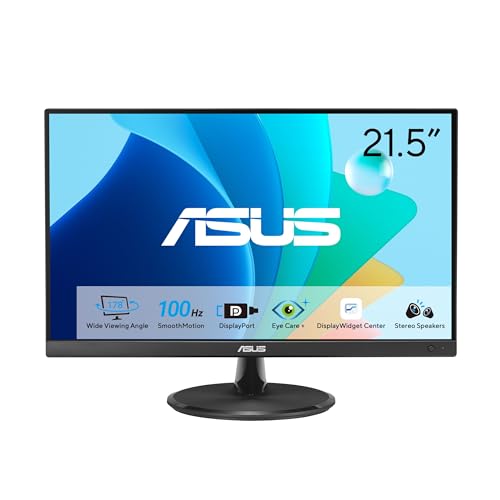
ASUS 22-Inch 100Hz IPS Gaming Monitor
Best for: Compact desks and casual gaming
- Screen Size
- 21.5-inch
- Resolution
- 1920x1080
- Refresh Rate
- 100Hz
- Panel Type
- IPS
- Sync Technology
- Adaptive-Sync
- Connectivity
- HDMI, DisplayPort, VGA
View on Amazon: ASUS 22-Inch 100Hz IPS Gaming Monitor Affiliate link
The ASUS VP229QF is a 21.5-inch Full HD gaming monitor featuring an IPS panel and a 100Hz refresh rate. It supports Adaptive-Sync for tear-free visuals and includes eye care technologies like flicker-free and low blue light modes. The frameless design and VESA mountability help save desk space. You can control settings via the ASUS DisplayWidget Center app. This model suits users needing a compact, clear display for everyday tasks or casual gaming.
Pros
- IPS panel with 178-degree wide viewing angles
- 100Hz refresh rate with Adaptive-Sync support
- ASUS DisplayWidget Center app for mouse control
- TÜV Rheinland-certified flicker-free and low blue light
Cons
- 1080p resolution limits sharpness on larger screens
- 100Hz refresh rate is lower than 144Hz+ competitors
- No USB hub or built-in speakers listed
Good fit if
- You need a compact 22-inch display for limited desk space
- You want an IPS panel for accurate color and wide viewing angles
- You prefer software control over physical buttons
Skip if
- You require 4K resolution for detailed work
- You need high refresh rates for competitive esports
- You want built-in speakers or USB connectivity
Verdict: ASUS 22-Inch 100Hz IPS Monitor is a solid choice for users prioritizing screen real estate and viewing angles over high refresh rates. It fits casual gamers and office workers who value eye comfort and app-based control.
Specifications side by side
| Spec | ASUS 22-Inch 100Hz IPS Gaming Monitor |
|---|---|
| Screen Size | 21.5-inch |
| Resolution | 1920x1080 |
| Refresh Rate | 100Hz |
| Panel Type | IPS |
| Sync Technology | Adaptive-Sync |
| Connectivity | HDMI, DisplayPort, VGA |
| Dimensions | 8.1 × 19.3 × 14.3 inches |
| Weight | 5.6 pounds |
| Size | 22 Inch |
| Color | BLACK |
| Model | VP229QF |
Frequently asked questions
Is this monitor good for competitive gaming?
It is not ideal for high-level competitive play. The 100Hz refresh rate is lower than the 144Hz or 240Hz found in dedicated esports displays. You get smooth motion for casual titles, but fast-paced shooters may benefit from faster panels. It fits casual gamers who prioritize color accuracy over extreme speed.
Does it have built-in speakers?
The provided data does not list built-in speakers. You should plan to use external headphones or speakers for audio. This is common for compact monitors in this size class. You will need to connect your audio source separately to hear sound from games or videos.
Can I mount this monitor on a wall?
Yes, the ASUS VP229QF supports VESA wall mounting. The listing includes an L-shaped screwdriver to help you secure it to a compatible mount. Its compact dimensions and 5.6-pound weight make it easy to position on a desk or attach to a wall arm without requiring heavy-duty hardware.
How wide are the viewing angles?
The IPS panel provides wide viewing angles of 178 degrees. You can view the screen from the side without significant loss of color or contrast. This makes it suitable for collaborative work or if you frequently shift your position while working or gaming at your desk.
What cables are included in the box?
The package includes an HDMI cable and a power cord. You do not need to purchase an HDMI cable separately for basic setup. If you prefer DisplayPort, you will need to provide that cable yourself, as only the HDMI variant is bundled with the monitor.
Is it suitable for small office desks?
Yes, it is excellent for small spaces. The 22-inch size and compact footprint fit well on tight desks. It weighs only 5.6 pounds, making it easy to reposition. The frameless design minimizes bezel space, allowing it to blend neatly into small office environments or home workstations.