Best ASUS Ultrawide Monitors Under $1000: 7 Spec-Based Picks
As an Amazon Associate we earn from qualifying purchases. Links on this page are affiliate links.
Finding the best ASUS ultrawide monitors under $1000 requires careful spec comparison. We analyzed 7 models based on published listing details. The top pick is the ASUS ROG 49-Inch Curved 144Hz Gaming Monitor. It leads due to its 49-inch 1800R curved screen and 144Hz refresh rate, ideal for panoramic gaming. This guide helps you decide which display matches your desk size and performance needs. You will see how resolution, panel type, and connectivity differ across these options. Use this data to choose the right monitor for your setup.
Quick picks
The best fit for you
- You want super ultrawide high-refresh gaming ASUS ROG 49-Inch Curved 144Hz Gaming Monitor Its 49-inch 144Hz curved screen offers panoramic vision for large desks.
- You need compact 4K gaming and color work ASUS PG27UCDM 27-inch 4K QD-OLED The 240Hz QD-OLED panel delivers top-tier speed and accuracy in a 27-inch frame.
- You want fast-paced competitive gaming at 1440p ASUS ROG Swift OLED 27-inch 1440p Its 480Hz refresh rate prioritizes frame rates for competitive play.
Our 7 picks

ASUS ROG 49-Inch Curved 144Hz Gaming Monitor
Best for: super ultrawide high-refresh gaming on large desks
- Screen Size
- 49"
- Resolution
- 3840 x 1080
- Refresh Rate
- 144Hz
- Sync Technology
- FreeSync 2 HDR, Adaptive Sync
- Connectivity
- DisplayPort, HDMI
- Size
- 49 Inch
View on Amazon: ASUS ROG 49-Inch Curved 144Hz Gaming Monitor Affiliate link
This 49-inch curved display gives you an expansive 3840 x 1080 workspace with an 1800R curve. It features a 144Hz refresh rate, FreeSync 2 HDR support, and DisplayPort plus HDMI ports. The panel covers 90% of the DCI-P3 color space. If you want a wide field of view for high-speed gaming without driving a 4K resolution, this panel fits your setup.
Pros
- 3840 x 1080 super ultrawide panel with 1800R curvature
- 144Hz refresh rate paired with FreeSync 2 HDR
- Ergonomic stand with tilt, swivel, and height adjustments
- 90% DCI-P3 color gamut coverage
Cons
- 1080p vertical resolution provides lower pixel density than 1440p or 4K panels
- Heavy 21.4-pound weight and 47-inch length require substantial desk space
- DisplayHDR 400 certification provides entry-level peak luminance
Good fit if
- You want a 49-inch 1800R curved screen for an expansive field of view.
- You need a 144Hz refresh rate with FreeSync 2 HDR for fast-paced gameplay.
- You require ergonomic height, tilt, and swivel adjustability out of the box.
Skip if
- You need sharp 1440p or 4K vertical resolution for high pixel density.
- You have a compact desk unable to support a 47-inch wide, 21.4-pound display.
Verdict: ASUS 49-Inch Curved Ultrawide Gaming Monitor delivers an expansive 1800R curved screen at 144Hz for players prioritizing panoramic vision over high vertical resolution.

ASUS PG27UCDM 27-inch 4K QD-OLED
Best for: compact 4K gaming and color-critical work
- Screen Size
- 26.5-inch
- Resolution
- 3840 x 2160
- Refresh Rate
- 240Hz
- Panel Type
- QD-OLED
- Response Time
- 0.03ms
- Sync Technology
- G-SYNC Compatible
View on Amazon: ASUS PG27UCDM 27-inch 4K QD-OLED Affiliate link
The ASUS PG27UCDM is a 27-inch 4K QD-OLED gaming monitor with a 240Hz refresh rate and 0.03ms response time. It features 4th-gen QD-OLED technology for sharper imagery and a Neo Proximity Sensor to reduce burn-in risk. This model includes DisplayPort 2.1a and 90W USB-C power delivery. It suits gamers and creators who want high refresh rates and accurate color in a compact form factor.
Pros
- 240Hz refresh rate for smooth motion
- 0.03ms response time for fast reactions
- 99% DCI-P3 color gamut with Delta E < 2 accuracy
- Neo Proximity Sensor detects user absence to prevent burn-in
- DisplayPort 2.1a UHBR20 with 80Gbps bandwidth
Cons
- 27-inch screen is smaller than the 32-inch and 49-inch options on this list
- 16.8-pound weight is heavier than many standard 27-inch LCD monitors
- VESA DisplayHDR 400 True Black rating is lower than typical HDR1000+ OLED competitors
Good fit if
- You want a high-refresh-rate 4K display for competitive gaming
- You need accurate color for photo or video editing
- You prefer a compact 27-inch desk footprint
Skip if
- You need a screen larger than 27 inches
- You require a higher peak brightness than 400 nits
- You are on a strict budget under $1000
Verdict: The ASUS PG27UCDM 27-inch 4K QD-OLED delivers top-tier speed and color accuracy for gamers and creators who prioritize a compact size over larger screen real estate.

ASUS 27-Inch 4K QD-OLED Gaming Monitor
Best for: 27-inch 4K gaming and color-critical work
- Screen Size
- 26.5-inch
- Resolution
- 3840 x 2160
- Refresh Rate
- 240Hz
- Panel Type
- QD-OLED
- Response Time
- 0.03ms
- Sync Technology
- G-SYNC Compatible
View on Amazon: ASUS 27-Inch 4K QD-OLED Gaming Monitor Affiliate link
This 27-inch ASUS monitor uses 4th-generation QD-OLED technology to deliver 4K resolution at 240Hz. It features a 0.03ms response time and G-SYNC compatibility for smooth visuals. The panel covers 99% of the DCI-P3 gamut with true 10-bit color. OLED Care Pro and a Neo Proximity Sensor help manage burn-in risks. It is designed for gamers and creators who need high refresh rates and precise color accuracy in a compact form factor.
Pros
- 240Hz refresh rate with 0.03ms response time
- 4K (3840 x 2160) QD-OLED panel
- 99% DCI-P3 color gamut and Delta E < 2
- OLED Care Pro with Neo Proximity Sensor
- VESA DisplayHDR 400 True Black compliance
Cons
- 27-inch screen is smaller than the 32-inch and 49-inch options on this list
- 16.4-pound weight is heavier than the 24.1-inch width suggests for a 27-inch panel
- VESA DisplayHDR 400 rating is lower than typical HDR standards for professional editing
Good fit if
- You want a 27-inch display for a desk with limited space
- You need 4K resolution combined with a 240Hz refresh rate
- You prioritize color accuracy with 99% DCI-P3 coverage
Skip if
- You require a larger 32-inch or 49-inch screen size
- You need higher brightness levels than VESA DisplayHDR 400 provides
- You prefer a lighter monitor for frequent transport
Verdict: ASUS 27-inch 4K 240Hz QD-OLED fits users who want high-end 4K speed in a compact 27-inch frame. It suits those who value color precision and burn-in protection features over larger screen real estate.

ASUS 32-Inch 4K QD-OLED Gaming Monitor
Best for: Users wanting 32-inch 4K OLED performance
- Screen Size
- 32-inch
- Resolution
- 3840 x 2160
- Refresh Rate
- 240Hz
- Panel Type
- QD-OLED
- Response Time
- 0.03ms (GTG)
- Sync Technology
- G-SYNC Compatible
View on Amazon: ASUS 32-Inch 4K QD-OLED Gaming Monitor Affiliate link
This ASUS ROG PG32UCDM is a 32-inch 4K QD-OLED gaming monitor. It features a 240Hz refresh rate and a 0.03ms response time. The display covers 99% DCI-P3 with VESA DisplayHDR 400 True Black compliance. A custom heatsink and graphene film manage heat to reduce burn-in risk. It includes G-SYNC Compatible support and 90W USB-C power delivery. This model suits users seeking high-end OLED performance in a compact size.
Pros
- 32-inch 4K QD-OLED panel with 240Hz refresh rate
- 0.03ms (GTG) response time for fast gaming
- 99% DCI-P3 color gamut and true 10-bit depth
- Custom heatsink and graphene film for heat management
- 90W USB-C power delivery for single-cable setup
Cons
- VESA DisplayHDR 400 rating is lower than the 1000+ ratings found on other OLED models in this guide
- 32-inch screen size is smaller than the 49-inch and 27-inch options available from ASUS in this price range
Good fit if
- You want a high refresh rate OLED monitor with a 32-inch form factor
- You need 90W USB-C power delivery for your laptop or console
- You prioritize color accuracy with a 99% DCI-P3 gamut
Skip if
- You require a higher brightness rating than VESA DisplayHDR 400 True Black
- You prefer a larger screen size such as 49-inch or 27-inch
- You are looking for a monitor with a higher resolution than 4K UHD
Verdict: ASUS PG32UCDM 32-inch 4K 240Hz QD-OLED delivers premium OLED specs in a compact 32-inch package. It fits users who want fast 240Hz gaming and accurate colors without needing a massive screen.

ASUS ProArt 32-Inch 4K Mini-LED Monitor
Best for: professional color grading and HDR content creation
- Screen Size
- 32-inch
- Resolution
- 4K UHD
- Connectivity
- USB-C, HDMI
- Dimensions
- 28.6 × 18.7 × 9.65 inches
- Weight
- 27.1 pounds
View on Amazon: ASUS ProArt 32-Inch 4K Mini-LED Monitor Affiliate link
The ASUS ProArt PA32UCR-K is a 32-inch 4K UHD monitor designed for professional color work. It uses mini-LED backlighting to reach 1,000 nits of peak brightness. The panel covers 99.5% of the Adobe RGB color space with a delta-E value under 1. It includes a USB-C port and an X-rite i1 calibrator. This display suits users who need high brightness and extreme color fidelity for creative tasks.
Pros
- 32-inch 4K UHD resolution
- 1,000 cd/m2 peak brightness via mini-LED
- 99.5% Adobe RGB color coverage
- Delta-E < 1 color accuracy
- Includes X-rite i1 Calibrator
Cons
- 32-inch size is smaller than the 49-inch and 32-inch 4K OLED options on this list
- Resolution is 4K UHD, which is lower than the 4K QD-OLED and Tandem QD-OLED panels in the guide
- Weight is 27.1 pounds, making it heavier than the 27-inch models
Good fit if
- You need 99.5% Adobe RGB coverage for professional color grading
- You require 1,000 nits of peak brightness for HDR work
- You want a 32-inch screen with USB-C connectivity
Skip if
- You want a 49-inch ultrawide display
- You need a refresh rate higher than standard for fast-paced gaming
- You prefer a lighter monitor under 20 pounds
Verdict: ASUS ProArt 32-Inch 4K Mini-LED Monitor delivers precise color accuracy and high brightness for creative professionals. It fits users who prioritize Adobe RGB coverage and mini-LED performance over high refresh rates or larger screen real estate.

ASUS 32-Inch 4K Mini-LED IPS Gaming Monitor
Best for: HDR gaming and color-critical tasks
- Screen Size
- 32"
- Resolution
- 3840 x 2160
- Refresh Rate
- 144Hz
- Panel Type
- Mini-LED IPS
- Sync Technology
- G-SYNC ULTIMATE
- Connectivity
- DisplayPort 1.4 DSC, HDMI 2.0, USB
View on Amazon: ASUS 32-Inch 4K Mini-LED IPS Gaming Monitor Affiliate link
This 32-inch 4K monitor uses a Mini-LED IPS panel with 144Hz refresh rate. It features 1152 local dimming zones and peaks at 1400 nits for strong HDR performance. G-SYNC Ultimate ensures smooth gameplay. You get full connectivity with DisplayPort 1.4 DSC and three HDMI 2.0 ports. The wide 98% DCI-P3 color gamut suits creative work and gaming.
Pros
- 3840 x 2160 resolution on a 32-inch screen
- 1152 FALD zones for 1400 nits peak brightness
- G-SYNC Ultimate sync technology
- 98% DCI-P3 color gamut coverage
Cons
- 144Hz refresh rate is lower than 240Hz or 480Hz alternatives
- 32-inch size is smaller than 49-inch ultrawide options
- HDMI ports are limited to version 2.0
Good fit if
- You want high-end HDR brightness for gaming
- You need G-SYNC Ultimate compatibility
- You prefer a 4K resolution over ultrawide
Skip if
- You need a refresh rate above 144Hz
- You require a 49-inch ultrawide display
- You want HDMI 2.1 connectivity
Verdict: ASUS PG32UQX 32-inch 4K Mini-LED delivers intense HDR brightness and precise color for gamers who prioritize visual fidelity over maximum speed or ultrawide aspect ratios.
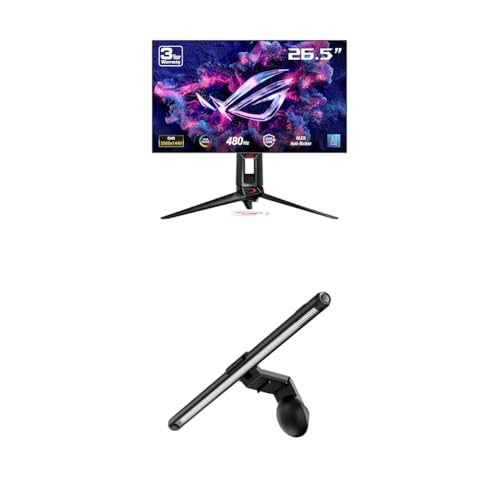
ASUS ROG Swift OLED 27-inch 1440p
Best for: Fast-paced competitive gaming at 1440p
- Screen Size
- 26.5"
- Resolution
- 1440P QHD
- Refresh Rate
- 480Hz
- Panel Type
- WOLED
- Response Time
- 0.03ms
View on Amazon: ASUS ROG Swift OLED 27-inch 1440p Affiliate link
This is a 27-inch OLED gaming monitor with a 1440p resolution and a 480Hz refresh rate. It features a 0.03ms response time for fast visuals. The display includes an integrated Aura monitor light bar with three lighting modes. It targets gamers who want high speed and sharp image quality in a compact size.
Pros
- 27-inch QHD 1440p resolution
- 480Hz refresh rate
- 0.03ms response time
- Integrated Aura monitor light bar
- OLED panel technology
Cons
- 27-inch screen size is smaller than the 32-inch and 49-inch options on this list
- 1440p resolution is lower than the 4K models included in this guide
- 480Hz refresh rate is lower than the 240Hz refresh rates found on some other OLED picks
Good fit if
- You prefer a 27-inch display size
- You want the highest refresh rate available for competitive gaming
- You value integrated desk lighting with your monitor
Skip if
- You require a 4K resolution for higher pixel density
- You need a larger 32-inch or 49-inch screen
- You are looking for a standard IPS or VA panel instead of OLED
Verdict: ASUS ROG Swift OLED 27-inch 1440p delivers top-tier speed with its 480Hz refresh rate. It fits you best if you prioritize frame rates and a compact 27-inch footprint over higher resolution or larger screen real estate.
Specifications side by side
| Spec | ASUS ROG 49-Inch Curved 144Hz Gaming Monitor | ASUS PG27UCDM 27-inch 4K QD-OLED | ASUS 27-Inch 4K QD-OLED Gaming Monitor | ASUS 32-Inch 4K QD-OLED Gaming Monitor | ASUS ProArt 32-Inch 4K Mini-LED Monitor | ASUS 32-Inch 4K Mini-LED IPS Gaming Monitor | ASUS ROG Swift OLED 27-inch 1440p |
|---|---|---|---|---|---|---|---|
| Screen Size | 49" | 26.5-inch | 26.5-inch | 32-inch | 32-inch | 32" | 26.5" |
| Resolution | 3840 x 1080 | 3840 x 2160 | 3840 x 2160 | 3840 x 2160 | 4K UHD | 3840 x 2160 | 1440P QHD |
| Refresh Rate | 144Hz | 240Hz | 240Hz | 240Hz | not stated | 144Hz | 480Hz |
| Panel Type | not stated | QD-OLED | QD-OLED | QD-OLED | not stated | Mini-LED IPS | WOLED |
| Response Time | not stated | 0.03ms | 0.03ms | 0.03ms (GTG) | not stated | not stated | 0.03ms |
| Sync Technology | FreeSync 2 HDR, Adaptive Sync | G-SYNC Compatible | G-SYNC Compatible | G-SYNC Compatible | not stated | G-SYNC ULTIMATE | not stated |
| Connectivity | DisplayPort, HDMI | DisplayPort 2.1a, USB-C, HDMI 2.1 | not stated | USB-C | USB-C, HDMI | DisplayPort 1.4 DSC, HDMI 2.0, USB | not stated |
| Size | 49 Inch | not stated | not stated | 9.40 | not stated | not stated | not stated |
| Dimensions | 47 × 20.8 × 13.6 inches | 8.6 × 24 × 21.6 inches | 6.6 × 24.1 × 20.1 inches | 21 × 38 × 49 inches | 28.6 × 18.7 × 9.65 inches | 28.6 × 19.8 × 12.1 inches | not stated |
| Weight | 21.4 pounds | 16.8 pounds | 16.4 pounds | 19.4 pounds | 27.1 pounds | 24 pounds | not stated |
| Color | Black | BLACK | BLACK | BLACK | BLACK | BLACK | not stated |
| Model | XG49VQ | PG27UCDM | XG27UCDMG | PG32UCDM | PA32UCR-K | PG32UQX | PG27AQDP |
If you want hardware capable of powering these ultrawide resolutions, compare the best ASUS graphics cards under 1000.
How to choose the right one
-
Match size to desk space
Screen size determines how much desk area you need. The 49-inch model requires a wide surface for its 47-inch width. Smaller 27-inch and 32-inch options fit tighter setups. Measure your desk before buying. A larger screen does not always mean better immersion if it overwhelms your view. Check the physical dimensions in the specs. Ensure your monitor stand fits on your desk without crowding other items. Proper sizing improves comfort during long sessions.
-
Choose refresh rate for speed
Refresh rate affects motion smoothness. If you play competitive shooters, look for 240Hz models like the PG32UCDP. This high rate reduces blur. Standard 144Hz panels suit most gamers well. Slower rates are rare in this price range. Higher refresh rates demand more from your graphics card. Verify your GPU can drive the resolution at that speed. Fast refresh rates make aiming feel more precise. Check the specs to see if the panel supports the speed you need for your favorite games.
-
Select panel type for contrast
Panel type defines image quality. OLED and QD-OLED panels offer perfect blacks and infinite contrast. This makes dark scenes look detailed. The PG32UCDP and XG32UCWMG use OLED technology. Mini-LED IPS panels provide high brightness for HDR content. They are good for creative work. Standard IPS panels lack deep contrast. Choose OLED for gaming immersion. Choose Mini-LED for bright room visibility. Your choice depends on whether you prioritize contrast or peak brightness for your environment.
-
Check resolution for clarity
Resolution impacts text sharpness and image detail. 4K UHD provides crisp visuals on 27-inch and 32-inch screens. The 49-inch model uses 1080p resolution. This lower resolution on a large screen can look pixelated. 4K is better for productivity and close viewing. Higher resolution requires more graphics power. Ensure your system can handle 4K gaming. Check the resolution spec carefully. Do not assume all large screens are high resolution. Match the resolution to your viewing distance and usage needs.
-
Verify sync technology compatibility
Sync technology prevents screen tearing. G-SYNC compatibility ensures smooth gameplay with NVIDIA cards. Most top picks feature G-SYNC. This is crucial for competitive gaming. Check if your graphics card supports the sync tech. Mismatched sync can cause stuttering. The PG32UCDP and XG32UCWMG include G-SYNC. This adds value for NVIDIA users. Verify your hardware supports the feature. Sync technology is a key spec for fluid motion. Do not ignore this when choosing a monitor for gaming.
Frequently asked questions
Which ASUS ultrawide monitor offers the largest screen size?
The ASUS ROG 49-Inch Curved 144Hz Gaming Monitor provides the largest display at 49 inches. It features a 144Hz refresh rate and FreeSync technology for smooth gaming. The screen curves at 1800R for immersive viewing. This model measures 47 inches in length and weighs 21.4 pounds, requiring significant desk space.
Does ASUS offer a 240Hz ultrawide or large format monitor?
The ASUS PG27UCDM and the standard ASUS 27-inch 4K QD-OLED both reach 240Hz. These models use QD-OLED panels for rapid response times. They also include G-SYNC compatibility. While not ultrawide in aspect ratio, their compact 27-inch size fits users prioritizing speed over horizontal screen real estate.
What is the difference between OLED and Mini-LED panels?
OLED panels, like those in the PG27UCDM, offer infinite contrast and fast 240Hz refresh rates. Mini-LED models, such as the ProArt 32-Inch 4K, provide high brightness for HDR content creation. The Mini-LED option focuses on Adobe RGB coverage and color accuracy rather than the ultra-high refresh rates found in OLED variants.
Which ASUS monitor is best for professional color grading?
The ASUS ProArt 32-Inch 4K Mini-LED Monitor is designed for creative professionals. It emphasizes precise color accuracy and high brightness levels. The panel supports Adobe RGB coverage, making it ideal for HDR content creation. It lacks high refresh rates, focusing instead on visual fidelity for work tasks.
How wide is the 49-inch ASUS gaming monitor?
The ASUS ROG 49-Inch Curved monitor measures 47 inches in length. Its width is listed as 20.8 inches, and it stands 13.6 inches tall. Weighing 21.4 pounds, it requires a substantial desk surface. The 1800R curve enhances the panoramic 1080p resolution experience.
Does the 32-inch ASUS OLED monitor support USB-C?
Yes, the ASUS PG32UCDM 32-inch 4K QD-OLED includes USB-C connectivity. This model delivers 240Hz refresh rates and G-SYNC compatibility. It fits users seeking premium OLED performance in a compact 32-inch package. The USB-C port allows for convenient connection options alongside DisplayPort and HDMI.
What is the highest refresh rate available on these ASUS monitors?
The ASUS ROG Swift OLED 27-inch 1440p offers the highest refresh rate at 480Hz. This model targets competitive gamers who prioritize frame rates. It features a 1440p OLED panel in a compact 27-inch frame. Other models like the PG27UCDM reach 240Hz, but the Swift OLED leads in speed.