CRUA 27" 4K UHD 60Hz Review (2026): A Spec-Based Look
As an Amazon Associate we earn from qualifying purchases. Links on this page are affiliate links.
This crua 27 4k UHD 60hz review examines a 27-inch display built for productivity and creative work. The monitor features a 3840×2160 resolution on an IPS panel, delivering sharp text and detailed images. It also includes USB-C connectivity for simplified cable management. You get a frameless silver aluminum design that fits modern desks. The panel covers 120% sRGB and 98% DCI-P3 for accurate color reproduction. With AMD FreeSync and built-in speakers, it handles daily tasks and casual media consumption. This listing focuses on visual clarity and ergonomic flexibility rather than high-speed gaming performance.
What stands out
- 27-inch IPS panel with 3840×2160 resolution for crisp visuals
- USB Type-C port alongside dual HDMI 2.0 and dual DP 1.2 inputs
- 120% sRGB and 98% DCI-P3 color gamut coverage
- Height-adjustable stand with 125mm lift and tilt adjustment
- Built-in speakers and 178° viewing angles
Who it fits
Good fit for
This monitor suits remote workers, programmers, and designers who need screen real estate and color accuracy. The 4K resolution helps with spreadsheets, coding, and video calls. The USB-C port simplifies connections for laptops. The height-adjustable stand supports ergonomic setups for long workdays. If you stream 4K content or do light photo editing, the wide color gamut and IPS panel provide consistent, rich visuals. The frameless design keeps your workspace looking clean and professional without distracting bezels.
Who should skip it
Gamers seeking high frame rates should look elsewhere. This panel runs at 60Hz, which limits competitive gaming performance. It lacks high refresh rates found in dedicated gaming monitors. If you play fast-paced shooters or racing games, the 60Hz cap may feel restrictive. The AMD FreeSync helps with tearing but does not increase smoothness beyond the base rate. Buyers needing more than 60Hz should consider the WQHD 165Hz variation or a different brand focused on high refresh rates.
Verdict: This is a solid choice for productivity and creative tasks that prioritize resolution and color accuracy over speed. It delivers sharp visuals and flexible connectivity for everyday users.
Key specs explained for CRUA 27
Resolution: 3840×2160
This 4K UHD resolution provides four times the pixel count of standard 1080p displays. You get sharper text and finer image details, which improves readability for spreadsheets and coding. It offers more desktop space for multitasking. While ultrawide monitors prioritize horizontal width, this square aspect ratio focuses on vertical clarity. You benefit from crisp visuals in creative work and media consumption without the need for scaling software.
Panel Type: IPS
In-Plane Switching technology ensures wide viewing angles and consistent color reproduction. You see accurate colors even when looking at the screen from the side. This is essential for designers and anyone sharing content with others. Unlike VA panels found in some ultrawide monitors, IPS avoids darkening shadows when viewed off-center. You get reliable performance for color-critical tasks and general productivity where color accuracy matters.
Refresh Rate: 60Hz
The screen updates sixty times per second, which is standard for office and creative work. You get smooth scrolling and responsive cursor movement for daily tasks. This rate is lower than the 144Hz or higher found in gaming monitors. You will not experience the ultra-smooth motion required for competitive fast-paced games. It is sufficient for web browsing, video calls, and casual gaming where high frame rates are not critical.
Sync Technology: AMD FreeSync
This feature synchronizes the monitor's refresh rate with the graphics card's output to reduce screen tearing. You get smoother motion during gaming or video playback without stuttering. It works with AMD graphics cards and some NVIDIA cards. While it does not offer the high refresh rates of gaming monitors, it helps stabilize visuals for casual use. You benefit from a more comfortable viewing experience during extended sessions without visual artifacts.
Connectivity: USB Type-C
This port allows for video, data, and power delivery through a single cable. You can connect your laptop with minimal clutter on your desk. It simplifies setup for work-from-home environments. Many ultrawide monitors lack USB-C, requiring separate cables for power and video. You gain convenience and cleaner cable management. Check your laptop's USB-C capabilities to ensure it supports video output and charging for full functionality.
Design and build analysis
According to the listing, this monitor features a silver aluminum housing with a frameless design. The chassis uses a sleek metal finish that adds a professional look to any workstation. You get a height-adjustable stand that lifts the screen up to 125mm. This allows you to position the display at eye level, which helps reduce neck strain during long work sessions. The stand also offers tilt adjustment from negative seven degrees to positive fifteen degrees.
The physical dimensions are listed as 24.2 inches wide and 19.8 inches high. The depth is 6.29 inches. These measurements indicate a compact footprint that fits well on standard desks. The frameless bezel design maximizes the visible screen area, which is useful for multitasking or using multiple monitors side by side. You can also mount the display on a wall using a 100x100mm VESA pattern. This saves desk space and keeps your workspace minimal.
The build choices suggest this unit is intended for home offices and creative desks. The metal housing and adjustable stand prioritize durability and comfort. The frameless look helps the monitor blend into modern interiors. You get a sturdy base that supports the 27-inch panel without wobbling. The design focuses on practical ergonomics rather than flashy gaming aesthetics.
Setup and daily operation details
You connect this monitor using the available ports on the back panel. The listing specifies a USB Type-C port, two HDMI 2.0 inputs, and two DisplayPort 1.2 connections. You also have access to a 3.5mm audio jack. This variety allows you to link the display to laptops, desktop PCs, or other peripherals without needing extra adapters. The USB-C connection can simplify your desk by potentially handling both video and power delivery, depending on your source device.
For daily use, the 3840×2160 resolution on the 27-inch IPS panel provides ample screen real estate. You can arrange multiple windows side by side for spreadsheets, coding, or video calls. The 60Hz refresh rate paired with AMD FreeSync helps maintain smooth motion. This reduces screen tearing when you scroll through documents or stream 4K content. It is suitable for casual gaming and general productivity tasks.
The stand allows you to adjust the height by up to 125mm and tilt the screen between -7° and 15°. You can position the monitor at a comfortable viewing angle to reduce neck strain. The unit also supports 100×100mm wall mounting if you prefer to save desk space. Built-in speakers provide audio output, keeping your workspace clutter-free. The monitor includes low blue light and flicker-free technology to help minimize eye fatigue during long work sessions.
Before You Buy This Monitor
You should verify that your laptop or desktop supports the USB-C port for both power delivery and video output. If your device lacks this, you will need to use the HDMI 2.0 or DisplayPort 1.2 connections instead. The monitor includes built-in speakers, but they are basic. For better audio, you may want external speakers or headphones. The stand allows height adjustment up to 125mm, which helps with ergonomics. However, it does not swivel or rotate. You should check your desk space to ensure it fits the 24.2-inch width. This model is designed for productivity and creative work, not high-refresh-rate gaming. If you need fast motion clarity for competitive games, you should look at the 165Hz variant in this lineup. Keep the screen clean with a microfiber cloth. Avoid harsh chemicals. This monitor fits well in home offices where sharp text and accurate colors matter most.
Check before you buy
- Check if your laptop supports USB-C video and power output.
- Ensure your desk fits the 24.2-inch width and 19.8-inch height.
- Verify you need 60Hz refresh rate for your workflow.
- Confirm you do not require swivel or rotation adjustments.
The product at a glance
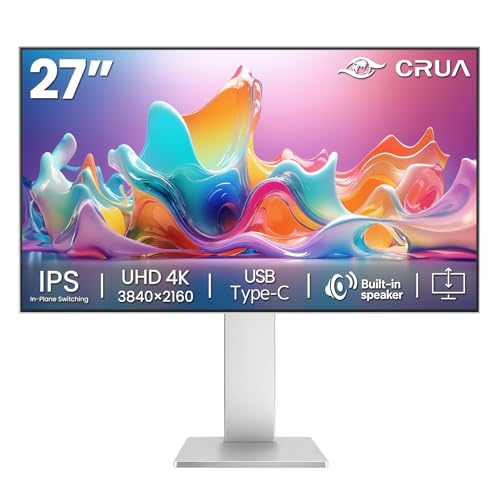
CRUA 27-Inch 4K UHD IPS USB-C Monitor
Best for: Productivity and color-accurate creative work
- Screen Size
- 27"
- Resolution
- 3840×2160
- Refresh Rate
- 60Hz
- Panel Type
- IPS
- Sync Technology
- AMD FreeSync
- Connectivity
- USB Type-C, dual HDMI 2.0, dual DP 1.2
View on Amazon: CRUA 27-Inch 4K UHD IPS USB-C Monitor Affiliate link
The CRUA 27-inch monitor delivers 4K UHD resolution on an IPS panel with 60Hz refresh rate. It covers 120% sRGB and 98% DCI-P3 for accurate colors. AMD FreeSync reduces tearing. Connectivity includes USB-C, dual HDMI 2.0, and dual DP 1.2. The stand adjusts height by 125mm. It suits productivity tasks and creative work rather than fast-paced gaming.
Pros
- 4K UHD 3840x2160 resolution for sharp text and detail
- 120% sRGB and 98% DCI-P3 color gamut coverage
- USB-C and dual HDMI 2.0 connectivity options
- Height-adjustable stand with 125mm vertical movement
Cons
- 60Hz refresh rate limits smoothness for fast gaming
- No mention of HDR support or high brightness
- Built-in speakers likely lack audio depth
Good fit if
- You need high resolution for detailed work or media
- You want accurate color reproduction for creative tasks
- You prefer a height-adjustable stand for ergonomics
Skip if
- You require high refresh rates for competitive gaming
- You need HDR for enhanced visual contrast
- You want a larger screen for multitasking
Verdict: CRUA 27" 4K 60Hz IPS Monitor is a solid choice for professionals and creators who prioritize color accuracy and sharp visuals over motion smoothness. It fits well in home offices where ergonomics and connectivity matter more than gaming performance.
Specifications side by side
| Spec | CRUA 27-Inch 4K UHD IPS USB-C Monitor |
|---|---|
| Screen Size | 27" |
| Resolution | 3840×2160 |
| Refresh Rate | 60Hz |
| Panel Type | IPS |
| Sync Technology | AMD FreeSync |
| Connectivity | USB Type-C, dual HDMI 2.0, dual DP 1.2 |
| Dimensions | 6.29 × 24.2 × 19.8 inches |
| Size | 27Inch-Silver |
| Color | Silver |
| Model | CR270HG |
Frequently asked questions
Is the CRUA 27 suitable for gaming?
This monitor is not ideal for fast-paced gaming. It features a 60Hz refresh rate, which limits motion smoothness. The 27-inch IPS panel prioritizes color accuracy and sharp visuals over speed. You should look elsewhere if you play competitive shooters. It fits better in a home office where productivity matters more than frame rates.
Does this monitor support USB-C power delivery?
The listing confirms the presence of a USB-C port. This allows you to connect a single cable for video and data. You can check if your laptop supports power delivery through this port. It helps simplify cable management on your desk. You still have HDMI and DisplayPort options for other devices.
What is the pixel density on a 27-inch 4K screen?
A 27-inch 4K UHD display offers high pixel density. This results in sharp text and clear images without visible pixels. The 3840×2160 resolution provides four times the detail of 1080p. You get better readability for spreadsheets and coding. This makes it a strong choice for creative work and detailed design tasks.
Can I adjust the height of the stand?
Yes, the monitor includes a height-adjustable stand. You can lift the screen to find a comfortable viewing angle. This helps reduce neck strain during long work sessions. The chassis features a silver aluminum housing with a frameless design. This ergonomic feature adds to its professional appearance on any workstation.
What input ports are available on the back?
You get a variety of connection options. The listing specifies one USB Type-C port. You also have two HDMI 2.0 inputs and two DisplayPort 1.2 connections. A 3.5mm audio jack is included for headphones or speakers. This setup allows you to connect multiple devices easily.
Is the IPS panel good for color work?
The IPS panel type is well-suited for color-accurate creative work. It delivers sharp visuals and detailed images. This makes it a solid choice for professionals who prioritize color fidelity. The 60Hz refresh rate is sufficient for static content. You get reliable performance for design and photo editing tasks.
What are the physical dimensions of the monitor?
The monitor measures 24.2 inches in width. The height is 19.8 inches with the stand. The length or depth is 6.29 inches. These dimensions fit well in standard home offices. The silver finish and frameless design contribute to a sleek look. You can place it on most desks without taking up too much space.