Dell 38-Inch IPS Black Curved Review (2026): A Spec-Based Look
As an Amazon Associate we earn from qualifying purchases. Links on this page are affiliate links.
This dell u3824dw 37 5 inch 21 9 USB c review focuses on a display that prioritizes professional clarity and connectivity. The Dell 38-Inch IPS Black Curved Monitor offers a 3840x1600 resolution on a 37.5-inch screen. Its 21:9 aspect ratio provides a wide viewing area for multitasking. The IPS Black panel delivers a 2000:1 contrast ratio, which is unusual for this panel type. It also includes a robust USB-C hub with 90W power delivery. This setup is designed for users who need a single-cable solution for their workstation.
What stands out
- IPS Black panel with 2000:1 contrast ratio for deeper blacks
- 90W USB-C power delivery for single-cable laptop connectivity
- 98% DCI-P3 color coverage for professional accuracy
- Integrated 2.5GbE Ethernet port with advanced networking features
- Auto KVM switch for seamless dual-PC control
Who it fits
Good fit for
You should consider this monitor if you work with dual computers and need to switch between them without changing peripherals. The Auto KVM feature handles this automatically. It also suits video editors and designers who require 98% DCI-P3 coverage and high contrast. The 90W USB-C charging is ideal for laptop users who want a clean desk setup. The built-in 2.5GbE network port is useful for offices that rely on wired connections for stability and speed.
Who should skip it
You should look elsewhere if you need a standard 16:9 aspect ratio for traditional gaming or media consumption. The 21:9 format may not fill your screen expectations. This model is also not suitable if you require wireless connectivity, as it lacks Wi-Fi and relies on the integrated RJ45 Ethernet port. If you prefer a flat display, note that this screen has a 2300R curvature. Users who do not need a hub or high contrast may find the premium specs unnecessary for basic tasks.
Verdict: The Dell U3824DW is a specialized tool for professionals who value high contrast and efficient multi-device management. Its combination of IPS Black technology and USB-C hub capabilities makes it a strong choice for specific workstation setups.
Dell U3824DW Key Specs Explained
Panel Type: IPS Black
This panel technology delivers a 2000:1 contrast ratio, which is double the standard for typical IPS screens. You get deeper blacks and richer colors without the viewing angle issues found in VA panels. This is ideal for creative work where color accuracy matters, such as photo editing or video grading. It offers better clarity than standard IPS monitors while maintaining wide viewing angles for shared screens.
Resolution: 3840x1600
This WQHD+ resolution provides more vertical space than standard 16:9 4K displays. You get sharper text and more screen real estate for multitasking. The 21:9 aspect ratio allows you to view two full desktops side-by-side comfortably. This is perfect for productivity workflows, coding, or managing multiple documents without constant window switching compared to narrower ultrawide formats.
Screen Size: 37.5"
This large diagonal measurement creates an expansive canvas that fills your peripheral vision. The 2300R curvature matches the natural curve of your eyes, reducing glare and eye fatigue during long sessions. It immerses you in content more than flat panels. This size suits desk setups with enough depth, offering a premium, all-in-one workspace experience for professionals who need maximum visual area.
Connectivity: USB-C, HDMI, DisplayPort
USB-C support allows you to connect a laptop with a single cable for video, data, and up to 90W power delivery. This simplifies your desk by reducing cable clutter. HDMI and DisplayPort inputs ensure compatibility with desktop PCs and gaming consoles. The integrated hub and Ethernet port further streamline your workspace, making it a central connection point for various devices.
Design and Build Quality
The listing describes the Dell U3824DW as a substantial piece of hardware. It measures 42 inches in width, 21 inches in depth, and 9 inches in height. The unit weighs 29.3 pounds. This mass suggests a sturdy base that can support the large 37.5-inch panel without wobbling. You will need a desk with enough surface area to accommodate its footprint. The finish is listed as Platinum Silver, giving it a professional look that fits well in office environments.
According to the listing, the build is eco-conscious. The casing uses 85% post-consumer recycled plastics and 90% recycled aluminum. This choice reduces environmental impact while maintaining durability. The monitor features a 2300R curve, which helps minimize glare and eye fatigue during long sessions. The design includes fully adjustable ergonomics, allowing you to tilt, swivel, and adjust the height. This flexibility ensures you can position the screen for optimal comfort.
Connectivity ports are integrated into the chassis. You get USB-C, USB-A, HDMI, DisplayPort, and an RJ45 Ethernet jack. The placement of these ports keeps cables organized. The integrated dual 9W speakers reduce the need for external audio devices. This layout supports a clean workspace. The monitor is designed for users who value a stable, adjustable, and sustainable build. It suits those who need a reliable display for multitasking and professional work.
Setup and Everyday Use Guide
Setting up the Dell U3824DW involves connecting your devices to its versatile port selection. You can use a single USB-C cable to transmit video, data, and up to 90W of power delivery to your computer. This simplifies your desk by reducing cable clutter. The monitor also includes multiple USB-A and USB-C ports, along with HDMI and DisplayPort inputs, allowing you to connect peripherals and secondary devices easily. For networking, the integrated RJ45 Ethernet port supports wired connections, featuring PXE boot and Wake on LAN capabilities for efficient IT management.
Daily use is streamlined by the Auto KVM feature. You can connect two separate PCs and switch control between them automatically. Alternatively, you can manage both systems using one keyboard and mouse. This is particularly useful if you work with multiple machines. The included Dell Display Manager software offers an Easy Arrange feature to help you organize windows efficiently across the 3840x1600 resolution.
Ergonomics play a key role in your daily comfort. The stand allows for tilt, swivel, and height adjustments, letting you position the 2300R curved screen to reduce glare and eye fatigue. Built-in dual 9W speakers provide basic audio output, so you may not need external speakers for simple tasks. The 100% sRGB and 98% DCI-P3 color coverage ensures that visuals remain accurate and vibrant for professional work, while ComfortView Plus helps manage blue light exposure during long sessions.
Before You Buy This Monitor
The Dell U3824DW is a substantial display that demands careful desk planning. You must ensure your workspace can support its 42-inch width and 29.3-pound weight. While the single USB-C cable simplifies connections for compatible laptops, verify that your devices support the required video and data protocols over USB-C. If you use a desktop PC, you will need to manage multiple cables for HDMI or DisplayPort inputs, as the hub does not replace all connectivity needs for non-USB-C peripherals. Regularly clean the IPS Black panel with appropriate materials to maintain its high contrast ratio. This monitor suits professionals who need color accuracy and multitasking features. It fits well alongside other wide-format options if you prioritize connectivity and ergonomic adjustability over pure gaming speed. Check your existing cables and stand compatibility before finalizing your purchase to avoid setup issues later.
Check before you buy
- Verify your desk can hold the 42-inch width and 29.3-pound weight.
- Confirm your laptop supports video and data transmission via USB-C.
- Ensure you have HDMI or DisplayPort cables for non-USB-C devices.
- Check if your current monitor stand is compatible with the VESA mount.
The product at a glance
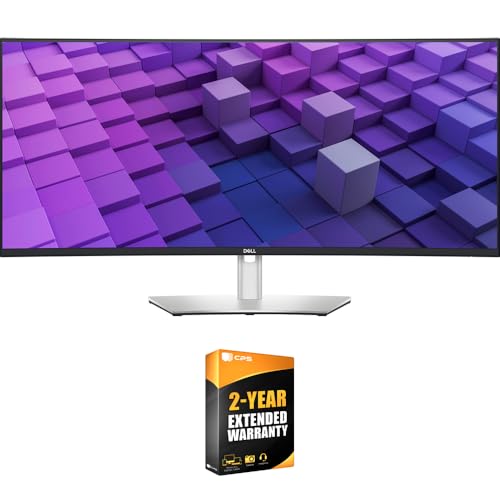
Dell 38-Inch IPS Black Curved Monitor
Best for: Dual-PC productivity and color-critical office workstations
- Screen Size
- 37.5"
- Resolution
- 3840x1600
- Panel Type
- IPS Black
- Aspect Ratio
- 21:9
- Connectivity
- USB-C, USB-A, HDMI, DisplayPort, RJ45
- Dimensions
- 42 × 21 × 9 inches
View on Amazon: Dell 38-Inch IPS Black Curved Monitor Affiliate link
This curved 37.5-inch ultrawide monitor gives you a 3840x1600 WQHD+ resolution across an IPS Black panel with a 2000:1 contrast ratio. It includes a built-in USB-C hub supplying 90W power delivery, a 2.5GbE Ethernet port, and an integrated Auto KVM switch. It suits you if you connect two PCs and need precise color coverage for daily production work.
Pros
- IPS Black panel delivers a 2000:1 contrast ratio at 3840x1600 resolution
- USB-C hub provides 90W charging, DisplayPort, and 2.5GbE RJ45 connectivity
- Built-in Auto KVM allows one keyboard and mouse to manage two systems
- Color coverage reaches 98% DCI-P3, 100% sRGB, and 100% Rec.709
Cons
- Heavy 29.3-pound total weight requires a sturdy desk setup
- Data lists no dedicated high refresh rate or gaming adaptive sync support
Good fit if
- You connect two computers and want to manage both using an integrated Auto KVM switch.
- You need single-cable USB-C docking with 90W power delivery and wired 2.5GbE networking.
- You require color-accurate 98% DCI-P3 coverage alongside higher 2000:1 contrast for productivity work.
Skip if
- You prioritize high-refresh-rate gaming panels with variable refresh rate technologies.
- You have a compact desk that cannot support a 42-inch-wide, 29.3-pound footprint.
Verdict: Dell 37.5-Inch IPS Black Curved Monitor delivers expansive 3840x1600 workspace, dual-PC control, and reliable color accuracy for professional workstation environments.
Specifications side by side
| Spec | Dell 38-Inch IPS Black Curved Monitor |
|---|---|
| Screen Size | 37.5" |
| Resolution | 3840x1600 |
| Panel Type | IPS Black |
| Aspect Ratio | 21:9 |
| Connectivity | USB-C, USB-A, HDMI, DisplayPort, RJ45 |
| Dimensions | 42 × 21 × 9 inches |
| Weight | 29.3 pounds |
| Color | Platinum Silver |
| Model | E99DELU3824DW |
Frequently asked questions
Is the Dell 38-Inch IPS Black Curved Monitor good for professional multitasking?
Yes, this monitor is built for professional multitasking and color-critical work. The 21:9 aspect ratio provides a wide viewing area that allows you to view multiple windows side-by-side without switching. This layout suits users who need to switch between two PCs without changing peripherals.
What resolution does the Dell U3824DW offer?
The Dell 38-Inch IPS Black Curved Monitor offers a 3840x1600 resolution on a 37.5-inch screen. This pixel density ensures sharp text and clear images, which is essential for detailed professional tasks. The high resolution complements the wide aspect ratio for an immersive workspace.
Does this monitor support USB-C connectivity?
Yes, the Dell U3824DW features USB-C connectivity. You can use a single USB-C cable to transmit video, data, and up to 90W of power delivery to your computer. This setup simplifies your desk by reducing cable clutter and allowing for efficient connection management.
What panel technology does the Dell 38-Inch monitor use?
It uses an IPS Black panel type. This technology delivers a 2000:1 contrast ratio, which is double the standard for typical IPS screens. You get deeper blacks and richer colors without the viewing angle issues found in VA panels, ensuring consistent image quality from various positions.
How much space does the Dell U3824DW take on a desk?
The monitor measures 42 inches in width, 21 inches in depth, and 9 inches in height. It weighs 29.3 pounds, suggesting a sturdy base that can support the display securely. You must ensure your workspace can support this substantial footprint and weight for stable operation.
What color options are available for the Dell 38-Inch monitor?
The listing describes the Dell U3824DW in Platinum Silver. This neutral color choice helps the monitor blend into professional office environments or home studios. The specific model number is E99DELU3824DW, which identifies the exact configuration and finish of the unit.