Dell UltraSharp 24-Inch Hub Monitor Review: Specs, Pros and Cons
As an Amazon Associate we earn from qualifying purchases. Links on this page are affiliate links.
This dell ultrasharp 24 hub monitor review focuses on the Dell UltraSharp 24-Inch Hub Monitor (U2424HE). It is a 23.8-inch display with Full HD resolution and a 60Hz refresh rate. The IPS panel delivers sharp images and reliable color accuracy. You get versatile connectivity through HDMI, DisplayPort, USB-C, and USB-A ports. A 5ms response time ensures smooth motion for daily tasks. This setup is built for productivity and clear visuals in office or home environments.
What stands out
- 100% sRGB color gamut support for accurate graphics work
- USB-C connectivity with power delivery for simplified desk setups
- Built-in KVM switch to control multiple computers easily
- Ambient light sensor for automatic brightness adjustment
- ComfortView Plus technology to reduce blue light emission
Who it fits
Good fit for
This monitor suits professionals who need precise color reproduction for graphic design or photo editing. The 100% sRGB and 85% DCI-P3 coverage ensures your work looks correct. Office workers will appreciate the KVM switch for managing multiple PCs. Users with single-cable setups benefit from the USB-C port and power delivery. It is also good for general productivity tasks where eye comfort matters, thanks to the ambient light sensor and blue light reduction features.
Who should skip it
Gamers should look at another option. The 60Hz refresh rate and 5ms response time are not ideal for fast-paced competitive gaming. If you need higher frame rates or faster motion clarity, this panel will feel limiting. Users requiring 4K resolution or ultrawide aspect ratios will also find this Full HD 23.8-inch display too small. It is not designed for immersive gaming or high-end video editing workflows that demand higher pixel density or wider color spaces like Adobe RGB.
Verdict: The Dell UltraSharp 24-Inch Hub Monitor offers solid color accuracy and convenient connectivity for productivity. It is a practical choice for office work and creative tasks that require reliable color performance.
Key specs explained
Panel Type: IPS
IPS stands for In-Plane Switching, a panel technology known for wide viewing angles and consistent color reproduction. When you view the screen from the side, the image remains clear without shifting colors or losing contrast. This makes it ideal for collaborative work or shared viewing spaces. Unlike VA panels often found in budget ultrawides, IPS prioritizes color accuracy over deep black levels, which suits office tasks and creative editing.
Resolution: Full HD
Full HD typically refers to a 1920x1080 pixel count. On a 23.8-inch screen, this provides a standard pixel density that keeps text sharp and images clear for general computing. While ultrawide monitors often offer higher resolutions like QHD or 4K, this resolution is sufficient for basic productivity. It ensures compatibility with almost all software and games without requiring high-end graphics hardware to drive the display smoothly.
Refresh Rate: 60Hz
A 60Hz refresh rate means the screen updates the image 60 times per second. This is the standard for office monitors and casual media consumption. For competitive gaming, higher rates like 144Hz or 240Hz provide smoother motion, but 60Hz is adequate for browsing, word processing, and non-fast-paced titles. It offers a stable visual experience without the motion blur associated with older panel technologies.
Response Time: 5ms
Response time measures how quickly a pixel can change color, here listed as 5ms. This speed helps reduce ghosting, where moving objects leave a faint trail behind them. While not as fast as the 1ms options found in high-end gaming monitors, 5ms is generally sufficient for everyday tasks and moderate gaming. It ensures that motion appears fluid enough for video playback and standard PC usage without significant visual artifacts.
Design and Build Quality
According to the listing, this Dell UltraSharp 24-Inch Hub Monitor has a black finish. The physical dimensions are 17.5 inches in width, 28.8 inches in length, and 5.8 inches in height. It weighs 8.77 pounds. This relatively compact footprint allows it to fit comfortably on standard desks without taking up excessive space. The modest height suggests a low-profile base, which helps keep your workspace clear for documents or other peripherals.
The model number is U2424HE. Dell lists versatile connectivity options including HDMI, DisplayPort, USB-C, and USB-A ports. This layout supports seamless integration with various devices. You can connect laptops, desktops, and peripherals through a single cable using the USB-C port. This simplifies your desk setup by reducing cable clutter. The inclusion of multiple port types ensures compatibility with older and newer equipment alike.
Comfort features are part of the design philosophy. The monitor includes an ambient light sensor and ComfortView Plus technology. These elements adjust the display based on your environment to reduce eye strain. The KVM switch functionality lets you control multiple PCs with one keyboard and mouse. This build supports productivity-focused environments where efficiency and visual comfort matter most. The sturdy construction aligns with professional use cases.
Setup and daily operation
Setting up the Dell UltraSharp 24-Inch Hub Monitor involves connecting your devices to its versatile port array. The listing specifies HDMI, DisplayPort, USB-C, and USB-A connectivity. You can link a computer via DisplayPort or HDMI for video input. If your device supports USB-C, you can use a single cable for both video and data transfer. The monitor also includes USB-A ports, which likely serve as downstream connections for peripherals like a keyboard or mouse. This hub functionality simplifies desk cable management by reducing the number of cables needed for each device.
For daily use, the 23.8-inch IPS panel provides a Full HD resolution at a 60Hz refresh rate. This combination is standard for office work and general computing. The 5ms response time ensures that motion appears fluid, which is useful for video playback or casual gaming. The 1000:1 contrast ratio helps distinguish between dark and light areas, contributing to clear text rendering and image detail.
The monitor includes features designed for long-term comfort. An ambient light sensor automatically adjusts display settings based on room lighting. ComfortView Plus technology reduces blue light emissions to help minimize eye strain during extended sessions. Additionally, the built-in KVM switch allows you to control multiple computers using a single keyboard and mouse. This is particularly useful if you switch between a work laptop and a personal desktop. The 100% sRGB and 85% DCI-P3 color gamut support ensures accurate colors for creative tasks like photo editing or graphic design.
Before You Buy This Monitor
Owning the Dell UltraSharp 24-Inch Hub Monitor requires checking your device compatibility first. Ensure your computer supports the USB-C power delivery you need for charging laptops while connected. If you use multiple PCs, the built-in KVM switch is a major advantage, allowing you to control both systems with one keyboard and mouse. Keep the screen clean with a microfiber cloth and mild cleaner, avoiding harsh chemicals that could damage the IPS coating. This model sits apart from the 1 other ultrawide and gaming monitors on this page because it prioritizes productivity and color accuracy over high refresh rates. It is not designed for fast-paced gaming. You should verify that your workspace has enough desk space for its 28.8-inch length. The ambient light sensor helps adjust brightness automatically, but you may still need to manually tweak ComfortView Plus settings for late-night work to reduce eye strain effectively.
Check before you buy
- Verify your laptop supports USB-C power delivery for charging.
- Check if you need a KVM switch for multiple PCs.
- Ensure your desk has space for the 28.8-inch length.
- Confirm your workflow benefits from 60Hz over higher refresh rates.
The product at a glance
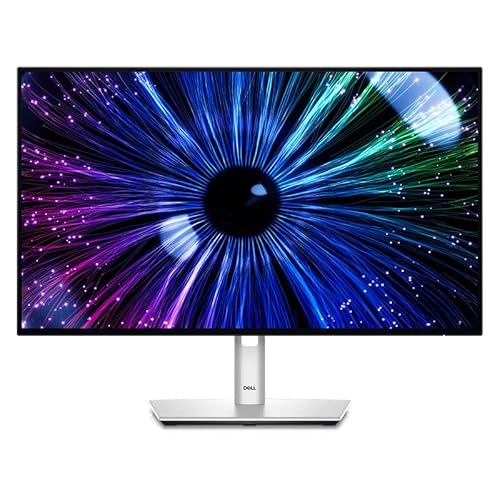
Dell UltraSharp 24-Inch Hub Monitor
Best for: productivity and color-accurate creative work
- Screen Size
- 23.8"
- Resolution
- Full HD
- Refresh Rate
- 60Hz
- Panel Type
- IPS
- Response Time
- 5ms
- Connectivity
- HDMI, DisplayPort, USB-C, USB-A
View on Amazon: Dell UltraSharp 24-Inch Hub Monitor Affiliate link
The Dell UltraSharp 23.8" Hub Monitor offers Full HD clarity on an IPS panel. It features a 60Hz refresh rate and 5ms response time for steady visuals. You get 100% sRGB color accuracy and USB-C connectivity with power delivery. This model includes a KVM switch and ambient light sensor. It suits professionals needing precise color and multi-device control.
Pros
- 100% sRGB and 85% DCI-P3 color gamut support
- USB-C port with power delivery for device charging
- Built-in KVM switch for controlling multiple PCs
- Ambient light sensor for optimized viewing conditions
Cons
- 60Hz refresh rate limits smoothness for fast gaming
- Full HD resolution may lack sharpness for high-DPI tasks
- 5ms response time is slower than dedicated gaming monitors
Good fit if
- You need accurate color reproduction for design work
- You want to connect and charge devices via USB-C
- You manage two computers and want to switch inputs easily
Skip if
- You require a high refresh rate for competitive gaming
- You need 4K resolution for detailed text or graphics
- You prefer a larger screen for immersive multitasking
Verdict: Dell UltraSharp 23.8" Hub Monitor delivers precise color and versatile connectivity for office productivity. It fits users who prioritize color accuracy and multi-device management over high refresh rates.
Specifications side by side
| Spec | Dell UltraSharp 24-Inch Hub Monitor |
|---|---|
| Screen Size | 23.8" |
| Resolution | Full HD |
| Refresh Rate | 60Hz |
| Panel Type | IPS |
| Response Time | 5ms |
| Connectivity | HDMI, DisplayPort, USB-C, USB-A |
| Dimensions | 28.8 × 17.5 × 5.8 inches |
| Weight | 8.77 pounds |
| Color | Black |
| Model | Dell-U2424HE |
Frequently asked questions
Is the Dell UltraSharp 24-Inch Hub Monitor good for office work?
Yes, it is designed for productivity and color-accurate creative work. The 23.8-inch IPS panel provides sharp images and reliable color reproduction. Its versatile connectivity supports multi-device management, making it suitable for users who prioritize accuracy over high refresh rates.
What is the screen size of this Dell monitor?
The Dell UltraSharp 24-Inch Hub Monitor features a 23.8-inch display. It offers Full HD resolution for clear visuals. The physical footprint is compact, measuring 28.8 inches in length and 17.5 inches in width, which fits well on standard office desks.
Does this monitor support USB-C connectivity?
Yes, the listing specifies USB-C connectivity alongside HDMI and DisplayPort. This allows you to link a computer via USB-C for video input. You can also charge connected laptops while using the monitor, streamlining your workspace setup and cable management.
How heavy is the Dell U2424HE monitor?
The monitor weighs 8.77 pounds. This relatively lightweight design contributes to its compact nature. The total dimensions are 28.8 inches long, 17.5 inches wide, and 5.8 inches high, allowing it to fit comfortably in most office environments without taking up excessive space.
What panel type does the Dell UltraSharp 24 use?
It uses an IPS panel. This technology is known for wide viewing angles and consistent color reproduction. When you view the screen from the side, the image remains clear without shifting colors or losing contrast, which is ideal for collaborative office settings.
Can I use this monitor with multiple computers?
Yes, the monitor includes a built-in KVM switch. This feature allows you to control multiple PCs from a single keyboard and mouse. It is a major benefit for users who need to switch between different devices frequently without unplugging cables.