Looking Beyond the Dell 43-Inch 4K USB-C Hub? 6 Alternatives Worth a Look
As an Amazon Associate we earn from qualifying purchases. Links on this page are affiliate links.
The Dell 43-inch 4K USB-C Hub Monitor offers a massive 43-inch canvas designed for multi-PC productivity. It supports internal multi-stream transport to split the screen into four distinct areas. You also get KVM switching and pop-out USB ports for easy peripheral access. This setup suits office workers who need extensive screen real estate and connectivity. However, you might look for dell ultrasharp 43 4k USB c alternatives if you prioritize gaming performance or a smaller footprint. The original monitor lacks high refresh rates and advanced gaming features found in other displays. You may also prefer a different panel type or brand for your specific workflow.
This list includes 6 options that share key specifications with the Dell model. Each alternative overlaps with the original in resolution or connectivity, ensuring you retain core functionality. Some picks focus on OLED panels for superior contrast and speed. Others offer compact sizes for portable professional use. You will find monitors with 240Hz refresh rates for gaming and 5K resolution for creative work. These selections provide varied specs while maintaining the 4K clarity or USB-C convenience you might expect. Review the detailed specifications to find the monitor that best matches your technical requirements.
How each alternative compares
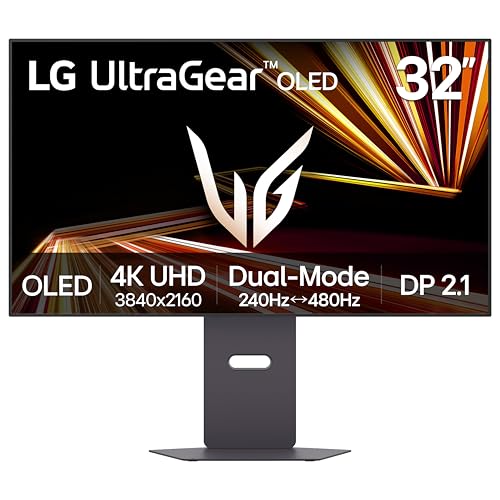
LG 32-Inch 4K Dual-Mode OLED Monitor
The LG 32-inch 4K Dual-Mode OLED Monitor shifts focus from multi-PC productivity to high-performance gaming. It replaces the Dell’s large 43-inch panel with a more compact 32-inch OLED screen. You gain a 240Hz refresh rate and FreeSync support, which the Dell lacks entirely. This monitor prioritizes visual fidelity and speed for single-screen gaming. You give up the ability to split your workflow across four distinct areas or use KVM switching. If you value screen real estate for office tasks, this option is smaller. However, if you want superior image quality and fast response times for gaming, this LG model offers a significant upgrade in performance over the Dell’s office-focused design.
Samsung 27" Odyssey OLED G8 4K Gaming Monitor
The Samsung 27-inch Odyssey OLED G8 4K Gaming Monitor offers a premium QD-OLED panel with a 240Hz refresh rate. It is significantly smaller than the Dell’s 43-inch display, measuring 27 inches diagonally. You get high color accuracy and speed suitable for gaming, but you lose the multi-PC productivity features like iMST and KVM switching. The Samsung model weighs only 14.3 pounds, making it much lighter and easier to set up than the heavy Dell unit. It includes DisplayPort and USB-C connectivity. This monitor is ideal if you want high-end specs without the bulk of a 43-inch screen. It suits users who prioritize visual performance and compact size over large workspace expansion.
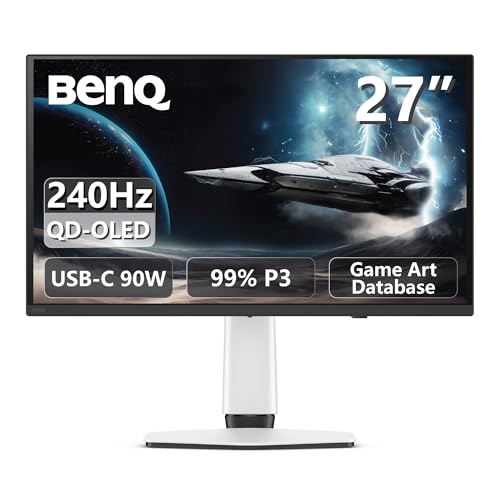
BenQ 27-Inch 4K 240Hz QD-OLED Gaming Monitor
The BenQ 27-inch 4K 240Hz QD-OLED Gaming Monitor provides fast-paced gaming performance in a compact 27-inch form factor. It features a QD-OLED panel with FreeSync support, delivering rich colors and high speed. Unlike the Dell, which is designed for office productivity with KVM and multi-stream transport, this BenQ model focuses on gaming speed and visual fidelity. You give up the large 43-inch canvas and multi-PC switching capabilities. Instead, you get a lighter, more agile monitor that fits well in smaller spaces. It is a strong option for players who prioritize refresh rates and color accuracy over screen size. This monitor suits those who want high performance without the bulk of a large office display.
ASUS ProArt 16-Inch 4K IPS Monitor
The ASUS ProArt 16-inch 4K IPS Monitor is a portable tool designed for video professionals. It is vastly smaller than the Dell’s 43-inch screen, measuring just 16 inches diagonally. You gain extreme portability and SDI input support, which the Dell lacks. This monitor is ideal for editors who need color-accurate monitoring on the go. You give up the large workspace and multi-PC productivity features like KVM switching and iMST. The ASUS model weighs only 3.1 pounds, making it easy to transport. It is a specialized tool for professionals who value compact size and precise color management over screen real estate. This option suits users who need a secondary display for field work or travel.
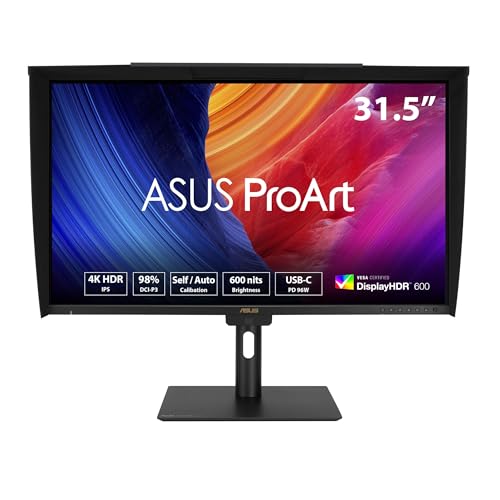
ASUS ProArt 32-Inch 4K Professional Monitor
The ASUS ProArt 32-inch 4K Professional Monitor is built for colorists who need precise calibration and brightness. It offers a 32-inch 4K UHD screen with USB-C connectivity, similar to the Dell but in a smaller format. You gain professional color management tools and high brightness for HDR review, which the Dell does not emphasize. You give up the 43-inch canvas and multi-PC productivity features like KVM switching and iMST. This monitor is heavier than the portable options but lighter than the Dell. It suits users who prioritize color accuracy and professional workflows over large screen size. This option is ideal for editors and designers who need reliable color performance in a compact package.
ALOGIC Clarity 27" 5K Monitor
The ALOGIC Clarity 27-inch 5K IPS Monitor provides exceptional clarity with a 5K resolution on a 27-inch screen. It offers higher pixel density than the Dell’s 4K display, making it suitable for detailed creative work. You gain a compact footprint with high-resolution output, but you lose the 43-inch screen size and multi-PC productivity features. The ALOGIC model includes DisplayPort, HDMI, and USB-C connectivity. It is designed for professionals who value sharpness and color accuracy over large workspace expansion. This monitor suits users who want a smaller screen with higher resolution for tasks like photo editing or design work. It is a strong option for those who prioritize image quality and compact size over multi-PC switching capabilities.
Quick picks
Our 7 picks

Dell 43-Inch 4K USB-C Hub Monitor
Best for: multi-PC productivity setups
- Screen Size
- 43"
- Resolution
- 4K
- Connectivity
- USB-A, USB-C
- Dimensions
- 2.5 × 38.1 × 22.1 inches
- Weight
- 54.5 pounds
View on Amazon: Dell 43-Inch 4K USB-C Hub Monitor Affiliate link
The Dell UltraSharp 43 offers a massive 43-inch 4K UHD canvas designed for productivity. It features Internal Multi-Stream Transport to split the screen into four FHD partitions without external splitters. The monitor includes KVM switching to control multiple PCs with one keyboard and mouse. You get front-facing USB-A and USB-C ports for easy peripheral access. This large display suits users who need extensive screen real estate for multitasking.
Pros
- 43-inch 4K UHD resolution provides ample workspace
- Internal Multi-Stream Transport supports four FHD partitions
- Built-in KVM and Auto KVM for multi-PC control
- Front-facing pop-out USB-A and USB-C ports
Cons
- 54.5-pound weight requires a sturdy desk
- Dimensions of 38.1 inches wide need significant space
- USB-C port offers only 15W charging power
Good fit if
- You need to view multiple windows simultaneously
- You manage multiple computers with one input set
- You have a large desk with room for a 43-inch display
Skip if
- You have limited desk space
- You require high refresh rates for gaming
- You need a portable or lightweight monitor
Verdict: Dell UltraSharp 43 4K USB-C Hub Monitor is a specialized tool for office workers who need to split their workflow across four distinct areas. It fits professionals who prioritize screen space and connectivity over gaming performance.
LG 32-Inch 4K Dual-Mode OLED Monitor
Best for: High-performance gaming on a single large screen
- Screen Size
- 32-inch
- Resolution
- 3840 x 2160
- Refresh Rate
- 240Hz
- Panel Type
- OLED
- Response Time
- 0.03ms (GtG)
- Sync Technology
- G-SYNC Compatible, FreeSync Premium Pro
View on Amazon: LG 32-Inch 4K Dual-Mode OLED Monitor Affiliate link
The LG 32GX870A-B is a 32-inch 4K UHD OLED monitor designed for high-performance gaming. It features a 240Hz refresh rate and a 0.03ms response time. The panel uses Micro Lens Array+ technology for higher brightness. It supports NVIDIA G-SYNC Compatible and AMD FreeSync Premium Pro. You will appreciate the dual-mode capability that allows switching to Full HD for 480Hz gameplay.
Pros
- 32-inch 4K UHD OLED panel
- 240Hz refresh rate with 0.03ms response time
- Dual-mode: 4K 240Hz or Full HD 480Hz
- Micro Lens Array+ for up to 1300 nits peak brightness
- NVIDIA G-SYNC Compatible and AMD FreeSync Premium Pro
Cons
- 32-inch size is smaller than the 43-inch Dell alternative
- No USB-C hub functionality for device connectivity
- Built-in speakers only, no headphone jack listed in specs
Good fit if
- You want a large OLED display for immersive gaming
- You need high refresh rates for fast-paced titles
- You prefer a single large screen over multiple monitors
Skip if
- You require a 43-inch screen for productivity
- You need USB-C connectivity for laptop docking
- You are looking for a monitor with a built-in hub
Verdict: LG 32-inch 4K OLED Gaming Monitor delivers excellent image quality and speed for gamers who prioritize visual fidelity and high refresh rates over large screen real estate.

Samsung 27" Odyssey OLED G8 4K Gaming Monitor
Best for: compact 4K OLED gaming setups
- Screen Size
- 27"
- Resolution
- 3840 x 2160
- Refresh Rate
- 240Hz
- Panel Type
- QD-OLED
- Response Time
- 0.03ms (GtG)
- Sync Technology
- AMD FreeSync Premium
View on Amazon: Samsung 27" Odyssey OLED G8 4K Gaming Monitor Affiliate link
The Samsung 27-inch Odyssey OLED G8 delivers 4K resolution on a QD-OLED panel with a 240Hz refresh rate. It features a 0.03ms response time and DisplayPort 2.1 connectivity. The USB-C port provides up to 96W of power. This monitor suits users who want high-end gaming performance and color accuracy in a compact 27-inch form factor.
Pros
- QD-OLED panel with 166 PPI pixel density
- 240Hz refresh rate and 0.03ms response time
- DisplayPort 2.1 for 80 Gbps bandwidth
- USB-C port with up to 96W power delivery
- Pantone Validated color reproduction
Cons
- 27-inch screen is smaller than the 43-inch Dell alternative
- No mention of built-in speakers
- No mention of HDMI 2.1 ports
Good fit if
- You want a high refresh rate on a 4K OLED panel
- You prefer a compact 27-inch desk footprint
- You need USB-C power delivery for your laptop
Skip if
- You need a screen larger than 27 inches
- You require HDMI 2.1 connectivity
- You prefer IPS panel technology over OLED
Verdict: Samsung 27" Odyssey OLED G8 4K 240Hz is a strong option for gamers who prioritize speed and color accuracy on a smaller screen. It fits users who want high-end specs without the bulk of a 43-inch display.
BenQ 27-Inch 4K 240Hz QD-OLED Gaming Monitor
Best for: fast-paced gaming in a compact space
- Screen Size
- 27"
- Resolution
- 4K
- Refresh Rate
- 240Hz
- Panel Type
- QD-OLED
- Response Time
- 0.03ms
- Sync Technology
- FreeSync Premium Pro
View on Amazon: BenQ 27-Inch 4K 240Hz QD-OLED Gaming Monitor Affiliate link
The BenQ MOBIUZ EX271UZ is a 27-inch 4K QD-OLED gaming monitor with a 240Hz refresh rate. It features HDMI 2.1 and USB-C with 90W power delivery. The panel covers 99% DCI-P3 color with 10-bit depth. FreeSync Premium Pro ensures smooth visuals. This setup suits gamers who want high speed and vivid color in a compact frame.
Pros
- 240Hz refresh rate for smooth motion
- QD-OLED panel with perfect blacks
- 99% DCI-P3 color gamut coverage
- USB-C port with 90W output
- FreeSync Premium Pro support
Cons
- 27-inch size is smaller than the 43-inch Dell
- VESA DisplayHDR 400 True Black rating
- No mention of built-in speakers
Good fit if
- You want a compact 27-inch desk setup
- You need high refresh rates for competitive gaming
- You require USB-C connectivity for laptops
Skip if
- You need a large 43-inch screen for multitasking
- You prefer IPS panels over OLED technology
- You want a higher HDR brightness rating
Verdict: BenQ 27-inch 4K QD-OLED Gaming Monitor delivers fast 240Hz performance and rich colors in a small footprint. It fits players who prioritize speed and color accuracy over large screen real estate.

ASUS ProArt 16-Inch 4K IPS Monitor
Best for: Portable professional video monitoring
- Screen Size
- 15.6 Inch
- Resolution
- 3840 x 2160
- Refresh Rate
- 60Hz
- Panel Type
- IPS
- Connectivity
- 12G-SDI, USB-C, HDMI, USB hub
- Dimensions
- 4.3 × 14.1 × 9.6 inches
View on Amazon: ASUS ProArt 16-Inch 4K IPS Monitor Affiliate link
This 15.6-inch portable monitor offers 4K UHD resolution on an IPS panel. It includes 12G-SDI for professional video workflows and USB-C connectivity. The display covers 100% sRGB and Rec.709 with factory calibration. It is designed for professionals needing accurate color and high-speed video input on the go. The compact size fits in bags for mobile editing.
Pros
- 15.6-inch IPS panel with 3840 x 2160 resolution
- 12G-SDI input for lag-free 4K@60Hz video playback
- Factory calibrated with Delta E < 2 color accuracy
- 100% sRGB and Rec.709 color gamut coverage
Cons
- Small 15.6-inch screen limits multitasking space
- 60Hz refresh rate is not suitable for gaming
- Requires external power adapter for operation
Good fit if
- You need a portable 4K display for video monitoring
- You require 12G-SDI connectivity for professional workflows
- You prioritize color accuracy over large screen size
Skip if
- You need a large primary desktop monitor
- You require high refresh rates for gaming
- You want a built-in battery for wireless use
Verdict: ASUS ProArt PA16USV 15.6-Inch 4K Portable Monitor is a specialized tool for video professionals who need portable 4K monitoring with SDI input. It fits editors who value color accuracy and compact portability over screen real estate.
ASUS ProArt 32-Inch 4K Professional Monitor
Best for: Professional color grading and HDR review
- Screen Size
- 31.5-inch
- Resolution
- 3840 x 2160
- Panel Type
- IPS
- Connectivity
- USB-C, DisplayPort, HDMI, USB hub
- Size
- 32 Inch
- Dimensions
- 9.5 × 28.1 × 24.3 inches
View on Amazon: ASUS ProArt 32-Inch 4K Professional Monitor Affiliate link
The ASUS ProArt PA32UCE is a 32-inch 4K IPS monitor designed for color-critical work. It covers 98% of the DCI-P3 color gamut with Delta E < 1 accuracy. The panel reaches 600 nits brightness and supports HDR-10 and HLG. It features a built-in colorimeter for auto-calibration and an ambient light sensor. USB-C connectivity delivers 96 watts of power delivery. This display suits professionals who need precise color management and reliable hardware.
Pros
- 98% DCI-P3 and 100% sRGB color coverage
- Built-in colorimeter for self and auto calibration
- 600 nits peak brightness with HDR-10 support
- 96-watt USB-C power delivery
- Ambient light sensor for consistent color
Cons
- IPS panel limits contrast compared to OLED alternatives
- No mention of high refresh rate gaming features
- Larger 32-inch size may not fit small desks
Good fit if
- You need professional color accuracy for creative work
- You require auto-calibration capabilities for consistent output
- You want high brightness for HDR content review
Skip if
- You prioritize high refresh rates for fast gaming
- You prefer OLED panels for deeper blacks
- You need a smaller 27-inch footprint
Verdict: ASUS ProArt PA32UCE 32-Inch 4K Professional Monitor fits colorists who value calibration tools and brightness over gaming speed. It delivers precise color management for professional workflows.

ALOGIC Clarity 27" 5K Monitor
Best for: high-resolution creative work on a 27-inch screen
- Screen Size
- 27"
- Resolution
- 5120 x 2880
- Panel Type
- IPS
- Connectivity
- USB-C, DisplayPort, Dual HDMI
- Dimensions
- 8.85 × 24.6 × 21.9 inches
View on Amazon: ALOGIC Clarity 27" 5K Monitor Affiliate link
This 27-inch monitor delivers a 5120x2880 resolution on an IPS panel. The pixel density offers 77% more detail than 4K, which sharpens text and images. It includes a 65W USB-C port for laptop charging and data transfer. The stand allows for four-way adjustments. You should consider this if you need high resolution on a standard screen size for creative work or detailed multitasking.
Pros
- 5120x2880 5K resolution for high pixel density
- IPS panel for accurate color reproduction
- 65W USB-C charging for laptops
- Inbuilt USB hub for single-cable connectivity
Cons
- 27-inch size is smaller than the 32-inch or 43-inch competitors
- No mention of high refresh rate for gaming
- No mention of HDR support or certification
Good fit if
- You prioritize sharp text and image detail over screen size
- You want to connect a laptop with a single USB-C cable
- You need a compact monitor for a crowded desk
Skip if
- You require a large 32-inch or 43-inch display
- You need a high refresh rate for fast-paced gaming
- You want HDR performance for media consumption
Verdict: ALOGIC Clarity 27" 5K IPS Monitor provides exceptional clarity for professionals who value pixel density. It suits users who prefer a smaller screen footprint with high-resolution output.
Specifications side by side
| Spec | Dell 43-Inch 4K USB-C Hub Monitor | LG 32-Inch 4K Dual-Mode OLED Monitor | Samsung 27" Odyssey OLED G8 4K Gaming Monitor | BenQ 27-Inch 4K 240Hz QD-OLED Gaming Monitor | ASUS ProArt 16-Inch 4K IPS Monitor | ASUS ProArt 32-Inch 4K Professional Monitor | ALOGIC Clarity 27" 5K Monitor |
|---|---|---|---|---|---|---|---|
| Screen Size | 43" | 32-inch | 27" | 27" | 15.6 Inch | 31.5-inch | 27" |
| Resolution | 4K | 3840 x 2160 | 3840 x 2160 | 4K | 3840 x 2160 | 3840 x 2160 | 5120 x 2880 |
| Refresh Rate | not stated | 240Hz | 240Hz | 240Hz | 60Hz | not stated | not stated |
| Panel Type | not stated | OLED | QD-OLED | QD-OLED | IPS | IPS | IPS |
| Response Time | not stated | 0.03ms (GtG) | 0.03ms (GtG) | 0.03ms | not stated | not stated | not stated |
| Sync Technology | not stated | G-SYNC Compatible, FreeSync Premium Pro | AMD FreeSync Premium | FreeSync Premium Pro | not stated | not stated | not stated |
| Connectivity | USB-A, USB-C | USB Type-C, DP2.1 | DP 2.1, USB-C | HDMI 2.1, USB-C 90W | 12G-SDI, USB-C, HDMI, USB hub | USB-C, DisplayPort, HDMI, USB hub | USB-C, DisplayPort, Dual HDMI |
| Size | 22.1" x 38.1" x 2.5" | not stated | 27 Inch | 27" | 16 Inch | 32 Inch | not stated |
| Dimensions | 2.5 × 38.1 × 22.1 inches | 9.83 × 28.1 × 24.4 inches | 10.4 × 24.1 × 22.2 inches | 24 × 22 × 9.5 inches | 4.3 × 14.1 × 9.6 inches | 9.5 × 28.1 × 24.3 inches | 8.85 × 24.6 × 21.9 inches |
| Weight | 54.5 pounds | 21.6 pounds | 14.3 pounds | not stated | 3.1 pounds | 19.6 pounds | not stated |
| Color | Information Not Available | Black | Silver | White | BLACK | BLACK | Silver |
| Model | U4323QE | 32GX870A-B.AUS | LS27HG802SNXZA | EX271UZ | PA16USV | PA32UCE | 27C5KPD |
For a related comparison, read koncept wd19s dell USB c docking alternatives.
Frequently asked questions
What is the best OLED alternative to the Dell 43-inch?
The LG 32-inch 4K Dual-Mode OLED Monitor stands out as the top OLED choice. It features a 240Hz refresh rate and FreeSync support for smooth gaming. The 32-inch size offers a compact footprint compared to the Dell’s massive display. This model prioritizes visual fidelity and speed for high-performance tasks.
Is there a smaller OLED monitor that rivals the Dell 43-inch?
The Samsung 27-inch Odyssey OLED G8 provides a premium compact option. It uses QD-OLED technology and runs at 240Hz for fast motion handling. The 27-inch screen suits users who want high-end specs without the bulk of a 43-inch panel. It delivers strong color accuracy and speed for gaming setups.
Which budget-friendly 4K OLED monitor can replace the Dell 43-inch?
The BenQ 27-inch 4K 240Hz QD-OLED Monitor offers a budget-conscious path. It combines QD-OLED panel tech with a 240Hz refresh rate. The 27-inch size fits players who prioritize speed and color accuracy over large screen real estate. This model delivers fast performance in a compact space for fast-paced gaming.
Can I find a portable 4K monitor similar to the Dell 43-inch?
The ASUS ProArt 16-inch 4K IPS Monitor serves as a portable alternative. Weighing just 3.1 pounds, it fits editors who value compact portability. It features USB-C connectivity and supports SDI input for professional video monitoring. This tool is ideal for professionals needing 4K accuracy on the go rather than a stationary desk setup.
What is the best 32-inch professional monitor instead of the Dell 43-inch?
The ASUS ProArt 32-inch 4K Professional Monitor is the top 32-inch pick. It targets colorists who value calibration tools and brightness over gaming speed. The 32-inch panel delivers precise color management for professional workflows. This monitor fits users who need accurate HDR review capabilities and dedicated color tools for their creative tasks.
Is there a high-resolution IPS monitor that offers more detail than the Dell 43-inch?
The ALOGIC Clarity 27-inch 5K IPS Monitor provides exceptional clarity for creative work. It offers a higher pixel density on a 27-inch screen compared to the Dell’s 4K resolution. The IPS panel ensures consistent color reproduction. This model suits users who prefer a smaller footprint while maintaining high-resolution output for detailed professional tasks.