Dell or AOC? Ultrawide Monitors Compared in 2026
As an Amazon Associate we earn from qualifying purchases. Links on this page are affiliate links.
You are comparing the Dell SE2726HG and the AOC Q27G3XMN. This dell vs AOC ultrawide monitor comparison highlights two distinct 27-inch gaming displays. Both monitors share a 27-inch screen size and high refresh rates for smooth motion. The main difference lies in their panel technology and resolution. The Dell uses a Fast IPS panel with 1080p resolution, while the AOC features a Mini-LED VA panel with 1440p resolution. These choices impact color accuracy, contrast, and image sharpness differently.
Key differences
| Aspect | Dell 27-Inch 240Hz IPS Gaming Monitor | AOC 27-Inch Mini-LED 1440p Gaming Monitor |
|---|---|---|
| Resolution | 1920x1080 (FHD) | 2560x1440 (QHD) |
| Panel Type | Fast IPS | VA with Mini-LED |
| Refresh Rate | 240Hz | 180Hz (overclocked) |
| Sync Technology | AMD FreeSync Premium | Adaptive-Sync |
| Connectivity | HDMI, DisplayPort 1.4 | DP 1.4 |
| HDR Support | not listed | VESA DisplayHDR 1000 |
Which one should you choose?
Choose Dell 27-Inch 240Hz IPS Gaming Monitor if
- You prioritize the highest possible refresh rate for competitive shooter gameplay.
- You need HDMI connectivity for console gaming alongside DisplayPort.
- You prefer the wider viewing angles and color consistency of an IPS panel.
Choose AOC 27-Inch Mini-LED 1440p Gaming Monitor if
- You want sharper image detail with a higher 1440p resolution.
- You value deep blacks and high contrast for dark room gaming.
- You require HDR performance with VESA DisplayHDR 1000 certification.
Verdict: Choose the Dell if you need maximum frame rates and versatile connectivity for mixed PC and console setups. Pick the AOC if you prioritize visual fidelity, higher resolution, and superior contrast for immersive gaming. Neither is universally better; the choice depends on whether you value speed or image quality more.
Dell vs AOC 27-Inch Showdown
Resolution clarity
The AOC Q27G3XMN uses a QHD resolution of 2560x1440 pixels. This provides higher pixel density and sharper images for detailed tasks. The Dell SE2726HG sticks to Full HD, or 1920x1080. While adequate for fast gaming, it lacks the crispness of the AOC. If you value sharp text and fine details, the higher resolution on the AOC is the better choice. The Dell is limited to standard definition by comparison.
Refresh rate speed
The Dell SE2726HG offers a native 240Hz refresh rate. This is faster than the AOC Q27G3XMN, which runs at 180Hz via DisplayPort 1.4 overclock. A higher refresh rate reduces motion blur and provides smoother visuals in fast-paced competitive shooters. The Dell has the clear advantage here for pure speed. The AOC is still very smooth, but the Dell leads in maximum frame delivery.
Panel technology
The AOC Q27G3XMN features a Mini-LED VA panel with 336 dimming zones. This delivers true blacks and high contrast, along with VESA DisplayHDR 1000 certification for bright highlights. The Dell SE2726HG uses a Fast IPS panel. IPS panels offer better viewing angles and faster response times but typically have lower contrast. The AOC wins for image depth and HDR performance, while the Dell is better for wide-angle viewing.
Sync technology
Both monitors support adaptive sync to prevent screen tearing. The Dell SE2726HG includes AMD FreeSync Premium, which ensures smooth gameplay on compatible AMD and NVIDIA GPUs. The AOC Q27G3XMN uses standard Adaptive-Sync. Both technologies work well to eliminate stuttering. Neither has a significant technical advantage over the other in this category. Both provide a solid foundation for tear-free gaming experiences.
Connectivity ports
The Dell SE2726HG provides both HDMI and DisplayPort 1.4 inputs. This allows you to connect consoles and PCs easily. The AOC Q27G3XMN lists only DisplayPort 1.4 in its key specs. While HDMI is often present on such monitors, the data only confirms DP for the AOC. The Dell is more versatile if you need multiple connection types without adapters.
Choose Your 27-Inch Monitor
Competitive FPS gamers seeking speed
The Dell SE2726HG offers a 240Hz refresh rate with a 0.5ms response time. This combination minimizes input lag and ensures fluid motion. Its Fast IPS panel provides wide viewing angles and 99% sRGB coverage. You get smooth gameplay with FreeSync Premium support and low blue light certification for comfort during long sessions.
Players wanting high contrast and sharp visuals
The AOC Q27G3XMN features QHD resolution for sharper images than Full HD. Its Mini-LED backlight with 336 dimming zones delivers true blacks and bright whites. The VA panel offers high contrast, while Adaptive-Sync prevents tearing. You gain VESA DisplayHDR 1000 certification and 134% sRGB coverage for vivid, detailed imagery in supported games.
Users prioritizing color accuracy and viewing angles
The Dell monitor uses Fast IPS technology, which maintains color consistency across wide viewing angles. It covers 99% of the sRGB color space for accurate reproduction. The 240Hz refresh rate ensures responsiveness. You benefit from TÜV Rheinland certification that reduces eye strain without washing out colors, making it suitable for mixed use.
The products compared

Dell 27-Inch 240Hz IPS Gaming Monitor
Best for: Fast-paced esports players needing 240Hz refresh rates
- Screen Size
- 27"
- Resolution
- 1920x1080
- Refresh Rate
- 240Hz
- Panel Type
- Fast IPS
- Response Time
- 0.5ms
- Sync Technology
- AMD FreeSync Premium
View on Amazon: Dell 27-Inch 240Hz IPS Gaming Monitor Affiliate link
This 27-inch Dell gaming monitor pairs a 1920x1080 Full HD resolution with a 240Hz refresh rate and a 0.5ms response time. Built on a Fast IPS panel, it provides wide viewing angles alongside 99% sRGB color coverage. Support for AMD FreeSync Premium and HDMI VRR keeps motion fluid. It suits you if you prioritize fast competitive frame rates over screen resolution.
Pros
- 240Hz refresh rate with 0.5ms response time
- Fast IPS panel with 99% sRGB coverage
- AMD FreeSync Premium and HDMI VRR support
- TÜV Rheinland 3-star certified eye comfort
Cons
- 1920x1080 Full HD resolution provides lower pixel density on a 27-inch panel than QHD
- No HDR support listed in product specifications
Good fit if
- You prioritize 240Hz fluid motion for competitive esports games.
- You want variable refresh rate support across both DisplayPort and HDMI.
Skip if
- You prefer sharper 1440p QHD resolution on a 27-inch screen.
- You need HDR capability for high-dynamic-range content.
Verdict: Dell 27-Inch 240Hz IPS Gaming Monitor fits competitive players who want maximum frame rates and tear-free motion at 1080p. Choose another option if you require higher pixel density for text clarity or HDR support.
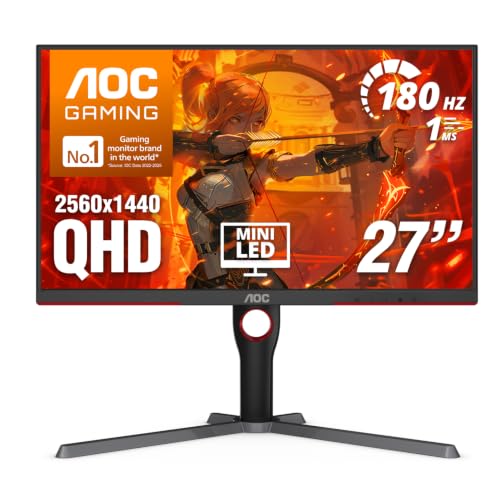
AOC 27-Inch Mini-LED 1440p Gaming Monitor
Best for: High contrast gaming with sharp QHD visuals
- Screen Size
- 27 Inch
- Resolution
- 2560x1440
- Refresh Rate
- 180Hz
- Response Time
- 1ms GtG
- Sync Technology
- Adaptive-Sync
- Connectivity
- DP 1.4, HDMI 2.1, USB 3.2
View on Amazon: AOC 27-Inch Mini-LED 1440p Gaming Monitor Affiliate link
This 27-inch monitor uses a VA panel with Mini-LED backlighting and 336 dimming zones for high contrast. It offers QHD resolution and an 180Hz refresh rate for smooth visuals. Adaptive-Sync prevents tearing, while VESA DisplayHDR 1000 supports bright highlights. It suits gamers who want sharp images and deep blacks without the cost of higher-end panels.
Pros
- 2560x1440 resolution for sharp detail
- 180Hz refresh rate via DisplayPort 1.4
- 336 Mini-LED dimming zones for contrast
- VESA DisplayHDR 1000 certification
Cons
- 1ms GtG response time is not the fastest available
- 15.6 pounds weight is heavier than average
- VA panel may have slower pixel transitions than IPS
Good fit if
- You want high contrast and deep blacks
- You need QHD resolution for clarity
- You play fast-paced games at 180Hz
Skip if
- You require the absolute fastest response times
- You prefer IPS panel color accuracy
- You need a lighter, more portable monitor
Verdict: AOC 27-inch QHD Mini-LED Monitor delivers strong contrast and sharp visuals for gamers who prioritize image quality and smooth motion. It is ideal for those who value HDR performance and high refresh rates in a standard 27-inch form factor.
Specifications side by side
| Spec | Dell 27-Inch 240Hz IPS Gaming Monitor | AOC 27-Inch Mini-LED 1440p Gaming Monitor |
|---|---|---|
| Screen Size | 27" | 27 Inch |
| Resolution | 1920x1080 | 2560x1440 |
| Refresh Rate | 240Hz | 180Hz |
| Panel Type | Fast IPS | not stated |
| Response Time | 0.5ms | 1ms GtG |
| Sync Technology | AMD FreeSync Premium | Adaptive-Sync |
| Connectivity | HDMI, DisplayPort 1.4 | DP 1.4, HDMI 2.1, USB 3.2 |
| Dimensions | 7.4 × 24.1 × 17.8 inches | 10.2 × 23.8 × 20.9 inches |
| Weight | 8.2 pounds | 15.6 pounds |
| Size | SE2725HG | 27" 180Hz Mini-LED |
| Color | Black | Black |
| Model | SE2726HG | Q27G3XMN |
Frequently asked questions
Is the Dell SE2726HG suitable for competitive gaming?
Yes, it is ideal for competitive play at 1080p. The 240Hz refresh rate and 0.5ms response time minimize input lag. This ensures fluid motion for fast-paced titles. You get speed over pixel density on this 27-inch display, making it a solid choice for FPS gamers who prioritize reaction time.
Does the AOC Q27G3XMN offer better image contrast?
Yes, it uses Mini-LED technology for strong contrast. This delivers sharp QHD visuals and improved HDR performance. The 1440p resolution provides higher pixel density than standard Full HD. It is best for gamers who value image quality and deep blacks in a standard 27-inch form factor.
Which monitor has a higher refresh rate?
The Dell SE2726HG has the higher refresh rate at 240Hz. The AOC Q27G3XMN operates at 180Hz. Both rates ensure smooth motion for gaming. If you need maximum speed for competitive titles, the Dell option provides the edge. The AOC focuses more on resolution and contrast instead.
What panel types do these monitors use?
The Dell SE2726HG uses a Fast IPS panel. This provides wide viewing angles and 99% sRGB coverage. The AOC Q27G3XMN utilizes Mini-LED technology. This enhances contrast and brightness for better HDR. Each panel type serves different priorities, with Dell favoring color accuracy and AOC favoring contrast.
How do the screen resolutions compare?
The AOC Q27G3XMN features a 1440p QHD resolution. This offers sharper images and higher pixel density for detailed tasks. The Dell SE2726HG is limited to Full HD 1080p. While adequate for fast gaming, it lacks the clarity of the AOC. Choose AOC for visual sharpness.
Which monitor is lighter and easier to move?
The Dell SE2726HG is significantly lighter at 8.2 pounds. The AOC Q27G3XMN weighs 15.6 pounds due to its Mini-LED components. The Dell also has smaller dimensions in height and length. If portability or a smaller footprint matters, the Dell is the more practical choice for your desk setup.
Do these monitors support adaptive sync?
The Dell SE2726HG supports FreeSync technology. This helps reduce screen tearing during gameplay. The provided data does not list specific adaptive sync technologies for the AOC Q27G3XMN. You should check the AOC specifications for its sync capabilities if this feature is critical for your setup.