Gawfolk 34" 240Hz UWQHD Curved Review: Who It Fits and Who Should Skip It
As an Amazon Associate we earn from qualifying purchases. Links on this page are affiliate links.
This gawfolk 34 240hz uwqhd curved review looks at a 34-inch ultrawide display built for speed and immersion. The screen delivers UWQHD resolution (3440x1440) on a 1500R curved VA panel with a 21:9 aspect ratio. It pairs this with a 240Hz refresh rate via DisplayPort for smooth motion. The monitor also includes AdaptiveSync, G-Sync, and FreeSync compatibility to reduce tearing. With 1.07 billion colors and built-in speakers, it aims to handle both fast-paced gaming and media consumption effectively.
What stands out
- 240Hz refresh rate via DP 1.4 for fluid gameplay
- UWQHD 3440x1440 resolution on a 1500R curved VA panel
- Supports AdaptiveSync, G-Sync, and FreeSync for tear-free visuals
- Dual HDMI 2.0 and dual DP 1.4 connectivity options
- 1.07 billion colors (8-bit+FRC) with 83% NTSC gamut
Who it fits
Good fit for
This monitor suits competitive gamers who need high refresh rates and ultrawide fields of view. The 240Hz speed and AdaptiveSync support help in action and esports titles. Users who enjoy immersive movies or multitasking will appreciate the 21:9 aspect ratio and 1500R curve. It also fits setups with multiple PCs or consoles, thanks to the dual HDMI and dual DP ports. The built-in speakers offer convenience for casual use.
Who should skip it
You should look elsewhere if you need a flat screen, as this model is strictly curved. Users requiring HDR10 or high brightness for professional color grading may find the 310 cd/m² and 3500:1 contrast ratio insufficient. If you prefer a stand with height or swivel adjustments, note that this unit only supports tilt. It is also not ideal for those who need USB-C connectivity, as it relies on HDMI and DisplayPort only.
Verdict: The Gawfolk 34-inch monitor offers a compelling mix of high refresh rates and ultrawide immersion for gaming. It is a practical choice for players seeking speed and wide visibility without extra ergonomic complexity.
Key specs explained
Resolution: 3440x1440
This UWQHD resolution provides more horizontal pixels than standard 1440p displays. The extra width supports the 21:9 aspect ratio, giving you a wider field of view. You get sharper text and detailed images without the heavy performance hit of 4K. It is the sweet spot for ultrawide gaming, balancing clarity with frame rates on most modern graphics cards.
Refresh Rate: 240Hz
A 240Hz refresh rate updates the image 240 times per second via DisplayPort. This high speed reduces motion blur and makes fast-paced action feel smoother. It is ideal for competitive esports and shooters where reaction time matters. You will notice a significant difference compared to 60Hz or 144Hz panels, especially in quick turns or rapid movements.
Sync Technology: AdaptiveSync, G-Sync & FreeSync
This monitor supports both G-Sync and FreeSync technologies under the AdaptiveSync umbrella. These features synchronize the screen refresh rate with your graphics card output. This prevents screen tearing and stuttering when frame rates drop. You get consistent visual stability during intense gaming sessions, regardless of whether you use an NVIDIA or AMD graphics card.
Screen Size: 34"
The 34-inch panel offers a large viewing area that fills your peripheral vision. Combined with the ultrawide aspect ratio, it creates an immersive experience for both gaming and productivity. You can fit multiple windows side-by-side for multitasking. This size is standard for ultrawide monitors, providing a substantial upgrade over traditional 16:9 displays without requiring excessive desk space.
Contrast Ratio: 3500:1
A 3500:1 contrast ratio means the display can show deep blacks and bright whites simultaneously. This is higher than the standard 1000:1 found on many IPS panels. You will see better depth in dark scenes and more distinct details in shadows. It enhances the visual quality of movies and games with high-contrast environments, making images appear more lifelike.
Design and build details
According to the listing, this monitor measures 31.9 inches wide, 18.6 inches high, and 10.6 inches deep. The unit weighs 12.6 pounds. These dimensions fit a standard desk setup, though the depth suggests a substantial footprint. The color is black, a neutral finish that blends with most gaming rigs or office environments. The model number is GFTY985. You will find the screen sits on a base that allows for tilt adjustment. This gives you some flexibility in viewing angle without needing a complex stand. The back includes VESA mounting holes spaced at 100x100mm. This means you can attach it to a third-party arm if you prefer more height or range of motion. The curved 1500R VA panel is designed to wrap around your field of view. This curvature helps reduce eye strain during long sessions by keeping edges closer to your line of sight. The build feels solid for its size, supporting the heavy panel without excessive flex. You get a practical, no-nonsense frame that prioritizes function over flashy aesthetics. The controls are likely on the bezon, as is standard for this class. This layout keeps your desk clear of extra buttons. The overall design supports both gaming and productivity tasks. You can mount it on a wall or arm to save desk space. The sturdy base works well if you keep it on a flat surface. The black finish hides fingerprints better than glossy options. This is a utilitarian design focused on performance and fit.
Setup and everyday use guide
Connecting this monitor requires a DisplayPort cable to achieve the full 240Hz refresh rate. You can also use HDMI 2.0 ports, though the refresh rate will be lower. The listing notes dual HDMI and dual DP 1.4 inputs, giving you flexibility for multiple devices. For audio, you can plug headphones directly into the earphone jack or use the built-in speakers for basic sound output.
Physical setup is straightforward. The stand allows tilt adjustment, letting you angle the screen for your preferred viewing position. If you prefer a different arrangement, the monitor supports VESA wall mounting with a 100x100mm pattern. This allows you to mount it on a compatible arm or wall bracket. The 1500R curve is fixed, so you cannot adjust the curvature. The 34-inch width and 21:9 aspect ratio mean you will need a desk wide enough to accommodate the 31.9-inch width comfortably.
In daily use, the 240Hz refresh rate and AdaptiveSync technology aim to reduce screen tearing and stuttering. This works with both G-Sync and FreeSync compatible systems. The 1.07 billion color support and 3500:1 contrast ratio help display deeper blacks and brighter highlights. The 83% NTSC color gamut suggests vivid visuals for gaming and movies. The UWQHD resolution provides a wider field of view, which can enhance immersion in supported games and applications without requiring the performance demand of 4K.
Before You Buy This Monitor
Owning this 34-inch curved monitor requires a powerful PC to drive the 3440x1440 resolution at 240Hz. You need a DisplayPort 1.4 cable for that maximum refresh rate. HDMI 2.0 ports limit the speed, so check your GPU outputs first. The 1500R curve suits most desks, but verify your stand space. The unit weighs 12.6 pounds, so ensure your desk can support it. Built-in speakers are present, but you may still want headphones for private gaming sessions. The 83% NTSC color gamut is decent for visuals, but serious color work might need an external calibration tool. This model competes with other high-refresh ultrawides in the 1 options we cover. It fits gamers who prioritize speed over pixel density. If you prefer sharper images, consider lower refresh rate models. Keep the firmware updated via the manufacturer’s support site. Regularly clean the VA panel with a microfiber cloth to maintain clarity. Avoid harsh chemicals that could damage the coating. This monitor is a solid choice for fast-paced titles, provided your system meets the demands.
Check before you buy
- Verify your GPU supports 240Hz at 3440x1440 via DisplayPort.
- Check desk space for the 31.9-inch width and 12.6-pound weight.
- Ensure you have a DisplayPort 1.4 cable for full speed.
- Confirm your room lighting suits the 350 cd/m² brightness level.
The product at a glance
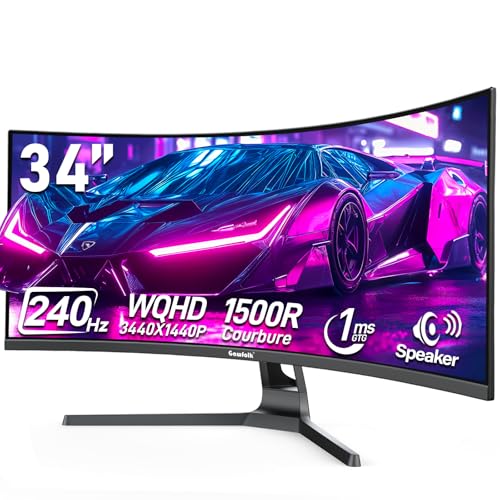
Gawfolk 34" 240Hz UWQHD Curved Monitor
Best for: fast-paced gaming and multi-device connectivity
- Screen Size
- 34"
- Resolution
- 3440x1440
- Refresh Rate
- 240Hz
- Aspect Ratio
- 21:9
- Sync Technology
- AdaptiveSync, G-Sync, FreeSync
- Connectivity
- HDMI 2.0, DP 1.4
View on Amazon: Gawfolk 34" 240Hz UWQHD Curved Monitor Affiliate link
This 34-inch curved monitor delivers UWQHD resolution and a 240Hz refresh rate for smooth gameplay. The VA panel features a 1500R curve and supports AdaptiveSync with G-Sync and FreeSync. You get 1.07 billion colors and built-in speakers. It offers dual HDMI 2.0 and dual DP 1.4 ports for versatile connectivity. The design includes tilt adjustment and VESA mounting compatibility for flexible desk setups.
Pros
- 240Hz refresh rate via DisplayPort for fast-paced gaming
- UWQHD 3440x1440 resolution on a 1500R curved VA panel
- AdaptiveSync compatible with both G-Sync and FreeSync
- Dual HDMI 2.0 and dual DP 1.4 connectivity options
- Built-in speakers and headphone jack for audio convenience
Cons
- 83% NTSC color gamut may limit professional color accuracy
- Tilt-only stand lacks height or swivel adjustment
- 3500:1 contrast ratio is lower than typical IPS panels
Good fit if
- You want a high refresh rate for competitive esports titles
- You need flexible connectivity with multiple HDMI and DP ports
- You prefer an immersive curved screen for gaming or movies
Skip if
- You require precise color grading for professional creative work
- You need a stand with height or swivel adjustments
- You prefer IPS panel technology for wider viewing angles
Verdict: Gawfolk 34-Inch 240Hz UWQHD Curved Monitor fits gamers who want high speed and wide connectivity. It suits those who value immersive curvature over professional color accuracy.
Specifications side by side
| Spec | Gawfolk 34" 240Hz UWQHD Curved Monitor |
|---|---|
| Screen Size | 34" |
| Resolution | 3440x1440 |
| Refresh Rate | 240Hz |
| Aspect Ratio | 21:9 |
| Sync Technology | AdaptiveSync, G-Sync, FreeSync |
| Connectivity | HDMI 2.0, DP 1.4 |
| Size | 34 Inch |
| Dimensions | 10.6 × 31.9 × 18.6 inches |
| Weight | 12.6 pounds |
| Color | black |
| Model | GFTY985 |
Frequently asked questions
Is the Gawfolk 34 suitable for competitive gaming?
Yes, it is built for speed. The 240Hz refresh rate allows for smooth motion in fast-paced titles. This high frame rate helps reduce input lag, making it ideal for players who prioritize responsiveness over static image quality. It fits those who value immersive curvature during intense gameplay sessions.
What is the panel type and curvature?
It uses a VA panel with a 1500R curvature. This curve wraps around your field of view for better immersion. VA panels typically offer high contrast ratios, which enhances dark scenes in games. The 1500R radius is a standard curve that suits most desk setups without being overly aggressive.
Does it support multi-device connectivity?
Yes, it supports multiple devices. The listing notes dual HDMI and dual DP 1.4 inputs. This allows you to connect a PC and a console or laptop simultaneously. You can switch between sources easily, making it a practical choice for users who juggle different gaming systems or workstations.
What are the physical dimensions of this monitor?
The monitor measures 31.9 inches wide, 18.6 inches high, and 10.6 inches deep. It weighs 12.6 pounds. These dimensions indicate a substantial footprint on your desk. The black finish provides a neutral look that blends with most gaming setups. Ensure you have enough depth for the stand and cables.
Is this monitor good for professional color work?
It is not primarily designed for professional color accuracy. The verdict suggests it suits gamers who want speed over precise color reproduction. While the UWQHD resolution offers sharp images, the focus is on high refresh rates and immersion. If you need strict color fidelity for design work, consider a dedicated professional display instead.
What resolution does the 34-inch screen offer?
It offers UWQHD resolution, which is 3440x1440 pixels. This provides more horizontal pixels than standard 1440p displays. The 21:9 aspect ratio gives you a wider field of view. You get sharper text and detailed images without the heavy performance hit of 4K, balancing clarity with gaming performance.
How does the 240Hz refresh rate benefit gameplay?
The 240Hz refresh rate displays up to 240 frames per second. This results in smoother motion and less ghosting in fast-moving scenes. It pairs well with high-end GPUs to minimize input lag. This speed is crucial for competitive shooters where reaction time and visual clarity determine your performance in real-time scenarios.