GIGABYTE 24.5-Inch 240Hz IPS Gaming vs GIGABYTE 27-Inch Curved 1080p Gaming (2026): Key Differences
As an Amazon Associate we earn from qualifying purchases. Links on this page are affiliate links.
This comparison covers the gigabyte g25f2a 24 5 superspeed ips vs gs27fc 27 180hz 1080p. Both monitors support AMD FreeSync Premium and HDR10. They share 8-bit color depth and 1ms response times. The main difference lies in the panel technology and screen dimensions. One uses a curved VA panel for immersion, while the other offers a flat IPS panel for speed. You need to decide which physical form factor fits your desk and gaming style.
Key differences
| Aspect | GIGABYTE 27-Inch Curved 1080p Gaming Monitor | GIGABYTE 24.5-Inch 240Hz IPS Gaming Monitor |
|---|---|---|
| Screen Size | 27 inches | 24.5 inches |
| Panel Type | VA (Curved) | SuperSpeed IPS (Flat) |
| Refresh Rate | 180Hz | 240Hz |
| Response Time | 1ms (MPRT) | 1ms (GTG) |
| Contrast Ratio | 3000:1 | 1000:1 |
| Color Gamut | 108% sRGB | 120% sRGB |
Which one should you choose?
Choose GIGABYTE 27-Inch Curved 1080p Gaming Monitor if
- You prefer a larger 27-inch display for a more immersive field of view.
- You want higher contrast ratios for deeper blacks in dark environments.
- You are satisfied with 180Hz refresh rates for competitive play.
Choose GIGABYTE 24.5-Inch 240Hz IPS Gaming Monitor if
- You need the fastest possible 240Hz refresh rate for esports.
- You value accurate viewing angles provided by IPS technology.
- You have limited desk space and need a smaller 24.5-inch footprint.
Verdict: The GS27FC suits players who prioritize screen real estate and contrast. The G25F2A is better for those needing higher refresh rates and wider viewing angles. Your choice depends on whether you value immersion or raw speed.
Panel Type and Refresh Rate
Refresh Rate Speed
The GIGABYTE G25F2A offers a higher maximum refresh rate of 240Hz, while the GIGABYTE GS27FC runs at 180Hz. Both monitors deliver smooth motion clarity for fast-paced gaming. The G25F2A’s 240Hz panel provides a slight advantage in frame delivery for competitive esports titles where every millisecond counts. The GS27FC’s 180Hz rate is still well above standard 60Hz displays, ensuring fluid gameplay. You will notice the difference in high-speed FPS battles, with the G25F2A giving you a smoother visual experience. Both support AMD FreeSync Premium to reduce screen tearing.
Panel Technology
Panel type significantly impacts color accuracy and viewing angles. The GIGABYTE G25F2A uses a SuperSpeed IPS panel, known for consistent colors and wide viewing angles. The GIGABYTE GS27FC features a VA panel with a 1500R curve. VA panels typically offer higher contrast ratios, with the GS27FC boasting 3000:1 compared to the G25F2A’s 1000:1. This means deeper blacks on the curved model. However, the IPS panel on the G25F2A provides better color reproduction, covering 120% of the sRGB gamut versus the GS27FC’s 108%. Your choice depends on whether you prioritize contrast or color fidelity.
Screen Size and Immersion
Screen size affects how much of your field of view the monitor occupies. The GIGABYTE GS27FC has a 27-inch display, which is larger than the 24.5-inch screen on the GIGABYTE G25F2A. The GS27FC is also curved, with a 1500R radius, bringing the edges closer to your eyes for a more immersive experience. The G25F2A is flat, which some users prefer for precise aiming in competitive shooters. Both are 1080p resolution, so pixel density is higher on the smaller G25F2A. If you want a bigger image, the GS27FC is the better choice.
Connectivity Options
Connectivity determines what devices you can link to the monitor. The GIGABYTE GS27FC includes one DisplayPort 1.4 and two HDMI 2.0 ports. This provides flexibility for connecting modern GPUs and consoles. The GIGABYTE G25F2A’s connectivity options are not explicitly detailed in the provided specifications, so we cannot confirm its port selection. You should check the product listing for the G25F2A’s specific ports before purchasing. The GS27FC’s inclusion of DisplayPort 1.4 is beneficial for high refresh rate connections on compatible systems.
Color Gamut Coverage
Color gamut coverage indicates the range of colors a monitor can display. The GIGABYTE G25F2A covers 120% of the sRGB color space, offering vibrant and wide color reproduction. The GIGABYTE GS27FC covers 108% of sRGB. Both monitors support 8-bit color depth, which allows for smooth color gradients. The G25F2A’s wider gamut makes it better for content creation or media consumption where color accuracy is important. The GS27FC still provides excellent color performance for general gaming. If you need more vivid colors, the G25F2A has the edge.
Which Gigabyte Monitor Fits Your Needs
Competitive FPS players needing max speed
The GIGABYTE G25F2A delivers a 240Hz refresh rate with a 1ms GTG response time. This SuperSpeed IPS panel ensures rapid frame delivery for high-speed esports. You gain a competitive edge when milliseconds matter, as every frame is rendered with precision and minimal input lag compared to slower alternatives.
Gamers seeking immersive curved visuals
The GIGABYTE GS27FC features a 27-inch curved VA panel with a 1500R radius. This curvature brings the display closer to your eye for a more immersive experience. You benefit from a 3000:1 contrast ratio and 108% sRGB coverage, providing deeper blacks and wider color gamut for richer visual detail.
Users wanting wider color accuracy
The GIGABYTE G25F2A covers 120% of the sRGB color gamut. This wide color coverage ensures vibrant and accurate hues on your 24.5-inch SuperSpeed IPS display. You experience fantastic color fidelity without sacrificing the 240Hz refresh rate, making it ideal for both gaming and content consumption with precise color reproduction.
Players preferring larger screen real estate
The GIGABYTE GS27FC offers a 27-inch display compared to the 24.5-inch G25F2A. This larger screen size provides more space for multitasking or immersive gaming. You get a 180Hz refresh rate and 1ms MPRT response time, ensuring smooth motion clarity while enjoying the benefits of a bigger viewing area.
The products compared
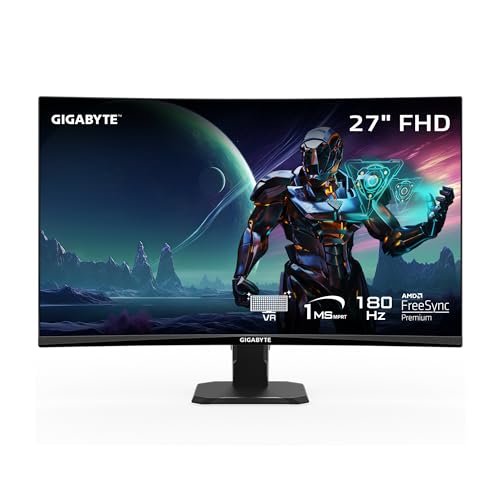
GIGABYTE 27-Inch Curved 1080p Gaming Monitor
Best for: immersive 1080p gaming with high contrast
- Screen Size
- 27"
- Resolution
- 1920 x 1080
- Refresh Rate
- 180Hz
- Response Time
- 1ms (MPRT)
- Sync Technology
- AMD FreeSync Premium
- Connectivity
- 1x DisplayPort 1.4, 2x HDMI 2.0
View on Amazon: GIGABYTE 27-Inch Curved 1080p Gaming Monitor Affiliate link
This 27-inch curved VA panel delivers 1080p resolution at 180Hz with 1ms MPRT response time. The 1500R curvature and 108% sRGB color gamut provide immersive visuals and wide color coverage. AMD FreeSync Premium reduces tearing. It suits players who prefer a larger screen size over the 24.5-inch flat IPS option, prioritizing contrast and immersion for competitive gaming.
Pros
- 27-inch curved VA panel with 1500R radius
- 180Hz refresh rate and 1ms MPRT response
- 108% sRGB color gamut and 3000:1 contrast
- AMD FreeSync Premium support
Cons
- VA panel has slower pixel response than IPS
- 1080p resolution on 27 inches reduces sharpness
- Tilt-only stand limits ergonomic adjustment
Good fit if
- You want a larger 27-inch screen for immersion
- You prefer the high contrast of a VA panel
- You play competitive FPS games at 1080p
Skip if
- You need pixel-perfect sharpness at 27 inches
- You require an IPS panel for faster response
- You need height-adjustable stand ergonomics
Verdict: GIGABYTE 27-Inch Curved 1080p Gaming fits players who prioritize screen size and contrast over the sharper viewing experience of a flat IPS panel. It is a solid choice for immersive 1080p gaming.

GIGABYTE 24.5-Inch 240Hz IPS Gaming Monitor
Best for: Competitive esports and fast-paced gaming
- Screen Size
- 24.5"
- Resolution
- 1920x1080
- Refresh Rate
- 240Hz
- Panel Type
- SuperSpeed IPS
- Response Time
- 1ms GTG
- Sync Technology
- AMD FreeSync Premium
View on Amazon: GIGABYTE 24.5-Inch 240Hz IPS Gaming Monitor Affiliate link
This GIGABYTE monitor features a 24.5-inch SuperSpeed IPS panel with a 240Hz refresh rate and 1ms GTG response time. It covers 120% of the sRGB color gamut and supports AMD FreeSync Premium. The display is HDR10 ready with 8-bit color depth. You get a fast, smooth experience for competitive gaming. The unit weighs 13.2 pounds and measures 19.6 inches wide.
Pros
- 240Hz refresh rate for smooth motion
- 1ms GTG response time
- 120% sRGB color gamut
- AMD FreeSync Premium support
Cons
- 24.5-inch screen is smaller than the 27-inch alternative
- 1920 x 1080 resolution on a small panel
- No USB hub or headphone jack listed
Good fit if
- You play fast-paced competitive shooters
- You prefer a smaller desktop footprint
- You want high refresh rates at 1080p
Skip if
- You need a larger 27-inch display
- You prefer curved screens for immersion
- You require 4K resolution clarity
Verdict: GIGABYTE 24.5-Inch 240Hz IPS Gaming Monitor suits players who prioritize speed and color accuracy over screen size. It delivers precise frame delivery for esports titles where every millisecond counts.
Specifications side by side
| Spec | GIGABYTE 27-Inch Curved 1080p Gaming Monitor | GIGABYTE 24.5-Inch 240Hz IPS Gaming Monitor |
|---|---|---|
| Screen Size | 27" | 24.5" |
| Resolution | 1920 x 1080 | 1920x1080 |
| Refresh Rate | 180Hz | 240Hz |
| Panel Type | not stated | SuperSpeed IPS |
| Response Time | 1ms (MPRT) | 1ms GTG |
| Sync Technology | AMD FreeSync Premium | AMD FreeSync Premium |
| Connectivity | 1x DisplayPort 1.4, 2x HDMI 2.0 | HDMI, DP |
| Dimensions | 5.8 × 24 × 19.2 inches | 7.38 × 19.6 × 21.9 inches |
| Weight | 9.98 pounds | 13.2 pounds |
| Color | Black | Black |
| Model | GS27FC US | G25F2A |
| Size | not stated | Fhd 240Hz |
Frequently asked questions
Which Gigabyte monitor has the larger screen?
The GIGABYTE GS27FC features a 27-inch display, making it the larger option. The G25F2A has a 24.5-inch panel. You should choose the GS27FC if you prefer a bigger viewing area for immersive gaming. The smaller G25F2A is better for desks with limited space or for players who want to keep their eyes closer to the screen.
Does the 27-inch Gigabyte monitor use an IPS panel?
No, the GIGABYTE GS27FC uses a VA panel. The G25F2A utilizes an IPS panel. VA panels typically offer higher contrast ratios, which can make dark scenes look deeper. IPS panels provide better color accuracy and wider viewing angles. Your choice depends on whether you prioritize contrast or color fidelity.
What is the refresh rate difference between these two models?
The GIGABYTE G25F2A runs at 240Hz, while the GS27FC operates at 180Hz. The G25F2A delivers faster frame updates for competitive shooters. The GS27FC still offers a smooth experience with its 180Hz rate. If you play fast-paced esports titles, the higher refresh rate on the smaller monitor provides a noticeable advantage in motion clarity.
Is the 27-inch Gigabyte monitor curved?
Yes, the GIGABYTE GS27FC has a curved screen design. The G25F2A is a flat panel. A curved display can wrap around your field of view, enhancing immersion in single-player games. The flat panel on the G25F2A offers consistent image geometry across the entire screen, which some competitive players prefer for precise aiming.
Do both monitors support FreeSync?
Yes, both the GIGABYTE G25F2A and the GS27FC support AMD FreeSync. This technology synchronizes the monitor refresh rate with the GPU frame rate. It helps reduce screen tearing and stuttering during gameplay. You get smoother visuals on either model without needing to pay extra for a different sync technology.
Which monitor is lighter to move around?
The GIGABYTE GS27FC weighs 9.98 pounds, making it the lighter option. The G25F2A weighs 13.2 pounds. If you frequently move your monitor between rooms or setups, the lighter GS27FC is easier to handle. The heavier G25F2A may feel more stable on a desk but requires more effort to transport.