GIGABYTE 27-Inch 1440p 180Hz Gaming vs GIGABYTE 27-Inch Curved 1080p Gaming (2026): Key Differences
As an Amazon Associate we earn from qualifying purchases. Links on this page are affiliate links.
This comparison of gigabyte gs27qa sa 27 superspeed vs gs27fc 27 180hz 1080p looks at two 27-inch gaming monitors from GIGABYTE. Both models offer an 180Hz refresh rate and 1ms MPRT response time to keep motion smooth. They also both support AMD FreeSync to reduce screen tearing. The main difference lies in their panel technology and resolution. One uses a flat IPS panel with higher resolution, while the other uses a curved VA panel with standard 1080p resolution.
Key differences
| Aspect | GIGABYTE 27-Inch 1440p 180Hz Gaming Monitor | GIGABYTE 27-Inch Curved 1080p Gaming Monitor |
|---|---|---|
| Resolution | 1440p (QHD) | 1080p (FHD) |
| Panel Type | SuperSpeed IPS (Flat) | VA (Curved, 1500R) |
| Contrast Ratio | 1000:1 | 3000:1 |
| Sync Technology | AMD FreeSync | AMD FreeSync Premium |
| Special Features | Not listed | Game Assist, Black Equalizer, OSD Sidekick |
| Warranty | Not listed | 3-year warranty |
Which one should you choose?
Choose GIGABYTE 27-Inch 1440p 180Hz Gaming Monitor if
- You prefer sharper image details for single-player games or productivity tasks.
- You want wider viewing angles with consistent color accuracy from the side.
- You prioritize a flat screen design for easier wall mounting or multi-monitor setups.
Choose GIGABYTE 27-Inch Curved 1080p Gaming Monitor if
- You want a more immersive field of view from a curved display.
- You play fast-paced shooters and value tactical overlays like crosshairs and timers.
- You prefer deeper black levels and higher contrast for dark room gaming.
Verdict: Choose the GS27QA SA if you want higher resolution clarity and accurate colors. Pick the GS27FC if you prefer the immersion of a curved screen and extra tactical gaming features. Both deliver smooth 180Hz performance for competitive play.
Specs and Design Comparison
Resolution and Clarity
The GS27QA SA delivers a 1440p resolution on its 27-inch screen, providing sharper image detail than the GS27FC. The GS27FC sticks to a 1080p resolution for the same physical size. This means the pixel density is higher on the GS27QA, which helps text and game elements look crisper. If you sit close to your monitor, the lower resolution on the GS27FC may appear less sharp. The GS27QA offers a clearer picture for detailed visuals. You get better definition with the higher pixel count on the SuperSpeed IPS model compared to the standard 1080p display on the curved VA model.
Panel Type and Curvature
The GS27QA uses a flat SuperSpeed IPS panel, while the GS27FC features a curved 1500R VA panel. The curved design on the GS27FC wraps around your field of view, which can feel more immersive for games. The flat IPS panel on the GS27QA typically offers better viewing angles and consistent colors from the side. VA panels like the one in the GS27FC often provide deeper blacks and higher contrast ratios, listed at 3000:1 compared to the 1000:1 on the IPS model. The choice depends on whether you prefer immersion or color accuracy.
Color Gamut and Contrast
Both monitors cover a wide color gamut, but they differ in contrast. The GS27FC VA panel boasts a 3000:1 contrast ratio and 108% sRGB coverage, which helps dark scenes look richer and colors pop more. The GS27QA IPS panel has a 1000:1 contrast ratio and 100% sRGB coverage. While both are 8-bit color, the higher contrast on the GS27FC can make images appear more vivid in dark environments. The IPS panel on the GS27QA may offer more consistent color reproduction across different viewing angles. Both support HDR10 for enhanced dynamic range.
Sync Technology Features
Both monitors run at 180Hz with 1ms MPRT response times, ensuring smooth motion. The GS27QA supports standard AMD FreeSync to reduce screen tearing. The GS27FC upgrades this to AMD FreeSync Premium, which often includes additional features like low framerate compensation for smoother gameplay at lower frame rates. This premium certification on the GS27FC can provide a more stable experience when frame rates drop. If you play fast-paced competitive titles, the premium sync technology on the curved model may offer a slight advantage in stability.
Tactical and Assist Features
The GS27FC includes built-in tactical features designed to help with gameplay. These include an OSD Sidekick, a timer, and crosshairs to help track time and focus on enemies. It also features Black Equalizer to brighten dark areas without washing out the rest of the screen. The GS27QA does not list these specific tactical assistance tools in its features. If you want on-screen aids to improve your reaction time and situational awareness, the GS27FC provides these utilities directly through its OSD. The GS27QA focuses more on pure display performance without these extra overlays.
Warranty Coverage
The GS27FC comes with a 3-year warranty from GIGABYTE, providing longer coverage for your purchase. The GS27QA data does not explicitly list the warranty length in the provided specifications or features. While GIGABYTE often provides standard warranties, the GS27FC explicitly states its 3-year coverage. This gives you more peace of mind regarding hardware defects or issues over time. If warranty length is a priority for your buying decision, the GS27FC offers a clearly defined longer protection period.
Which GIGABYTE 27-Inch Monitor Fits You
You want sharper image detail for general gaming
The GS27QA SA uses a 1440p resolution on its 27-inch screen. This provides higher pixel density and clearer image detail compared to the 1080p panel. You will notice sharper textures and text. It also features a SuperSpeed IPS panel for consistent color accuracy. This makes it ideal if you prioritize visual fidelity over immersion.
You prefer curved displays for immersive gaming
The GS27FC features a native 1500R curved VA panel. This curvature brings the edges closer to your eyes, creating a more immersive field of view. The VA panel also offers a 3000:1 contrast ratio, which is higher than the IPS model. You will see deeper blacks and better contrast in dark scenes.
You need tactical features for competitive play
The GS27FC includes built-in tactical assistance features like OSD Sidekick, a timer, and crosshairs. These tools help you track game time and focus on enemies. It also supports AMD FreeSync Premium for enhanced synchronization. If you value on-screen utilities and competitive aids, this monitor provides specific tools to improve your gameplay precision.
The products compared

GIGABYTE 27-Inch 1440p 180Hz Gaming Monitor
Best for: Competitive gaming with sharp 1440p visuals
- Screen Size
- 27"
- Resolution
- 2560x1440
- Refresh Rate
- 180Hz
- Panel Type
- SuperSpeed IPS
- Response Time
- 1ms MPRT
- Sync Technology
- AMD FreeSync
View on Amazon: GIGABYTE 27-Inch 1440p 180Hz Gaming Monitor Affiliate link
This GIGABYTE monitor pairs a 27-inch IPS panel with 1440p resolution and a 180Hz refresh rate. It covers 100% sRGB and supports AMD FreeSync for smoother visuals. The 1ms MPRT response time helps in fast-paced games. You get HDR10 support and wide color gamut coverage. It suits players who want clarity and speed without the bulk of larger screens.
Pros
- 1440p resolution on a 27-inch IPS panel
- 180Hz refresh rate for smooth motion
- 100% sRGB color gamut coverage
- AMD FreeSync support reduces tearing
- 1ms MPRT response time
Cons
- 1000:1 contrast ratio limits deep blacks
- Flat screen design lacks curvature
- HDR10 certification is entry-level
Good fit if
- You want sharp 1440p detail on a 27-inch screen
- You play fast-paced games and need high refresh rates
- You prefer accurate colors from an IPS panel
Skip if
- You need a curved display for immersion
- You require high-end HDR performance
- You prefer 1080p resolution for lower GPU demand
Verdict: GIGABYTE 27-inch 1440p 180Hz IPS Monitor delivers sharp visuals and smooth gameplay for competitive players. It fits those who prioritize color accuracy and resolution over curvature or premium HDR.
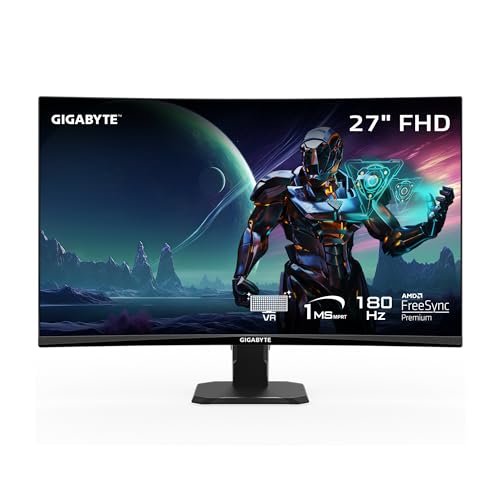
GIGABYTE 27-Inch Curved 1080p Gaming Monitor
Best for: Competitive gamers seeking immersion
- Screen Size
- 27"
- Resolution
- 1920 x 1080
- Refresh Rate
- 180Hz
- Response Time
- 1ms (MPRT)
- Sync Technology
- AMD FreeSync Premium
- Connectivity
- 1x DisplayPort 1.4, 2x HDMI 2.0
View on Amazon: GIGABYTE 27-Inch Curved 1080p Gaming Monitor Affiliate link
The GIGABYTE GS27FC is a 27-inch curved gaming monitor with a 1920 x 1080 VA panel. It offers an 180Hz refresh rate and 1ms MPRT response time for smooth motion. The display features a 1500R curvature, 108% sRGB color gamut, and AMD FreeSync Premium support. This model suits players who prioritize immersion and high refresh rates over pixel density on a budget.
Pros
- 180Hz refresh rate for smooth motion
- 1500R curved VA panel for immersion
- 108% sRGB color gamut coverage
- AMD FreeSync Premium reduces tearing
Cons
- 1080p resolution on 27 inches yields lower pixel density
- Tilt-only stand limits ergonomic adjustment
- 1ms MPRT response time requires motion blur reduction
Good fit if
- You want a curved screen for immersion
- You prioritize high refresh rates over sharpness
- You play fast-paced competitive titles
Skip if
- You need sharp 1440p or 4K clarity
- You require height or swivel adjustments
- You prefer IPS panel color accuracy
Verdict: GIGABYTE GS27FC 27-Inch 180Hz 1080p Curved Monitor delivers smooth gameplay and immersion for competitive gamers who accept lower pixel density. It fits users who value refresh rate and curvature over sharpness and ergonomic flexibility.
Specifications side by side
| Spec | GIGABYTE 27-Inch 1440p 180Hz Gaming Monitor | GIGABYTE 27-Inch Curved 1080p Gaming Monitor |
|---|---|---|
| Screen Size | 27" | 27" |
| Resolution | 2560x1440 | 1920 x 1080 |
| Refresh Rate | 180Hz | 180Hz |
| Panel Type | SuperSpeed IPS | not stated |
| Response Time | 1ms MPRT | 1ms (MPRT) |
| Sync Technology | AMD FreeSync | AMD FreeSync Premium |
| Connectivity | 2x HDMI 2.0, DP 1.4 | 1x DisplayPort 1.4, 2x HDMI 2.0 |
| Dimensions | 6.77 × 24.4 × 17.6 inches | 5.8 × 24 × 19.2 inches |
| Weight | not stated | 9.98 pounds |
| Size | 27" QHD | not stated |
| Color | SS IPS Panel 180Hz | Black |
| Model | GS27QA SA | GS27FC US |
Frequently asked questions
Which monitor has a curved screen?
The GIGABYTE GS27FC features a curved panel. This design wraps around your field of view to enhance immersion during gameplay. The GS27QA SA uses a flat IPS panel instead. You will notice the physical difference in the stand height and depth dimensions between the two models.
Does the 1440p model have FreeSync?
Yes, the GS27QA SA supports AMD FreeSync technology. This syncs the refresh rate with your GPU to reduce screen tearing. The GS27FC also includes FreeSync support. Both monitors use this feature to maintain smooth visuals during fast-paced gaming sessions without stuttering.
Which model is lighter?
The GS27FC weighs 9.98 pounds. The GS27QA SA does not list a weight in its specifications, so a direct comparison is not possible. However, the GS27FC has a slightly smaller depth at 5.8 inches compared to the 6.77 inches of the flat model.
What panel type does the 1080p monitor use?
The GS27FC utilizes a VA panel type. VA panels typically offer higher contrast ratios than IPS panels. The competing GS27QA SA uses an IPS panel instead. You should choose the VA panel if you prefer deeper blacks and the curved immersion it provides.
Are both monitors 27 inches?
Yes, both the GS27QA SA and GS27FC have a 27-inch screen size. Despite sharing the same diagonal measurement, their physical footprints differ. The curved model is slightly narrower in width but taller in height. The flat model is wider and deeper.
Which monitor is better for competitive gaming?
The GS27QA SA is better for competitive gaming due to its 1440p resolution. It offers sharper visuals and higher pixel density on the 27-inch screen. The GS27FC provides 1080p, which has lower pixel density. Both share the 180Hz refresh rate needed for smooth motion.
Does the 1440p model support HDMI?
The specifications for the GS27QA SA do not explicitly list HDMI connectivity. The GS27FC clearly lists HDMI as a connectivity option. You should check the ports on the GS27QA SA manually if HDMI is required for your specific console or PC setup.