Great voell 49 Inch Curved Gaming Review (2026): A Spec-Based Look
As an Amazon Associate we earn from qualifying purchases. Links on this page are affiliate links.
This great voell 49 inch curved gaming review focuses on a display that merges two 27-inch screens into one seamless panel. The 5120 x 1440 resolution and 165Hz refresh rate define its performance. You get a 32:9 aspect ratio that expands your field of view significantly. The 1500R curvature brings the edges closer to your eyes for better immersion. This monitor targets users who want a wide canvas without bezel interruptions. It pairs high speed with a broad color gamut. The result is a setup designed for intense gaming and multitasking.
What stands out
- 5120 x 1440 DQHD resolution across a 32:9 aspect ratio
- 165Hz refresh rate via DisplayPort 1.4 for smooth motion
- 127% sRGB color gamut with HDR400 certification
- 1500R deep curvature to reduce eye strain
- FreeSync and G-Sync compatible for tear-free gaming
Who it fits
Good fit for
This monitor suits gamers who play racing, simulation, or strategy titles where a wide view matters. The 165Hz refresh rate helps in fast-paced FPS games by reducing motion blur. Professionals who edit photos or video will appreciate the 127% sRGB coverage and HDR400 support. Users with large desks can use the VESA mount for flexible positioning. The 49-inch size is ideal for those who want a dual-monitor experience in a single panel without bezel gaps.
Who should skip it
You should look elsewhere if you have a small desk, as this 46.8-inch wide unit requires significant space. The 32:9 aspect ratio is not supported by all games, requiring manual mods or settings changes. If you primarily use HDMI 2.0 connections, you will be limited to 100Hz, not the full 165Hz. Users who need a standard 16:9 screen for general office work may find the ultrawide format too unusual for text-heavy tasks.
Verdict: The Great voell Q49B5D delivers a spacious, high-speed ultrawide experience for immersive gaming and creative work. It is best for setups with ample desk space and compatible GPUs.
Key specs explained for this monitor
Resolution: 5120 x 1440
This DQHD resolution is equivalent to two 27-inch 1440p screens side by side. You get a wide 32:9 aspect ratio that provides an expanded field of view. This setup allows you to see more details in games without the distraction of bezels. It is ideal for immersive simulation titles and productivity tasks where screen real estate matters.
Refresh Rate: 165Hz
A 165Hz refresh rate ensures smooth motion and fluid transitions on screen. You can dominate in fast-paced FPS and racing games with reduced blur. This high frame rate provides a competitive edge by updating the image more frequently. It works best when connected via DisplayPort 1.4 to achieve the full speed potential.
Response Time: 1ms
A 1ms response time minimizes ghosting and motion blur during rapid movements. You benefit from clearer visuals when tracking fast-moving objects in games. This speed helps eliminate artifacts that can obscure details. It complements the high refresh rate to deliver a responsive experience for competitive gaming scenarios.
Sync Technology: FreeSync, G-Sync
Adaptive sync technology eliminates screen tearing and stuttering by synchronizing the monitor with your GPU. FreeSync ensures seamless performance across compatible graphics cards. G-Sync compatibility offers optimal performance when using NVIDIA cards via DisplayPort. This feature maintains visual stability during intense gaming sessions without frame drops.
Screen Size: 49"
This 49-inch panel offers a massive display area that replaces dual monitors. You get a single seamless surface for gaming and work. The 1500R curvature brings the edges closer to your eyes, reducing strain. It creates a wrap-around effect that enhances immersion for both gaming and media consumption.
Physical design and build quality
According to the listing, this monitor measures 46.8 inches wide, 19.4 inches high, and 6.91 inches deep. It weighs 24.2 pounds. The unit comes in a black finish. These dimensions confirm that the 49-inch panel requires significant desk space. You need a wide surface to accommodate the 32:9 aspect ratio comfortably. The depth suggests a standard stand profile, though the listing notes 100x100mm VESA support for alternative mounting options.
The casing appears to be made of plastic, typical for this price tier. The listing does not mention metal alloys or premium textured finishes. You get a straightforward black aesthetic that blends with most gaming rigs or workstations. The physical controls are not detailed in the provided data, so you should check the side or bottom edge for buttons or joysticks when you receive it. The 1500R curvature is built into the panel structure, bringing the edges closer to your eyes to reduce strain during long sessions.
This heavy unit is not designed for frequent portability. You should plan for a permanent setup. The 19.4-inch height may require a monitor arm if you prefer eye-level viewing without neck strain. The build prioritizes stability for the large screen. You get a solid base for the 5120 x 1440 display, ensuring the heavy panel remains secure during intense gaming or multitasking workflows.
Setup and everyday use guide
Setting up this monitor requires attention to cable selection and software configuration. The listing specifies that the 165Hz refresh rate is available via the DisplayPort 1.4 connection. You must use a compatible DP cable to achieve this speed. The HDMI 2.0 port limits the refresh rate to 100Hz. If you prioritize maximum fluidity for fast-paced titles, the DP connection is the correct choice. The monitor supports FreeSync technology to synchronize with your GPU. It also notes that G-Sync performs best when using the DP ports. You should connect your graphics card to the DisplayPort for optimal adaptive sync performance.
The 1500R curvature is designed to match the natural field of human vision. This deep curve brings the screen edges closer to your eyes. You will need to adjust your seating position to align with the center of the panel. The 49-inch width spans approximately two 27-inch monitors. Ensure your desk has sufficient depth and width to accommodate the 46.8-inch width. The unit weighs 24.2 pounds and includes 100x100mm VESA mounting support. You can use a standard arm if preferred.
For daily use, you must verify that your games support the 32:9 aspect ratio. Some titles may require manual modification or specific settings to display correctly in ultrawide format. The 127% sRGB color gamut and HDR400 certification suggest the display is suitable for both gaming and photo editing. The 1ms response time aims to reduce motion blur. You should configure your operating system to recognize the 5120 x 1440 resolution for proper window management and scaling.
Before you buy this monitor
Owning this 49-inch display requires planning. The 46.8-inch width demands a large desk. You must verify your PC has a DisplayPort 1.4 output to reach 165Hz. Using HDMI 2.0 limits refresh to 100Hz. Check that your GPU supports FreeSync or G-Sync for smooth gameplay. The listing notes that some games do not natively support the 32:9 ratio. You may need to install mods or adjust settings to fill the screen properly. Keep the panel clean with a microfiber cloth. Avoid harsh chemicals. This model fits well among 1 ultrawide options if you prioritize immersion. It suits simulation and racing fans more than competitive shooters who prefer smaller, faster panels. Ensure your VESA mount supports 100x100mm holes. The 24.2-pound weight is substantial. Secure mounting is essential for safety. This choice works best when paired with a powerful graphics card capable of driving high resolution at high refresh rates.
Check before you buy
- Verify your GPU supports FreeSync or G-Sync for tear-free gaming.
- Ensure your desk is wide enough for the 46.8-inch panel.
- Check that your PC has a DisplayPort 1.4 output for 165Hz.
- Confirm your GPU can drive 5120 x 1440 at high refresh rates.
The product at a glance
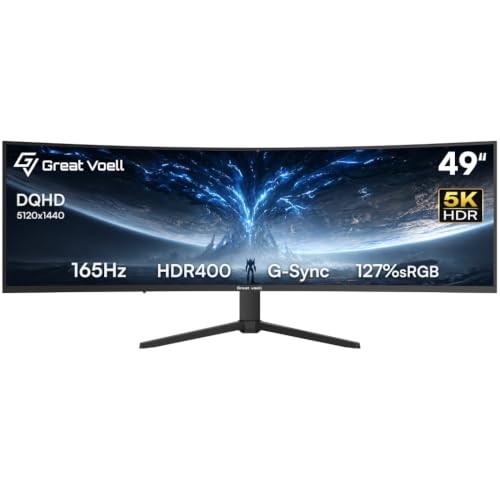
Great voell 49" 165Hz DQHD Gaming Monitor
Best for: Immersive ultrawide gaming and productivity
- Screen Size
- 49 Inch
- Resolution
- 5120x1440
- Refresh Rate
- 165Hz
- Aspect Ratio
- 32:9
- Response Time
- 1ms
- Sync Technology
- FreeSync
View on Amazon: Great voell 49" 165Hz DQHD Gaming Monitor Affiliate link
This 49-inch ultrawide monitor features a 5120x1440 resolution and 165Hz refresh rate for immersive gaming. The 32:9 aspect ratio replaces dual monitors, while the 1500R curve reduces eye strain. It supports FreeSync and G-Sync for tear-free visuals. With 127% sRGB coverage and HDR400, it offers vivid colors. This display suits players seeking a wide field of view and high-speed performance in a single screen.
Pros
- 165Hz refresh rate via DisplayPort 1.4 for fluid motion
- 127% sRGB color gamut with HDR400 certification
- 1500R curvature mimics natural human vision
- FreeSync and G-Sync compatible for sync technology
Cons
- HDMI 2.0 limits refresh rate to 100Hz
- Requires game mods or support for 32:9 aspect ratio
- 24.2 pounds weight requires sturdy VESA mount
Good fit if
- You want a single screen replacing two 27-inch displays
- You play fast-paced FPS or racing simulations
- You need wide color coverage for photo editing
Skip if
- You only use HDMI and need 165Hz
- You prefer a flat screen over a curved one
- You need native 32:9 support without mods
Verdict: Great voell 49" 165Hz DQHD Gaming Monitor delivers a massive field of view and high refresh rates for immersive gaming. It fits players who prioritize screen real estate and color accuracy over native aspect ratio support.
Specifications side by side
| Spec | Great voell 49" 165Hz DQHD Gaming Monitor |
|---|---|
| Screen Size | 49 Inch |
| Resolution | 5120x1440 |
| Refresh Rate | 165Hz |
| Aspect Ratio | 32:9 |
| Response Time | 1ms |
| Sync Technology | FreeSync |
| Connectivity | DP 1.4, HDMI 2.0 |
| Panel Type | VA |
| Dimensions | 6.91 × 46.8 × 19.4 inches |
| Weight | 24.2 pounds |
| Size | 49.0" |
| Color | Black |
| Model | Q49B5D |
Frequently asked questions
Is the Great voell 49 inch monitor compatible with PlayStation 5?
The listing confirms a 165Hz refresh rate is available via DisplayPort 1.4. It does not explicitly state HDMI 2.1 support or 120Hz output for consoles. You should verify your specific console’s HDMI capabilities against the monitor’s port specifications. The high resolution may require upscaling on some gaming systems.
How much desk space does this 49 inch curved gaming monitor require?
You need a desk with at least 46.8 inches of width. The monitor’s physical width is listed as 46.8 inches. Its depth is 6.91 inches, and it weighs 24.2 pounds. Ensure your desk surface is sturdy enough to support the weight and provide ample room for the wide footprint.
What resolution does the Great voell 49 inch DQHD monitor use?
It uses a 5120 x 1440 resolution. This is known as DQHD or Super Ultra-Wide. The aspect ratio is 32:9, which is equivalent to two 27-inch 1440p screens placed side by side. This provides a seamless, expansive view for gaming and multitasking without black bars.
Does this monitor support FreeSync or G-Sync?
The provided data does not explicitly mention FreeSync or G-Sync compatibility. You should check the product listing for Adaptive Sync support. The high 165Hz refresh rate suggests it is designed for smooth gaming, but variable refresh rate features are not confirmed in the current specifications.
Can I use this monitor with a laptop?
You can use it if your laptop has a DisplayPort 1.4 output. The listing specifies that 165Hz requires a DisplayPort 1.4 connection. HDMI connections may limit the refresh rate. Ensure your laptop’s GPU can drive the 5120 x 1440 resolution at high speeds for optimal performance.
What is the color option for the Great voell Q49B5D model?
The monitor comes in a black finish. The model number is Q49B5D. The design is described as a black unit, which is standard for gaming monitors. This color choice helps blend with most desk setups and reduces visual distraction during gameplay.
Is the 49 inch screen size too large for office work?
The 32:9 aspect ratio provides significant screen real estate. It is ideal for productivity tasks like coding, spreadsheets, or video editing. The 5120 x 1440 resolution allows you to view multiple windows side by side. However, you must ensure your desk is large enough to accommodate the 46.8-inch width.