HP OMEN 27" 180Hz FHD Review: Who It Fits and Who Should Skip It
As an Amazon Associate we earn from qualifying purchases. Links on this page are affiliate links.
This hp omen 27 180hz fhd review looks at a 27-inch gaming display that balances speed with solid color accuracy. The monitor features a 1920 x 1080 resolution and an 180Hz refresh rate. It uses an IPS panel to deliver wide viewing angles and vibrant visuals. The 1ms response time helps reduce motion blur during fast-paced scenes. You get HDR 400 support for better contrast in supported content. This setup targets players who want smooth performance without sacrificing image quality. It connects via HDMI and supports AMD FreeSync for tear-free gameplay.
What stands out
- 180Hz refresh rate for smooth motion
- IPS panel with 95% Display P3 color gamut
- 1ms GtG response time with overdrive
- HDR 400 certification for enhanced contrast
- VESA Certified AdaptiveSync compatibility
Who it fits
Good fit for
This monitor suits competitive gamers who prioritize high refresh rates and low input lag. The 180Hz panel and 1ms response time make it ideal for fast-paced shooters. The IPS panel offers accurate colors, which benefits both gaming and media consumption. You will appreciate the HDR 400 support for more immersive visuals. The HDMI connectivity ensures easy setup with consoles and PCs. It is a strong choice for those who want a responsive display without the cost of higher resolutions.
Who should skip it
You should look elsewhere if you need higher pixel density. The 1920 x 1080 resolution on a 27-inch screen results in visible pixelation. Text may appear less sharp compared to QHD or 4K displays. If you work with detailed graphics or need crisp text for productivity, this FHD panel may not meet your standards. The HDR 400 rating is entry-level and may not deliver significant improvements in darker scenes. Consider a higher-resolution model if image clarity is your top priority.
Verdict: The HP OMEN 27 offers a compelling mix of speed and color accuracy for FHD gaming. It is best for players who value smooth performance over pixel density.
HP OMEN 27 Key Specs Explained
Resolution: 1920 x 1080
This Full HD resolution offers 1080p clarity on a 27-inch screen. You will see sharper images than standard HD, though pixel density is lower than QHD. This setup suits competitive gamers who prioritize high frame rates over extreme detail. It is a practical choice if you prefer smoother motion over pixel-perfect sharpness found in higher-resolution ultrawide displays.
Refresh Rate: 180Hz
An 180Hz refresh rate updates the image 180 times per second. This high speed reduces motion blur and makes fast-paced action feel fluid. You benefit from smoother gameplay in shooters and racing titles. This rate is significantly faster than standard 60Hz monitors, providing a competitive edge in fast-moving scenes where every frame counts for reaction time.
Panel Type: IPS
IPS technology provides wide viewing angles and consistent color reproduction. You can view the screen from the side without significant color shift or contrast loss. This panel type is ideal for shared viewing spaces or multi-monitor setups. It delivers vibrant colors suitable for both gaming and media consumption, ensuring a consistent visual experience across different seating positions.
Response Time: 1ms GtG
A 1ms Gray-to-Gray response time minimizes ghosting and trailing artifacts. Fast-moving objects render clearly without blurring behind them. This speed is crucial for competitive gaming where split-second decisions matter. It ensures that your inputs translate to immediate visual feedback, creating a more responsive and immersive experience during intense gameplay sessions compared to slower response times.
Sync Technology: AMD FreeSync
AMD FreeSync synchronizes the monitor's refresh rate with the GPU's frame output. This eliminates screen tearing and stuttering without requiring a fixed refresh rate. You enjoy smoother gameplay even when frame rates fluctuate. This technology is essential for maintaining visual consistency, ensuring that your gaming experience remains fluid and uninterrupted during demanding graphical scenes or variable performance loads.
Design and Build Overview
The HP OMEN 27 measures 24.16 x 2.06 x 14.34 inches and weighs 17.7 pounds. It comes in a black finish. The listing states it is built for gaming. The 2.06-inch depth suggests a slim profile. This allows it to fit on most desks without taking up too much space. The weight indicates a solid base. You should expect it to stay stable during intense sessions. The dimensions help you plan your setup. Measure your desk before placing it. The black color matches most gaming rigs. It does not stand out visually. This neutral look suits minimal setups. The monitor uses an IPS panel. This affects viewing angles more than the build itself. You get consistent colors from the side. The design prioritizes function over flair. There are no flashy lights or unique shapes. It looks like a standard workhorse. The HDMI connectivity is standard. You can connect consoles or PCs easily. The listing mentions console compatibility. This means the ports work well with controllers. The build feels practical. It is not a luxury item. It is a tool for play. The 27-inch size is clear. It fills your field of view. The 180Hz rate is fast. The design supports this speed. The stand likely holds it steady. You can adjust it if needed. The listing does not mention height adjustment. Assume it is fixed. This limits ergonomic flexibility. You may need a monitor arm. The weight helps with mounting. Check the VESA pattern if you buy an arm. The build is straightforward. It does not hide features. It shows what it is. A gaming display for speed.
Setup And Daily Use Guide
Setting up this display is straightforward. You connect it via HDMI to your source device. The listing confirms compatibility with consoles after passing over 140 test cases. This means you can plug in your console and begin playing immediately. There is no mention of DisplayPort or USB hubs in the provided data, so assume HDMI is the primary connection method.
The monitor supports AMD FreeSync and VESA Certified AdaptiveSync. These technologies synchronize the refresh rate with your system’s frame rate. This reduces screen tearing and stuttering during gameplay. You get smooth visuals without manual configuration. The 180Hz refresh rate ensures fast updates. Combined with the 1ms GtG response time, motion blur is minimized. This is ideal for fast-paced titles where every millisecond counts.
For daily use, the IPS panel provides wide viewing angles. Colors remain consistent even if you view the screen from the side. The factory calibration covers 95% of the Display P3 color space. This ensures accurate hues for both gaming and media consumption. HDR 400 certification indicates a peak brightness of 400 nits. This allows for brighter whites and deeper blacks. You experience more contrast in supported content. The 27-inch size with Full HD resolution is best suited for competitive gaming. You get crisp action without the pixel density of higher resolutions. This setup prioritizes speed and clarity for everyday play.
Before You Buy This Monitor
Before you commit to the HP OMEN 27, verify your PC’s video outputs. This model relies on HDMI connectivity, so ensure your graphics card has the necessary ports. You may need an adapter if your system uses DisplayPort only. Check your console compatibility as well, since the listing confirms over 140 test cases for console use. This ensures smooth integration with PlayStation or Xbox systems. Keep the screen clean with a microfiber cloth and mild cleaner, avoiding harsh chemicals that could damage the IPS coating. This monitor sits alongside higher-resolution options in our 1 product guide. It suits players who prioritize speed over pixel density. If you prefer sharp 1440p visuals, consider other listings. For competitive shooters, the 180Hz refresh rate and 1ms response time offer a clear advantage. Just remember to calibrate your HDR settings for optimal contrast.
Check before you buy
- Verify your GPU has HDMI ports for connection.
- Check console compatibility for PlayStation or Xbox use.
- Ensure your desk fits the 24.16-inch width.
- Confirm your game supports 180Hz refresh rates.
The product at a glance
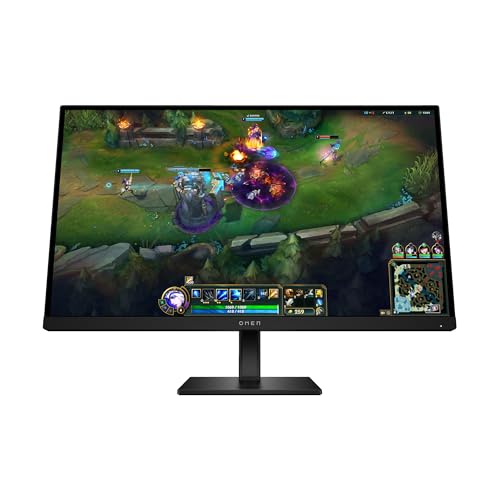
HP OMEN 27" 180Hz FHD Gaming Monitor
Best for: Competitive 1080p gaming with high refresh rates
- Screen Size
- 27 inch
- Resolution
- 1920 x 1080
- Refresh Rate
- 180Hz
- Panel Type
- IPS
- Response Time
- 1ms GtG
- Sync Technology
- AMD FreeSync, AdaptiveSync
View on Amazon: HP OMEN 27" 180Hz FHD Gaming Monitor Affiliate link
The HP OMEN 27-inch monitor combines a 180Hz refresh rate and 1ms GtG response time with an IPS panel. It delivers 95% Display P3 color coverage and HDR 400 certification for improved contrast. This 1920 x 1080 display supports AMD FreeSync and VESA AdaptiveSync for smooth gameplay. It connects via HDMI and includes factory color calibration. You get a fast, color-accurate screen suitable for competitive gaming.
Pros
- 180Hz refresh rate reduces motion blur
- 1ms GtG response time for fluid action
- 95% Display P3 factory color calibration
- HDR 400 with 400 nits peak brightness
- AMD FreeSync and VESA AdaptiveSync support
Cons
- 1920 x 1080 resolution on a 27-inch screen lowers pixel density
- Only HDMI connectivity listed, no DisplayPort
- No USB hub or built-in speakers mentioned
Good fit if
- You prioritize high refresh rates and fast response times over sharpness
- You want accurate colors with 95% Display P3 coverage
- You play competitive shooters on consoles or PC
Skip if
- You need 4K resolution for detailed text or media
- You require DisplayPort connectivity for your graphics card
- You want a monitor with built-in speakers
Verdict: HP OMEN 27-inch 180Hz FHD Monitor fits gamers who value speed and color accuracy over pixel density. It is a solid choice for competitive play on 1080p.
Specifications side by side
| Spec | HP OMEN 27" 180Hz FHD Gaming Monitor |
|---|---|
| Screen Size | 27 inch |
| Resolution | 1920 x 1080 |
| Refresh Rate | 180Hz |
| Panel Type | IPS |
| Response Time | 1ms GtG |
| Sync Technology | AMD FreeSync, AdaptiveSync |
| Connectivity | HDMI |
| Weight | 17.7 pounds |
| Size | 24.16 x 2.06 x 14.34 in |
| Color | BLACK |
| Model | AV4K1AA#ABA |
Frequently asked questions
Is the HP OMEN 27 good for competitive gaming?
Yes, this monitor is built for speed. It features a 180Hz refresh rate and FreeSync support. The IPS panel ensures wide viewing angles and vibrant colors. This combination suits gamers who value high frame rates and color accuracy over pixel density for 1080p play.
What is the screen resolution of this display?
The HP OMEN 27 uses a Full HD resolution of 1920 x 1080. This provides 1080p clarity on a 27-inch screen. You will see sharper images than standard HD, though pixel density is lower than QHD. This setup is ideal for competitive gamers who prioritize high frame rates.
Does the HP OMEN 27 support FreeSync?
Yes, the monitor includes FreeSync technology. This sync technology helps reduce screen tearing and stuttering during gameplay. It works well with compatible graphics cards to maintain smooth visuals. This feature enhances the gaming experience by keeping frames synchronized with the 180Hz refresh rate.
What panel type does this monitor use?
It uses an IPS panel type. This technology delivers wide viewing angles and accurate color reproduction. You can view the screen from different positions without significant color shift. The IPS panel also contributes to the vibrant image quality noted in the product specifications for this gaming display.
How heavy is the HP OMEN 27 monitor?
The monitor weighs 17.7 pounds. It measures 24.16 x 2.06 x 14.34 inches in size. The black finish gives it a sleek appearance. The slim 2.06-inch depth allows it to fit easily on most desks. This weight and size make it stable for daily gaming use.
Is this monitor compatible with consoles?
Yes, the listing confirms compatibility with consoles. It has passed over 140 test cases to ensure this works properly. You can plug in your console and begin playing immediately. The HDMI connection supports this straightforward setup for gaming on various console platforms without complex configuration.
What connectivity options are available on this monitor?
The monitor relies on HDMI connectivity for video input. You should verify your PC or console has the necessary HDMI ports. This ensures you can connect your source device directly. The design focuses on straightforward setup, allowing you to plug in and start using the display quickly.