HP Series 5 Pro 24-Inch Review: Specs, Pros and Cons
As an Amazon Associate we earn from qualifying purchases. Links on this page are affiliate links.
This hp series 5 pro 524pf review covers a dual-monitor pack from HP. You get two 24-inch screens in one box. Each unit features a 1080p IPS panel. The refresh rate sits at 100 Hz. This setup targets users who need extra screen real estate without buying separately. The IPS technology ensures wide viewing angles. The 100 Hz refresh rate offers smoother motion than standard 60 Hz displays. This combination makes it a practical choice for productivity tasks. It is not designed for high-end gaming. The focus remains on clear visuals and efficient workspace management for daily use.
What stands out
- 100% sRGB color gamut for accurate color reproduction
- 100 Hz refresh rate for smoother scrolling
- 1920 x 1080 resolution on 24-inch IPS panels
- 3-sided borderless design for seamless dual-monitor setups
Who it fits
Good fit for
This pack suits office workers and multitaskers who need two screens. The 100 Hz refresh rate helps with smooth scrolling in documents and web pages. The IPS panel provides consistent colors from different angles. The borderless bezels make side-by-side arrangement look clean. You will appreciate the low-blue light filter for long work sessions. It is ideal for coding, data entry, or managing multiple applications. The included dock adds connectivity convenience. This setup maximizes your desk space efficiently.
Who should skip it
Gamers should look elsewhere. The 5ms response time and 100 Hz refresh rate are not competitive for fast-paced titles. The 1080p resolution is too low for immersive experiences on larger screens. If you need 4K clarity or high refresh rates, this is not the right choice. The 24-inch size may feel small for some setups. Users seeking HDR support or advanced gaming features will find this display lacking. Stick to monitors built for performance rather than productivity.
Verdict: This dual-monitor pack delivers solid productivity features with accurate colors and smooth scrolling. It is a practical choice for multi-screen workspace setups.
HP Series 5 Pro Key Specs
Panel Type: IPS
In-Plane Switching panels offer wide viewing angles and consistent color reproduction. You can view the screen from the side without colors washing out. This makes the monitor suitable for collaborative work or shared spaces. Unlike VA panels, IPS avoids the black smearing seen in dark scenes. It is a standard choice for general productivity and office tasks.
Resolution: 1920 x 1080
Full HD provides a clear image on a 24-inch display. Text remains sharp for documents and spreadsheets. This resolution is not suitable for ultrawide gaming or high-density video editing. You get ample pixel density for standard office work. It is a practical baseline for users who prioritize screen count over individual screen detail.
Refresh Rate: 100 Hz
The screen updates 100 times per second. This is faster than the standard 60 Hz found in many office monitors. You will notice smoother cursor movement and less motion blur in scrolling web pages. It is not high enough for competitive gaming. It provides a subtle upgrade for daily desktop use and light media consumption.
Response Time: 5ms
Gray-to-gray response time measures how fast pixels change color. A 5ms rating is adequate for general use. It prevents noticeable ghosting during fast-moving video or mouse movements. It is not fast enough for serious esports titles. You get reliable performance for office applications and casual media viewing without input lag issues.
Screen Size: 24 inches
This diagonal measurement fits well on standard desks. It allows you to place two monitors side by side without overwhelming your workspace. The size balances readability and desk space. It is smaller than ultrawide displays but offers better pixel density for text. It is ideal for users who need multiple windows open simultaneously.
Design and Build Quality
The HP Series 5 Pro 524pf features a sleek, borderless design with micro-edge bezels. This layout is intended to create a virtually seamless look when you pair two monitors together. The listing notes a black and silver finish. This color scheme helps the units blend into most office environments. The physical dimensions for each screen measure 21.2 inches in width and 19.8 inches in height. The depth is 7.46 inches. Each monitor weighs 10.8 pounds. This weight suggests a stable base that resists tipping during normal adjustments.
According to the listing, the stand allows for a tilt range of -5 to +23 degrees. This adjustment lets you angle the screen slightly upward or downward to match your viewing height. The design prioritizes a clean workspace. The three-sided borderless frame maximizes your visible area. This minimizes visual distraction between screens in a dual setup. The anti-glare coating is also part of the build specification. This finish helps reduce reflections from overhead lights or windows. You do not get height adjustment or swivel capabilities listed here. The tilt-only stand keeps the footprint compact. This makes the monitor suitable for desks with limited depth. The USB connectivity options, including four Type-A ports and one Type-B port, are integrated into the unit. This layout allows you to connect peripherals directly without extra cables cluttering your desk surface.
Setup and everyday use
Setting up the HP Series 5 Pro 524pf involves connecting two 24-inch monitors to your computer. Each unit includes one HDMI port and one DisplayPort for video input. You also have four USB Type-A ports and one USB Type-B port on each screen. The USB Type-B port typically connects to your computer to enable the downstream USB ports. This allows you to plug peripherals directly into the monitor rather than the PC. The pack includes a Dockztorm Dock for data sync, which may simplify cable management if you use it. You can adjust the tilt angle from -5 to +23 degrees. This range lets you angle the screens for better visibility without needing a complex stand. The monitors measure 21.2 inches in width and 19.8 inches in height. They weigh 10.8 pounds as a set. Daily use benefits from the 100% sRGB color gamut. This specification ensures accurate color reproduction for standard tasks. The IPS panel provides consistent viewing angles, so colors remain stable even if you look at the screen from the side. The 350-nit brightness level is suitable for most indoor environments. The anti-glare coating helps reduce reflections in well-lit rooms. The low-blue light filter, HP Eye Ease, is always on. It reduces blue light without adding a yellow shift or impacting color accuracy. This feature aims to keep your eyes comfortable during long work sessions. The 100 Hz refresh rate offers smoother motion than standard 60 Hz displays. This is helpful for general desktop use and light gaming. The 5ms response time is adequate for non-competitive tasks. You do not need to worry about significant input lag for everyday productivity.
Before You Buy This Dual Pack
Owning this dual-monitor pack means managing two 24-inch screens. You must ensure your computer has enough video outputs for both units. Each monitor requires its own power source and connection. The included portable data hub simplifies USB connectivity, but you still need to verify cable lengths for your desk setup. Cleaning the anti-glare screen gently is important to maintain the 350-nit brightness over time. This setup is ideal for productivity tasks like coding or spreadsheet work. It differs significantly from ultrawide monitors found on this site. While ultrawides offer a single continuous canvas, this pack provides physical separation. You should consider this if you prefer distinct windows or need to isolate tasks. It also suits users who want flexible placement without the curve of a gaming display. Check your desk depth to ensure the tilt adjustment works well for your viewing distance.
Check before you buy
- Verify your PC has enough HDMI or DisplayPort outputs for two screens
- Ensure your desk is deep enough for the 21.2-inch width and tilt range
- Confirm you have two separate power outlets for each monitor
- Check if you need longer USB cables for the included data hub
The product at a glance
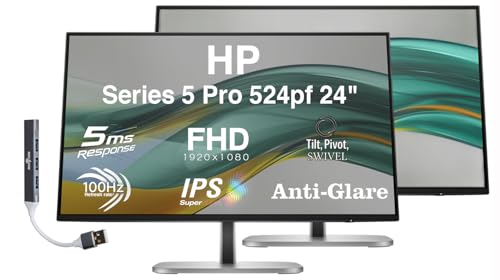
HP Series 5 Pro 24-Inch Dual Monitor Pack
Best for: Dual-screen office productivity setups
- Screen Size
- 24"
- Resolution
- 1920 x 1080
- Refresh Rate
- 100 Hz
- Panel Type
- IPS
- Response Time
- 5ms
- Connectivity
- 1 x HDMI, 1 x DP, USB-A, USB-B
View on Amazon: HP Series 5 Pro 24-Inch Dual Monitor Pack Affiliate link
You get two 24-inch HP 524pf monitors with 1920x1080 resolution and IPS panels. The 100 Hz refresh rate and 5ms response time suit office work. Each unit offers 350 nits brightness and 100% sRGB color coverage. The design features a micro-edge bezel for dual setups. You also receive a portable data hub dock for connectivity.
Pros
- 100% sRGB color gamut for accurate colors
- Micro-edge bezel design for seamless dual setups
- Includes portable USB data hub dock
- Low-blue light filter without yellow shift
Cons
- 1080p resolution limits sharpness on larger screens
- 100 Hz refresh rate is not for gaming
- No USB-C input for single-cable connectivity
Good fit if
- You need a dual-monitor office setup
- You prioritize color accuracy for work tasks
- You want a clean, borderless aesthetic
Skip if
- You require 4K resolution for detailed work
- You need high refresh rates for gaming
- You want a single large ultrawide display
Verdict: HP 524pf 24" FHD IPS Monitor 2-Pack provides a practical dual-screen solution for productivity. It fits users who need accurate colors and a clean desk layout for standard office tasks.
Specifications side by side
| Spec | HP Series 5 Pro 24-Inch Dual Monitor Pack |
|---|---|
| Screen Size | 24" |
| Resolution | 1920 x 1080 |
| Refresh Rate | 100 Hz |
| Panel Type | IPS |
| Response Time | 5ms |
| Connectivity | 1 x HDMI, 1 x DP, USB-A, USB-B |
| Dimensions | 7.46 × 21.2 × 19.8 inches |
| Weight | 10.8 pounds |
| Size | Two monitors |
| Color | Black/Silver |
| Model | HP 524pf |
Frequently asked questions
Is the HP 524pf suitable for gaming?
The HP 524pf features a 100Hz refresh rate. This is higher than the standard 60Hz found in many office monitors. It provides smoother motion for casual gaming. However, it is not designed for competitive esports. The IPS panel ensures good color accuracy. This setup is best for productivity rather than high-performance gaming.
What is the panel type of this monitor?
This monitor uses an IPS panel. IPS technology offers wide viewing angles. Colors remain consistent even when you look at the screen from the side. This is ideal for collaborative work. It also provides better color reproduction than TN panels. You get reliable performance for standard office tasks and creative work.
Does the HP Series 5 Pro come with a stand?
The product data lists the dimensions and weight of the units. It describes a sleek design with micro-edge bezels. The listing does not explicitly mention the stand specifications. You should check the box contents for the base. The dimensions provided are 21.2 inches wide and 19.8 inches tall. This likely includes the stand in the total height.
How heavy is the HP 524pf dual pack?
The total weight for the two-monitor pack is 10.8 pounds. This includes both screens and their respective stands. The weight is distributed across two units. This makes each monitor relatively light for desk mounting. You can easily adjust the position during setup. The compact size fits standard office desks without taking up too much space.
What ports are available on the HP 524pf?
Each monitor includes one HDMI port and one DisplayPort. You also get four USB Type-A ports. There is one USB Type-B port for hub connectivity. This allows you to connect peripherals easily. The USB hub simplifies cable management. You can plug in a mouse and keyboard directly to the monitor.
Is this monitor good for dual-screen setups?
Yes, this pack is designed for dual-screen productivity. It includes two 24-inch monitors in one box. The micro-edge bezels create a seamless look when paired. This reduces visual distraction between screens. It is ideal for users who need extra screen real estate. The clean layout helps organize multiple windows efficiently.