INNOCN 40-Inch 144Hz Ultrawide Monitor Alternatives: 6 Similar Picks Compared
As an Amazon Associate we earn from qualifying purchases. Links on this page are affiliate links.
The INNOCN 40C1R ultrawide monitor alternatives list helps you find similar displays when the original does not fit your specific needs. This guide covers 6 picks that share core specifications with the INNOCN 40C1R, ensuring you compare apples to apples. The INNOCN 40C1R offers a large 40-inch canvas with a 21:9 aspect ratio and 144Hz refresh rate. It also includes USB-C connectivity and strong color accuracy with 95% DCI-P3 coverage. These specs make it ideal for users who want an expansive view and convenient single-cable connections.
However, you might prefer a different size, brand, or feature set. Some buyers need a smaller 27-inch footprint for compact desks. Others may prioritize G-SYNC compatibility over FreeSync or seek higher refresh rates for competitive gaming. The alternatives in this list were chosen because their specs overlap with the original. You will find options that match the 1440p resolution and IPS panel type while varying in connectivity, ergonomics, and sync technology. This approach ensures you can find a monitor that aligns with your exact requirements without losing the performance baseline.
Our top pick: INNOCN 40-Inch 144Hz Ultrawide Monitor.
Comparing alternatives to the INNOCN 40-inch model
Dell 27-Inch 144Hz QHD Monitor
The Dell 27-inch QHD monitor replaces the massive 40-inch canvas with a compact 27-inch footprint. You gain ergonomic adjustability, including height, pivot, tilt, and swivel adjustments, which the INNOCN 40C1R also offers but with a different form factor. Both monitors feature IPS panels, 1440p resolution, and 144Hz refresh rates. The Dell model includes USB-C connectivity and FreeSync support. You sacrifice ultrawide immersion for a standard 16:9 aspect ratio. This pick suits users who prioritize desk space and precise ergonomic control over the expansive 21:9 view. It is ideal for setups where a smaller screen fits better without losing color accuracy or smooth gaming performance.
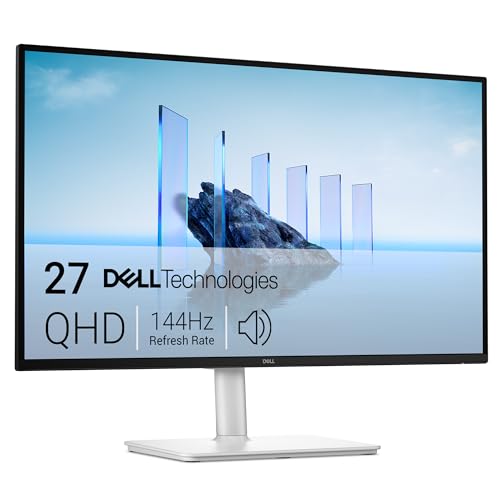
Dell 27 Plus QHD USB-C Monitor
The Dell 27 Plus QHD USB-C monitor provides a compact alternative to the large INNOCN 40C1R. It features a 27-inch IPS panel with 1440p resolution and 144Hz refresh rate. Like the original, it supports FreeSync for smoother visuals. This model includes DisplayPort, HDMI, and USB-C connectivity, offering similar port versatility. You give up the 40-inch ultrawide screen size and 21:9 aspect ratio for a standard 16:9 display. The Dell unit weighs 14.3 pounds and measures 24.1 inches in width. It fits users who want USB-C convenience and a smaller footprint. This option is best for those who value a clean desk setup and reliable performance over immersive ultrawide dimensions.
LG 27-Inch QHD 144Hz IPS Monitor
The LG 27GL83A offers a 27-inch IPS panel with 1440p resolution and 144Hz refresh rate, matching the INNOCN 40C1R’s core performance metrics. However, it uses a standard 16:9 aspect ratio instead of ultrawide. A key difference is its G-SYNC compatibility, providing certified sync technology alongside FreeSync support. The LG monitor weighs 20.3 pounds and measures 29.2 inches in width. You trade the 40-inch canvas and 21:9 field of view for G-SYNC certification and color accuracy. This pick suits gamers who prioritize certified sync technology and standard aspect ratios. It is ideal for users who do not require ultrawide immersion but want reliable performance and cross-platform compatibility.
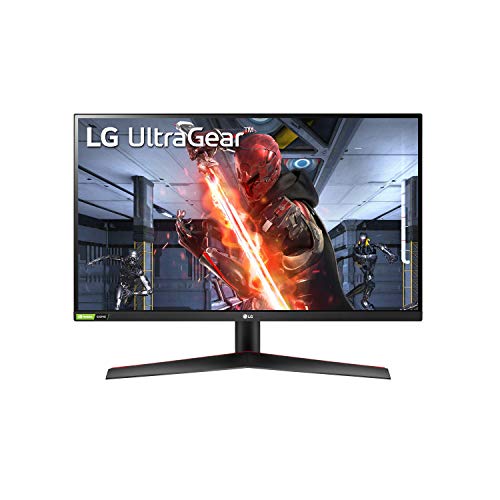
LG 27-Inch UltraGear 144Hz QHD IPS Monitor
The LG 27GN800-B delivers a 27-inch IPS panel with 1440p resolution and 144Hz refresh rate, similar to the INNOCN 40C1R. It supports both FreeSync and G-SYNC for versatile sync technology. You sacrifice the 40-inch ultrawide screen and 21:9 aspect ratio for a compact 16:9 display. The LG monitor weighs 13.2 pounds and measures 24.2 inches in width. It includes DisplayPort and HDMI connectivity. This model suits gamers who value color fidelity and fast response times over a wider field of view. It is the right choice for users who need certified sync technology and standard screen dimensions. You get sharp visuals and smooth performance in a smaller, lighter package.
LG 27-Inch UltraGear 300Hz Gaming Monitor
The LG 27G640A-B offers a 27-inch IPS panel with 1440p resolution and a 300Hz refresh rate, significantly higher than the INNOCN 40C1R’s 144Hz. It supports both FreeSync and G-SYNC for advanced sync technology. You give up the 40-inch ultrawide canvas and 21:9 aspect ratio for a standard 16:9 display. The LG monitor weighs 12.1 pounds and measures 24.2 inches in width. It includes HDMI and USB-C connectivity. This pick suits competitive esports players who prioritize response time and sync technology over screen size. It is ideal for users who want top-tier speed and color accuracy. You trade ultrawide immersion for superior refresh rates and certified gaming performance.
Z-Edge 40-Inch 144Hz Ultrawide Monitor
The Z-Edge 40-inch ultrawide monitor matches the INNOCN 40C1R’s 40-inch screen size and 144Hz refresh rate. It features an IPS panel with 1440p resolution, providing a similar 21:9 aspect ratio. The Z-Edge model weighs 23 pounds and measures 37.2 inches in width. It lacks the USB-C connectivity found on the INNOCN, focusing on DisplayPort performance. You gain a spacious single-screen setup but lose USB-C convenience. This pick suits multitaskers who prioritize screen size and multitasking features. It is ideal for users who do not need HDMI versatility or USB-C power delivery. You get a large ultrawide canvas with similar gaming performance, optimized for DisplayPort users.
Quick picks
Our 7 picks

INNOCN 40-Inch 144Hz Ultrawide Monitor
Best for: Users needing a large 40-inch ultrawide display with USB-C
- Screen Size
- 40"
- Resolution
- 3440 x 1440p
- Refresh Rate
- 144Hz
- Panel Type
- IPS
- Aspect Ratio
- 21:9
- Sync Technology
- FreeSync Premium
View on Amazon: INNOCN 40-Inch 144Hz Ultrawide Monitor Affiliate link
This 40-inch ultrawide monitor offers a 3440 x 1440 resolution on a 21:9 IPS panel. It delivers a 144Hz refresh rate via DisplayPort and supports AMD FreeSync Premium for smoother gameplay. The display covers 95% of the DCI-P3 color gamut and meets HDR400 standards. You get USB-C connectivity alongside standard ports, plus height, tilt, and swivel adjustments for ergonomic setup.
Pros
- 40-inch 21:9 aspect ratio provides 18% more viewable area than 34-inch models
- 144Hz refresh rate via DisplayPort for fluid gaming performance
- 95% DCI-P3 color gamut coverage with Delta E <2 calibration
- USB-C connectivity supports video and data transfer from compatible devices
Cons
- HDMI port is limited to 100Hz refresh rate
- HDR400 certification offers limited high dynamic range impact
- 1200:1 contrast ratio is lower than typical gaming monitors
Good fit if
- You want a large 40-inch screen for immersive gaming or multitasking
- You need USB-C connectivity for direct laptop connections
- You prioritize color accuracy for creative work alongside gaming
Skip if
- You require a 144Hz refresh rate over HDMI
- You need high contrast ratios for dark room gaming
- You prefer a standard 16:9 display format
Verdict: INNOCN 40" WQHD 144Hz Ultrawide fits users who need a massive 40-inch canvas with USB-C convenience and strong color accuracy. It suits those who can accept HDMI limitations and modest HDR performance in exchange for the expansive 21:9 view.

Dell 27-Inch 144Hz QHD Monitor
Best for: Compact setups needing USB-C and adjustability
- Screen Size
- 27"
- Resolution
- 2560x1440
- Refresh Rate
- 144Hz
- Panel Type
- IPS
- Aspect Ratio
- 16:9
- Response Time
- 1ms MPRT
View on Amazon: Dell 27-Inch 144Hz QHD Monitor Affiliate link
This 27-inch QHD monitor offers a 144Hz refresh rate and 1ms MPRT response time on an IPS panel. It features 99% sRGB coverage and AMD FreeSync for smooth visuals. The design includes a fully adjustable stand and built-in dual 3W speakers. USB-C connectivity delivers up to 65W power. It suits users seeking a compact, ergonomic display for gaming or productivity without external audio gear.
Pros
- 144Hz refresh rate with 1ms MPRT response
- 99% sRGB color gamut on IPS panel
- USB-C port with 65W power delivery
- Fully adjustable stand with pivot support
- Built-in dual 3W speakers
Cons
- Smaller 27-inch screen compared to 40-inch alternatives
- Standard 16:9 aspect ratio, not ultrawide
- Only 3W speaker output per unit
Good fit if
- You need a compact 27-inch display for a smaller desk
- You want USB-C connectivity with laptop charging
- You prefer a fully adjustable stand with pivot
Skip if
- You require a 40-inch ultrawide screen
- You need a 21:9 or 32:9 aspect ratio
- You want higher resolution than QHD
Verdict: Dell Plus 27" QHD 144Hz Monitor fits users who prioritize ergonomic adjustability and USB-C convenience in a compact 27-inch form factor. It is ideal for those who do not need ultrawide dimensions but want solid color accuracy and smooth gaming performance.
Dell 27 Plus QHD USB-C Monitor
Best for: Compact desktop setups with USB-C laptops
- Screen Size
- 27"
- Resolution
- 2560x1440
- Refresh Rate
- 144Hz
- Response Time
- 1ms MPRT
- Sync Technology
- AMD FreeSync
- Connectivity
- USB-C, HDMI, DisplayPort 1.4
View on Amazon: Dell 27 Plus QHD USB-C Monitor Affiliate link
This 27-inch QHD monitor offers 2560x1440 resolution and a 144Hz refresh rate. It features a 1ms MPRT response time and AMD FreeSync for smooth visuals. The USB-C port delivers up to 65W power delivery, simplifying your desk setup. Integrated dual 3W speakers add audio without extra cables. It is ideal for users seeking a compact, high-refresh-rate display with versatile connectivity.
Pros
- 2560x1440 QHD resolution with 1500:1 contrast ratio
- 144Hz refresh rate and 1ms MPRT response time
- USB-C connectivity with up to 65W power delivery
- Integrated dual 3W speakers for audio output
- TÜV-certified eye comfort with reduced blue light
Cons
- 27-inch size is smaller than the 40-inch alternatives
- 1ms MPRT response time is slower than typical 1ms GtG specs
- Lacks mention of HDR support or high brightness ratings
Good fit if
- You need a single-cable solution for laptop charging and video
- You prefer a compact 27-inch display over ultrawide formats
- You want integrated speakers to reduce desk clutter
Skip if
- You require an ultrawide 21:9 or 32:9 aspect ratio
- You need high dynamic range for vivid color contrast
- You prioritize a faster pixel response time for competitive gaming
Verdict: Dell 27 Plus QHD 144Hz Monitor is a compact, connectivity-focused option for users who value USB-C convenience and a smaller footprint over ultrawide immersion. It suits those who want a clean desk setup with reliable 144Hz performance.

LG 27-Inch QHD 144Hz IPS Monitor
Best for: Gamers needing G-SYNC and color accuracy
- Screen Size
- 27-Inch
- Resolution
- 2560 x 1440
- Refresh Rate
- 144Hz
- Panel Type
- IPS
- Response Time
- 1ms (GtG)
- Sync Technology
- NVIDIA G-SYNC, FreeSync Premium
View on Amazon: LG 27-Inch QHD 144Hz IPS Monitor Affiliate link
The LG 27GL83A is a 27-inch IPS monitor with 2560 x 1440 resolution and 144Hz refresh rate. It features 1ms GtG response time and supports both NVIDIA G-SYNC and AMD FreeSync Premium. This model offers 99% sRGB color accuracy and a 3-side borderless design. It suits gamers who want certified sync technology and color fidelity on a standard 16:9 screen rather than an ultrawide format.
Pros
- Certified NVIDIA G-SYNC Compatible and AMD FreeSync Premium support
- IPS panel with 99% sRGB coverage for accurate colors
- 1ms (GtG) response time for fast motion clarity
- Adjustable stand allows tilt, height, and pivot changes
Cons
- 27-inch 16:9 aspect ratio is not ultrawide
- Resolution is QHD, not WQHD ultrawide
- No mention of HDR support in specifications
Good fit if
- You want certified G-SYNC compatibility for smoother gameplay
- You prefer accurate colors from an IPS panel
- You need a 16:9 display instead of ultrawide
Skip if
- You require a 21:9 or 32:9 ultrawide screen
- You need a resolution higher than 1440p
- You are looking for a budget ultrawide alternative
Verdict: LG 27GL83A 27-inch 144Hz QHD IPS is a certified sync monitor for gamers who prioritize color accuracy and standard aspect ratios. It fits buyers who need G-SYNC compatibility but do not require ultrawide immersion.
LG 27-Inch UltraGear 144Hz QHD IPS Monitor
Best for: Gamers wanting color accuracy on a 16:9 screen
- Screen Size
- 27 inch
- Resolution
- 2560x1440
- Refresh Rate
- 144Hz
- Panel Type
- IPS
- Response Time
- 1-millisecond (GtG)
- Sync Technology
- NVIDIA G-SYNC, AMD FreeSync Premium
View on Amazon: LG 27-Inch UltraGear 144Hz QHD IPS Monitor Affiliate link
The LG 27GN800-B is a 27-inch QHD monitor designed for gaming. It features an IPS panel with 144Hz refresh rate and 1ms GtG response time. The display covers 99% of the sRGB color gamut. It supports both NVIDIA G-SYNC and AMD FreeSync Premium to reduce tearing. This model suits players who want color accuracy and smooth motion on a standard 16:9 screen.
Pros
- 144Hz refresh rate for smooth motion
- 1ms GtG response time reduces blur
- 99% sRGB color accuracy
- Supports G-SYNC and FreeSync Premium
Cons
- 27-inch size is smaller than 40-inch alternatives
- 16:9 aspect ratio limits horizontal view
- No USB hub listed in specifications
Good fit if
- You prefer a standard 16:9 screen over ultrawide
- You want precise color reproduction for work and play
- You need compatibility with both NVIDIA and AMD GPUs
Skip if
- You require an ultrawide 21:9 or 32:9 display
- You need a screen larger than 27 inches
- You prioritize high brightness for HDR content
Verdict: LG 27-Inch QHD IPS 144Hz Gaming Monitor delivers sharp 1440p visuals and fast response times. It is the right pick for gamers who value color fidelity and cross-platform sync over a wider field of view.

LG 27-Inch UltraGear 300Hz Gaming Monitor
Best for: competitive esports and fast-paced gaming
- Screen Size
- 27"
- Resolution
- 2560 x 1440
- Refresh Rate
- 300Hz
- Panel Type
- IPS
- Response Time
- 1ms GtG
- Sync Technology
- G-SYNC Compatible, FreeSync Premium
View on Amazon: LG 27-Inch UltraGear 300Hz Gaming Monitor Affiliate link
This 27-inch LG monitor delivers QHD clarity with a 300Hz refresh rate and 1ms response time. It supports both NVIDIA G-SYNC and AMD FreeSync Premium for tear-free gameplay. The IPS panel covers 95% of the DCI-P3 color gamut and meets VESA DisplayHDR 400 standards. You get versatile connectivity including USB-C and dual HDMI 2.1 ports. It is ideal for competitive gamers who need speed and color accuracy.
Pros
- 300Hz refresh rate for ultra-smooth motion
- 1ms (GtG) response time minimizes ghosting
- 95% DCI-P3 color gamut coverage
- Dual HDMI 2.1 and USB-C connectivity
Cons
- 27-inch size is smaller than the 40-inch alternatives
- VESA DisplayHDR 400 is entry-level brightness
- No built-in speakers listed in specifications
Good fit if
- You prioritize high refresh rates for competitive gaming
- You want color accuracy with 95% DCI-P3 coverage
- You need flexible connectivity with USB-C and HDMI 2.1
Skip if
- You require a 40-inch ultrawide screen
- You need a higher HDR brightness level than 400 nits
- You prefer a 16:9 aspect ratio over ultrawide
Verdict: LG 27G640A-B 27-inch 300Hz QHD Monitor offers top-tier speed and color for esports players. It suits those who value response time and sync technology over screen size.

Z-Edge 40-Inch 144Hz Ultrawide Monitor
Best for: Multitaskers wanting a large single-screen setup
- Screen Size
- 40 inch
- Resolution
- 3440×1440
- Refresh Rate
- 144Hz
- Panel Type
- IPS
- Aspect Ratio
- 21:9
- Response Time
- MPRT 1ms
View on Amazon: Z-Edge 40-Inch 144Hz Ultrawide Monitor Affiliate link
The Z-Edge 40-inch ultrawide monitor offers a 3440x1440 resolution on a 21:9 IPS panel. It delivers 144Hz refresh rates via DisplayPort for smooth gaming. The screen includes PIP/PBP modes for multitasking. You get an adjustable stand with height and tilt controls. Built-in speakers add convenience. This large display suits users who want expansive screen real estate without the bulk of dual setups.
Pros
- 40-inch 3440x1440 WQHD IPS panel
- 144Hz refresh rate via DisplayPort
- PIP and PBP split-screen modes
- Adjustable stand with height and tilt
- Built-in dual speakers
Cons
- 100Hz max refresh rate on HDMI
- No mention of USB-C video passthrough
- 23-pound weight requires sturdy desk space
Good fit if
- You need a single large screen for multitasking
- You want 144Hz gaming on DisplayPort
- You prefer adjustable ergonomics
Skip if
- You rely on HDMI for high refresh rates
- You have limited desk depth
- You need USB-C video input
Verdict: Z-Edge 40-Inch 144Hz Ultrawide Monitor provides a spacious 40-inch canvas with 144Hz performance for DisplayPort users. It fits those prioritizing screen size and multitasking features over HDMI versatility.
Specifications side by side
| Spec | INNOCN 40-Inch 144Hz Ultrawide Monitor | Dell 27-Inch 144Hz QHD Monitor | Dell 27 Plus QHD USB-C Monitor | LG 27-Inch QHD 144Hz IPS Monitor | LG 27-Inch UltraGear 144Hz QHD IPS Monitor | LG 27-Inch UltraGear 300Hz Gaming Monitor | Z-Edge 40-Inch 144Hz Ultrawide Monitor |
|---|---|---|---|---|---|---|---|
| Screen Size | 40" | 27" | 27" | 27-Inch | 27 inch | 27" | 40 inch |
| Resolution | 3440 x 1440p | 2560x1440 | 2560x1440 | 2560 x 1440 | 2560x1440 | 2560 x 1440 | 3440×1440 |
| Refresh Rate | 144Hz | 144Hz | 144Hz | 144Hz | 144Hz | 300Hz | 144Hz |
| Panel Type | IPS | IPS | not stated | IPS | IPS | IPS | IPS |
| Aspect Ratio | 21:9 | 16:9 | not stated | not stated | not stated | not stated | 21:9 |
| Response Time | not stated | 1ms MPRT | 1ms MPRT | 1ms (GtG) | 1-millisecond (GtG) | 1ms GtG | MPRT 1ms |
| Sync Technology | FreeSync Premium | AMD FreeSync | AMD FreeSync | NVIDIA G-SYNC, FreeSync Premium | NVIDIA G-SYNC, AMD FreeSync Premium | G-SYNC Compatible, FreeSync Premium | not stated |
| Connectivity | USB Type-C, DP, HDMI | HDMI 2.1, DisplayPort 1.4, USB-C, USB-A | USB-C, HDMI, DisplayPort 1.4 | HDMI, DisplayPort | HDMI, DisplayPort | USB-C, dual HDMI 2.1, DisplayPort 1.4 | 1x DP, 2x HDMI, 1x USB-C |
| Size | 40 Inch | S27-144Hz-QHD-USB-Height/Pivot/Tilt/Swivel | 27 Inch | 27 Inch | 14.4"x24.2"x2.1" | 27G640A-B | 40 Inch |
| Dimensions | 5.71 × 5.71 × 15.7 inches | 7.95 × 24.1 × 19.7 inches | 7.95 × 24.1 × 15.4 inches | 8.2 × 29.2 × 20.6 inches | 24.2 × 8.9 × 17.9 inches | 9.4 × 24.2 × 21.2 inches | 37.2 × 11.3 × 23.5 inches |
| Weight | not stated | not stated | 14.3 pounds | 20.3 pounds | 13.2 pounds | 12.1 pounds | 23 pounds |
| Color | black | WHITE | Ash White | Black | Black | Black | Black |
| Model | 40C1R | not stated | S2725DC | 27GL83A-B | 27GN800-B | 27G640A-B.AUSQ | UG40S |
Another guide worth a look: innocn portable monitor touchscreen laptop alternatives.
Frequently asked questions
Which alternative offers the best ergonomic stand?
The Dell 27-inch QHD monitor provides the most comprehensive adjustability. It supports height, pivot, tilt, and swivel adjustments. This allows you to position the screen precisely for your workspace. Other options like the INNOCN 40-inch and Z-Edge 40-inch focus on size rather than stand flexibility. If desk space is limited, the Dell 27 Plus also offers a compact footprint with USB-C connectivity.
Can I use these monitors for competitive gaming?
Yes, if you prioritize speed over screen size. The LG 27G640A-B features a 300Hz refresh rate, making it ideal for fast-paced esports. It supports both FreeSync and G-SYNC for smooth visuals. The LG 27GL83A-B and 27GN800-B also support G-SYNC compatibility. These 27-inch models deliver high performance for gamers who do not need the ultrawide immersion of the 40-inch options.
Do the alternatives support USB-C connectivity?
Several models include USB-C ports for convenient laptop connections. The INNOCN 40-inch, Dell 27-inch QHD, Dell 27 Plus, and LG 27G640A-B all feature USB-C. This allows you to connect a single cable for video and data. The Dell 27 Plus adds DisplayPort and HDMI for further flexibility. The Z-Edge 40-inch and standard LG 27GL83A-B rely on DisplayPort and HDMI instead.
Which monitor is best for multitasking with a single screen?
The Z-Edge 40-inch and INNOCN 40-inch models are designed for large single-screen setups. Both offer a 40-inch IPS panel with 1440p resolution. The Z-Edge model is particularly noted for its spacious canvas, suitable for users who want to maximize screen real estate. These ultrawide formats provide a 21:9 aspect ratio, which is ideal for multitasking across multiple windows.
Are there options with G-SYNC compatibility?
Yes, three LG models offer G-SYNC compatibility alongside FreeSync. The LG 27GL83A-B, 27GN800-B, and 27G640A-B all support this technology. This ensures smooth gameplay without screen tearing on NVIDIA systems. The INNOCN, Dell, and Z-Edge monitors rely primarily on FreeSync. If you use an NVIDIA GPU and want certified sync, the LG 27-inch series is the correct choice.
What is the resolution of these alternatives?
All listed monitors share a 1440p (QHD) resolution. The INNOCN 40-inch, Dell 27-inch, Dell 27 Plus, and all LG models display at 1440p. The Z-Edge 40-inch also uses 1440p resolution. This ensures consistent clarity across the list, regardless of whether you choose a 27-inch or 40-inch screen. The pixel density will vary based on size, but the total pixel count remains the same.
Which monitor has the smallest physical footprint?
The Dell 27 Plus QHD USB-C Monitor has the most compact dimensions. It measures 24.1 inches wide and 15.4 inches high. The Dell 27-inch QHD is slightly larger at 24.1 inches wide and 19.7 inches high. The 40-inch models are significantly larger, with the Z-Edge measuring 37.2 inches wide. If desk space is tight, the 27-inch Dell options are the most suitable.
Do any alternatives offer a 300Hz refresh rate?
Only the LG 27G640A-B offers a 300Hz refresh rate. All other monitors in this list, including the INNOCN 40-inch and Dell models, operate at 144Hz. The LG 27G640A-B is an IPS panel that balances speed with color accuracy. It is the top choice for users who need the highest possible frame rates for competitive gaming.