KTC 24 inch Monitor vs KTC 32 inch Curved Gaming: Spec Comparison
As an Amazon Associate we earn from qualifying purchases. Links on this page are affiliate links.
This comparison of ktc 24 inch monitor vs 32 inch curved gaming highlights two distinct KTC displays. Both models prioritize speed with 1ms MPRT response times and support for adaptive sync technologies like FreeSync Premium and G-Sync compatibility. They also share modern connectivity options including DisplayPort and HDMI ports. The main difference lies in their physical dimensions and visual output. One offers a compact 1080p flat screen, while the other provides a larger 1440p curved experience with a higher refresh rate.
Key differences
| Aspect | KTC 24-Inch Fast IPS 144Hz Gaming Monitor | KTC 32-Inch 1440p Curved Gaming Monitor |
|---|---|---|
| Screen Size | 24 inches | 32 inches |
| Resolution | 1080p | 2560 x 1440 |
| Panel Type | Fast IPS | HVA (Curved 1500R) |
| Refresh Rate | 165Hz | 180Hz |
| Color Gamut | 125.25% sRGB | 120% sRGB |
| Connectivity | 2x HDMI 2.0, 2x DP 1.4 | HDMI, DP, USB, Earphone Jack, DC |
Which one should you choose?
Choose KTC 24-Inch Fast IPS 144Hz Gaming Monitor if
- You need a compact display that fits on smaller desks or requires a lighter footprint.
- You prefer the wider viewing angles and color consistency typical of IPS panels.
- You want higher sRGB coverage for accurate color reproduction in creative tasks.
Choose KTC 32-Inch 1440p Curved Gaming Monitor if
- You want a larger screen real estate with higher 1440p detail for immersive gaming.
- You prefer the deeper blacks and high contrast ratio provided by VA panel technology.
- You seek the highest refresh rate available at 180Hz for competitive play.
Verdict: The 24-inch model suits users with limited desk space or those prioritizing IPS color accuracy and wide viewing angles. The 32-inch curved model is better for those wanting immersive 1440p visuals and a higher refresh rate. Choose based on your preferred screen size and panel characteristics.
KTC 24 vs 32 Spec Showdown
Screen size and resolution
The KTC 24-Inch Fast IPS 144Hz Gaming Monitor features a 24-inch panel with 1080p resolution. This setup delivers a sharp pixel density suitable for close-range gaming. In contrast, the KTC 32-Inch 1440p Curved Gaming Monitor offers a significantly larger 32-inch display with 2560 x 1440 resolution. This higher resolution provides more screen real estate and clearer detail on the larger surface. You get more immersive visuals with the 32-inch model, while the 24-inch option remains compact and space-efficient for smaller desks.
Refresh rate and speed
Both monitors prioritize high refresh rates for smooth gameplay. The KTC 24-Inch Fast IPS 144Hz Gaming Monitor supports a 165Hz refresh rate with 1ms MPRT response time. The KTC 32-Inch 1440p Curved Gaming Monitor pushes this further with an 180Hz refresh rate, also featuring 1ms MPRT. While both eliminate motion blur effectively, the 32-inch model offers a slightly higher frame rate ceiling. This gives you a marginal advantage in competitive scenarios where every frame counts, making the 32-inch variant the faster choice on paper.
Panel type and curvature
The display technologies differ notably between the two models. The KTC 24-Inch Fast IPS 144Hz Gaming Monitor uses a Fast IPS panel, known for accurate colors and wide viewing angles. It has a flat screen design. The KTC 32-Inch 1440p Curved Gaming Monitor utilizes an HVA panel with a 1500R curvature. This curve wraps around your field of view for better immersion. HVA panels typically offer higher contrast ratios than IPS. If you prefer deep blacks and a wrapped visual experience, the curved HVA panel on the 32-inch model is the superior option.
Color gamut and HDR
Color performance is a key differentiator for visual fidelity. The KTC 24-Inch Fast IPS 144Hz Gaming Monitor covers 125.25% sRGB and supports HDR10. The KTC 32-Inch 1440p Curved Gaming Monitor covers 120% sRGB and also includes HDR10. While the 24-inch model has a slightly higher sRGB percentage, both monitors support HDR10 for enhanced contrast and brightness. The difference in color gamut is minimal. You will find vibrant colors on both displays. Since both support HDR10 and have comparable color coverage, neither has a decisive advantage here.
Connectivity and mounts
Connection options vary between the two units. The KTC 24-Inch Fast IPS 144Hz Gaming Monitor provides two HDMI 2.0 ports and two DP 1.4 ports, along with VESA 100mm x 100mm mount compatibility. The KTC 32-Inch 1440p Curved Gaming Monitor includes HDMI, DisplayPort, USB ports, an earphone jack, and DC ports. It supports VESA mounting at 3.9 x 3.9 inches. The 32-inch model offers more diverse connectivity with USB and audio outputs. The 24-inch model provides more DisplayPort options. For versatility, the 32-inch monitor wins due to additional USB and audio interfaces.
Which KTC monitor fits your setup
Competitive FPS players needing speed
You should choose the 24-inch model for competitive play. Its Fast IPS panel offers wider viewing angles and consistent color at 1080p. The 165Hz refresh rate and 1ms MPRT response time ensure smooth motion. Borderless design on three sides helps with multi-monitor setups. This compact size keeps you close to the action for precise aiming.
Immersive gamers wanting high resolution
Select the 32-inch curved monitor for deeper immersion. The 2560 x 1440 resolution provides sharper images on a larger screen. The 1500R curve wraps around your field of view. The HVA panel delivers strong contrast for dark scenes. You get a 180Hz refresh rate for fluid gameplay and 120% sRGB coverage for vibrant colors in a single, spacious package.
Users with limited desk space
The 24-inch monitor is the better fit for small desks. It weighs only 6.17 pounds and has a smaller footprint. The dimensions are 24.4 inches wide by 18.7 inches high. This compact size frees up room for your keyboard and mouse. You still get Full HD clarity and fast performance without overwhelming your workspace.
Viewers wanting flexible connectivity
The 32-inch model offers more port variety for different devices. It includes HDMI, DisplayPort, USB, an earphone jack, and DC power inputs. This abundance of connections reduces the need for extra adapters. You can link multiple peripherals directly to the monitor. The ergonomic stand also allows tilt adjustments for comfortable viewing angles during long sessions.
The products compared
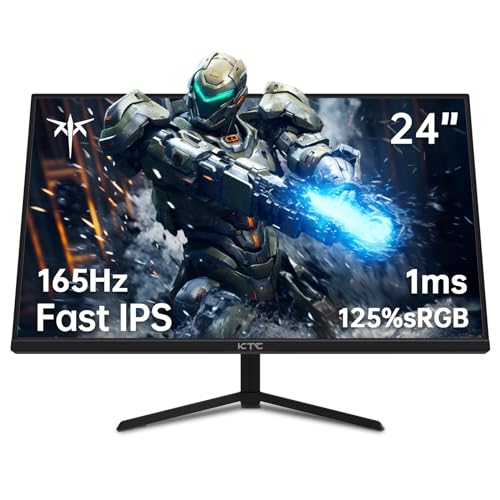
KTC 24-Inch Fast IPS 144Hz Gaming Monitor
Best for: competitive gaming and multi-monitor setups
- Screen Size
- 24.1 Inch
- Resolution
- 1080p
- Refresh Rate
- 165Hz
- Panel Type
- Fast IPS
- Response Time
- 1ms MPRT
- Sync Technology
- FreeSync Premium & G-Sync
View on Amazon: KTC 24-Inch Fast IPS 144Hz Gaming Monitor Affiliate link
This 24-inch monitor features a Fast IPS panel with 1080p resolution and a 165Hz refresh rate. It delivers 1ms MPRT response times and covers 125.25% of the sRGB color gamut. You get versatile connectivity via two HDMI 2.0 and two DisplayPort 1.4 ports. The borderless design aids multi-monitor setups, while flicker-free and low blue light technologies help reduce eye strain during long sessions.
Pros
- Fast IPS panel with 165Hz refresh rate
- 1ms MPRT response time for smooth motion
- 125.25% sRGB color coverage
- Borderless design on three sides
- Two HDMI 2.0 and two DP 1.4 ports
Cons
- 1080p resolution on a 24-inch screen
- HDMI ports limited to version 2.0
- No mention of USB-C connectivity
Good fit if
- You play competitive shooters requiring high refresh rates
- You need a compact secondary display for multitasking
- You want a borderless design for multi-monitor setups
Skip if
- You require 4K resolution for detailed work
- You need USB-C connectivity for single-cable docking
- You prefer a larger 32-inch viewing area
Verdict: KTC 24 Inch Fast IPS 1080p Monitor suits players who prioritize speed and color accuracy in a compact form factor. It is ideal for those building multi-monitor rigs or seeking a responsive display for fast-paced gaming.
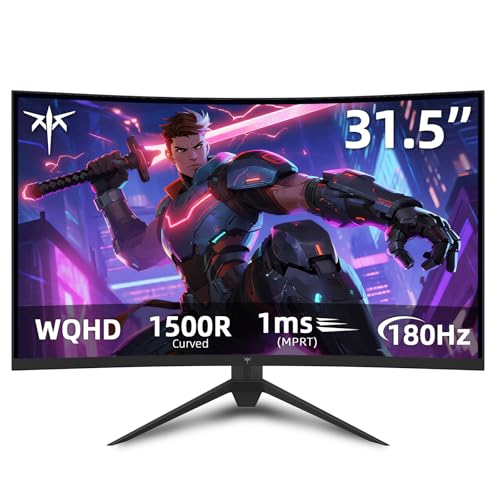
KTC 32-Inch 1440p Curved Gaming Monitor
Best for: immersive curved gaming at 1440p
- Screen Size
- 32"
- Resolution
- 2560 x 1440
- Refresh Rate
- 180Hz
- Panel Type
- HVA
- Response Time
- 1ms MPRT
- Sync Technology
- Adaptive Sync, FreeSync Premium, G-SYNC
View on Amazon: KTC 32-Inch 1440p Curved Gaming Monitor Affiliate link
This 32-inch curved gaming monitor features a 1440p HVA panel with a 1500R curvature. It delivers a 180Hz refresh rate and 1ms MPRT response time for smooth motion. The display covers 120% of the sRGB gamut and supports HDR10. You get FreeSync Premium and G-SYNC compatibility for tear-free gameplay. Ergonomic tilt adjustment and VESA mounting are included for flexible setup.
Pros
- 1440p resolution on a 32-inch screen
- 180Hz refresh rate with 1ms MPRT response
- 1500R curved HVA panel for immersion
- 120% sRGB color gamut coverage
- Supports FreeSync Premium and G-SYNC
Cons
- 1500R curvature is less aggressive than typical 1000R gaming curves
- Response time is listed as 1ms MPRT, not native panel response
- Only offers tilt adjustment, lacking height or swivel pivot
Good fit if
- You want a larger 32-inch screen with 1440p clarity
- You prefer curved displays for immersive gaming
- You need high refresh rates for competitive play
Skip if
- You require a flat panel design
- You need height-adjustable ergonomics
- You prefer a 1080p resolution on a smaller screen
Verdict: KTC 32 inch Curved 1440p 180Hz Monitor is a solid choice for gamers who prioritize screen size and smooth motion over aggressive curvature or advanced ergonomic adjustments.
Specifications side by side
| Spec | KTC 24-Inch Fast IPS 144Hz Gaming Monitor | KTC 32-Inch 1440p Curved Gaming Monitor |
|---|---|---|
| Screen Size | 24.1 Inch | 32" |
| Resolution | 1080p | 2560 x 1440 |
| Refresh Rate | 165Hz | 180Hz |
| Panel Type | Fast IPS | HVA |
| Response Time | 1ms MPRT | 1ms MPRT |
| Sync Technology | FreeSync Premium & G-Sync | Adaptive Sync, FreeSync Premium, G-SYNC |
| Connectivity | HDMI 2.0, DP 1.4 | HDMI, DisplayPort, USB |
| Size | 24.1 Inch | 32 Inch |
| Dimensions | 4.53 × 24.4 × 18.7 inches | 27.6 × 23.6 × 11.8 inches |
| Weight | 6.17 pounds | 13.2 pounds |
| Color | Black | black |
| Model | H24T09P | H32S17 |
Frequently asked questions
Is the KTC 24-inch monitor better for competitive gaming?
Yes, the 24-inch model is ideal for competitive play. Its Fast IPS panel provides consistent colors and wide viewing angles. The 1080p resolution ensures high frame rates on most GPUs. This compact size also suits multi-monitor setups where desk space is limited. You get responsive performance without the need for high-end hardware.
Does the 32-inch curved monitor have a high refresh rate?
Yes, the 32-inch model supports a 144Hz refresh rate. This smooth motion is crucial for fast-paced games. It uses a VA panel which enhances contrast for deeper blacks. The curved design also helps reduce eye strain during long sessions. You get a balance of size and speed for immersive gaming.
What is the difference between the panel types in these monitors?
The 24-inch unit uses a Fast IPS panel, while the 32-inch uses a VA panel. IPS offers better color accuracy and wider viewing angles. VA panels typically provide higher contrast ratios for darker scenes. Your choice depends on whether you prioritize color fidelity or deep blacks and immersion.
Can I connect both monitors to my PC via HDMI?
The 24-inch monitor supports HDMI connectivity for easy connection. The 32-inch model includes both DisplayPort and HDMI ports. This flexibility allows you to connect various devices like consoles or PCs. You can choose the cable that best fits your current setup without needing adapters.
Which monitor supports G-Sync compatibility?
The 24-inch KTC monitor supports both FreeSync and G-Sync. This ensures smooth gameplay without screen tearing on NVIDIA cards. The 32-inch model supports FreeSync for AMD compatibility. If you use an NVIDIA GPU, the smaller monitor offers broader sync technology support for a seamless experience.
How much desk space does each monitor require?
The 24-inch model is compact, measuring 24.4 inches wide. It weighs 6.17 pounds, making it easy to reposition. The 32-inch model is wider at 23.6 inches but deeper due to curvature. It weighs 13.2 pounds. You need more desk depth for the larger curved display to maintain a comfortable viewing distance.